
Our readers keep the lights on and my morning glass full of iced black tea. As an Amazon Associate, I earn from qualifying purchases.
Specs are compiled from manufacturer listings and verified buyer reviews and can change over time — please confirm the key details on the product page before buying.
Here is the thing that actually matters with an automatic locking deadbolt: the bolt has to throw itself every single time, without you thinking about it. That is the whole promise — you shut the door, walk away, and the lock has already done its job. The trick is that not every lock throws that bolt the same way. Some count seconds, some watch for the door to close, some wait for you to touch a button. That difference decides whether you ever second-guess yourself at 11 p.m. This guide sorts nine genuinely self-locking deadbolts by how they handle that moment, what it takes to install them, how long they run before you swap batteries, and which ones you can talk to through your phone.
I’m Min — the founder and writer behind Gadgets Feed. This guide is built by comparing the manufacturers’ published specifications and the patterns across verified customer reviews, so you get each pick’s real strengths and trade-offs instead of marketing spin.
Below you will find what to check before you buy, a plain-English comparison, and honest picks for every door and budget. The simplest way to choose an automatic locking deadbolt is to match its auto-lock trigger and connectivity to how your household actually comes and goes.
Our Picks at a Glance


How To Choose The Best Automatic Locking Deadbolt
An automatic locking deadbolt does one job differently from every ordinary deadbolt: it throws the bolt for you. Everything else — the keypad, the fingerprint pad, the app — is just how you get back in. So the first question is not “which has the most features” but “how does this one decide the door is shut and locked.” Get that wrong and you will either be re-locking by hand every night or standing in your doorway waiting for a countdown.
How the auto-lock trigger works
Two designs dominate. The first is a timer: you pick an interval and the bolt extends after that many seconds, no matter what. The second uses a sensor that confirms the door has actually closed before the bolt throws. A sensor-based lock will not extend the bolt while the door hangs open, which saves your doorframe and your sanity when someone leaves it ajar. A timer lock is simpler and cheaper, but if you pick a short interval and stop to grab a parcel, the bolt can meet your hand. Look at the adjustable range each lock publishes — a wide range from a few seconds up to a couple of minutes lets you tune it to your own habits.
Battery chemistry and real upkeep
This is where owners get surprised most often. Four AA alkaline cells are the classic setup and are easy to buy anywhere. Eight AA cells double the capacity and keep Wi-Fi radios fed more steadily. Rechargeable packs are the lowest-maintenance route but tie you to a proprietary battery — when it finally fades you are buying from one source. Check whether your lock lists a USB-C port for emergency power, because that lets you jump it from a power bank instead of hunting for a key. Also note whether the maker tells you to avoid rechargeable or carbon cells; some electronics are fussy about voltage.
Entry methods worth paying for
Count what you will genuinely use. A fingerprint reader is the fastest daily entry for most people, but it is the most sensitive part of any lock — how it copes with wet or dirty fingers varies. A keypad with backlit buttons matters if you come home after dark. App control earns its keep for two things: locking the door from your car when you cannot remember if you did, and issuing a temporary code to a cleaner or dog-sitter without cutting a new key. Voice control is a convenience layer on top, not a reason to buy. And a mechanical backup key is your floor — never buy a deadbolt without one.
Fit and finish before features
Measure before you shop. Most of these locks fit doors between 1-3/8 inches and 2 inches thick and drop into standard bore holes, but the published ranges vary and one pick here wants a 2-1/2 inch backset. Grade ratings tell you about durability and finish: Grade 2 is the sturdier certification, Grade 3 is the common residential standard. A weather rating matters if your door is exposed to rain — look for an IP number and treat it as a minimum, not a guarantee.
Quick Comparison
Every lock below auto-locks. The three columns track the things that actually separate them: how you get in, how the bolt gets thrown, and how the lock talks to your phone.
| Model | Best For | Top Entry Method | Auto-Lock Control | Battery Setup | Amazon |
|---|---|---|---|---|---|
| Tapo DL110★ Best Overall | Rechargeable, fingerprint-first homes | Fingerprint (0.42s) | Adjustable intervals | Rechargeable pack | Amazon |
| TEEHO TE012WBest Value | Big families on a tight budget | Fingerprint (20 users) | 10–180s in app | 8 AA batteries | Amazon |
| Tapo DL100Top Performer | Keypad users who skip biometrics | Keypad (200 codes) | Adjustable intervals | 4 AA batteries | Amazon |
| Philips DDL210X | Offline homes that want zero wireless | Fingerprint (0.3s) | 30–180s timer | 4 AA alkaline | Amazon |
| Wyze Lock Bolt v2 | Wyze camera households | Fingerprint (0.5s) | 5–10s observed | 8 AA batteries | Amazon |
| Veise VE027-K | Multi-resident rentals and shared doors | Fingerprint (0.2s) | 10–180s | 8 AA batteries | Amazon |
| Kwikset SmartCode 270 | Simple keypad entry, long battery gaps | Keypad (50 codes) | 30 sec–10 min | 4 AA alkaline | Amazon |
| Yale Assure Touchscreen | Keypad-only today, smart later | Touchscreen code | Adjustable to 180s | 4 AA batteries | Amazon |
| Yale Assure Lock 2 | Grade 2 security in a blackout-proof design | Backlit keypad | Auto-Lock with DoorSense | 4 AA batteries | Amazon |
In‑Depth Reviews
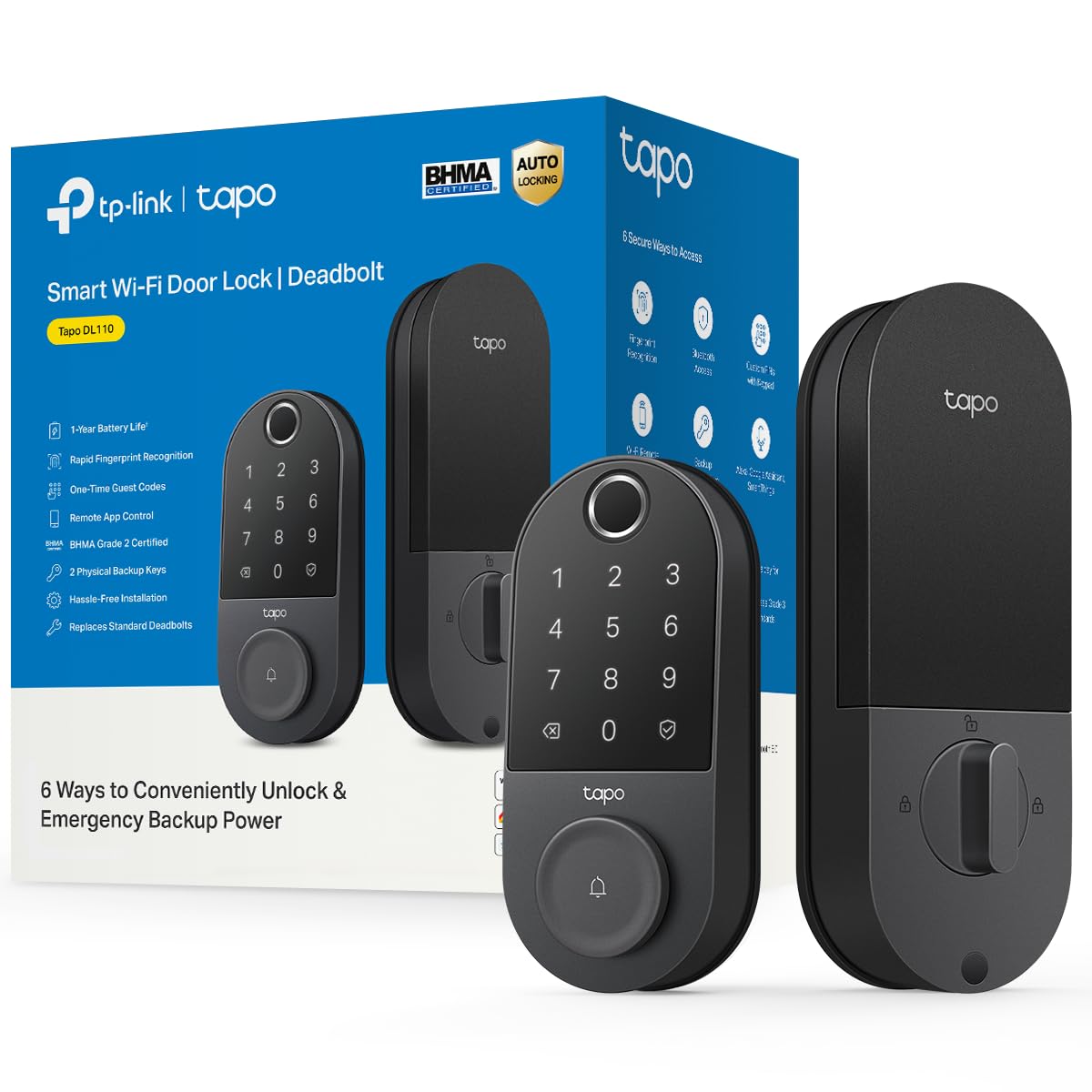
1. Tapo Smart Wi-Fi Door Lock, Deadbolt, Fingerprint Recognition, DL110
Our pick — over 4.5★ from 800+ verified ratings; the strongest balance of quality and price.
Six ways in, zero house keys, and a battery you plug into the wall instead of buying.
The Tapo DL110 removes the two recurring chores of a smart deadbolt: hunting for keys and buying batteries. No key hunt, because your finger opens the door in 0.42 seconds — fast enough that you stop noticing the lock at all. And no battery aisle runs, because the power source is a rechargeable pack you top up over USB-C. Register up to 100 fingerprints, or hand out permanent, scheduled, and one-time codes to family, guests, and the dog-sitter. BHMA Grade 2 is the sturdier of the two residential durability ratings, and it shows in the hardware.
Build quality is the most-praised trait in the DL110’s review record, with owners noting the mechanism uses thicker plastic than the lock it replaced. Connectivity holds up too, with Alexa, Google, and iOS/Android app control over Wi-Fi or Bluetooth, and automatic locking you can program to fire on its own schedule. It runs on the brand’s own app alongside its cameras and mesh gear, so it slots into one dashboard rather than four. Note the heft: at 2.09 kg it is 2.3x the mass of the TEEHO TE012W at 0.92 kg, and its footprint measures 5.91 x 2.69 x 1.29 inches against the TEEHO’s 5.12 x 2.95 x 1.3 inches.
The honest catch is the doorbell. It is a bonus feature that sits on the exterior assembly, and it can fire accidentally when something piles up behind the door. A few owners also hit a unit that arrived dead on arrival, and the app’s automation options are thinner than power users want — no Matter or API, and limited Smart Actions. The auto-lock delay presets are also a short list rather than a full suite. None of that touches the core job: the bolt throws itself, and the lock keeps working.
What earns it first place
- Rechargeable battery with USB-C — as buyers put it: “Battery at 60% after ~1 year; app shows level.”
- 0.42-second fingerprint read with 100 slots, so the whole family gets in without a code
- Six access routes: fingerprint, keypad code, Wi-Fi app, Bluetooth, voice assistant, or the two included keys
Where it asks patience
- The doorbell button is sensitive and can trigger with items stacked behind the door
- Auto-lock offers only a few preset delays, and there is no Matter or API for power users
- Heavier and larger than the TEEHO at 2.09 kg versus 0.92 kg
Best for: anyone who wants a fingerprint-first front door and never wants to shop for batteries again.
Look elsewhere if: you plan to build deep automations or want a Matter-ready lock — this one stays inside its own app.
2. TEEHO TE012W WiFi Fingerprint Smart Door Lock for Front Door, Satin Nickle
Eight AA cells, twenty fingerprints, and the kind of price that makes guests ask which lock this is.
Start with the number that decides this one: eight AA batteries. That is double the four cells most Wi-Fi locks use, and the extra capacity is what keeps the 2.4GHz radio steady instead of dropping out at the far end of the driveway. It connects without a hub, so there is nothing else to buy, and the KK Home app runs user permissions, code sharing, remote locking, and low-battery alerts. Data is protected by AES-128 encryption and stored locally, which is a meaningful detail if you dislike cloud dependency.
Price is the most-cited positive in the TE012W’s owner feedback, and most users get a first-touch fingerprint read. Five entry methods cover the bases: fingerprint for up to 20 users, passcode for up to 100 codes, app, two backup keys, and voice control through Alexa and Google Assistant. Break-in protection is unusually thorough for the tier: enter ten wrong PINs and the lock seals itself for 3 minutes and pushes an alert, and the anti-peep feature lets you bury your real code inside random digits. You also get silent mode, away mode, and a backlit keypad for dark porches.
Battery life is the recurring gripe, and it is worth sizing honestly. Multiple buyers report swapping all eight cells more than once in a matter of months, so treat the power budget as the trade-off you accept in exchange for the price. The app is functional but thin, some routines do not carry over from Alexa, and a few units throw a brief “abnormal state” error. It installs in 10 to 15 minutes with a screwdriver and no drilling, fitting doors 1-3/8 to 2 inches thick with either a 2-3/8 or 2-3/4 inch backset. BHMA Grade 3 and IP55 round out the spec sheet.
Price-to-capability read: at 0.92 kg it is well under half the mass of the Tapo DL110, and the 5.12 x 2.95 x 1.3 inch body sits closer to the door face. Owners mention it stands in for a pricier smart lock at a third of the cost, with a 10-minute setup and stable Wi-Fi.
One thing to plan for: the app leans on its own backend server, so remote features depend on that service staying up.
Reach for this if: you want full smart-lock function for a household of 20 fingerprints without paying flagship money.
Step up if: you would rather not handle eight AA batteries several times a year.
3. Tapo Smart Wi-Fi Deadbolt Door Lock, Keyless Tactile Buttons, DL100
No fingerprint pad, no fuss — just a backlit keypad, two hundred codes, and a bolt that throws itself.
If biometrics have never appealed to you, the DL100 strips them out and puts the money into capacity instead. You get up to 200 customizable codes, which is a lot of neighbours, cleaners, contractors, and relatives before you run out of slots. The keypad is backlit for night entry and supports anti-peep entry, so you can type random digits around your real code on a busy sidewalk. open up works through the keypad, Bluetooth at close range, Wi-Fi through the Tapo app, voice with PIN verification, or the two included backup keys.
Reliability and build quality top the DL100’s owner feedback, and the exterior assembly is metal with plastic only on the interior. Grade 3 certification keeps it in the residential durability class, and an IP54 rating means it shrugs off rain, dust, and dirt rather than merely surviving them. Runtime is quoted at up to 200 days in Wi-Fi mode or 300 days in Bluetooth mode, powered by four AA cells, with a USB-C port standing by for emergency power. Smart home support covers Alexa, Google Home, and Samsung SmartThings, and the app lets you lock or open up remotely, issue temporary codes, and read a timestamped activity log.
The catch is the battery estimate. Customers note the cells dropping below 17 percent well before the quoted 200 days when Wi-Fi stays connected for long stretches — one account swaps batteries monthly. If you set it to Bluetooth-only when you are home, the drain is far gentler. The other detail is fit: a few doors need the inner bevel ground slightly to sit flush, which is a five-minute job with the right tool but worth knowing before you start. There is also no fingerprint reader and no HomeKit or Matter support.
Where it beats its siblings: at 1.5 pounds it is far lighter than the DL110, and 200 codes is double the Philips lock’s passcode approach for a household with heavy traffic.
Who should keep looking: anyone who wants to leave their phone in their pocket and open the door with a fingertip.
The verdict: the sharpest pick for code-heavy households and rental doors where different people need different access.
The honest limit: budget for more frequent battery swaps if you keep Wi-Fi permanently on.
4. Philips Fingerprint Keyless Entry Door Lock with Touchscreen, Matte Black

A lock with no wireless radio at all — because the safest network is the one that does not exist.
The Philips DDL210X makes its case on what it lacks. There is no Wi-Fi and no Bluetooth, so there is no app account, no server dependency, and nothing to pair. Owners who deliberately wanted that describe it as unhackable, and the trade is straightforward: you gain privacy and lose remote control. Entry happens three ways — a fingerprint scanner rated to recognize in 0.3 seconds, a touchscreen keypad, or the mechanical key. Aluminum and zinc make up the body, and the matte black finish is a genuinely different look from the glossy plastics on cheaper locks.
Two features stand out for a lock at this level. The first is unlimited one-time PIN codes, so you can hand a single-use code to a delivery driver or a contractor without ever cutting a permanent credential. The second is voice-guided programming — the lock talks you through setup in English, French, or Spanish, which is why programming shows up as a frequently praised point. The auto-lock timer adjusts from 30 to 180 seconds, and one-touch locking lets you press and hold any number for 2 seconds to throw the bolt immediately.
Here is the fit note that matters most. The auto-lock is a timer, not a sensor, and it is disabled by default — you have to turn it on. Because the lock cannot detect whether the door is actually shut, the bolt will still extend if the door is left open, and the manufacturer states plainly that this is not a malfunction. Set your interval longer if your household tends to leave the door ajar. Rechargeable and carbon batteries are also ruled out; use 1.5V AA alkaline (LR6) cells, and the lock beeps below 20 percent power. Installation fits doors 1-3/8 inches to 1-3/4 inches thick, and a few owners found the wiring maze more fiddly than the rest of the job.
Pick this one when: you want fingerprint entry and temporary codes on a door you never plan to connect to the internet.
Think twice when: you expect to lock the front door from your phone from the office.
5. Wyze Auto-Lock Bolt v2 Fingerprint Keyless Entry Smart Lock

If your doorbell camera already runs on the Wyze app, this lock joins the family without a second login.
The headline mechanic here is the fingerprint scanner, which reads in 0.5 seconds through tempered glass treated to resist scratches and smudges. The other headline is that the scanner learns: the lock adapts from every touch to sharpen recognition over time, which is meant to cut down on repeated failed scans. It runs eight AA batteries for up to 8 months, and if they die while you are standing outside, a USB-C port lets you power it from any common power bank to get in.
Functionality and reliability are the Wyze Lock Bolt v2’s strongest owner themes, and setup is its quiet win. Owners routinely report a ten-minute install, and the Wyze app detects the lock and walks you through configuration. A hole-cutting template is included, which is the sort of thing cheaper kits leave you to improvise. Once installed you can open the door by fingerprint, app, code, or the physical key, and the auto-lock timing is adjustable — owners observe it throwing the bolt in 5 to 10 seconds. Pair it with a Wyze Video Doorbell and you can open up straight from the live feed after seeing who is there. It carries a BHMA2 rating and IP53 for weather resistance.
The wrinkles are small and worth knowing. Fingerprint recognition reads as mixed in the owner feedback — a handful found the initial enrollment error-prone before it settled in and worked reliably. The audible beeps for locking and open up are also faint, so if you rely on hearing the lock confirm itself, this one will not announce much. And the deepest integration only pays off if you already own Wyze hardware; used as a standalone lock, the camera-linking feature sits idle.
Why it earns a slot
- AI-learning fingerprint scanner behind tempered glass that resists scratches and smudges
- Ten-minute installs are the norm, with the app auto-detecting the lock and a hole template in the box
- USB-C emergency power means a dead battery is a power-bank problem, not a locksmith call
Before you commit
- Fingerprint enrollment is the fussiest step, and some owners needed a second attempt
- Beeps are quiet, so you get little audible confirmation when the bolt throws
- Camera pairing only matters if you already run Wyze doorbells
Fits you if: you want an inexpensive, well-integrated smart deadbolt and already live in the Wyze ecosystem.
Fits you less if: you need loud confirmation tones or want your fingerprint read on the first touch, every time.
6. Veise VE027-K WiFi Smart Deadbolt Locks with 2 Knobs Set, Matte Black
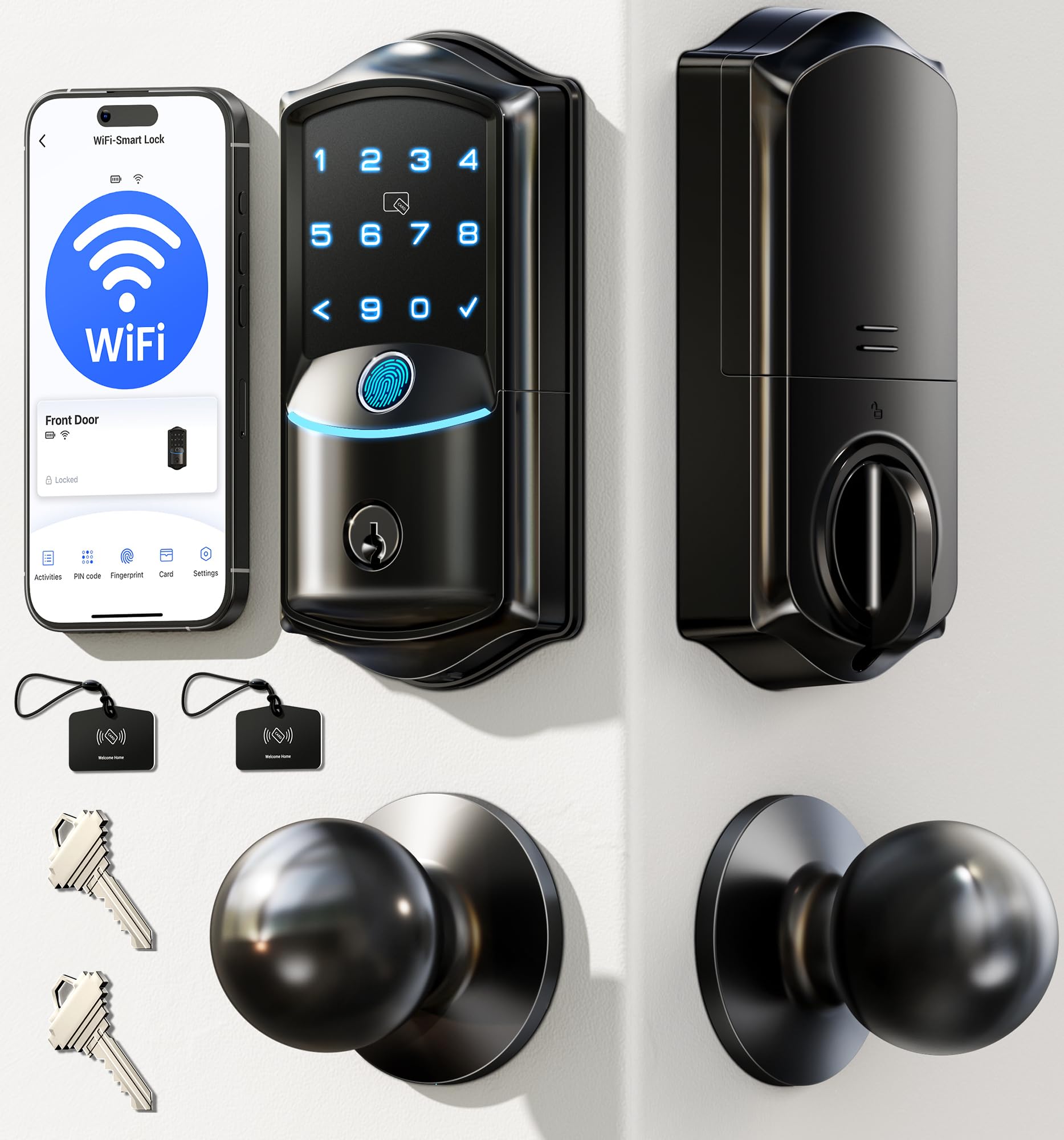
Eight ways through the door, plus two knobs in the box — this is the lock built for a busy shared entrance.
The VE027-K leads with the fastest read in this group: a 608DPI sensor that recognizes a fingerprint in 0.2 seconds, backed by AI self-learning, and stores up to 20 prints for the household. From there it keeps adding doors in. Beyond fingerprints you can use the remote app, an IC card from the two included, more than 100 PIN codes, a physical key, voice control through Alexa or Google, user authorization for other people’s phones, or code sharing. Four pin types are available — permanent, scheduled, one-time, and expiring — so you can give a housekeeper Tuesday mornings and a delivery driver exactly one entry.
Auto-lock adjusts from 10 to 180 seconds, and the lock also carries an anti-drill design, break-in detection, and an anti-peep password mode. The published 8 AA battery estimate reaches up to 240 days, and the IP65 rating is the highest weatherproofing in this roundup, which suits exposed doors and covered porches alike. Build and reliability are the VE027-K’s two strongest owner themes, and setup is a 10-to-15-minute screwdriver job with no wiring. The system even detects whether your door swings left or right and adjusts itself. A one-year warranty extends to two with registration, and support runs on US phone lines plus 24/7 email.
Two practical notes. The batteries are not included, so plan to have eight AA cells on hand before you start. And the included knobs make this a set rather than a single deadbolt swap, which is a bonus for a full door refresh but extra hardware to install if you only needed the deadbolt.
Standout spec callout: the 0.2-second fingerprint read is the speed leader here, and the 99.99% accuracy figure comes from the manufacturer’s own AI self-learning sensor.
One honest trade-off: a bigger feature set means more to configure, and no batteries ship in the box.
Buy it if: your door sees a rotating cast of family, renters, cleaners, and contractors who all need their own way in.
Skip the set if: you only need the deadbolt and already have matching knobs you like.
7. Kwikset SmartCode 270 Keyless Entry Electronic Touchpad Deadbolt Door Lock

No app, no radio, no fingerprint — just a touchpad, a re-keyable cylinder, and a battery that goes a year.
Some buyers do not want another app. The SmartCode 270 respects that. It is a keypad deadbolt with an auto-lock that you set to 30 seconds, 1, 3, 5, or 10 minutes, and everything runs on four AA alkaline cells quoted at 12 months of life. It is a genuinely low-touch device — no pairing, no firmware, no account. Up to 50 user codes plus 10 one-time codes cover guests and service calls, and a single programming code lets you edit or delete any of them. BHMA Grade 2 certification puts it in the sturdier durability tier, and the maker rates that class at up to 2.5x the strength of Grade 3 sets.
The SmartKey cylinder is the sleeper feature. It lets you re-key the lock yourself to any KW1 key in seconds using the included tool, so a lost key or a new tenant is a two-minute fix rather than a locksmith visit. Security touches are thoughtful: three consecutive wrong codes trigger an alarm and disable the keypad for one minute, and Vacation Mode turns the keypad off entirely while you are away. The LED keypad lights up on a tap for entry after dark. Installation is screwdriver-only, with BILT 3D instructions in text, voice, and animation walking you through it.
The SmartCode 270’s reliability record is genuinely mixed: many reviewers point out years of flawless use, while a smaller share report bolt misalignment or incomplete extension within months. Many shoppers say flawless performance for years, while a smaller share describe the bolt misaligning after a few months or the mechanism failing to fully extend. One account describes re-aligning the internals and seeing the issue return. If you want app alerts, remote open up, or fingerprint entry, this lock is not for you — it is deliberately the analog option in a digital roundup.
The value story: installation is the most-praised quality, and owners describe fitting it to a standard steel door in about 30 minutes including reading the manual.
The fit note: no Wi-Fi, no Bluetooth, no app — if you check your lock from work, look at the Veise or the Tapo instead.
Made for: a rental unit, a garage, or a front door where you want code entry with a year between battery changes and nothing to pair.
Not for: anyone who wants their phone to be the key.
8. Yale Assure Deadbolt Lock with Touchscreen, Satin Nickel, YRD226NR619
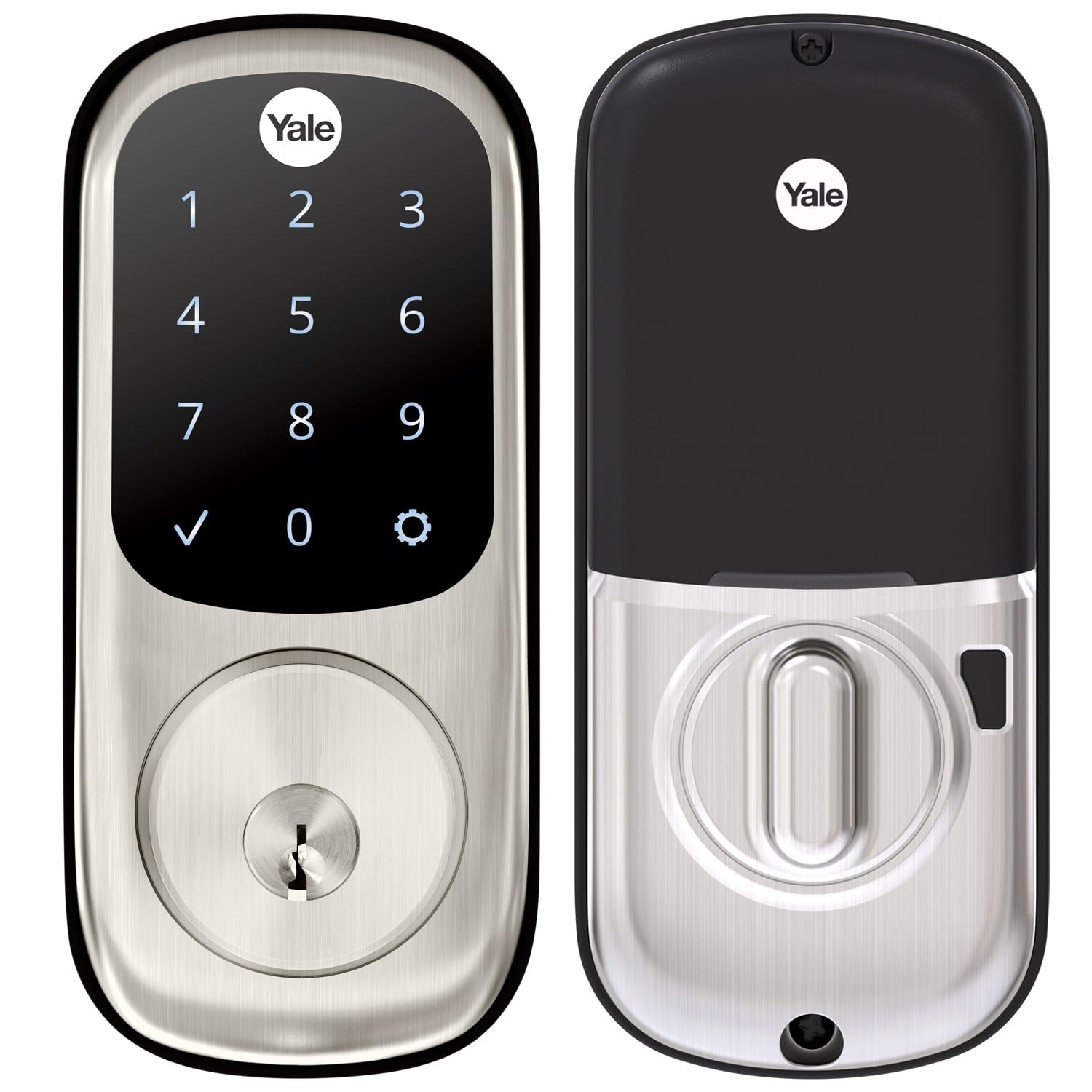
Buy the keypad now, add the smarts later — this is the deadbolt you grow into rather than replace.
The Yale Assure YRD226NR619 is built around a patient idea. from the start it is a touchscreen keypad deadbolt with auto-lock and no network connection at all. When you are ready for app control, a separately sold Yale Access Upgrade Kit turns your phone into the key. That staged approach means you are not paying twice for hardware you already own. Auto-lock is the core promise — the lock throws the bolt on its own every time you leave and again when you go to bed, and the delay is adjustable from immediate to 180 seconds, or you can switch it off and lock manually.
Quality is the most-cited positive in the Yale Assure YRD226NR619’s owner feedback by a comfortable margin. Installation is the close second. It is a drop-in replacement for a standard deadbolt, fitting doors 1-¾ to 2-¼ inches thick, with a thin door kit required for anything under 1-⅜ inches. The touchscreen takes unique codes for different people, and you can disable any code later without cutting a key or changing a cylinder — owners describe the freedom of never checking a pocket again. The included components cover the deadbolt, strike, mounting hardware, four AA batteries, a door template, and two backup keys.
The price of that flexibility is a split experience. The auto-lock feature draws mixed feedback, and some buyers report the door not opening fully on the first attempt — a mechanical alignment issue rather than a software one, and worth checking your strike plate fit. Remote locking also requires that upgrade kit and its own network module, so plan for it if app control is a must. A couple of buyers found the printed instructions hard to follow and brought in a locksmith. None of it undermines the core: a solid touchscreen deadbolt that fits standard doors and upgrades on your schedule.
A smart fit for: a homeowner who wants a quality keypad deadbolt today and optional phone control later without starting over.
A poor fit for: anyone who wants Wi-Fi and app control working the day the box arrives.
9. Yale Assure Lock 2 Key-Free Deadbolt with Bluetooth Keypad, Lifetime Brass
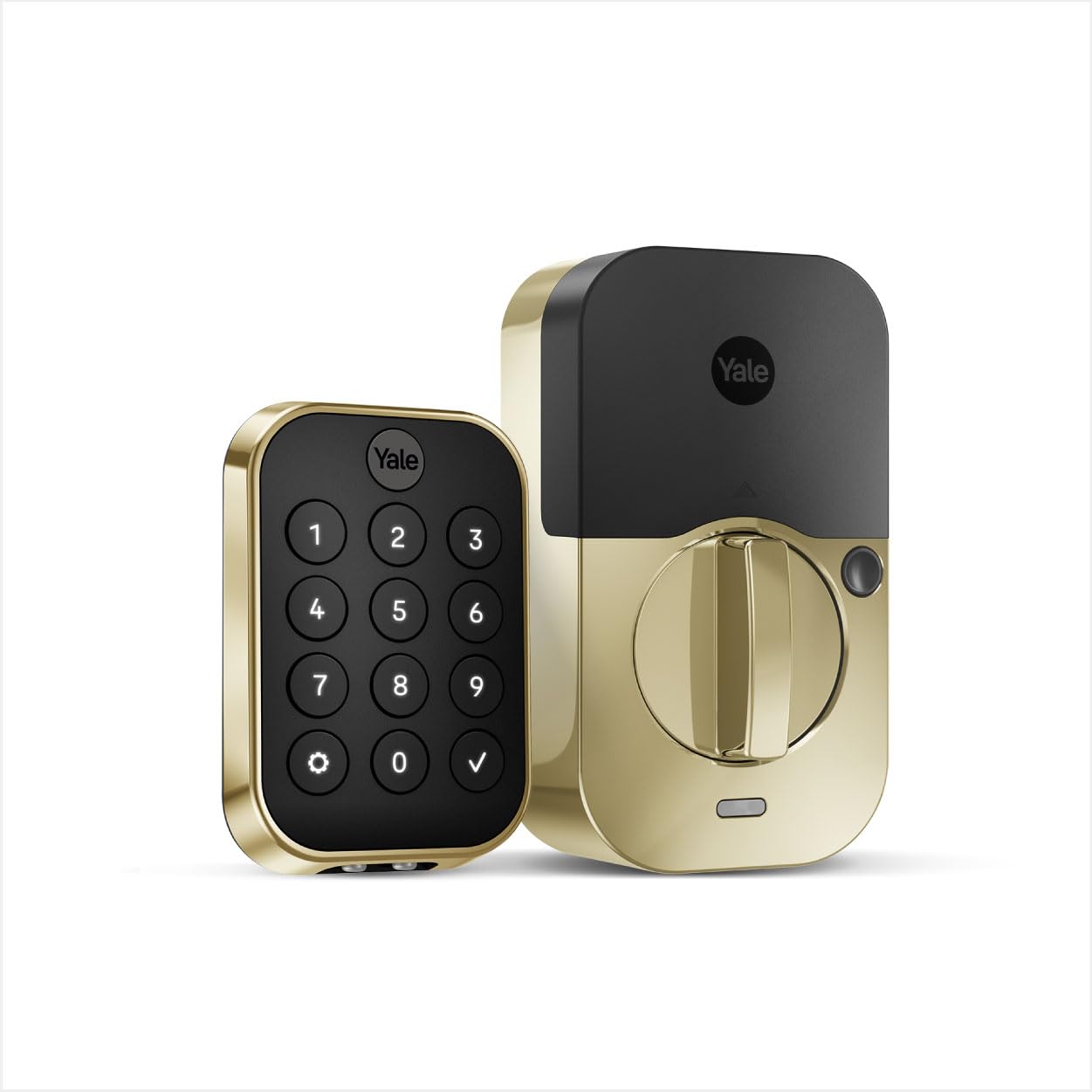
No keyhole at all — just a backlit keypad, a closed-door sensor, and a Grade 2 shell.
The Assure Lock 2 answers the one flaw that bothers careful buyers about every keypad deadbolt: the keyway itself. There is no key slot on the exterior, so there is no cylinder to pick or bump. Security comes from ANSI/BHMA Grade 2 certification, Bluetooth encryption, locally stored codes, and a matte keypad designed to resist fingerprint transfer — so a stranger cannot read which four digits you pressed from the smudges. Unlimited entry codes can be shared with family, friends, and service people through the Yale Access App while in Bluetooth range, and the app tracks who used what.
Auto-lock here is the more sophisticated kind. Rather than counting seconds blindly, the lock pairs with DoorSense, a sensor that detects the door has actually closed before the bolt throws. That solves the frustrating scenario where a timer lock bolts a door that is still open. There is also an optional Auto-open up that opens the door as you approach with your phone, which helps when your hands are full. The lock runs on Bluetooth from the start and accepts a Wi-Fi or Z-Wave module upgrade when you want remote access.
The trade-offs are honest ones. This is the most expensive pick in the roundup, and the mix of opinions in owner feedback reflects it — some find it worth the outlay, others do not, largely depending on whether they use the app features. Connectivity, battery life, and compatibility all land in mixed territory, with battery reports ranging from 8 to 12 months and ultra-lithium cells lasting longer than standard ones. Because there is no keyhole, a dead battery is a real lockout risk — Yale builds in a 9V failsafe terminal, so keep a battery in the car. The interior housing is also bulkier than most, and the 2-1/2 inch backset requirement needs checking against your door before ordering.
What justifies the premium
- Key-free exterior removes the pickable cylinder entirely, backed by ANSI/BHMA Grade 2 certification
- DoorSense pairs auto-lock to a closed-door sensor instead of a blind countdown
- Bluetooth now, with Wi-Fi or Z-Wave module upgrades available when you want them
What to weigh first
- Highest-cost pick here, and owner opinion on value is split
- No keyhole means a 9V battery is your emergency backup — keep one accessible
- Requires a 2-1/2 inch backset, which does not match every existing door
Worth it for: a security-minded household that wants no keyway, a smarter auto-lock sensor, and a premium brass finish.
Harder to justify: if you rarely use an app and only need a code pad, the Kwikset does that job for far less.
Understanding the Specs
BHMA / ANSI Grade ratings
A grade is an independent durability and finish certification for door hardware, and it is the closest thing to a strength guarantee you get. Grade 2 is the sturdier residential rating and Grade 3 is the common baseline. Kwikset rates the Grade 2 class as up to 2.5x stronger than Grade 3 sets, which is why the premium picks in this list carry Grade 2. Grade 3 is still perfectly suitable for a home front door — the DL100 and TE012W both use it. What the grade does not cover is the electronics, so it tells you about the bolt and housing, not the board inside.
IP weather ratings
The IP number tells you how well a lock keeps out solids and liquids. The first digit covers dust and dirt, the second covers water. The Veise carries IP65, the highest in this roundup, which is what you want on an exposed door with no porch cover. The TEEHO sits at IP55 and the Tapo DL100 at IP54, both fine for a covered entry where rain hits the door face rather than a driving storm. Think of the rating as advice about placement: a lock rated lower belongs under an overhang, not on a gate.
Fingerprint read speed
Read speed is quoted in seconds and measures how long the sensor takes to match your print. The Veise publishes 0.2 seconds, the Philips 0.3 seconds, the Tapo DL110 0.42 seconds, and the Wyze v2 0.5 seconds. In practice, anything under half a second feels instant and you stop thinking about it. The bigger variable is the sensor’s tolerance for real-world fingers — wet, dirty, or cold hands are what trip up biometric locks, not raw speed. The Philips guidance notes recognition may be less effective for children under 6 and adults over 65, so a keypad code is a sensible fallback in either case.
Auto-lock interval range
The range of intervals a lock offers is the flexibility you get to tune it to your habits. One that only offers a rare handful of delays forces you to live on its schedule, while a wide range from around 10 seconds to a few minutes lets you set a delay long enough to bring in groceries without re-entering a code, but short enough that the bolt throws before you reach the car. The Kwikset gives you up to 10 minutes, the Veise up to 180 seconds, and the Yale Assure Lock 2 synchronizes the throw with an actual closed-door sensor.
FAQ
Will an automatic locking deadbolt fit my existing door?
What happens when the batteries die while I am outside?
Does auto-lock work if I leave the door open?
How often will I actually change the batteries?
Is a fingerprint reader more secure than a keypad code?
Can I give a temporary code to a cleaner or dog-sitter?
What is the difference between a Grade 2 and Grade 3 deadbolt?
Do I need Wi-Fi for an automatic locking deadbolt?
Which entry method is fastest when my hands are full?
Can I keep my existing keys and match other hardware?
Final Thoughts: The Verdict
For most doors, the automatic locking deadbolt worth starting with is the Tapo DL110, because it removes both recurring chores at once — no key hunt and no battery shopping — while adding a 0.42-second fingerprint read, six ways in, and Grade 2 hardware. If your household runs on codes rather than fingers, the Tapo DL100 gives you up to 200 of them with a backlit keypad. And if you want a keypad today with the option to add phone control later, the Yale Assure YRD226NR619 is the one that upgrades without being replaced.
Shopping this category with a clear head depends on one question: do you want the bolt thrown on a timer, or only after the lock senses the door has actually closed? Once you answer that, the fingerprint-versus-keypad argument, the battery chemistry, and the Grade rating all fall into place around it.
How We Picked
We do not accept paid placement. Every pick is matched to a real buyer and a real use-case; we do not hands-on test units.
Sources & Methodology
Specifications: manufacturer listings and product documentation. Review insights: verified customer reviews, as of September 2026. Pricing: not shown on this page (it changes often); check the current price via the retailer link.
As an Amazon Associate, Gadgets Feed earns from qualifying purchases. This does not affect which products we feature.