
Our readers keep the lights on and my morning glass full of iced black tea. As an Amazon Associate, I earn from qualifying purchases.
Specs are compiled from manufacturer listings and verified buyer reviews and can change over time — please confirm the key details on the product page before buying.
If your gameplay recordings look soft and muddy while everyone else’s look sharp, the piece you’re missing is the hardware between your console and your computer. A capture card takes the video signal coming out of your PS5, Xbox, or Switch and turns it into something your PC or laptop can record and stream. The right one passes your console’s signal through to your monitor at full frame rate while it records. The wrong one adds input lag to your controls or drifts your audio out of sync mid-stream.
I’m Min — the founder and writer behind Gadgets Feed. This guide is built by comparing the manufacturers’ published specifications and the patterns across verified customer reviews, so you get each pick’s real strengths and trade-offs instead of marketing spin.
If your stream looks blurry or your recordings stutter, the capture card is usually the bottleneck. Three things decide whether a card feels smooth or frustrating: the resolution and frame rate it can pass through to your monitor (how sharp and fluid your own screen stays), how it connects to your computer, and whether it handles the audio side of your setup. Below are the strongest capture card options for streaming and recording your games, so you can match one to how you actually play.
Our Picks at a Glance
How To Choose The Best Capture Card
Before you buy, the key is understanding what your computer can actually accept and what your monitor needs. A capture card sits between your console and your PC, splitting the signal so your own screen stays smooth while your computer records a separate copy. Get that chain wrong and you get input lag you can feel in your hands or washed-out colors on stream.
Passthrough versus capture resolution
These two numbers are not the same thing, and mixing them up is the most common mistake. Passthrough is what your monitor sees, and it needs to stay at whatever frame rate you actually play at. Capture is what gets recorded, and it can be lower. A 4K60 passthrough with 4K30 capture card, for example, lets you play at 60 frames per second while recording at half that. Check the passthrough spec first, because that is the number you feel while playing.
USB versus internal PCIe cards
External USB cards plug straight into a laptop or desktop and travel easily, which is ideal if you stream from a MacBook or a tablet. Internal PCIe cards install into an open slot inside your tower, and that direct connection can mean cleaner latency and no USB bandwidth fights. If you stream from a laptop or move between setups, go external USB. If you have a desktop tower and want the lowest latency, an internal PCIe card is worth the install.
Quick Comparison
| Model | Best For | Interface | Passthrough | Capture | Amazon |
|---|---|---|---|---|---|
| Elgato 4K S★ Best Overall | Most console streamers | USB 3.0 Type C | 4K60 / 1440p120 / 1080p240 | 4K60 | Amazon |
| GENKI ShadowCast 3 ProBest for Travel | Portable iPad and laptop setups | USB 3.0 | 4K60 / 1440p120 / 1080p240 | 4K60 | Amazon |
| AVerMedia GC571 | Desktop towers with a PCIe slot | PCIe x4 | 4K60 | 4K30 | Amazon |
| OREI 4K Capture Card | Creators who need audio mixing | USB 3.0 | 8K60 input / 4K144 | 4K60 | Amazon |
| AVerMedia Live Gamer Ultra 2.1 | High-refresh competitive play | USB 3.2 Gen 2 Type-C | 4K144 / 1440p240 / 1080p360 | 4K144 | Amazon |
| ASUS TUF CU4K30 | Setup-free plug and play | USB 3.2 Type-C | 4K HDR60 | 4K30 / 2K60 / 1080p120 | Amazon |
| Elgato 4K Pro | Internal tower builds | PCIe | 8K60 | 4K60 | Amazon |
In‑Depth Reviews
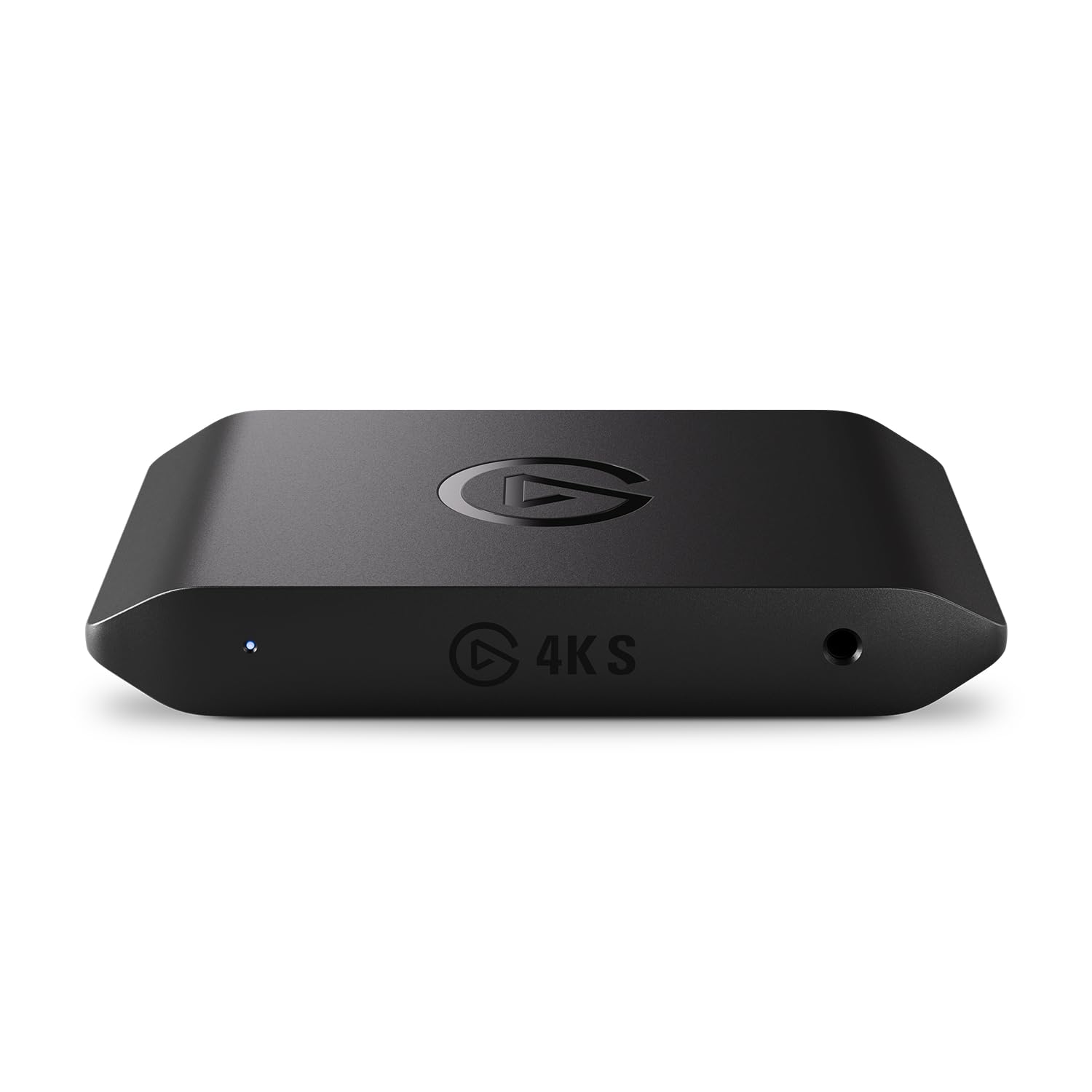
1. Elgato 4K S Capture Card for PS5, Xbox Series X/S, Switch 2
Our pick — 4.5★ from 850+ verified ratings; the strongest balance of quality and price.
The console streamer’s default — 4K60 capture with a passthrough that holds fast, twitchy games together.
What wins people over here is sheer capture quality, and it holds up across the board. You get 4K60 recording, plus high frame rate support at 1440p120 and 1080p240 for games that demand it. HDR10 support means your brightest highlights and deepest shadows survive the trip to your viewers, with tone mapping handled on Windows. The 3.5mm analog audio input lets you fold in game chat or your own commentary without extra gear, which keeps a simple setup genuinely simple.
Setup is the other thing buyers keep coming back to — it is quick and it just works. It runs on a USB 3.0 Type-C connection and is built to work with PS5, Xbox Series X/S, Switch 2, and more. The catch is a real one worth knowing: PS5 owners need to disable HDCP first, or you get a black screen. That same setting breaks streaming apps like YouTube and Netflix on the console, so you toggle it back and forth. Call it the price of admission if you stream PS5.
Against the pricier 4K X, this card gives up little that matters for streaming — 4K60 versus 4K144 only counts if you are chasing ultra-high refresh, not broadcasting. It weighs next to nothing at 0.09 kg, so it lives happily behind a console or in a bag. The one honest gap is that some setups report connection hiccups and mixed results at 720p, so it helps to confirm your PC meets the listed requirements. For the majority of console streamers, this is the pick — the crowd favorite at 4.5 stars across 800+ owners.
What earns its spot
- 4K60 capture with 1440p120 / 1080p240 passthrough for smooth high-refresh play
- HDR10 support with tone mapping on Windows for richer recorded color
- 3.5mm analog audio input for chat and commentary
- Cross-platform across PS5, Xbox Series X/S, and Switch 2
What to weigh first
- PS5 players must disable HDCP, which breaks on-console streaming apps
- A few setups report connection and 720p quirks, so check your PC specs
Made for: Console streamers on PS5, Xbox, or Switch 2 who want crisp 4K recording without a PC rebuild.
Think twice if: You stream PS5 and rely heavily on that console’s built-in YouTube or Netflix apps — the HDCP toggle will annoy you.
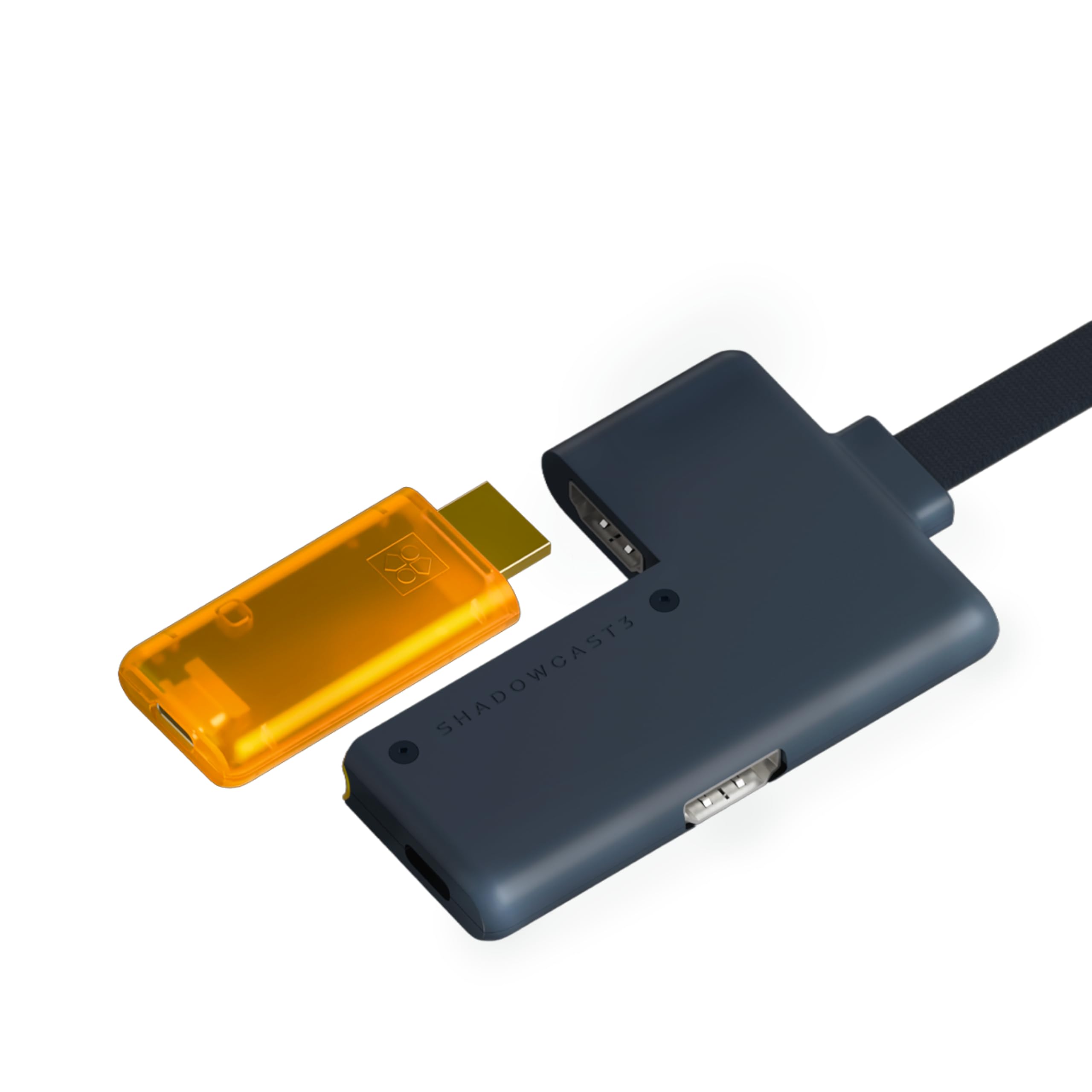
2. GENKI ShadowCast 3 Pro 4K60 Capture Card HDMI Passthrough USB-C
A pocket-sized 4K60 powerhouse that turns an iPad or laptop into a portable capture station.
The defining feature is the integrated HDMI passthrough module, and it is what makes this different from the standard version. You play on your main monitor with zero lag while the card simultaneously records to a second screen. It handles 4K at 60Hz, 1440p at 120Hz, and 1080p at 240Hz, so fast games stay fluid. The four-port layout covers HDMI input, HDMI passthrough, USB-C capture output, and a passthrough power supply to keep your setup charged through long sessions.
Portability is the whole pitch, and it lands. There is no bulky rig and no drivers, so you can plug into an iPad or laptop and go — handy in a hotel or at a convention. The Genki Studio app powers that tablet workflow. Buyers report that it is the cheapest 4K passthrough capture card that actually works, with great video quality and easy setup across Xbox Series X and Switch 2. For turning a mirrorless camera into a high-end webcam for meetings, it shows up recognized by OBS, Streamlabs, Zoom, and Discord as a simple camera feed.
Now the honest trade-offs, because the data flags a few. The MJPEG compression at 4K60 and 1080p120 can cause color issues inside streaming software, and HDR capture needs a manual color profile fix. The included cables run short. On the support side, one buyer’s power passthrough did not work as advertised and support was unresponsive — that is a rare report, not the pattern, but worth weighing if you need the passthrough power feature specifically. At 4.0 stars, it is a specialized tool rather than a universal default.
The travel edge: Four interfaces in a body small enough for a pocket, with zero-lag passthrough that lets you play and stream at once.
Know before you buy: You may need to troubleshoot MJPEG color and HDR profiles, and you supply your own longer cables.
Reach for this if: You stream or record from an iPad, MacBook, or laptop on the move and want 4K60 passthrough without a tower.
Look elsewhere if: You want a fire-and-forget desktop card that never needs a settings dive.
3. AVerMedia Live Streamer Ultra HD GC571

An internal card that slots in and streams 4K without a single driver install.
This is a PCIe card, so it lives inside your desktop tower rather than dangling off a USB port, and it wants an open x1, x4, x8, or x16 slot. What you get is 4K60 pass-through so your monitor stays smooth, paired with 4K30 capture for your stream. VRR support keeps fast motion tear-free, and 1080p120 high frame rate gives you exceptionally smooth footage when you drop resolution for frame rate. The best part is drive-free plug and play — install it, and it just shows up, no driver hunting.
For people who want an internal card, the fuss-free install is the draw. It works with Windows and Linux without any driver installation, and it does not need a fan or heatsink to run. Because it hangs off the PCIe bus instead of USB, it sidesteps the bandwidth tug-of-war that trips up external cards. Owners mention it performing better than the USB capture devices they replaced, which had been hogging the USB data stream.
The honest caveat is latency and format limits. In OBS, capture latency can run high enough that it is fine for turn-based RPGs but not for twitchy action games, and quality tops out at HDMI 2.0 input with 4K30 HDR10 only in the 2K30 range. So this is a card for a desktop owner who values clean internal installation and 4K30 streaming over competitive-level responsiveness. If that describes your build, it delivers.
Internal simplicity: PCIe install with zero drivers, VRR support, and 1080p120 for smooth high-frame-rate capture.
Where it plateaus: Capture latency is not built for fast action games in OBS, and you are capped at HDMI 2.0 input.
Best for: Desktop tower owners who want a clean internal install and 4K30 streaming from turn-based or slower-paced games.
Skip if: You play competitive shooters and need minimal in-app latency at 4K.
4. OREI 4K Capture Card for Streaming USB 3.0 Loop-Out Audio Mixing UVCUAC HDR

A capture card with a built-in audio mixer and a solid metal chassis.
What sets this one apart is integrated audio mixing, and it is the reason people choose it. Digital HDMI audio blends with mic and line-in inputs, so you can fold commentary and call audio into one clean feed without a separate mixer. It takes up to 8K60 input and does uncompressed 4K60 capture, feeding USB 3.2 Gen 1 at 5Gbps for stable, low-latency transmission. The HDMI loop-out gives you zero-delay monitoring, so what you play stays exactly in step with what you see.
It is plug-and-play through UVC and UAC compliance, which means no drivers, and it is recognized by OBS, Streamlabs, vMix, Zoom, and Teams across Windows, macOS, and Linux. Customers note it as a true plug-and-play card with crisp 4K60 capture and flawless long-session stability. The metal chassis is a genuine upgrade over plastic, and it comes with a USB cable and a user manual. It also handles YUY2, NV12, and MJPEG formats with HDR.
The recurring gripe is heat — it runs warm to the touch, and it lacks rubber feet, so it can slide around. No HDMI cables are included, and the bundled USB cable is short, so budget for your own. On latency, uncompressed formats run higher than compressed ones, so if instant responsiveness is your priority, expect a tradeoff. One more honest note: it works with PS5, Switch 2, and retro consoles via an adapter, so check your chain.
Where it shines
- Integrated audio mixing folds mic and line-in into one clean feed
- Up to 8K60 input with 4K60 uncompressed capture
- HDMI loop-out for zero-delay monitoring
- Driver-free UVC/UAC across Windows, macOS, and Linux
The fine print
- Runs warm and lacks rubber feet, so it can slide
- No HDMI cables included and the USB cable is short
- Uncompressed capture formats add latency versus compressed
Choose this for: Streamers and creators who want real audio mixing built in without adding a mixer to the rig.
Different pick if: You want cables in the box and a cool-running chassis out of the gate.
5. AVerMedia Live Gamer Ultra 2.1 4K144 HDMI 2.1 USB Capture Card, GC553G2

For players who refuse to give up frame rate — 4K144 capture with an HDMI 2.1 passthrough to match.
If competitive frame rates are the point, this card makes its case with numbers. It records up to 4K144 MJPEG on supported Windows PCs, and passes through up to 4K144 HDR/VRR, 1440p240, or 1080p360 to compatible displays. That is the highest passthrough on this list, straight through an HDMI 2.1 connection. Dual 3.5mm four-pole ports capture headset and gamepad audio, with 5.1-channel support on compatible Windows setups, so party chat rides along cleanly.
Connectivity is USB 3.2 Gen 2 Type-C at 10Gbps, and it links to Windows, Mac, or iPad for capturing PS5, Xbox Series X/S, Switch 2, and PC gameplay. Buyers praise the capture performance and the low input lag — one put it through a stable five-hour Twitch stream with no dropped frames. It works with OBS through the AVerMedia plugin, and the RGB plays nicely with Windows Dynamic Lighting. Against the Elgato 4K X, more than one owner reports this one outshining it.
Here is the caution, and it is the most-discussed point by far: compatibility earns more comments than anything else, and it is mixed. Some units work perfectly with the PS5 Pro, while others do not work from the start, and audio synchronization issues get flagged. Owners also note it runs hot and wish it cost less. Also plan for the right port — it needs a USB-C 3.2 Gen 2 connection, and a lesser cable can throw a yellow-light error. Reviewers point out a very noticeable audio delay creeping in after about twenty minutes of daily streaming, so test the audio early.
High-refresh reward: 4K144 capture and 4K144 / 1440p240 / 1080p360 passthrough over HDMI 2.1 is the top of this list.
Set expectations: Compatibility and audio sync are the recurring reports, and it needs a proper USB 3.2 Gen 2 cable to behave.
Pick it when: You game at high refresh on a capable Windows PC and want the fastest passthrough here.
Pass if: You want guaranteed out-of-box behavior across every console and cannot spend time on audio troubleshooting.
6. ASUS TUF Gaming Video Capture Card CU4K30

A tank-built card that multitasks across resolutions, from 4K30 all the way down to 1080p120.
This one plays the flexibility card well. It passes through up to 4K HDR at 60Hz while offloading capture up to 4K at 30Hz, and it scales capture to 2K at 60fps or Full HD up to 120fps when you want smoother high-frame-rate footage. Being certified for OBS Studio means it works across a wide range of streaming platforms without fighting the software. Controller and headset connections let team comms flow to your audience, and the durable alloy shell keeps the footprint slim.
What earns its spot is build and setup. The solid metal casing draws steady praise, and it is genuinely plug-and-play through UVC — connect to any PC with USB 3.2 Type-C and start, no extra drivers or utilities. Shoppers say it recognized an Xbox Series X at 1440p 120FPS instantly, with zero lag on PS5 passthrough to a 4K 240Hz panel. For ITX builds without a PCIe slot, it is a clean alternative to a big internal card, and it works across PS1 through PS5 plus older systems like SNES and N64.
The caveats are real but manageable. Some units arrive needing an update to the USB firmware from the start, and a few report intermittent cutouts that require replugging. Heat is the recurring note — one owner found it freezes after several hours in a warm room. It also gets warm in normal use and runs a fixed three-second audio delay that OBS can correct in sound settings. So treat it as a card you set up once and occasionally babysit, especially in a hot room.
Why it stands out
- Flexible capture: 4K30, 2K60, or 1080p120 depending on your priority
- Certified for OBS Studio and driver-free UVC plug and play
- Durable alloy outer shell in a slim footprint
- Controller and headset audio pass-through for team comms
What to watch for
- May need a USB firmware update on first setup
- Heatsink struggles in warm rooms on marathon sessions
- Occasional intermittent cutouts that need a replug
Go with this if: You need one tough card that handles multiple consoles and resolutions without installing software.
Not ideal if: You run multi-hour sessions in a warm room and want zero thermal babysitting.
7. Elgato 4K Pro Internal Capture Card, 8K60 Passthrough

The internal heavyweight — 8K60 passthrough and 4K60 HDR10 capture for builders who want it all inside the tower.
This is a PCIe card built for desktop towers, and it leans into the internal advantage. Passthrough runs at an astounding 8K60 so your monitor stays pristine, while capture happens at 4K60 HDR10. HDMI 2.1 in and out lets it record high frame rates, reaching up to 240fps in 1080p. VRR passthrough keeps screen tearing away, and ultra-low latency keeps your broadcast lockstep with gameplay. It is also built for dual-PC setups, which matters if you run a separate streaming machine.
Connection-wise it wants a Windows 10 machine with an open PCIe slot, and it installs into x4, x8, or x16 without needing USB power. Buyers praise the install and the clean, lightweight software approach — one notes that, with an HDMI switch, they route all their consoles through a desktop and stream with no lag and great visuals. It works with OBS, Discord, Streamlabs, Twitch Studio, Zoom, and Teams, and Flashback recording runs up to 4 hours.
The trade-offs are honest ones. Some owners see video quality issues like periodic stutters, and a few report Windows Explorer needing a restart after a few hours of gaming. Compatibility is the one aspect that skews negative, so double-check your build before committing. Setup, when you go dual-PC, can take a day or two of tuning rather than minutes. But if you have a full tower and want the highest passthrough of any internal card here, this is the one.
Internal advantage: 8K60 passthrough with 4K60 HDR10 capture, HDMI 2.1, and up to 1080p240, all without USB power.
Do your homework: Compatibility is the weak spot, and dual-PC setups demand patience during configuration.
Built for: Desktop tower owners who want the top internal passthrough and are comfortable tuning their setup.
Look elsewhere if: You stream from a laptop or want a card that works perfectly the moment you plug it in.
Understanding the Specs
Input Resolution versus Capture Resolution
Input is what your console or camera sends, and capture is what actually gets recorded — they are separate numbers and often differ. A card can accept a high input like 8K60 while recording at 4K60. If you only look at the input spec, you may overestimate what lands in your file. Always match the capture spec to what your audience actually needs.
USB Bandwidth
External cards send data down the USB pipe, and that pipe has a limit. USB 3.0 and USB 3.2 Gen 1 run at 5Gbps, while USB 3.2 Gen 2 runs at 10Gbps. Higher bandwidth means cleaner, lower-latency transmission, especially at high frame rates. It is worth checking that your computer’s port matches the card’s requirement — a lesser connection can cause errors.
HDMI Passthrough
Passthrough is the signal your own monitor sees while the card records a copy. It affects how your games look and feel, so it should stay at your play resolution and frame rate. Zero-lag passthrough ensures what you play is not delayed by the capture process. This is the spec to protect above all — a weak passthrough makes even the sharpest recording feel bad to play.
HDR and VRR Support
HDR widens the color and brightness range, so highlights and shadows retain detail, while VRR keeps motion tear-free by matching the display’s refresh. Both make your footage and your games look better. On some cards, HDR capture needs a manual color profile or works only on certain platforms. Check the fine print if color accuracy in your recordings matters.
FAQ
What is the difference between a capture card and a passthrough card?
Do I need a capture card to stream console games?
Is USB or an internal PCIe capture card better?
Why does my capture card show a black screen on PS5?
Does a capture card add input lag?
Can a capture card record audio from a headset and controller?
What does 4K60 passthrough mean for my monitor?
Is capture resolution or passthrough resolution more important?
Do capture cards work with Mac and iPad?
How much bandwidth does a capture card need?
Final Thoughts: The Verdict
For most people, the best capture card winner is the Elgato 4K S because it balances crisp 4K60 capture, high-frame-rate passthrough, and cross-platform support at a level that suits a wide range of console streamers. If audio mixing built into the card matters most to you, grab the OREI 4K Capture Card. And for a tower build that wants the highest internal passthrough, the Elgato 4K Pro is the one to reach for. Whatever you pick, confirm your computer’s connection type and your console’s HDCP setting first — those two checks head off the most common setup headaches.
How We Picked
We do not accept paid placement. Every pick is matched to a real buyer and a real use-case; we do not hands-on test units.
Sources & Methodology
Specifications: manufacturer listings and product documentation. Review insights: verified customer reviews, as of September 2026. Pricing: not shown on this page (it changes often); check the current price via the retailer link.
As an Amazon Associate, Gadgets Feed earns from qualifying purchases. This does not affect which products we feature.