
Our readers keep the lights on and my morning glass full of iced black tea. As an Amazon Associate, I earn from qualifying purchases.
Specs are compiled from manufacturer listings and verified buyer reviews and can change over time — please confirm the key details on the product page before buying.
If your laptop has one or two USB-C ports and a growing pile of drives, cameras, and dongles, a four-port hub is the cheapest fix that actually works. The catch is that most cheap hubs split their speed and quietly stall when two drives run at once. The picks below separate the hubs that hold their rated speed under real load from the ones that only hold it on paper.
I’m Min — the founder and writer behind Gadgets Feed. This guide is built by comparing the manufacturers’ published specifications and the patterns across verified customer reviews, so you get each pick’s real strengths and trade-offs instead of marketing spin.
Every hub here spreads one port into four, and the differences that matter are bandwidth sharing, power delivery, and port mix. The Qeefun 4-Port USB 3.2 Hub is the crowd favorite with 4.4 stars and per-port switches, but the best 4-port usb 3.2 hub for your desk depends on if you need USB-A, USB-C, or a power brick in the box.
Our Picks at a Glance

How To Choose The Best 4-Port USB 3.2 Hub
Four ports sounds simple until you plug in two external SSDs and watch the transfer bar crawl. A hub is one 10Gbps lane split four ways, so what matters is how steadily it shares that lane under load. Here is what decides whether a hub feels fast or feels broken.
Shared bandwidth: the 10Gbps number is a total, not per port
When a hub claims 10Gbps, that figure is the ceiling for the whole hub, not each port on its own. Two drives copying at the same time split that lane between them, which is why a hub can feel instant with one SSD and sluggish with three. If your day involves moving big files between drives, look for a hub that stays stable rather than one that simply advertises the highest number.
Bus-powered vs powered: the hard-drive question
A bus-powered hub draws all its electricity from your laptop’s port, which is perfectly fine for keyboards, mice, and flash drives. A powered hub plugs into its own adapter and can feed more current to each port, which is what you want when a portable hard drive or a stack of devices spins up. Some hubs offer both — they run unplugged for light duty and take an optional power brick when you add drives.
Port mix and cable length decide your desk setup
Four USB-C ports are ideal if every device you own is USB-C, but a mixed 2x USB-A and 2x USB-C layout saves you from buying adapters for an older keyboard or printer. Cable length matters more than it sounds: a four-foot cable reaches a desktop tower sitting under the desk, while a short molded pigtail is tidier for a laptop bag. Match the cable to where the hub will actually live.
Quick Comparison
| Model | Best For | Data Speed | Port Mix | Power | Amazon |
|---|---|---|---|---|---|
| Qeefun 4-Port USB 3.2 Hub★ Best Overall | Switched desk control | 10 Gbps | 4x USB-A | Optional USB-C 5V/3A | Amazon |
| TSUPY USB 3.2 4-Port HubBest Port Mix | Mixed A/C on a budget | 10 Gbps | 2x USB-A 2x USB-C | Optional USB-C 5V | Amazon |
| ORICO 4 Ports Zinc Alloy HubSturdiest Build | Desk-top metal build | 10 Gbps | 2x USB-A 2x USB-C | Optional 5V 2A | Amazon |
| UGREEN USB C Hub 4 Ports | All-USB-C laptop add-on | 10 Gbps | 4x USB-C | Bus-powered | Amazon |
| UGREEN USB C Hub Aluminum | All-USB-C daily driver | 10 Gbps | 4x USB-C | Bus-powered | Amazon |
| Rosonway RSH-A104 | Powered hard-drive stability | 10 Gbps | 4x USB-A | 10W (5V/2A) adapter included | Amazon |
| Anker USB-C 4-in-1 Hub | Display plus data | 10 Gbps | 4x USB-C | Up to 100W PD input | Amazon |
| Waveshare 4-Ch USB 3.2 Gen1 HUB | Wall-mount installations | 5 Gbps | 4x USB-A | 7~36V DC terminal | Amazon |
| StarTech 309B-USBC-HUB | USB-C data plus charging | 10 Gbps | 4x USB-C | 100W PD passthrough | Amazon |
In‑Depth Reviews
1. Qeefun 4-Port USB 3.2 Hub, Individual LED Power Switches, 10Gbps Data Transfer USB 3.2 Gen 2 Splitter with 4ft Extension Cable, Multiple USB Extender for Laptop, PC, iMac, USB Flash Drives and More
Our pick — over 4★ from 3,000+ verified ratings; the strongest balance of quality and price.
A four-foot cable and a physical on/off switch for every port — that combination is why this one wins.
The number that decides it is four feet. That is the length of the cable on the Qeefun, and it means the hub sits on your desk where you can reach it instead of dangling behind a tower. Each of the four USB-A ports carries 10Gbps (10 gigabits per second — the top speed a USB 3.2 Gen 2 hub can move data), and Qeefun rates it to move a 10 GB file in 8.2 seconds. In plain terms, a batch of photos or a single big video project lands on your drive while you are still deciding what to do next.
What wins people over is the switching. Every port has its own button and its own LED, so you can kill a charging trickle or an external drive without yanking cables. That is exactly what the reviews keep coming back to — one studio owner runs five of these and points out these hubs are port-powered, so they are not built to feed four high-current devices at once, but that for bus-powered hubs they are far more reliable than most. Worth knowing: the Qeefun splits into four USB-A ports, so if your laptop is USB-C-only you will want the adapters ready.
There is an optional USB-C port for external 5V/3A power, which matters if you hang a portable hard drive off it. One catch spelled out clearly: that port feeds the hub’s devices only — it will not charge your laptop. If you need a hub that charges your machine, this is not that product.
What Earns It First Place
- Four individually switched USB-A ports with LED indicators, so dead devices stop drawing power on command.
- 4ft cable with a Velcro tie reaches a desktop tower sitting under the desk.
- Plug-and-play across Windows, Linux, Chrome OS and Mac with no drivers to install.
- Optional USB-C 5V/3A input stabilizes a portable hard drive when you add one.
Where It Asks For Care
- All four ports are USB-A — USB-C-only laptops need an adapter in the chain.
- No power adapter in the box, so heavy-drive users must supply their own USB-C 5V brick.
- The DC-in port feeds devices only and cannot charge a laptop or phone.
Made for: Anyone with a mix of older USB-A drives, keyboards, and dongles who wants a desktop hub they can switch off port by port.
Think twice if: Your only ports are USB-C, or you expect the hub to top up your laptop battery.
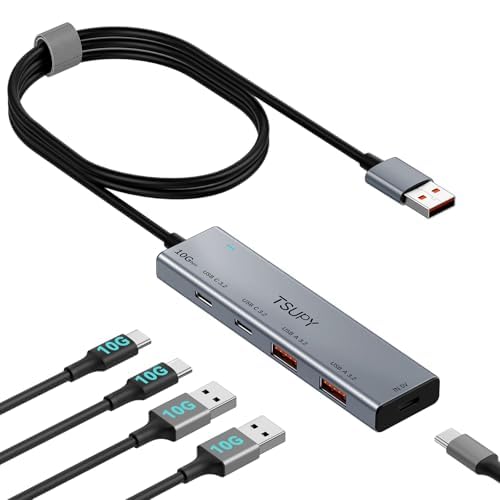
2. USB HUB 3.2, TSUPY USB 3.0 HUB 10Gbps USB 3.2 Gen 2 USB HUB with 4 Multi USB Ports, 4FT Extended Cable HUB for MacBook Air/Pro,Laptop,PC and More
Two USB-A and two USB-C ports in one slim aluminum shell — the adapter drawer stays closed.
Most four-port hubs force a choice between USB-A and USB-C. TSUPY does not: you get two of each, so an older flash drive and a modern USB-C SSD both plug in without an adapter. The whole line runs at 10Gbps shared across all four ports, and the cable stretches 120 centimeters — roughly four feet — which is long enough to reach a tower tucked under a desk. The aluminium body weighs 70 grams, light enough that it rides in a laptop sleeve without adding noticeable bulk.
The speed ceiling shows up when you stack several drives on it. TSUPY’s own notes explain the speed ceiling is set by your host port, so a USB 3.0 socket gives you USB 3.0 speed regardless of the hub. Buyers report it moving data “at greater than 10Gbps, almost 20 depending on the drive” in one verified review, and another owner stacking three external SSDs saw it settle to USB 3.0 speeds but stay stable with no random disconnects. So it stays stable with three SSDs attached, but drops to USB 3.0 speeds rather than failing.
Build quality gets the most consistent praise, with the mix of USB-A and USB-C singled out as the reason people keep it. There is an optional USB-C 5V power input for stability when you run several drives, and it is rated at 5Gbps — the current standard — and works with Windows, Mac, Linux and Chrome OS without setup.
Why It Rates Highly: The two-and-two port split is the practical balance for anyone whose devices are half legacy, half modern — no sacrifices, no dongle hunt. The aluminium case keeps it looking tidier than plastic rivals, and the 24-month warranty adds confidence.
Reach for this if: You want USB-A and USB-C in the same hub and prefer a slim aluminum body for a laptop bag.
Look elsewhere if: You need to run several high-speed SSDs simultaneously at full speed — a powered hub will serve you better.
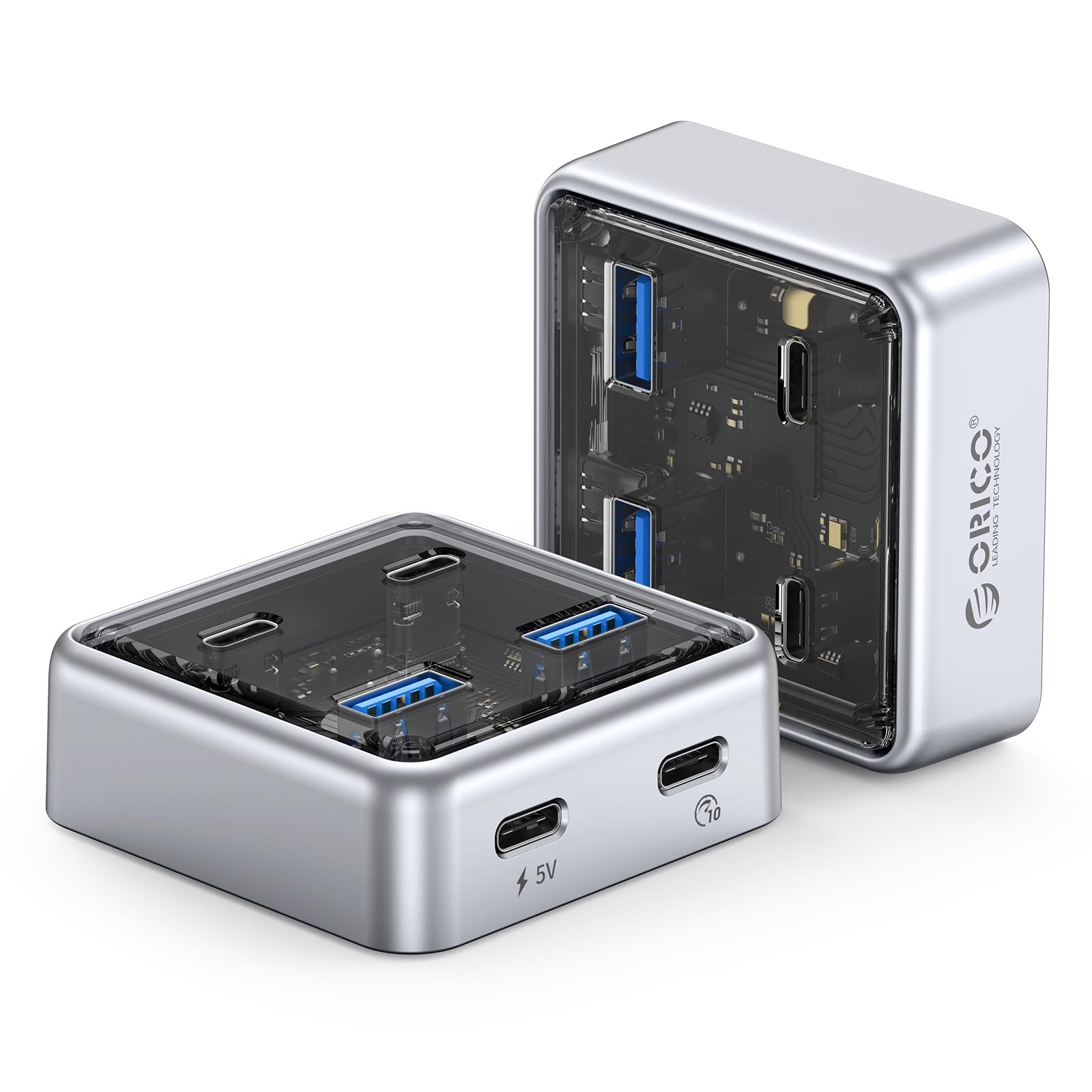
3. ORICO 4 Ports Zinc Alloy USB 3.2 Hub, 10Gbps USB Splitter for Laptop
A see-through zinc alloy shell you can actually watch transfer over — and it runs cooler than plastic rivals.
The ORICO leans on its materials. The body is zinc alloy with a transparent PC panel, and the alloy is treated to resist oxidation — a fancy way of saying it will not pit or tarnish from daily desk handling. It pairs 2 USB-A with 2 USB-C 3.2 ports and moves data at 10Gbps, again shared across all four. The hub measures 2.24 x 2.24 x 0.81 inches — small enough to slip into a side pocket — and ORICO offers the cable in 1.64ft and 3.28ft lengths so you can match it to your setup.
What owners praise most is how the metal body feels and stays cool. Reviews describe the zinc alloy as sturdy and “cooler than plastic” while handling multiple devices at once, and one reviewer swapped an old case that lacked USB-C and 3.0 support for this hub and had zero disconnects running an NVMe enclosure. A real-world caveat: when daisy-chaining it off another hub, one owner had to supply a separate 5V 2A power block before their PC would detect it — so if you plan to chain hubs, budget for an adapter.
Windows 8 and Mac OS are supported, and it is plug-and-play with no driver install. The main limit to know is the port count is fixed at four — one reviewer wanted more but noted that other options failed quickly on stability, so they kept it.
The Materials Stand Out: Zinc alloy and a transparent panel set this apart from the plastic pack, and the anti-oxidation treatment means it keeps its looks over time.
Best match for: Buyers who value a premium-feeling metal build on their desktop and want the option to switch between two cable lengths.
Worth knowing: Chaining it behind another hub may need a separate 5V 2A power supply before your PC sees it.
4. UGREEN USB C Hub 4 Ports, Multiple USB 3.2 Hub, 4x10Gbps Data Transfer

Four USB-C ports, a 50-gram body, and no power brick — this is the one that lives in your laptop bag.
The numbers are what sell this UGREEN. It turns one USB-C port on your laptop into four USB-C data ports at up to 10Gbps, and UGREEN rates it to move a 20 GB file in 16.4 seconds. At 50 grams it barely registers in a bag. It is a data-only hub — the ports do not pass video or charge your laptop — and that narrower job is exactly what keeps it small and simple.
The caveat is battery drain on tablets and phones. If you connect a hub to an iPad or an iPhone without its own power, the tablet has to supply current to whatever you plug in, which drains faster than using a hub with its own supply. That drain is inherent to bus-powered hubs, which draw current from the host device. Owners note it works well with a MacBook Pro M5 for external SSDs and YubiKeys, and one reviewer summed up the appeal plainly: it fits in a travel bag and takes no external power.
Build quality is the consistent theme in reviews — solid, braided cable, no overheating — and the portable size is where this really delivers over the cheaper plastic hubs.
The Case For It: Four USB-C ports at 10Gbps in a 50-gram body that slips into a sleeve is a genuinely useful combination for anyone whose older devices are already USB-C.
But Know This: No USB-A fallback means legacy peripherals need a stub adapter, and the ports move data only — no video, no charging.
Suited to: Minimalist travelers whose entire kit — SSDs, keys, phones — is already USB-C and who want the lightest possible hub.
Skipped by: Anyone who needs to charge a laptop or drive a monitor through the same hub.
5. UGREEN USB C Hub, 4 Ports USB-C 3.2 10Gbps Data, Aluminum, Only Adapter
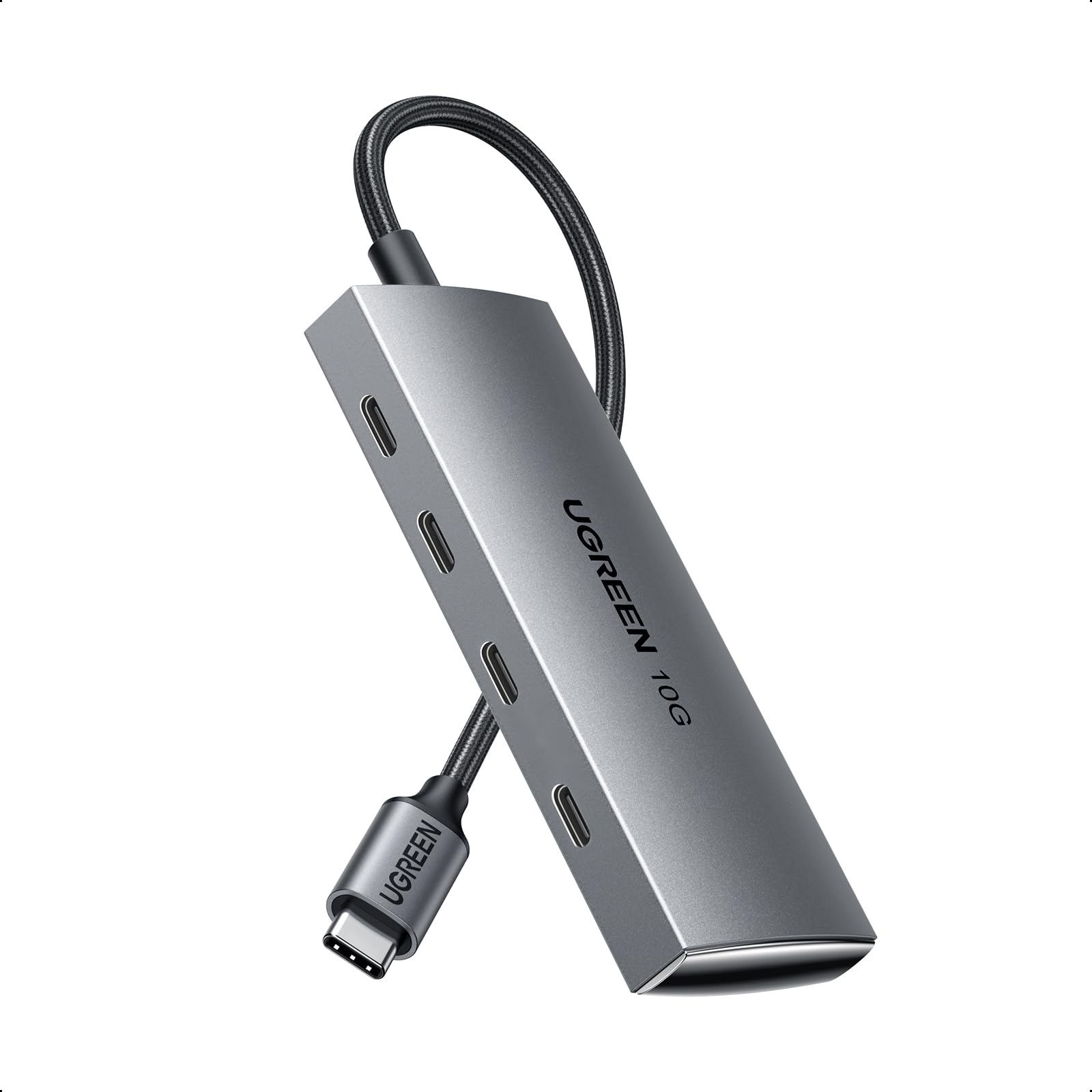
Aircraft-grade aluminum, a braided one-foot cable, and four ports that hit full speed together.
Where the smaller UGREEN is trim for travel, this one is built for the desk. All four ports are USB-C 3.2 and all four carry 10Gbps simultaneously when the drives support UASP, a transfer mode that lets USB storage skip some of the overhead of older protocols. The shell is aircraft-grade aluminum that spreads heat, and the one-foot braided cable cuts the strain on a laptop’s port. It fits laptops, tablets, Steam Deck, and mobile workstations.
Part of what makes this model rate higher than its sibling is the smaller band of complaints. It is a data hub first, and most owners are clear on that. The larger set of reviews on the smaller, cheaper UGREEN includes a meaningful share of units that drop drives mid-transfer, especially when several are connected at once — a real-world warning that not every 10Gbps hub holds its speed under a genuine load. This model earns its position by delivering the full number with less of that mixed feedback.
The trade-offs are the same design choices that keep it fast. No Thunderbolt displays, no HDMI, no DisplayLink docks — the ports are for drives, keyboards, and audio gear, not monitors. And it does not charge your laptop. Buyers who connect four USB-C audio interfaces to a Mac mini or Mac Studio report it running without noticeable heat, which is exactly the use case the aluminum shell was built for.
Reasons It Stays On The Desk
- All four USB-C 3.2 ports run at 10Gbps at the same time with UASP-ready drives.
- Aircraft-grade aluminum shell keeps it cool and looks the part on a workstation.
- One-foot braided cable relieves strain on the laptop’s own port.
- Plug-and-play across MacBook, iPad, Surface Book 2, XPS, and Galaxy devices.
The Compromises To Weigh
- No charging, no video, no Ethernet or HDMI — it moves data and nothing else.
- Not compatible with Thunderbolt monitors or DisplayLink docks.
- Four USB-C ports means USB-A peripherals need an adapter.
For the desk you want to clean up: If your machine is USB-C-native and your peripherals are too, this is the hub that keeps its rated speed with everything running at once.
Not for: You if you need one port to also charge the laptop or feed a monitor.
6. Rosonway 4-Port Powered USB 3.1/3.2 Gen 2 Data Hub 10Gbps, RSH-A104

The one that ships with its own power brick — so four hard drives do not lean on your laptop.
A hub that plugs into the wall is a different animal from one that sips power from your laptop, and the Rosonway is the only pick here that includes its own 10W (5V/2A) adapter in the box. That adapter is the reason this hub can feed each of its four USB 3.1 Gen 2 ports steadily, and it has a built-in surge protector with overvoltage and overcurrent protection. The cable is a 3.3ft run, long enough for a Mac Studio, M1 Mac mini, iMac, XPS or Surface Pro sitting further from your chair.
What buyers praise most is speed and steady power. One long-time owner testing two NVMe enclosures found a real limit worth repeating: the hub delivers the full 10Gbps to the motherboard, but its onboard chipset cannot push 10Gbps between two ports at once — with two M.2 enclosures on separate ports, throughput drops below 5Gbps. That is an honest ceiling on hub-to-hub copy jobs, and it only bites if you routinely move large files between two external drives at the same time.
The individual on/off switches — light press to open, long press to close, with the port remembering its last state — round out the package. The metal casing is a solid aluminum alloy that stands up to desk life. This model is for the desk with a few external drives on it, not for the bag.
Where It Wins: A bundled 10W power adapter is rare at this level and lets you stack portable drives without leaning on the laptop’s bus power. The aluminum body and side-mounted switches keep the whole thing feeling purposeful.
The Honest Limit: It cannot run two 10Gbps transfers between its own ports at the same time — drive-to-drive copies will crawl, even though drive-to-PC stays fast.
Best for: Desks that run three or four external drives and want a hub with its own wall power and per-port switches.
More than you need if: Your devices are all bus-powered and you mostly move files one drive at a time.
7. Anker USB-C Hub, 4-in-1 USB-C Adapter, USB-C Splitter for 4K Display

The hub that does display, charging, and data through one cable — as long as you use the first port.
This is the only pick in this list built to do more than move files. Anker rates it for 10Gbps data (their own note: 20X faster than USB 2.0), a 4K@60Hz display output, and up to 100W charging input — all fed through a single USB-C cable. The detail that matters is the display only mirrors via the first USB-C port, so you need to know which one that is before you plug in a monitor. The body uses 75% post-consumer recycled materials, which is a rare detail in this category.
The trade-off is structural: PD and video share the first USB-C port. Owners mention the power delivery and the display port share a lane — you cannot easily run a monitor’s 90W power feed, video, and full port expansion at once. One software developer uses it to solve a port shortage, and a stage performer uses it to chain MIDI devices — both real uses where reliability matters more than raw speed.
The 4K@60Hz figure refers to the refresh rate, a smoothness measure for on-screen motion. It is comfortable at 60Hz for everyday work but not the ideal choice for someone who needs 10Gbps and full-bandwidth passthrough charging at the same time.
What It Brings To The Desk
- 4K@60Hz display output via the first USB-C port, useful for docking at a desk.
- Up to 100W PD charging input arrives through the same single cable.
- 10Gbps data transfer, Anker’s own figure of 20X faster than USB 2.0.
- Compact 3.31 × 1.85 × 0.55in footprint with 75% recycled materials in the shell.
The Trade-Offs To Know
- Display and PD share the first port, so combining monitor power, video, and expansion on one cable is limited.
- Port layout can leave the display port only on that first connector.
- Plastic shell feels lighter in hand than the aluminum alternatives.
Ideal if: You want a slim desk dock that adds a 4K monitor plus three data ports through one cable.
Leave it if: You need to charge at full rate and drive a display through the same cable at the same time.
8. Waveshare 4-Ch USB 3.2 Gen1 HUB, Compatible with Windows, macOS, Linux and Android, Metal Case with Wall-Mount Support, Driver-Free, Plug-and-Play

A metal hub that screws into a panel and runs off screw-terminal power — built for machines, not laps.
The Waveshare is aimed at projects, not desks. It runs four USB 3.2 Gen1 ports at 5Gbps (a step below the 10Gbps hubs above, but plenty for most peripherals) and each port can deliver up to 2A maximum output current, which is the built-in protection against USB current backflow. It has a 7~36V DC power port on board, screw terminals for hardwiring power, and mounting holes so you can bolt it inside an enclosure.
What earns the praise here is suitability for builds. Home Assistant and 3D printer owners are the natural fit: one reviewer has run it continuously for over seven months with zero downtime, another powers it from a 24V supply inside a Voron 3D printer enclosure with six USB devices hanging off it. The metal case shields USB 3.0 noise that was interfering with a telescope’s wifi, which is the kind of problem this hub exists to solve. One owner notes the supplied USB A-to-A cable is the weak link — a replacement cable fixed disconnects and corruption — so budget for a better one.
The one buyer to avoid: someone who specifically needs 10Gbps. Reports vary on how well it holds top Gen1 speeds, and this is fundamentally a 5Gbps hub. Its job is to be bolted in place and forgotten about, not to race USB 3.2 Gen 2 drives.
The Builder’s Pick: Screw terminals, wall-mount holes, a metal shell and 7~36V DC input are exactly what an enclosure needs and nothing a desk does — this is a hub for machines, sensors, and dongles that stay plugged in for years.
Choose this if: You are building a 3D printer enclosure, a Home Assistant server, or a Raspberry Pi rig where the hub bolts in and runs off 12V.
Pass on it if: Your goal is the fastest external-SSD transfers at 10Gbps. This one caps at 5Gbps by design.
9. StarTech 4-Port USB-C Hub 10Gbps with 100W PD Charging (309B-USBC-HUB)
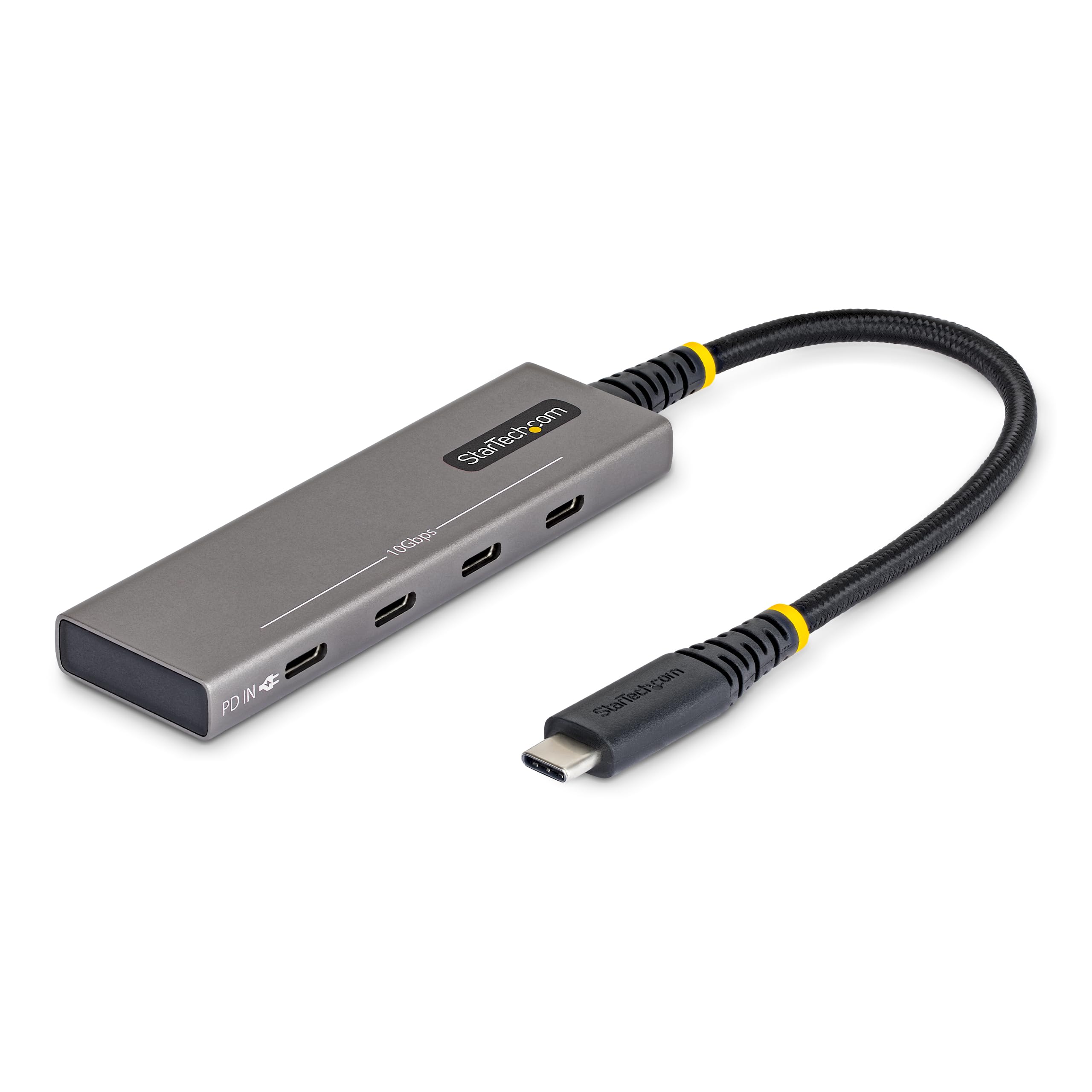
Three dedicated 10Gbps USB-C ports plus a fourth that also passes 100W of power through.
The StarTech splits its four USB-C ports in a way that is worth understanding: three are dedicated 10Gbps data, and the fourth is shared — it either moves data or passes your laptop’s charger through at up to 100W. That shared fourth port solves the charging-versus-data tension the cheaper hubs force you to pick between. The housing is 90% post-consumer recycled aluminum, the braided cable is a compact 8 inches, and setup requires no drivers.
The 8-inch cable is a deliberate choice: it keeps the hub and its cable close to the laptop or tablet, which is ideal for a sleeve or a crowded laptop bag, but less tidy if you want the hub to sit on top of a fixed desk away from the machine. StarTech markets this for IT setups and field work, and the aluminum shell with braided cable lasts better than the plastic bodies elsewhere in this list. One careful reviewer measured it transferring at 989 MB/s from a 10Gbps NVMe enclosure — the number a serious buyer will care about, because it means no speed drop against a direct connection.
The catch: the four ports share a 10Gbps total, so two heavy drives at once split the pipe. If your work is a single SSD at a time, you will never notice.
Premium Touches That Earn The Label
- Three dedicated 10Gbps USB-C data ports plus one shared for data or 100W PD passthrough.
- 90% post-consumer recycled aluminum housing, cooler than plastic under load.
- Measured at 989 MB/s from a 10Gbps NVMe enclosure with no speed loss against a direct drive connection.
- 8-inch braided cable and 3.8 × 1.1 × 0.4in footprint fit a laptop bag corner.
The Honest Limits
- The four ports share a 10Gbps ceiling — two heavy drives at once will split the pipe.
- All four ports are USB-C, so USB-A peripherals need adapter cables.
- The short 8-inch cable keeps the hub tethered close to the laptop.
Built for: A traveler or IT professional who wants one compact hub to power a laptop and add three USB-C data ports without compromise.
Overkill if: A fixed desk with a single drive — you will not fully use the 100W passthrough and the shared fourth port.
Understanding the Specs
Data transfer rate (10Gbps vs 5Gbps)
The 10Gbps rate is how much data the whole hub can move per second — not per port. A hub rated 10Gbps shares that ceiling across all four of its ports. A hub rated 5Gbps is capped at half that, which is fine for keyboards, mice, and audio hardware but slow for large-file backup drives. Match the number to your job: an editor moving video will feel the 10Gbps hubs, a desk running keyboards and dongles never will.
Power delivery and passthrough charging
Power delivery (PD) is the standard that lets a hub both carry data and send your laptop’s charger through the same cable. Some hubs accept up to 100W PD; others can only power the connected USB devices from the hub, not the laptop. Check which one you are buying — the published spec will say whether it charges your laptop or only the peripherals attached to it.
Powered vs bus-powered hubs
A bus-powered hub runs entirely off your laptop’s USB port with no wall adapter. That works for light peripherals but is the reason a portable hard drive or stacked devices can misbehave. A powered hub has its own AC adapter — often an included 10W (5V/2A) unit — which feeds each port a steady current. If you run several drives, powered is the safer bet.
Shared bandwith across ports
The most common misconception is that a 10Gbps hub gives 10Gbps per port. It does not — the total is shared, and two drives copying at once each get part of it. That is why a hub can feel instant with one SSD and slow with two, and why copy-from-one-drive-to-another-through-the-hub jobs hit the hub’s chipset limit before they hit the drive’s.
FAQ
Will a 4-port USB 3.2 hub charge my laptop while I transfer files?
Why is my 10Gbps hub barely faster than an older USB 3.0 hub?
Can I run four external hard drives on one bus-powered hub?
Does a USB-C hub work with an iPad or an Android tablet?
What is the difference between USB 3.2 Gen 1 and Gen 2 in practical terms?
Can I use a USB hub with a 4K monitor on the same hub as my SSD?
Do I have to install drivers for a 4-port USB hub?
Why do some hubs stop recognizing a drive during a large file copy?
Is it worth buying a 10Gbps hub if my laptop only has USB 3.0 ports?
Can I daisy-chain two USB hubs together to get more ports?
Will a 4-port hub hold its speed with all four ports occupied at once?
Final Thoughts: The Verdict
For most desks, the 4-port usb 3.2 hub winner is the Qeefun 4-Port USB 3.2 Hub — 4.4 stars across 3,000+ ratings, four individually switched USB-A ports, a four-foot reach, and an optional USB-C power input for heavy drives. Four switched USB-A ports on a four-foot cable, with no adapter needed for legacy drives. If your devices are mostly USB-C and you want a hub that also charges your laptop, the StarTech 309B-USBC-HUB is the premium pick with three dedicated 10Gbps data ports and a fourth that passes up to 100W of power through. And if your laptop just needs four more USB-C ports in the lightest possible shell, the UGREEN USB C Hub 4 Ports earns its spot at 50 grams.
How We Picked
We do not accept paid placement. Every pick is matched to a real buyer and a real use-case; we do not hands-on test units.
Sources & Methodology
Specifications: manufacturer listings and product documentation. Review insights: verified customer reviews, as of September 2026. Pricing: not shown on this page (it changes often); check the current price via the retailer link.
As an Amazon Associate, Gadgets Feed earns from qualifying purchases. This does not affect which products we feature.