
Our readers keep the lights on and my morning glass full of iced black tea. As an Amazon Associate, I earn from qualifying purchases.
Specs are compiled from manufacturer listings and verified buyer reviews and can change over time — please confirm the key details on the product page before buying.
A hot PC is a slow PC, and the quickest fix is a case that actually lets air move. If your graphics card is throttling under load or your fans are screaming just to hold safe temperatures, the problem is usually the box around your parts, not the parts themselves. This guide cuts straight to the ATX cases that feed cool air in and push hot air out without forcing you to rebuild your whole rig.
I’m Min — the founder and writer behind Gadgets Feed. This guide is built by comparing the manufacturers’ published specifications and the patterns across verified customer reviews, so you get each pick’s real strengths and trade-offs instead of marketing spin.
You will see how front mesh, fan count, and radiator clearance decide real cooling. A mesh-front atx case with good airflow feeds your GPU and CPU cooler air, so both run cooler and quieter.
Our Picks at a Glance


How To Choose The Best ATX Case With Good Airflow
Airflow is not a marketing word — it is the physical path cool air takes to reach your graphics card and processor, and the path hot air takes to leave. Before you compare models, get clear on four things: how open the front panel is, how many fans you can mount and where, what size radiators the case accepts, and whether your GPU, CPU cooler, and power supply fit inside.
Front panel: mesh versus glass
A mesh front panel (a panel full of small holes) lets air pass almost freely, while a solid glass front blocks it and pushes your fans to work harder. One pick here advertises a metal front panel with a 51% ventilation rate, which is the kind of number that tells you air moves with little resistance. If looks matter and you still want strong cooling, perforated steel panels — like the ones on the NZXT H9 Flow — give you a middle ground.
Fan mounts and radiator size
The count and size of fan mounts decide how much air you can move and how quietly. Look for 120mm and 140mm mounts you can populate, plus rear and bottom positions that feed the GPU directly. Radiator support matters just as much: a 360mm radiator (three 120mm fans in a row) is the common liquid-cooling size, while 420mm gives you a little more surface area. Check whether the top and front both accept your radiator, because limited mounting locations can force a compromise.
Clearance numbers that actually matter
GPU length, CPU cooler height, and PSU length are the three clearances that decide if your parts physically fit. Modern triple-fan cards run long, so a case rated for GPUs up to 400mm gives you headroom. CPU tower coolers get tall, so a 180mm height limit clears most of them. Power supply length matters in dual-chamber designs, where the PSU sits in its own space.
Quick Comparison
| Model | Best For | Case Type | Included Fans | Max Radiator | Amazon |
|---|---|---|---|---|---|
| Lian Li O11 Vision Compact (O11VPX)★ Best Overall | Showcase builds with hidden AIO tubes | Mid Tower | — | 360mm (top) | Amazon |
| MUSETEX Y6Budget Champion | Budget 270° glass showcase | Mid Tower | 4 × 120mm non-LED | 360mm | Amazon |
| MONTECH XR PanoramicBest Value | Wood-grain style with ARGB included | Mid Tower | 3 × 120mm ARGB PWM | 360mm | Amazon |
| FOIFKIN F1 | Most included fans from the start | Mid Tower | 6 × 120mm ARGB PWM | 360mm | Amazon |
| CORSAIR 4000D FRAME | Modular upgrades and directional airflow | Mid Tower | — | 360mm (3 locations) | Amazon |
| MONTECH AIR 903 MAX | High-airflow value with big fans | Mid Tower | 4 × 140mm PWM (3 ARGB) | 360mm (front + top) | Amazon |
| be quiet! Pure Base 501 Airflow | Quiet builds without a light show | Mid Tower | 2 × 140mm PWM | 360mm front | Amazon |
| Lian Li LANCOOL 216 RGB | High-end GPUs and multi-drive builds | Mid Tower | 2 × 160mm ARGB + 1 × 140mm | 360mm | Amazon |
| NZXT H9 Flow | Big dual-chamber builds with large radiators | Mid Tower | 3 × F140Q + 1 × F120Q | 420mm (top and front) | Amazon |
In‑Depth Reviews
1. Lian Li O11 Vision Compact ATX PC Case, Back-Connect, Black (O11VPX)
Our pick — over 4.5★ from 450+ verified ratings; the strongest balance of quality and price.
The aquarium case that hides your AIO tubing while showing off everything else
This is the case for the builder who wants a display piece that still breathes. Its defining trick is a patented three-panel tempered glass layout — glass on the front, top, and left side — backed by a top mesh panel sized for a 360mm AIO (all-in-one liquid cooler). That mesh top is your escape route for heat, so you get the see-through look without sealing the box shut. It also works with back-connect motherboards, which means your cables plug in behind the board instead of snaking across the front.
Where it pulls ahead of the MUSETEX Y6 is in the details of the build itself. The second chamber conceals your AIO tubing when the cooler sits on the side, so the main view stays clean. Cable management runs on hitches and hooks rather than guesswork. Space is not a worry either — the 17.6″D x 11.3″W x 17.57″H frame fits large GPUs and 360mm radiators with room to spare. Note the weight: at 26.4 pounds it is a heavy case, and it runs 2.0x the weight of the 13.1-pound MUSETEX Y6. Plan for a solid desk, not a flimsy shelf.
The thing that wins owners over is the sheer quality of the build — it is the most-talked-about trait by a wide margin, with the glassy looks not far behind. Ease of building comes next, and plenty of buyers call out the spacious interior. As one owner put it, the case has good cable management hooks and is very intuitive to take apart. The recurring catch is front I/O: a few wish it offered more ports. That is a minor gripe on an otherwise polished case.
Where it earns its keep
- Three-panel tempered glass with a mesh top that still exhausts heat
- Hidden AIO tube routing in the second chamber keeps the view clean
- Back-connect motherboard support for a cable-free interior
- Roomy enough for large GPUs and a 360mm AIO
What to plan around
- Heavy at 26.4 pounds — it is 2.0x the weight of the MUSETEX Y6
- Front I/O is limited, so a few builders want more ports
- Cable routing takes some planning to look its best
Built for: the builder who treats the case as part of the decor and still wants real airflow up top.
Think twice if: you need lots of front-panel ports or you move your rig around often — the glass and weight make it a stay-put centerpiece.
2. MUSETEX Y6 PC Case, Pre-Installed 4 Non-LED Fans, ATX Mid Tower Case, Computer Case with Type-C, 270° Full View Tempered Glass, Black
Four fans, dual glass, and a Type-C port on an entry-level budget
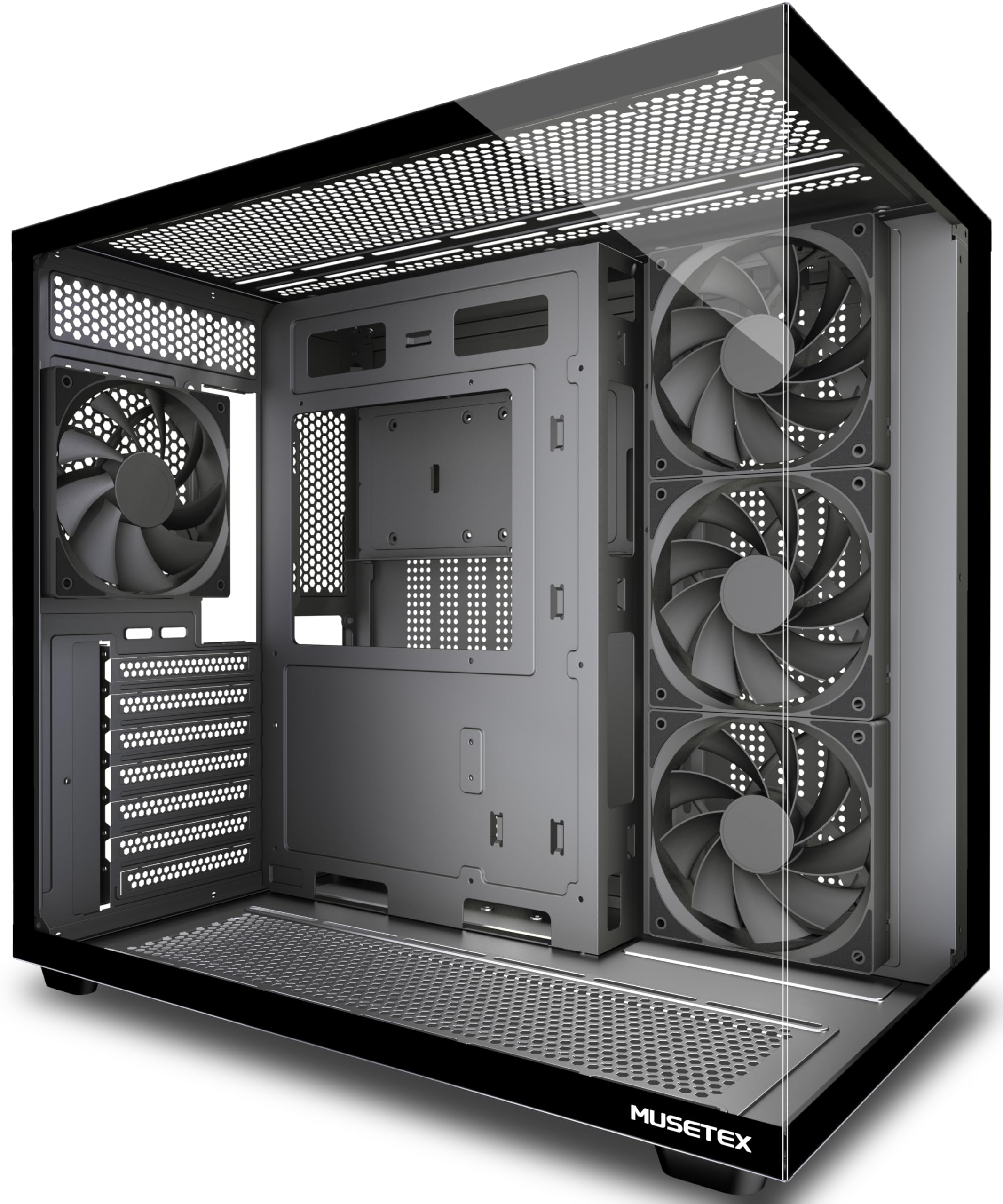
If you want a panoramic showcase without spending much, this is the one to look at first. It comes with four 120mm non-LED fans already installed — three reverse-blade fans on the side and one forward fan at the back — so you are not buying fans on top of the case. The 270° dual tempered glass wraps the view wider than a lot of similarly priced towers, and a front Type-C port keeps modern devices within easy reach. It supports ATX, Micro-ATX, and Mini-ITX motherboards.
Clearance is the headline for builders with big cards. It fits GPUs up to 410mm (16.14″), CPU coolers up to 160mm (6.3″), top-mounted liquid cooling up to 360mm, and power supplies up to 230mm (9.05″). That GPU room is the standout number here. A dual-chamber design separates the PSU into its own ventilated channel, and magnetic dust filters sit at the top and bottom to cut buildup without choking airflow. It is also a compact, light frame at 13.1 pounds — lighter than the Lian Li O11 Vision Compact, which is 2.0x heavier at 26.4 pounds.
Build quality and value lead what owners talk about, with space and airflow close behind. There is an honest split on cable management and ease of use — a clear divide between smooth builds and fussy ones. On the fussy side, a veteran builder reported missing screws, a stubborn ASUS backplate, and standoff threads that did not match. Weigh that against the many first-timers who found the fit and finish solid. The pattern reads as a case that rewards careful assembly and punishes rushing.
The value math: four pre-installed fans and 410mm of GPU clearance give this budget tower real headroom for the money.
Build with patience: the standoffs and backplate occasionally fight back, and a few builders note sharp edges — set aside time and take it slow.
Reach for this if you are building on a tight budget and want fans and glass included.
Look elsewhere if you want a tool-free, no-fuss assembly or a lot of front-panel connectivity.
3. MONTECH XR Panoramic High Airflow ATX PC Case, 3 ARGB PWM Fans, Black
A wood-grain touch panel on a case that quietly fits nine fans
For the desk setup that wants a warm, furniture-style look instead of aggressive gamer angles, the XR leads with a wood grain I/O interface panel. Behind that styling sits real cooling intent: three pre-installed ARGB fans (two reverse-blade up front, one regular-blade at the rear) spinning up to 1500 RPM. It supports up to nine fans total, so you can add intake later without running out of mounts. The panoramic layout pairs dual tempered glass with a 360mm top radiator mount for high-end GPUs.
Clearance is generous for a compact frame. It supports ATX, Micro-ATX, and Mini-ATX boards, takes GPUs up to the 40 series, and offers up to 420mm of GPU support. Filters cover the top, bottom, and side so dust has fewer places to land. Compared with the FOIFKIN F1, the XR gives you the fan-mount ceiling; the FOIFKIN counters with more fans already in the box. If expansion is your plan, the nine-fan capacity is the reason to pick this one.
Design is what buyers rave about most, followed by value and appearance — this is a case people buy because they like looking at it. Easy building and cable management get solid mentions too, helped by tie-downs and removable panels. The one honest note that repeats is fan noise: the included fans can be audible across a room, and the RGB is bright enough to distract some. Swap or dial down the fans if you need near-silent running, and the case itself rewards the effort.
Why it fits a styled build
- Wood-grain I/O panel stands out from typical gamer styling
- Three pre-installed ARGB fans with reverse blades up front
- Mounts for up to nine fans for future expansion
- 360mm top radiator and up to 420mm GPU support
Where it asks for a compromise
- Included fans can run noisy — several note the sound across a room
- Some found the left panel screws very tight on arrival
- Bright ARGB is distracting for light-averse desks
Go for it when: you want a distinctive look, plenty of fan mounts, and are happy to tune your own fans.
Hold off if: silence is your top priority or you dislike bright lighting.
4. FOIFKIN F1 PC Case – Pre-Installed 6 PWM ARGB Fan, ATX Mid-Tower Computer case, Gaming PC Case, Type-C, 360mm Radiator Support, FOIFKIN (Black)

Six ARGB fans in the box — the biggest fan bundle in this lineup
Six pre-installed 120mm ARGB PWM fans is the number that defines this case, and it is the most included fans of any pick here. PWM means the fan speed is controlled by the motherboard, so you get automatic ramp-up and ramp-down instead of a constant blast. Five of the fans are reverse-blade for intake, one is forward for exhaust, and they arrive daisy-chained so the wiring stays manageable. A separate chamber holds the power supply and its cables, keeping heat and clutter away from your GPU.
Clearance leans practical for big builds. It fits ATX, M-ATX, and ITX boards, GPUs up to 400mm (15.75″), power supplies up to 200mm (7.87″), a 360mm top radiator, and CPU air coolers up to 170mm. Storage covers one HDD and three SSDs. The front I/O gives you Type-C 3.0, USB 3.0, dual USB 2.0, and audio with a dedicated LED switch. Compared with the MONTECH XR above, you trade the wood-grain look for six fans and a taller cooler clearance.
Case quality is what owners praise most, with value and appearance right behind it. Cable management and internal space draw consistent praise, and most find it easy to disassemble and reassemble. Here is the fair warning: fan quality is the one trait buyers are split on, and some units arrive with a faulty fan — the maker stands behind the case, so a replacement is part of the deal. Everything else from the frame to the glass holds up well for the money.
Fan-per-dollar leader: six ARGB PWM fans pre-wired means you are ready to game the moment your parts are in.
The catch to know: fan quality is the mixed spot — a few arrive with a dead fan, so test them on first boot.
Best fit for the buyer who wants the most lighting and airflow straight from the start.
skip it if you plan to install your own premium fans — you would be paying twice for airflow.
5. CORSAIR 4000D Frame Modular Mid-Tower ATX PC Case – High Airflow

The case you can re-configure with a slide of a steel rail
Offering directional airflow and a steel-thick frame, the defining feature here is the InfiniRail fan mounting system. That is a sliding steel rail that lets you position front and roof fans up to 200mm (140mm in the roof) wherever you want them, so you can point cooling exactly at the parts that run hot. The front panel is perforated steel in a 3D Y-pattern, which gives air a low-obstruction route into the case. It is built on Corsair’s modular FRAME platform, meaning parts like the front I/O panel can be swapped to suit your build.
This case is about choice. It supports up to twelve 120mm fans and three 360mm radiators across front, roof, and side. The internal side panel can act as a clean cable cover, or come off so you can mount fans to the side for extra airflow. Board compatibility covers ATX, mATX, and ITX. It fits the ASUS BTF, MSI Project Zero, and Gigabyte Project Stealth back-connect ecosystems. Where the FOIFKIN F1 gives you six fans immediately, the CORSAIR gives you the flexibility to add up to twelve your way.
Owners consistently call out the airflow, the thoughtful design, and the clean, quiet build experience. But not every builder is happy: build quality is the mixed trait here, with some finding the frame sturdy and others describing the steel as flimsy. One builder reported fan-mount screw holes that did not align. The flip side is that the rail system is forgiving — you can reposition the mount rather than fight it. If you like to tweak and re-tune, this rewards that; if you want a fixed, sturdy box, temper your expectations.
The flexible case
- InfiniRail mounts fans up to 200mm anywhere along the front rail
- Supports up to twelve 120mm fans and three 360mm radiators
- Modular FRAME platform lets you swap panels and front I/O
- Back-connect ready for ASUS BTF, MSI Project Zero, Gigabyte Project Stealth
The honest catches
- Build quality divides buyers — some steel feels flimsier than expected
- One report of fan-mount holes that did not line up
- Best airflow needs you to actively configure the rails and panels
Suits the tinkerer: a builder who gets a kick out of tuning fan placement and swapping panels.
Less ideal for: anyone who wants a rigid, set-and-forget frame and consistent stiffness.
6. MONTECH AIR 903 MAX High Airflow E-ATX PC Case, 4x140mm PWM Fans, Black

A metal front panel with a 51% ventilation rate and four big fans
This is airflow as a hard number: a metal front panel with a 51% ventilation rate, which means more than half the panel is open to moving air. It arrives with four 140mm PWM fans — three ARGB and one standard — plus a fan and lighting hub to control them. The front mesh doubles as a removable dust filter, so you can pull it off and rinse it without pulling the case apart. It accepts extended ATX, ATX, Mini ITX, and Micro ATX motherboards. For builders sizing up a large tower, those 140mm fans push more air at lower RPM than smaller ones.
Headroom is where it shows its value. It supports 360mm AIO coolers at both the front and top, clears CPU coolers up to 180mm, and takes GPUs up to 400mm long and 190mm wide, including the RTX 40 series. Power supplies up to 240mm slide in without a fight. There is also a filter on every intake surface and a strong fan setup in the box, so you are not shopping for extras. Compared with the be quiet! Pure Base 501, which ships two fans, the AIR 903 MAX gives you double the fan count and a higher ventilation rate.
Case quality and value dominate the feedback, with airflow and space right behind. First-time builders describe it as a dream to build in, and the PSU shroud hides cable clutter. The main recurring note is fan noise: the stock 140mm fans move a lot of air but run loud at full speed. Set a custom fan curve and the noise drops without costing you cooling. Size is the other consideration — it is a large mid-tower, and a couple of owners mention unused space at the front.
The airflow bargain: a 51% ventilated front panel plus four 140mm fans, three of them ARGB, makes this the strongest cooling-per-dollar pick here.
Noise tip: the included fans are loud at full tilt, so a custom fan curve turns this into a quiet case.
Pick this when airflow per dollar is your scoring metric and you want the fans included.
Not for you if you want a small footprint or silent stock fans — this is a big case with loud ones.
7. be quiet! Pure Base 501 Airflow Black ATX Case – 2 Preinstalled Pure Wings 3 140mm PWM Fans
Minimalist, muted, and built to vanish into a living room
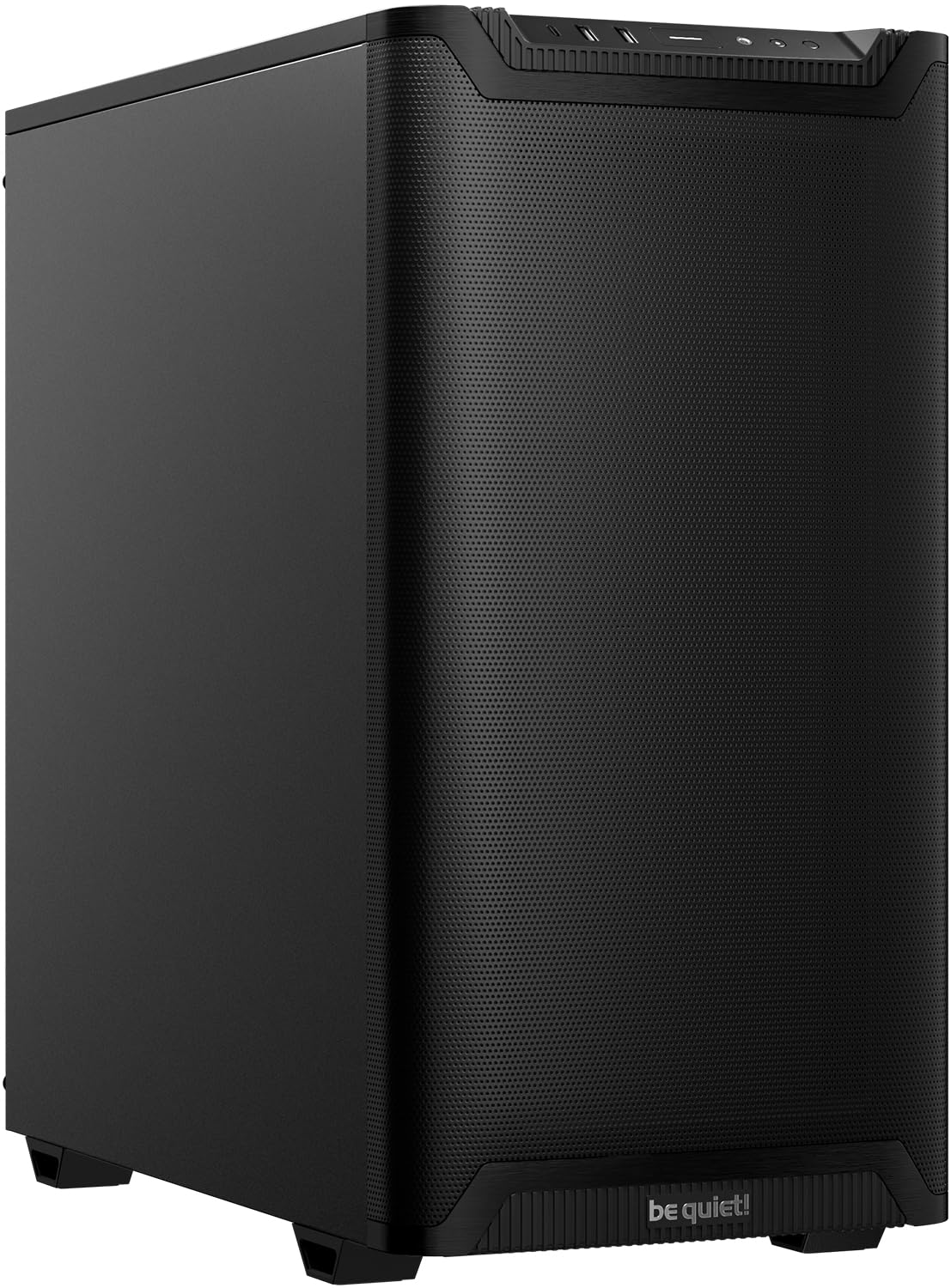
For a build that has to stay quiet in a shared space, this case leads with two pre-installed Pure Wings 3 140mm PWM fans tuned to reduce turbulence and noise. The side panels carry sound-dampening material, which is the reason this tower stays as quiet as it does under load. It supports three front fans or a 360mm radiator up front, and three top fans or a 240mm radiator up top. The design is deliberately plain — no side window, no lighting — so it disappears next to a TV or a desk.
Two features separate it from the flashier picks here. First, a vertical GPU option: the PCIe slots rotate 90° so you can mount a card upright with an optional riser cable, which helps prevent GPU sag. Second, the front I/O runs USB 3.2 Gen. 2 Type C plus dual Type A ports, so modern peripherals connect at the faster standard. Inside, it holds six storage drives and fits full-size graphics cards and air coolers. Compared with the NZXT H9 Flow, the be quiet! trades the wraparound glass and 420mm radiator support for a far quieter, understated box.
Quality and quiet operation are what buyers highlight most, with assembly and airflow close behind. It holds up over the long run — owners note using it for six months or more with no hardware issues and no added noise. The recurring gripe is the front USB ports: they lack flared entry, so inserting a device can take a bit of wiggle. One owner also found a single front port dead on arrival. Neither changes the core appeal of a case that earns its name.
Stealth appeal: a windowless, silently tuned tower that fits a media room better than a glass showcase.
Watch the ports: the flared-less USB openings are fiddly, and a rare unit arrives with a dead front port.
Made for the builder who values low noise and a clean, light-free look above all.
Look past it if you want RGB, a glass side, or the biggest radiator options.
8. LIAN LI LANCOOL 216 RGB Black ATX Mid-Tower Case, 2x160mm ARGB Fans

Two 160mm front fans and a modular motherboard tray built for giant GPUs
Two oversized 160mm ARGB fans up front are the signature here, backed by a single 140mm rear fan, so you start with serious airflow across a wide swath of the case. The metal frame is heavy-duty steel with 4.0mm tempered glass, and mesh covers the front, top, and the side of the PSU shroud. The modular motherboard I/O lets you move the board higher or lower depending on whether you run an air-cooled or water-cooled setup, which is rare flexibility at this level.
Clearance is designed for the biggest cards, with room for graphics cards up to 392mm long and 180mm tall. It fits a 360mm radiator and storage for two 3.5″ HDDs plus six 2.5″ SSDs, with a dedicated top radiator bracket that seals against pressure leaks. It supports E-ATX (width under 280mm), ATX, Micro-ATX, and Mini-ITX boards. Cable routing gets a grommet bar, Velcro straps, and small clips. Where the CORSAIR 4000D makes you choose a rail position, the LANCOOL 216 lets you shift the whole board instead.
Case quality is what owners talk about most, followed by space and buildability. Large GPUs and tall air coolers fit without a fight, and the bundled front-panel connectors simplify the wiring. A few honest notes show up: the side panel push-pins use fragile plastic inserts (spares are included), the front plastic feels a touch cheap to some, and one owner ran into a defective audio jack on arrival. A couple also want the case an inch taller for extra GPU room. None of it dims the airflow reputation.
Room to grow into
- Two 160mm ARGB front fans give broad, quiet-feeling airflow
- Fits GPUs up to 392mm long and coolers up to 180mm tall
- Modular motherboard I/O shifts up or down for your cooling plan
- Storage for two 3.5″ HDDs and six 2.5″ SSDs
Small things to expect
- Side panel push-pins rely on plastic inserts that can wear
- Front plastic material feels less premium than the steel frame
- An occasional unit arrives with a faulty front audio jack
Built for: a high-end build with a long graphics card and a tall air cooler that needs breathing room.
Not the pick if: you want a fully premium-feeling exterior material on every panel.
9. NZXT H9 Flow – Dual-Chamber ATX PC Case – Black

The wraparound-glass flagship that swallows a 420mm radiator
The headline number here is radiator room: it takes a 420mm radiator at the top and front-right, which is the largest cooling support of any case here. It ships with three F140Q 140mm fans across the front-right and one F120Q 120mm fan at the rear, all of them Case Version (CV) 3-pin DC fans. The dual-chamber layout separates the power supply and drives from your main components, which keeps heat and cabling out of the showcase area. Perforated steel panels and angled front-right fans feed it cool air.
Capacity is the theme. It holds up to nine 140mm fans across the top, front-right, and bottom, plus one 120mm rear fan, giving you ten-fan capacity in total. The rear cable channels are extra-wide with built-in Velcro straps and tie-down points, so routing stays tidy even with a lot of fans. It is also back-connect ready for ASUS BTF and MSI Project Zero boards. Compared with the Lian Li O11 Vision Compact, the H9 Flow pushes radiator support further, while the O11 keeps a hidden-AIO design and a lighter, more compact footprint.
Design and cable management are what owners love most, with space and build quality following. The wraparound tempered glass shows off a build cleanly, and the swing-open PSU bracket and hidden 2.5″ SSD mounts keep the interior looking finished. Two honest notes recur: the stock fans are the weak spot, with several replacing them for quieter units, and the case is genuinely large — verify your space before you order. A rare unit arrives with a stripped rear screw, but that is the exception.
For showcase builds: wraparound glass and ten-fan capacity make it a display-and-cooling pick at once.
The fan question: many swap the stock fans for quieter ones, so budget for that if silence matters.
Suits you if you want maximum radiator room, a wraparound glass view, and room for a big fan layout.
Overkill if you have a compact desk or plan to run the stock fans as-is.
Understanding the Specs
Ventilation Rate and Front Panel
Ventilation rate is the percentage of the front panel that is open to air, so a higher number means less resistance for your intake fans. Mesh and perforated steel panels let air in freely, while a solid glass front blocks it entirely. Look for openings at the top and bottom as well, since dust filters there keep the case clean without stranding the airflow.
GPU, Cooler, and PSU Clearance
These three numbers decide what physically fits. GPU length is set by the longest card you can mount, with modern three-fan designs running long. CPU cooler height limits tall tower air coolers, and PSU length matters most in dual-chamber designs where the supply sits in its own bay. Measure your parts before you buy, and leave a little slack for cables.
Fan Mounts and Sizes
Fans come in 120mm, 140mm, and 160mm sizes, and bigger fans move more air at lower speeds, which usually means less noise. Count how many mounts the case offers and where they sit — front, top, side, and bottom positions each serve a different job. More mounts give you room to add intake later without replacing the case.
Radiator Support
A radiator size like 240mm, 360mm, or 420mm refers to the number and size of fans it holds in a row. If you plan to run liquid cooling, confirm the case supports your radiator at the top or front, since some configurations clash — a side-mounted radiator and a large front fan can compete for the same space.
FAQ
Will a mesh front case really keep my GPU cooler than a glass front case?
How do I know if my graphics card fits in a specific ATX case?
Is a 360mm radiator always better than a 240mm for airflow builds?
Does a dual-chamber design improve airflow or just cable management?
How many fans do I actually need for good airflow in an ATX case?
Can I install a vertical GPU in an airflow-focused case?
Are the included stock fans usually good enough or should I replace them?
Do I need a back-connect motherboard to use a back-connect case?
How much does case weight matter for an airflow build?
Will a tall CPU air cooler fit in a compact ATX case?
Final Thoughts: The Verdict
For most builders, the atx case with good airflow winner is the Lian Li O11 Vision Compact because it pairs a mesh top that exhausts heat with a hidden-AIO second chamber and a sturdy, spacious frame — and its 4.8-star reputation reflects that balance. If airflow per dollar is your metric, grab the MONTECH AIR 903 MAX with its 51% ventilated front and four 140mm fans. And for a quiet, glass-free media build, the be quiet! Pure Base 501 Airflow is the one to reach for. Whichever you pick, check GPU length, CPU cooler height, and PSU length against the case’s rated limits before ordering.
How We Picked
We do not accept paid placement. Every pick is matched to a real buyer and a real use-case; we do not hands-on test units.
Sources & Methodology
Specifications: manufacturer listings and product documentation. Review insights: verified customer reviews, as of September 2026. Pricing: not shown on this page (it changes often); check the current price via the retailer link.
As an Amazon Associate, Gadgets Feed earns from qualifying purchases. This does not affect which products we feature.