
Connecting a legacy DVD player, retro game console, or analog CCTV camera to a modern VGA monitor sounds simple until you realize most cables are directional and many cheap boxes introduce motion blur or fail to lock onto the signal. A dedicated converter handles the video deinterlacing and scaling that a basic cable cannot.
I’m Min — the co-founder and writer behind Gadgets Feed. For this guide I spent hours analyzing technical specifications, comparing supported resolutions from 800×600 up to 1920×1200, and cross-referencing real user reports about PAL/NTSC compatibility and input latency across seven different converter models to isolate the units that actually work reliably.
Whether you are reviving an old console on a modern display or hooking a security camera into a spare monitor, the right hardware makes the difference. This is your straight-to-the-point breakdown of the best av to vga converter for every real-world scenario.
How To Choose The Best AV To VGA Converter
An AV to VGA converter is an active device that takes analog composite video (RCA yellow, S-Video, or BNC) and converts the interlaced signal into a progressive VGA output that a modern monitor can display. Unlike a simple adapter cable, the converter must deinterlace, scale, and sync the signal before sending it out through a VGA connector. Selecting the right one depends on three factors: input compatibility, output resolution support, and power requirements.
Input Type: RCA, S-Video, or BNC
Most converters offer two or three input options. RCA composite (yellow plug) is the most common for older VCRs, DVD players, and game consoles. S-Video separates luminance and chrominance for a cleaner picture on devices like the Super Nintendo or Sega Saturn. BNC connectors appear on CCTV cameras and some professional video equipment. Choose a converter that natively supports the exact connector your source device uses — adapters add another point of signal degradation.
Output Resolution and Scaling
Every converter supports a range of VGA output resolutions, typically from 800×600 up to 1920×1080 or 1920×1200. A unit that tops out at 1024×768 may leave black bars on a widescreen monitor, while one that handles 1920×1080 fills the panel edge-to-edge. Higher-end models also include an OSD (on-screen display) to manually adjust horizontal and vertical position, brightness, and contrast, which is critical when pairing with a non-standard monitor.
Power Source and Build Quality
Every active converter in this category requires external USB or wall-wart power — there is no signal-powered passive option. A unit that draws 5V at 1A is standard, but the quality of the included power supply varies. Some buyers report that cheap power adapters fail after a few weeks, so a model with a robust power brick or the ability to accept a generic 5V supply adds long-term reliability. The enclosure material (plastic versus aluminum) also affects heat dissipation during extended use.
Quick Comparison
On smaller screens, swipe sideways to see the full table.
| Model | Category | Best For | Key Spec | Amazon |
|---|---|---|---|---|
| Wiistar AV to VGA | Premium | Retro gaming on CRT monitors | 1920×1080 output, BNC input | Amazon |
| XMSJSIY BNC to VGA | Premium | High-resolution CCTV monitoring | 1920×1200 output, 8 resolutions | Amazon |
| eKL VGA to AV | Mid-Range | 480i scan conversion for classic consoles | Aluminum case, NTSC/PAL toggle | Amazon |
| MAKETHEONE RCA to VGA | Mid-Range | Multi-input versatility | RCA, S-Video, VGA inputs | Amazon |
| HDSUNWSTD BNC to VGA | Mid-Range | BNC security camera feeds | BNC + S-Video input, 1920×1200 | Amazon |
| MakeTheOne BNC S-Video VGA | Mid-Range | Bulk CCTV monitor replacement | BNC + S-Video + VGA in, 1920×1200 | Amazon |
| HDSUNWSTD AV to VGA | Budget | Budget retro computer setup | RCA + S-Video + VGA in, NTSC/PAL | Amazon |
In‑Depth Reviews
1. Wiistar AV S-Video Composite to VGA Video Converter Box

The Wiistar converter earns the top spot because it handles the widest variety of legacy sources — composite, S-Video, and BNC — while outputting a clean 1920×1080 signal that fills a modern widescreen monitor without distortion. Multiple buyers report excellent video quality from original Xbox, Saturn, and Genesis consoles connected through S-Video, with the converter successfully deinterlacing the 480i signal into a stable progressive picture. The single-button input switching lets you toggle between three sources without digging through menus.
Owners consistently praise the plug-and-play nature of this unit: connect power, attach your source, plug the VGA cable into any monitor or projector, and the image appears immediately without driver installation. The ability to change interlaced video signals into non-interlaced VGA signals eliminates the flicker that plagues cheap cables, making it comfortable for extended viewing sessions. A few users note the on-screen menu defaults to Chinese, but the included instructions clearly explain how to switch it to English or another language.
Where this unit separates itself from lower-priced alternatives is the consistent reliability across different device types — it works equally well with a cable box, a retro console, and a CCTV camera without requiring manual resolution tweaks. The compact chassis measures 3.74 x 2.17 x 0.98 inches, so it tucks neatly behind a monitor. Note that this is a one-way converter (AV to VGA only) and does not pass audio, so you will need a separate audio solution for sound.
Why it’s great
- Reliable plug-and-play with three different input types
- Stable 1920×1080 output eliminates flicker on modern monitors
- Compact size fits behind displays without cable stress
Good to know
- Default language is Chinese; must be switched manually
- No audio conversion — separate speaker solution required
- Does not work with monochrome or non-RGB composite sources
2. XMSJSIY BNC to VGA Video Converter

The XMSJSIY converter distinguishes itself by supporting the widest range of VGA output resolutions in this roundup — eight distinct modes from 800×600 up to 1920×1200@60Hz. This is particularly valuable for security system integrators who need to match an odd monitor aspect ratio or for retro computing enthusiasts running an Apple IIgs at a non-standard resolution. The unit includes dedicated function buttons for Input, Menu, Freeze/+, and Resolution/- on the front panel, giving you direct control without needing to memorize a remote sequence.
The ergonomic streamline design with a soft-touch matte surface and dual-sided heat dissipation vents allow the unit to run continuously for days — critical for CCTV setups where the converter stays powered 24/7. Buyers who installed it as a replacement for a failed security monitor report that the image quality is noticeably better than the original black-and-white feed, with the XMSJSIY delivering full color output even from cameras that previously only displayed grayscale through other converters. The package includes a VGA cable and an S-Video cable, though you will need to purchase a BNC cable separately if you are using that input.
The main reliability concern across multiple reports centers on the included USB power supply. Several customers experienced the wall adapter failing after a few weeks, and one reported a rattling sound from a replacement unit. The good news is that the converter itself continues to work perfectly when swapped to a generic 5V 1A supply, so the core electronics are solid even if the accessory power brick is mediocre. If you plan to run this unit round-the-clock, budget a few dollars for a higher-quality replacement adapter.
Why it’s great
- Eight supported resolutions including 1920×1200 for wide monitors
- Front-panel buttons for instant resolution and input switching
- Ventilated design runs cool during 24/7 security camera duty
Good to know
- Included USB power supply has reliability issues
- BNC cable not included — must be purchased separately
- All menus and instructions are in English only
3. eKL VGA to AV Adapter Converter Box
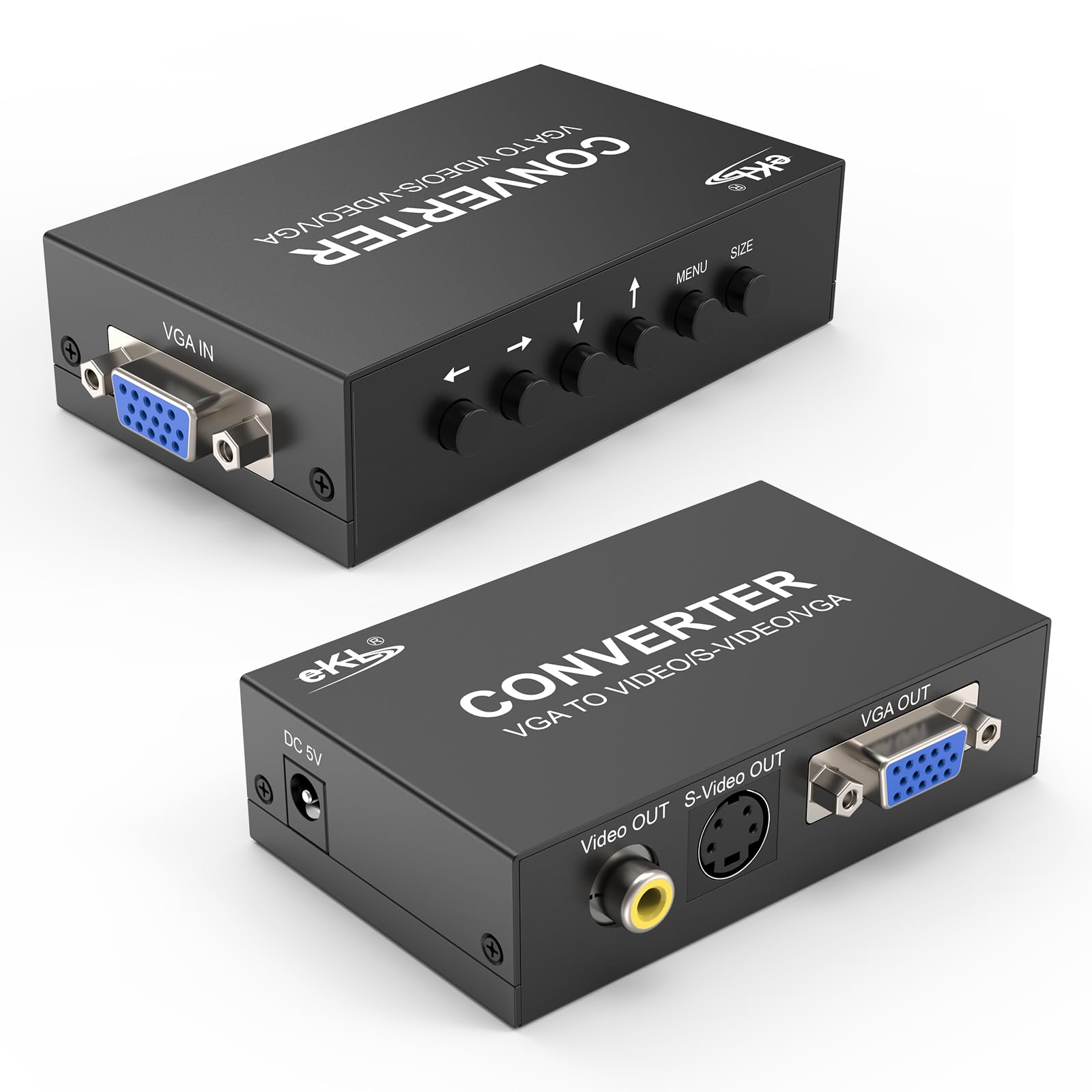
The eKL converter is unique in this list because it is technically a VGA-to-AV scan converter, not an AV-to-VGA converter — it accepts a VGA input and outputs composite or S-Video. This makes it the ideal choice for a very specific use case: connecting a modern laptop or Steam Deck to an old CRT television or a built-in navigation screen that only has composite input. The aluminum enclosure feels substantially denser than the plastic boxes from other brands, and the 5W power draw stays cool enough for always-on installation in a car or AV rack.
Retro gaming enthusiasts report that the eKL delivers excellent 480i scan conversion when fed a 1280×960 VGA signal from a Steam Deck or MiSTer FPGA, producing a crisp 2x upscale with minimal input lag. The unit defaults to PAL out of the box, which is a common complaint among North American buyers — a quick menu sequence (Menu, down six times, left up to five times) switches it to NTSC, and the setting saves between power cycles. The adjustable brightness, contrast, sharpness, and saturation give you fine-grained control over the final image quality on the target display.
Build quality is the strongest argument for the eKL despite its higher price point. The aluminum case resists bending and provides better heat dissipation than plastic alternatives, and the included power supply is more robust than the adapters bundled with budget converters. A small number of buyers received units with non-functional Menu buttons, though most customers report that the fix is straightforward once you know the correct button-press sequence. If your project requires composite output from a VGA source, this is the most reliable option available.
Why it’s great
- Aluminum metal case for durability and heat management
- Adjustable picture parameters for fine-tuning output quality
- Low power draw suitable for 24/7 installations
Good to know
- Defaults to PAL; requires menu sequence to switch to NTSC
- Direction is VGA input to AV output — opposite of most converters
- Some units ship with non-responsive Menu buttons
4. M MAKETHEONE RCA to VGA Adapter

The MAKETHEONE RCA to VGA converter delivers the most input flexibility at its price point, accepting composite RCA, 4-pin S-Video, and a secondary VGA input alongside the standard VGA output. This makes it a genuine three-input switcher, not just a single-purpose adapter. The unit natively supports output resolutions from 800×600 all the way to 1920×1200, and it includes useful OSD functions like an image-freeze button and auto-save of the last-used settings when power is disconnected.
Real-world reports from retro computer enthusiasts confirm that this converter works beautifully with Apple IIc, Apple IIe, and Commodore 64 systems connected via composite or S-Video, displaying graphics correctly on any VGA monitor without the color rainbowing effect that plagues some cheaper adapters. CCTV users also report success converting BNC camera feeds to VGA using the RCA input with an adapter, though this specific model is primarily designed for RCA rather than direct BNC (the separate MakeTheOne B018I5OSBK model covers that use case).
The most frequently noted trade-off is the build quality of the plastic housing — the case feels hollow and lightweight at 0.09 kg, and the unit has no physical power switch, so it stays energized as long as the adapter is plugged in. Several owners wished it did not require external power at all, though that is a limitation of the active converter category rather than a defect of this specific model. If you need a versatile multi-input converter on a budget and can accept a lightweight plastic enclosure, this is the strongest value proposition in the price band.
Why it’s great
- Three input sources on one compact box
- Image-freeze function and OSD for manual tuning
- Excellent compatibility with vintage 8-bit computers
Good to know
- Plastic case feels cheap and lightweight
- No on/off switch — always drawing power when plugged in
- Requires external 5V power supply included in box
5. Portable HDSUNWSTD BNC to VGA Video Converter

The HDSUNWSTD BNC converter is purpose-built for surveillance and video distribution environments where BNC connections are the standard. It accepts BNC and S-Video inputs and outputs VGA at resolutions up to 1920×1200, making it a direct replacement for aging CRT security monitors. The unit includes a front-mounted control panel with adjustable settings accessible through the OSD, and the compact portable size allows it to fit into tight network racks or be mounted behind a monitor with velcro.
Security system integrators report that this converter integrates seamlessly into existing CCTV networks without introducing noticeable latency, which is critical when monitoring live camera feeds. The package includes a BNC cable, an S-Video cable, and a VGA cable, so you have everything needed to connect out of the box — a rarity among converters that often force you to buy cables separately. The included North American 3-pin power plug is rated at 1.59 watts, keeping power consumption low even in 24/7 operation.
The primary limitation is that this unit does NOT accept standard RCA composite input — it is strictly BNC and S-Video. If your source device outputs through a yellow RCA jack, you will need a BNC-to-RCA adapter, which adds another connection point and potential signal degradation. Users also note that the on-screen menu is relatively basic compared to the MAKETHEONE or XMSJSIY converters, lacking finer controls like image freeze or multiple language options. For a dedicated security monitor replacement at a mid-tier price, however, this box delivers exactly what it promises.
Why it’s great
- Includes all necessary cables in the box
- Near-zero latency for live security camera feeds
- Compact design integrates easily into network racks
Good to know
- No RCA composite input — BNC and S-Video only
- Basic OSD with limited adjustment options
- Bundled power supply uses North American plug only
6. MakeTheOne CCTV Camera BNC S Video VGA to PC VGA Monitor Converter

This MakeTheOne model is essentially the BNC-centric sibling of the RCA-based B081SBNJ58, swapping the composite RCA input for a direct BNC connector. It accepts BNC, S-Video, and a secondary VGA input, then outputs VGA at resolutions up to 1920×1200 with the same OSD features — image freeze, auto-save settings, and single-button input switching. The slim 10 x 6.1 x 2.6 cm chassis weighs just 0.09 kg, making it one of the most space-efficient converters on the list.
Buyers in the security space report that this converter solved persistent DVR video feed loss problems by allowing them to repurpose an old VGA monitor as a dedicated CCTV display. The image quality is described as noticeably better than the original BNC monitor it replaced, and the unit has been running continuously for months without a single dropout. Retro computing users also appreciate the direct BNC input for vintage systems that output through BNC (such as certain Commodore and Amiga models), with no adapter needed between the source and the converter.
The main caution involves the VGA connector orientation — a handful of buyers who upgraded from a previous version of this converter found that the input and output VGA ports are swapped in position compared to the older revision, so reading the manual is essential before wiring it up. The included power adapter is region-specific, so international buyers should verify that the shipped plug matches their country. If your primary need is connecting a BNC camera or vintage computer to a VGA monitor, this is the most streamlined and reliable option at this price.
Why it’s great
- Direct BNC input without needing adapters
- Proven reliability in 24/7 security camera operation
- Ultra-compact footprint for tight installation spaces
Good to know
- VGA port positions differ between revisions — read manual
- Region-specific power adapter; verify before purchase
- No RCA composite input on this BNC-specific model
7. HDSUNWSTD PC Laptop Composite Video TV RCA to VGA Converter

The HDSUNWSTD composite-to-VGA converter is the no-frills entry point for anyone who just needs to get a yellow RCA signal onto a VGA monitor without spending extra for features they will not use. It supports RCA composite and S-Video inputs plus a secondary VGA input, outputs at standard resolutions, and includes PAL/NTSC compatibility for international video sources. The package bundles a VGA cable, an S-Video cable, and an AV cable, so you truly have everything needed to connect out of the box.
This converter has found a loyal following among retro computing and gaming enthusiasts working with 8-bit systems. Multiple verified buyers report perfect compatibility with Commodore 64 and SX-64 computers using the S-Video input, delivering a stable picture on modern LCD monitors that the systems were never designed to drive. The NTSC/PAL support is particularly valuable for European users who need to display PAL video on NTSC monitors or vice versa. The menu defaults to Mandarin Chinese out of the box, but pressing the Menu button repeatedly cycles through to the language setting.
The trade-offs at this budget entry tier are predictable: the picture quality is described as “so-so” by some users, with slight blurring and occasional tearing on the composite input when used extensively. One owner noted that the frequency response is marginal compared to higher-end units, making it unsuitable for all-day professional monitoring. The included VGA cable is also notoriously poor — several buyers replaced it with a higher-quality spare cable and saw immediate improvements in color saturation and artifact reduction. If your usage is occasional or for a non-critical secondary display, this converter saves money without being completely unreliable.
Why it’s great
- Includes three cables so no extra purchases needed
- Works perfectly with Commodore 64 and other 8-bit systems
- PAL/NTSC support for international video standards
Good to know
- Picture quality shows blurring during extended use
- Included VGA cable causes color and artifact issues
- Menu defaults to Chinese; must cycle to change language
FAQ
Can I use an AV to VGA cable instead of an active converter?
Why does my converter default to a Chinese language menu?
Will these converters work with my PAL video source on an NTSC monitor?
Final Thoughts: The Verdict
For most users, the best av to vga converter winner is the Wiistar AV S-Video Composite to VGA because it offers the best balance of broad input compatibility, stable 1920×1080 output, and proven plug-and-play reliability across retro gaming, CCTV, and media device use cases. If you need the highest possible resolution range for a wide-format monitor or 24/7 security operation, grab the XMSJSIY BNC to VGA for its eight supported resolutions and ventilation-friendly design. And for a budget-friendly retro computing or occasional use scenario, nothing beats the HDSUNWSTD RCA to VGA for getting a Commodore 64 or similar 8-bit system onto a modern display without breaking the bank.