
Our readers keep the lights on and my morning glass full of iced black tea. As an Amazon Associate, I earn from qualifying purchases.
Specs are compiled from manufacturer listings and verified buyer reviews and can change over time — please confirm the key details on the product page before buying.
If your cursor stutters, your wrist aches by 3 p.m., or your last cheap mouse died in under a year, you do not need a 12-button gaming rig. You need three buttons done properly: left click, right click, and a scroll wheel you can actually press. That is the whole job, and the nine mice below do it at every budget tier — from disposable office workhorses to a quiet USB-C model for MacBook owners.
I’m Min — the founder and writer behind Gadgets Feed. This guide is built by comparing the manufacturers’ published specifications and the patterns across verified customer reviews, so you get each pick’s real strengths and trade-offs instead of marketing spin.
The trick is knowing which of three button layouts, connection types, and sensor resolutions actually fits your desk, then ignoring everything else. Here are the honest picks worth your money in any 3 button mouse lineup.
Our Picks at a Glance


How To Choose The Best 3 Button Mouse
Three buttons is not a limitation — it is the layout most office work actually needs. The decisions that matter are connection type, sensor resolution, physical size, and how much noise the clicks make. Here is how to sort them without overthinking it.
Connection: wired, wireless, or USB-C
A wired mouse draws power from the cable, so it never asks for batteries — ideal if you hate swapping AA cells mid-deadline. A 2.4 GHz wireless mouse (a small USB receiver that talks to the mouse over radio, not Bluetooth) gives you a clean desk, and entry models can run months on a single set of batteries. If your laptop only has USB-C ports, a USB-C wired model saves you from hunting for an adapter.
DPI and sensor resolution
DPI means dots per inch — literally how far the cursor moves across your screen for each inch your hand travels. A 1000 dpi sensor is comfortable on a standard monitor for documents and email. A 1600 dpi sensor moves faster with less hand travel, which helps on a big screen or a cramped desk. Some models let you switch between several DPI settings on the fly.
Size and hand fit
A mouse that is too small forces your fingers into a pinch, and one that is too large leaves your palm floating. Compact travel mice suit smaller hands and bags; full-size shapes with a raised arch suit long fingers. If you switch hands during the day, an ambidextrous shape (symmetrical, so it works in either hand) is the safer pick.
Click noise and build
Silent-click designs use rubber dampers inside the switch so the click is a soft thud instead of a sharp snap. That matters in a shared office or a quiet room at night. Rubberized shells and non-slip scroll wheels also cut down on the micro-slipping that makes your aim wobble over a long shift.
Quick Comparison
| Model | Best For | Connection | Sensor | Buttons | Amazon |
|---|---|---|---|---|---|
| Amazon Basics 3-Button USB Wired (30-Pack)★ Best Overall | Outfitting a whole office | USB-A wired | 1000 dpi optical | 3 | Amazon |
| Amazon Basics 2.4 GHz Wireless OpticalBest for Travel | Cord-free everyday desktop | 2.4 GHz wireless (USB nano receiver) | Optical | 3 | Amazon |
| HP X3000 G2 Wireless MouseBest Battery | All-day battery and any-surface tracking | 2.4 GHz wireless (USB-A) | 1600 dpi optical | 3 | Amazon |
| Cherry WheelMouse Wired Optical | Retro desk builds and long fingers | USB wired (PS/2 adapter included) | 1000 dpi optical | 3 | Amazon |
| Logitech Doodle Collection M238 | Small hands and fun desks | Wireless | Optical | 3 | Amazon |
| Censprin Silent Click Wired Mouse | Shared offices and late-night work | USB wired | Optical | 3 | Amazon |
| Macally Wired USB C Mouse | MacBook and USB-C laptops | USB-C wired | 800/1200/1600/2400 DPI optical | 3 | Amazon |
| Acer Wireless 2.4G Slim | Travel and long work sessions | 2.4 GHz wireless (USB-A receiver) | 1600 DPI optical | 3 | Amazon |
| elec Space Cool Sport Car Mouse | Kids, gifts, and playful desks | 2.4 GHz wireless (USB receiver) | 1600 DPI optical | 3 | Amazon |
In-Depth Reviews
1. Amazon Basics 3-Button USB Wired Computer Mouse, Black, 30-Pack
Our pick — over 4.5★ from 93,500+ verified ratings; the strongest balance of quality and price.
One box that quietly solves mouse problems for an entire office floor.
If you are buying for a school lab, a call center, or a family of four who keep losing mice, this is the pick that ends the argument. You get 30 individual wired mice in one box, each with a 1000 dpi optical sensor — that sensor resolution keeps your cursor steady for text selection and spreadsheet work — and a 4.9-foot cable that reaches from a tower under the desk to the surface without a slack-killing tug.
The three buttons are the usual layout: left, right, and a scroll wheel you can press in for middle-click. Tracking is via USB-A, so if your machine only has USB-C ports you will need an adapter. Convenience is the real story here — the amassed reviews on these report it simply works the moment you plug it in, which is why it holds the highest review volume of any mouse in this roundup, at 4.6 stars across 93,000+ ratings. Owners describe it as “Very Basic and standard mouse, plug and play,” and multiple long-term users echo the same refrain: simple, quiet, and exactly what you need for standard computer usage.
What you are not buying is a gaming mouse. The same buyers who rate it five stars for the cost say so directly, steering fast-reflex players elsewhere. Its smaller footprint also splits opinion — some large-handed owners find the low profile comfortable, others want more palm support. At 4.3 by 2.4 inches (L x W), it stays compact on a crowded desk. For general office use, though, this is the safest bulk purchase in the category.
Where It Wins
- Thirty mice from one order means no scrambling when a unit dies mid-shift.
- Works right from the start — no driver, no software, no setup screen.
- Ambidextrous shape suits left- and right-handed users on the same desk.
- 30-pack volumes mean the per-mouse outlay is the lowest of any pick here.
Where It Falls Short
- USB-A only — modern USB-C laptops will need an adapter.
- 1000 dpi is below the 1600 dpi of several models in this list.
- Not built for fast gaming tracking, and the manufacturer says so, not me.
- Compact shell suits average hands more than extra-large ones.
Right for: anyone outfitting a lab, office, or classroom where reliability matters more than polish.
Look elsewhere for: a solo gamer who needs speed, or a modern USB-C-only laptop without an adapter.
2. Amazon Basics 2.4 GHz Wireless Optical Computer Mouse with USB Nano Receiver
The cord-cutting classic that arrives ready to run on day one.
Batteries are the hidden cost of going wireless, and this one skips the surprise: it ships with two AAA batteries included, plus a small tool for popping the back cover off. The nano receiver (a tiny USB dongle that stays put in your laptop port, or stows inside the mouse for travel) pairs over 2.4 GHz radio. That is the dependable flavor of wireless, not Bluetooth pairing, so there is nothing to sync and no driver to install. It is a compact 3.97 x 2.28 inches — noticeable in the hand next to the larger Censprin below, which spreads to 4.7 inches for full palm contact.
What wins people over is the sheer reliability of a mouse that costs next to nothing. There is an on/off switch to save battery when it is bagged, and owners routinely report it working from the start with smooth, precise tracking. The “as long as you understand it’s a basic mouse” crowd is right — and plenty are happy with that.
Here is the honest catch: the top-quoted gripe is how long the batteries hold out. Some get months; others rotate cells sooner. Quiet click feel, wireless convenience — but if you hate changing batteries even twice a year, a wired model like the Cherry WheelMouse never asks.
The honest trade-off: battery life is where this mouse gets the most criticism. Owners split down the middle — some get 3 months and counting on a single cell, others want longer. Neither camp is wrong; it just depends on daily hours of use.
Buy it if: you want a dead-simple wireless mouse for a laptop bag or a shared desk with zero setup friction.
Pass if: swapping batteries is something you know you will forget about. That is the one job the wire does better.
3. HP X3000 G2 Wireless Mouse
Track on grainy wood without a mouse pad, then forget about batteries for the rest of the year.
Its Blue LED multi-surface sensor reads the surface texture rather than just a glossy mat, so the cursor keeps moving on wood, fabric, and uneven desk tops where other mice skip. One reviewer noted it plainly — this mouse “doesn’t need a mouse pad (can’t stand those) and moves perfectly over a grainy wood surface.”
The battery rating is just as straightforward. HP rates it at up to 15 months on a single AA battery — the longest rated life of any mouse in this roundup. On top of that the 1600 dpi sensor matches Acer’s for responsiveness, and it connects to Windows 10, Windows 11, Mac, and Chrome OS. Ambidextrous body, 30-foot range, and a one-year manufacturer warranty included.
The weak spot shows up in a minority of reviews, and it’s about value rather than performance: some owners feel the build quality doesn’t live up to their expectations for the outlay. It is not a widespread complaint, but it is the recurring note on the page. For heavy multi-surface use, though, the sensor and battery make a strong case.
Why It Earns Its Place
- Up to 15 months of battery from one AA cell — the longest rated life in this roundup.
- Blue LED multi-surface sensor means it works on wood, fabric, and uneven desk tops.
- 1600 dpi optical sensor with precise, configurable tracking.
- Connects to Windows, Mac, and Chrome OS, and works up to 30 feet away.
Worth Knowing
- Some owners feel the build does not justify the outlay — it is the recurring note on the review page.
- USB-A receiver, so a USB-C-only laptop needs an adapter or a free port.
- No silent-click mechanism, so it clicks with normal volume.
The quick read: the mouse to grab if you regularly work on rough or uncoated surfaces and want to stop thinking about batteries.
The one caveat: a handful of owners want more premium build feel; if that matters to you, look at the Macally instead.
4. Cherry WheelMouse Wired Optical Mouse, Light Gray
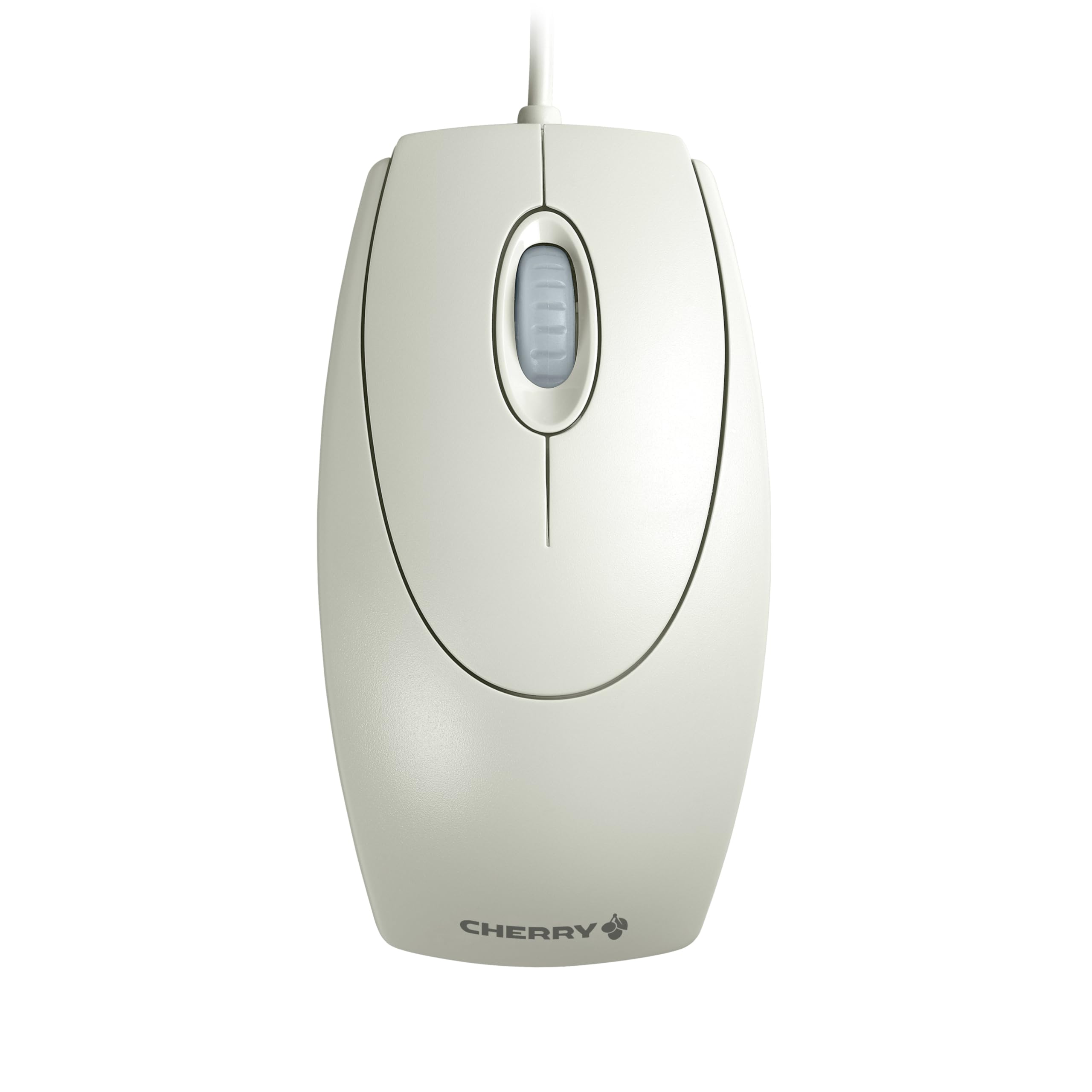
Long enough for lanky fingers, and built to outlast the keyboard beside it.
Cherry has an owner on this mouse for six years who is still happy, and that loyalty is easy to explain. The M-5400 is a 1000 dpi optical wired mouse with three buttons and a PowerWheel for scrolling. Its real differentiator is length — at 4.72 x 2.56 x 1.57 inches, it is the longest and tallest body on this entire list, which is why buyers with big hands call it the one that finally fits. Cable length is 70 inches, and a PS/2 adapter is included for older tower PCs that still use the round port. It also weighs 4.8 ounces — 2.5x the weight of the 1.94-ounce Acer next to it in this list.
The aesthetic is deliberate. This is a light-gray, retro-styled mouse that pairs with vintage keyboards for a 90s build, and the crowd that wants that look gives it top marks. One buyer describes it as a daily driver for work and casual use that glides on all four corner skates, even across an antique wooden desk without a mouse pad. That confidence comes from the four glide pads plus the sensor’s accuracy.
The recurring gripe is the red sensor light bleeding out through the scroll-wheel gap. It is bright enough for a couple of buyers to notice glare on their screens. One owner solved it by opening the shell and covering the LED with black tape, which tells you it is a cosmetic issue, not a functional one. An occasional unit also arrives with a scuffed lens base after years of hard use — that is a wear symptom, not a defect. If that LED bothers you, look at the silent Censprin instead.
The veteran’s note: this is the one mouse in the roundup with buyers who have owned it for six years and re-purchased it after the first one wore out. That tells you more about long-term durability than any spec sheet will.
Choose this if: your hand runs large, you want a wired mouse that never needs batteries, or you are building a retro desk with a beige keyboard.
Choose the Macally instead if: red light bleed or extra weight would bother you, or your laptop only has USB-C ports.
5. Logitech Doodle Collection M238 Mouse, Triple Scoop

A wired mouse with a personality, built for kids, small hands, and a little desk joy.
Its defining features are the triple scoop graphic shell and an 18-month battery rating that beats almost every other wireless mouse here. This is deliberately a child-friendly size, and one parent’s review proved it: they shared a photo of their six-year-old’s hand fully covering the mouse as a size reference, and reported that she found it smooth and easy to slide on a wooden table. Buttons click cleanly and the wheel scrolls without hiccups.
Its appeal is not just for kids. One office worker took note after buying a nameless budget mouse that gave out in weeks: they switched to Logitech and have been happy since. The playful shell has a secondary benefit — a quirky pattern is dramatically harder to walk away with from a shared office than a black plastic brick. The layout is the standard three: left, right, clickable wheel.
Do not grab it for serious gaming or a wide hand. The receiver only pairs with its own dongle, not a unifying receiver, so it cannot share a slot with other Logitech devices. And it maxes out in comfort on the small end of hand sizes. If neither of those fits your setup, it is a genuinely fun mouse at a modest price.
What Buyers Like
- Eighteen-month battery life keeps fresh cells out of your shopping list.
- Design is cheerful enough that kids genuinely reach for it.
- Wireless without setup friction and a receiver that stores inside the body.
Where It Shows Its Age
- Too small for large hands or serious gaming.
- Its receiver is proprietary, not a unifying one.
- A few owners hit intermittent connection snags, though most range and interference reports read clean.
Perfect for: a child’s first mouse, a small-handed desk, or anyone who wants a wireless mouse that looks less boring than the rest.
Not for: large palms, competitive gaming, or any desk that depends on one unifying receiver for multiple devices.
6. Macally Wired USB C Mouse for Mac and PC

The USB-C wired mouse that plugs straight into a MacBook and goes to work.
If your laptop has no USB-A port and you are tired of dongles, this is the one built for you. It is a wired USB-C mouse that plug-and-plays with MacBook Pro, MacBook Air, iMac, iPad, and any USB-C Windows machine. The scroll wheel is the third button, and the layout is deliberately stripped back to left, right, and scroll — the manufacturer explicitly says no useless extra buttons. At 73 grams, it is the lightest wired mouse here, and it stays ambidextrous for either hand.
Where this pick pulls ahead is silence and sensor choice. Its quiet buttons are rated to cut around 90% of click noise, and one owner who tested many wired mice calls the USB-C version quieter than the USB-A model in the same line. Then it gets even more flexible: a DPI button cycles through 800, 1200, 1600, and 2400 dpi, the highest resolution in this entire roundup. That is four speeds to match anything from precise document work to quick on-screen navigation, far more options than the single 1600-dpi setting on the Acer below.
The honesty tax here is durability. Some owners say it works flawlessly, while a minority report the mouse dropping its connection or giving out after about six months. This is the complaint most often raised on the page, and it is worth weighing against the extended 18-month track record some other buyers report with daily use. For Mac users who want a plug-and-play wired mouse right now, the deal is still solid.
Standout Selling Points
- USB-C plug means modern laptops need no adapter.
- Quiet buttons designed to cut click noise.
- Four switchable dpi settings, from 800 up to 2400.
- 73 grams — the lightest wired mouse on this list.
Recurring Complaint
- A minority report connectivity dropouts and units that stop working around the six-month mark.
- Wired only, so you have a cable across the desk at all times.
- The middle scroll-wheel click is louder than the two side clicks.
Made for: MacBook, iPad, and USB-C laptop users who want a wired, near-silent mouse with adjustable speed.
Consider the HP instead: if you need wireless freedom or want to avoid the small share of durability complaints around the six-month mark.
7. Censprin USB Computer Mouse Wired, Silent Click

Built for late shifts and shared rooms where every mouse click echoes.
This is the mouse for a dorm room, a quiet office cubicle, or a library carrel. Its entire reason for existing is the silent click switch — near-silent button presses designed so you are not the person tapping away at midnight. Build quality is the top thing people comment on, and it holds up: buyers relate dropping the mouse multiple times over nearly a year and finding it still quiet and running fine. The right-handed ergonomic shape is another headline feature — the wide tail and flanking finger rests are sized to fit the natural resting contour of your palm, and buyers with big hands say it reduces the ache of a long shift compared to a smaller mouse.
The physical layout is a 4.7 x 3.07-inch body at 3.35 ounces, so it is wider than most mice in this roundup. The 3D non-slip rubber wheel is a design point — scale-step grip that keeps scrolling silent and steady. Plug-and-play USB means no drivers, and it works with Windows 10, 8, 7, Vista, and XP as well as major computer brands. Three buttons, standard left/right/scroll layout.
The clearest honest caveat: not everyone is the right fit. A 4.4-star rating with over 900 reviews means most owners are happy, but a small number of reviewers mention their hand aching after a few hours of use — usually people with narrower or smaller palms than this shape was built for. It is also a right-handed design only, so left-handers should look to an ambidextrous pick.
Buyers who stuck with it report: “it’s been almost exactly a year and it’s still quiet and has been dropped multiple times and still runs great.” That is the pattern most reviewers describe.
Reach for this if: your household has a night owl, a light sleeper, or a closed-plan office where loud clicks draw stares.
Think twice if: you are left-handed or your hand is smaller than average, since the shape assumes a larger right palm.
8. Acer Computer Mouse Wireless, 2.4G Slim USB Wireless Mouse

At 45 grams, it is the featherweight of this list — the mouse you forget you are holding.
Weight is the whole story here. At 45 grams it is one of the lightest wireless mice on this list, which means your wrist does less work per click. Pair that with a 1600 dpi optical sensor — matching the HP’s tracking speed — and a slim 4.02 x 2.36 x 1.26-inch frame that slips into any laptop bag. It runs on 2.4 GHz radio with a USB-A receiver (not Bluetooth) and claims a stable range up to 20 feet, so you can sit back from the screen. No drivers, no software, works on Windows, macOS, and Linux.
It also has a deliberate characteristic that buyers either love or tolerate: a crisp, audible click. The manufacturer frames it as a sense of rhythm, and honestly, some people do find it helps them stay focused. It is the opposite philosophy of the silent Censprin above — you are buying the response feel, not the hush.
The right way to read this mouse is as a budget travel option that overdelivers on portability. Most owners mention it works exactly as described. A handful want a firmer, more substantial build — at 45 grams, it does not pretend to be heavy. That is a fair trade for the lightest carry here.
What Stands Out
- 45 grams — feather-light for long writing sessions.
- 1600 DPI sensor for smooth, accurate cursor tracking.
- Slim enough to disappear into a laptop sleeve.
- Works with Windows, macOS, and Linux with no driver install.
What to Expect
- The click is crisp and audible, not silent.
- 45 grams can feel too insubstantial for buyers used to a heavier mouse.
- USB-A receiver, so USB-C-only laptops need an adapter.
Best when: you carry your mouse daily and want the lightest option that never needs a driver.
Not ideal if: you need a weighty, high-mass feel under your palm or hate click noise.
9. elec Space Cool Sport Car Shape 2.4GHz Wireless Mouse

The mouse that gets compliments from coworkers before anyone even clicks.
This is a sport car shaped wireless mouse with headlights and tail lights, and that is not a marketing line — buyers describe it exactly that way. The appeal is genuine: people give it as Father’s Day gifts, kids claim it for their desks, and one owner reported compliments piling up at the office. In terms of specs, it is a real mouse underneath the shell: 1600 DPI optical sensor, three buttons, 2.4 GHz wireless with a USB receiver, and a 10-meter (about 30-foot) operating range. Powered by two AAA batteries (not included), with a power-saving sleep mode. It runs 4.4 x 2.16 inches and weighs 2.12 ounces.
The practical detail buyers flag most is what Amazon’s own customers call reliability — some units occasionally stutter or send the cursor haywire, usually resolved with a driver reset. It is not universal; one owner reports daily use through years with no issues and only low-battery oddness. But it is the trade to know going in. The lighting trick actually helps here — the blue headlights do not drain the battery quickly, and their glow gives you a small visual marker that the mouse is powered on.
Buy the car mouse on purpose, not as your most important tool. It makes an excellent gift, a child-friendly starter mouse, or an heirloom for a home office that takes itself less seriously.
Best as: a gift, a kid’s first mouse, or a conversation piece for a friendlier desk setup.
Skip for: mission-critical daily work where a rare cursor glitch is unacceptable.
Understanding the Specs
DPI — What It Actually Changes
DPI (dots per inch) is how far your cursor slides across the screen for each inch you move your hand. A 1000 dpi sensor is forgiving and precise for spreadsheet cells and document editing. A 1600 dpi sensor moves further with less wrist travel, handy on a large monitor or a small desk. The Macally is the outlier here: it lets you switch between 800, 1200, 1600, and 2400 dpi with a button, so you can set sensitivity per task without touching system settings.
Button Count — Why Three Is Enough
A three-button mouse means left click, right click, and a scroll wheel that also works as a pressable middle button. That middle button is what lets you open links in new tabs, paste from a selection, or scroll-click for shortcuts. Every mouse on this list is confirmed three-button. What you give up in extra macros you gain back in a simpler shape that fits more hands and needs no software to use.
Connection Type — Wired, 2.4 GHz, or USB-C
A wired mouse pulls power from the cable and cannot drop its signal — no batteries, no pairing. A 2.4 GHz wireless mouse uses a USB receiver dongle (not Bluetooth) for a low-latency connection; you insert the receiver once, and it stays paired. USB-C wired mice exist for modern laptops with no USB-A port, like the Macally. Choose wired for zero-maintenance reliability, wireless for a clean desk, and USB-C if your only ports are the modern shape.
Hand Fit and Shape — The Spec Nobody Prints
The physical size numbers tell you the fit story. The Cherry is 4.72 x 2.56 inches — the longest on this list, ideal for large and long-fingered hands. The Acer is a slim 4.02 x 2.36 inches at 45 grams for small hands and travel. Ambidextrous mice are symmetrical and work in either hand, while right-handed ergonomic shapes like the Censprin add a wider tail and finger rests. Match the length and arch to your actual hand and a lot of “which mouse is comfortable” gets answered before you even plug in.
FAQ
What counts as a 3 button mouse, exactly?
Do I need a driver or software to use one of these?
Will a wireless 2.4 GHz mouse work with a Mac?
How long do the batteries actually last on a wireless mouse?
Is a wired or wireless mouse better for office work?
Why would I want a mouse with silent clicks?
Will the Acer wireless mouse work with a USB-C-only laptop?
How do I know which mouse size fits my hand?
Can I use a 3 button mouse with an iPad?
Is a 30-pack of mice worth it for personal use?
Final Thoughts: The Verdict
The verdict splits cleanly by how you actually sit. For a whole office or lab, the Amazon Basics 3-Button USB Wired 30-Pack ends the “we lost another mouse” problem for good — it is the top pick because 4.6 stars across 93,000+ owners backs a plug-and-go design that needs no window dressing. If you want cord-free work on any surface, grab the HP X3000 G2 and its multi-surface sensor plus up-to-15-month battery. And for a MacBook owner who wants a USB-C wire and near-silent clicks, the Macally USB C Mouse is the one to reach for — it holds 4.3 stars across 2,000+ ratings and its four DPI settings cover everything from spreadsheets to a big display.
How We Picked
We do not accept paid placement. Every pick is matched to a real buyer and a real use-case; we do not hands-on test units.
Sources & Methodology
Specifications: manufacturer listings and product documentation. Review insights: verified customer reviews, as of September 2026. Pricing: not shown on this page (it changes often); check the current price via the retailer link.
As an Amazon Associate, Gadgets Feed earns from qualifying purchases. This does not affect which products we feature.