
Our readers keep the lights on and my morning glass full of iced black tea. As an Amazon Associate, I earn from qualifying purchases.
Specs are compiled from manufacturer listings and verified buyer reviews and can change over time — please confirm the key details on the product page before buying.
A business 3D printer has one job that matters more than any spec sheet number: it has to keep producing parts while you are doing something else. That means you want automatic bed leveling so the first layer works without you fiddling, an enclosed chamber so engineering filaments like ABS and ASA do not warp, and enough build volume that you are not splitting one client job into four glued-together pieces. Everything below is chosen on those three things first, and on the extras second.
I’m Min — the founder and writer behind Gadgets Feed. This guide is built by comparing the manufacturers’ published specifications and the patterns across verified customer reviews, so you get each pick’s real strengths and trade-offs instead of marketing spin.
Some models here swap whole toolheads to change color instead of purging filament; others heat the chamber to 65°C to tame ABS. Below you will find the honest trade-offs behind each best business 3d printer.
Our Picks at a Glance

How To Choose The Best Business 3D Printer
A machine sold for business use gets judged on uptime, not on a single beautiful test print. The questions below are the ones that decide whether a printer earns its bench space in a workshop, a studio, or a small production run.
Enclosure and chamber heat decide which materials you can actually sell
An enclosed body keeps warm air around the part, which is the single biggest defense against warping on ABS and ASA. An actively heated chamber goes further still — a 65°C chamber holds the whole build area at temperature instead of just the air near the bed. If your work is PLA and PETG signage and prototypes, an open frame is fine. The moment a client asks for a functional bracket in ABS, ASA, or carbon-fiber nylon, chamber heat stops being a luxury.
Multi-color done two different ways, with two different bills
Single-nozzle filament changers load, unload, and purge each color change, which throws away material and adds time. Toolhead systems keep four spools loaded and preheated and swap the head itself, so almost nothing is purged. That difference shows up in operating cost per part, and it shows up again in how long a four-color print takes overnight.
Build volume is a batch-size decision, not a bragging right
A 400 x 400 x 400 mm build area lets you print one oversized prototype or lay out a plate of smaller parts in a single run. Measure the biggest part you expect to sell, then add margin — gluing two halves back together is the fastest way to lose a client’s tolerance.
Automation that pays for itself on overnight jobs
Auto bed leveling removes the manual paper-shim routine. AI camera monitoring pauses a print when it detects a spaghetti failure, which saves the filament and the hours already invested. Power-loss recovery lets a job resume after a breaker trips. These are the features that keep a machine producing while nobody is watching it.
Quick Comparison
| Model | Best For | Build Volume | Max Speed | Heated Chamber | Amazon |
|---|---|---|---|---|---|
| Bambu Lab P2S Combo★ Best Overall | Plug-and-play multi-color production | — | 600 mm/s | 50 °C (Adaptive Airflow) | Amazon |
| Bambu Lab P1S ComboBest Value | First enclosed multi-color machine | — | 500 mm/s | Enclosed body | Amazon |
| QIDI Q2 ComboEngineering Pick | Engineering filaments on a budget | — | 600 mm/s | 65 °C | Amazon |
| Creality Ender 5 Max | Large single-color batch runs | 400 x 400 x 400 mm | 700 mm/s | None (enclosure optional) | Amazon |
| FlashForge Creator 5 Pro (4-Toolhead) | Waste-free multi-material benches | — | — | 65 °C | Amazon |
| Snapmaker U1 | Fast color changes with almost no purge | 270 x 270 x 270 mm | 500 mm/s | Enclosed body | Amazon |
| FlashForge Creator 5 Pro (Industrial) | Office and classroom air quality | 256 mm³ | 600 mm/s | 65 °C | Amazon |
| Creality K2 Plus | Big, quiet overnight runs | 350 x 350 x 350 mm | 600 mm/s | Enclosed body | Amazon |
| QIDI Max4 Combo | Large industrial parts in one pass | 390 x 390 x 340 mm | 800 mm/s | 65 °C | Amazon |
| Original Prusa MK4S | Open-ecosystem prototyping | 9.84 x 8.3 x 8.6 in | — | None (open frame) | Amazon |
| Snapmaker Artisan | 3D printing, laser, and CNC in one frame | 400 x 400 x 400 mm | — | Enclosure (3DP version) | Amazon |
In‑Depth Reviews
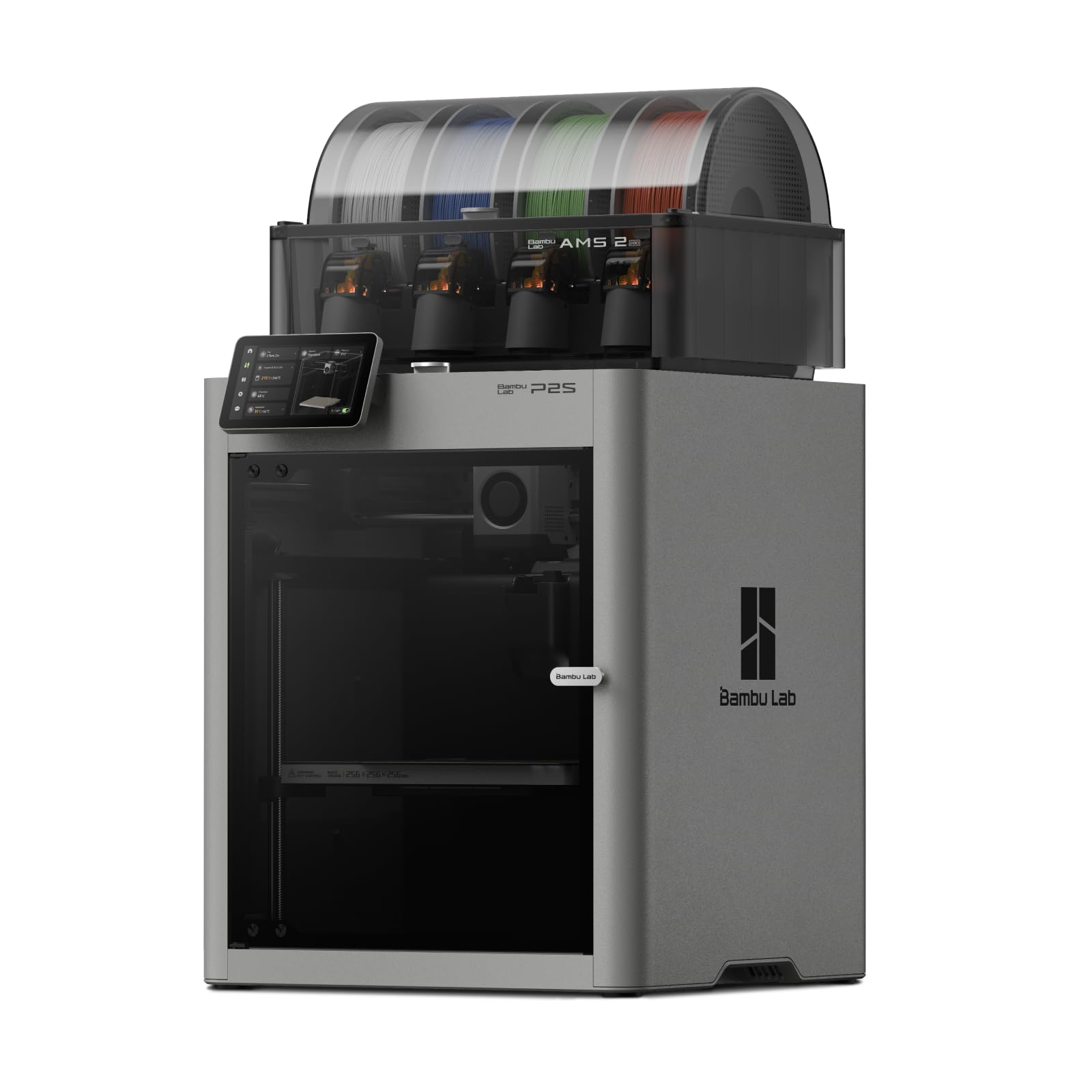
1. Bambu Lab P2S Combo, P2S 3D Printer & AMS 2 Pro, Multi-Color 3D Printing
Our pick — over 4.5★ from 100+ verified ratings; the strongest balance of quality and price.
The machine that turns multi-color production into a push-button job.
The pitch here is simple: you unbox it, and fifteen minutes later you are printing. The P2S Combo includes the AMS 2 Pro, a four-spool feeder that also dries filament at up to 65 °C while it prints, so a damp spool in a humid workshop stops being the cause of a failed overnight run. It prints at up to 600 mm/s with the PMSM Servo Extruder and Active Flowrate Compensation smoothing out each layer — a direct step above the 500 mm/s of the Bambu Lab P1S Combo below it.
What wins people over is how little of the hobby’s tinkering is left in the room. Owners say the machine removes most of the learning curve, that Bambu Studio is approachable, and that the MakerWorld model library means you are rarely starting from a blank slicer screen. The Adaptive Airflow System balances cooling and heat retention automatically — crisp overhangs on PLA, a 50 °C chamber for engineering materials — and a carbon filter handles the air side while it works.
The honest catch is that the enclosed frame is not the same as an actively heated 65 °C chamber, so the hardest carbon-fiber nylon grades belong to the QIDI Max4 Combo instead. Build volume is also modest, which is fine for prototypes and small production batches but not for oversized single-piece molds. Buyers report “beginner-friendly, worth cost, 300 hrs no issues, quiet, superb print quality.”
What earns it first place
- Set up and printing in about fifteen minutes with automatic calibration and quick-swap nozzles.
- AMS 2 Pro dries filament at up to 65 °C, so damp spools stop killing multi-hour jobs.
- 600 mm/s with Active Flowrate Compensation — sharper corners than the P1S below it at 500 mm/s.
Where it gives ground
- Multi-color printing requires the Combo version — the printer alone does not support it.
- The chamber tops out at 50 °C, so the toughest engineering filaments stay out of reach.
Reach for this if: you want a multi-color machine that behaves like an appliance — unwrap, calibrate, and start shipping parts the same afternoon.
Look elsewhere if: your work is carbon-fiber nylon and large-format single-piece molds, where the AMS is not the bottleneck — the chamber is.
2. Bambu Lab P1S Combo, P1S 3D Printer and AMS, Multi-Color 3D Printing
The enclosed multi-color workhorse that made a whole workshop tier affordable.
For most small operations this is the machine that sets the baseline: a fully enclosed body for advanced filaments, automatic bed leveling, and 500 mm/s printing with 20,000 mm/s² acceleration. Add the AMS and you can run up to sixteen colors and materials, which is why it holds the largest review base in this entire roundup.
Owners describe the setup as straightforward enough to finish in one to two hours, and the auto bed leveling and calibration as the feature that removes the usual headaches. A recurring practical tip keeps surfacing: check the fan connection on arrival, because shipping has a habit of unplugging it, and print a waste-catcher to keep the purge tidy. Bambu Studio has a real learning curve, but the community documentation — one buyer simply says “Bambu Studio” — is thick enough to close it.
Know the shape of the floor: durability feedback runs mixed, and the small monochrome screen plus clunky Bluetooth/Wi-Fi binding draw genuine friction on the setup path. The enclosed body does not actively heat to 65 °C, so ABS and ASA go ahead, but the hardest engineering nylons remain the QIDI Q2 Combo’s territory.
The honest trade-off: you are buying into the largest support community and the easier price tier at the cost of a smaller, less informative display and slower 500 mm/s ceiling compared with the P2S above. For a first enclosed machine, that is usually the right trade.
Who this suits: a workshop stepping into enclosed multi-color printing who wants the safety net of the biggest user base in the category.
The one thing to trade away: skip it if the machine’s interface matters as much as the prints — the screen and the software bind genuinely irritate some buyers on day one.
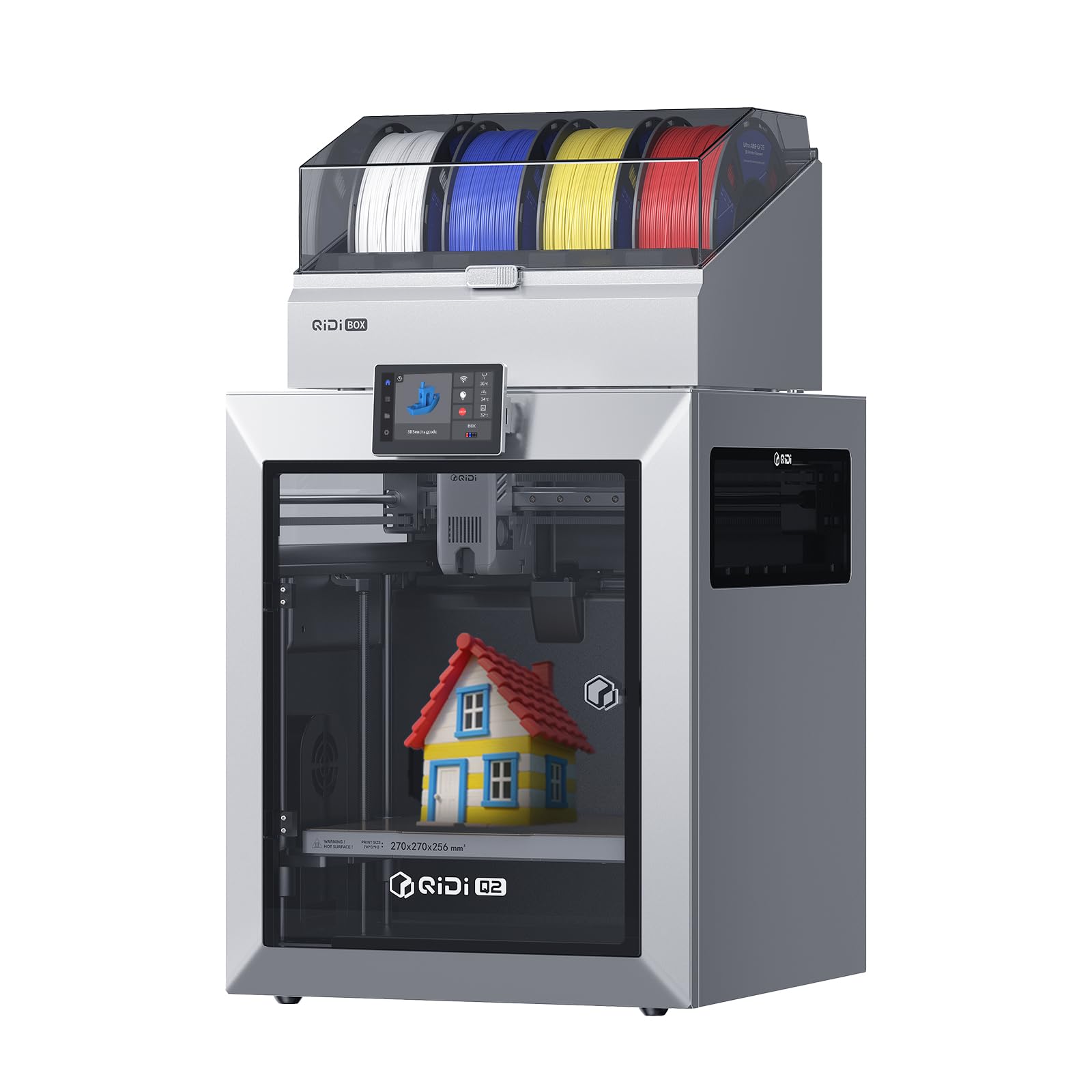
3. QIDI Q2 Combo Multi-Color 3D Printer, 65℃ Heated Chamber and 370℃ Nozzle
The heated-chamber machine that lets a small shop print carbon-fiber parts at home.
Where this pick separates itself is materials. The second-generation PTC heated chamber holds a steady 65 °C to fight warping and lock in layer adhesion, and a 370 °C hardened-steel dual-gear extruder opens the door to carbon-fiber and glass-fiber composites that genuinely break a lower-tier machine. Full-metal CoreXY structure with precision linear rails carries speeds up to 600 mm/s, and the QIDI BOX keeps filament dry at 65 °C while it prints — drying and printing in the same operation.
The footprint is where you notice the trade. At 21 x 20 x 23 inches and 54.9 pounds, this is a genuinely large machine — noticeably bigger than the Bambu Lab P2S Combo, which sits at 18 x 22 x 18 inches. In wall space terms that is a real footprint cost, and the 600 mm/s speed matches the P2S rather than beating it. What you get back is a chamber that runs 15 °C warmer than the P2S’s adaptive 50 °C.
Factor in the mixed feedback the platform draws on reliability and connectivity — some units perform perfectly, others stumble — and this is best treated as a machine for an experienced operator, not a first 3D printer. The trade-off you keep is that the reviews are not uniformly glowing, but the print quality consensus is genuinely positive and the price-to-capability ratio for engineering filaments is hard to match at this tier.
What it open up: 65 °C chamber heat plus a 370 °C hardened nozzle plus dry-while-print filament handling is exactly the trio a shop needs for carbon-fiber nylon production parts.
Best for: an operator already comfortable with a slicer who needs to move into carbon-fiber and glass-fiber materials without buying a much bigger machine.
pass on it if: you are brand new to 3D printing — the feedback pattern on reliability and connectivity suggests a learning buffer matters more than raw capability here.
4. Creality Ender 5 Max 3D Printer, 400×400×400mm Build Volume

The big-plate machine that lets you batch a client order into one overnight run.
400 x 400 x 400 mm is the whole story here. That build volume means oversized prototypes and multi-part plates print without splitting a model in two, and the CoreXY structure with high-torque motors carries it at up to 700 mm/s — the fastest speed in this roundup. Rigid die-cast aluminum frame with an X-axis linear rail keeps tall or heavy models steady, and a 64-point auto leveling system with automatic Z-offset means first-layer adhesion is set-and-print rather than shim-and-pray.
For scaled work the extras matter as much as the plate. WLAN multi-printer control with grouped management and a tri-color status indicator lets a studio run a small farm from one screen, and the 1000W rapid-heating bed reaches working temperature in minutes rather than a quarter-hour. A direct-drive dual-gear extruder with hardened gears is spec’d for continuous production, intended to lower clogging risk on long uptime runs.
What to know before you commit is that the chamber is not actively heated. The Ender 5 Max prints PLA, PETG, ABS, ASA, and PA, but ABS and ASA really want an enclosure added, and the platform’s reliability reputation is genuinely mixed rather than a preference thing — some users report no issues over weeks, others describe a defective build plate or a warped replacement bed. Add the Nebula USB camera for monitoring if you want to watch overnight runs.
What the plate size buys you
- 400 x 400 x 400 mm build volume — enough for oversized single-piece prototypes without stitching.
- 700 mm/s CoreXY speed with 64-point auto leveling, so first layers work without manual shims.
- WLAN multi-printer control with grouped management for anyone scaling toward a print farm.
The reality checks
- No active chamber heating — ABS and ASA really want an enclosure added.
- Reliability experiences vary; a few owners hit delivery or plate issues rather than a machine that never cooperates.
The right pick for: a shop that needs large single-color capacity and multi-machine farm control more than it needs multi-color out of one chassis.
Think twice if: your orders are multi-color, because the Co-Print upgrade path is available but limited — this machine is built for throughput, not for color.
5. FLASHFORGE Creator 5 Pro 3D Printer, 4 Toolheads with 7s Toolchanger
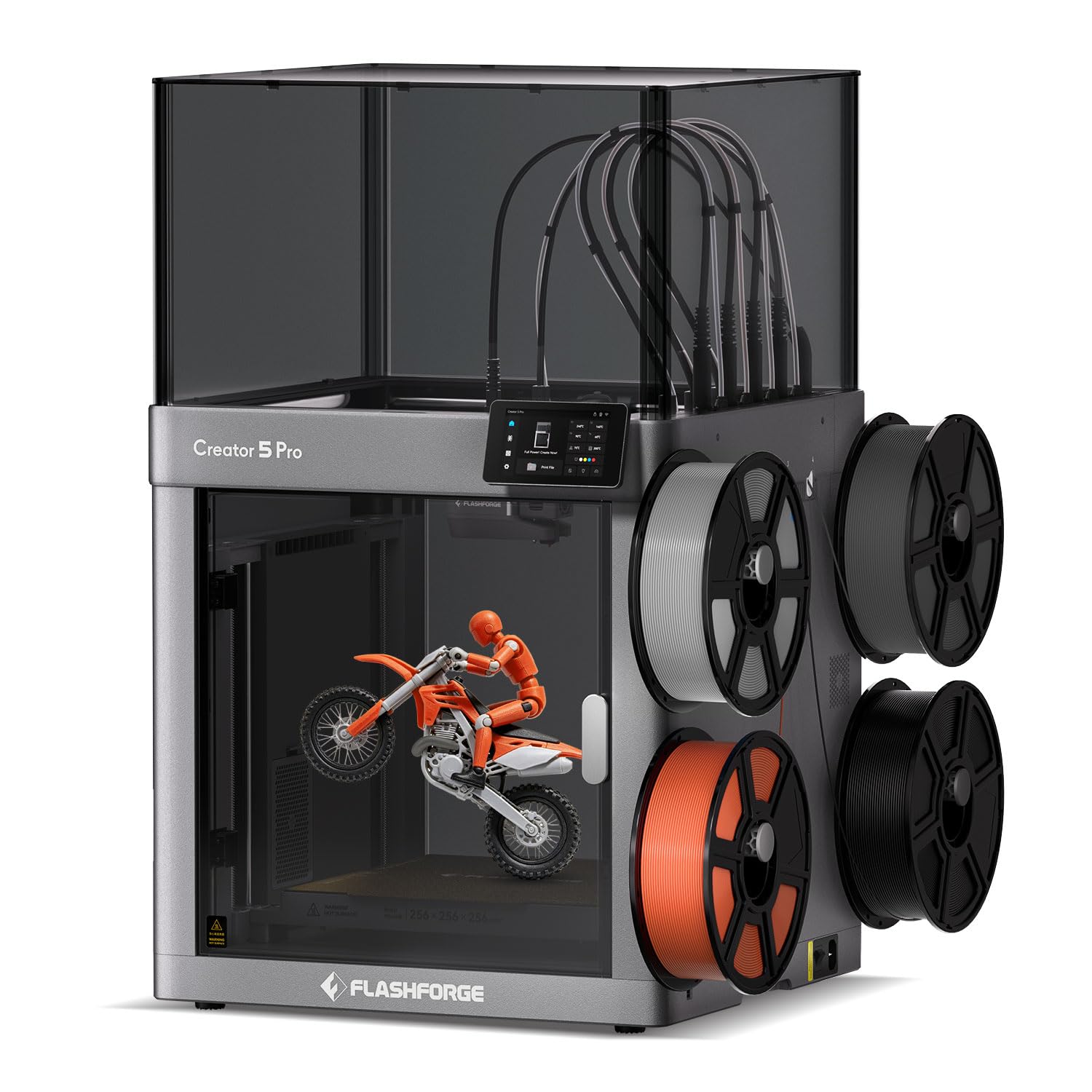
Four preheated toolheads that swap materials instead of purging them away.
The defining move here is the FlashSwap toolchanger. Four preloaded, preheated toolheads mean a material change is a head swap, not a load-unload-purge cycle — the classic waste problem multi-color printing is famous for is designed out rather than trimmed. The chamber actively heats to 65 °C and a 320 °C hardened nozzle handles filaments like PA-CF, PPS-CF, and PET-CF, with Flow Dynamics Calibration adjusting extrusion as the nozzle wears.
Weight is where this machine surprises. At 30.8 pounds in a 17.36 x 16.18 x 18.11 inch footprint, it is meaningfully lighter than the QIDI Q2 Combo’s 54.9 pounds, which matters if you are managing a bench layout or considering a second unit. The adaptive airflow system swaps between cooling overhangs on PLA and holding 65 °C chamber heat for engineering materials in the same machine.
Two recurring notes come up in ownership. The first is filament: the slicer and its Flash Studio workflow need the right profile to shine — one user found the machine unusable for two weeks until a firmware update fixed a missing non-pro profile. The second is that with four toolheads you genuinely need the sample spools replaced, since what ships is small. Owners mention the machine runs “2x faster than Anycubic Kobra X” on PLA and PETG.
The defining advantage: dedicated nozzle swaps eliminate the color-transition delay that single-nozzle systems eat on every color change — a real productivity difference on multi-day production batches.
Suits you if: multi-material production is the point of the machine, and you have the patience to dial in the software workflow properly.
Skip if: you want a machine that just works with zero firmware fiddling — this one rewards the operator who reads the release notes.
6. Snapmaker U1 3D Printer, 4-Toolhead with 5s Toolchanger

A four-toolhead machine that changed color by swapping heads in five seconds flat.
Snapmaker’s SnapSwap system does the material change by physically picking up a different toolhead, and the swap takes five seconds rather than the two-minute ballpark a filament-reloading cycle assumes. Snapmaker rates the toolhead locking mechanism for over 1,000,000 swaps. That combined with a 270 x 270 x 270 mm build volume and a rigid CoreXY motion system on lightweight carbon fiber X-axis rails at up to 500 mm/s gives you a fast and genuinely stable mid-format multi-color machine.
What this buys in operating cost is the interesting part. Owners repeatedly mention near-zero purge waste in color prints, and one concrete comparison gets cited: a four-color tiger model took 32 hours with zero purge waste on the U1 versus roughly 58 hours and ~350 g of waste on a single-nozzle multi-color machine. If your business runs color-jobs on the regular, that is a direct materials cost difference that shows up on the ledger every month.
Setup draws praise for being well documented — a printed manual, a touchscreen-guided calibration, and QR troubleshooting videos — with most users printing inside about twenty minutes. On the honest side, the STL-to-G-code workflow throws new users for a loop and slight bottom-layer stringing shows up occasionally until nozzle settings are dialed in. Both are fixable, and neither reads as a deal-breaker against a machine that consistently lands at five stars.
Why it’s on the list: the five-second toolchange is the single biggest time-saving feature any color printer in this roundup offers, and the zero-waste framing is backed by materially lower purge cost per part.
The catch: the software path from STL to G-code still has friction for novices, so plan an evening to learn Snapmaker Orca before your first paid job.
Best for: a small workshop or design studio whose color parts need to move from idea to shipped part without the purge tax of single-nozzle systems.
The trade-off to accept: you are trading away the massive Bambu ecosystem in favor of the U1’s own workflow, which is worth doing if waste reduction and change speed are what you actually sell.
7. FLASHFORGE Creator 5 Pro Industrial 3D Printer, 65°C Heated Chamber, HEPA13 Filtration

The multi-color machine you can put next to a desk without the whole floor smelling like ABS.
Most machines in this roundup can print ABS. This one is built to do it in a room with people in it. A fully sealed enclosure, an actively heated chamber stable up to 65 °C, and a HEPA13 internal recirculation filter that captures volatile particles and odors — that trio is the reason an office or classroom can run engineering filaments with the machine in the room. The “outside-in” cooling mode protects prints from drafts while keeping the nozzle clear of clogs.
Four independent extruders switch colors by swapping nozzles rather than threading a single nozzle through each transition, so color separation stays clean and material purity holds. Speed and acceleration are strong — 600 mm/s with 30,000 mm/s² — and the rigid all-metal frame plus automatic platform leveling and toolhead offset calibration keep first layers accurate run after run. A 4-inch touchscreen, tool-less nozzle changes in under thirty seconds, and a flexible PEI magnetic plate round out the day-to-day ergonomics.
The practical note is that at 30.9 pounds and 18.9 x 16.06 x 17.17 inches, this is a compact industrial machine — meaning it slots onto a benchtop beside other equipment rather than needing its own floor section. Filament run-out and tangle sensors catch the failure modes that used to kill an overnight print.
What earns its place on an office bench
- HEPA13 internal recirculation filter captures particles and odors — clean air in shared rooms.
- Four independent extruders remove color-transition delay and cross-contamination on multi-material jobs.
- 65 °C actively heated chamber and 600 mm/s speed handle ABS, ASA, PC, and Nylon without warping dramas.
The scope of the trade
- Smaller footprint than the large-format picks means smaller single-piece parts come off this machine.
- Filtration and chamber infrastructure push this into the premium tier, so it competes on environment, not on price.
Who should pick this: a design studio, engineering office, or classroom running engineering filaments next to human beings who do not want to inhale them.
Who should pass: anyone whose whole job is oversized single-piece parts, where the 400 mm³ plate of the bigger machines is worth more than the air filtration.
8. Creality K2 Plus 3D Printer, Support Multi Color Printing Needs CFS
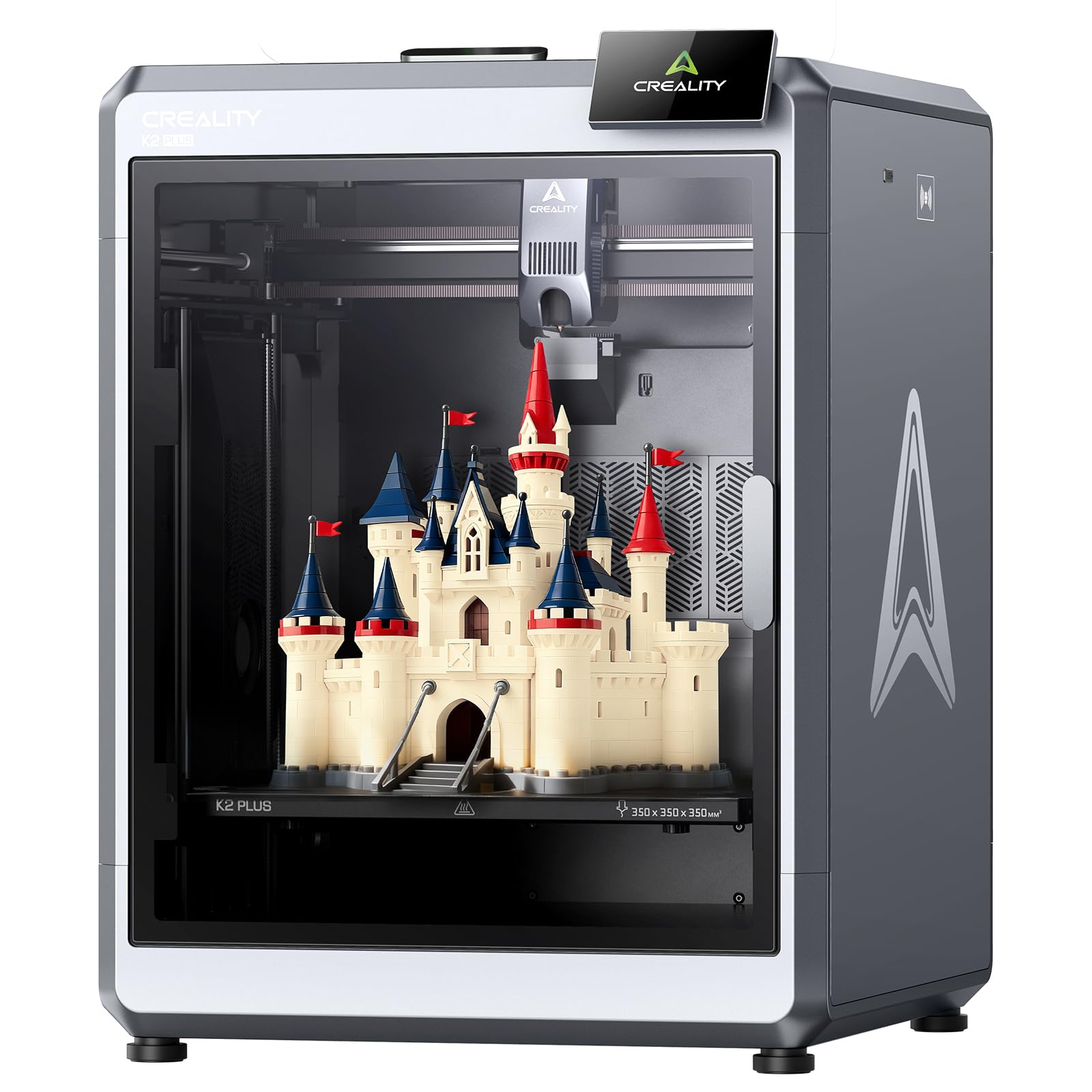
A 350 mm cube of build volume that runs overnight at 45 dB.
When the job is large and the office is quiet, this machine answers the mail. 350 x 350 x 350 mm of build volume, 600 mm/s printing with 30,000 mm/s² acceleration, and a rated 45 dB noise level, which Creality compares to typing on a laptop. Eighteen sensors plus dual AI cameras monitor the run from two angles, one at the chamber and one on the toolhead, catching failures before they eat the filament.
What holds it in the mix is the earlier-tested combination of automation: the machine arrives pre-assembled, the power-up quick guide walks through self-tests for leveling and fan calibration, and a built-in belt tension sensor proactively checks tension. Owners who get a good unit describe printing every day for months with zero issues, some running it around the clock, and repeatedly call out print quality and speed as things they never had to tune. This is the pick for the operator who wants a big plate with no hobby tinkering.
Read the reliability range honestly, though. Some owners describe the machine as perfect out-of-the-box, others report build failures through the first several prints — a specific pattern of early damage rather than a slow decline. Multi-color work also requires the separate CFS unit, which is not included. The build volume is the argument: 350 mm³ beats the Snapmaker U1’s 270 mm³ plate and stays under the QIDI Max4 Combo’s 390 x 390 x 340 mm, so the K2 Plus sits in the balance between compact multi-color machines and true large-format ones.
Why buyers reach for it: one machine that is big, quiet, mostly automatic, and prints sized items without the split-and-glue compromise of smaller platforms.
Good for: a workshop that wants the largest build volume it can get in this price tier, quiet operation for a shared floor, and simultaneous monitoring.
Worth reconsidering if: you need multi-color from the start — the CFS is a separate purchase on top of the machine.
9. QIDI Max4 Combo 3D Printer, 390×390×340mm Build Volume, 65℃ Heated Chamber

390 by 390 by 340 mm of chamber, and a 65 °C interior to keep the ABS flat inside it.
The Max4 Combo is the largest actively heated-chamber machine in this roundup. QIDI rates that build volume 55% larger than the MAX3’s, and it lets you print industrial parts, molds, and prototypes in a single piece without splitting the job. A full-surface silicone heated bed spreads heat evenly for first-layer adhesion, closed-loop motors on the X and Y axes push speeds to 800 mm/s with 30,000 mm/s² acceleration, and a 2 mm Z-axis lead screw with anti-backlash nut cuts vertical gaps for cleaner surface finish.
Material range and safety carry the professional framing. A 40 mm³/s high-flow hotend with hardened steel nozzle handles both PLA and carbon-fiber-reinforced nylon, and the 65 °C active heated chamber pairs with the Polar Cooler system (note: sold separately from the Max4 series) to push high-temp materials like ABS-CF, PC, and PPS-CF. A built-in AI camera detects spaghetti-style failures and pauses the run, and the QIDI BOX adds expandable multi-color up to sixteen colors with real-time filament level monitoring and auto-pause on runout.
Two things to plan for. First, this is a genuinely large machine at 120 pounds and 28 x 28 x 30 inches — it needs its own bench section, not a shared shelf. Second, the included manual is sparse and maintenance schedules are not spelled out, so a first-time owner will rely on the QIDI wiki and community footage in the early weeks. Response from support gets uniformly positive mentions when things go wrong, which softens that onboarding gap.
top-tier for what: chamber heat plus plate size plus high-flow hotend is exactly the combination a shop needs to print structural engineering parts in one pass, and the closed-loop motors keep that stability at speed.
The honest gap: the flow of knowledge on this machine still depends on the QIDI community rather than a thick printed manual, so bank a learning weekend before paid work.
The right buyer: a professional shop or prototyping lab whose bread and butter is large single-piece engineering parts in ABS-CF, PC, or PPS-CF.
The one to walk past: it’s not for you if you need a hobby-scale printed part in PLA on weekends — the size, weight, and industrial framing are all out of proportion to that job.
10. Original Prusa MK4S Fully Assembled High-Speed FDM Desktop 3D Printer

The fully assembled desktop unit for tinkerers who want a machine they can upgrade for years.
The pitch on this one is longevity rather than raw speed. A fully assembled, open-source FDM platform with an upgrade path built in, plus Prusa’s own long-term firmware updates and hardware upgrade modules, means this machine can grow as your shop grows instead of turning into bench clutter when the next model lands. Input Shaping motion compensation keeps edges sharp at higher speeds by reducing ringing and vibration, and the printed quality carries dimensional accuracy that matters when parts have to fit together.
At just 15.4 pounds in a 19.6 x 15.7 x 21.6 inch footprint, this is the lightest and most compact machine in the top tier of this list — a genuine desk fixture rather than a floor unit. The 9.84 x 8.3 x 8.6 inch print size (approximately 250 x 211 x 220 mm) is the honest limit: fine for brackets, jigs, prototypes, and small-batch functional parts, not for any oversized single-piece work. What it ships with is a 1 kg spool of Prusament PLA Galaxy Black, so you can plug in and start printing the same day, plus lifetime technical assistance from Prusa Research.
The trade-offs are worth naming plainly. Print bed size is smaller than most of this list, and the chamber is open, so this is not the machine for ABS-heavy production. Reliability feedback has an outlier, and one buyer hit a support experience they found frustrating — a caution sized against the fact that most owners describe it as a workhorse. For a sole operator in a studio, this is the low-risk, known-quantity pick.
Pick this if: you value an open, upgradeable platform with published specs and years of firmware behind it over anything else.
Pick something else if: you need even one 400 mm part, in which case the Ender 5 Max above is the honest answer.
11. Snapmaker Artisan 3D Printer, Dual Extrusion, 400×400×400mm Large Printing Size

A 400 mm cube of 3D printing — and a frame that can swap into laser and CNC later.
The Artisan’s defining characteristic is potential. Buy the 3D printing version now, and the same chassis can become a three-in-one machine later by buying the laser module or the 200W CNC module; the modular quick-swap design lets you shift between those functions in about a minute. The chassis itself is serious: 400 x 400 x 400 mm of working volume, an all-metal frame, and CNC-ground steel guiderails for rigidity that keeps tall parts stable. A 7-inch touchscreen shows live status and dual-nozzle settings on one screen.
Dual extrusion is where the machine earns its place in a business roundup. A 7:5:1 planetary gearbox with dual extrusion gears pushes speed and precision together, and material support stretches across PLA, ABS, PETG, TPU, and Nylon, plus easy-to-remove support material on the second extruder. That combination — rigid 400 mm cube plus dual extrusion — is a rare pairing, and it is the reason someone building a workshop around one machine picks this over a pure single-nozzle platform.
What to size up before buying: the machine is 79.8 pounds and 24.41 x 22.83 x 24.96 inches, and one buyer advises counting at least a 4 by 5 workspace once the enclosure and separate control head are counted. The assembly guide is a quick-start rather than a full build manual, so budgeting a few hours of setup time is realistic. Durability and value feedback run mixed — the chassis is praised, the premium-tier positioning gets pushback from buyers comparing it against cheaper single-purpose machines. As a maker workshop’s single-platform purchase, though, it stands alone.
The real selling point: one chassis that starts as a 400 mm dual-extrusion 3D printer and can later become a laser or CNC machine keeps a workshop from buying three separate tools.
Suits: a maker workshop or design studio that wants 400 mm of build volume now with the option to expand into laser and CNC without a second machine.
Does not suit: a buyer who only wants 3D printing and nothing else — the extra chassis capability pushes the price past machines of equal print quality.
Understanding the Specs
Print Speed — What mm/s Actually Tells You
Print speed in mm/sdescribes how fast the toolhead travels along a straight line, while acceleration in mm/s² describes how quickly it reaches that speed. A machine rated 600 mm/s with 20,000 mm/s² acceleration like the Bambu Lab P1S Combo behaves differently from one rated 600 mm/s with 30,000 mm/s² like the FlashForge Creator 5 Pro Industrial — the faster acceleration is what actually shortens a long multi-part job, because the toolhead spends less time ramping. Look at both numbers together, never speed alone.
Heated Chamber and Nozzle Temperature — Two Separate Jobs
Nozzle temperature decides which filament you can melt — a 370 °C hardened nozzle like the QIDI Q2 Combo’s opens carbon-fiber and glass-fiber composites that a lower-temp nozzle cannot handle. Chamber temperature is the different job: a 65 °C actively heated chamber like the QIDI Max4 Combo’s keeps the whole build area warm so a tall ABS or ASA part does not cool unevenly and curl off the plate. An enclosure alone traps some heat; an active heater holds a set temperature regardless of the room. If your work is PLA and PETG, enclosure is enough. For engineering materials, the heated chamber is the spec that decides whether the part sells or goes in the scrap bin.
Build Volume — Read It as Batch Size
Build volume is written as three numbers: width, depth, and height. A 400 x 400 x 400 mm plate like the Creality Ender 5 Max’s lets you lay out a full plate of small parts in one overnight run, or print one oversized prototype without splitting it. A 270 x 270 x 270 mm plate like the Snapmaker U1’s is enough for most client prototypes but will not fit a single large enclosure panel. Measure the biggest part you actually expect to sell, then add margin — the labor of gluing two halves back together and sanding the seam is the hidden cost of choosing a plate that is too small.
Toolhead Swaps vs. Filament Purge
Multi-color printing happens two ways, and the difference shows up on your material bill. Single-nozzle filament changers load, unload, and purge every color transition, throwing away filament each time. Toolhead systems keep multiple spools loaded and preheated and swap the head itself — the Snapmaker U1’s SnapSwap swaps a toolhead in five seconds versus the roughly two-minute cycle a filament change implies, and a four-color tiger model illustrates the gap: 32 hours with zero purge waste on the toolhead system versus roughly 58 hours and about 350 g of waste on the single-nozzle alternative. If color work is steady, toolhead swaps are the cost-reducing choice.
Auto Bed Leveling and First-Layer Reliability
The first layer decides whether the whole print succeeds. Auto bed leveling measures the plate and adjusts the nozzle gap without you sliding paper under the head, and automatic Z-offset sets that initial height for you. The Creality Ender 5 Max uses a 64-point mesh for this. On a business machine running unattended overnight, leveling automation is not a convenience feature — it is the difference between a full plate of sellable parts and a spaghetti pile discovered the next morning.
Failure Detection and Power-Loss Recovery
AI camera monitoring watches the print and pauses the job when it spots a spaghetti-style failure, saving the filament and the hours already invested. Power-loss recovery logs the last completed layer and resumes there after an outage. The Creality K2 Plus carries 18 sensors plus two AI cameras for this job, and the QIDI Q2 Combo pairs an AI camera with a triple filtration system and real-time power cutoff. For a shop running long jobs overnight, these are the features that decide whether the machine can safely run while nobody is watching it.
FAQ
Do I need a fully enclosed 3D printer for business use?
How much build volume do I actually need for client work?
What is the difference between a toolhead changer and a filament changer for multi-color printing?
Can these printers run unattended overnight?
Do I need to add an enclosure to a large open-frame machine?
Do I need the multi-color module, or is the base printer enough?
How long does a business 3D printer take to get printing from the start?
Can I run more than one of these machines from one control panel?
How do I know which machine fits my material mix?
Do any of these printers support laser or CNC work, or are they 3D-printing only?
Final Thoughts: The Verdict
For most business users, the best business 3d printer pick is the Bambu Lab P2S Combo because it is the machine most likely to keep producing parts unattended — the fifteen-minute setup, the AMS 2 Pro that dries filament at 65 °C while printing, and the 600 mm/s print speed add up to a business machine that behaves like a tool, not a project. It is note the Bambu Lab P1S Combo farther down has far more reviews behind it, so the P2S is the newer and higher-scoring choice rather than the more-seasoned one.
If waste reduction on color jobs is what your shop sells, the Snapmaker U1 is the pick — its SnapSwap toolhead change in five seconds and its near-zero purge waste change the math on operating cost for multi-color work. For large single-color batch runs where the plate size is the whole point, the Creality Ender 5 Max with its 400 x 400 x 400 mm build volume is the machine to reach for. And if you need a warmly heated chamber for carbon-fiber and engineering nylon alongside your color work, the QIDI Q2 Combo with its 65 °C chamber and 370 °C hardened nozzle is the engineering-focused pick.
Whichever direction you go, order a spare spool of filament with the machine and a waste-catcher for the purge line on models that use a filament changer. The first week is always the learning week on any of these platforms, so size the printer to your actual order book and start there.
How We Picked
We do not accept paid placement. Every pick is matched to a real buyer and a real use-case; we do not hands-on test units.
Sources & Methodology
Specifications: manufacturer listings and product documentation. Review insights: verified customer reviews, as of September 2026. Pricing: not shown on this page (it changes often); check the current price via the retailer link.
As an Amazon Associate, Gadgets Feed earns from qualifying purchases. This does not affect which products we feature.