
Our readers keep the lights on and my morning glass full of iced black tea. As an Amazon Associate, I earn from qualifying purchases.
Specs are compiled from manufacturer listings and verified buyer reviews and can change over time — please confirm the key details on the product page before buying.
When you buy a case for a home server, you are really choosing drive bays and airflow, not looks. The right chassis lets you stack ten or more 3.5-inch hard drives (the standard size for desktop drives) without overheating them. It also keeps noise low enough to live in a closet or living room, and leaves room to grow when your library doubles again. Get the bays wrong and you will rebuild in a year; get the airflow wrong and your drives run hot forever.
I’m Min — the founder and writer behind Gadgets Feed. This guide is built by comparing the manufacturers’ published specifications and the patterns across verified customer reviews, so you get each pick’s real strengths and trade-offs instead of marketing spin.
From full towers that swallow eighteen drives to compact ITX boxes built for a shelf, here is how to match the chassis to your build. The picks below cover the whole spread of what makes a case for a home server actually worth buying.
Our Picks at a Glance


How To Choose The Best Case For A Home Server
A home server case is a multi-year purchase, so the specs you pick now decide how easy the next upgrade is. Three numbers do most of the work: how many 3.5-inch bays you get, what motherboard size fits, and how the air moves past the drives.
Start with bay count, not case height
Every 3.5-inch hard drive you plan to run needs a bay, a power connector, and a SATA data cable. A case listing ten 3.5-inch bays plus three 2.5-inch SSD mounts gives you a realistic ceiling for a growing media library. Budget chassis often skip the 2.5-inch mounts entirely, which means no room for an SSD cache drive later.
Match the motherboard form factor
Full towers usually accept E-ATX and SSI-EEB boards, while compact NAS cases lock you to Mini-ITX. If you already own a board, that single spec decides most of your shortlist before you look at anything else. Note that installing a large E-ATX board in a storage-first case can mean removing drive cages first.
Check how the air reaches the drives
Hard drives fail faster when they run hot, and stacked bays block their own airflow. Mesh fronts and dedicated front fans pushing straight across the drive cages keep temperatures down. A case with a sealed front panel and only a top vent tends to trap heat around the drives instead of clearing it.
Quick Comparison
| Model | Best For | Drive Bays | Form Factor | Included Fans | Amazon |
|---|---|---|---|---|---|
| Fractal Design Define 7 XL★ Best Overall | Massive silent storage builds | 18 HDD + 5 SSD | Full Tower | — | Amazon |
| DARKROCK Classico Storage MasterBest Value | Budget high-bay NAS | 13 | Full Tower | 4x 120mm | Amazon |
| Rosewill Helium NASBest Airflow | All-mesh airflow builds | 13 | Mid Tower | 4x 140mm PWM | Amazon |
| DARKROCK Classico Max Storage Master | E-ATX server builds | 13 | Full Tower | 4x 120mm | Amazon |
| JONSBO N2 | Compact shelf NAS | 6 | ITX Mini | 1x 120mm | Amazon |
| Rosewill RSV-R4100U | Rack-mounted Plex servers | 7 | 4U Rack | 1x 120mm + 2x 80mm PWM | Amazon |
| JONSBO N3 | Tiny 8-bay home servers | 9 | Mini-Tower | 2x 100mm | Amazon |
| Rackchoice 4U N4058 | Rack labs with big GPUs | 8x 3.5 + 3x 3.5 | 4U Rack | 3x 120mm + 2x 80mm | Amazon |
| JONSBO N5 | Hot-swap E-ATX growth | 16 | Full Tower | 3x 120mm | Amazon |
In‑Depth Reviews
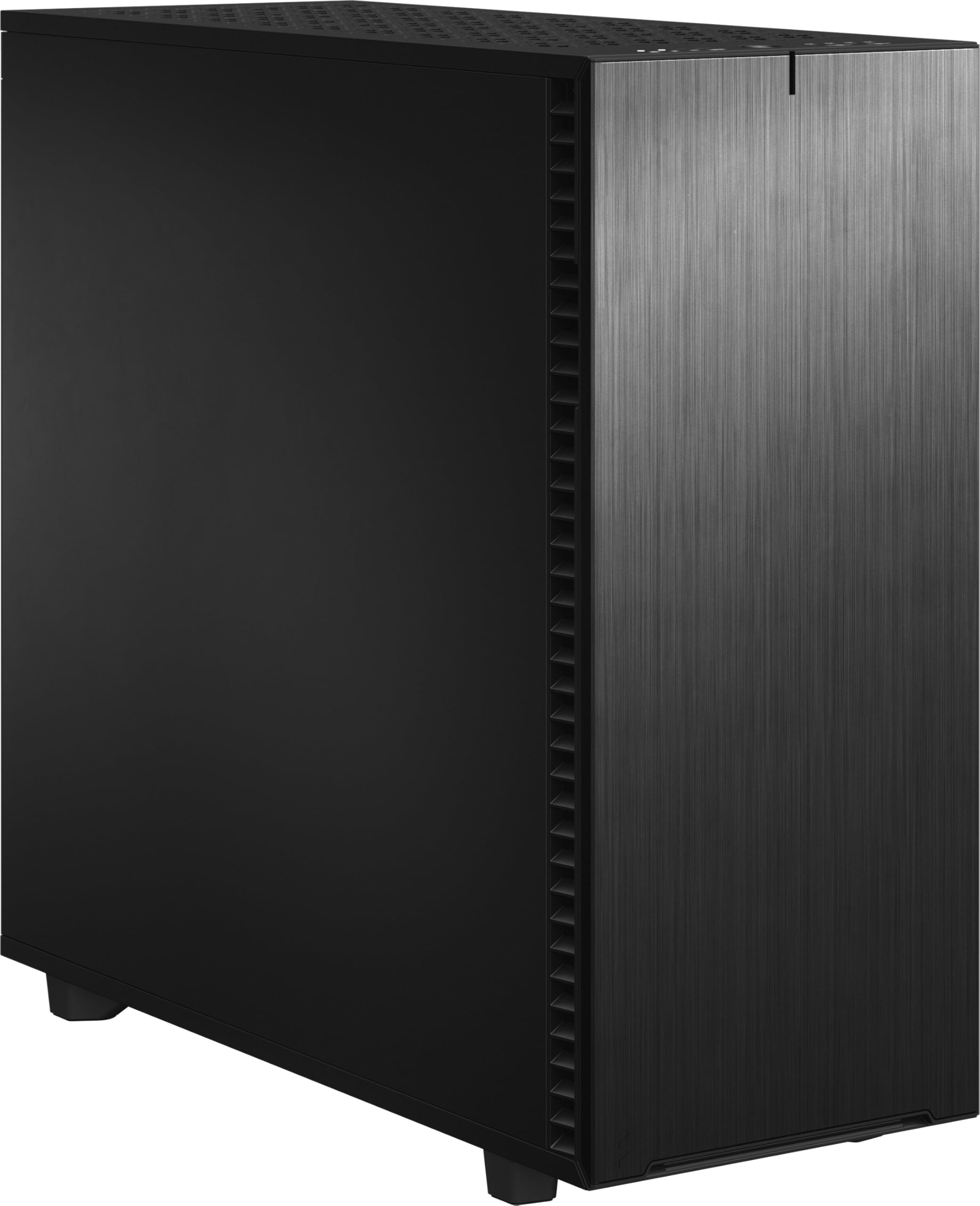
1. Fractal Design Define 7 XL Black Solid Brushed Aluminum/Steel E-ATX Silent Modular Full Tower Computer Case
Our pick — over 4.5★ from 250+ verified ratings; the strongest balance of quality and price.
The full tower that grows from four drives to eighteen without ever feeling crowded.
The headline here is vault-like capacity. In its default Storage Layout this case holds up to 18 HDDs alongside 5 SSD mounts, and the brushed aluminum front door closes over it all. At 23.78″D x 9.45″W x 22.28″H, it is a full tower you build around rather than move often. Independent fan positions can be swapped to a second HDD, SSD, or pump mount via the multi-brackets, so bays fill in as your library grows rather than all at once.
What wins people over is the design, with the cavernous interior and damped panels next. The sound-dampening is real: builds running a Ryzen 9950x, a Dark Rock Elite cooler, a 4060ti, 2 SSDs and 4 HDDs with no water cooling are reported to sit near-silent even under heavy CPU and GPU loads. You also get reversible dual-handed hinges on the door, magnetic latching, and a vented top. Bear in mind this is a full tower, so the 12-centimeter fan platform and overall footprint set it apart from the mesh mid-tower builds below rather than on top of them.
The catch is weight and size. Owners describe a finished build tipping toward 50lb, and the front panel is secured by four small screws and eight plastic tabs — lifting the case by the nose risks cracking it. The motherboard tray cutout also will not line up with every large socket layout, so measure before you commit. Assembly itself is tool-less and snaps together, and cable channels with velcro ties are the part most people call excellent.
Where it earns the top spot
- Up to 18 HDDs plus 5 SSD mounts in default Storage Layout
- Sound dampening keeps intensive builds near-silent under load
- Reversible dual-handed hinged door with magnetic latching
- Multi-brackets convert spare fan slots to HDD, SSD, or pump mounts
What to weigh before buying
- Finished builds land near 50lb — plan for two people to move it
- Front panel lifts only by small screws and plastic tabs, so never carry it by the nose
- Motherboard tray cutout may not align with every large socket layout
Reach for it if: you want a quiet, expandable storage tower and have room for a full-size footprint.
Look elsewhere if: you move your server often or need a small case for a shelf — the weight and height fight you.
2. DARKROCK Classico Storage Master ATX NAS Computer Case with 4x120mm Fans
A wallet-friendly full tower with four fans and a mountain of drive space built in from day one.
This is the case to look at if storage count and price tag are your two main filters. It ships with 13 internal bays — officially 12x 3.5-inch drives plus 2x 2.5-inch SSDs, expandable further with mods — and includes four 120mm fans so you are not buying cooling on top of the case. At 18.3″D x 9.06″W x 18.78″H, it is shorter than the Rosewill Helium NAS above at 25″D x 24.41″W x 12.68″H. It carries 4x120mm fans front-loaded, and the mesh front and side panel pull air straight across the cages.
This case earns its spot on drive density and airflow: buyers report it runs TrueNAS (a free storage operating system) with 8 drives quieter and cooler than the aging Dell server it replaced. A typical build fits 12 HDDs (hard disk drives) with temperatures holding under 32C (about 90F), so your drives stay cool even in a warm closet. The mesh front and side panel also mean the bays get direct airflow instead of recirculated heat. Cable management gets mixed reviews, so plan a modular power supply (one with detachable cables) — non-modular cabling makes the back panel tight.
The honest gripe is build feel. Buyers describe the metal as thin and occasionally sharp at this price, and the 3.5-inch bays have to be removed individually for each drive install, which is fine for a set-and-forget server and annoying for frequent swaps. The 10x central bays are 3.5-inch only, so your 2.5-inch SSD cache drives go in the labeled mounts. If you want a case that simply delivers bays cheaply and runs cool, this is where your money stretches furthest.
Drive-first math: 13 bays for the price of a mid-range PC case, with four 120mm fans bundled in rather than sold separately.
Build-feel trade-off: the sharp edges and finicky bay removal that keep the price down are exactly the complaints that show up in reviews.
Pick it when: you want maximum bays per dollar and run a modular PSU.
Think twice if: you swap drives often or want premium build feel.
3. Rosewill Helium NAS ATX Mid Tower Computer Case
Mesh everywhere and four big fans make this the one that keeps stacked drives genuinely cool.
Buying tip: airflow is the spec that keeps a home server alive, and this case is built around it. All-mesh side panels leave nothing between the outside air and your components, while four 140mm PWM fans move that air without sounding like a jet. PWM means the motherboard throttles the fan speed, so they spin slow and quiet when the server is idle and ramp only under load. It holds 10x 3.5-inch HDDs and 3x 2.5-inch SSDs, and supports ATX boards plus a 360 AIO radiator.
The fans deserve their reputation. Buyers routinely report the drives sitting under roughly 32C in a five-cage layout, with the PWM fans quiet enough to barely notice. Cable routing works well once inside, and the 25″D x 24.41″W x 12.68″H frame gives plenty of depth for long GPUs. Its 14-centimeter fan platform is larger than the 12-centimeter fans in the DARKROCK and Fractal cases above, which is the practical reason it moves more air across the cages.
The honest catch is quality control on individual units. A rare case arrives dented around the power-supply area, and the breakaway PCIe slot covers are permanent — pop one out for a card and the hole stays open. Screw alignment occasionally falls short of perfect, and a couple of HDD screws may be missing from the box. None of that is universal, and the mesh-and-fans core is what most people are here for.
Go for this if: silent, low-temperature operation is your priority and you want ATX flexibility.
Steer away if: you need every bay individually screwed in without fine-tuning — some units arrive with minor cosmetic dents.
4. DARKROCK Classico Max Storage Master E-ATX Computer Case

The step-up DARKROCK that trades a slightly higher price for E-ATX boards and vertical GPU mounting.
If your board is E-ATX, this is the version of the Classico to look at. It carries the same 13-bay ceiling as the Classico Storage Master — 10x 3.5-inch HDD plus 3x 2.5-inch SSD — but adds support for E-ATX alongside ATX, M-ATX, and ITX boards, which requires removing the drive cages first. Three vertical PCI slots let you mount a GPU upright, with front and rear fans forming parallel air ducts around it. It also takes up to a 360mm radiator on top.
Buyers tend to rate the raw space and build quality well, especially for a large Unraid array. One buyer writes that it is “spacious, well-built, and works very well with my PC components,” running it with an ASUS TUF Gaming Z890-PLUS WiFi board and a Corsair Nautilus 360 RS AIO. Interior clearance fits that large cooler and its radiator without a fight, which is the whole point of stepping up from a mid-tower.
Shortcomings show up in the details. Drive-frame access is tedious — you unscrew rather than reach for thumbscrews — and the right-hand side leaves little room for power and SATA cables, so an L-shaped SATA plug can be a squeeze. One reviewer found the vertical-GPU panel flimsy, the top filter loose, and the reset button easy to bump. None of these prevent a working build, but plan your cabling before you start screwing.
Board-fit upgrade: E-ATX and vertical GPU support in the same storage-first shell as the cheaper Classico.
Cable-space caveat: tight right-side clearances mean you should map your PSU and SATA routing first.
Built for: E-ATX home servers with a vertical GPU and large AIO.
Skip it for: a compact build where cable space and thumb-screw convenience matter most.
5. JONSBO N2 Black NAS ITX Case 5+1 Disk Bays Mini Aluminum Case

An aluminum cube that fits five drives and a Mini-ITX board onto a bookshelf.
If your server lives in a closet or beside the router, this is the space-saver. It holds 5x 3.5-inch HDDs plus 1x 2.5-inch SSD (a solid-state drive), takes Mini-ITX boards (a small motherboard size), a 12-centimeter built-in fan, an SFX power supply (a compact power unit), and a CPU cooler up to 65mm tall — all in roughly an 8.86 x 8.86 x 8.82 inch aluminum chassis. There is a single low-profile PCIe slot (a short expansion slot for add-in cards), so expansion is limited to a low-profile card. The integrated top cover is removable for assembly.
Compact size is the second-most-praised thing after case quality in reviews. Buyers talk about it fitting a factory-fresh ITX board without fuss and keeping a full rack of drives cool with low noise. Real builds run it with a 54TB drive total and a swapped fan for quiet operation. The machined aluminum finish is the reason it looks tidy enough to sit out in the open.
It is the most fiddly case to build in on this list, and reviewers are upfront about that. Cable routing is tight, especially around the power supply, and sideways-angled SATA connectors can be too snug to seat. The exhaust fan is not tied to a motherboard header by default, so you reroute it yourself. HDD mounts are asymmetrical — the thicker side faces the drives. If you accept a slower, more careful build, you get one of the smallest home-server cases on the market.
Made for: a small, quiet NAS on a shelf, with five drives and a low-profile card at most.
Not for: anyone wanting easy cable routes, tall coolers, or room for more than one expansion card.
6. Rosewill 4U Server Chassis Rackmount Case RSV-R4100U

A rack-mountable 4U chassis for Plex servers that need to shelve neatly above the desk.
This is a chassis for a standard equipment rack. It carries 7 internal 3.5-inch HDD bays, 7 PCI expansion slots, and takes ATX and CEB motherboards, so it handles a real CPU-plus-drives server rather than a slim media box. Three pre-installed cooling fans do the work — 1x 120mm PWM up front and 2x 80mm PWM at the rear — and there are 2x USB 3.0 ports plus a front panel lock with key. Front LEDs show power and drive activity at a glance. Critically, it only fits HDDs with three screw holes per side, not the two-hole type.
Reviewers land in two camps. Builders who need a rackable chassis and a defined budget rate the functionality and value highly; one owner says it “was very easy to work in… comes with a decent 120mm fan and has two back 80mm fans,” running it as a rack Plex server (a media server). Another built two of them for a video production rig and fits standard ATX boards (a common motherboard size) with an RTX 3060 (a graphics card), noting you need a heatsink of 92mm or less or the lid will not close.
The trade-off is build quality, which is among the most-discussed topics and depends on expectations. Metal is thin and light; the handles will not carry a fully-loaded server safely; the ATX standoff holes (mounting points for the motherboard) in some units arrive unthreaded and need self-threading. It is not a premium rack chassis, but it is an honest 4U tower (a 7-inch-tall rack size) for the size. Plan your coolers and cabling around its tight internal layout.
Why a rack builder would choose it
- 4U rack footprint with 7 PCI slots and ATX/CEB board support
- One 120mm and two 80mm PWM fans pre-installed for drive cooling
- Front panel lock plus power and HDD activity LEDs
Where it trades away
- Thin metal and light handles — do not lift a full build by them
- CPU coolers must be 92mm or shorter or the lid will not close
- Some ATX standoff holes are unthreaded and need self-threading
Good when: your server lives in an equipment rack and you want a legitimate 4U ATX chassis.
Look past it if: you want roomy cable space or premium damped panels.
7. JONSBO N3 Mini-ITX NAS PC Chassis 8HDD+1SSD

A compact aluminum cube with eight hot-swap bays and a backplane built for real home servers.
When you need eight drives in the smallest footprint possible, this case is the one most buyers point to. It holds 8x 3.5-inch HDDs plus 1x 2.5-inch SSD in a steel-and-aluminum Mini-Tower measuring around 9.17 x 10.31 x 11.73 inches. Two 10-centimeter fans sit directly on the drive compartment for heat dissipation, and it runs a standard server-grade hot-swap backplane powered by dual D-type connectors plus SATA. A removable one-piece top cover and a split upper/lower compartment make assembly easier than the size suggests. There is one PCI expansion slot and it supports a CPU cooler up to 130mm tall.
What buyers notice first is the case quality, with compact dimensions close behind. Measured drive temps in real builds sit around 28C, and the backplane has proven reliable with eight 16TB drives. A lot of builds use it as a Synology alternative with Unraid or TrueNAS, and there is a reason the review page reads the way it does — one buyer sums it up plainly: “This case is amazing. It’s compact that has a good amount of space when putting together a NAS.”
The recurring frustration is the stock fans, which several owners find too loud for a bedroom closet. Swapping to 92mm aftermarket units is common and the mounting holes accept them. The included manual is thin, the top is held by four hex screws, and the backplane uses a 4-pin molex plug that may need an adapter in some builds. Treat fan noise as something you will likely replace, and the case itself rewards you with serious density.
Density without bulk: eight hot-swap bays plus an SSD in a chassis that still fits on a shelf.
Fan-noise reality: the same compact cooling that keeps drive temps around 28C also produces noise you may want to swap out.
Meant for: home labs and Unraid or TrueNAS builds that juggle many drives in a small space.
Consider another option if: you want factory-quiet fans or a low-maintenance manual.
8. Rackchoice 4U Rackmount Server Chassis N4058

A shallow-depth 4U rack chassis that fits E-ATX boards and big GPUs where others cannot.
If you need a rack that holds both storage and graphics cards, this chassis is unusually flexible. Front bays hold 8x 3.5-inch drives internally, and it accommodates E-ATX boards (a large motherboard size) up to 12″ by 13″ as well as ATX, Micro-ATX, and Mini-ITX. It has 7 full-height expansion slots (for add-in cards) and takes a standard ATX PS-2 power supply — not the more expensive SFX type — and its depth is 420mm excluding the handle, so it fits rack rails front-to-back without needing a fixed-depth cabinet. Cooling comes from three 12cm fans up front and two 8cm fans at the rear. Two front-accessible USB 3.0 ports are included, with a 2.0 adapter in the box.
Owners tend to like the build quality for the money and how much hardware it swallows. One buyer fit an i7 13700k, MSI Z790-S board, RTX 3080, 850W PSU, and a 360mm AIO after removing the HDD cages and top bar — tight but workable with 3-5mm GPU clearance. Others report running it as a rack gaming server with a Ryzen 9 and 4090, using a front radiator. It is a genuinely capable expandable platform rather than a drives-only chassis.
Airflow is the wide area of complaint, along with build difficulty. The included 60mm molex fans are typically swapped for PWM units, radiator fan holes may only line up on one mounting position, and CPU cooler height is limited — a Thermalright Assassin X120 fits only just. There is no printed manual, so plan on four out of five for ease of building. If you want a rack chassis that fits a big GPU, this is the trade.
What makes it stand out
- E-ATX and 7 full-height PCI slots in a 420mm-deep 4U chassis
- Fits a standard ATX PS-2 power supply
- Five pre-installed fans (3x 120mm, 2x 80mm) for the drive row
- Handles a 360mm AIO and large triple-slot GPU
Honest friction points
- Stock fans are 60mm molex type and louder than PWM — many buyers replace them
- Radiator fan mounting holes may only align on one position
- No printed instructions, so plan for a longer build
Buy it if: your rack build mixes E-ATX, a big GPU, and storage and you want room for all three.
Skip it for: a drives-only server where stock fans and easy assembly are the priority.
9. JONSBO N5 NAS PC Case, E-ATX, 12HDD+4SSD Drive Bay

The furniture-grade home server case — sixteen bays and real wood on the front panel.
This is the case for a server that lives in the living room and does not look like one. It supports 12x 3.5-inch hot-swappable HDDs (drives you can swap without powering down) plus 4x 2.5-inch SSDs — 16 bays total — and up to four GPUs (graphics cards) inside. Motherboards from ITX through E-ATX all fit. Cooling is handled by three built-in 120mm fans plus front slots for two more 120mm or 140mm units, and it takes a 240mm or 280mm AIO (a liquid cooler). There are 8 PCI slots, a front USB 3.2 Gen2 Type-C, and a USB 3.0. The front is finished in North American black walnut veneer on a steel and aluminum frame. If you load all 12 drive bays you need a compatible power supply — ATX units up to about 170mm wide leave room for the full 12-bay face, while wider units cut that to 8 — and the CPU cooler maxes out at 160mm.
Reviews consistently rank it the best case in the lineup, with plenty of room for drives and upgrades. Airflow is strong: some builds report an i9 holding around 45C at load. The wood finish and general layout earn a lot of attention, and it is easy to build in — the one-piece top cover and removable 4-bay HDD cage help. A handful of users run it in the lounge because it looks like a piece of furniture rather than a NAS.
The trade-offs are real and consistent. Stock fans are noisy for a bedroom, and the grommet-based drive mounting is less elegant than screw-in trays. There are only 8 activity LEDs for 12 bays, and the backplane has felt initially sketchy to some buyers even when it held up long-term. Some buyers also want more cable-management hardware. None of that prevents a great build — just budget for quieter fans and accept a fussier mount system.
Premium for a reason: 16 bays, hot-swap by default, and a walnut finish that makes a server look like furniture.
Fan and mounting caveat: you will likely swap the stock fans and want a cleaner tray system than the grommets.
Perfect for: a large media library that has to sit out in a visible room, loaded with hot-swap drives.
Better options exist if: you need bedroom-level noise or prefer screw-in drive trays.
Understanding the Specs
Drive bay count and type
Bay count is the ceiling on how many drives you can run in the case without mods. Most home servers fill 3.5-inch bays first for bulk capacity and leave 2.5-inch mounts for an SSD cache. A case with ten 3.5-inch bays and three 2.5-inch mounts gives you a working library now and headroom later. Check whether the bays are hot-swap (drive pulls out the front through a backplane) or screw-in (you open the side panel to add a drive).
Motherboard form factor and cooler clearance
Form factor determines which boards fit: E-ATX is the largest common size, then ATX, Micro-ATX, and Mini-ITX, smallest. A full tower usually accepts all four; a Mini-ITX NAS case locks you to the smallest. CPU cooler height and power supply size are the two clearances that trip people up most often — a 160mm cooler simply will not fit inside a case rated for less. Check both numbers against your parts before ordering.
Airflow path and fan configuration
Drives generate heat and stacked bays shield each other from moving air. A mesh front with fans pushing directly across the cages keeps temperatures down; a sealed front panel with only a top vent traps heat. PWM fans let the motherboard control speed so they idle quietly and ramp up under load. Look at how many fans ship with the case — some include four, some include none.
Rack versus tower footprint
Rack-mount cases (measured in rack units, where 4U is a common height) sit in standard equipment racks, which is ideal for a home lab or utility room. Tower and mini-tower cases sit on a shelf, desk, or floor. Rack chassis are usually longer front-to-back, and depth matters for sliding them onto rails. Decide where the server will physically live before picking a form factor.
FAQ
How many drives can a home server case realistically hold?
Do I need hot-swap drive bays or are screw-in trays fine?
Which motherboard size should I pick for a home server case?
How much CPU cooler clearance do home server cases have?
Should I use an SFX or standard ATX power supply?
Will a full-size GPU fit in a home server case?
How loud will a home server case be, and can I quiet it down?
Can a home server case be mounted in a standard rack?
Does mesh or a sealed front keep drives cooler?
Do I need to worry about cable management in a compact NAS case?
Final Thoughts: The Verdict
For most builders, the case for a home server winner is the Fractal Design Define 7 XL because it combines up to 18 HDDs and 5 SSD mounts with sound dampening that keeps an intensive build near-silent. If airflow and value in the same footprintmatter more than a damped, oversized tower, the Rosewill Helium NAS keeps stacked drives around 32C with four 140mm PWM fans. And for a small, quiet build on a shelf, the JONSBO N3 fits eight hot-swap bays into a compact aluminum cube. One last nudge: the Fractal Design Define 7 XL earns a 4.6-star rating from well over 250 owners, making it the safest bet for a first home server build.
How We Picked
We do not accept paid placement. Every pick is matched to a real buyer and a real use-case; we do not hands-on test units.
Sources & Methodology
Specifications: manufacturer listings and product documentation. Review insights: verified customer reviews, as of September 2026. Pricing: not shown on this page (it changes often); check the current price via the retailer link.
As an Amazon Associate, Gadgets Feed earns from qualifying purchases. This does not affect which products we feature.