
Our readers keep the lights on and my morning glass full of iced black tea. As an Amazon Associate, I earn from qualifying purchases.
Specs are compiled from manufacturer listings and verified buyer reviews and can change over time — please confirm the key details on the product page before buying.
Craning your neck down at a flat laptop or monitor all day is what wrecks your posture. The fix is simple: get the screen up to eye level with a stand that adjusts and then stays put. This guide covers nine adjustable stands that do exactly that — laptop risers, monitor risers, and dual-monitor platforms — and tells you which one fits your desk, your device, and your body.
I’m Min — the founder and writer behind Gadgets Feed. This guide is built by comparing the manufacturers’ published specifications and the patterns across verified customer reviews, so you get each pick’s real strengths and trade-offs instead of marketing spin.
Before you buy, measure your desk width and your screen height. Those two measurements decide whether a riser fits your desk and lifts your screen to eye level.
Our Picks at a Glance


How To Choose The Best Adjustable Computer Stand
An adjustable computer stand is a riser that lifts your laptop or monitor off the desk and lets you set the height and angle you need. The goal is the top of your screen level with your eyes. Hours of looking down strain your neck and shoulders. A good stand raises the screen to eye level and frees the space underneath for your keyboard, files, or supplies.
Height range is the first spec to check
Every stand here adjusts, but the range differs a lot. Some offer fixed steps, like four height settings, while others use stiff hinges you set anywhere along the arc. A stand with a wider range suits more people and more desks. Short users and taller users need different heights, so a stand with a few clear levels is easier to dial in than one with a single set position.
Angle adjustment keeps your wrists and your screen happy
Angle is the second lever. A hinged laptop stand lets you tilt the screen toward you, so you are not reaching or leaning forward. Dual-monitor risers often let the side shelves swing so you can angle screens toward your seat or wrap them into a corner layout. If you share your screen with people across the desk, a swivel base saves you from turning the whole machine around.
Build material decides stability and portability
Alloy steel and aluminum stands are stiffer and heavier, which is exactly what you want on a desk that stays put. Wood risers are lighter and look warmer, but they tend to stay in one place. If you carry your stand between home and office, a foldable aluminum design packs flat. If it lives on your desk forever, a heavier steel stand will not budge while you type.
Quick Comparison
| Model | Best For | Load Capacity | Height / Levels | Material | Amazon |
|---|---|---|---|---|---|
| BoYata Adjustable Laptop Stand★ Best Overall | All-day laptop work and drawing | Up to 17″ laptops | Incline and height via stiff hinges | Alloy Steel (brushed) | Amazon |
| Bostitch Konnect Adjustable Monitor RiserBest for Small Spaces | Neat single-monitor desks | 25 lbs | 4 levels (2 1/8″–6 1/2″) | Plastic | Amazon |
| ECOLOVI Adjustable Wood Monitor StandBest Value | Home offices and printers | 44 lbs | 4 settings (4.00″–6.10″) | Wood (2-pack) | Amazon |
| Nulaxy 360° Rotating Laptop Stand | Screen-sharing and small laptops | 22 lbs | Dual hinge, foldable | Aluminum Composite | Amazon |
| BONTEC Dual Monitor Stand Riser | Dual-monitor and corner setups | 44 lbs | Length adjusts 31.5″–42.5″ | Wood | Amazon |
| WALI Dual Monitor Stand | Budget dual-screen tidying | 44 lbs | 3 heights (3.9″–5.5″) | Metal | Amazon |
| WESTREE Triple Dual Monitor Stand | One-to-three monitor flexibility | 120 lbs | Length 29.14″–50.6″ | Plastic | Amazon |
| AX WABER Dual Monitor Stand Riser | Small desks with heavy dual screens | 100 lbs | 3.7″–5.2″ adjustable legs | Alloy Steel & Wood | Amazon |
| Lamicall Adjustable Laptop Stand | Travel and big 17.3″ laptops | 10″–17.3″ laptops | Foldable, adjustable height and angle | Aluminum alloy | Amazon |
In‑Depth Reviews
1. BoYata Laptop Stand, Adjustable Multi-Angle Riser
Our pick — over 4.5★ from 14,500+ verified ratings; the strongest balance of quality and price.
An alloy-steel riser with stiff joints that hold a 17-inch laptop at your set angle.
If your laptop spends all day at eye level, this is the one to beat. BoYata builds it from alloy steel, so the whole frame has real heft — 1100 g — and that weight is what keeps a heavy machine rock-steady while you type. It fits laptops up to 17 inches, including MacBook and Surface models, and the Z-type shape lets you set an incline and a height that suits your seat, not the other way around. The stand earns the crowd’s trust as the top pick here, with a 4.8-star score across 14,000+ owners.
The detail that wins people over is the build. Between the metal frame and the four slide-proof silicone pads on the bottom, the stand stays where you put it — even when a 17-inch machine gets leaned on. Buyers report it plainly: “Sturdy, heavy aluminum stand fits 17″ laptop and iPad for drawing.” The surface also has a ventilation hole, which lets air move under the machine instead of trapping heat against the desk.
Here is the honest part. The stiff joints are what make it stable, but they also mean you need both hands to change the angle, so it is not a stand you reposition ten times a day. One buyer even notes the base could be heavier and that it can occasionally tilt back on a slick surface. It is also weighty — easy to leave on the desk, less fun to carry around. For a work-from-home setup that stays put, that trade is well worth it.
What Earns It The Top Spot
- Alloy steel frame with 1100 g of heft — does not wobble under a heavy laptop
- Fits up to 17-inch laptops, including MacBook and Surface
- Four silicone pads grip the desk so it will not slide
- Ventilation hole keeps air moving under the machine
The Fine Print
- Stiff joints need two hands to adjust — not a quick tweak mid-session
- Heavy enough that it is a stay-at-desk stand, not a travel one
- Base can tilt back on a very slick surface if you push hard
Go for it if: you want one heavy-duty riser that locks a large laptop in place for good.
Think twice if: you need a stand to toss in a bag every day.
2. Bostitch Konnect Adjustable Monitor Riser with Drawer
A tidy little riser that hides your clutter in a pull-out drawer.
If your desk is small and cluttered, this stand clears the mess. It gives you four height levels — 2 1/8″, 3 5/8″, 5″, and 6 1/2″ — so you can raise the screen to a comfortable spot. The built-in drawer swallows pens, sticky notes, and earbuds so they stop living on the desktop. There is also a dedicated phone slot and a cable-management channel, which keeps the wires from turning into a nest. It holds up to 25 lbs for a single monitor up to 30 inches or a laptop.
Buyers keep praising how well it organizes. One review page sums it up: “Adjustable height, fits regular papers underneath, no assembly issues, drawer includes slot dividers for custom sections.” Compare it to the bigger steel risers here and the trade is clear: this one is compact and light at 2.7 pounds, where the BoYata above is built like a brick. For a small telework desk, the lighter footprint is the point.
Two things worth knowing before you commit. The drawer is shallow, so small items fit while a bottle of lotion will not — set your expectations to office supplies, not storage boxes. And build quality draws mixed feelings, since the frame is plastic rather than metal. That is the price of the low weight. On the upside, it comes together quickly with no fuss, and the height steps suit anyone who wants to raise a screen a few notches at a time.
The desk-space math: at 16.5 inches wide it also creates more of a gap than the compact ECOLOVI riser below, so a full-size keyboard slides underneath with room to spare.
The weight argument: at 2.7 pounds it is light enough to relocate with one hand, which is a real advantage if your desk setup moves around.
Reach for this if: you want your monitor raised and your desktop clutter contained in one tidy unit.
Look elsewhere if: you need to store anything bulky under the screen.
3. ECOLOVI Adjustable Wood Computer Monitor Stand Riser (2-Pack)
Warm wood looks, serious heft, and two stands for the price of one setup.
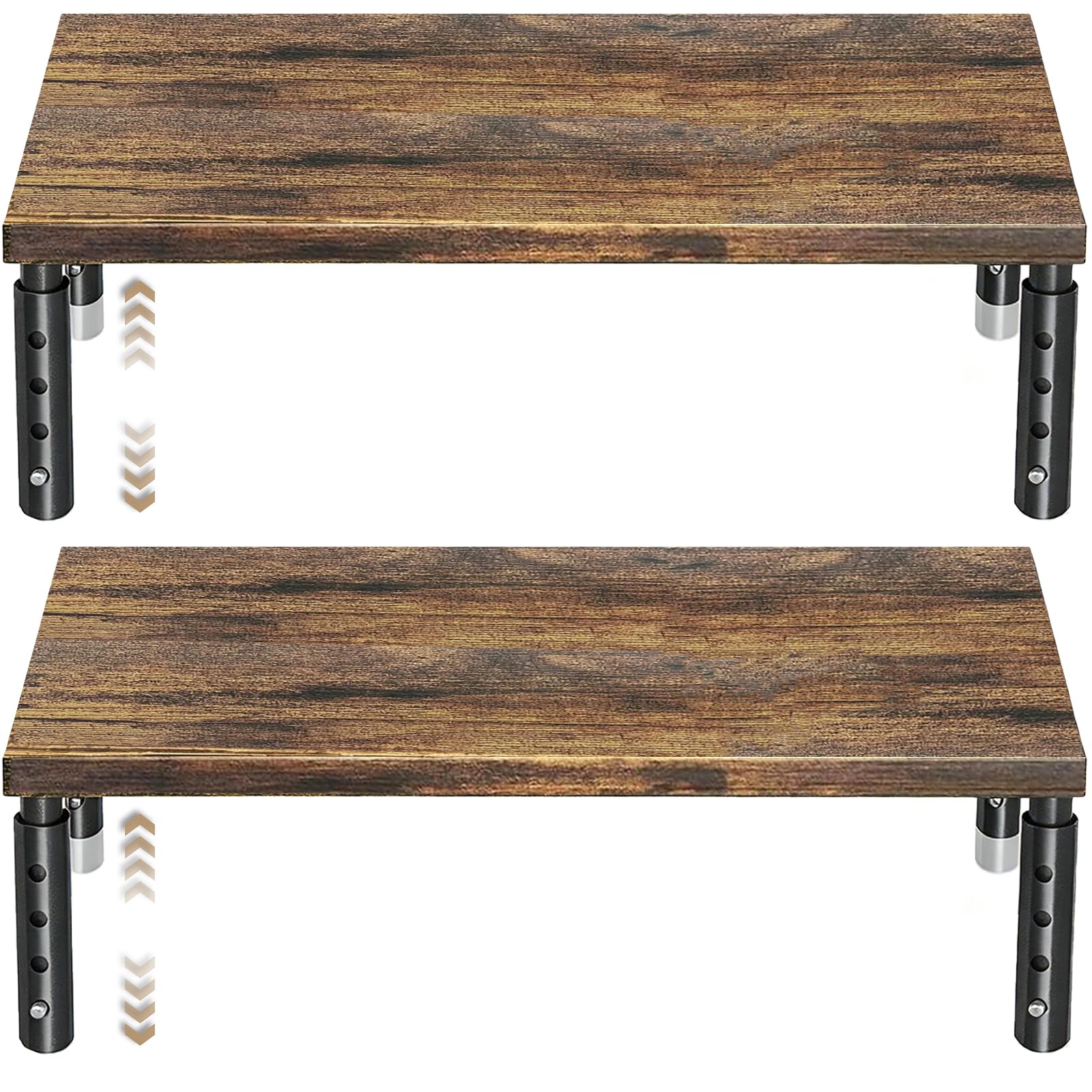
Two wood stands in one box make this the easy call for anyone outfitting more than one desk spot. Each one adjusts through four height settings — 4.00″, 4.80″, 5.50″, and 6.10″ — changed in seconds by pressing the leg buttons, so you can lift a screen to eye level without tools. The wooden top has a natural finish that reads far warmer than black plastic, and the frame holds up to 44 lbs, which is plenty for a monitor, laptop, printer, or gaming console.
Underneath, there is a 12.50″ x 7.00″ storage area for a keyboard, notebooks, and supplies, plus non-slip rubber pads that keep it planted and protect the desktop from scratches. The gap between the leg and the shelf runs smaller than the roomier Bostitch above, so measure if you plan to tuck a thick peripheral under there. What owners praise here is the overall quality of the build, with sturdiness right behind it in the feedback.
The slight caveat: height sits in the middle of what owners talk about, and some feel the range is a touch limited for taller users. There is also the odd report of a minor cosmetic chip on arrival — a rare finish issue, not a structural one. The honest case for it stays strong: sturdy enough for a 22-inch monitor, good-looking enough to match a wood desk, and cheap enough that the second unit feels like a bonus.
Two-desk advantage: buying a pair covers both your home and office desk in one purchase, and still leaves you a second riser for a printer or console.
Best for: buyers who want a stylish wood riser and a spare without stretching the budget.
Skip the pair if: you need a stand tall enough for a very tall monitor setup.
4. Nulaxy 360° Rotating Ergonomic Laptop Stand
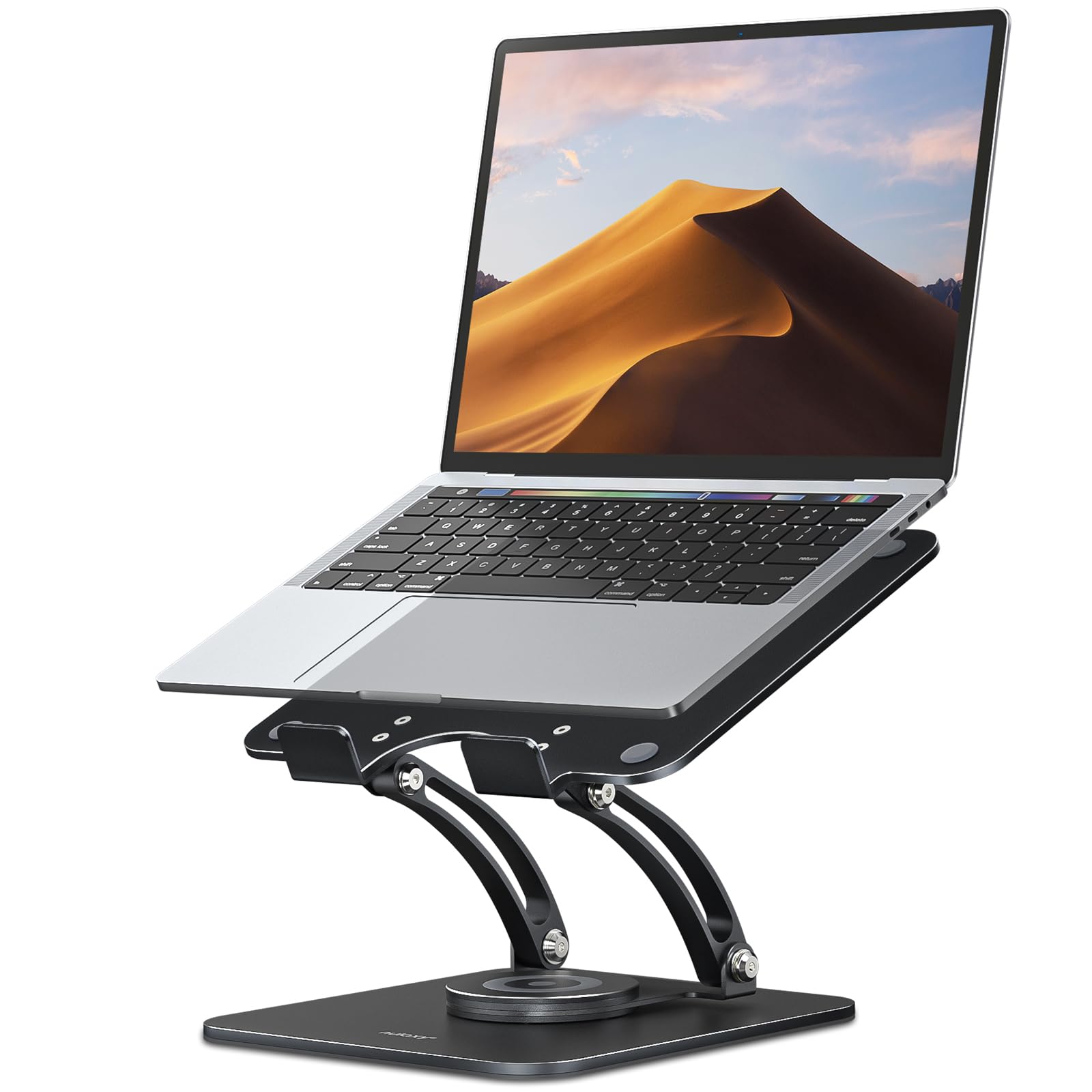
A foldable riser that spins a full circle so you can share your screen without lifting a thing.
You can swing your screen toward a colleague for a meeting or a video call without dragging your laptop across the desk, thanks to the 360° rotating base — the whole platform turns around. Its two high-precision hinges are rated for 6000+ rotations, the company’s proof that the stand holds its angle instead of sagging. It supports up to 22 lbs, so a heavy gaming or business laptop is fine, and the non-slip silicone pads and baffle hooks keep the device from sliding off.
When the day is done, the dual foldable structure flattens the whole thing so it can slide into a backpack, which separates it from the fixed steel risers here. It works with 10–16″ laptops, and at 840 g it is light enough to travel with regularly. The height and angle adjustment lifts a screen to eye level, and that adjustability is what owners like most about it after the overall quality.
One practical gripe shows up in the feedback: the hinge can be a little stiff to move, and a few people wonder whether loosening a screw would help. In practice that stiffness is the same thing that keeps the stand from wobbling while you type, so it is a deliberate trade rather than a flaw. If you set it once and leave it, you will barely notice.
Set-and-forget build: the stiff damping hinge is what stops screen jitter while you type, so the resistance you feel is doing real work.
Travel reality: the foldable frame packs flat, which most risers in this list cannot do.
Pick this if: you present or share your screen often and want a stand that folds away afterward.
Pass on it if: you want easy one-finger angle changes all day long.
5. BONTEC Dual Monitor Stand Riser

A wood dual-screen platform that stretches to fit your desk and tidies everything beneath it.
For two monitors, this is the pick that adapts to your setup instead of the other way around. The length slides from 31.5″ to 42.5″ to fit smaller or larger desks, and the swivel side shelves support straight, angled, or corner layouts, so you can angle each screen toward your seat. Built from wood with a 44-lb capacity, it raises both displays to a more comfortable level and gives you three open compartments underneath for a keyboard, mouse, files, and a docking station. There is a phone slot and a cable-management opening to keep wires in check.
Assembly is genuinely quick here — the maker says it comes together in about two minutes with the included screws, and owners agree it is a breeze, though some take a little longer. What buyers rate highest is the overall quality, followed closely by how easy it is to put together. Compared with the smaller single-riser options above, this one earns its place purely on dual-screen real estate.
The follow-up question most people have is whether it fits a corner desk. Because the side shelves swing, it handles angled layouts better than a rigid platform, but you still want to check your desk width before ordering. The non-slip base looks after your desktop, and the wooden finish blends in with most modern setups. For a two-screen home office, it is a clean, organized answer.
Layout flexibility: the swivel shelves mean you are not locked into a straight-line arrangement, which sparse flat risers cannot match.
Buy it if: you run two monitors and want them raised, angled, and organized in one move.
Move on if: a single screen is all you use.
6. WALI Dual Monitor Stand for Desk

Two ventilated metal risers, no tools required, at a price that is hard to argue with.
You get two metal stands in the box, which makes this the value play if you want matching risers for more than one desk. Each one has a 14.6 x 9.3 inch metal shelf that holds most flat screens, laptops, and printers, up to 44 lbs, and the height adjusts through three settings — 3.9 inches, 4.7 inches, or 5.5 inches off the desk. The platform is vented, so air moves under your device and helps it run cool instead of baking against the desk surface. Anti-skid rubber pads protect the desktop and keep things from sliding.
The set-and-go nature is the appeal. There are no tools needed to assemble it, and owners single out the easy setup right after the overall quality of the build. It also works well as a shelf or storage riser, not just a monitor stand, so flexible use is baked in. Compare it to the BONTEC above and you trade a wider, swiveling dual-screen platform for a simpler, cheaper pair of fixed-shape risers.
Adjustment is the one place it holds back a little — the three height steps give you options but not the fine control of a hinged stand, and one owner found the surface shows fingerprints easily. Neither is a dealbreaker for a tidying riser you rarely touch. If you want stability and airflow without fuss, this pair delivers.
Why it works: the vented metal top keeps a screen cool, and the rubber feet stop the stand from creeping across the desk.
Choose this if: you want two sturdy no-tools risers and prefer a simple height step over micro-adjustment.
Keep looking if: you need fine-tune control over the exact height.
7. WESTREE Triple Dual Monitor Stand Riser

One expanding platform that carries from a single monitor all the way up to three.
This is the stand that grows with your setup. The length changes from 29.14″ to 50.6″, so the same riser handles a single large monitor, a dual-screen layout, or a full three-monitor spread, and both side shelves swing through a +/-90° angle so you can arrange devices even on an irregular desk. The load capacity is the headline number — 120 pounds — which is what lets it hold three heavy screens without sagging. It also comes with three shelves for keyboard, files, and supplies, and the middle board is lengthened to 22.84″ to fit a full keyboard.
For a multi-screen user, the value is obvious: you get what amounts to three storage compartments and a pen holder for the sort of setup that would normally need several separate risers. It assembles in about five minutes with the included tools and instructions. What buyers appreciate most is how it looks — the wood tone reads far better than a bare metal frame — and it fits two 23-inch monitors plus a laptop with room to spare.
Two honest notes. The side shelves attach by slotting into prongs rather than locking, so a hard bump can knock one loose — treat them gently. And the base footprint is generous, so on a small or angled desk it can push your gear forward and eat into the space beneath the monitors. If your desk is wide and flat, neither is a problem, and one owner reported the stand still looking new after two years of use.
The capacity story: at 120 lbs this is the heaviest-duty riser in the roundup, which is what makes a three-monitor spread realistic.
This one is for: anyone running two or three monitors who wants a single expanding platform instead of several risers.
Not the pick if: your desk is small or sharply angled.
8. AX WABER Dual Monitor Stand Riser

Wood on top, steel underneath, and a tilt that nudges your screens to the perfect angle.
This one pairs a wood top with stainless steel legs and adjusts length from 29.2″ to 42.5″ to suit most monitors, laptops, and printers. The steel legs slide through a height range of 3.7 to 5.2 inches, so you can dial in a comfortable viewing line, and the head tilts forward 0–15 degrees to angle the screen toward you — a feature most risers here skip. It holds up to 100 lbs, which is a lot of headroom even for a heavy dual-screen setup, and the steel feet carry non-slip rubber pads to protect the desk.
Underneath, three storage spaces wait for a keyboard, files, and notebooks, so a messy desk gets tidied in one move. Assembly is quick — the maker says about two minutes, and owners agree it comes together fast, with most setups done inside ten minutes. The quality of the build is what people rate most highly, followed by how sharp it looks on the desk. The individual height-adjustable legs mean you can level it on an uneven surface, which not every stand can do.
The recurring note to know about is that the slide-together parts can shift a little, so the pieces may separate slightly if you drag the whole thing around. Sized for small spaces and surprisingly sturdy once set, it is a strong match for a compact desk with two screens on top.
The angle edge: that 0–15° forward tilt is the standout — you can aim your screens down slightly to meet your gaze without a separate mount.
Good fit for: a compact desk running two screens where you want a little tilt control and serious capacity.
Less ideal if: you want every joint to lock firmly — the panels slot together rather than clamp.
9. Lamicall Adjustable Laptop Stand for Desk

An aluminum riser that folds flat, sized for the biggest laptops you can carry.
If you move between locations and use a big machine, this is the one built for you. It fits laptops from 10″ up to 17.3″, covering everything from a MacBook Air to a Surface Laptop, Dell XPS, or Chromebook, and the height and angle are both adjustable so you can raise the screen to eye level. The larger, heavier aluminum-alloy base is designed to stop the stand shaking, sliding, or falling while you type, and multiple ventilation holes let air move under the machine to keep it cool. It folds flat to slip into a laptop bag or backpack for travel and business trips.
Owners rate the quality of this stand the highest of any trait, and it is easy to see why from the spec alone: aluminum alloy, a weighty base, and a foldable frame that travels well. One buyer’s take sums up the appeal — the stand is “solid” and good-looking, and the base even doubles as a spot to rest a phone or a mini keyboard. Compared with the stiff steel BoYata up top, this one adds portability at the cost of a little raw heft.
The trade-off worth naming is stability under a heavy hand. Many owners find it rock-solid, while others notice it can wobble during enthusiastic typing — the fix is usually a rubber pad and a steadier desk. One more thing: on curved older laptops, the bottom prongs may not seat quite as cleanly as on newer flat models, so check your machine’s underside. For flat ultrabooks and big screens at eye level, it is a dependable buy.
Travel-ready design: the foldable aluminum frame fits a 17.3″ laptop and still packs away, which is rare at this size.
Pick it for: a large laptop that needs to travel and still sit at a comfortable height.
Consider alternatives if: you have a curved older laptop that may not seat well on the prongs.
Understanding the Specs
Load Capacity
This is the weight a stand is rated to hold. It matters because a sagging or tipping riser is worse than no riser at all. A laptop-only stand might be rated in the range its hinges can support, while a dual-monitor platform is often built for far more — some here carry up to a 120-pound load. Match the rating to what you will put on top, and leave a little headroom for a monitor arm or a heavy docking station.
Height Levels vs. Continuous Adjustment
Some stands use fixed steps — four settings, three settings — while others use stiff hinges you can set anywhere along an arc. Fixed steps are quicker to reset and harder to bump out of place. Hinges give you finer control but need both hands and stay put once set. If several people share the stand or the height needs to change often, fixed steps are easier. If you want one exact angle for your own body, hinges win.
FAQ
How high should an adjustable computer stand raise my screen?
Will a laptop stand fit a 17-inch laptop?
What does load capacity mean on a monitor stand?
Is an aluminum stand better than a wood or plastic one?
Do adjustable stands really help with neck and shoulder strain?
Can I use a monitor stand for a laptop or printer instead?
Are these stands easy to assemble?
Do these stands keep my laptop from overheating?
Which stand is best for a small desk or a corner layout?
Can I fold a laptop stand flat to carry it in a bag?
Final Thoughts: The Verdict
For most people, the best adjustable computer stand is the BoYata Laptop Stand because its heavy alloy-steel frame and stiff, stay-put joints hold a large laptop exactly where you set it. If you want your monitor raised with your clutter tucked away, reach for the Bostitch Konnect Riser. And if you run two or three screens, the expanding WESTREE Triple Dual Stand carries the load without complaint.
If you want one riser to start with, the BoYata’s 4.8-star rating across 14,000+ owners makes it the safe first buy.
How We Picked
We do not accept paid placement. Every pick is matched to a real buyer and a real use-case; we do not hands-on test units.
Sources & Methodology
Specifications: manufacturer listings and product documentation. Review insights: verified customer reviews, as of September 2026. Pricing: not shown on this page (it changes often); check the current price via the retailer link.
As an Amazon Associate, Gadgets Feed earns from qualifying purchases. This does not affect which products we feature.