
Our readers keep the lights on and my morning glass full of iced black tea. As an Amazon Associate, I earn from qualifying purchases.
Specs are compiled from manufacturer listings and verified buyer reviews and can change over time — please confirm the key details on the product page before buying.
You rent, so you cannot drill holes in the doorframes or run wire through the walls — but you still want to know the moment your front door opens while you are at work. The good news: every system below mounts with self-adhesive strips or a counter-top hub, and peels off clean at move-out. The Ring Alarm 14-Piece Kit is the pick that fits most renters best, because it covers a 2-4 bedroom place from the start and needs no wiring at all.
I’m Min — the founder and writer behind Gadgets Feed. This guide is built by comparing the manufacturers’ published specifications and the patterns across verified customer reviews, so you get each pick’s real strengths and trade-offs instead of marketing spin.
Start with the two questions that decide everything for a renter: does it stick to a wall without screws, and does it still work if you move in a year? The picks below answer both, and this breakdown of the alarm systems for renters covers hubs, sensors, alerts, and the honest monthly-fee traps.
Our Picks at a Glance


How To Choose The Best Alarm Systems For Renters
What separates a system you actually use from one that sits in the closet is how it attaches to your rental. Renter-friendly alarms use self-adhesive strips, counter-top hubs, and wireless sensors you press into place. Nothing gets screwed into a doorframe, so nothing gets charged against your security deposit.
Mounting without making a mark
Look for a system that lists self-adhesive installation in its own specs. Door and window sensors stick to the frame with adhesive backing, and the hub either plugs into an outlet or sits on a counter. When you move, you peel the sensors off and pack them — the kit travels with you, which is why owning the equipment beats renting it from a monitoring company.
One practical trap: adhesive sensors need the two halves to line up within a small gap. If your door trim sticks out further than the frame, a sensor may not close cleanly. A pack of small shims or a scrap of foam board fixes it, but check your doorframes before you buy if they are unusually thick.
Wi-Fi, hubs, and why 2.4GHz keeps coming up
Most of these systems connect to your home Wi-Fi — specifically the 2.4GHz band, the slower-but-further-reaching network your router broadcasts alongside 5GHz. If your router is set to 5GHz only, the hub will not find it. A plug-in range extender usually solves it, and many renters end up adding one anyway for a back bedroom.
The hub is the brain: sensors talk to it, and it pushes alerts to your phone. A few systems skip the Wi-Fi worry with a cellular radio built into the base, which keeps the alarm online if your internet drops. Weigh that cellular option before you buy a bigger sensor box.
Self-monitoring versus paid monitoring
Free self-monitoring means the system pings your phone and you decide what to do. Paid 24/7 monitoring means a call center watches the alarm and can dispatch police, fire, or medical help when you are unreachable. For renters, free self-monitoring is plenty in a quiet building; paid monitoring earns its keep in a ground-floor unit or a house you leave empty for long stretches.
Check the contract length, not just the monthly fee. Some plans lock you in; the renter-friendly ones are month-to-month with cancellation anytime. Several systems here run entirely without a subscription and still send alerts, so a fee is a choice rather than a requirement.
Quick Comparison
| Model | Best For | Pieces | Monitoring | Mounting | Amazon |
|---|---|---|---|---|---|
| Ring Alarm 14-Piece Kit★ Best Overall | 2-4 bedroom homes | 14-piece | Optional Ring Protect plan | Wireless, no drilling | Amazon |
| Abode 4 Piece Smart Security SystemSmart-Home Pick | Smart-home tinkerers | 4-piece | Optional, no-fee self-monitoring | Wireless DIY | Amazon |
| SimpliSafe 11 Piece Gen 3Own-It Pick | Owning your equipment | 11-piece | Optional 24/7, no contract | Self-adhesive | Amazon |
| Arlo Home Security System SS1501 | Cameras plus alarm | 5 sensors + hub | Optional Arlo Secure plan | Self-adhesive | Amazon |
| OSI Alarm System Gen 2 (4G) | No-fee self-monitoring | 11-piece | Free self-monitor or optional paid | Counter-top or surface mount | Amazon |
| ADT Blu Starter Kit | Paid monitoring fans | 5-piece + sign | Plan required | Self-adhesive or screws | Amazon |
| 15-Piece WiFi Home Security System | Whole-home door coverage | 15-piece | No subscription | Adhesive strips | Amazon |
| Wireless Home Alarm System 15-Piece Kit | Two people arming separately | 15-piece | No monthly fees | Self-adhesive | Amazon |
| Home Security Systems 16-Piece Alarm System | Single-door monitoring | 16-piece | No monthly fees | Wi-Fi, app setup | Amazon |
In‑Depth Reviews
1. Ring Alarm 14-Piece Kit (newest model)
Our pick — over 4.5★ from 6,000+ verified ratings; the strongest balance of quality and price.
The full-house kit that covers every door you rent without touching a single screwdriver
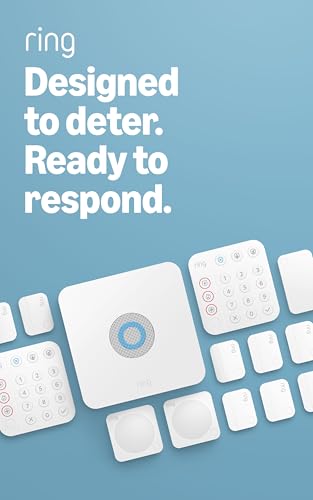
Ring built this for a 2-4 bedroom home, and the box shows it: one Base Station, two Keypads, eight Contact Sensors, two Motion Detectors, and one Range Extender. That is eight doors or windows watched plus two rooms of motion coverage, which is more than most renters need and exactly the count you want when your landlord will not let you add locks. Nothing is wired. The sensors press onto frames, the base sits wherever an outlet is free, and when your lease ends you peel and pack.
What wins people over is the build quality — it holds up as the most-praised thing about this kit by a wide margin, ahead of how easy it is to set up. Owners who move over from a wired system describe the switch as painless, and the cellular backup keeps the alarm alive during an outage for 20+ hours when you add a Ring Protect plan. The app arms and disarms remotely, schedules itself around your work week, and lets you tune each sensor separately so a bedroom window and a front door can behave differently. Alexa owners can arm and disarm by voice once that subscription is active.
Reliability is the biggest complaint in owner feedback, and it splits buyers. Most say the system connects smoothly through the app, but a smaller share report connection dropouts and the occasional false alarm. One recurring gripe: the keypads do not glow red to show the system is armed, which is how a few people ended up tripping their own alarm. A handful of owners also mention that contact sensors protrude on entry doors, so a door with tight trim may need a thin shim to close against the sensor cleanly. For the crowd behind the 4.6-star rating, these are quirks, not dealbreakers: the kit does the job, and it scales whenever you want to add sensors sold separately.
Where it earns first place
- Covers a 2-4 bedroom rental from the start: 8 contact sensors, 2 motion detectors, 2 keypads, 1 range extender
- Cellular backup runs the alarm for 20+ hours during an outage with a Ring Protect plan
- No drilling, no wiring — sensors stick on and come off clean at move-out
- Voice arming and disarming through Alexa, plus per-device settings in the Ring app
Where it asks for patience
- A slice of buyers report connection dropouts and occasional false alarms
- Keypads do not light up to confirm an armed state, which trips up some households
- Contact sensors sit proud on entry doors and may need shimming against tight trim
Pick this if: you have a 2-4 bedroom rental with several entry points and want one box that covers them all.
Think twice if: your entry doors have very tight trim, or you want a keypad that visibly confirms it is armed.
2. Abode 4 Piece Wireless Smart Security System
Four pieces, one hub, and the widest smart-home reach of any kit here
If your rental already runs on smart plugs and voice commands, Abode’s gateway is the piece that ties it together. The 4-piece kit ships with a central hub that carries a built-in 93dB siren and a backup battery, plus a motion sensor, a key fob, and a mini door/window sensor. Those four pieces cover your front door and living room on day one. The hub itself is a Z-Wave and Zigbee controller — two wireless languages smart locks, lights, and sensors speak — so the same box that watches your door can also run a smart lock.
You can control this alarm from the same app you already use for your lights and thermostat, and that cross-brand flexibility is the real reason to step up here. Functionality leads the feedback by a clear margin, ahead of easy setup. Abode works with Alexa, Google Assistant, and Siri, and it is certified for Works with Apple HomeKit, so you can watch and control the alarm straight from the iOS Home app. Self-monitoring is free, so nothing is billed unless you deliberately add professional monitoring, and owners prize the ability to call in 24/7 dispatch only when they need it. Setup runs about 20 minutes for a full starter system, and the app lets you build automation rules far beyond a basic arm/disarm schedule.
Four pieces covers a front door and one room, so you will need to buy additional Abode sensors to cover the rest of a two-bedroom apartment. Reliability also draws mixed notes — most say it performs well, though a share of owners find it does not always behave as expected, and geofencing (auto-arm based on your phone’s location) is the most frequently called-out weak spot. Budget for expansion sensors up front and this kit stops being a starter and starts being a platform.
What four pieces really covers: one door and one room, watched by a hub with a 93dB siren and a standby battery — enough for a studio, thin for a two-bedroom until you add sensors.
The automation upside: the same hub runs Z-Wave and Zigbee locks, lights, and sensors, and it is certified for Apple HomeKit, so your security and smart-home gear share one brain.
The right call for: Apple HomeKit households and serial tinkerers who want one hub running locks, lights, and alarms.
Less ideal for: anyone who needs whole-apartment coverage out of one box — this kit expects you to buy more sensors.
3. SimpliSafe 11 Piece Wireless Home Security System Gen 3
The kit that watches six doors, two rooms, and still belongs to you at move-out
SimpliSafe’s Gen 3 kit arrives ready to work: a Base Station, a Keypad, six Entry Sensors, two Motion Sensors, and one indoor wireless camera. Six entry sensors is serious door-and-window coverage for a rental, and the motion sensors each watch a 35-foot zone with a 90-degree field of view — enough to blanket a living room from one corner. They also tolerate pets under 60lbs, which matters if you rent with a dog.
The reason owners gravitate here is simple: you own the hardware outright. There is no equipment rental and no contract, so you keep the kit and take it with you when the lease ends. Value leads the owner feedback, with security close behind. The wireless keypad has backlit buttons that light up when you approach and go dark when you do not — a small detail that helps a dark hallway at 2 a.m. Add a plan and the Smart Alarm camera lets monitoring agents see and speak to an intruder through two-way audio, and the system arms by voice through Google Assistant or Alexa.
Two honest notes before you commit. The system leans on your Wi-Fi, and a share of owners hit unsuccessful connections or motion sensors that drop offline and need a physical reset — the recurring advice is that it works better with a strong signal near the base, and some add a siren and hide the base to protect against a smash-and-grab. And if you want the camera’s live features and video, that lives behind a paid plan. Reliability is genuinely mixed in owner notes, but SimpliSafe’s value-per-piece and zero contract keep most buyers happy, and adding extra panels or sensors later is straightforward.
The case for it
- Six entry sensors, two motion sensors, and a camera in one box — some of the widest door coverage in this group
- You own the equipment: no contract, no hardware rental, take it to your next place
- Motion sensors cover a 35-foot zone at a 90-degree view and tolerate pets under 60lbs
- Backlit keypad buttons go dark when idle, and voice arming works with Alexa or Google Assistant
Worth knowing
- Runs on your Wi-Fi, and some owners mention motion sensors going offline and needing a reset
- Live camera features and video sit behind a paid plan
- Door and window sensors have limited range to the base, so signal placement matters
Best fit: renters who want to own their gear and cover six entry points, especially in a two-bedroom or a place with a garage and shed to watch.
Not the pick if: you need bulletproof Wi-Fi-free reliability with no resets, or you refuse to pay for camera features.
4. Arlo Home Security System SS1501

One hub that listens for smoke alarms, watches for motion, and arms with a tap
Arlo’s SS1501 packs an unusual amount of hardware into five sensors and one keypad hub. The Keypad Sensor Hub is a 6-in-1 device: it arms to away, home, or standby, carries its own siren and motion detection, listens for smoke and CO alarms, and offers one-tap emergency buttons for fire, police, or medical response. Each of the five All-In-One Sensors wears 8 sensing functions in one unit — motion, door alarm, and more — so a single sensor can stand in for hardware that would otherwise be several pieces. Sensors stick on with adhesive backing; the hub mounts on the wall with screws or sits plugged in, and an Ethernet cable ties it to your router.
What people like best is the security performance — the actual job of detecting and alerting ranks above everything else in owner feedback. Owners pair the alarm with Arlo cameras for camera-plus-alarm coverage, and those who also run Arlo cams praise the picture quality and how footage saves with a subscription. Battery life is a bright spot for the wireless gear, holding up for a couple of months between charges unless a sensor triggers constantly. The SecureLink radio extends range and stretches battery life for paired devices, so a back bedroom sensor stays in touch with the hub.
Setup is genuinely split, and this is where the system earns its spiky reputation. The process is app-driven, and while plenty of owners call it super simple, a real share describe it as extremely painful — the review pages sum it up bluntly: “Not boomer friendly.” If you skip a step or improvise, you can fight the pairing for an hour. Connectivity draws mixed notes too, with some owners reporting sensors that fail to connect to Wi-Fi, and the loudest caution is a well-documented one: installing the Arlo upgrade can rewrite your account and disable older Arlo automation you already rely on. If you follow the steps in order and are not carrying legacy Arlo gear, the upside is a compact system with camera coverage no pure sensor kit matches.
What you get in the box: five 8-in-1 sensors plus a 6-in-1 keypad hub that also listens for smoke and CO alarms and takes one-tap emergency calls.
The smartphone-app reality: everything runs through the Arlo Secure app, and following each step in order is the difference between a ten-minute setup and a frustrating afternoon.
Reach for this if: you already own or plan to add Arlo cameras and want sensing, smoke listening, and emergency buttons in one tidy hub.
Look elsewhere if: you run older Arlo automation you cannot risk losing, or you want a setup that never argues back.
5. OSI Alarm System Gen 2 (4G), 11pc

A 7-inch touchscreen panel that runs the whole system without a single monthly fee
Most kits here hand you a phone app and call it a day. OSI’s Gen 2 leads with a 7-inch control panel carrying a 1024 x 600px touchscreen — a real display you mount on a counter or wall. Inside the box you get the panel, two motion sensors, five contact sensors, a wireless strobe siren, and two remote controllers. It stays online through 4G as well as Wi-Fi, and a 24-hour backup battery keeps the alarm running through a power cut, so a dead router does not take your security with it.
The free path is the star for renters: self-monitoring with no monthly fees sends instant app alerts the moment a sensor trips or power drops. If you want a human watching, 24/7 professional monitoring is available with emergency dispatch, SMS notification, and phone-call confirmation, and there is no long-term contract to trap you. Setup runs through a step-by-step wizard, and multiple user levels — one administrator plus five limited user accounts — let you give a roommate or a short-term guest arm-and-disarm access without handing over the keys to every setting. Owners rate quality highest, with easy setup right behind it, which tracks with a system this size and a panel this capable.
Two things to plan around. The panel grows to as many as 160 sensors, but it only supports its own ecosystem — you will not bolt on your neighbor’s brand of sensor. And the wireless siren is a plug-in unit, so it needs a free outlet near where you want the noise, and it has been described as the cheapest-feeling piece in the kit. Durability over many years is simply unproven, since this generation is newer. If you want a screen-based system you own outright and no subscription ever, though, this is the one to beat in this group.
Why it stands out
- 7-inch 1024 x 600px touch panel runs the whole system without needing your phone
- Free self-monitoring with instant app alerts — zero monthly fees, no SIM needed
- 24-hour backup battery and 4G connectivity keep it working through a power or Wi-Fi outage
- One admin plus five limited user accounts suit roommates and short-term guests
Plan around this
- Only works with OSI’s own sensors — no mixing in other brands
- The plug-in wireless siren needs a free outlet and feels like the lightest-built piece in the kit
- Long-term durability is untested because this generation is new
The pick for you if: you want a screen-driven system you own outright and refuse to pay a monthly fee ever.
Skip only if: you insist on mixing other brands’ sensors into one hub.
6. ADT Blu Home Security System Starter Kit
A well-known monitoring name in a small, renter-friendly starter box that wants a plan
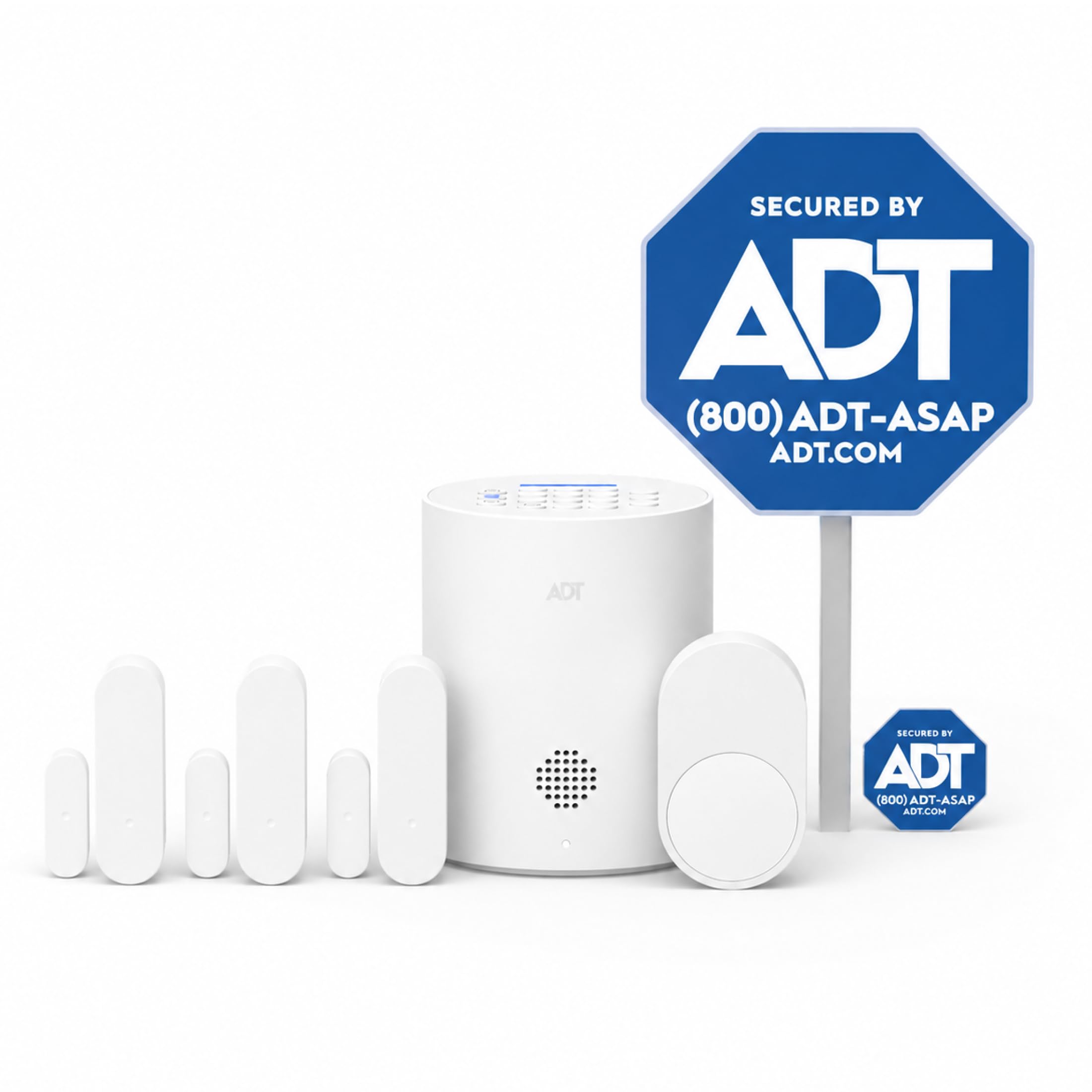
ADT Blu’s starter kit is the smallest package here — one base hub, three door/window sensors, one pet-friendly motion sensor, a yard sign, and four window stickers. Four sensors is a true starter setup, best suited to an apartment or a studio where the front door and a couple of windows are your main concerns. The base pairs with the ADT+ app for real-time phone alerts, and the system is built to scale: you can add indoor, outdoor, and doorbell cameras, glass-break sensors, and more as you go. The kit itself mounts with adhesive tape or optional screws and takes about 30 minutes to set up the base plus sensors.
The reason to pick ADT over the self-monitoring crowd is the monitoring itself. The purchase includes a 30-day window of free monitoring, and then it is month-to-month through Self-Protect or Pro-Protect plans — Pro-Protect brings 24/7 professional watching with dispatch, and it explicitly says no long-term contracts. For renters who want a real call center backing the alarm without signing a lease-length agreement, that structure fits. It is also designed for people who are not tech-savvy: the intent is no professional installer, and setup leans on guided steps in the ADT+ app.
Two friction points show up in owner feedback. First, getting started can go sideways: a share of owners ran into activation trouble — an app that would not issue a verification code and, for at least one long-time ADT customer, an account setup failure that ended in a return. Second, the hardware is fussy about tight doors: the door sensors want roughly a half-inch gap to close cleanly, which some standard doors do not give you. And the base is tied to the email account used at purchase, so it is not something you can hand off easily to a roommate or resell later. There is also a note that the siren begins a beat or two after a door opens rather than instantly. Get the activation through and set up the gap correctly, though, and this is the simplest route to professional monitoring a renter can buy.
The monitoring advantage: a genuine 24/7 professional option with dispatch, offered month-to-month with no long-term contract and 30 days free to start.
The setup tax: activation can require a support call, and door sensors need about a half-inch of gap to close — measure your trim before you buy.
Worth it if: you want a recognized monitoring service behind your alarm without a long contract, and a small apartment to cover.
May frustrate you if: you dislike app-based activation or your doors do not offer the sensor gap it needs.
7. 15-Piece WiFi Home Security System, DIY Wireless Alarm Kit

Ten door sensors, a keypad, and a 120dB siren — for renters with lots of doors to watch
The tolviviov 15-piece kit leans hard into coverage: one Wi-Fi base station, one keypad, ten door sensors, one motion sensor, and two remote controls. Ten door sensors is the most door/window hardware in this whole group, which is exactly what you want in a rental with a front door, a back door, a garage entry, and a stack of windows to keep an eye on. All of it mounts with the included adhesive strips or mounting hardware — no drilling — and the base plugs in near your Wi-Fi.
Owners find this one easy to live with. It connects to smart-home apps, arms and disarms from the app, the keypad, or the remotes, and Alexa voice control is on board. The 120dB siren is genuinely loud — owners note it can be heard from outside, which is the point of a siren. No monthly fee applies, and the base can take as many as 20 sensors and 5 remotes or keypads if you want to grow it. Setup typically takes under an hour for the whole kit, and a backup battery keeps it alert during an outage. This is one of the higher-rated kits here, so the crowd who owns it is broadly satisfied.
Two practical realities come with a kit this cheap. It only works on a 2.4GHz Wi-Fi network — if your router is running 5GHz, you will need to switch bands or add a plug-in extender to get it online. And the contact sensors have a little play in them and are not flush-mount, so on a door with thick trim you may need a shim to get them to line up. Neither is unusual at this price; both just mean you should check your router band and doorframes before you buy.
Most doors per box: ten door sensors, a motion sensor, a keypad, and two remotes make this the widest entry-point coverage in the group.
One network caveat: it needs a 2.4GHz Wi-Fi network, so a 5GHz-only router will need an extender before the hub will connect.
Best for: renters with many doors and windows who want the most sensors without paying a subscription.
Heads up: your Wi-Fi needs to broadcast 2.4GHz, and thick door trim may require a small shim.
8. Wireless Home Alarm System 15-Piece Kit

Two keypads, two remotes, and a 120dB siren for households with two people coming and going
Here is a kit built for a shared front door. The GRSICO 15-piece set gives you a base station, two keypads, two remote controls, two motion sensors, and eight contact sensors — so two roommates can each carry their own fob and punch in at their own keypad without swapping. Eight contact sensors and two motion sensors are solid coverage for an apartment or small house, and everything dies of a self-adhesive mounting, so nothing goes into the wall. The 120dB siren is loud enough to matter, and alerts route through the free Smart Life app for arming, disarming, and remote control from anywhere with no monthly fee.
What buyers mention most is the functionality — the sheer amount of arming and sensor management the base handles. The free app is the standout: it works well, lets you arm and disarm from your phone, and toggles notifications to your taste. You get two fobs and two keypads in the box, which is a genuinely useful count for a rental with a partner or a roommate. If you want more, extra sensors, remotes, and motion sensors are available, and the setup runs over Bluetooth plus the Smart Life app.
The honest caveats matter here, because this is the lower-rated kit in the group and the notes are worth reading. Connectivity is the recurring complaint: the base expects 2.4GHz Wi-Fi and some owners could not get it to link to Alexa at all. A few report quirks like the system flipping between home and away on its own or alarming right after being set. And a brand-specific catch — GRSICO’s own extra fobs are not sold separately, though Tolviviov remotes are compatible if you hunt them down. If you want a budget kit with two keypads and accept a little Wi-Fi fiddling, the functionality-per-piece is strong; if reliability is your top priority, look at the higher-rated picks instead.
Built for two arming routines: two keypads, two remotes, and eight contact sensors cover a shared entry without anyone trading fobs.
The fine print: it wants 2.4GHz Wi-Fi, some customers note Alexa pairing trouble, and extra GRSICO fobs are not sold on their own.
Choose it if: you share a rental and want each person to have their own keypad and fob on a budget.
Pass if: you need guaranteed Alexa integration or the highest reliability, since this is the trickier kit to connect.
9. Home Security Systems for House, 16-Piece Alarm System
The small-bodied starter that puts a door alert on your phone in minutes
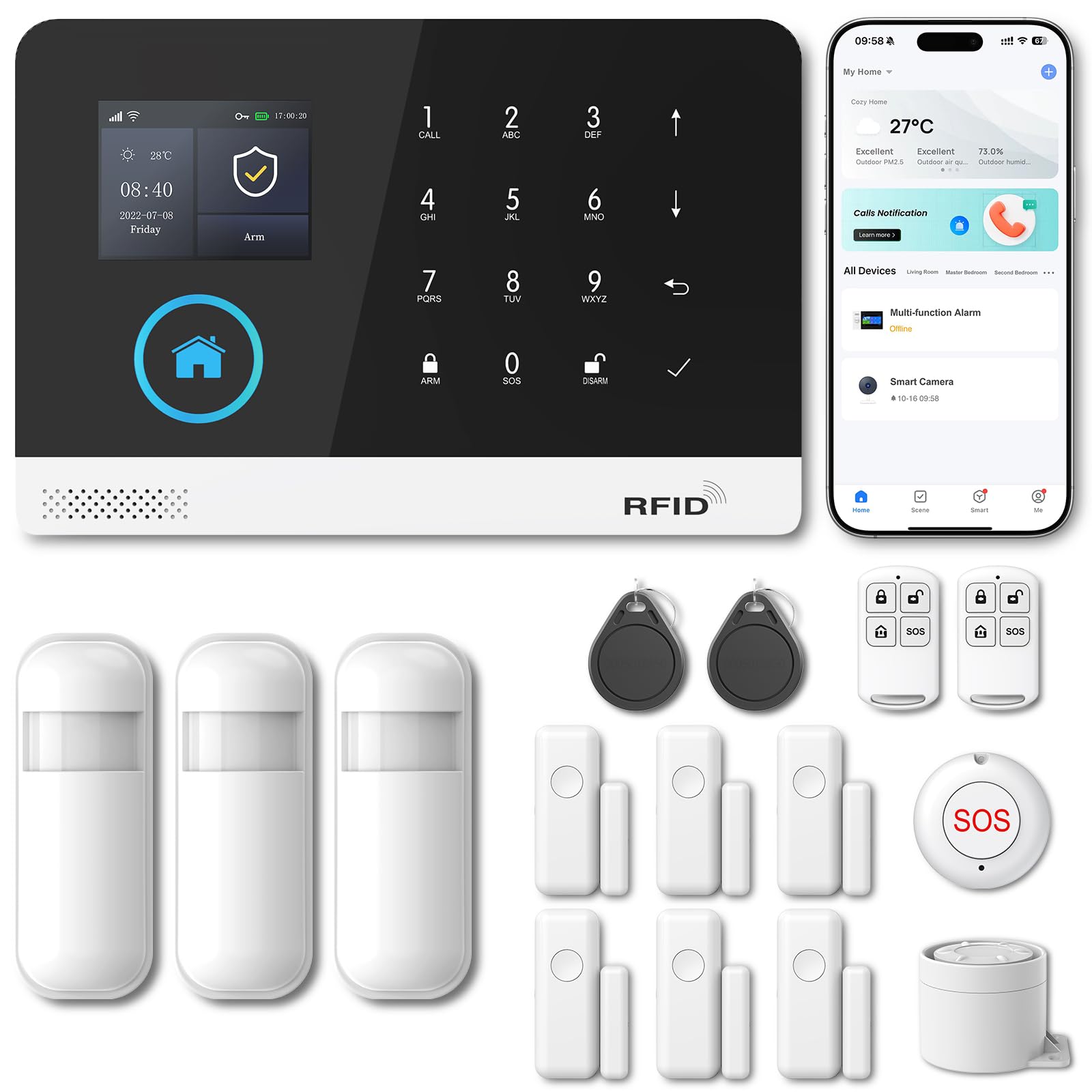
This PGST kit is the lightest-footed pick here, and for a lot of renters that is the whole point. The host unit is a compact box — it measures 3.9 x 3.1 x 2.3 inches, so it tucks onto a shelf or a counter and disappears, and it weighs 0.7 kg. Down the comparison table, that footprint sits well below the bulkier GRSICO fifteen-piece base, which measures 10 x 7 x 4 inches. If you are short on counter space in a small apartment, that size difference is not cosmetic.
The system itself punches above its size. It connects over Wi-Fi and 4G GSM, so it can keep reporting even when your internet is out, and there are no monthly fees or contracts. You get remote control through the Smart Life or Tuya app — arm, disarm, and monitor from your phone, on either Android or iOS. Alerts arrive as app push, SMS, or voice call, and the internal alarm sounds up to 120dB. It stores as many as 100 wireless accessories, so you can add motion detectors, remotes, outdoor sirens, and door sensors as you expand. It also presets five phone numbers for SMS and voice alerts, and lets you rename twelve alarm types — so you can tell your main door from your hall at a glance. Setup is the part owners talk about with enthusiasm: the door sensor connects straight to your phone’s Wi-Fi and starts notifying you the moment a door opens. It is discreet once installed, and it makes a clean child-safety or single-door alert.
The realistic expectation with this one is scope. This is a starter system, not a whole-apartment blanket — the feedback centers on the door sensor and its alerts, so come in expecting to expand with more PGST sensors if you want to watch every window. The app lives entirely in the Smart Life or Tuya ecosystem, and the host is the only piece that talks to those accessories. For a renter who just wants to know when the front door opens — for security or for a kid who slips out — the simplicity, the compact host, and the no-fee alerting are exactly the point.
Size that fits small rentals: a 3.9 x 3.1 x 2.3-inch host at 0.7 kg hides on a shelf, well under the bulkier kits here.
What owners praise: the door sensor connects right to your phone over Wi-Fi and fires an instant alert the moment a door opens — simple, discreet, and effective.
Ideal for: a studio or small apartment, or anyone who wants an instant door alert with no fees and minimal hardware.
Scale up if: you need whole-apartment coverage — this is a starter that grows only with PGST accessories.
Understanding the Specs
Pieces And Sensor Counts
Piece count tells you what a kit covers, not how well it works. A “15-piece” kit usually means a base station, keypads, remotes, and a mix of door and motion sensors. The count that matters most is how many contact sensors are inside — those are the door and window sensors. Eight to ten contact sensors will cover a two-bedroom apartment, while a four-piece kit is a single-door and one-room starter. Count your doors and reachable windows, then match the contact-sensor count to them.
Siren Loudness (dB)
The siren is measured in decibels, written dB, which is just a way of scoring how loud a sound is. A higher dB is a louder alarm. The kits here range from a 93dB built-in hub siren up to alarms rated at 120dB — loud enough to be heard from outside the home, per owner notes. A loud siren deters an intruder and draws a neighbor; pair it with phone alerts so you know what is happening while you are away.
Wi-Fi Band And Cellular Backup
Most renter alarms connect over Wi-Fi, and specifically the 2.4GHz band — the slower network your router broadcasts that reaches further than 5GHz. If your hub cannot find your Wi-Fi, the fix is usually switching bands or adding a plug-in range extender. A system with cellular backup uses a mobile network as a second path, so the alarm keeps reporting during an internet or power outage. If your internet drops often, cellular backup is the feature worth paying for.
Monitoring And Contracts
Self-monitoring means the system alerts your phone and you respond — no fee. Professional monitoring means a call center watches for you and can dispatch police, fire, or medical help. Look at the contract, not just the monthly charge: some plans lock you in for a year, while the renter-friendly ones are month-to-month with cancellation anytime. Several systems in this group self-monitor for free and treat paid monitoring as an optional switch you can flip on or off.
FAQ
Can I install a home alarm system in a rental without drilling holes?
Will a wireless alarm work if my landlord does not allow any modifications?
Do renter alarm systems require a monthly fee?
Will an alarm system work with 5GHz Wi-Fi or only 2.4GHz?
How many sensors do I need for a two-bedroom apartment?
Can I take my alarm system with me when I move to a new rental?
What is the difference between self-monitoring and professional monitoring?
Do these systems still work during a power or internet outage?
Why do some of these alarms need a hub and others connect straight to Wi-Fi?
Will a pet set off the motion sensors in a rental?
Is a bigger kit with more sensors always the better buy for a renter?
Final Thoughts: The Verdict
For most renters, the alarm systems for renters winner is the Ring Alarm 14-Piece Kit because it covers a 2-4 bedroom rental with eight contact sensors and two motion detectors, needs no drilling, and keeps working through an outage with cellular backup. If you want to own your hardware outright with no contract and watch six entry points, grab the SimpliSafe 11 Piece Gen 3. And for a screen-based system you self-monitor with zero monthly fees, the OSI Alarm System Gen 2 is the one to reach for.
Every kit here peels off cleanly at move-out, so the choice is really about how many doors you need to watch and if you want a call center behind the alarm. Match the sensor count to your entry points, confirm your Wi-Fi runs on 2.4GHz, and you can protect a rental without ever touching your security deposit.
How We Picked
We do not accept paid placement. Every pick is matched to a real buyer and a real use-case; we do not hands-on test units.
Sources & Methodology
Specifications: manufacturer listings and product documentation. Review insights: verified customer reviews, as of September 2026. Pricing: not shown on this page (it changes often); check the current price via the retailer link.
As an Amazon Associate, Gadgets Feed earns from qualifying purchases. This does not affect which products we feature.