
Our readers keep the lights on and my morning glass full of iced black tea. As an Amazon Associate, I earn from qualifying purchases.
Specs are compiled from manufacturer listings and verified buyer reviews and can change over time — please confirm the key details on the product page before buying.
If you want a laptop that folds flat into a tablet and actually comes with a working pen, the trick is knowing which sub-$500 machines include one in the box and which just claim to support one. Cheap 2-in-1s fail in predictable ways: the hinge loosens, the stylus is a passive plastic stick, or the screen dims under bright light. This guide cuts through that by comparing what each machine physically ships with, so you know exactly what lands on your doorstep.
I’m Min — the founder and writer behind Gadgets Feed. This guide is built by comparing the manufacturers’ published specifications and the patterns across verified customer reviews, so you get each pick’s real strengths and trade-offs instead of marketing spin.
A 360-degree hinge and a bundled active stylus matter far more than raw benchmark numbers at this end of the market, because the pen is what turns a cheap laptop into a note-taking and drawing machine. That single hardware question — does the pen come in the box — separates the genuinely useful options from the ones that quietly expect you to buy a stylus separately, which is why every pick here was vetted for the best 2-in-1 laptop under $500 with pen.
Our Picks at a Glance

How To Choose The Best 2-In-1 Laptop Under $500 With Pen
The deciding factor on a budget convertible is not the processor badge on the lid. It is whether the screen responds to a real stylus and whether the hinge survives being flipped hundreds of times. Get those two right and the rest is comfort.
Confirm the pen is included, not “compatible”
A listed laptop can technically support a stylus while shipping without one, which leaves you hunting for a matching pen that may cost extra or not exist. Check the box contents line specifically. If the listing names a stylus, a pen, or a specific brand pen in “Built-In Media” or the accessory list, you are covered on day one. A passive capacitive stylus that comes free is fine for tapping and swiping but usually cannot do pressure-sensitive drawing, so if art is the goal, look for a pressure-level figure or a named active pen.
Watch the hinge action, not just the hinge angle
A 360-degree hinge means the screen folds all the way around to the back. That gives you laptop mode for typing, tent and stand modes for watching, and tablet mode for pen work. What matters in daily use is stiffness — a hinge that holds its position lets you draw on a slightly propped screen, while a loose one flops when you press on it.
Match the screen and storage to the job
A 1920 x 1200 panel shows sharper text and more vertical rows than a 1366 x 768 one, which you feel immediately when reading documents or scrolling. On storage, eMMC is slower than an SSD but fine for web and documents, while an SSD boots and opens apps noticeably quicker. More RAM helps when you keep many browser tabs open at once.
Quick Comparison
| Model | Best For | Display | Processor Speed | Battery Life | Amazon |
|---|---|---|---|---|---|
| Samsung Chromebook Plus V2 360★ Best Overall | Students and everyday pen work | 12.2″ FHD+ (1920 x 1200) touch | 1.5 GHz | 10 hours | Amazon |
| HP Chromebook x360 14″Best Performer | Multitasking and homeschool | 14″ FHD IPS touch | 3.8 GHz | 12 hours | Amazon |
| Samsung 12.2″ FHD 2-in-1 Chromebook Plus | Beginners and bundle seekers | 12.2″ FHD (1920 x 1200) touch | 1.5 GHz | — | Amazon |
| Acer Spin 311-2H | Education and casual home use | 11.6″ HD (1366 x 768) IPS touch | 2.6 GHz | 13 hours | Amazon |
| KOOFORWAY 8″ Mini Laptop | Travel and on-the-go pen work | 8″ HD (1280 x 800) touch | 3.4 GHz | 5 hours | Amazon |
In‑Depth Reviews
1. Samsung Chromebook Plus V2 360, 12.2″ 2-in-1 Laptop
Our pick — over 4★ from 2,000+ verified ratings; the strongest balance of quality and price.
The pen-first convertible that folds all four ways and still hands you a stylus in the box.
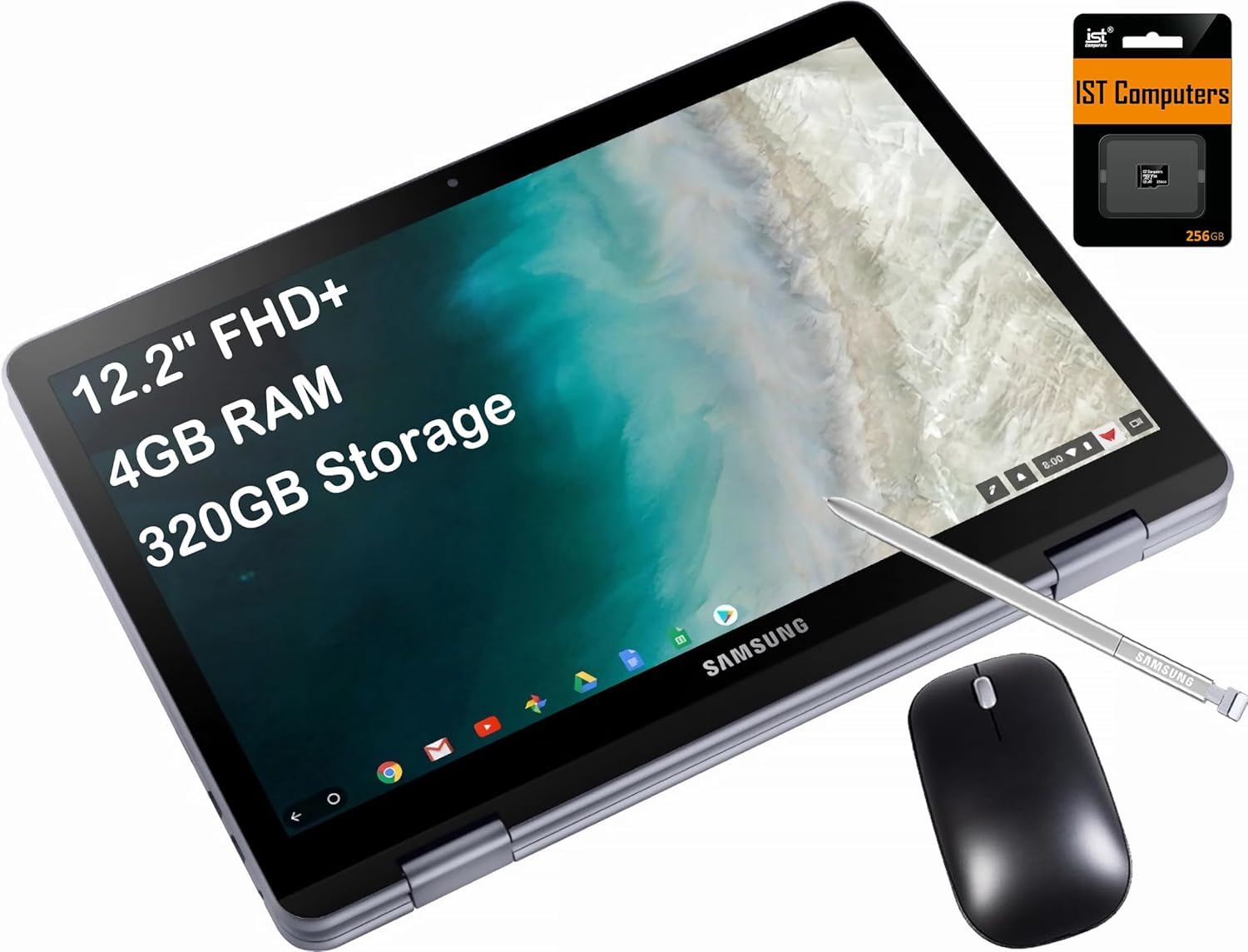
For students and anyone who takes notes by hand, this is the pick that gets the pen question right from the start. Samsung includes its own stylus with the machine, so you are not chasing a compatible pen after the fact. The screen is a 12.2-inch FHD+ panel at 1920 x 1200, which is sharper than the 1366 x 768 display on the Acer Spin 311-2H. Vertical space matters here: the 16:10 shape shows more rows of a document before you scroll. The full-metal body gives the frame a solid feel, and the 360-degree hinge lets you go laptop, yoga, flip, or tablet without any wobble in the mechanism.
The battery is rated at 10 hours, and the listing pairs a 30W USB Type-C power adapter with the machine for refills. Compared with the HP Chromebook x360’s 12-hour rating, the Samsung gives up some endurance, but it also runs a lower-power Intel Celeron 3965Y at 1.5 GHz against the HP’s 3.8 GHz. That speed gap is real for heavy multitasking. Where the Samsung shines is the writing experience — the stylus tracks accurately with solid palm rejection, which is exactly what you want when your hand rests on the screen while marking up a page. Storage splits into 64GB of eMMC plus a bundled 128GB SD card for 320GB total, which is more room than the 224GB on the other Samsung 12.2-inch model in this list.
The fuller picture is a machine that nails the physical basics and asks you to accept a modest engine. Setup is quick, the touchscreen is responsive, and the 13 MPix camera on the keyboard deck is an unusual extra. Reviewers single out the stylus tracking and palm rejection for handwritten notes on the 1920 x 1200 screen. The honest catch is longevity: the platform is a dual-core chip with 4GB of memory, so it feels its age against newer hardware, especially in apps that have grown heavier. Buyers report the metal body holds up for years, but the 1.5 GHz Celeron and 4GB of RAM feel slower as Chrome OS updates arrive.
What holds up
- Samsung Stylus ships in the box with a 12.2-inch 1920 x 1200 touch display
- 360-degree hinge flips to laptop, yoga, flip, or tablet with no wobble
- 320GB total storage (64GB eMMC + 128GB SD card) — more than the 224GB on the other Samsung 12.2
- Full-metal body and a 13 MPix rear camera on the keyboard deck
Where it asks patience
- Celeron 3965Y at 1.5 GHz and 4GB RAM feel slow in heavier apps
- 10-hour rating sits below the HP Chromebook x360’s 12 hours
- The plastic bottom panel scratches and the down-firing speakers sound muffled
- Steam gaming is a non-starter on this hardware
Built for: students and everyday note-takers who want a bundled active stylus, a sharp 1920 x 1200 screen, and a firm 360 hinge in one machine.
Look elsewhere if: you need raw speed for gaming or heavy desktop apps — the dual-core Celeron and 4GB of memory cap how far this goes.
2. HP Chromebook x360 14″ Touchscreen 2-in-1
An 8-core engine in a flip laptop that quietly out-runs every other pen machine here.
If you keep a dozen Chrome tabs open while a video plays in the corner, this is the one built to absorb that. The headline is the processor: an 8-core Intel N305 rated up to 3.8 GHz, paired with 8GB of RAM. Against the Samsung Chromebook Plus V2 360’s 1.5 GHz Celeron, the clock speed runs more than twice as high, which is the clearest performance gap in this whole list. It also carries twice the memory of that Samsung’s 4GB. The result is a machine that multitasks without the stutter you feel on dual-core budget convertibles. Storage is a 256GB SSD, the largest in this comparison, and it boots and opens apps faster than the eMMC drives elsewhere on this page.
The pen is included, so the stylus requirement is handled from the start. The screen is a 14-inch FHD IPS touch panel that presents color and detail cleanly, and the 2-in-1 hinge gives you laptop, tablet, tent and stand modes. Families running online courses tend to like this one for the flip flexibility: it props into a stand for video class and folds into a tablet for reading. The 12-hour battery rating is the longest here apart from the Acer’s 13 hours, and it tops the Samsung’s 10 hours. Wi-Fi 6E and Bluetooth 5.3 give you newer wireless standards than the Wi-Fi 5 and Bluetooth 4.0 on the Samsung. A backlit keyboard, an FHD webcam with a privacy shutter, and Bang & Olufsen dual stereo speakers round out a package that feels a step above its budget price.
Chrome OS sets the ceiling here. Owners mention that it runs the apps you do use well and charges quickly, and the flip screen and touch control are the parts they enjoy most. But the Google Play environment limits what installs cleanly, so if your workflow lives inside desktop Microsoft Office or a niche Windows program, this is not the machine for you. The other thing to weigh: the pen is a passive stylus, which is great for tapping, selecting and casual sketching, but not for pressure-sensitive illustration. As a fast, flexible, pen-equipped daily driver for the web, it leads the field.
The speed story: the N305 at 3.8 GHz and 8GB of RAM is the quickest combination among these five, and the 256GB SSD means you feel that speed at startup too.
The trade to know: Chrome OS restricts the software you can install, and the bundled pen is passive rather than pressure-sensitive — fine for notes and navigation, not for serious digital art.
Reach for this if: you want the fastest, most versatile flip laptop in the round-up and you live in a browser, cloud apps, and video meetings.
Step past it if: your work depends on full desktop Office or Windows-only programs — Chrome OS will get in the way.
3. Samsung 12.2″ FHD 2-in-1 Chromebook Plus for Business & Students

The starter kit that arrives with a pen, a mouse, and a docking station already in the carton.
Newcomers to convertible laptops get the most complete box here. Alongside the laptop you get a stylus pen, a wireless mouse, a 7-in-1 docking station with a 128GB SSD, and a 32GB microSD card with an adapter. The storage math lands at 224GB total, split between 64GB of eMMC and the docking station’s SSD. Compare that with the 320GB on the Samsung Chromebook Plus V2 360 above, which pairs 64GB of eMMC with a 128GB SD card — the V2 360 carries more total room, while this bundle spreads its capacity across a dock that stays on your desk instead of living inside the machine.
The chassis is light at 2.98 lbs, and the 360-degree hinge flips the 12.2-inch FHD touchscreen from laptop to tablet without tools. That screen runs at 1920 x 1200, the same sharp resolution as the other Samsung convertible, so web pages and documents read crisply. It is powered by an Intel Celeron 3965Y at 1.5 GHz with 4GB of LPDDR3 memory, the same modest engine as the V2 360. Ports cover 1x USB 3.0, 2x USB-C, a MicroSD reader and a headset jack, and the included Type-C data cable and 3-in-1 charging cable mean you can wire up the dock right away.
Who this suits best is the first-time buyer who wants everything at once and mostly browses, takes notes and joins online meetings. A 720p front camera handles video calls, and the Intel HD Graphics keep everyday content looking clean. The honest limit is horsepower: with a 1.5 GHz dual-core chip and 4GB of RAM, heavy programs drag, and the accounts of sluggishness on ambitious tasks are worth heeding if you push it. Treat it as a web-and-notes machine that arrives with a stylus, mouse and SSD dock in the box.
Suits you when: you want a single purchase that includes the stylus, mouse, and an SSD-equipped dock without buying each separately.
Think twice if: you expect desktop-class speed — the 1.5 GHz Celeron and 4GB of memory set a modest ceiling.
4. Acer Spin 311-2H 11.6″ 2-in-1 Touchscreen Chromebook

The classroom workhorse with the longest battery in the group and a stylus in the sleeve.
For a child’s first flip laptop or a college machine that just needs to keep working, the Acer Spin 311-2H is the pragmatic bet. It runs an Intel 4-core Celeron N4000 listed at up to 2.6 GHz, with 4GB of LPDDR4X memory and 64GB of eMMC storage. The battery rating reaches 13 hours, the longest of the five, ahead of the HP’s 12 and the Samsung V2 360’s 10. A capacitive stylus is included and its slim aluminum body is built to live in a bag without bending, and the attached pen works on most capacitive touchscreens, so a spare stylus from around the house will also function.
The display is an 11.6-inch HD IPS touchscreen at 1366 x 768. That is the lower-resolution panel in this round-up: the two Samsung machines both run 1920 x 1200. So the Acer trades sharpness for a smaller, tougher package and longer runtime. The 360 hinge delivers the same laptop, tent, stand and tablet modes as the rest, and the fanless design stays silent while you work. Ports include one USB Type-C that also carries power and display output, one USB 2.0, a headphone jack and a Kensington lock slot for tethering it to a desk.
The 11.6-inch touchscreen responds well to small fingers, and the aluminum lid survives backpack knocks. Customers note it handles homework, streaming and video class without stutter, and at 2.98 lbs it slips into a school bag. The recurring gripes are worth knowing: the screen can occasionally go black mid-use, a quirk seen across Chromebooks that has a known fix, and there are accounts of the included stylus being flaky, so a pen-dependent artist should test it early. For typing, reading and browsing, it holds its ground.
Where it wins: a 13-hour battery, a fanless silent build, and a bundled aluminum stylus make this the best pick for students and shared family machines that need to survive a school year.
The caveat: at 1366 x 768 it has the softest screen here, and some reviewers point out the stylus can be unreliable — fine for tapping and notes, less certain for serious pen work.
Pick this for: kids, students and anyone who needs the longest runtime and a pen-equipped flip laptop that takes abuse.
Choose differently if: a crisp high-resolution screen or dependable pressure-sensitive drawing is essential — both are compromises on the Acer.
5. KOOFORWAY 8″ 2-in-1 Mini Laptop
A full Windows PC small enough to hold one-handed, with the most pen sensitivity here.
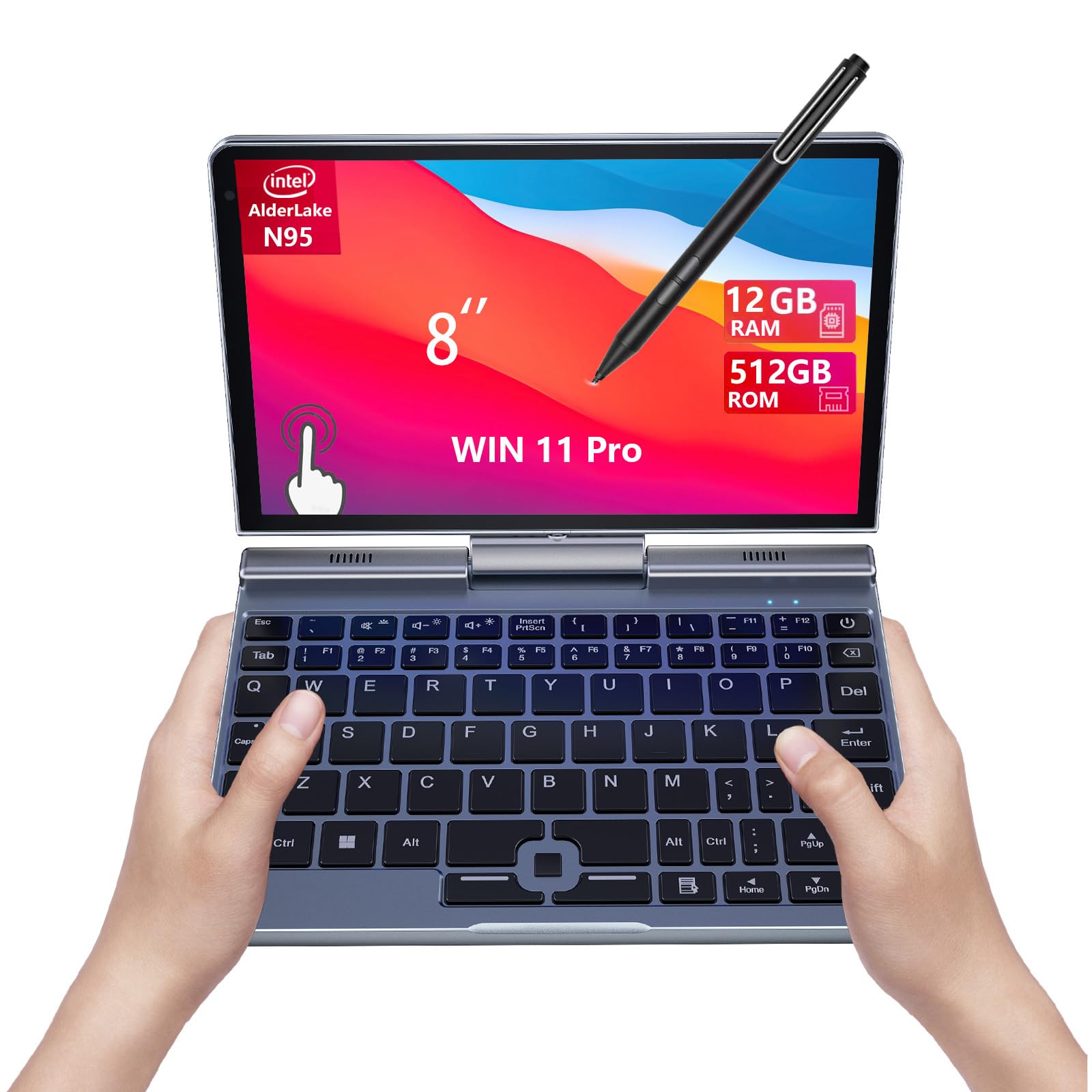
Travelers and field workers who want a real Windows machine in a pocketable shell should look closely at this one. It runs Windows 11 Pro on an Intel Alder Lake-N95 processor up to 3.4 GHz, with 12GB of LPDDR5 memory and a 512GB NVMe SSD — the largest storage and the most RAM in the group, and the only Windows machine among these Chrome OS convertibles. The pen support is the standout: the 8-inch 1280 x 800 screen handles 10-point touch and a 1024-level pressure-sensitive pen, which is the most pressure gradation on this list and the setting that lets strokes vary from light to heavy in a drawing app.
There is no 360 hinge here in the fold-around sense; this is a mini laptop that converts to a Windows tablet once you detach or fold the keyboard, and it is the size of a small paperback. It weighs 0.78 kg, light enough to slip into a jacket or bag and barely notice. Connectivity runs to Wi-Fi 6 and Bluetooth 5.2, the newest wireless standard in this comparison, ahead of the Wi-Fi 5 and Bluetooth 4.0 on the Samsung machines. A 2MP front camera and dual-channel speakers cover calls and audio, and an HDMI output lets you push the picture to an external monitor for a larger workspace. The included stylus ships in the box.
The bundled magnetic stylus handles document signing and quick notes, and the HDMI plus USB ports let you dock a monitor without a dongle. The battery is the compromise: the spec lists 5 hours of battery life, far below the 13 hours on the Acer, so this is a machine for a meeting or a commute, not a full unplugged workday. The other real limitation is the keyboard — the layout is cramped, and typing on it takes adjustment. If you need Windows 11 Pro and 1024-level pen pressure in a 0.78 kg body, nothing else here comes close.
Why it earns a spot
- 1024-level pressure-sensitive pen — the most in the group
- 12GB LPDDR5 RAM and a 512GB NVMe SSD, the largest of the five
- Runs Windows 11 Pro on an Intel N95 up to 3.4 GHz
- Weighs 0.78 kg with Wi-Fi 6 and Bluetooth 5.2
Where it compromises
- 5-hour battery life is the shortest here
- 8-inch 1280 x 800 screen is the smallest and lowest resolution
- Cramped keyboard layout takes real adjustment for typing
- The pointing nub is awkward for gaming or fast navigation
Ideal for: frequent travelers and field professionals who need full Windows, a precise pressure-sensitive pen, and a machine they can carry in one hand.
Not the fit if: you need a big screen and all-day battery — the 8-inch panel and 5-hour runtime make this a companion device, not a primary desk machine.
Understanding the Specs
Active vs passive stylus
An active pen senses how hard you press, so lines vary from faint to bold — this is what makes drawing and handwriting feel natural. A passive capacitive stylus is a simple stick that mimics a fingertip: great for tapping, swiping and selecting, but with no pressure variation. Check which one a listing includes before you buy, because “stylus included” can mean either.
Chrome OS vs Windows
Chrome OS boots fast and stays secure with cloud backups, but it installs apps differently than Windows and runs some desktop programs poorly. Windows 11 Pro installs standard desktop software, which matters if your work depends on specific business applications. The trade-off is that Windows usually needs more storage and memory to run smoothly.
eMMC vs SSD storage
eMMC storage is compact and cheap, and it handles web, email and documents fine. An SSD reads and writes faster, so the machine boots quicker and opens apps sooner. For a budget convertible doing light work, eMMC is adequate; for heavier multitasking, SSD feels noticeably snappier.
Battery ratings explained
A battery-hour figure is a rated estimate and can reflect standby time as well as active use, so the same cell can be described several ways. Longer ratings generally mean fewer charges through the day, which matters most for students and travelers. Real runtime drops when the screen is bright or many apps run at once.
FAQ
Do these 2-in-1 laptops come with a pen in the box?
Is a 360-degree hinge better than a detachable keyboard for note-taking?
Can a budget 2-in-1 handle digital drawing and art apps?
Does Chrome OS limit what apps I can install compared to Windows?
How much RAM and storage do I need for schoolwork on one of these?
Will the screen on a budget convertible look sharp enough for reading?
How long does the battery actually last on these laptops?
Which of these is the fastest for multitasking?
Are these laptops good for video calls and online classes?
Can I connect an external monitor to a budget 2-in-1?
Final Thoughts: The Verdict
For most buyers, the 2-in-1 laptop under $500 with pen worth owning is the Samsung Chromebook Plus V2 360, because it hands you a Samsung stylus in the box, a sharp 1920 x 1200 touchscreen, and a firm 360-degree hinge — the three things that make a budget convertible actually useful for pen work. It holds 4.3 stars across 2,300+ ratings. If raw speed and the newest wireless standards matter more to you, step up to the HP Chromebook x360 with its 3.8 GHz N305, 8GB of RAM and 12-hour battery. And if you want full Windows in a machine that fits one hand with the most pressure-sensitive pen of the lot, the KOOFORWAY 8″ Mini Laptop is your pick.
How We Picked
We do not accept paid placement. Every pick is matched to a real buyer and a real use-case; we do not hands-on test units.
Sources & Methodology
Specifications: manufacturer listings and product documentation. Review insights: verified customer reviews, as of September 2026. Pricing: not shown on this page (it changes often); check the current price via the retailer link.
As an Amazon Associate, Gadgets Feed earns from qualifying purchases. This does not affect which products we feature.