
Our readers keep the lights on and my morning glass full of iced black tea. As an Amazon Associate, I earn from qualifying purchases.
Specs are compiled from manufacturer listings and verified buyer reviews and can change over time — please confirm the key details on the product page before buying.
If you spend your day on calls, the headset on your ear decides how your whole workday goes. The right one keeps your voice clear over a barking dog or a busy open office, and stays comfortable through an eight-hour shift. Some business Bluetooth headsets are built for noisy roads and warehouses, others are tuned for Microsoft Teams meetings at your desk. This guide sorts the real contenders by what actually matters: how much background noise the mic kills, how long the battery lasts, and whether you can roam away from your laptop without dropping the call.
I’m Min — the founder and writer behind Gadgets Feed. This guide is built by comparing the manufacturers’ published specifications and the patterns across verified customer reviews, so you get each pick’s real strengths and trade-offs instead of marketing spin.
Every pick below hides its noise cancellation inside the microphone, not the earpiece, so you should judge these on mic quality first, everything else second. That single shift is the difference between a cheap set of earbuds and a genuine business bluetooth headset.
Our Picks at a Glance


How To Choose The Best Business Bluetooth Headset
Buying a headset for work is not like buying headphones for music. Your caller only ever hears you through the microphone, so the mic and its noise-canceling processing do most of the heavy lifting. Get that wrong and every call sounds like you are standing in a wind tunnel.
Start with your noise, not the specs sheet
Ask yourself what surrounds you while you talk. A truck cab, a coffee shop, an open-plan office, and a quiet home study each demand a different amount of mic suppression. A headset that blocks a high share of background noise is worth more to a driver than a listener-style headset with richer sound. Match the mic’s noise suppression to your environment before you compare anything else.
Then check how you connect
Some offices lock laptops down so you cannot pair Bluetooth at all. That is where a USB dongle saves you — it plugs in and works like a wired connection with none of the cord. If you also take calls on your phone, look for multipoint (the ability to hold two devices at once) so you can jump between laptop and mobile without re-pairing.
Finally, count the hours you actually talk
Talk time is quoted in hours and it is the number that decides whether you finish the day on one charge or reach for a cable by lunch. If you move around, wireless range matters too, because stepping away from your desk should not drop the call. Weight and headband padding decide whether you can wear it for an eight-hour shift.
Quick Comparison
| Model | Best For | Talk Time | Bluetooth Range | Mic Noise Cancellation | Amazon |
|---|---|---|---|---|---|
| BlueParrott B450-XT★ Best Overall | Loud truck cabs and field work | 24 hours | 100 meters | Blocks 96% of noise | Amazon |
| Lenovo Wireless VoIP HeadsetBest for Ops Desks | Teams meetings on a locked-down PC | 31 hours | — | Three-mic suppression | Amazon |
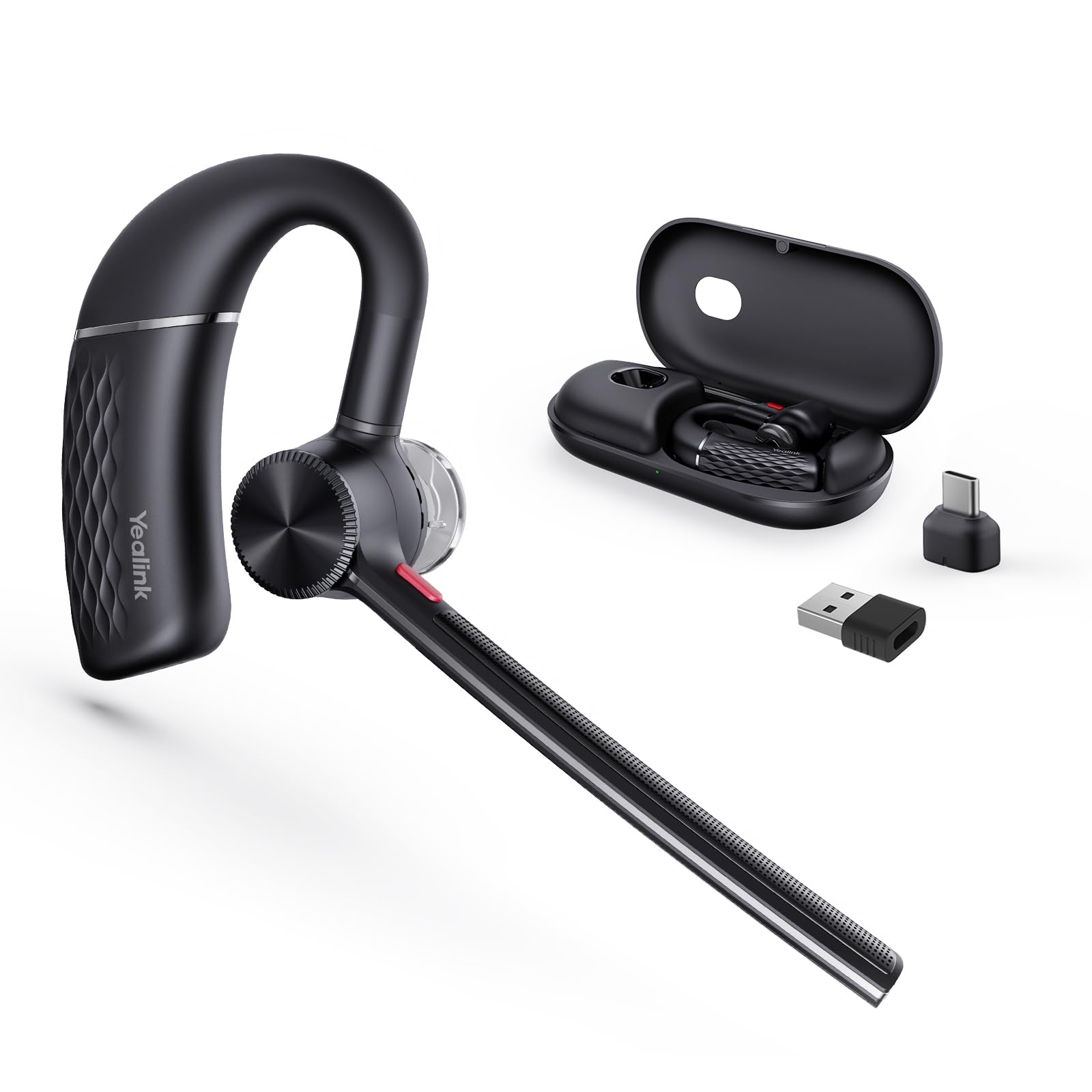
| Yealink BH71 ProPocket-Size Pick | Pocketable calls on the move | 10 hours | 40 meters | Four beamforming mics | Amazon |
| Poly Voyager Legend 50 UC | All-day wear with a carry case | 10 hours | 30 meters | Four mics with WindSmart | Amazon |
| Yealink BH74 | Open offices and hybrid work | 32 hours | 50 meters | Six AI mics with ANC | Amazon |
| Poly Voyager 4320 UC | Stereo sound for PC and mobile | 24 hours | 50 meters | Dual-mic Acoustic Fence | Amazon |
| Jabra Engage 75 | Call centers and desk-phone setups | 13 hours | 100 meters | Advanced noise-cancelling mic | Amazon |
| LEVN Wireless Headset | Budget remote-work and call centers | 65 hours | 17 meters | AI noise cancellation | Amazon |
| MONODEAL Bone Conduction | Open-ear awareness while working | 8 hours | 15 meters | Dual-mic ENC | Amazon |
In‑Depth Reviews
1. BlueParrott B450-XT Bluetooth Headset
Our pick — over 4.5★ from 9,000+ verified ratings; the strongest balance of quality and price.
The headset that makes a running engine sound like a library
The B450-XT blocks out an industry-leading 96% of noise, and that one number is the reason it is the top pick here. For a trucker, a delivery driver, or anyone working beside machinery, it means your caller hears your voice and almost nothing else. The mono design puts a thick, padded headband and a large cushioned earcup against your head, built for the long hours these jobs demand.
Roaming is where it pulls away from the field. Class 1 Bluetooth holds a reliable link up to 100 meters (about 300 feet), which is far past the 15 meters you get from the MONODEAL open-ear model. Talk time runs 24 hours on a charge against the MONODEAL’s 8 hours. That 100-meter range lets you leave the desk mid-call, where the MONODEAL’s 15 meters would drop it.
Newer Bluetooth lives in some of the cheaper rivals — the Lenovo runs Bluetooth 5.3 against this headset’s 5 — so if you prize the newest wireless standard over raw range, you can find it elsewhere. The fit is also the thing to watch. The padded mono band suits all-day road work but not everyone’s ear shape. A handful of long-haul users find it causes pressure after half an hour, and the mic arm is best handled with a little care rather than yanked into place.
What wins people over
- Blocks 96% of background noise, so callers hear you and not the truck cab
- 24 hours of talk time and a 100-meter Class 1 range for real freedom
- IP54-rated protection against dust and moisture for outdoor and field work
- USB-C charging and a BlueParrott Button for fast mute or speed dial
Where it asks for care
- Older Bluetooth 5 rather than the 5.3 some rivals carry
- Mono earcup fit does not suit every ear for marathon sessions
- The mic boom and buttons need a gentle hand
Built for the road: Reach for this if you work in a cab, on a jobsite, or anywhere the background is loud and you move around a lot.
Think twice if: You sit at a tidy desk all day and would rather have the latest Bluetooth standard than maximum range.
2. Lenovo Wireless VoIP Headset Teams Certified
Built for the desk worker who lives inside Microsoft Teams all day
If your IT department locks the laptop down and you cannot pair Bluetooth, this Lenovo solves it with a USB-A receiver: plug it in and it works. It carries Microsoft Teams Open Office certification (the badge that means it was validated against Teams calling features), and it flashes the newer Bluetooth 5.3 standard that the BlueParrott above lacks. Multipoint lets it hold two devices at once, so you can switch between laptop and phone without digging into menus.
The comfort engineering suits back-to-back meeting days. At 140 grams it stays light, and the memory foam earcups and flexible headband are made for long sessions. Battery is the headline: up to 31 hours of talk time or 60 hours of playback on a single charge, so you charge it on a weekend, not every night. One owner reported three weeks of daily Teams meetings still showing plenty of charge left. Voice prompts announce charge, connect, and mute status, which keeps you from guessing mid-call.
The Teams mute button is the catch worth understanding before you buy. It only works on a PC with the USB-A dongle plugged in and Lenovo’s companion software installed — there is no mobile support for that feature. The overall connection also draws mixed feedback, with some owners reporting dropped or crackly calls where it should be rock solid. Sound quality and noise cancellation, on the other hand, draw the strongest praise.
Where it shines: You get clear Microsoft Teams calls and less background noise, thanks to three microphones that suppress noise (three mics working together to cut background sound). The charging extras — a dedicated mute application and voice status prompts — keep your calls tidy.
The swap to watch: Budget headsets often stumble on connection stability, and a few owners hit exactly that here. If your calls are mission-critical, test it hard in the first week and use the included protective case to keep the dongle (the USB plug that connects the headset to your computer) safe.
Suits: The hybrid worker whose main room is Microsoft Teams and who wants one charge to cover the week.
Skip if: You need the Teams mute button to work on your phone — that feature is PC-only here.
3. Yealink BH71 Pro Bluetooth Headset
A single-ear earpiece that vanishes into your pocket between calls
Some people hate wearing a headset when they are not on a call, and the BH71 Pro is built for exactly them. It is a single-ear wireless earpiece that slips into a pocket, and it comes with a magnetic charging case that tops it up on the go. Four beamforming microphones (mics that focus on the direction of your voice) cancel 90% of background noise, so you sound clear on the road or in the terminal. The rotatable ear hook and mic arm hold a secure fit, and the earpiece expands vertically for larger ears.
Battery is 10 hours of talk time on a full charge in 1.5 hours, and the case keeps it going. You also get the wide compatibility serious buyers want: a USB-C/A dongle for PC, Bluetooth 5.3 for mobile, and a 40-meter range for walking around. It holds two devices at once, and it is certified to work with Team, Zoom, and other conferencing platforms.
The honest thing to weigh is durability and the on/off button. Sound quality and battery draw the strongest praise, and the fit earns its share too, but a few buyers report the unit going shaky and stopping a recharge after a month or so. The on/off button sits on top and can be hard to feel on the move. Neither issue affects most buyers, but they are worth knowing if you switch your headset on and off dozens of times a day.
Why people keep it in a pocket: The charging case and the 40-meter range turn a quick trip to the kitchen into a still-connected call.
The trade to accept: Build tolerance varies — handle the magnetic dock gently, and pick a different mono headset if you are hard on gear.
For the mobile talker: Great if you take calls on the move and want something that disappears between them.
Not the one if: You want a stereo sound experience or a headset you can toss in a bag without care.
4. Poly Voyager Legend 50 UC Bluetooth Headset

Ten hours on the ear, thirty once the pocket case tops it up
The Legend 50 UC is the headset to pick if you work from wherever the day takes you and want a compact case in your bag. Four noise-canceling microphones plus Poly’s NoiseBlockAI and WindSmart tech (processing designed to strip wind and background noise) keep your voice front and center, whether you are at a desk, in a cafe, or outside on a breezy day. The Qi wireless charge case docks the headset vertically and extends talk time from 10 to up to 30 hours, so it recharges between meetings instead of being tethered.
The build leans toward a professional, understated mono boom design, and the case doubles as a stand during the day. The understated mono boom and pocketable case suit a professional who takes calls away from a desk.
Where opinions split is the fit and the older wireless standard. Some owners find the ear loop comfortable through long sessions; others have to adjust it to keep it seated when they move. It also uses Bluetooth 4, older than the 5.3 found in the Lenovo and the Yealink BH74, so if you want the newest wireless version this is not it. Call quality and noise cancellation stay the headline strengths.
The case is the feature
- Charge case extends talk time from 10 to up to 30 hours
- Four mics with NoiseBlockAI and WindSmart cut outside noise
- 30-meter Bluetooth range for moving around the office
- Fast charging and a balanced-armature driver for clear speech
Weigh before you buy
- Bluetooth 4, older than the 5.3 on newer rivals
- Ear-loop fit needs adjusting for some wearers
- Mono earpiece, not a full stereo design
Reach for this if: You want a professional, pocketable mono set and the case matters as much as the call quality.
Look elsewhere if: You need the newest Bluetooth version or you know a mono earpiece does not sit well on your ear.
5. Yealink BH74 with Stand ANC Wireless Headset

The open-office specialist that silences the room on both ends of the call
For a shared office where a dog barks, a baby cries, and the coffee machine hisses, the BH74 was purpose-built. Six AI-powered microphones combine feedforward and feedback mics to hunt down background noise, with four adjustable ANC (active noise cancellation) modes. It is certified for Microsoft Teams Premium Open Office, and it runs the newer Bluetooth 5.3 with a 50-meter range. That certification matters if you want a headset that was validated for the exact room type most people struggle with.
Battery is a standout: up to 32 hours of talk time or 65 hours of music playback, with a full charge in 90 minutes and a five-minute fast charge that buys 45 minutes of talk time. Weighing 152 grams with a float-on-air headband and rotatable memory-foam ear cushions, it is built to sit lightly through a full working day. Pull the mic down and you mute; that flip-to-mute motion is quick and quiet in a meeting.
The one thing to size up carefully is connectivity. The connection gets more mentions than any other single aspect of this headset, and those mentions are mixed — some owners connect to Teams without a hitch, while others hit occasional connection quirks that need a dongle re-plug. So the pitch is this: near-reference-grade noise isolation for loud rooms, provided you are comfortable troubleshooting a connection now and then.
The loud-room answer: Six AI mics and teams of adaptive ANC modes make callers swear the barking dog is not on your end of the line.
Keep an eye on: Connection is the aspect owners discuss most, and it is a mixed bag — some setups need the dongle nudged back in, so plan a little patience if your workflow is picky about signal.
Right for the noise: Choose it if you sit in open-plan or hybrid spaces where silence is impossible and you need the mic to do the work.
Second-guess it if: You cannot face any connection fiddling at all and want the simplest setup possible.
6. Poly Voyager 4320 UC Wireless Headset & Charge Stand

Stereo sound for work, with a charging stand that keeps it ready
If you want true stereo audio instead of a single earcup, the Voyager 4320 UC is the pick. Two earcups give you rich stereo sound, which is unusual among workplace headsets that mostly run mono. A dual-mic HP Poly Acoustic Fence (technology that draws a virtual boundary around your voice) filters out the room so callers hear you, not your surroundings. It connects to a PC through a USB-C to USB-A adapter or to your phone over Bluetooth 5.2, with up to 164 feet of range, and includes a charging stand.
It is Microsoft Teams certified, with an on-call indicator light and a dedicated Teams button, and it delivers up to 24 hours of talk time. The dual-ear build is comfortable enough for a full workday, and the stand saves you hunting for a cable. If your day mixes calls with concentration-heavy work, the dual earcups beat a mono earpiece.
Value is the honest caveat here. Sound quality, comfort, and battery are the strengths people talk about most, but the wider picture of quality and reliability is more mixed, and a few owners mention connection dropouts or mic sensitivity that needs careful positioning. That is the trade for the stereo design and stand: a headset that sounds great and stays comfortable, provided your setup cooperates with its Bluetooth connection.
Why the dual-ear design wins
- Stereo dual-earcups for richer sound than a mono earpiece
- Dual-mic Acoustic Fence filters background noise
- USB-C to USB-A adapter plus Bluetooth, and a charging stand
- Up to 24 hours of talk time and Teams certification
Manage before you commit
- Connection reliability draws mixed feedback
- Mic sensitivity can demand careful positioning
- Bluetooth 5.2, not the newest standard
Best for stereo lovers: Pick it if you want dual-ear sound and a stand that keeps the headset charged and tidy.
Consider a mono pick if: You want to keep one ear free for the room, or you find connection fussiness a deal you would rather avoid.
7. Jabra Engage 75 Wireless Headset, Stereo

The call-center flagship built to wander far and hold the line
The Engage 75 is for the heavy user who takes calls all day from a desk phone, a computer, and a mobile without ever thinking about pairing. It connects up to five devices at once and reaches up to 150 meters (about 490 feet), which is the greatest range here — well past the 100 meters of the BlueParrott B450-XT. An integrated busy light acts as a do-not-disturb sign for co-workers, and the noise-cancelling microphone with enhanced speakers keeps both ends of the call clear.
Battery is up to 13 hours of talk time, with a fast charge that reaches 40% in 30 minutes and a full charge in 90 minutes, helped by the included charging stand. The design also builds in hearing protection features, which matters if you wear a headset for hours of continuous calls. Stereo earcups give you richer sound than a mono set, and the intuitive on-headset controls let you answer, mute, and adjust volume without touching a screen.
The setup is more desk-bound than the pocket picks. It ships with a charging station and a desk phone cable, and one owner notes it cannot connect directly to a mobile without the base — so it is best for a fixed workstation. Call quality and sound clarity draw the strongest praise, while reliability and value draw more mixed responses, with some owners finding the connection fussy or the price hard to justify at full retail.
The range story: At 150 meters, you can walk the whole floor and stay on a live call — further than any other headset here.
The desk anchor: The base station and desk-phone cable make it a workstation tool, and a few heavy users find the battery runs down before a full day of nonstop calls.
Suits the call center: Best if you juggle several devices from one desk and prize maximum range and all-day ergonomics.
Not for the road warrior: Look at the pocket-pick models if you need something that lives in a jacket and never touches a base.
8. LEVN Wireless Headset 5.2 for Call Center

A budget set that stretches a single charge across a whole workweek
An AI noise-cancellation system is rated to strip up to 99% of ambient noise, filtering keyboard taps and nearby chatter so your voice lands clean. It runs Bluetooth 5.2 and also ships with a USB dongle, so it works on computers that have no Bluetooth at all.
Day-to-day convenience is clearly thought through. A charging base doubles as a dock for the dongle, keeping your desk tidy and the dongle findable, and the microphone rotates 270 degrees so you can wear the headset on whichever side you prefer. The 17-meter range is fine for moving around a home office, though it is the shortest here, so this is a desk-adjacent set rather than a roam-the-building one. The stand-plus-dongle combination is a rare find at this tier.
The trade-off is build feel. Buyers mention quality and reliability most often, but sound quality and noise cancellation get more mixed feedback, and the recurring complaint is durability — a few customers note the set giving out sooner than a premium model would. It is the cheapest pick here with a charging stand, a USB dongle, and 65 hours of battery, but the plastic build needs gentle handling.
The value math
- 65 hours of battery and 400 hours of standby
- AI noise cancellation rated to cut up to 99% of ambient noise
- USB dongle for computers without Bluetooth, plus a charging base
- Microphone rotates 270 degrees for either-side wearing
The compromises
- Shortest range here at 17 meters
- Sound quality and noise cancellation draw mixed feedback
- Durability is the recurring gripe — handle it gently
For the budget remote worker: Choose it if you want a charging stand, a dongle, and a week of battery without the premium spend.
You will want more if: You roam a large office or expect premium build quality that lasts years.
9. MONODEAL Bone Conduction Headphones with Mic

Keeps your ears open to the room while you take the call
Not everyone wants sealed ears, and bone conduction is the answer for those who need to hear the world while they talk. This set sits outside your ear canal and sends sound through cheekbone vibration, which means you stay aware of traffic, co-workers, or a ringing doorbell while the call plays. The open-ear design leaves the ear canal unobstructed, which suits anyone who dislikes eartips during long calls. At 33 grams with soft silicone pads, it barely registers on your head.
Dual-mic ENC (environmental noise cancellation that isolates your voice from the room) plus an adjustable boom microphone keep your voice clear in noisy places, and the boom swings into position when you need it. Bluetooth 5.3 with multipoint means you can pair to two devices at once and switch, and the newer chip aids quick, stable pairing. Talk time is up to 8 hours per charge in 2 hours, and a multifunction button handles play, call answer, and voice assistant. If you wear a helmet or glasses, the aluminum-alloy band is designed to stay put anyway.
The catch is volume and punch. Bone conduction leans on earplugs (two are included) because the volume is modest, and a couple of owners find heavier audio can cause a faint vibration you feel rather than hear. Sound quality is the most-praised aspect here and the mic draws more mixed notes — it wants to sit close to your mouth to sound its best. Battery is mixed across the field, with some owners reporting trouble charging past a certain point.
Why awareness wins: Open-ear design and Bluetooth 5.3 multipoint let you stay connected to two devices and still hear the room — rare in a work headset.
The trade to know: Volume is modest without the included earplugs, and the boom mic needs to sit close; not the set for a loud truck cab.
For the aware worker: Best if you need to hear your surroundings and keep the ear canal clear, on a budget.
Steer away if: You work in constant loud noise or want deep, punchy audio for calls and music.
Understanding the Specs
Mic noise cancellation, in plain words
This is the processing that runs on your voice before it travels to your caller. Multiple microphones listen to the room and your mouth separately, then the headset subtracts the room. Brands quote it as a percentage — one pick blocks 96% of noise, another rates its system to strip up to 99% — so a higher figure usually means your caller hears less of your surroundings. This matters far more than speaker quality, because the person on the other end only ever hears your microphone.
Talk time and range
Talk time is quoted in hours, and it tells you how long the headset runs on a charge before you reach for a cable. Shorter sets run a few hours; the longest here stretch past a full shift and into a workweek. Range is quoted in meters and tells you how far you can walk from your paired device before the call drops. Longer range suits warehouses, yards, and moving around; shorter range is fine for a fixed desk.
Multipoint and dongles
Multipoint means one headset holds two devices at once, so a call on your laptop and one on your phone both connect without re-pairing. A USB dongle is a small plug that gives a locked-down work computer wireless audio without native Bluetooth. If your IT will not let you pair, the dongle is often the deciding feature — some sets here include one, others rely on Bluetooth alone.
On-ear design and comfort
Mono sets put weight on one ear and suit long single-ear use, while stereo sets cover both ears for richer sound but block the room. Open-ear bone-conduction sets sit outside the ear entirely. Weight, headband padding, and earcup cushioning decide whether you can wear it for an eight-hour day, so comfort is the quiet spec worth checking before you commit.
FAQ
Will a business Bluetooth headset work with Microsoft Teams?
How many hours of talk time do I need for a full workday?
What is multipoint pairing and do I really need it?
Do I need a USB dongle if my laptop has Bluetooth?
How much Bluetooth range do I need to walk around?
Are bone conduction headsets good for office calls?
Mono or stereo headset for work calls?
How long should a business headset battery last on standby?
Can one headset connect to a desk phone and a computer at once?
What does IP54 protection mean on a headset?
Final Thoughts: The Verdict
The strongest business bluetooth headset for most people is the BlueParrott B450-XT, because it blocks 96% of background noise and holds a 100-meter Class 1 range that outruns every other pick here, with 24 hours of talk time to match. If you live inside Microsoft Teams on a locked-down PC, the Lenovo is the one to reach for, thanks to its USB-A receiver and 31-hour talk time. And for a roaming professional who wants a pocketable mono set and a charging case, the Poly Voyager Legend 50 UC is the natural fit.
How We Picked
We do not accept paid placement. Every pick is matched to a real buyer and a real use-case; we do not hands-on test units.
Sources & Methodology
Specifications: manufacturer listings and product documentation. Review insights: verified customer reviews, as of September 2026. Pricing: not shown on this page (it changes often); check the current price via the retailer link.
As an Amazon Associate, Gadgets Feed earns from qualifying purchases. This does not affect which products we feature.