
Our readers keep the lights on and my morning glass full of iced black tea. As an Amazon Associate, I earn from qualifying purchases.
Specs are compiled from manufacturer listings and verified buyer reviews and can change over time — please confirm the key details on the product page before buying.
Most laptops sold today have no disc tray at all, which is why burning a mix CD or ripping an old album suddenly means buying a separate drive. The trick is picking one that reads scratched discs and doesn’t flex under your hand. The six drives below cover the range, from budget workhorses to a name-brand standby.
I’m Min — the founder and writer behind Gadgets Feed. This guide is built by comparing the manufacturers’ published specifications and the patterns across verified customer reviews, so you get each pick’s real strengths and trade-offs instead of marketing spin.
We broke down read speeds, connector types, and build quality so you can pick the right drive the first time. Whether you are archiving a shelf of discs or burning a one-off mix, this breakdown of the best audio cd burner options covers the drives worth buying.
Our Picks at a Glance


How To Choose The Best Audio CD Burner
Buying an external drive isn’t about finding the one with the biggest number on the box. It’s about matching the connector to your laptop and the read speed to how many discs you plan to handle.
Connectors: USB-A vs USB-C
Modern MacBooks and slim Windows laptops often only have USB-C ports. If you buy a drive with a hard-wired USB-A cable, you will need an adapter. Look for a drive with a built-in 2-in-1 cable or a separate USB-C cable to avoid dongle clutter.
Read/Write Speeds
For ripping audio CDs, read speed is your best friend. A drive with a 24X CD read speed will tear through a stack of albums much faster than a standard drive. If you are burning DVDs, look for at least 8X DVD write speeds.
Build Quality and Power
External drives are notoriously light, which can make them slide around or feel flimsy. Some models include rubber anti-skid pads or metal enclosures for stability. Also, check if the drive requires a separate power cable for desktop use, as some USB ports don’t provide enough juice.
Quick Comparison
| Model | Best For | Max CD Read | Connectivity | Key Feature | Amazon |
|---|---|---|---|---|---|
| ROOFULL External CD DVD Drive★ Best Overall | Overall performance | 24X | USB 3.0 & Type-C | Includes Case | Amazon |
| Rioddas External CD/DVD DriveBest Value | Budget burning | — | USB 3.0 | Physical Eject Button | Amazon |
| Wbacon External CD/DVD Drive | Extra ports | 24X | USB 3.0 & Type-C | 7-in-1 Hub | Amazon |
| ORIGBELIE External CD DVD Drive | Slim portability | 24X | USB 3.0 & Type-C | Ultra Slim | Amazon |
| Disk Duplicator External DVD Drive | Mac compatibility | — | USB 3.0 Type-C | High Volume Ripping | Amazon |
| HP External Portable Slim Design | Name brand reliability | 24X | USB | M-DISC Support | Amazon |
In‑Depth Reviews
1. ROOFULL External CD DVD Drive for Laptop & Mac with Case, USB 3.0 Type-C
Our pick — over 4★ from 21,500+ verified ratings; the strongest balance of quality and price.
The do-it-all default that handles burning, ripping, and reading without a fuss.
If you want a drive that works immediately after you plug it in, this ROOFULL model is the one to beat. It uses a built-in 2-in-1 USB 3.0 and Type-C cable, so you don’t need to hunt for an adapter for your MacBook or PC. The max read/write speeds are DVD 8X and CD 24X, which is fast enough to rip a full album in a minute or two. It even comes with a protective carrying case to keep the dust out when you aren’t using it.
The reliability here is backed by a 2-year warranty, which is longer than most budget drives offer. While it lacks the extra USB hub ports of some rivals, it makes up for it with raw build quality. The enclosure is metal and plastic, giving it a bit more heft than the all-plastic options. One buyer reports it is “Ready in 5 seconds; ripped 4 CDs to iTunes with no issues.”
The one catch is for Mac users: the physical eject button won’t work after burning due to macOS restrictions. You have to right-click the disc icon on your desktop and select “Eject” to get your disc back. It’s a minor software quirk, not a hardware flaw, but it’s worth knowing before you buy.
Mac and laptop ready
- Includes a padded carrying case for protection
- 2-year warranty and responsive support
- Dual USB-A and Type-C cable built-in
short cable reach
- Eject button disabled by macOS software limits
- Slightly bulkier than ultra-slim rivals
everyday ripping: Anyone who wants a reliable, warranty-backed drive for both Mac and Windows.
long sessions: You need the smallest possible footprint for travel.
2. Rioddas External CD/DVD Drive for Laptop
A budget workhorse that gets the job done, provided you treat it gently.
You get a drive that burns discs for very little money, which is why so many people buy it. It connects via USB 3.0 (a fast data port) at speeds up to 5Gbps, so a full album copies over in seconds rather than minutes. A physical eject button forces the tray open even when your computer freezes and won’t recognize the drive. The body has a brushed texture, and the cable tucks into the bottom for storage.
For the money, it performs well. One buyer calls it a “plug and play” solution that “burned my first cd thru windows media player legacy worked fine and fairly quick.” It works with Windows 11, 10, and macOS 10.16+ (Apple’s older operating system versions), so you can burn discs on most computers. If your newer MacBook only has USB-C ports, you’ll need an adapter. The compact size slips easily into a laptop bag.
The main trade-off is durability. The plastic shell feels a bit flimsy, and the tray mechanism can be delicate if you are rough with it. You should be careful when closing the tray, as the top flexes slightly under pressure. It is a great choice for occasional use, but if you are burning hundreds of discs every week, you might want something sturdier.
light travel use: A top-selling budget pick that works great for casual burning and ripping.
heavy daily use: You need a heavy-duty build for daily, high-volume use.
3. Wbacon External CD/DVD Drive for Laptop, USB 3.0 & 4 USB Ports

More than just a burner, this drive doubles as a full port hub for your laptop.
If your laptop is lacking ports, this Wbacon drive solves two problems at once. It functions as a CD/DVD burner and a 7-in-1 USB hub. You get 1 USB 3.0 port, 3 USB 2.0 ports, and slots for SD and TF cards. This means you can plug in your wireless mouse, keyboard, and transfer photos from your camera without needing a separate dongle. It supports 8x DVD read speed and 24x CD write/read speed.
The design includes a skip-proof rubber pad to stop it sliding around your desk. The cable is embedded, so you don’t have to worry about losing it in your bag. It supports Windows, Linux, and Mac OS 10.6 or above. The compact size and lightweight build make it a solid travel companion for photographers or students who need to access legacy files.
However, the SD and TF card slots cannot be used at the same time. You have to pick one or the other. The reliability is also a mixed bag compared to the top pick; while many units work flawlessly, the plastic construction doesn’t inspire as much confidence for long-term heavy use. It is best used as a stationary hub for your desk rather than getting tossed around in a bag daily.
fast installs: Perfect for laptops with too few ports and photographers needing instant card access.
quiet rooms: Users who need simultaneous SD and TF card reading.
4. ORIGBELIE External CD DVD Drive for Laptop, USB 3.0 Type-C 13mm DVD Player
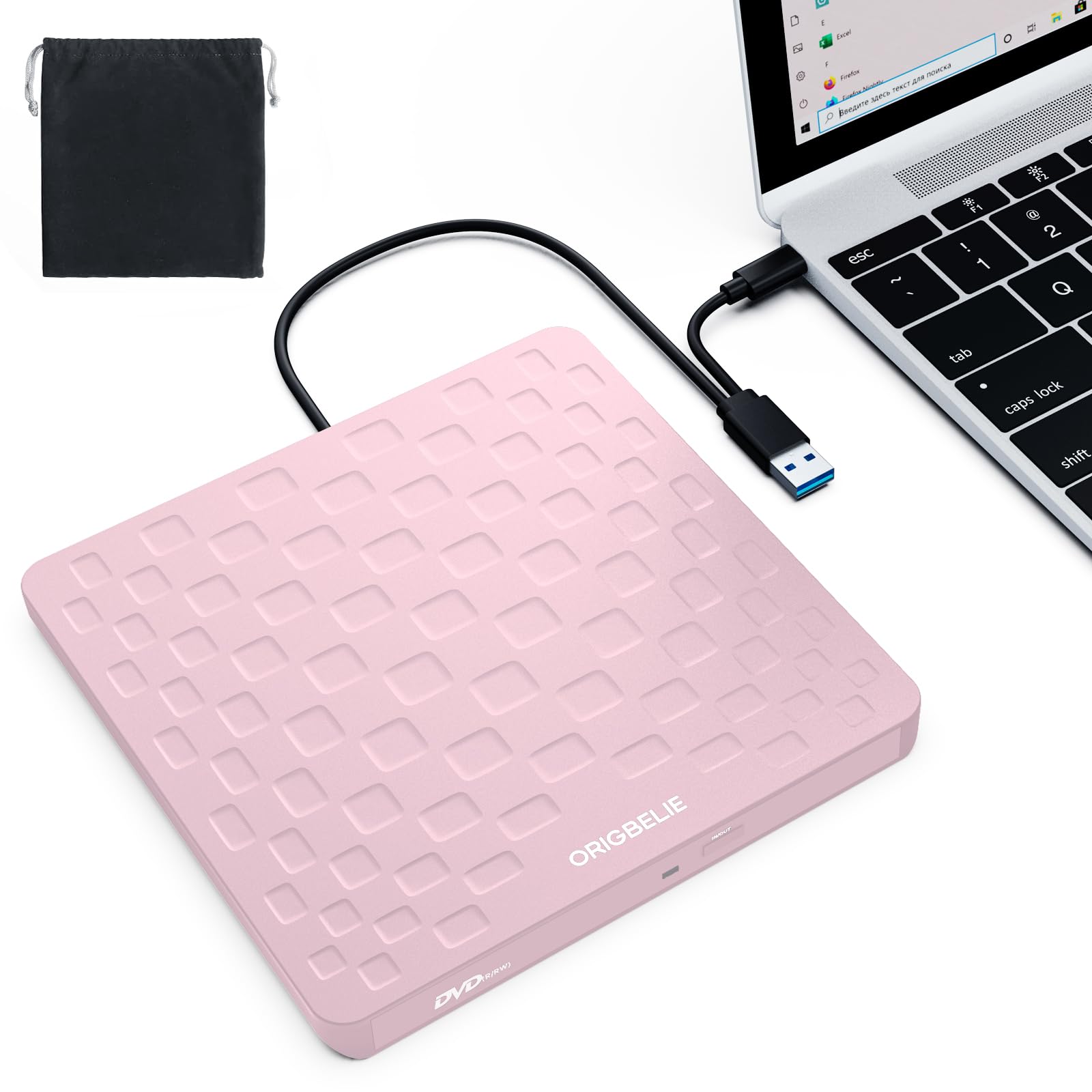
A fashion-forward drive that prioritizes a thin profile and a pop of color.
At just 13mm thick, this is one of the slimmest drives in this lineup. It is designed to slip into a bag without taking up bulk, making it ideal for travelers. It supports USB 3.0 speeds up to 5Gbps and offers max 8x DVD and 24x CD read/write speeds. The design uses a pink ABS plastic shell that stands out from the typical black boxes.
Setup is plug-and-play, though the casing is notably lightweight. It includes an anti-skid bottom to keep it steady on the desk. The integrated cable design means you don’t have to carry a separate cord. It is compatible with Windows, Linux, and Mac OS, and works with a variety of disc formats including CD-R/RW and DVD-R/RW.
The trade-off is the feel. The plastic is very light, which can make it feel fragile. One reviewer noted it “feels cheap, but works” and warned that the eject button needs a firm, careful press. You also have to press the eject button twice occasionally to get the tray to open. It is a style-first choice that performs well, but it won’t win any prizes for tank-like durability.
mixed port setups: Style-conscious buyers who want a lightweight drive for occasional ripping.
old systems: If you prefer a heavier, metal-feeling build.
5. Disk Duplicator External DVD Drive USB 3.0 Type C

Built to handle massive music libraries, though disc quality dictates success.
This drive is a favorite among Mac users who need to digitize large collections. It comes with both USB-C and USB-A cables, so it works with modern MacBooks and older PCs without an adapter. It boasts a unique capability for high-volume work; buyers report ripping 2,800 CDs in 3 weeks continuously without issues, which is proof of its endurance for long projects. New discs reportedly rip at 24x.
The drive is lightweight and self-powered, meaning it runs off your laptop’s battery without needing a wall plug. However, it has specific compatibility quirks. It strictly requires standard, original retail CDs or normally-burned blanks. Heavily scratched, aged, or copy-protected discs often fail to read. This isn’t a defect; it’s a limitation of the optical pickup.
Skip this if you want to watch DVDs, because several users report it is “Great for burning cds however it doesn’t work for playing DVDs on a computer.” It is a specialist tool for ripping audio, not a general media player. If you have a stack of pristine CDs and a Mac, this is a strong contender.
duplication tasks: Mac owners digitizing pristine CD collections at high speed.
tight desks: You need a drive for watching DVD movies.
6. HP External Portable Slim Design CD/DVD RW Write/Read Drive

The familiar name brand for buyers who value a simple, recognizable warranty.
If you already own an HP desktop or laptop, this drive matches the ecosystem. It offers standard read/write speeds including 24X CD-RW and 8X DVD+RW. It supports a wide range of discs, including M-DISC (a durable archival format) and CPRM. The slim form factor is classic black, designed to look at home next to a business PC.
It is truly plug-and-play for Windows and Mac. Owners mention ripping 400-500 CDs to WAV files on a Mac without failures. The drive is powered via USB, so there is no bulky power brick to carry. It is a straightforward utility device that does the basics well without extra frills like SD card slots or hubs.
The build quality is a bit polarizing. While it works well for many, some users find the tray mechanism shallow. One reviewer scratched DVDs “just placing them in the tray as it doesn’t extend very far.” You have to be precise when loading a disc to avoid scraping it against the front bezel. It is a reliable choice for HP loyalists, but the mechanical tray requires a gentle touch.
reliable backups: A solid choice for HP desktop owners who want a matching name-brand drive.
speed chasing: A shallow tray that requires careful disc alignment.
Understanding the Specs
Read Speed (24X vs 8X)
CD read speed is measured in “X” ratings, where 1X equals the base speed of the first CD-ROM drives. A 24X CD read speed is generally the standard for external drives, allowing you to rip a full audio disc in about three to four minutes. DVD read speeds are typically slower, maxing out at 8X, because the data is denser. If you are ripping a large library of audio CDs, the 24X speed is what you want to look for.
Connectivity (USB 3.0 vs Type-C)
USB 3.0 is the standard for external drives, offering data transfer rates up to 5Gbps. This is significantly faster than the old USB 2.0 standard and prevents lag during high-speed ripping. Type-C refers to the shape of the connector. Many new laptops only have Type-C ports, so a drive with a built-in 2-in-1 cable (like the ROOFULL) is more convenient than one that requires a separate adapter.
FAQ
Can I use an external CD burner to rip audio CDs to MP3?
Do these drives work with MacBooks that only have USB-C ports?
Why does my computer not recognize the external drive?
Can I play DVD movies with an external CD burner?
What is the difference between USB 3.0 and USB 2.0 for a CD burner?
Why is my external drive making a loud noise?
Can I use these drives with a Chromebook?
Do I need to install a driver for the external drive to work?
Final Thoughts: The Verdict
The audio cd burner that offers the best balance of speed, compatibility, and protection is the ROOFULL External CD DVD Drive. It brings the perfect mix of USB 3.0 speed, a built-in Type-C connector, and a protective case that keeps it safe when not in use. If you need extra ports for your laptop, grab the Wbacon External CD/DVD Drive. And for those who want the familiarity of a name brand, the HP External Drive is a solid performer.
How We Picked
We do not accept paid placement. Every pick is matched to a real buyer and a real use-case; we do not hands-on test units.
Sources & Methodology
Specifications: manufacturer listings and product documentation. Review insights: verified customer reviews, as of September 2026. Pricing: not shown on this page (it changes often); check the current price via the retailer link.
As an Amazon Associate, Gadgets Feed earns from qualifying purchases. This does not affect which products we feature.