
Our readers keep the lights on and my morning glass full of iced black tea. As an Amazon Associate, I earn from qualifying purchases.
Specs are compiled from manufacturer listings and verified buyer reviews and can change over time — please confirm the key details on the product page before buying.
The short answer: if you want to make an existing light switch smart, you want a relay that hides behind the wall plate — not a plug that eats an outlet. If your appliances just plug into a socket, a smart plug is faster and safer. That single difference decides which of these nine picks is right for you.
I’m Min — the founder and writer behind Gadgets Feed. This guide is built by comparing the manufacturers’ published specifications and the patterns across verified customer reviews, so you get each pick’s real strengths and trade-offs instead of marketing spin.
Relays wire into your home’s existing circuits and plugs sit in a wall socket, and knowing which one fits your setup is the whole game. Here is a straightforward look at the affordable smart appliance modules worth your time.
Our Picks at a Glance


How To Choose The Best Affordable Smart Appliance Modules
Before you buy anything, you need to know two things: whether your existing switch box has a neutral wire, and how much current the device you want to control actually draws. Get those wrong and even the best module in the world won’t work in your home.
Relay Module vs. Smart Plug
A relay wires in behind your existing switch or inside an appliance casing. It keeps your wall switch looking normal but adds app and voice control on top. A smart plug is simpler — it sits in a socket and the appliance plugs into it. Relays suit lights, ceiling fans, and garage door openers. Plugs suit lamps, coffee makers, and anything you already unplug.
The trade-off is real: relays need you to work inside an electrical box, which means knowing what you’re doing or hiring someone. Plugs take thirty seconds. If you’ve never touched home wiring, start with a plug.
Amperage and Load Rating
Every module has a maximum current rating measured in amps. An 8A relay handles lights and small appliances. A 16A relay handles heavier loads like motors and heaters. Match the module’s rating to the highest-draw device you plan to connect, and leave some headroom.
Protocol and Hub Requirements
Wi-Fi modules connect directly to your router — no extra hardware. Zigbee and Matter devices often need a compatible hub or bridge. If you already run a smart home hub, Matter and Zigbee open more automation options. If you’re starting fresh, Wi-Fi is the path of least resistance.
Quick Comparison
| Model | Best For | Current Rating | Connectivity | Form Factor | Amazon |
|---|---|---|---|---|---|
| Shelly 2PM Gen4★ Best Overall | Two-channel light and blind control | 16 A | Wi-Fi, Zigbee, Matter, Bluetooth | In-wall relay | Amazon |
| MHCOZY 4-Channel Dry ContactBest for DIY Projects | Garage doors and low-voltage projects | 10 A | Wi-Fi, Bluetooth, 433MHz RF | DIN rail module | Amazon |
| SONOFF POWR316D EliteBest Power Meter | Energy monitoring on heavy appliances | 16 A | Wi-Fi | Inline relay | Amazon |
| Emporia Energy Monitoring Plug | Tracking energy costs on plugged-in devices | 10 A continuous | Wi-Fi (2.4GHz) | Plug-in outlet | Amazon |
| GHome Dual Smart Plug | Two devices from one outlet | 15 A | Wi-Fi, Bluetooth | Plug-in outlet (2-in-1) | Amazon |
| Tapo P125M | Cross-platform Matter control on a budget | 15 A | Wi-Fi, Matter, Bluetooth | Plug-in outlet | Amazon |
| Tapo P110M | Energy tracking with Matter flexibility | 15 A | Wi-Fi, Matter | Plug-in outlet | Amazon |
| Shelly 1 Mini Gen4 | Tight retrofits and garage doors | 8 A | Wi-Fi, Zigbee, Matter | In-wall relay | Amazon |
| NOUS A9 4-Pack | Dual-band Wi-Fi whole-home coverage | 15 A | Wi-Fi (2.4GHz & 5GHz) | Plug-in outlet (4-pack) | Amazon |
In‑Depth Reviews
1. Shelly 2PM Gen4 Smart Relay Switch
Our pick — over 4.5★ from 750+ verified ratings; the strongest balance of quality and price.
Two independent 16A channels with 18A switching headroom and per-channel power metering — the in-wall relay that earns top billing.
For anyone who wants to control two light circuits or a pair of motorized blinds from a single device tucked behind the wall, this is the one to beat. That gap matters if you’re wiring a motor or a heavy fixture rather than a simple lamp.
Built-in power metering means you can see exactly how much each circuit draws. Not just a total number — each channel reports independently, so you can spot which light is the energy hog. It works with Amazon Alexa, Google Home, Home Assistant, Samsung SmartThings, and Apple HomeKit without a separate hub. The app handles schedules, scenes, and remote access, and it doubles as a Bluetooth gateway for other devices nearby.
The setup process is where most buyers split. Functionality wins people over in a big way — it’s the aspect mentioned most and skews heavily positive. But connectivity and setup both land in mixed territory. Some installations go smoothly on the first try; others need a firmware update before the Zigbee radio behaves. It ships with old firmware, so update it before you mount it inside a box. A few buyers also note that the app lacks multi-user sharing, which means you’ll lean on Alexa or Google for household access. If you’re comfortable with basic electrical work, none of this is a dealbreaker.
Why It Earns The Top Spot
- 16A per channel with an 18A maximum switching current handles motors and heavy fixtures
- Independent power metering on both channels so you can track each circuit separately
- Works with Alexa, Google Home, Home Assistant, SmartThings, and Apple HomeKit — no hub needed
- Compact enough to tuck behind a standard wall box
Where It Might Not Fit
- Zigbee connectivity can be delayed compared to Wi-Fi, and setup is mixed across buyers
- Ships with outdated firmware — update before installing inside a box
- No multi-user sharing in the app; you’ll need Alexa or Google for that
- Only works with single-gang switches
Reach for this if: you’re wiring two light circuits or blinds and want per-channel energy data without a hub.
Look elsewhere if: you want a plug-and-play solution with zero wiring — a smart plug further down this list is the better starting point.
2. MHCOZY 4-Channel Dry Contact Relay Module
Four independent dry-contact channels for gate openers, garage doors, and any project that needs a clean on/off signal.
This is the module you buy when you need to trigger something that already has its own power source — a gate motor, a garage door opener, a prop controller. The dry contact design means the output is a passive signal with no voltage passing through. You’re just closing a circuit, not powering a device. It runs on either DC 5V or AC 85-250V for the input side, and handles up to 10A per channel at a maximum switching voltage of 250V.
Three working modes let you set each channel independently: self-lock (stays on until you turn it off), momentary or inching (press and it fires for a set time), and interlock (only one channel active at a time). The inching timer is adjustable from 1 second to 1 hour in the Smart Life app. That’s practical for a gate that should open for exactly thirty seconds, or a chicken coop door that closes on a schedule. It supports 2.4GHz Wi-Fi and also accepts a 433MHz RF remote if you want a physical button alongside your phone.
What buyers rave about is the connectivity — it reacts instantly to SmartLife triggers, and quality is the other top-rated aspect. One buyer wired it into an automatic gate opener and now opens the gate and turns on the light above it remotely. Another used it for Halloween props, syncing skeleton eyes and lights on a timer. The catch is that it doesn’t support IFTTT, so if your automation logic lives there, you’re out of luck. Wire ports are also small, though 12AWG fits. And this is a bare module — you need to supply your own enclosure.
Where it shines: four channels for the price of one, with three configurable modes and a timer that stretches from 1 second to 1 hour.
The honest limit: no IFTTT support, and the small wire ports mean you’ll want to plan your gauge before you start.
The DIY pick: if your project needs a clean contact closure — gate, garage, prop — this delivers four channels without breaking a sweat.
Not for you if: you need to actually power a device through it. This module signals; it doesn’t supply.
3. SONOFF POWR316D Elite Smart Power Meter Switch
A 16A inline relay that tells you exactly what your suspect appliance is costing you.
If you have a pump, a heater, or an old fridge that you suspect is running up the bill, this module gives you the data. It’s rated for 16A — 60% more current capacity than the 10A MHCOZY module above — and reports live power usage for the appliance it switches. The inching feature automatically turns things off after a set period, which is handy for anything you don’t want running unattended. It works with Alexa, Google Home, and IFTTT, and carries an IP51 rating, meaning it’s protected against dust ingress and dripping water.
Buyers like it for exactly what it promises. Tracking power on suspect appliances lets you conserve energy, and the setup is straightforward enough that it’s ready to go in minutes. Reports from months-deep installations say there are no equipment issues over time. One buyer called it one of the best Sonoff products they’ve used, and several confirm it handles a home water pump reliably. The copper contacts and clamp connectors are a step above the flimsier terminals on budget relays.
The one real caveat: a few buyers report the meter won’t pair with Wi-Fi from the start. Bluetooth pairing can flip the device into Wi-Fi mode before you’re ready, and then it fails to connect even with a full signal. It’s occasional, not universal — but if you hit it, the fix is a hard reset and a careful pairing sequence. For most people, this is a reliable 16A monitor that earns its spot.
Buy this when: you want to know what a specific appliance actually costs to run, and you need 16A of headroom to do it safely.
Think twice if: you’re not comfortable troubleshooting a Wi-Fi pairing hiccup — a few units ship finicky.
4. Emporia Energy Monitoring Smart Plug (2 Pack)
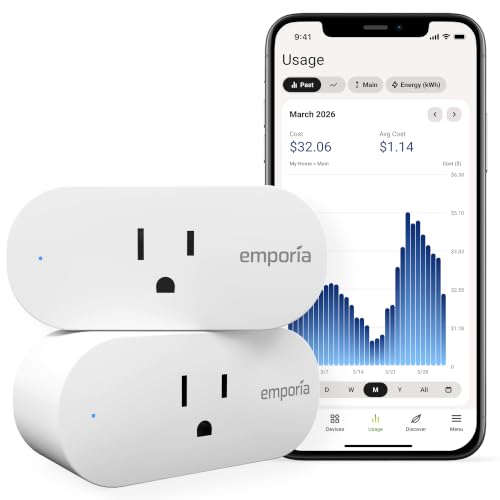
Built for people who want to know what every plugged-in device is costing them — not just whether it’s on or off.
Emporia’s system is designed around the Vue energy monitor, and these plugs extend that ecosystem to individual outlets. You get real-time voltage, current, power, and cost data in the app. If you have a pellet stove, a dehumidifier, or a wax warmer drawing constant power, you can see exactly what it uses and when. The app even lets you enter your utility’s time-of-use rates so the cost numbers reflect your actual bill. It handles 10A maximum continuous load and 15A max peak for up to an hour a day, and works with Alexa and Google Home.
What buyers consistently praise is the functionality — it does what it says. Setup is the second most-praised aspect, with people noting it takes just a couple of minutes per plug. And the energy monitoring itself earns genuine enthusiasm from owners who use it to track down phantom loads. Three units running inductive motor loads — pumps and fans — handled them where other brands failed. The monitoring side of this plug is genuinely good.
Here’s the catch: connectivity is the most-discussed aspect, and it skews negative. The plugs only work on 2.4GHz Wi-Fi — 5GHz networks aren’t supported. Multiple owners mention they can shut off on high-wattage loads like heaters or AC units, sending a warning email before they cut power. The app also lacks sorting, requires an account, and pairing can be fiddly. If energy data is your priority and you can live with 2.4GHz, this delivers. If you want trouble-free smart control, look at the GHome or Tapo options instead.
What It Gets Right
- Real-time voltage, current, power, and cost data per outlet
- Integrates with the Emporia Vue system for whole-home energy tracking
- Handles inductive motor loads that tripped other brands
- Setup takes a couple of minutes per plug
What to Know Before You Buy
- 2.4GHz Wi-Fi only — no 5GHz support
- Shuts off on high-wattage heaters and AC units, with a warning email first
- App lacks sorting and requires an account
- Pairing can be finicky for some users
Best for: data-driven homeowners who want cost-level visibility on individual appliances and already use or plan to use an Emporia system.
skip it if: you just want a plug that turns a lamp on and off — this is overkill and its connection quirks will frustrate you.
5. GHome Smart Dual Plug (2 Pack)
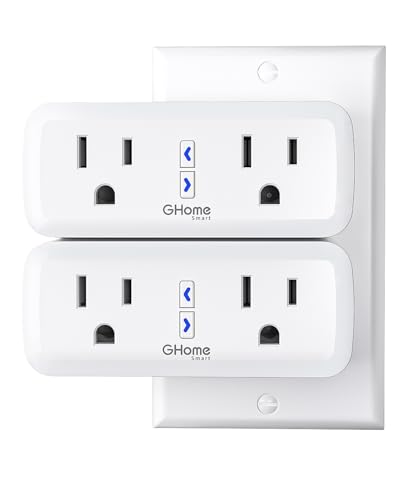
One plug body, two independently controlled outlets — designed to stop you giving up a socket.
Most smart plugs occupy an entire outlet. This one splits into two separately controlled sockets from a single body, so you can run a lamp and a fan on their own schedules without sacrificing the second wall position. It’s rated for 15A and 1800W, enough for a fish tank heater or a string of outdoor lights. Bluetooth handles the initial pairing, then it switches to your 2.4GHz Wi-Fi network for everyday control. No hub required.
You get this plug working in about thirty seconds, which is why buyers praise its ease of use more than anything else. Customers note they connect over Bluetooth (a short-range wireless link) and pair in roughly half a minute, then link Alexa in seconds after that. One owner runs four independently controlled outlets from a two-pack — outdoor string lights, a fish tank, reptile lights, and holiday inflatables — all through Google Home, with no resets or dropouts in a year of daily use. The fire-resistant casing and overload protection (which cuts power if the draw gets too high) add confidence.
The recurring gripe is scenes: when a scheduled scene fires, not every light comes on. Manual control through the app works fine — it’s specifically the automated scene trigger that’s unreliable for some users. App compatibility is mixed, and some buyers find they need a second app on their phone. But for straightforward on/off, timers, and voice control, it’s a dependable choice.
What owners keep coming back to: the setup is among the fastest in the category — Bluetooth pairing in about thirty seconds, Alexa linked moments later.
The one honest snag: scheduled scenes occasionally miss a device. Manual app control works every time, so if you rely on scenes, test them before you commit.
Choose this if: you want two smart outlets from one wall position, with the quickest setup in this lineup.
Pass it over if: your whole smart home runs on automated scenes — the scene reliability here isn’t guaranteed.
6. TP-Link Tapo P125M Matter Smart Plug (3-Pack)

Matter certification means this plug talks to Apple Home, Alexa, Google Home, and SmartThings — no ecosystem lock-in.
If you’ve ever bought a smart plug that only works with one app, this is the antidote. Matter is a universal standard — like a common language that every major smart home platform agrees to speak — so this plug works across Apple Home, Amazon Alexa, Google Home, and Samsung SmartThings without switching apps or buying a bridge (a hub that translates between systems). It’s rated for 15A and 1800W max, so it can handle high-draw devices like a space heater or hair dryer. It plugs into any standard outlet, and its compact body avoids blocking the second socket. UL certified with a flame-retardant casing and a 2-year limited warranty.
Setup is the strongest thing about it, and quality is the second most-praised. The Tapo app is cleaner than most competitors, and Bluetooth onboarding gets you connected without fuss. It supports sunrise and sunset scheduling instead of being locked into one-hour increments, and it responds quickly to voice commands. One owner uses it to reboot hard-to-reach devices through automations; another runs the whole setup through Home Assistant and Google Home with better speed than their old Z-Wave gear.
The honest trade-off: while the plug itself is reliable, the Matter protocol adds a layer of complexity that trips some users. Connecting across ecosystems can require a hub per platform, and one buyer saw Google Home report it offline until a hard reset. It’s not the plug’s fault — it’s how Matter works today. Buy the 3-pack, start with one to test your setup, and you’ll know quickly whether your ecosystem plays nicely.
This is your pick if: you run multiple smart home platforms and want one plug that works everywhere without a proprietary bridge.
Don’t pick it if: you’re on a single-platform setup and want the simplest possible experience — a dedicated Wi-Fi plug will feel easier.
7. Tapo P110M Matter Smart Plug with Energy Monitoring (2-Pack)

Matter compatibility plus per-device energy tracking — the upgrade path if the P125M doesn’t give you enough data.
Same Tapo platform, same Matter certification, but this one adds the feature serious energy savers want: built-in consumption monitoring. You get voltage, current, and power stats in the app, plus an energy-bill estimator that works with your utility’s rates. The overcharge prevention feature automatically cuts power based on user-set thresholds — if you’re charging an e-bike or running a device you don’t want to overcharge, that’s your safety net. Scheduling lets you shift high-consumption devices to off-peak hours when electricity is cheaper.
Setup is the standout — the most-praised aspect here, and energy monitoring follows second. The app is friendly, pairing takes about fifteen minutes from download through firmware update, and the connection holds even through thick concrete walls with rebar. One buyer runs a 12,000 BTU air conditioner and an e-bike charger off it, and both toggle instantly in the app. It also integrates with Home Assistant for data logging and time-of-use cost analysis.
The honest consideration: connectivity is the most-discussed aspect, and it’s mixed. Most buyers connect on the first try, but a few report the Matter setup being finicky — several attempts needed, and if you switch to local-only control you might need a reset. The plug body is also on the larger side and can block adjacent outlets in power strips. Its 15A rating handles most household loads, but if you’re stacking two in a duplex outlet side-by-side, check the spacing first.
Where it wins: per-device energy tracking plus Matter flexibility — two features that rarely appear together on the same plug.
Worth knowing: the body is wider than a standard plug, so plan your outlet layout before committing to a pair.
Best for: energy-conscious owners who want Matter compatibility and real per-device consumption data in one plug.
Consider the P125M instead if: you don’t need energy monitoring and just want the simplest, most reliable Matter plug available.
8. Shelly 1 Mini Gen4 Smart Relay Switch
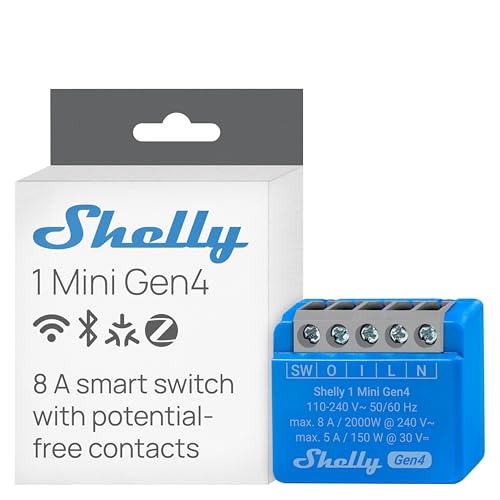
At 20 grams, this relay disappears into tight switch boxes and garage door casings where nothing else fits.
The 1 Mini Gen4 solves a specific problem: you need a relay that fits inside a crowded switch box or inside the casing of an appliance itself. At 20 grams, it’s lighter than the 26g Shelly 2PM above, and its 8A dry-contact rating suits lights, coffee makers, and garage door openers rather than heavy motors. It works with Wi-Fi, Zigbee, and Matter, with no hub required, and includes an upgraded processor with 8 MB of memory for faster response. You get a 3-year device warranty from Shelly.
Quality is what buyers rave about — the most-praised aspect here — with ease of use right behind it. The terminals are well-labeled, it fits 12-gauge Romex wiring, and it’s instantly discoverable in Home Assistant and the iOS app. It can function as a Bluetooth Low Energy repeater, which extends the range of other BLE devices in your home. For garage doors specifically, it fits inside the opener casing or near the motor, and 8A handles the load. Compact size also earns consistent praise from people retrofitting older homes with tight or crowded electrical boxes.
The honest trade-off: Zigbee mode is genuinely finicky. It requires a firmware update through a browser URL, and the instructions aren’t always accurate — reviewers point out hours spent trying to pair it with Hubitat before giving up and using Wi-Fi instead. It’s also not UL or ETL listed, and it works in metal boxes only with a plastic faceplate. If you want just the Wi-Fi path, this is an excellent, tiny relay. If you specifically need Zigbee reliability, that’s where it stumbles.
The Case For This Tiny Relay
- 20g body fits switch boxes and garage door casings where larger modules won’t
- Three wireless protocols — Wi-Fi, Zigbee, and Matter — with no hub needed
- 8 MB memory and upgraded processor for fast response
- Functions as a Bluetooth repeater, extending BLE range in your home
What to Watch Out For
- Zigbee mode requires a firmware update and can be unreliable to pair
- Not UL or ETL listed
- Only works in metal boxes with a plastic faceplate
- No reset button on the device itself
Right for you if: you need the smallest relay available for a tight box or an appliance retrofit, and you’re happy on Wi-Fi or Matter.
Look past it if: Zigbee is your primary protocol — that path is unreliable enough to cause real frustration.
9. NOUS Wi-Fi Smart Plug 15A Dual-Band 4-Pack
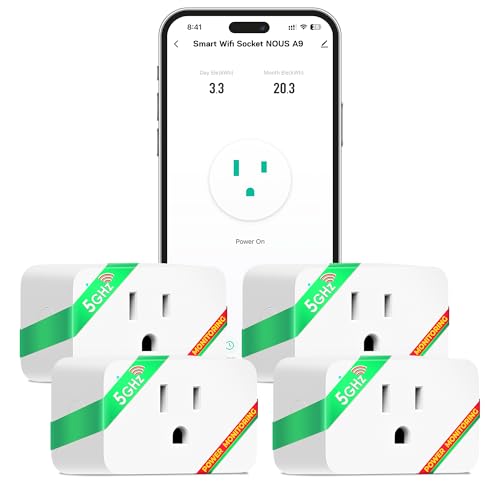
Four plugs that connect to either 2.4GHz or 5GHz Wi-Fi — the rare budget option that won’t fight your router.
Almost every budget smart plug is stuck on 2.4GHz. This one also supports 5GHz, which means it can connect on the less-crowded band when your 2.4GHz network is overloaded. That’s genuinely different from the Emporia and GHome plugs above, both of which are 2.4GHz only. Each plug handles 15A, has real-time energy monitoring with consumption reports in the app, and works with Alexa and Google Home. The compact body won’t block your second outlet, and setup takes minutes with no hub required.
What buyers appreciate most is the compatibility — the dual-band connection earns the top aspect rating, with setup following right behind. One owner paired nine units back-to-back without a problem, and several note the Smart Life app offers more scheduling options than the standard Tuya version. It works well for landscape lighting control and simple on/off automation. Voice control through Alexa and Google Assistant is available once you’ve set it up in the app.
The weak spot is the app experience. The NOUS app itself is basic — one buyer describes it as having no instructions and being difficult to navigate, with a cost-calculation feature that doesn’t work properly. Connectivity is also mixed: some units connect instantly, while others won’t connect at all despite the dual-band support. It’s a solid budget pick if you’re comfortable using the Smart Life app instead of the proprietary one, or if you’re just after simple voice and app on/off control.
The standout spec: 5GHz support (a faster Wi-Fi band that suffers less interference) separates it from nearly every competitor at this level, so your commands respond faster. And four plugs in one box covers a whole home.
The trade-off: the companion app is the weakest piece here — plan on using Smart Life instead, and test each plug before you’re past the return window.
Worth buying if: you need four plugs, your router runs 5GHz, and you want to cover multiple rooms without spending much.
Better to skip if: you want an app you’ll actually enjoy using — the Tapo or GHome apps are cleaner.
Understanding the Specs
Amperage Rating (What It Actually Means)
Every module has a maximum current rating in amps — that’s how much electrical current it can safely pass through. An 8A relay suits lamps, small appliances, and coffee makers. A 15A plug handles most household devices, and a 16A relay can run motors, pumps, and heaters. Match the rating to the highest-draw device you plan to control, and don’t exceed it. If an appliance draws more than the module’s rating, the module can overheat or fail.
Dry Contact vs. Live Output
A dry contact relay doesn’t supply power — it simply closes or opens a circuit, sending an on/off signal. That’s what you need for a garage door opener or a gate motor that has its own power supply. A live output relay passes voltage through to the connected device, so it actually powers the light or appliance. Knowing which type you need before you buy saves a return.
Wireless Protocols: Wi-Fi, Zigbee, Matter
Wi-Fi connects directly to your router with no extra hardware. Zigbee requires a compatible hub but uses less power and builds a mesh network for better range. Matter is a universal standard that lets devices from different brands work together across Apple, Google, Alexa, and SmartThings. If you’re starting fresh, Wi-Fi is simplest. If you run a hub, Zigbee and Matter open up more automation options.
Energy Monitoring: Real Numbers or Just a Total
Some modules report total power for the whole device; others give you per-channel or per-outlet data. The difference matters if you want to identify which specific appliance is the energy hog. Look for modules that show voltage, current, and power separately — those give you the raw data to actually calculate costs against your utility rate.
FAQ
Do I need a neutral wire for a smart relay module?
What is the difference between a dry contact relay and a live output relay?
Can a smart plug handle a space heater or air conditioner?
Will a Matter smart plug work without internet?
Do these modules work with 5GHz Wi-Fi?
How much current can these smart modules handle safely?
Can I control multiple lights with one relay module?
What happens if my smart plug loses Wi-Fi connection?
Is a smart relay or a smart plug better for controlling lights?
Do I need a hub for these smart modules?
Final Thoughts: The Verdict
For most people wiring lights, blinds, or appliances into a smart setup, the affordable smart appliance modules winner is the Shelly 2PM Gen4. Two independent 16A channels with 18A switching headroom, per-channel power metering, and no hub required — it covers more ground than any other relay here. If you want the quickest path to controlling plugged-in devices without touching wiring, grab the GHome Dual Smart Plug — Bluetooth setup in about thirty seconds. And for covering a whole home with four dual-band plugs, the NOUS A9 4-Pack is the one to reach for.
How We Picked
We do not accept paid placement. Every pick is matched to a real buyer and a real use-case; we do not hands-on test units.
Sources & Methodology
Specifications: manufacturer listings and product documentation. Review insights: verified customer reviews, as of September 2026. Pricing: not shown on this page (it changes often); check the current price via the retailer link.
As an Amazon Associate, Gadgets Feed earns from qualifying purchases. This does not affect which products we feature.