
Our readers keep the lights on and my morning glass full of iced black tea. As an Amazon Associate, I earn from qualifying purchases.
Specs are compiled from manufacturer listings and verified buyer reviews and can change over time — please confirm the key details on the product page before buying.
If you pay for a multi-gig internet plan and your router only has gigabit ports, you are handing money back to your provider every month. The fix is simple: you need a router with at least one 2.5-Gigabit (2.5G) port — a socket that moves data at 2,500 megabits per second instead of the old 1,000 Mbps ceiling. This guide cuts through five routers that all clear that bar, and tells you which one fits how you actually use your home network.
I’m Min — the founder and writer behind Gadgets Feed. This guide is built by comparing the manufacturers’ published specifications and the patterns across verified customer reviews, so you get each pick’s real strengths and trade-offs instead of marketing spin.
You do not need to read every spec sheet to pick correctly — you need to know which port layout, Wi-Fi generation, and firmware style matches your house. Every pick below was checked against the same three things: real 2.5G throughput, how it handles a crowded device list, and how painful setup actually is. Here is the shortlist for the best 2-gigabit router.
Our Picks at a Glance


How To Choose The Best 2-Gigabit Router
Most people buy a router by staring at the giant Wi-Fi speed number on the box. That number tells you almost nothing about whether you will actually get your full internet speed. What matters is the port speed on the back, the Wi-Fi generation the router speaks, and whether the firmware is one you can live with. Get those three right and everything else falls into place.
Start With The Ports, Not The Wi-Fi Number
A 2-Gigabit router needs at least one 2.5G port, which moves data at 2,500 megabits per second. If your router only has gigabit ports, your connection is capped at 1,000 Mbps no matter how fast your provider’s line is. Two 2.5G ports let you run a multi-gig connection in and a fast wired device out at the same time, which is what most fiber installs actually need. Modern desktops and NAS boxes often ship with 2.5G network cards already, so a matching router port is what lets them stretch their legs.
Match The Wi-Fi Generation To Your Devices
Wi-Fi 7 (the newest standard, also called 802.11be) is backwards compatible, so older laptops and phones still connect fine. The catch is that only devices that support Wi-Fi 7 see the full benefit. If you own mostly Wi-Fi 5 and Wi-Fi 6 gear, a Wi-Fi 6 router with dual 2.5G ports often gives you more real-world speed than a Wi-Fi 7 router with a weak wired side. Buy the Wi-Fi generation your next device will actually use.
Decide How Much Control You Want
Some routers run locked-down apps that walk you through setup in minutes but hide the deep settings. Others run open-source firmware (software you can freely inspect and change) where every routing rule, VLAN (a virtual network that keeps traffic separated), and firewall entry is yours to tune. Neither is better on its own — it depends on if you want a router that disappears into the background or one you enjoy tinkering with. Be honest about which person you are before you buy.
Quick Comparison
All five routers below clear the 2-Gigabit bar, but they take different roads to get there. Scan the wired port speed and port count first — that is what caps your internet plan.
| Model | Best For | Top Wired Port | Wi-Fi Standard | Stated Speed | Amazon |
|---|---|---|---|---|---|
| GL.iNet GL-MT6000 Flint 2★ Best Overall | Open-source tinkerers who want dual 2.5G ports | Dual 2.5G | Wi-Fi 6 | 6000 Mbps | Amazon |
| ASUS RT-BE88UTop Performer | Wired-heavy homes with lots of devices | 2x 10G | Wi-Fi 7 | 7200 Mbps | Amazon |
| ASUS RT-BE82U | Whole-home mesh on a mid-range budget | Five 2.5GbE | Wi-Fi 7 | 6500 Mbps | Amazon |
| TP-Link Omada ER707-M2 | Business-style multi-WAN load balancing | Dual 2.5G | N/A (wired only) | 2500 Mbps | Amazon |
| NETGEAR Nighthawk RS150 | A simple Wi-Fi 7 upgrade for smaller homes | 2.5G Internet Port | Wi-Fi 7 | 5.0 Gbps | Amazon |
In‑Depth Reviews
1. GL.iNet GL-MT6000 Flint 2 Wi-Fi 6 Gaming Router
Our pick — 4.5★ from 2,500+ verified ratings; the strongest balance of quality and price.
The router that turns your fiber line loose and lets you rewrite the rulebook
If your fiber plan is faster than a gigabit and your router is the slowest link in the chain, this is the pick. It carries a stated data transfer rate of 6000 megabits per second (Mbps) across dual-band Wi-Fi 6 (a Wi-Fi standard that splits traffic over 2.4GHz and 5GHz), so downloads and streams keep pace with your plan. It ships with two 2.5G ports (sockets that move data at 2,500 Mbps) so a multi-gig connection can go in and a fast wired device can go out at the same time. One buyer reports “2.5Gbps wired, 1.5Gbps WiFi, auto band switching, OpenWRT, WireGuard VPN, full ad-blocking, no extra servers.”
For comparison, the TP-Link Omada ER707-M2 is a superb wired unit, but its stated data transfer rate is 2500 megabits per second — a 2.4x gap. The Flint 2 simply moves more data and gives you the Wi-Fi to go with it. The 2GB-class spec sheet backs it up too: a 2GHz CPU, 1GB of RAM, and 8GB of eMMC storage for anyone who installs plugins, runs AdGuard Home for network-wide ad blocking, or hosts a VPN. WireGuard and OpenVPN both run on this box at speeds up to 900Mbps and 880Mbps respectively, so remote access does not choke your browsing.
The wrinkle is that this is a router that rewards a little curiosity. It runs pre-installed OpenWrt, which means every rule, VLAN, and firewall entry is yours to shape — a huge upside if you enjoy tinkering, but not the path of least resistance if you want a plug-and-forget appliance. And like every router in this class, the 5GHz range is good but not magical: one buyer loved the range, others found a stubborn concrete corner needs a second access point. If you want open firmware and real multi-gig ports, this is the one.
What Pushes This To The Top
- Dual 2.5G ports — one multi-gig in, one multi-gig out
- Pre-installed OpenWrt with 1GB RAM and 8GB eMMC for plugins and AdGuard Home
- WireGuard VPN up to 900Mbps and OpenVPN up to 880Mbps
- 6000 Mbps stated transfer rate across dual-band Wi-Fi 6
Where It Asks More Of You
- Open firmware means the deep settings are yours to manage — not for a set-and-forget household
- 5GHz range is solid, but a thick concrete corner may still want a second access point
- Update the firmware on first setup, or you may not see its best performance
Reach for this if: your internet plan runs past a gigabit and you want the router that actually lets it through, with open firmware you can tune.
Think twice if: you want a router that never asks you to open a settings page — the app-only crowd will be happier elsewhere on this list.
2. ASUS RT-BE88U WiFi 7 Router
Two 10-gigabit ports and eight LAN sockets for a house that lives on wires
A stated data transfer rate of 7200 megabits per second is the headline here, and it is one of the fastest figures in this roundup. But the reason to buy this router is the back panel: two 10G ports (one 10G SFP+ and one 10G WAN/LAN) plus four 2.5G and four Gigabit LAN ports — ten wired sockets in total. If you have a NAS, a gaming desktop, and a few consoles all wanting a cable, this is the one that stops you buying a separate switch.
The hardware underneath is a quad-core 2.6GHz 64-bit CPU paired with a reported 2GB of RAM, which is what lets it juggle ten wired devices and thirty-plus wireless clients without breaking a sweat. Owners running it in homes over 3,000 square feet report full coverage without an extender. One consistent pattern: the wired side is where this router shines, and the Wi-Fi side is excellent but not infinite — a garage or far corner may still want an extender or the built-in AiMesh system.
The honest catch is the one you will see in the spec sheet before you even open the box: this router does not broadcast a 6GHz band. It speaks Wi-Fi 7 everywhere else, but the 6GHz channel that some Wi-Fi 7 routers add is simply not here. For most households that is a non-issue, because only a small slice of gear supports 6GHz today. If your entire plan hinged on a 6GHz radio, look elsewhere; for a wired-heavy home, the trade is a good one. Setup is quick, the mobile app guides you the whole way, and Asus Merlin firmware support is there if you want it.
The port math: Ten wired sockets including two 10G ports is genuinely unusual at this tier — most routers at this end of the market top out at one or two multi-gig ports and four LAN jacks. That abundance is the whole reason to pick it over its RT-BE82U sibling.
The firmware wrinkle: recent firmware updates have introduced periodic low-signal reports for some owners, so a rolled-back or patched version may be worth checking if you see odd drops.
Best for a wired-first household: two 10G ports, eight LAN sockets, and a 7200 Mbps stated rate mean this router earns its place in a home that treats every device as a docking station.
skip it if: the 6GHz band is a non-negotiable part of your plan — this router does not include it.
3. ASUS RT-BE82U WiFi 7 Router
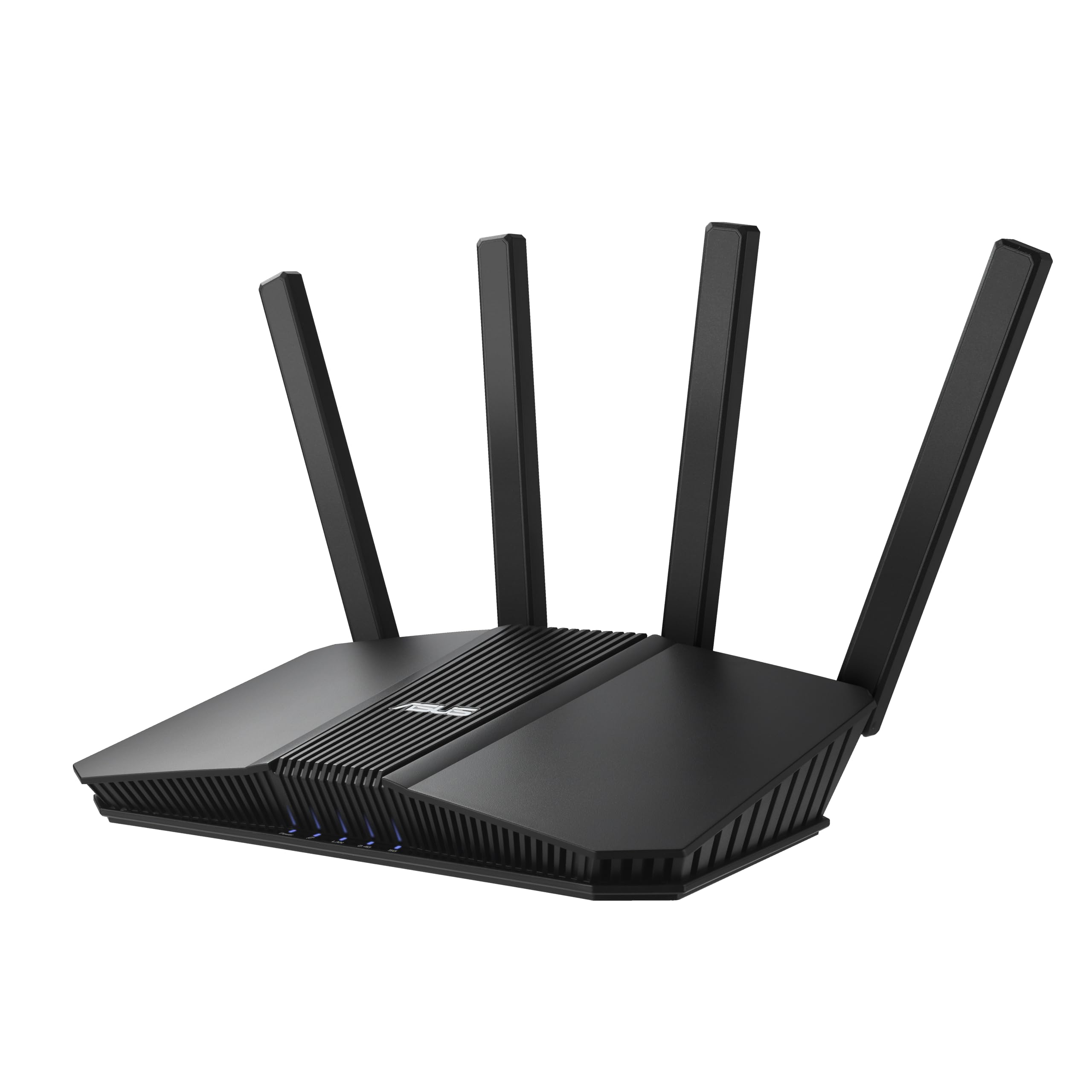
A Wi-Fi 7 router that grows with your house instead of forcing a full replace
The standout number here is five. Not five stars — five 2.5GbE ports, each one a socket that moves data at 2,500 Mbps and can be assigned to prioritize the traffic that matters to you, so your gaming PC and NAS (network storage) both get a fast lane. Add a stated 6500 Mbps Wi-Fi 7 speed, dual-band coverage, and support for 4096-QAM (a signal trick that crams more data into the same radio wave), and you have a router built to be the hub of a home that keeps adding devices.
The other reason this one earns its spot is AiMesh, Asus’s system for joining multiple routers into one smooth network. Two units cover a large house with a single network name, and devices hop between them without dropping the call or the game. Buyers describe setting up two AiMesh units in about fifteen minutes and then leaving them alone. If you are moving from an older router, this is the upgrade path with the least friction.
Where it falls short of the RT-BE88U above is the wired side. Both cover Wi-Fi 7, but this one tops out at five 2.5GbE ports while the RT-BE88U doubles down with two 10G ports and eight total LAN sockets. If you run a NAS or a 10G network, the flagship is the better fit; if you want the same Wi-Fi 7 generation for a mid-range home network, this is the smarter buy. The one nagging gripe is the lack of wall-mount holes — one owner had to reroute cables to place it, so plan your shelf space before it arrives.
What buyers love: the reliability story is the star — owners consistently call it a set-and-forget router that simply stays connected, even with a couple of dozen devices on the network at once.
Where it stumbles: setup and signal both draw mixed notes — a few buyers report needing a reset to connect the first time, and a thick wall can still eat a signal that the marketing copy suggests should reach everywhere. It is a fixed-antenna unit, so placement matters.
The smart-mesh choice: five 2.5GbE ports plus AiMesh support make this the router to buy if your next move is adding a second unit rather than buying a bigger single box.
Look elsewhere if: a 10G port is on your shopping list — you want the RT-BE88U instead.
4. TP-Link Omada ER707-M2 Multi-Gigabit VPN Router

The wire-only router for load balancing two internet lines and never going dark
This is not a router you buy for Wi-Fi — it has none. The ER707-M2 is a wired router with a stated data transfer rate of 2500 megabits per second, and its job is to route and protect your network with business-grade discipline. It carries one 2.5G WAN port, one 2.5G WAN/LAN port, four Gigabit WAN/LAN ports, one Gigabit SFP WAN/LAN port, and a USB 2.0 port for storage or an LTE backup dongle. That is genuine multi-gig in and out, with the whole network under your control.
The reason to choose this over a consumer router is what happens when an internet line goes down. It handles load balancing and automatic failover, which buyers confirm by running two providers at once: routing IoT devices and phones to one link, computers and TVs to the other, and keeping everything online if either drops. It also supports up to 100 LAN-to-LAN IPsec VPN connections, 66 OpenVPN, 60 L2TP, and 60 PPTP — a serious amount of remote-access headroom for the money. And at 500,000 concurrent sessions with room for 1,000+ clients, it does not flinch at a busy network.
The honest caveat is that this is prosumer gear wearing a friendly label. Setup is more involved than a consumer router, and that shows in the pattern of owner experience — some people set it up in minutes, others find it complicated because it asks questions consumer routers never do. One customer reports 1,400Mbps line speed versus 700Mbps on an old router once the configuration is sorted. If you want a router that thinks, this is it. If you want plug-and-play, look at the picks that ship with a guided app.
What the pro features buy you: VLAN support, a stateful firewall, and Omada controller management make this a small-business or home-lab router that you can grow into rather than replace.
The trade-off to accept: no Wi-Fi at all, and setup takes investment. This router is a wired backbone — you pair it with access points and a switch, which is the point.
For the load-balancing crowd: if you run two internet lines and want automatic failover with dual 2.5G ports and room for a thousand clients, this router was built for exactly that job.
Not the one if: you want your router to broadcast Wi-Fi from the start — this unit is wired-only by design.
5. NETGEAR Nighthawk Dual-Band WiFi 7 Router (RS150)
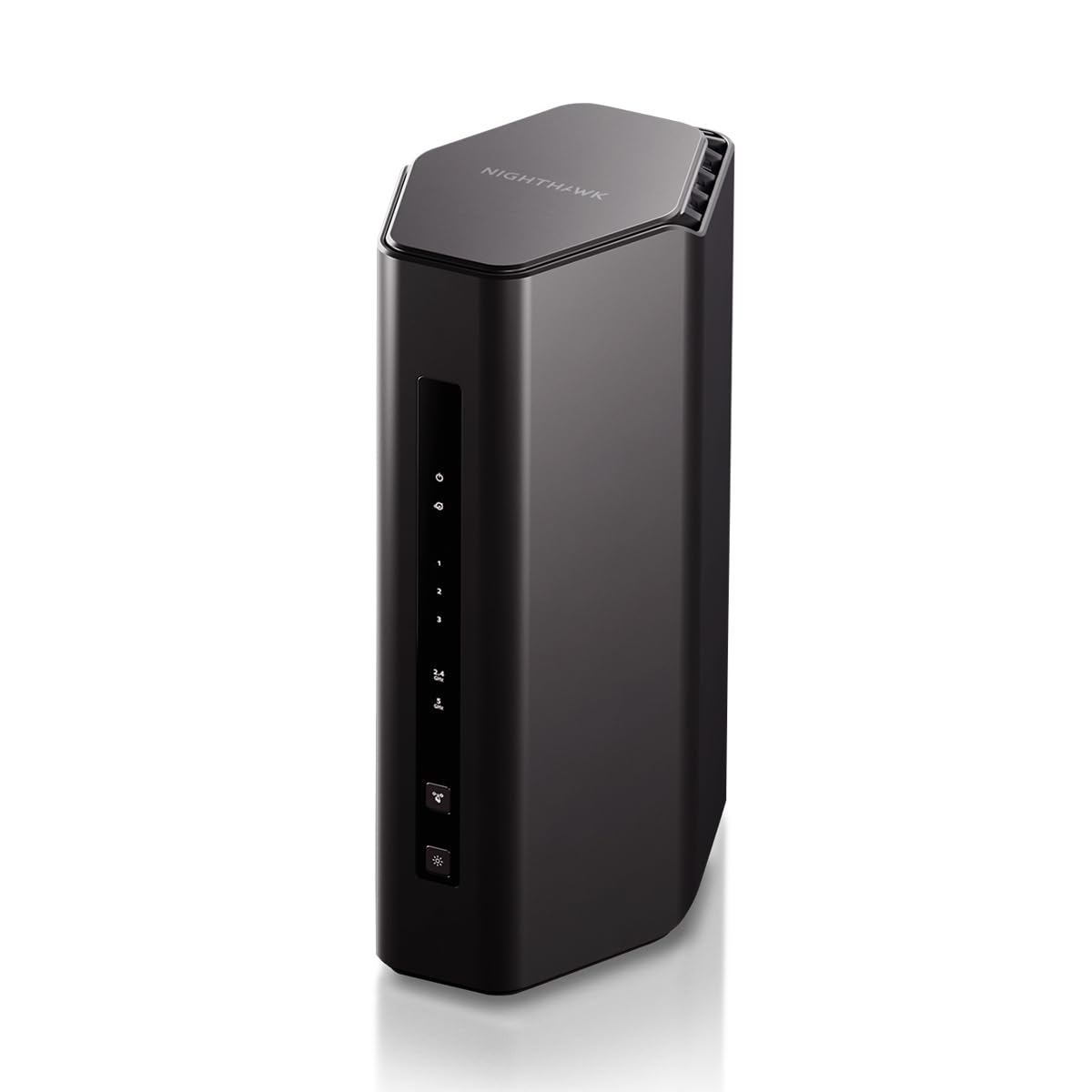
An entry point into Wi-Fi 7 with a real 2.5G internet port on the back
If you want the newest Wi-Fi standard without paying flagship money, this is the doorway. It carries a stated 5.0 Gbps wireless speed, up to 2,250 square feet of coverage, and a 2.5G internet port (2,500 Mbps) that lets a multi-gig plan through the front door — the exact bar this guide is built around. It is also a renewed unit, which is why it sits in the value slot, so its price advantage is the honest reason it makes the list.
NETGEAR Armor adds an automatic security layer across your connected devices, and the router is rated for up to 80 devices, which covers a typical family home with phones, laptops, tablets, and smart-home gear all talking at once. Owners mention the signal reaches upstairs and outside without a struggle, and that setup was quick for most. One buyer describes the renewed unit arriving in near-perfect condition and performing exactly as advertised.
It is worth being honest about what a renewed router means. One owner reported a Wi-Fi range issue that conflicted with an extender and returned it, and one buyer hit an app that kept hanging during setup. Because it is renewed, a quick check of the unit on arrival is smart. But for a budget-friendly entry into Wi-Fi 7 with a genuine 2.5G port, nothing else on this list asks less of your budget.
Why It Earns The Value Slot
- 2.5G internet port — a real multi-gig socket, not a fast-looking number
- Wi-Fi 7 speeds up to 5.0 Gbps with 2,250 sq. ft. of stated coverage
- Rated for up to 80 devices, so a full family home stays connected
- NETGEAR Armor security built in
The Honest Trade-Offs
- Renewed unit — check the hardware on arrival, since a rare range issue has been reported
- Coverage is stated at 2,250 sq. ft., so larger or multi-floor homes may want a mesh node
- Some owners hit friction with the Nighthawk setup app
The budget-friendly Wi-Fi 7 entry: a 2.5G internet port and 80-device rating at the entry-level tier make this the pick for a small-to-mid home that wants multi-gig without premium money.
Hold off if: your home runs past 2,250 square feet or you want to avoid the renewed-unit question entirely.
Understanding the Specs
2.5G Ports and Multi-Gig WAN
A 2.5G port moves data at 2,500 megabits per second — two and a half times the older 1,000 Mbps gigabit ceiling. If your internet plan is faster than a gigabit, your router’s port speed is what caps you. A multi-gig WAN port lets that faster connection in; a 2.5G or 10G LAN port lets a single wired device pull the full speed. A dual 2.5G router, like the GL.iNet Flint 2, gives you both in and out. A wired-only router like the TP-Link ER707-M2 gives you the same math without any Wi-Fi at all.
Wi-Fi Generation and Port Versus Radio
The Wi-Fi number on the box (Wi-Fi 6, Wi-Fi 7) describes the wireless radio, not the wired ports. Wi-Fi 7 is the newest standard and speaks the 802.11be protocol, but only Wi-Fi 7 devices actually use it — every older phone, laptop, and tablet simply connects on the slower standard they support. That is why port type and Wi-Fi generation are separate buying decisions: you can have a fast radio with a slow wired side, or a fast wired side with an older radio. Match both to how your devices actually connect.
FAQ
Do I need a 2-Gigabit router if my internet plan is only 1 Gigabit?
What is the difference between a 2.5G port and a 10G port?
Will a 2-Gigabit router work with my existing modem?
Do I need a separate switch if I buy a router with two 2.5G ports?
Is Wi-Fi 7 worth it over Wi-Fi 6 on a 2-Gigabit router?
How many devices can a 2-Gigabit router handle?
Can I use a 2-Gigabit router with a mesh system I already own?
Does a 2-Gigabit router improve Wi-Fi range or just speed?
Should I buy a renewed 2-Gigabit router to save money?
Do I need special Ethernet cables to get 2-Gigabit speeds?
Final Thoughts: The Verdict
For most people, the 2-gigabit router winner is the GL.iNet GL-MT6000 Flint 2, because dual 2.5G ports, pre-installed OpenWrt, and WireGuard VPN up to 900Mbps cover both the wired and the remote-access sides of a fast home network. If your house runs on wires and you want ten sockets with two 10G ports, grab the ASUS RT-BE88U. And if you want a mesh-ready Wi-Fi 7 setup on a mid-range budget with five 2.5GbE ports, the ASUS RT-BE82U is the one to reach for.
Whichever direction you go, buy the router that matches the way your house actually connects — if most of your devices live on Wi-Fi, a strong Wi-Fi 7 router with a good 2.5G port serves you well; if you have desktops and a NAS asking for cable, prioritize the wired port count. And on any pick, update the firmware on first setup — several of these routers only show their best performance after a fresh update.
How We Picked
We do not accept paid placement. Every pick is matched to a real buyer and a real use-case; we do not hands-on test units.
Sources & Methodology
Specifications: manufacturer listings and product documentation. Review insights: verified customer reviews, as of September 2026. Pricing: not shown on this page (it changes often); check the current price via the retailer link.
As an Amazon Associate, Gadgets Feed earns from qualifying purchases. This does not affect which products we feature.