
Our readers keep the lights on and my morning glass full of iced black tea. As an Amazon Associate, I earn from qualifying purchases.
Specs are compiled from manufacturer listings and verified buyer reviews and can change over time — please confirm the key details on the product page before buying.
If you are shopping for a portable drive to hold a terabyte of photos, game installs, or work files, the honest answer is simple: the Samsung T7 is the safest pick for most people. It has the biggest track record, real-world proof it holds up under constant recording, and a size that disappears into a pocket. The rest of this list covers drives that are faster, tougher, or cheaper, so you can match one to how you actually use it.
I’m Min — the founder and writer behind Gadgets Feed. This guide is built by comparing the manufacturers’ published specifications and the patterns across verified customer reviews, so you get each pick’s real strengths and trade-offs instead of marketing spin.
A portable drive is only useful if it survives your bag, your transfer, and your habit of yanking the cable. Speed numbers on the box are a starting point, not a promise, so here is how each pick actually behaves once it is in your hand. Every drive below holds exactly 1TB, so the real question is which one fits your setup, and this guide to the 1tb external ssd answers that on specs and owner experience alike.
Our Picks at a Glance


How To Choose The Best 1TB External SSD
Before you compare model names, know the three things that actually decide whether a 1TB external SSD feels fast or slow in daily use: the interface it runs on, its physical toughness, and how it connects to the devices you already own.
Match the interface to your port, not the box
A 2000MB/s drive only hits that number through USB 3.2 Gen 2×2, a newer plug standard that many laptops and desktops simply do not have. On an older USB 3.0 port, the same drive tops out far lower. Check what your computer, console, or phone actually supports first, then buy the speed tier you can really use. A drive rated higher than your port can feed is fine, just not faster in practice.
Decide how rough your life is
If the drive rides in a bag or gets clipped to a phone, toughness matters more than a speed bump. Look for an IP65 rating (dust-sealed and protected against water spray), a drop-resistance figure, and a metal or silicone shell. Durable enclosures also shed heat better, which keeps sustained transfers from slowing partway through a big backup.
Connectors for phones, cars, and consoles
A dual-plug drive with both USB-C and USB-A built in skips the adapter hunt entirely, which matters if you move between a laptop, a car dashcam port, and a phone. If your target device is an iPhone, confirm the model compatibility in the listing — several of these drives call out specific phone generations and console support, and getting that wrong is the most common reason a drive feels useless on day one.
Quick Comparison
| Model | Best For | Rated Speed | Interface | Shell | Amazon |
|---|---|---|---|---|---|
| Samsung T7 Portable SSD 1TB★ Best Overall | All-purpose everyday backup | Up to 1,050MB/s read | USB 3.2 Gen 2 | Aluminum unibody | Amazon |
| ORICO External SSD 1TBBest Dual-Port Design | Dual-plug convenience | Up to 1050MB/s | USB 3.2 Gen 2 | Zinc alloy metal | Amazon |
| SSK 1TB Portable SSDCoolest Running | Cool, quiet everyday storage | Up to 550MB/s | USB 3.2 Gen 2 (6Gbps) | Aluminum | Amazon |
| fanxiang 1TB External SSD PS2000W | Fast transfers on a tight budget | Up to 2000MB/s read | USB 3.2 Gen2x2 | Aluminum alloy | Amazon |
| KingSpec Z5 1TB External SSD | Gaming setups that want RGB | Up to 2100MB/s | USB 3.2 Gen2x2 | Zinc alloy casing | Amazon |
| Lexar ES3 1TB Portable SSD | Ultra-thin pocket carry | Up to 1050MB/s read | USB 3.2 Gen 2 | NAND flash body | Amazon |
| Lexar ES5 1TB External SSD | Magnetic phone attachment | Up to 2000MB/s read | USB-C | Liquid silicone casing | Amazon |
| Amazon Basics Portable External SSD 1TB | Weather-ready rough handling | Up to 2000MB/s | USB 3.2 Gen 2×2 | Metal casing, polymer bottom | Amazon |
| Sandisk 1TB Extreme Portable SSD | Creators who need speed and armor | Up to 2000MB/s | USB | Dust and water resistant | Amazon |
In‑Depth Reviews
1. Samsung T7 Portable SSD 1TB Titan Gray, USB 3.2 Gen 2, Up to 1,050MB/s
Our pick — over 4.5★ from 21,000+ verified ratings; the strongest balance of quality and price.
The proven workhorse that records, edits, and backs up without complaint — and almost never lets you down.
Here is the number that decides it for the T7: up to 1,050MB/s read and 1,000MB/s write over USB 3.2 Gen 2, which is the plug standard that lets it move roughly a gigabyte per second. In real use, that is a full podcast session or a large video project transferred in minutes rather than the half-hour coffee break a spinning hard drive demands. It is the drive you default to when a project cannot afford a dropped frame.
The proof is in how people abuse it. One studio setup runs seven simultaneous 1080p/30fps recording streams to a single T7 with no dropped frames or write errors, according to a buyer who runs exactly that workload. It also survives car life: it slots into the USB-C port of a Rivian and records Gear Guard footage continuously, with heat managed and no external power needed. At roughly credit-card size, it drops into a coin pocket and forgets it is there.
Two honest caveats. It warms up on a long transfer, though the reviews point to that being warm rather than a problem, and the T7 is the most expensive drive in this group on speed-per-dollar terms. There is also a counterfeit issue worth naming: one buyer received a fake from a third-party seller before getting a genuine unit from a proper listing, so buy from a trusted source. What wins people over is the combination of reliability, speed, and that aluminum unibody build — genuinely the safest general-purpose drive here.
What earns its keep
- Up to 1,050MB/s read and 1,000MB/s write over USB 3.2 Gen 2
- Handles seven simultaneous 1080p/30fps recording streams with zero dropped frames
- Aluminum unibody, shock resistant, survives drops of up to 6 feet
- 256-bit AES hardware encryption protects files if the drive is ever lost
Worth knowing before you buy
- The priciest pick here relative to raw speed
- Gets warm under sustained transfer, which is normal but noticeable
- Counterfeit units circulate from untrusted sellers — buy from Amazon’s own listing
Solid pick for: anyone who wants one drive for backups, video, photos, and phone clips without worrying about it failing mid-transfer.
Look elsewhere if: you want the cheapest per-megabyte and mostly move small files, where its speed advantage never gets used.
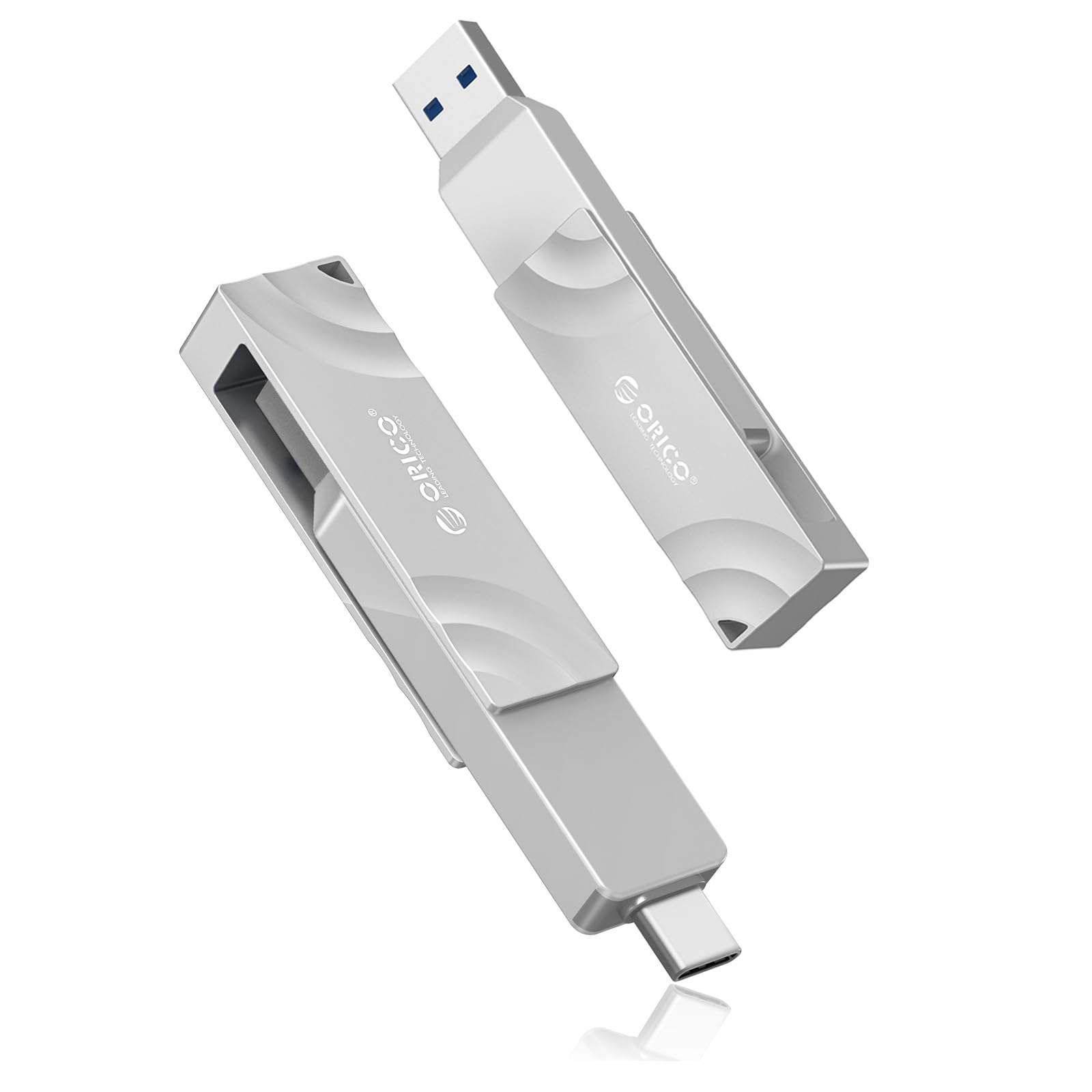
2. ORICO External SSD 1TB, Dual-Port USB 3.2 Gen 2, Up to 1050MB/s
Two plugs on one tiny body: switch from laptop to phone to car without ever hunting for an adapter.
What sets the ORICO apart is its connector strategy. It carries both a USB-C and a USB-A plug in a single compact drive with the P1-tagged swivel that rotates 90 degrees with a satisfying click stop. That means no dongle for a car’s USB-A port one minute and no adapter for a phone’s USB-C socket the next. Storage capacity is 1TB, speed is rated up to 1050MB/s, and the zinc alloy body runs heavy and sturdy in the hand.
The metal casing does double duty: it feels like a serious piece of gear and it sheds heat steadily under load. Real users clambered onboard too: lots of legitimate storage is confirmed on a single 1TB unit, and owners have used it as dashcam storage on a vehicle via the USB-A side while switching the same drive to their phone through the USB-C plug.
Now the catch. Heat is genuinely the recurring knock here. Several owners describe it as hot enough to want to hold carefully after extended use, and a couple of units run too hot for comfort. If you plan long uninterrupted writes, this is worth weighing. Speed is also honest rather than record-setting — one verified buyer notes it does not quite hit the advertised figure depending on the host device. For a travel and dual-device drive, it is still one of the friendliest designs in this group.
The design win: a USB-C plug and a USB-A plug built into one pocketable body, so the drive works everywhere without an adapter graveyard.
Where it gives ground: it runs warm to the touch during heavy transfers, so plan around that if you push it hard.
Pick it when: you bounce between USB-C phones and USB-A car or laptop ports and want zero adapters.
Think twice when: your workflow is one long continuous write at a time — the warm casing will be a constant companion.
3. SSK 1TB Portable SSD, Up to 550MB/s, USB 3.2 Gen2
The steady, cool-running backup drive that trades top speed for reliability and near-silent everyday use.
If your priority is a drive that stays composed through a long backup, the SSK makes its case with behavior rather than brute speed. Its rated ceiling is up to 550MB/s over USB 3.2 Gen2, and it uses SLC caching (a fast buffer that keeps early transfers quick) plus TRIM support to hold transfer speed steady and extend the drive’s life. It also carries S.M.A.R.T. monitoring, a self-check system that reports drive health, so you get early warning before a drive misbehaves. Size and transfer speed are its two best-loved traits alike.
Owners confirm the steady personality. A 512GB internal drive clones over in about 20 minutes in one account, and the drive runs cooler and noticeably quieter than a traditional spinning hard drive. It is genuinely pocketable, about the size of a car key fob — far smaller than the two-iPhones-stuck-together bulk of older SSD designs. It ships with both a USB-C cable and a USB-A adapter, which covers most laptops, tablets, and desktops without extra purchases.
Two things to keep in mind. The 1TB figure is nominal: a buyer measuring it saw about 953GB usable, which is normal for how drives report capacity, not a fault. And on the iPhone front, the listing’s phone support is uneven — one user hit an accessory power error that demanded an Apple camera adapter plus external power, defeating the portable point. On laptops and consoles it behaves exactly as advertised. The heat-dissipation and compatibility aspects earn mixed billing, which fits a drive that is dependable rather than dazzling.
The quiet strength: stays cool and quiet through long backups, with S.M.A.R.T. health monitoring and TRIM support working in your favor.
What to plan around: phone connectivity is hit-or-miss compared to laptop use, so buy it for computers first.
Worth grabbing if: your setup centers on laptops, tablets, and desktops and you value a cool, dependable backup companion over peak speed.
Pass if: iPhone backup is your primary job — the phone compatibility here is inconsistent.
4. fanxiang 1TB External SSD PS2000W, Up to 2000MB/s, USB 3.2 Gen2x2

A high-speed aluminum drive at a value price — with a real ongoing question about how long it lasts.
The fanxiang throws down a serious spec: up to 2000MB/s read and 1800MB/s write over USB 3.2 Gen2x2, the interface that doubles USB throughput on ports that support it. The drive is pocket-size at 3.35×1.97×0.34 in and just 1.6oz, so it adds almost nothing to a bag. Its defining strength, though, is that it goes fast without making you pay premium-tier money for the speed. That combination suits anyone upgrading from a slow hard drive to a fast backup target for photos or a laptop image.
The physical build backs the pitch. An aluminum alloy casing resists shock and drops while quietly dissipating heat, keeping the drive stable during long transfers. Owners confirm quick file transfers and a surprisingly quiet, cool-running experience in everyday use. The drive covers a wide device range too, from Windows and Mac to phones and consoles, and it ships with a 2-in-1 USB-C to C/A cable so the right plug is always with you.
There is a real caveat you should hear before buying. Durability and speed both carry mixed feedback: some units ran flawlessly, while others stopped working within a few months or fell well short of advertised write speeds on a large review base. The honest framing is that this is the drive to consider when you want maximum rated speed at a lower entry point, and it comes with a 5-year after-sales service pledge plus 512TBW endurance rating. But if a drive dying early would be a disaster for you, spend a little more on the Samsung T7 above and get the reliability track record.
Where it shines
- Up to 2000MB/s read and 1800MB/s write over USB 3.2 Gen2x2
- Only 1.6oz and 0.34 in thick — nearly weightless in a pocket
- Aluminum alloy casing resists drops and sheds heat
- Backed by a 5-year service pledge and 512TBW endurance rating
Where the risk sits
- Durability is the wildcard — some units quit within months, others run perfectly
- Advertised write speeds aren’t always reached in real tests
- Slower real-world performance than its 2000MB/s figure implies on many ports
A good fit for: budget-conscious buyers upgrading to fast 2000MB/s-class performance and comfortable keeping a second copy of anything critical.
Not the safest pick if: you cannot afford even one drive failing early — the reliability record here is genuinely mixed.
5. KingSpec Z5 1TB External SSD, 2100MB/s, RGB, USB 3.2 Gen2x2

The only drive here that lights up — a zinc-alloy gaming drive with a 2100MB/s ceiling and RGB on top.
KingSpec’s Z5 lives and dies on its gaming identity. The headline is up to 2100MB/s over USB 3.2 Gen2x2 with a Type-C cable rated to 20Gb/s, and it is wrapped in a zinc alloy casing that brings real impact and wear resistance plus steady heat dissipation. Then there are the lights: 128-color breathing ambient illumination that gives your setup a reason to exist beyond pure function. That RGB glow is the detail that makes this the pick for anyone who wants their storage to look like it belongs in a gaming rig.
The gaming credentials are more than cosmetic. Owners who use it with Steam Deck report it formats easily to exFAT and works without drama, though the drive does pull extra battery — the recommended workaround is a 100W splitter to keep the handheld charged while the drive is connected. The zinc alloy construction earns repeated praise as solid and well-built, and storage capacity of the full 1TB gives you real room for a game library. Performance overall reads as a strong strength on this drive, not a weak spot.
Two honest notes. Speed is the one area with mixed reviews — some transfers fly while others fall short of the advertised ceiling, and a defective first unit that was replaced under service came back excellent, which says more about unit variance than anything else. It is also not an iPhone drive; the listing explicitly says it is not for Apple iPhone and that Mac performance caps around 10Gbps. For Windows, Android, PlayStation, and Deck, it does exactly what the box promises.
The gamer’s detail: 128-color RGB plus a zinc alloy shell that shrugs off wear and moves heat effectively.
Keep in mind: it is not built for iPhone use and Mac speeds cap at 10Gbps, so check your platform before committing.
Reach for this if: you game on Windows, PlayStation, or Steam Deck and want a sturdy, fast drive that also looks the part with RGB lighting.
skip it if: your main device is an iPhone or a Mac, where its speed and compatibility both step down.
6. Lexar ES3 1TB Portable SSD Silver, USB 3.2 Gen 2, Up to 1050MB/s

Thin, light, and reliable at everyday speeds — a pocket drive that disappears into a jacket and stays put.
At 42g and only 10.5mm thick, the Lexar ES3 is the drive that makes other portable SSDs feel chunky. It is genuinely smaller than a bank card in footprint, which means it slides into a pocket, a wallet slot, or the tiniest camera bag with room to spare. Speed is rated up to 1050MB/s read and 1000MB/s write over USB 3.2 Gen 2 — quick, but tiered below the 2000MB/s drives. It ships with a Type-C cable for plug-and-play and includes Lexar DataShield 256-bit AES encryption software to lock your files down.
Functionality is what owners call out as its standout. It moves between Mac and PC smoothly, plus phones and consoles, and a plug-and-play setup means most people are backing up within seconds of unboxing. It moved over 50,000 photos and videos off an iPhone with room to spare in one account, and it happily serves as a Time Machine backup target for a MacBook Air. The build quality gets consistent praise too — the thin shell still feels sturdy despite the profile.
Two things to weigh. Connectivity is mixed: it works with recent iPhones but not on older models, so confirm your phone generation explicitly, because a couple of buyers expected it to work where it does not. Reliability also carries a note — a small number report a drive failing in the first month or two, which is the kind of thing you insure against with a second backup copy. Also note that the listing’s MagSafe note applies to a different version, not this ES3.
The form-factor win: 42g and 10.5mm thick — small enough to carry like a credit card, still sturdy enough to trust.
What to double-check: phone support is generation-specific, so verify your exact iPhone model before you buy.
Ideal for: travelers and photographers who want the thinnest, lightest 1TB drive here and value portability over peak speed.
Not your pick if: you need top-tier 2000MB/s transfers or own an older iPhone the listing doesn’t support.
7. Lexar 1TB ES5 External SSD, 2000MB/s R/W, USB-C, Magnetic/MagSafe
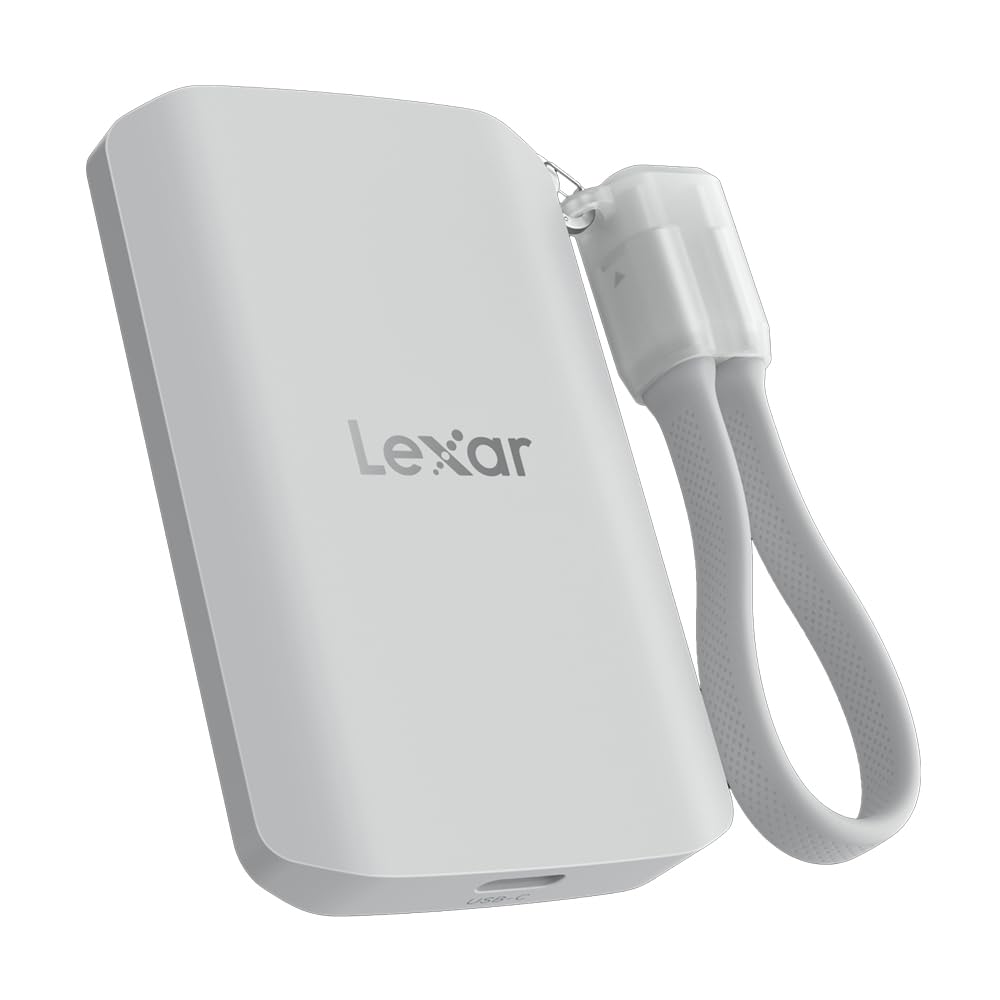
A magnetic phone-side drive for creators — it snaps to your device and records straight off the back of it.
The ES5’s defining feature is its MagSafe-compatible design: it magnetically snaps to the back of a compatible phone, and a metal ring accessory is included so any device can become a magnetic mounting surface. That turns your phone into a self-contained recording rig with no cables attached. Speed runs up to 2000MB/s read and 2000MB/s write, and it supports Apple ProRes at 4K120FPS plus Samsung Pro Video at 8K 30FPS — the kind of high-bitrate formats that fill internal storage fast. A free Lexar App handles automatic media backup and expands your phone’s effective storage.
The build matches its creator ambitions. The casing is liquid silicone around NAND storage, rated IP65 for dust and water resistance and drop resistant up to 3M — so a fumble on a shoot is survivable. Reviewers describe a tidy magnetic clip that keeps the drive attached and the cable tethered, with the attached cord singled out for making the whole setup cleaner than a loose drive flopping around. Performance and speed are its two strongest draws, and the compact, lightweight form keeps it out of the way during shooting.
Worth flagging for the right buyer. Compatibility carries mixed billing — while it works well with iPhone photo backup explicitly, it is not the plug-and-play universal drive a wired connector design is, and one account of another Lexar drivespeed note about Mac performance applies to the ES5 family too. It is best understood as a phone-centric, magnetic-top drive rather than a desk-drive replacement. For iPhone video shooters, it offloads ProRes 4K120FPS clips before internal storage fills.
For the phone shooter: snaps magnetically to a compatible phone, handles Apple ProRes 4K120FPS, and shrugs off drops up to 3M with IP65 sealing.
The trade-off: it is a phone-first design, so treat it as your creator tool rather than a general desk drive.
Made for: iPhone and Android creators who shoot video on the move and need storage that attaches directly to the phone.
Less compelling for: desk-bound backups where a cheaper, faster-by-cable drive would do the same job for less.
8. Amazon Basics Portable External SSD, 1TB, 2000MB/s, IP65

The no-drama overachiever: 2000MB/s speeds, an IP65 shell, and a smart case thrown in for good measure.
Here is a drive that goes fast and takes a knock. The Amazon Basics runs read and write speeds up to 2000MB/s over USB 3.2 Gen 2×2, the newer connection that requires a compatible port to hit that figure. It pairs the speed with a premium metal casing and a scratch-resistant polymer bottom, plus an IP65 rating that fends off dust and sprayed water. That combination makes it the one you can toss in a backpack pocket or a glovebox without wincing. It also arrives with both a Type C-to-C and a Type C-to-A cable and a storage case.
Thermal management is where it earns quiet respect. The drive is designed to stay below 50°C/122°F to prevent overheating during heavy use, so long backups do not turn into a scald risk. Value reads as one of its strongest traits — owners consistently describe the price-to-performance as excellent for what you get, and the small, quiet form keeps it easy to live with. Performance and transfer speed are the two things praised most here, so the speed claim lands in real use too. It also comes in exFAT, so it drops into most devices without reformatting.
Two honest points. Compatibility is the one area with mixed reports: it works with Mac for many owners, but some users report trouble connecting to certain MacBooks — worth a test run if that is your platform. The Quick Setup Guide text is extremely small, and one unit needed NTFS formatting on Windows, which takes seconds but is worth knowing. Net effect: this is the tough, fast, well-priced option if your priority is durability and value at once.
What people like
- Up to 2000MB/s read and write over USB 3.2 Gen 2×2
- IP65 water and dust resistance with a metal casing and polymer base
- Designed to stay below 50°C/122°F to prevent overheating
- Ships with both cable types plus a carry case
The caveats
- Some buyers report connection trouble with specific MacBook models
- Quick Setup Guide text is very small for some buyers
- Windows units sometimes need a quick NTFS format
Good match for: buyers who want speed and a genuinely rugged shell without paying the premium-brand markup.
Check first if: your main computer is a Mac with a finicky port history — a test connection is worth the few minutes.
9. Sandisk 1TB Extreme Portable SSD, Up to 2000MB/s
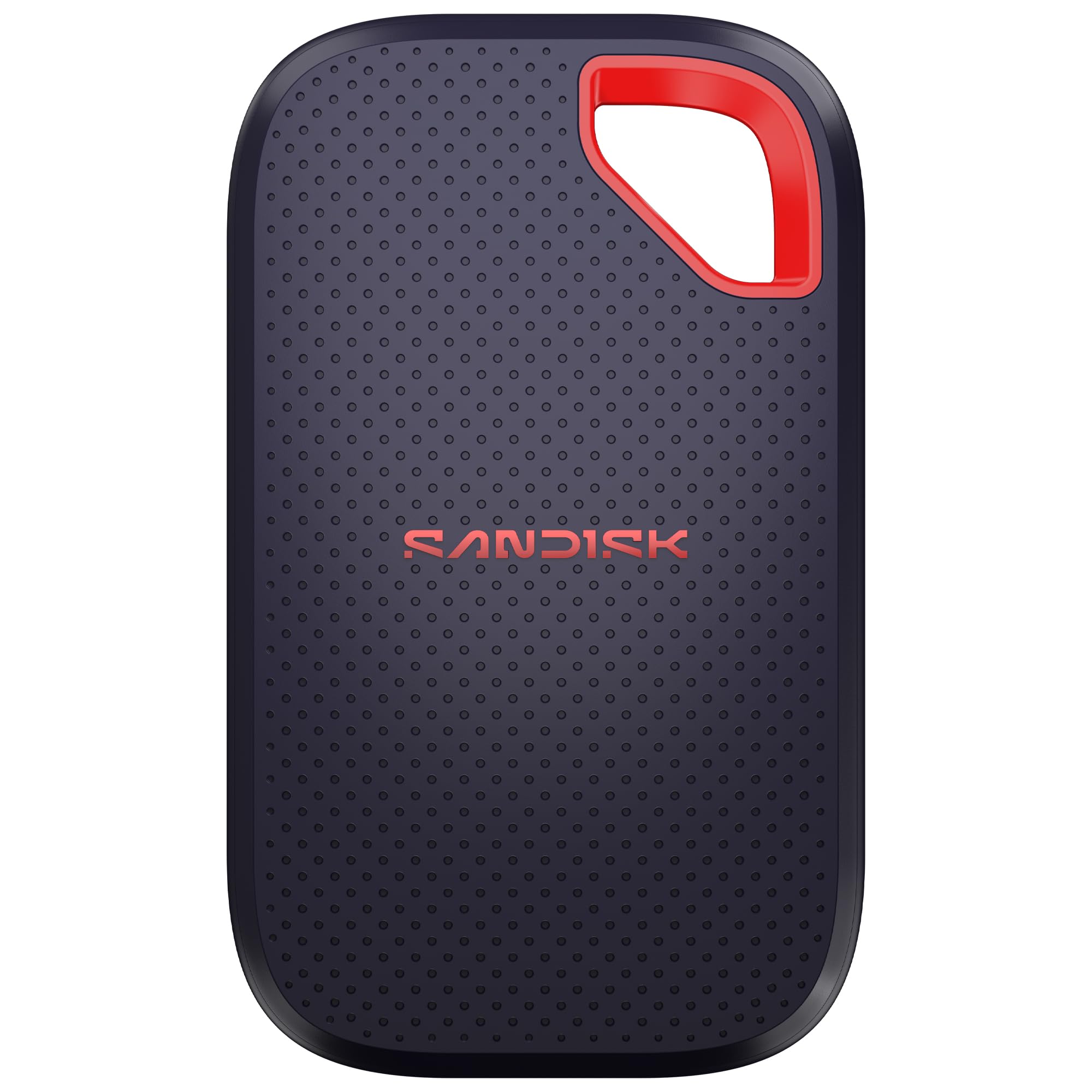
The creator’s hard-shell drive — drop protection, encryption, and enough speed to move a photo library in an afternoon.
Sandisk’s Extreme chases the same 2000MB/s transfer speed as the fastest drives here, with the added insurance of an IP65 dust and water rating and drop protection up to 3M. That makes it the one you trust in a camera bag or a backpack that gets treated like a backpack. It is pocket-sized by design, and it carries 256-bit AES encryption with password protection for the files you would not want someone else opening. The listing points to its ability to keep up with high-res clips and photo edits.
Owners describe a sturdy, reliable, quick drive that lives up to the rugged pitch. It is compact and light — owners mention it is smaller and lighter than the previous generation and fast even on older hardware. Storage and compact size are the two attributes owners mention most, and speed follows close behind. It fits in a pocket or a keychain loop, and the small form keeps it out of the way whether it is clipped to a bag or sitting on a desk.
Two honest notes. Value is the one area where opinions split — some buyers call it worth every cent for the security and durability, while others find the premium-brand cost steep next to comparable drives. The current version’s front cover is plastic rather than the older metal or rubber styling, which some owners read as a slight step down in feel. For a rugged, encrypted, studio-grade drive, though, it holds its own as the polished premium option.
Why it’s worth a look
- Up to 2000MB/s transfer with IP65 sealing and 3M drop protection
- 256-bit AES encryption with password protection built in
- Pocketable and light enough to clip to a keychain
- Durable, fast, and reliable per owner experience
Points to weigh
- Premium-brand cost, so value opinions split
- Current cover is plastic, which some feel is a step down from older metal
- Strictly lower cost-per-gigabyte than the value options above
Best for: photographers and videographers who want encryption, drop protection, and speed in one polished package and are happy to pay for the brand.
Harder to justify if: you mostly store documents and photos you back up anyway — the tough build is paying for insurance you may never need.
Understanding the Specs
Rated speed versus the speed you actually see
A drive rated at 2000MB/s only reaches that figure on a USB 3.2 Gen 2×2 port, the faster flavor of the USB-C connection. On an older USB 3.0 port, the same drive is capped far lower — the connector is the bottleneck, not the drive. Always match the drive’s interface to the port your laptop, desktop, or console actually supports, because a high-speed drive on a slow port is money spent on unused headroom.
What IP65 and drop ratings really protect against
An IP65 rating means the drive is sealed against dust and can handle sprayed water, so a spilled drink or a dusty bag is survivable. A drop rating like 3M describes how far it can fall onto a hard surface without giving up. These protections are the difference between a drive that travels in a backpack and one that instead stays home on the desk. If your drive leaves the house, this is the spec that matters most.
FAQ
Will a 1TB external SSD work with my iPhone?
Why does my drive show less than 1TB of free space on Windows?
Do I need a special cable to reach 2000MB/s speeds?
Is it normal for an external SSD to feel warm during use?
What is the difference between USB 3.2 Gen 2 and USB 3.2 Gen 2×2?
Can I use these drives with a PlayStation or Xbox?
Does a rugged SSD need a case for carrying?
Why do some drives fall short of their advertised speeds?
Is hardware encryption worth choosing a drive for?
How long will a 1TB external SSD last compared to a hard drive?
Do these drives require any software, or do they just work when plugged in?
Final Thoughts: The Verdict
For most people, the winner among these 1tb external ssd picks is the Samsung T7, because it pairs up to 1,050MB/s read speeds with the longest track record of reliability here — including surviving seven simultaneous 1080p/30fps recording streams without a single dropped frame. It is the drive you stop thinking about after you buy it.
If you want speed and toughness without the premium-brand price, the Amazon Basics Portable External SSD delivers 2000MB/s read and write in an IP65 shell that stays below 50°C/122°F. For a phone-first creator rig, the Lexar ES5 snaps magnetically to your device with IP65 sealing and 3M drop protection. And if you game on Windows or Steam Deck, the KingSpec Z5 brings a zinc alloy body and RGB lighting to match. Pick the one whose interface matches your ports first — that single match decides how fast any of these actually feel.
How We Picked
We do not accept paid placement. Every pick is matched to a real buyer and a real use-case; we do not hands-on test units.
Sources & Methodology
Specifications: manufacturer listings and product documentation. Review insights: verified customer reviews, as of September 2026. Pricing: not shown on this page (it changes often); check the current price via the retailer link.
As an Amazon Associate, Gadgets Feed earns from qualifying purchases. This does not affect which products we feature.