
Our readers keep the lights on and my morning glass full of iced black tea. As an Amazon Associate, I earn from qualifying purchases.
Specs are compiled from manufacturer listings and verified buyer reviews and can change over time — please confirm the key details on the product page before buying.
If your desk is buried under paper and you would rather not feed each page by hand, an ADF document scanner (a scanner with an automatic document feeder — a tray that pulls pages in for you) does the job. For most people, the best pick is the Doxie Pro: it scans both sides of a page in one pass, so a stack of receipts becomes searchable digital files while you do something else. You load a pile into the feeder tray, and the machine handles the rest.
I’m Min — the founder and writer behind Gadgets Feed. This guide is built by comparing the manufacturers’ published specifications and the patterns across verified customer reviews, so you get each pick’s real strengths and trade-offs instead of marketing spin.
Below you will find eleven machines ranked by what they actually do well — duplex speed, feeder size, software, and daily reliability. Whether you are a notary clearing loan docs or a small office digitizing decades of receipts, this breakdown covers the best ADF document scanner for every workload and budget.
Our Picks at a Glance


How To Choose The Best ADF Document Scanner
Match the scanner to the size of your paper pile. A machine that handles a five-page credit card statement will choke on a 400-page medical file, and one built for heavy daily use is wasted on occasional receipts. Ask how many pages you scan in a typical week, then work backward to the features that matter.
Duplex or single-sided
Duplex scanning flips the page internally so both sides are captured in one pass — you load the stack once instead of reloading it to catch the backs. That single feature cuts your handling time roughly in half on any double-sided job, which is why it is the first specification serious buyers check.
Feeder capacity and sheet handling
The ADF (automatic document feeder) tray is where you stack pages before scanning. A larger capacity like 60 or 100 sheets means fewer refills on big jobs, while a small 20 to 25 sheet tray suits short batches. Pay attention to what the feeder can handle too — thin receipts, thick cardstock, and odd sizes like embossed ID cards all test the feed rollers differently.
Connection type
USB keeps things simple and fast with one cable to your computer. Wi-Fi and Ethernet let you scan straight to cloud accounts or a shared network folder without a PC tethered nearby. If you work from a laptop bag or a client site, USB-only is often the sturdier choice; if you scan to Dropbox or share a machine across an office, wireless earns its keep.
Quick Comparison
| Model | Best For | Sheet Capacity | Scan Speed | Connection | Amazon |
|---|---|---|---|---|---|
| Doxie Pro★ Best Overall | Home and small office | ~20 pages | Duplex one-pass | USB | Amazon |
| Canon imageFORMULA R40IIBest for Big Batches | High-volume office batches | 60 sheets | Up to 45 ppm | USB-C | Amazon |
| HP HPPS200Best for Travel | Traveling professionals | 25 sheets | 25 ppm | USB | Amazon |
| Epson ES-580W | Stacks without a computer | 100 sheets | 35 ppm / 70 ipm | Wi-Fi | Amazon |
| Epson ES-500W II | Mobile notary and field work | 50 sheets | 35 ppm / 70 ipm | Wi-Fi | Amazon |
| Brother ADS-4300N | Networked workgroup scanning | 80 sheets | Up to 40 ppm | Ethernet, USB | Amazon |
| ScanSnap iX2500 | Fast wireless workflows | 100 sheets | 45 ppm duplex | USB-C, Wi-Fi 6 | Amazon |
| ScanSnap iX1600 Receipt Edition | Receipt and invoice automation | — | Duplex | USB, Wi-Fi | Amazon |
| Brother ADS-2200 | Budget duplex desktop scanning | 50 sheets | 35 ppm | USB | Amazon |
| Fujitsu fi-8170 | High daily volume offices | — | High speed | Ethernet, USB | Amazon |
| RICOH fi-8170 | Heavy professional capture | — | Up to 70 ppm | Ethernet, USB | Amazon |
In‑Depth Reviews
1. Doxie Pro – Duplex Document Scanner and Receipt Scanner for Home and Office
Our pick — over 4.5★ from 650+ verified ratings; the strongest balance of quality and price.
The desk-friendly duplex scanner that turns a pile of receipts into organized digital files without a fuss.
The biggest selling point here is that it takes up almost no room but still scans both sides of every page in a single pass. It measures 11.75 by 4 by 3 inches and weighs just over 3 pounds, so it tucks into a drawer or sits beside a monitor without hogging desk space. For comparison, that makes it far easier to park than the Canon imageFORMULA R40II, which tips the scale at 7.1 pounds.
What wins people over is the scan quality — the thing buyers rave about most, and the crisp 600 dpi output backs it up. The collapsible feeder and a direct feed slot handle thick or delicate paper that would jam a standard tray, and the software auto-crops, rotates, and boosts contrast on the fly. Text recognition makes your documents searchable, so a scanned contract is findable later by keyword instead of by scrolling through folders.
The honest catch is the feeder size — it holds roughly 20 pages, so a huge job means refilling a few times, and overfilling or mixing paper sizes can cause a jam. It is also wired USB only, which suits a fixed desk but not someone who wants to scan from across the room. For a home office or a student clearing classwork, though, that trade-off buys a lot of compact convenience.
What earns its keep
- Duplex scanning captures both sides in one pass, with 600 dpi color and black-and-white output
- Compact 3-pound body stores in a drawer and travels well for client work
- No-fuss software sends scans to Dropbox, Evernote, OneNote, and iCloud, with no subscription required
Where it asks patience
- The ADF holds roughly 20 pages, so big batches need refilling
- Wired USB only — no wireless connection option
- Mixing paper sizes in one load can trigger a jam
Reach for this if: you scan at a desk in short-to-medium bursts and want both sides captured in one pass without spending much desk space.
Look elsewhere if: your daily work is a 100-page stack that would send you back to the feeder again and again.
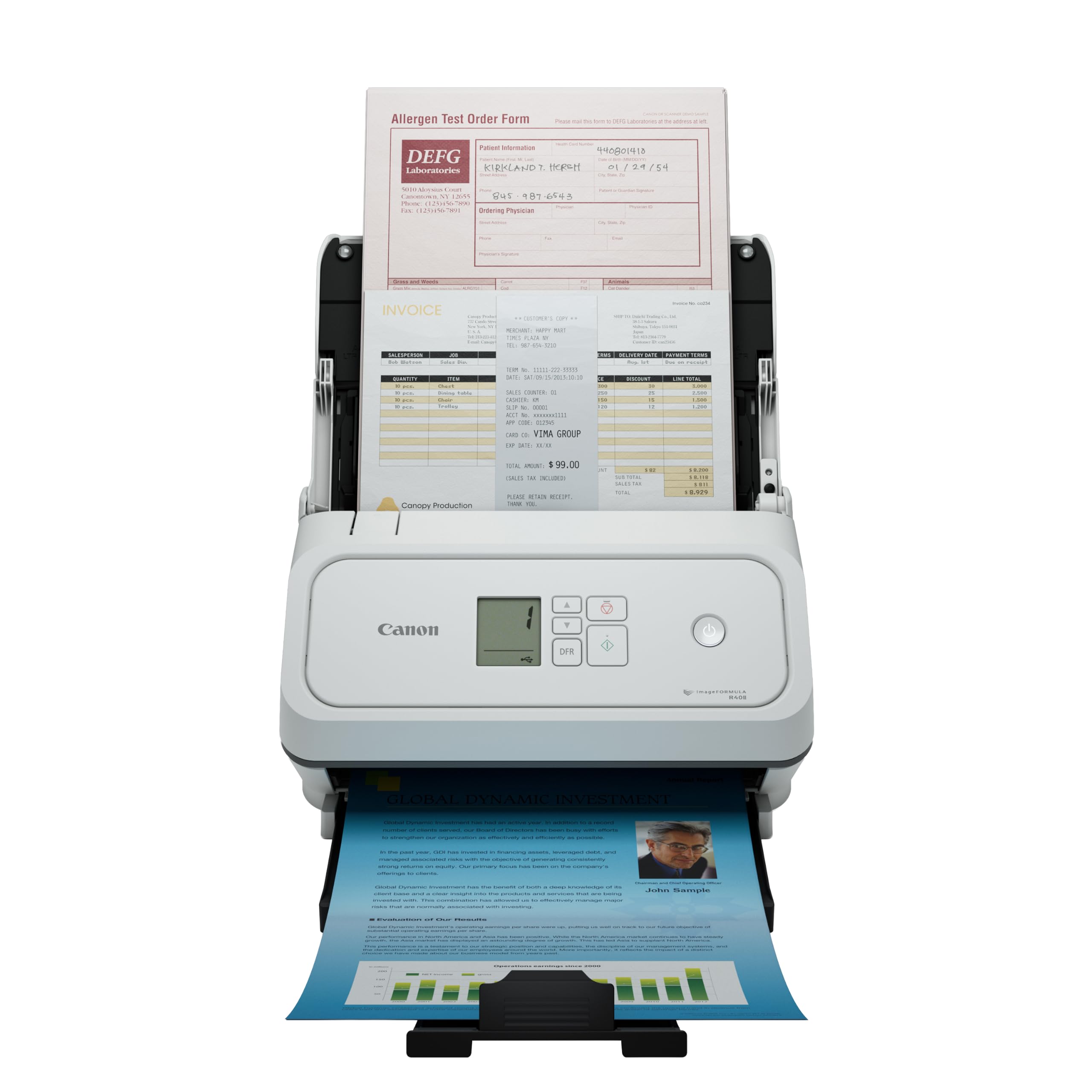
2. Canon imageFORMULA R40II Office Document Scanner – Duplex Scanning, Easy Setup, Scans a Wide Variety of Documents, Scans to Cloud
When your paper pile is measured in hundreds of pages, this is the feeder that keeps pace without babysitting.
Two numbers define this machine: a 60-sheet feeder and duplex scanning at up to 45 pages per minute. Both sides of the page are captured in color in one pass, and the one-touch operation means you press a button and walk away while it works.
It also handles a wide mix of paper — receipts, business cards, contracts, and both thick and thin documents — which matters if your pile is never uniform. Setup is a single USB-C cable to your computer, and the bundled CaptureOnTouch software is built for the machine, including OCR for searchable PDFs and QuickBooks integration. The review pages sum it up neatly: “I scanned 437 pages of medical records with this scanner as its first job. It was excellent.”
Know the trade-offs before you buy. The monochrome LCD display (a small black-and-white screen) is basic, the machine was designed exclusively for the included Canon software, and TWAIN and ISIS drivers (the standard connectors that let other scanning programs talk to a scanner) are not supported — so if your workflow depends on third-party scanning programs, this is not the fit. There is also no Wi-Fi, and at 7.1 pounds it is a heavier desktop unit.
The volume play: a 60-sheet feeder plus 45 ppm duplex speed is the combination that clears a real office backlog in one sitting.
Tied to its software: no TWAIN or ISIS support and a basic LCD mean you are committing to Canon’s own CaptureOnTouch workflow.
The right tool if: you regularly scan multi-hundred-page files and want a big feeder that runs unattended.
Pass if: you need to plug into a third-party document management program or want wireless freedom.
3. HP Compact Desktop Duplex USB Mobile Document & Photo Scanner with Auto-Feed Tray
A scanner thin enough to ride in a laptop bag and quick enough for batch work on the road.
The HPPS200 is built to travel: it slips inside a bag or briefcase, and its integrated rear tray folds down flat when not in use. Inside that slim frame sits more resolution than most rivals at this size — 1200 dpi (dots per inch, the measure of how much detail a scan captures), double the 600 dpi of the Doxie Pro — so detailed photos and ID cards come through sharp enough to edit later.
Speed is solid for small and medium batches at 25 ppm, which works out to about 2.4 seconds per page. It scans both sides in a single pass, handles paper from a tiny 2 by 2.9 inches up to a full legal 8.5 by 14 inches, and outputs to PDF and JPG. The free HP WorkScan software lets you crop, adjust, and clean up backgrounds without any tech skill.
Be aware the resolution number carries a caveat. Some buyers report the real 1200 dpi claim does not hold up in practice, and that reliability has been up and down for some units — one returned theirs after duplex scanning failed and auto-crop cut into photos. For most buyers it scans fine day to day, but this is the pick to choose for its size and portability, not for mission-critical volume.
Why it travels well
- Slim body with a folding feeder tray that fits in a rolling laptop bag
- 1200 dpi resolution handles photos and cards with detail
- Scans paper sizes from 2 x 2.9 inches up to 8.5 x 14 inches
Where to temper expectations
- Some units fall short of the advertised maximum resolution in real use
- Reliability has been uneven for a minority of buyers
- No wireless — USB connection only
Best matched to: traveling bookkeepers and commuters who need a scanner that lives in a bag and sets up in minutes.
Not the one for: anyone expecting heavy-duty daily batches to run without any hiccups.
4. Epson Workforce ES-580W Wireless Color Duplex Desktop Document Scanner with 100-Sheet ADF

A hundred-sheet feeder and a touchscreen that let you digitize a whole drawer without touching a computer.
The standout spec is the 100-sheet auto document feeder — enough to load a big stack and let the machine work through multiple paper types in one batch. Paired with Single-Step Technology that captures both sides in one pass at up to 35 ppm, this is built to chew through volume. This unit is an Epson Certified-Refurbished product, meaning it has been inspected and tested by Epson’s quality-assurance team before it ships.
The 4.3-inch touchscreen is where the freedom lives. You can scan straight to smartphones, tablets, email, a USB drive, or cloud accounts like Dropbox, Google Drive, and OneDrive — no computer required. Scanning quality is what gets praised most here, and the saved time shows up fast: buyers scanning hundreds of pages a day report finishing in a fraction of the time.
The honest caveat is the software and network side. Some users hit snags with Wi-Fi setup, and the driver situation can be finicky on Mac systems with Adobe tools. Once it is running it tends to stay running, but the initial connection is the part that occasionally tests patience.
Where it shines: a 100-sheet feeder that can scan straight to cloud accounts or a USB drive with no PC in the loop at all.
Mind the setup: a few buyers wrestle with Wi-Fi pairing and Mac driver quirks before everything settles in.
Pick this to: clear large paper backlogs and push files straight to the cloud without tethering to a laptop.
Think twice if: you scan from a Windows-free workflow that depends on Adobe Acrobat and want zero driver fiddling.
5. Epson Workforce ES-500W II Wireless Color Duplex Desktop Document Scanner

Built for the mobile notary who needs loan docs digitized on-site, fast and in one pass.
The ES-500W II runs a 50-sheet feeder with 35 ppm / 70 ipm duplex speed, so both sides come through in a single pass at the same speed. That combination of a mid-size tray and full duplex speed is what makes it a favorite for field work. Scan quality is what owners praise most, and the reliability that matters most for repeated on-site jobs shows in units that keep performing after a year.
Beyond the feeder, it brings genuinely useful software smarts. The included Epson ScanSmart software creates searchable PDFs with OCR, converts scans to editable Word and Excel files, and handles auto crop, blank page skip, and paper-skew correction. Ultrasonic double-feed detection watches for pages that stick together, which protects against a missed page slipping into a gap. It scans extra-long pages up to 240 inches — handy for tall receipts or banner-style documents.
The wireless connection is where the friction lives. Buyers praise the convenience but plenty hit network pairing snags, and some end up running the included USB cable instead. If you want a scanner that connects flawlessly over Wi-Fi on the first try, expect to spend a little time on setup.
The field-work fit: a 50-sheet feeder at 35 ppm duplex suits a notary or sales rep digitizing on-site without a desktop rig.
What to expect on day one: wireless connection occasionally needs a firewall tweak, and the USB cable is only 6 feet with no extension option in the box.
Choose it for: mobile professional work where duplex speed and portable size matter more than a giant feeder.
skip it if: you need a flawless one-touch Wi-Fi setup or scan the biggest stacks daily.
6. Brother ADS-4300N Professional Desktop Scanner with Fast Scan Speeds, Duplex, and Networking

An 80-sheet feeder on a network drop means the whole office shares one scanning station.
For a workgroup, the defining feature is the built-in Ethernet network interface — you plug it into your network and anyone can share it, no dedicated PC required. The large 80-sheet feeder swallows serious batches, and continuous scanning mode lets you add pages on the fly so long jobs keep rolling. Single and double-sided materials both scan in a single pass at up to 40 ppm, in color or black and white.
Driver support is broad here: TWAIN, WIA, ISIS, and SANE mean it slots into whatever document management program you already run, and scans can go to email, cloud services, SharePoint, or a USB memory stick. Scan quality is the thing praised most, with owners calling it a workhorse that replaces slow all-in-one printers. One buyer summed up the speed gain: a 300-page batch that used to take an afternoon now finishes in minutes.
The recurring gripe is paper jams, and reliability has been uneven for a minority — some units run flawlessly, others balk. Thin or curled paper and stacked items like sticky notes tend to be the triggers, so treat the feeder as it wants to be treated and it behaves far more predictably.
What a workgroup gains
- Ethernet connectivity shares the scanner across an office without a tethered computer
- 80-sheet feeder with continuous scanning mode handles long unattended jobs
- Wide driver support (TWAIN, WIA, ISIS, SANE) fits existing document systems
The honest caveats
- Paper jams are the most-discussed issue, especially with thin or curled sheets
- Reliability has been inconsistent for a small number of buyers
- Browser-based interface feels clunky to some
Right for: a small office or workgroup that wants one networked scanner serving everyone and clearing large batches.
Wrong for: a heavy book-scanning job full of fragile, thin pages that need the gentlest feed.
7. ScanSnap iX2500 Wireless or USB High-Speed Document Scanner

Heavyweight scanning speed in a body that wires up to Wi-Fi 6 and quietly clears 100-page batches.
This is the model to beat on raw throughput for a wireless scanner: 45 ppm double-sided scanning through a 100-sheet feeder. It pairs over Wi-Fi 6 — the newest, fastest, and most secure wireless standard — or over a USB-C cable, so you can scan to a computer, a phone, or the cloud without a desktop in the way. A large touchscreen with customizable profiles lets you save separate one-touch jobs for receipts, photos, and documents.
What it does best is avoid trouble before it starts. A brake roller system feeds paper smoothly, a multi-feed sensor catches sheets stuck together, and skew detection stops pages from getting damaged or data from going missing. Owners mention 100-page batches scanned in minutes, with setup done in under five. Performance is the trait praised most here, and it shows in mixed media — documents, receipts, and photos all flow through the same slot.
The trade-offs are worth noting. Wireless pairing occasionally drops, and a few buyers find color rendition less vivid than expected. There is also a maintenance rhythm: the sensors need periodic cleaning after heavy use, and mixing paper sizes in one load is a common cause of jams.
Speed and safety together: 45 ppm duplex plus multi-feed and skew detection means fast jobs rarely turn into damaged-page rescues.
Keep it clean: sensors want wiping down after heavy runs, and mixing paper sizes invites jams.
Made for: a busy small business that scans a variety of documents and wants fast, wireless, jam-resistant throughput.
pass on it if: you only scan a few pages at a time and would rather not bother with periodic sensor maintenance.
8. ScanSnap iX1600 Receipt Edition Color Duplex Invoice Document Scanner

A scanner tuned for bookkeeping, where every receipt and invoice lands ready for your accounting software.
What separates this model from a general document scanner is its finance focus. It scans invoices and receipts straight into QuickBooks Online from a preconfigured touch panel, and intelligent processing automatically extracts key data into editable fields. For a law office or a small business drowning in paper trails, that turns a shoebox of receipts into organized entries with far less typing.
The 4.3-inch touchscreen drives the whole experience end to end, and you can set up to 30 customizable profiles — personalized with your own color, icon, or letter — for every routine job. Wi-Fi lets it connect directly to smart devices or cloud services without a PC. Performance is the standout, with duplex scanning of both sides in one pass, and buyers describe clearing hundreds of receipts and invoices in minutes without a jam.
The honest limit sits in the software. Some users find the OCR inconsistent at reading vendor names and amounts, and profiles are locked to a single computer rather than shared across machines. It is also the pricier route, so the value tilts toward anyone who will actually lean on the receipt and invoice automation.
Accounting-first: direct QuickBooks Online import and auto-extracted invoice fields save hours for bookkeepers.
The setup catch: profiles stay tied to one PC, and OCR accuracy on vendor names and totals is not always spot on.
Ideal for: small-business owners and accountants who want receipts and invoices to flow straight into QuickBooks without manual entry.
Overkill if: you mostly scan generic documents and will not use the finance-specific automation.
9. Brother High-Speed Desktop Document Scanner, ADS-2200, Multiple Scan Destinations, Duplex Scanning

Load a 50-page stack, press go, and let a compact desktop unit do the heavy lifting.
Speed is what this scanner hangs its hat on: single or two-sided documents scan in one pass at up to 35 ppm through a 50-sheet feeder. Page-continuous scanning lets you keep adding to a job, and multiple destinations — email, OCR, file, image, or a USB flash drive — mean you are not locked into one workflow. Image-optimization features handle multi-feed detection, background removal, and blank page removal automatically.
It folds down for a small footprint and runs across Windows, Mac, and Linux with TWAIN, WIA, ICA, and SANE driver support. Owners lean on it for volume work: a notary clearing 300-plus pages of loan documents, and others scanning batches of photos at 300 DPI. When it sings, it is fast and simple, and setup via USB is quick.
Be realistic about consistency. Scan quality and reliability have been mixed for some buyers, with occasional reports of a dark line appearing, and a few find the Brother software less polished than they hoped. The maximum resolution in practice is lower than the headline figure suggests, so heavy photo work at extreme detail may disappoint.
Value you notice
- 35 ppm duplex through a 50-sheet feeder at an entry-level position
- Folds down small for a tight desk footprint
- Runs on Windows, Mac, and Linux with multiple driver options
Keep in mind
- Scan quality and reliability have been inconsistent for a minority of buyers
- Practical maximum resolution falls short of the advertised figure
- Included software feels dated to some users
Worth it for: budget-conscious buyers who want duplex speed and a mid-size feeder without paying premium prices.
Not for: critical high-detail photo archiving where every scan must come out perfectly.
10. Fujitsu fi-8170 Document Scanner High Speed Scanner with LAN Connectivity

A scanner rated for 10,000 sheets a day, built for offices where paper never stops coming.
The headline spec here is duty cycle: a rated daily volume of 10,000 sheets, which is a machine built for nonstop office scanning rather than occasional home jobs. It connects over Ethernet or USB and pairs an automatic document feeder with a manual feed option, so you can handle both stacked batches and single tricky items. Setup is quick, and the scans come through fast, with both sides captured in one pass.
Performance is what earns the praise — customers note running these in medical centers and businesses that scan thousands of pages a week without complaint, and the plug-and-play design means it works from the start once drivers are loaded. The 600 dpi resolution handles standard office documents cleanly, and higher resolution slows the pace but keeps detail.
The honest note is that reliability has been mixed, with a minority reporting a brand-new unit that would not power on properly. Most units run flawlessly for long stretches, but if you buy one, test it thoroughly in the first weeks. It is also a heavier, costlier machine aimed at real production work.
Built for duty: a 10,000-sheet daily rating means it is meant to run all day in a working office.
Test it early: a small number of units arrive with power or driver faults, so verify everything in the first couple of weeks.
Suited to: high-volume offices scanning thousands of pages daily that need a rated-to-duty production machine.
Too much machine if: your scanning is sporadic and a lighter desktop unit would cover it comfortably.
11. RICOH fi-8170 Professional High Speed Color Duplex Document Scanner

Professional-grade throughput that eats passports, plastic cards, and carbonless copies without blinking.
The number that sets this scanner apart is 70 — as in up to 70 double-sided pages per minute, the fastest single-pass duplex speed on this list. For a county office or a business that scans continuously, that pace is the difference between a job that runs all afternoon and one that finishes before lunch. It connects over USB or Ethernet and integrates with most ECM solutions, so it slots into an existing document system.
Versatility is the other strong suit. It handles everything from lightweight carbonless copies to thick items like passports and plastic cards, and RICOH’s Clear Image Capture processing aims for accurate color reproduction. PaperStream Capture software and TWAIN drivers keep operation simple, and reviewers point out years of heavy daily use with clean output and no jam problems, calling it the best workhorse scanner they have owned.
The friction is on the software side. Setup has been described as tedious by some, and compatibility has been a mixed experience — a few struggle to get everything connected cleanly. Card damage and jamming also come up as occasional issues. For a professional buyer, though, the speed and build reward the effort once it is running.
Throughput leader: 70 ppm duplex scanning makes it the fastest single-pass option for continuous production work.
Expect setup effort: compatibility and installation can be fiddly, and a few shoppers say the occasional card jam or damage.
The pro choice for: offices scanning high volumes daily that need the fastest duplex speed and are fine handling a real setup process.
Not worth it if: you want a plug-and-play unit for light home use and do not need that throughput.
Understanding the Specs
Duplex Scanning and ppm
Duplex means the scanner captures both sides of a page in a single pass, so you load the stack once. Speed is measured in ppm, or pages per minute, and often in ipm, or images per minute — because a duplex page counts as two images, ipm is roughly double the ppm figure. A higher ppm clears a big pile faster, which matters most when you regularly scan hundreds of pages at a time.
ADF Sheet Capacity
The ADF, or automatic document feeder, is the tray you stack pages into before scanning. Its capacity is measured in sheets — a 20-sheet tray means you refill it often on long jobs, while a 100-sheet tray lets you load a whole drawer and walk away. A bigger feeder suits volume work; a smaller one keeps the machine compact and travel-friendly.
Resolution and OCR
Resolution is measured in dpi, or dots per inch — higher dpi means sharper detail, which matters for photos and small print. OCR, or optical character recognition, is what makes a scan searchable by turning the picture of text into actual editable text. If you want to find a document later by typing a keyword, OCR is the feature that makes it possible.
Wired and Wireless Connections
USB keeps a scanner tied to one computer with a single cable — simple and fast. Wi-Fi and Ethernet let the scanner connect to your network, your phone, or the cloud without a tethered PC. A wireless scanner is easier to share across an office or place anywhere in the room; a wired scanner is often the sturdier, more predictable choice.
FAQ
What does ADF mean on a document scanner?
What is the difference between duplex and single-sided scanning?
Can an ADF scanner handle receipts, cards, and photos?
Will an ADF scanner work with Mac and Windows?
Do I need Wi-Fi on a document scanner, or is USB enough?
How fast does a typical ADF document scanner scan?
What resolution do I need for scanning documents?
How do I stop my scanner from jamming?
What is OCR and why does it matter?
How long does an ADF document scanner usually last?
Final Thoughts: The Verdict
For most people, the adf document scanner worth starting with is the Doxie Pro — it captures both sides in one pass, fits in a drawer, and its 600 dpi scans plus no-fuss software make short work of receipts and everyday documents. If your piles run into the hundreds of pages, reach for the Canon imageFORMULA R40II, whose 60-sheet feeder and 45 ppm duplex scanning (45 pages per minute, both sides at once) are built for exactly that. And if you need fast, wireless, jam-resistant throughput for a busy small business, the ScanSnap iX2500 is the one to grab.
How We Picked
We do not accept paid placement. Every pick is matched to a real buyer and a real use-case; we do not hands-on test units.
Sources & Methodology
Specifications: manufacturer listings and product documentation. Review insights: verified customer reviews, as of September 2026. Pricing: not shown on this page (it changes often); check the current price via the retailer link.
As an Amazon Associate, Gadgets Feed earns from qualifying purchases. This does not affect which products we feature.