
Our readers keep the lights on and my morning glass full of iced black tea. As an Amazon Associate, I earn from qualifying purchases.
Specs are compiled from manufacturer listings and verified buyer reviews and can change over time — please confirm the key details on the product page before buying.
You want a 3D printer that sits on a desk corner, not one that swallows a workbench. For most buyers, the Bambu Lab A1 is the one to buy first. It pairs the best print quality on this list with 10,000 mm/s² acceleration and full-auto calibration. It holds 4.5+ stars across 700+ ratings. But at 21.76 x 20.83 x 12.87 inches and 22 pounds, it is neither the tiniest nor the cheapest here — a short shelf or a tight budget points elsewhere.
I’m Min — the founder and writer behind Gadgets Feed. This guide is built by comparing the manufacturers’ published specifications and the patterns across verified customer reviews, so you get each pick’s real strengths and trade-offs instead of marketing spin.
Small printers split into two families, and knowing which one you need settles most of the decision. Resin machines melt liquid resin with a screen, and filament machines melt plastic wire with a hot nozzle. Each pick below names its family, its footprint and the buyer it fits. That is the fastest route to the right small 3d printer for your desk.
Our Picks at a Glance


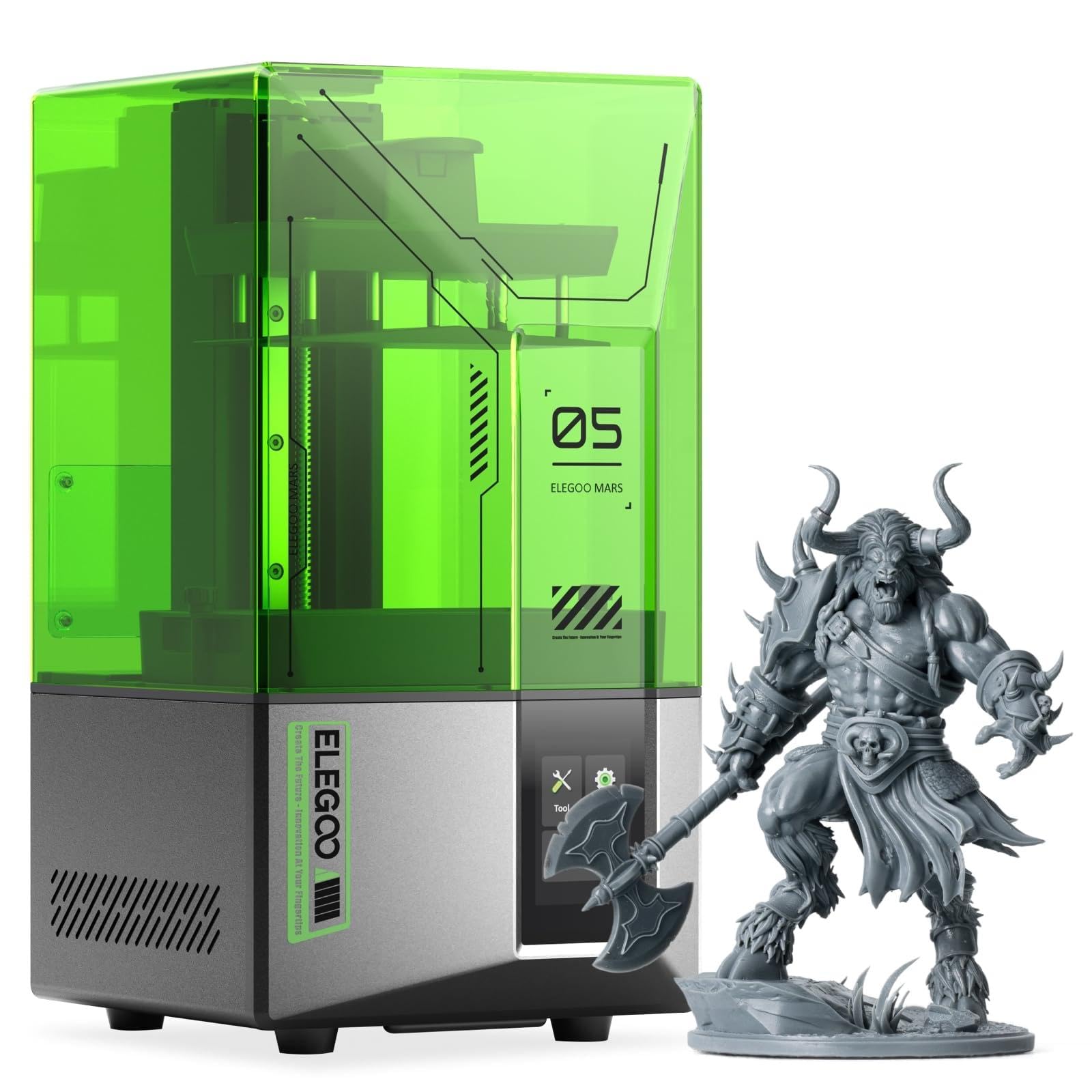
How To Choose The Best Small 3D Printer
A compact printer has to earn its space twice. It must fit where you plan to put it, and it must still print the things you actually want to make. Nail both and the rest of the spec sheet matters far less.
Measure the print area, not the machine
Build volume is the size of the largest object the printer can make. That is the number that decides whether a helmet, a model house or a phone stand fits in one piece. A printer can have a small footprint and still offer a decent print area — the Flashforge Adventurer 5M gives you an 8.7″x8.7″x8.7″ print area inside a frame that measures 15.75 x 14.29 x 17.64 inches. Compare the machine’s outside dimensions with the shelf or desk you have in mind before anything else.
Pick your material family first
Filament printers melt plastic wire through a heated nozzle. They are the easier starting point, because the material comes on a spool, the finished print is sturdy, and cleanup is a matter of trimming. Resin printers set liquid resin layer by layer with a screen. They reach finer detail on tiny models but bring gloves, a wash-and-cure step and a resin smell into your room. For toys and brackets, filament is the sensible default: spool-fed, sturdy and trimmed clean with a pair of cutters. For miniatures with facial detail, resin is the tool: a masked LCD cures each layer at 17–22µm per pixel.
Leveling and assembly decide your first weekend
Bed leveling is the setup step that keeps the first layer stuck to the plate. Get it wrong and the print lifts, warps or turns to spaghetti. Automatic leveling removes most of that work, and several picks here level the bed with no manual adjustment. “Fully assembled” is the other time-saver: it means the frame arrives together, not in a box of loose rails. Even then, expect to load filament, slice a file and run one test print before you trust a long job.
Speed claims need context
Print speed is quoted in mm/s, or millimeters of plastic laid down per second. Higher numbers finish models faster, but only if the hotend can actually melt plastic that quickly. A 250mm/s machine and a 600mm/s machine differ a great deal in real print time on a detailed model. Decide up front if you need turnaround speed or fine surface detail, because pushing one usually costs you the other.
Quick Comparison
| Model | Best For | Print Area | Machine Footprint | Weight | Amazon |
|---|---|---|---|---|---|
| Bambu Lab A1★ Best Overall | All-round best for beginners | — | 21.76 x 20.83 x 12.87 in | 22 lb | Amazon |
| TINA2SBest for Families | Kids and total first-timers | — | 8.3 x 8.3 x 11.4 in | 6.4 lb | Amazon |
| ELEGOO Mars 5Most Detailed Entry | Detail on a resin budget | — | 20.87 x 12.8 x 11.61 in | 14.52 lb | Amazon |
| Geeetech Mini | Smallest possible footprint | 3.94×4.33×3.94 in | 3.94 x 4.33 x 3.94 in | 9.8 lb | Amazon |
| ANYCUBIC Photon Mono 4 | Tiny high-detail models | 6.04 x 3.42 x 6.49 in | 10 x 10 x 15 in | 7.7 lb | Amazon |
| Entina Tina2 Plus | Fast desk printing with an app | — | 11.4 x 8.6 x 8.6 in | 9.98 lb | Amazon |
| Entina Tina2C | Gift bundle with filament | 3.9 x 3.9 x 3.9 in | 11.4 x 8.6 x 8.6 in | 11.33 lb | Amazon |
| Flashforge Adventurer 5M | Speed and engineering parts | 8.7 x 8.7 x 8.7 in | 15.75 x 14.29 x 17.64 in | 23.3 lb | Amazon |
| Phrozen Sonic Mini 8K S | Miniature and figure detail | 6.5 x 2.8 x 6.7 in | 11.4 x 11.4 x 16.9 in | 22 lb | Amazon |
| Bambu Lab P1S | Enclosed, advanced filament | — | 15.31 x 18.03 x 15.31 in | 38.9 lb | Amazon |
| Flashforge AD5X | Four-color printing on a desk | 220 x 220 x 220 mm | 14.3 x 16.3 x 14.8 in | 24.3 lb | Amazon |
In‑Depth Reviews
1. Bambu Lab A1 3D Printer
Our pick — 4.5+★ from 700+ verified ratings; the strongest balance of quality and price.
The beginner machine that levels itself and still prints like a veteran.
Bambu Lab built this for people who want to print, not tinker. The A1 handles calibration on its own — bed leveling, Z-offset and flow rate all adjust without you touching a screwdriver. Z-offset is the height gap between nozzle and plate, and getting it wrong is the classic reason a first print fails. Here the printer measures and corrects it every time. What owners keep coming back to is the print quality: it is the single thing this machine is praised most for, far ahead of any other point.
The speed figure is the part that surprises people. Acceleration of 10,000 mm/s² means the print head reaches its working speed almost instantly instead of easing up to it, so small parts finish in a fraction of the time a slow machine needs. Active flow rate compensation then adjusts how much plastic is pushed out based on live readings, which keeps surfaces smooth rather than lumpy. Add the 1-Clip quick-swap nozzle and routine maintenance turns into a two-minute job. Active motor noise canceling keeps the whole thing quiet enough to sit beside you while you work.
Here is the honest trade-off. At 21.76 x 20.83 x 12.87 inches and 22 pounds, this is the largest and heaviest pick here — for scale, the TINA2S starter kit weighs 6.4 pounds and measures 8.3 x 8.3 x 11.4 inches. It needs a real desk, not a narrow shelf. Multi-color printing also requires the AMS lite unit, which is not in the base box. Reliability draws some mixed feedback in the review pages, so treat it as a machine that rewards a clean plate and fresh filament rather than abuse.
What earns it the top slot
- Full-auto calibration removes the steepest part of the learning curve
- Print quality is the standout — the thing this machine is praised most for
- 10,000 mm/s² acceleration and live flow compensation keep prints fast and clean
- 1-Clip nozzle swap and noise canceling make ownership low-fuss
Where it asks more of you
- 22 pounds and a 21.76-inch width demand a proper desk
- Multi-color needs the AMS lite, sold separately from the base unit
- Some reliability complaints appear among otherwise happy buyers
Buy this if: you want the shortest path from unboxing to a good-looking print, and you have desk space to give it.
Think twice if: your only free surface is a narrow shelf — the footprint rules it out.
2. TINA2S Fully Assembled Mini 3D Printer
Six and a half pounds of printer that a child can run without adult rescue.
What makes the TINA2S easy to recommend is not one headline number — it is the 8.3 x 8.3 x 11.4 inch body paired with a complete starter kit. There is 10M of PLA filament in the box, a microSD card already loaded with model files and slicing software, and the printer arrives fully assembled. You plug it in, pick a model and print. Beginners are the group this machine is praised most for, and the reason is simple: nothing in the first session requires judgment.
The build details back that up. Auto leveling plus a dual z-axis rail holds the gantry steady for high-precision prints, a 2.4″ LCD screen handles navigation, and the flexible magnetic build plate lets you pop a finished model off by flexing it. One-touch filament loading means you press a button to load and another to retract — no feeding wire by hand into a hidden tube. It runs PLA, PLA pro and TPU. It also connects over Wi-Fi and Bluetooth and works with Cura, Simplify3D and Slicr3d.
The catch worth knowing before you order: this printer wants the included magnetic platform plate or a comparable metal one. A non-magnetic plate stops the proximity sensor from reading correctly and the machine will misbehave. Also budget for a small print area — this is a starter machine, not a helmet printer. As a first printer for a kid’s bedroom or a classroom table, the combination of low weight and a full kit is hard to argue with.
The kit does the work: filament, card, software and assembly all arrive handled, so a first print happens in the first sitting rather than the first weekend.
One rule to follow: stick to the magnetic plate it ships with — that sensor setup is not optional.
Right for: a household buying its first printer, especially one a child will use with supervision.
Look elsewhere if: you need to print objects larger than a small figurine in one piece.
3. ELEGOO Mars 5 Resin 3D Printer
A resin machine that checks its own work before every single print.
Resin printing has a reputation for fiddly setup, and the Mars 5 attacks that head-on. Leveling is one click. Before a job starts, the printer runs a self-check on its own components, so a faulty part gets caught before you waste resin and hours. A mechanical sensor also watches for cured residue in the vat, which protects the LCD screen underneath — the expensive part. Quality is what this printer is praised most for, and setup is the second thing buyers highlight.
Detail is the whole reason to pick resin over filament, and the 4K mono LCD with a COB light source is the engine here. COB means chip-on-board, a cluster of LEDs behind the screen that lights the layer evenly instead of spot by spot. That evenness cuts layer lines and produces a smoother surface on small parts. There is also real safety logic: if the LED temperature passes 80℃, printing halts and an alarm sounds. Resin shortage and leveling failures trigger their own alerts.
Be honest about the workflow, though. Resin has to be handled with gloves, washed and cured after printing, and it brings a smell. Feedback on adhesion and print quality splits both ways in the review pages, and value draws mixed opinions — this is a machine that rewards learning your resin and exposure settings. If your goal is a shelf of crisp miniatures rather than durable household parts, that trade is worth making. At 14.52 pounds and 20.87 x 12.8 x 11.61 inches it still wants a dedicated corner.
Reasons it stands out
- One-click leveling and a pre-print self-check cut the guesswork
- Residue detection protects the LCD from cured debris
- 4K mono LCD with COB lighting keeps fine detail clean
- Overheat cutoff at 80℃ plus cooling for long sessions
What resin asks in return
- Gloves, washing and curing are part of every print
- Adhesion and print quality split opinion across buyers
- Resin odor means ventilation matters
Suits you if: your prints are miniatures, jewelry masters or small parts where surface detail is the point.
Skip the resin route if: you want to hand a finished part to a child straight off the plate.
4. Geeetech Mini 3D Printer
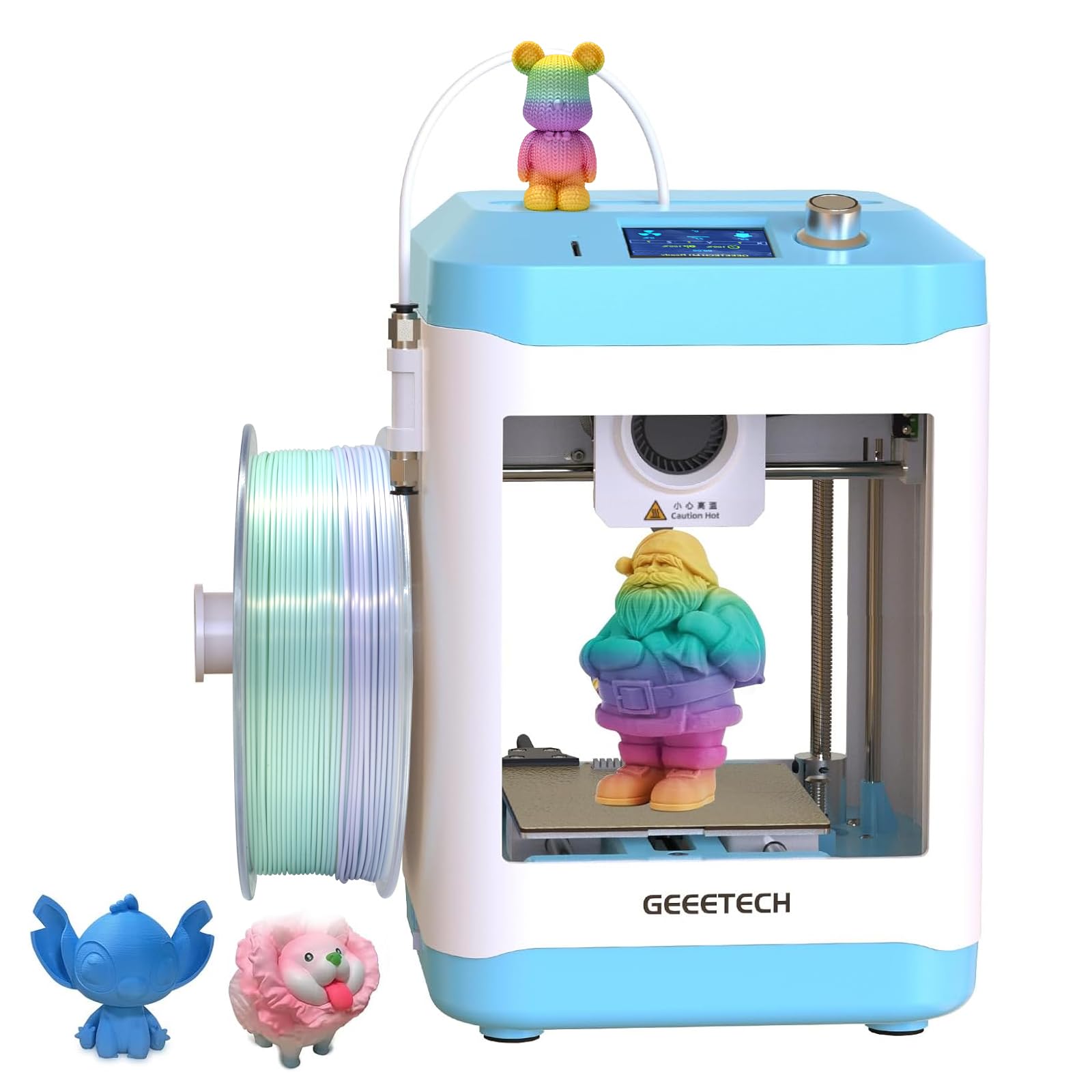
A printer smaller than most speakers, with a heated bed and a metal extruder.
If your space is genuinely tight, this is the machine that fits. The whole unit measures 3.94 x 4.33 x 3.94 inches — the Bambu Lab A1 spans 21.76 x 20.83 x 12.87 inches by comparison, so the gap in desk space is enormous. The build area matches those numbers at 3.94×4.33×3.94 in, which tells you exactly what you are getting: small models, fast. Print quality is the thing this printer is praised most for, and it punches above its size there.
This printer works faster than its small size suggests. A 50W hot-end heating rod (the heater that melts the plastic) with a large-capacity nozzle pushes plastic at up to 250mm/s, so a small bracket can print in minutes rather than hours. The direct drive extruder (a motor that feeds filament straight into the nozzle) uses a dual-drive metal gear with a gear ratio of up to 1:5, which means more grip and more pushing force — the maker says it handles 0.5kg of TPU or PLA (flexible and standard filament). A 16-point full-auto leveling system sets the bed for you, and the flexible magnetic PEI plate (a removable build surface) helps models pop off without warping. There is a 2.4″ color screen and one-button filament in and out.
Two practical notes. First, the 1kg spool needs the separate filament holder profile the maker provides — plan for that if you buy standard spools. Second, reliability and auto-leveling both get mixed feedback across the review pages, so this is a machine to buy with the understanding that you may need to re-run leveling and check your first layer. The 12-month repair cover and 30-day return window soften that. For a school desk or a craft shelf, the size argument is compelling.
Best when space wins: a compact desk, classroom shelf or craft corner where every inch counts.
Consider a bigger frame if: you plan to print anything beyond small parts and desk toys.
5. ANYCUBIC Photon Mono 4 Resin 3D Printer

A 10K screen packed into a 7.7-pound resin printer that sits on a bookshelf.
The number to understand here is 17×17μm. Each pixel on the 7-inch 10K LCD measures 17 by 17 micrometers, which is the physical dot size that builds your model layer. Smaller dots mean finer edges and smoother curves, and the maker rates this screen at 105% more print precision than the Mono 2. With a 9024×5120 resolution, that is a lot of dots doing the work. Printer quality is praised most in the reviews, and detail runs a close second.
The lighting matters as much as the screen. Anycubic’s LighTurbo matrix light source spreads light evenly across the panel, which reduces layer lines and the stair-step look on curved surfaces. Build volume comes in at 6.04” x 3.42” x 6.49” — enough for a batch of miniatures or a small prototype. A laser-engraved platform improves grip on the model during printing while still letting you pop it free afterward, and the 4-point leveling method needs only one pass: tighten the four screws and you are set. Power-loss recovery picks a print back up if the power drops.
Where you should temper expectations: reliability and durability draw more criticism here than the print results do. Value for money and build plate adhesion split opinion. Some of that is the nature of resin — a scratched screen or a worn release film is a consumable, not a defect — but it is worth knowing going in. The Photon Mono 4 does not support the Anycubic app, either, so plan on transferring files by card or cable. For high-detail miniature and jewelry work at entry level, the screen is the reason to pick it.
Where the money went: into the 10K panel and even lighting, which is exactly where a resin printer earns its keep on small figures.
Set your expectations: expect to replace consumable films over time, and don’t count on the Anycubic app.
Reach for this if: you print small, high-detail pieces and want the sharpest screen at the entry tier.
Not your machine if: you expect a resin printer to need no maintenance beyond pressing start.
6. Entina Tina2 Plus Smart 3D Printer

The desk printer that heats in 40 seconds and lets a phone pick the model.
The Tina2 Plus is designed around the shortest possible gap between wanting a print and starting one. It arrives fully assembled with a TF card and preloaded models, so the first job is a menu choice rather than a slicing lesson. Speeds reach 250mm/s, and a ceramic hotend heats in roughly 40 seconds — that is the difference between deciding to print and actually printing, since you are not standing around waiting for the nozzle. Ease of use is what this printer is praised most for.
You get more ways to start a print than on a basic starter machine. The Poloprint Cloud app carries 3,000+ printable models, and you can start a print from your phone, slice online (prepare the file for printing), or send files by TF card (a small memory card), Wi-Fi or USB. Windows, macOS, Linux and Chromebook are all supported. The frame is partially enclosed, which keeps the hot and moving parts behind a barrier while still leaving the print area accessible. Dual Z-axis support (two threaded rods that steady the print head) with automatic leveling and a PEI spring steel plate handles the first-layer work, so the base of your print sticks evenly.
Be aware of two things. Performance draws genuinely mixed feedback — plenty of buyers report it works well, others could not get it running, and connectivity gripes appear too. This is a machine where buying from a seller with a clear return path matters. And the 250mm/s rating describes the machine’s ceiling, not a guarantee on every model. Nine and a half pounds and an 11.4 x 8.6 x 8.6 inch frame make it genuinely desk-sized, which is the other half of its appeal.
Why it appeals
- 40-second ceramic hotend gets you printing almost immediately
- 3,000+ models via the Poloprint Cloud app, phone-started
- Partially enclosed frame keeps hot parts behind a barrier
- Dual Z-axis and PEI plate support first-layer consistency
Worth weighing up
- Performance experiences range widely across the review pages
- Connectivity problems are a recurring thread
- Wi-Fi and app features are the path to most of its convenience
Made for: a household that wants app-driven printing and a fast heat-up on a small desk.
Prefer a simpler machine if: you would rather avoid app setup and just want a printer that behaves.
7. Entina Tina2C Mini 3D Printer Bundle
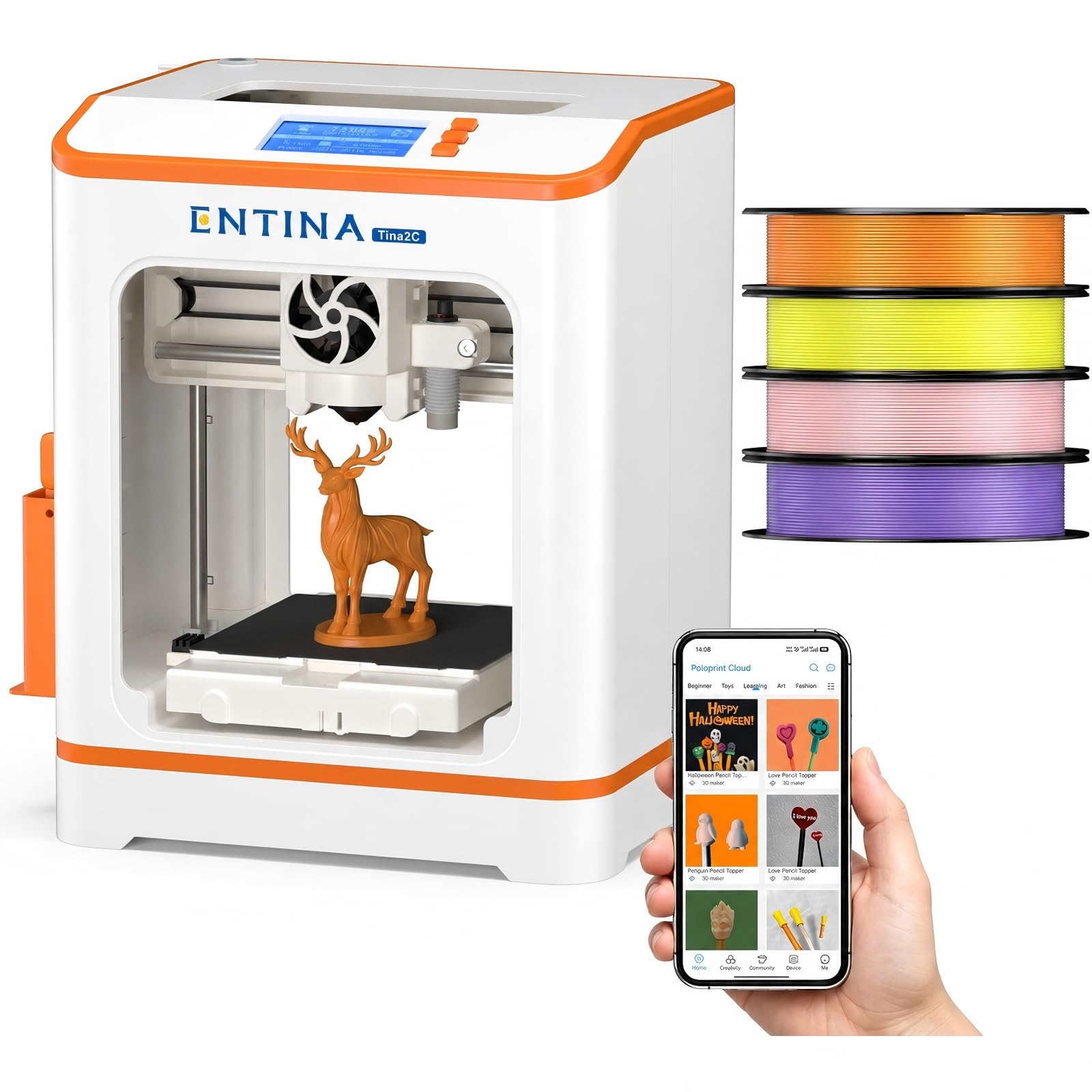
Four spools of color in the box, so the first print is a choice not a shopping trip.
This bundle is built for the gift scenario, and the contents make that obvious. You get 4 PLA filament colors totaling roughly 1kg, so the printer is usable the moment it is unwrapped rather than after a separate filament order. Setup runs through the Poloprint app with guided steps, which suits a family where nobody has printed before. Build volume is 3.9″ x 3.9″ x 3.9″ — small objects, desk toys, keychains and small prototypes. Quality is what this printer is praised most for, with its suitability for children close behind.
Beyond the filament, the software side is where the value sits: Wi-Fi and offline modes, a large model library, 25+ DIY modules, smart search and a photo-to-print feature. Auto leveling removes the manual bed work, power-loss recovery resumes a print after an interruption, and the flexible magnetic build plate bends to release models. A quick-swap nozzle keeps maintenance simple, and built-in LED lighting makes the print area visible on a dim desk.
The realistic caveat is scale. A box this size means parts, not projects — if a child wants to print a full action figure in one pull, this is not the machine for it. Value for money also splits opinion. But framed as a starter kit that includes the consumables, the low noise and 11.4 x 8.6 x 8.6 inch footprint make it an easy thing to live with in a bedroom or study.
The gift angle: everything needed to print on day one is inside the box, including four colors of filament.
The limitation to accept: a 3.9-inch cube build volume caps what can be made in one piece.
8. Flashforge Adventurer 5M

A CoreXY frame that hits 600mm/s and still holds a first layer to 0.01mm.
Speed is the headline, but the frame is why it holds up. The Adventurer 5M runs a CoreXY structure — a design where the print head moves in two axes on a rigid frame rather than dragging the bed around. Dual linear rails and an aluminum body cut resonance by 63% compared with bed-slinger designs, which is why it can print fast without the surface going wavy. It carries an 8.7″x8.7″x8.7″ PEI build plate, which is a real print area for functional parts rather than just trinkets.
On the numbers, it reaches 600mm/s with 20,000mm/s² acceleration, using a 32mm³/s high-flow nozzle and a 50W ceramic heater that gets to 200°C in 35 seconds. Leveling runs 25 detecting points with pressure-sensor compensation to hit 0.01mm, which is the setup work that decides whether your first layer sticks. Dimensional accuracy is rated at ±0.1 mm, and the machine is built for 24/7 continuous printing. Maintenance is quick by design: MagSwitch PEI plate comes off in 3s, Nozzle X swaps in under 15s. Quality is the thing it is praised most for, with ease of use next.
The honest part: setup divides opinion sharply. Some buyers had it running quickly, others found it a chore, and connectivity complaints appear too. The nozzle range spans 0.25-0.8mm, which covers miniature work through to larger prints, and an optional enclosure is available separately if you later want to print advanced filaments. At 23.3 pounds it is a solid object on the desk. If fast turnaround on real parts is the goal rather than a first toy, this is the strongest fast option here.
Under the hood
- 600mm/s speed on a CoreXY frame tuned for stability
- 25-point leveling to 0.01mm for consistent first layers
- MagSwitch plate off in 3s and nozzle swap under 15s
- ±0.1 mm accuracy rated for continuous printing
Before you commit
- Setup divides buyers sharply — some found it a slog
- Connectivity complaints recur
- An enclosure for advanced filaments is a separate purchase
Pick this one for: rapid prototyping and functional parts where print time is the bottleneck.
Keep looking if: you want a plug-and-play first printer with zero setup friction.
9. Phrozen Sonic Mini 8K S Resin 3D Printer

An 8K panel with 22-micron resolution, built for action figures and tabletop minis.
The spec to hold onto is 22 microns. XY resolution means the size of the smallest dot the LCD can light on the build plane — 22µm is fine enough that facial features and small text survive on a figure. Behind it sits an 8K mono LCD, and image quality earns steady praise in the reviews for exactly that reason. The print volume is 6.5 x 2.8 x 6.7 inches, which is a deliberately tall, narrow window that suits standing miniatures and busts rather than wide flat parts.
What buyers tend to report is dependability. It works right from the start, and reliability is the aspect it is praised most for — with value for money right behind. Open source support is part of the appeal: Lychee, Chitubox and Tango all work, so you are not tied to one slicer. Precise Z-axis calibration keeps layers even, which matters more on a resin printer because the plate pulls away and re-dips for every single layer.
Ease of use is the split point. Resin printing always involves gloves, washing and curing, and the 22-pound, 11.4 x 11.4 x 16.9 inch body wants a dedicated spot away from food surfaces. If you accept that routine, the detail ceiling here is well above what a filament printer of the same size can reach. If you want to hand a completed item to someone immediately, this is the wrong family of printer.
The detail argument: 22µm dots on an 8K screen put small facial features within reach, which is the whole point of a figure printer.
The reality check: wash-and-cure handling is not optional, and the tall narrow volume limits wide prints.
Built for: tabletop gamers, figure painters and model makers chasing crisp small detail.
Not the one if: you want to print flat panels or anything wider than the 6.5-inch build window.
10. Bambu Lab P1S 3D Printer

A boxed-in workhorse that handles ABS without you building an enclosure.
The enclosed body is the reason to pay more here. Advanced filaments like ABS and ASA warp when cool air hits them mid-print, and a sealed frame keeps the temperature steady around the part. The P1S ships enclosed, so that problem is solved before you start. It also reaches 500mm/s with 20,000 mm/s² acceleration and levels the bed automatically. Print quality is what it is praised most for — the widest margin of any point in its reviews — with ease of use tying value for money for second place.
Filament support is broad and clearly split in the listing: PLA, PETG, TPU, PVA, PET, ABS and ASA are rated ideal, PA and PC are listed as capable, and carbon or glass fiber reinforced polymers are not recommended. Setup takes about 15 minutes, which is why buyers describe it as ready to go rather than a build project. Multi-color printing is possible, but it requires connecting the Bambu Lab AMS unit, so treat 16 colors as an add-on capability rather than what arrives in the box.
Two things to weigh honestly. At 38.9 pounds and 15.31 x 18.03 x 15.31 inches, it is the heaviest machine on this list — twice the mass of the A1, and far beyond a shelf printer. Durability and bed adhesion both draw some mixed feedback in the reviews. And room for it matters: an enclosed machine wants clearance around it for airflow. If your prints need to be strong and temperature-stable, that weight is the price of the frame doing its job.
The case for it: enclosed printing for ABS and ASA without a DIY box, plus automatic leveling and a fast warm-up path to printing.
The sticking point: 38.9 pounds and a 15.31-inch cube footprint rule out anything but a dedicated table.
11. Flashforge AD5X Multi-Color 3D Printer

Four colors in one print, on a Core XY frame tucked into a small workspace.
Multi-color printing is usually the thing that pushes a printer into large-format territory. The AD5X keeps it on a compact machine: up to four colors simultaneously, with the Intelligent Filament System auto-detecting and refilling filament so a long job does not stall on one empty spool. The print area is 220 x 220 x 220mm — a cube that handles models, signage and multi-part assemblies. Quality is what buyers praise most here, and ease of use sits second.
Under that, the mechanical picture is solid. An all-metal Core XY structure damps vibration so fast motion does not smear the surface, and maximum speed is 600mm/s with 20,000mm/s acceleration. The nozzle reaches up to 300°C, which opens the door to higher-temperature materials. Flexible TPU printing is supported, so you are not locked to rigid parts. The machine measures 14.3 x 16.3 x 14.8 inches and weighs 24.3 pounds — dense, but still a desk-class footprint.
The caveat is consistency. Reliability draws genuinely mixed feedback: some units work right from the start, others reportedly fail on most prints. Multi-color printing itself and connectivity also split opinion, which fits the pattern — switching four filaments cleanly is a fussier job than single-color printing. Buy from a seller with a straightforward return policy and start with single-color prints to learn the machine before trying a four-color job. When it works, the color range on a compact frame is genuinely useful.
Where it delivers
- Up to four colors simultaneously on a compact Core XY frame
- Intelligent Filament System auto-detects and refills spools
- 600mm/s speed with a nozzle rated to 300°C
- TPU support adds flexible parts to the range
What to plan around
- Reliability experiences range from flawless to frustrating
- Multi-color jobs and connectivity split opinion
- Learn single-color printing first before attempting four colors
The draw is the color range: four filaments feeding one compact Core XY machine, with an auto-refill system behind it.
The risk to manage: mixed reliability means buying somewhere with a clear return path.
Understanding the Specs
Build Volume and Machine Footprint
Build volume is the largest object a printer can make in one piece, written as width by depth by height. Machine footprint is how much desk space the printer itself takes up. These are two different numbers, and the gap can be large. The Geeetech Mini has a 3.94×4.33×3.94 in print area inside a body that measures 3.94 x 4.33 x 3.94 inches, while the Flashforge Adventurer 5M offers an 8.7″x8.7″x8.7″ print area in a 15.75 x 14.29 x 17.64 inch frame. If your shelf is shallow, check the footprint first. If your project is a helmet, check the build volume first. Most buyers need both numbers to fit their space and their plans.
Resolution: Nozzle Diameter vs Pixel Size
On a filament printer, detail depends on the nozzle and how finely it lays plastic. A 0.25-0.8mm nozzle range, like the Adventurer 5M offers, lets you pick a small nozzle for fine work or a wide one for speed — so a miniature figure gets crisp edges, while a large bracket prints faster. On a resin printer, resolution is measured in microns per pixel (a micron is one thousandth of a millimeter). The Anycubic Photon Mono 4 uses 17×17μm pixels and the Phrozen Sonic Mini 8K S uses 22µm. Smaller is finer, because each pixel is a smaller dot building your layer. In plain terms, resin gives you sharper small detail and filament gives you tougher parts.
Auto Leveling Explained
Leveling sets the gap between the nozzle and the build plate so the first layer of plastic sticks properly. Manual leveling means turning screws and sliding a sheet of paper until it feels right. Automatic leveling measures the plate with a sensor and adjusts itself — some machines probe a handful of points, others check 16 or 25 points across the bed. The more points checked, the more the machine can compensate for a slightly uneven plate. This is the single setup step most likely to ruin a beginner’s first session, so it is worth paying attention to.
Print Speed in mm/s and Acceleration
Print speed measures how fast the nozzle travels while extruding plastic, in millimeters per second. Acceleration measures how quickly it reaches that speed, in mm/s². A printer with high acceleration spends less time slowing down and speeding up at every corner, which is where small models lose most of their time. Both figures need the hotend to keep up — a high-flow nozzle and a strong heater are what let the machine actually melt plastic at that pace. Treat quoted maximums as the ceiling, and expect real jobs to run slower on detailed models.
FAQ
Is a small 3D printer good enough for a complete beginner?
Do I need a resin printer or a filament printer for miniatures?
How much desk space does a compact 3D printer really take?
Can these small printers handle ABS or other advanced filaments?
How long does it take to set up a small 3D printer?
What is the difference between auto leveling and manual bed leveling?
Do resin printers smell, and where should I put one?
How fast can a compact printer finish a model?
Is multi-color printing possible on a small printer?
Can I print flexible TPU on these machines?
Final Thoughts: The Verdict
For most people shopping for the best small 3D printer, the Bambu Lab A1 is the one to start with. It levels and calibrates itself, its print quality is the thing it is praised most for, and 10,000 mm/s² acceleration means small jobs finish fast rather than crawl. Accept that it wants a real desk at 22 pounds, and it will be the machine you stop thinking about and just use.
If a child or a total newcomer will run it, the TINA2S removes almost every obstacle — fully assembled, filament and models included, and light enough to move from room to room. For anyone printing miniatures rather than parts, the ANYCUBIC Photon Mono 4 puts a 10K screen and 17×17μm pixels on a bookshelf-sized body, which is the sharpest detail at the entry tier.
And if your parts need strength and temperature stability, the enclosed Bambu Lab P1S solves ABS warping before you print a single layer. Whichever direction you go, weigh the build volume against the footprint on your actual desk — that single check prevents most of the disappointment in this category.
How We Picked
We do not accept paid placement. Every pick is matched to a real buyer and a real use-case; we do not hands-on test units.
Sources & Methodology
Specifications: manufacturer listings and product documentation. Review insights: verified customer reviews, as of November 2026. Pricing: not shown on this page (it changes often); check the current price via the retailer link.
As an Amazon Associate, Gadgets Feed earns from qualifying purchases. This does not affect which products we feature.