
The difference between a frustrating typing session and a genuinely satisfying one often comes down to a single component you touch for hours every day. Mechanical keyboards have transformed from a niche enthusiast hobby into the standard for anyone who values precision, durability, and a tactile response that membrane boards simply cannot replicate. The challenge for most shoppers isn’t finding a mechanical keyboard—it’s finding one that delivers a creamy, thocky sound and responsive feel without demanding a three-figure investment.
I’m Min — the co-founder and writer behind Gadgets Feed. I have spent countless hours analyzing switch types, sound-dampening layers, and build quality across dozens of models to separate the true performers from the marketing fluff in this crowded space.
Whether you are a competitive gamer chasing rapid trigger responses or a writer who wants a buttery smooth keystroke, choosing the right budget mechanical keyboard requires understanding which features actually matter at each price tier and which ones you can safely skip.
How To Choose The Best Budget Mechanical Keyboard
Finding the right entry-level mechanical keyboard comes down to balancing a few key specifications that directly affect how the board feels and sounds. Here is what to look for when separating a genuine bargain from a board that will rattle and disappoint within weeks.
Switch Type and Hot-Swappability
The switch determines every keystroke. Linear switches offer a smooth unbroken press ideal for gaming, while tactile switches provide a bump for confident typing feedback. The real differentiator at the entry-level tier is a hot-swappable PCB, which lets you pull out and replace switches without soldering. This feature future-proofs your purchase because worn or buzzing switches can be swapped for a different feel for under twenty dollars rather than requiring a whole new board.
Build Quality and Sound Dampening
A cheap mechanical keyboard can sound hollow and cheap if it lacks internal padding. Look for models that include multiple layers of sound-absorbing foam between the PCB and the case. Gasket-mounted boards, where the plate floats on soft silicone strips rather than rigid standoffs, deliver a softer bottom-out feel and eliminate the metallic ping that plagues poorly constructed frames.
Quick Comparison
On smaller screens, swipe sideways to see the full table.
| Model | Category | Best For | Key Spec | Amazon |
|---|---|---|---|---|
| Aula WIN60 HE | Hall Effect | Competitive FPS Gaming | 8000 Hz Polling / 0.02mm RT | Amazon |
| HUO JI E-Yooso Z-99 | 96% Layout | Creamy Typing at Desk | 5-Layer Foam / Gasket Mount | Amazon |
| Redragon K745 | Full Size | Quiet Office and Gaming | 108 Keys / 5-Layer Dampening | Amazon |
| Womier M87 Pro | 75% Wireless | Retro Aesthetic + Portability | OLED Display / 3-Mode Connection | Amazon |
| RK R98 Pro | 96% Premium | Enthusiast Sound out of Box | MDA PBT Keycaps / Pre-Lubed Switches | Amazon |
| Keychron V6 | Full-Size Custom | Programmable Layouts for Work | QMK/VIA / Hot-Swappable Knob | Amazon |
| Corsair K70 CORE | Gaming Flagship | Battery-Free Low-Latency Gaming | Aluminum Frame / MLX Red Switches | Amazon |
In‑Depth Reviews
1. Aula WIN60 HE

The Aula WIN60 HE completely redefines what entry-level pricing can deliver by packing hall-effect magnetic switches that eliminate physical contact and wear. Its 8000 Hz polling rate and 0.02 mm rapid trigger step distance provide a responsiveness that competitive gamers previously had to spend three times as much to get from brands like Wooting. The 60% layout keeps the footprint tiny, freeing up mousing space for fast flick shots in Valorant and CS2.
The Graywood V3 switches come pre-lubed from the factory and feel surprisingly smooth with a low actuation force that suits both rapid gaming and extended typing sessions. The PBT keycaps resist shine over time, and the web-based driver handles remapping and macro creation without bloated software installs. Build quality is solid for a plastic chassis, with early adopters reporting a premium feel that rivals boards at double the price.
The browser-based customization software is functional but not as polished as dedicated apps, and there is no wireless connectivity—this board is strictly wired USB-C. A small percentage of units have required a system restart to clear initial input lag, but a firmware update resolves the issue quickly. For pure gaming performance per dollar, this is the strongest contender on the market.
Why it’s great
- Hall-effect switches deliver zero-debounce performance
- 8000 Hz polling outpaces most gaming keyboards
- Compact design ideal for low-sensitivity gamers
Good to know
- Web driver is functional but unpolished
- No wireless or Bluetooth mode
2. HUO JI E-Yooso Z-99 Creamy Mechanical Keyboard

The HUO JI E-Yooso Z-99 focuses on one thing acoustics purists care about most: the sound profile. Its gasket-mounted plate combined with five layers of sound-absorbing foam and a silicone dampener pad reduces hollow cavity noise by roughly 80 percent, producing a creamy auditory feedback that reviewers consistently describe as satisfying and ASMR-like. The 99-key 96 percent layout keeps a dedicated number pad and arrow cluster while shaving inches off the desk footprint.
Pre-lubed linear switches feel buttery smooth straight off the factory line, and the hot-swappable PCB accepts any standard 3-pin or 5-pin switch, so you can experiment with different tactile feels down the road without soldering. Double-shot PBT keycaps ensure the legends will never fade, and the included keycap and switch pullers make customization straightforward. The USB-C to USB-A cable is detachable, adding convenience for travel or cable management.
Some users note that the RGB backlighting could be brighter, and the board is wired only—no Bluetooth option for those who need to switch between multiple devices. A few early units exhibited minor input quirks, but newer batches appear to have resolved these. If acoustic satisfaction is your top priority at a mid-range investment, this board delivers a creamy thock that punches well above its position on the shelf.
Why it’s great
- Five-layer dampening eliminates hollow noise
- Gasket mount provides cushioned, even typing feel
- Full numpad in a compact 96% frame
Good to know
- RGB brightness is below average
- No wireless connectivity
3. Redragon K745 Wired Gasket RGB Gaming Keyboard
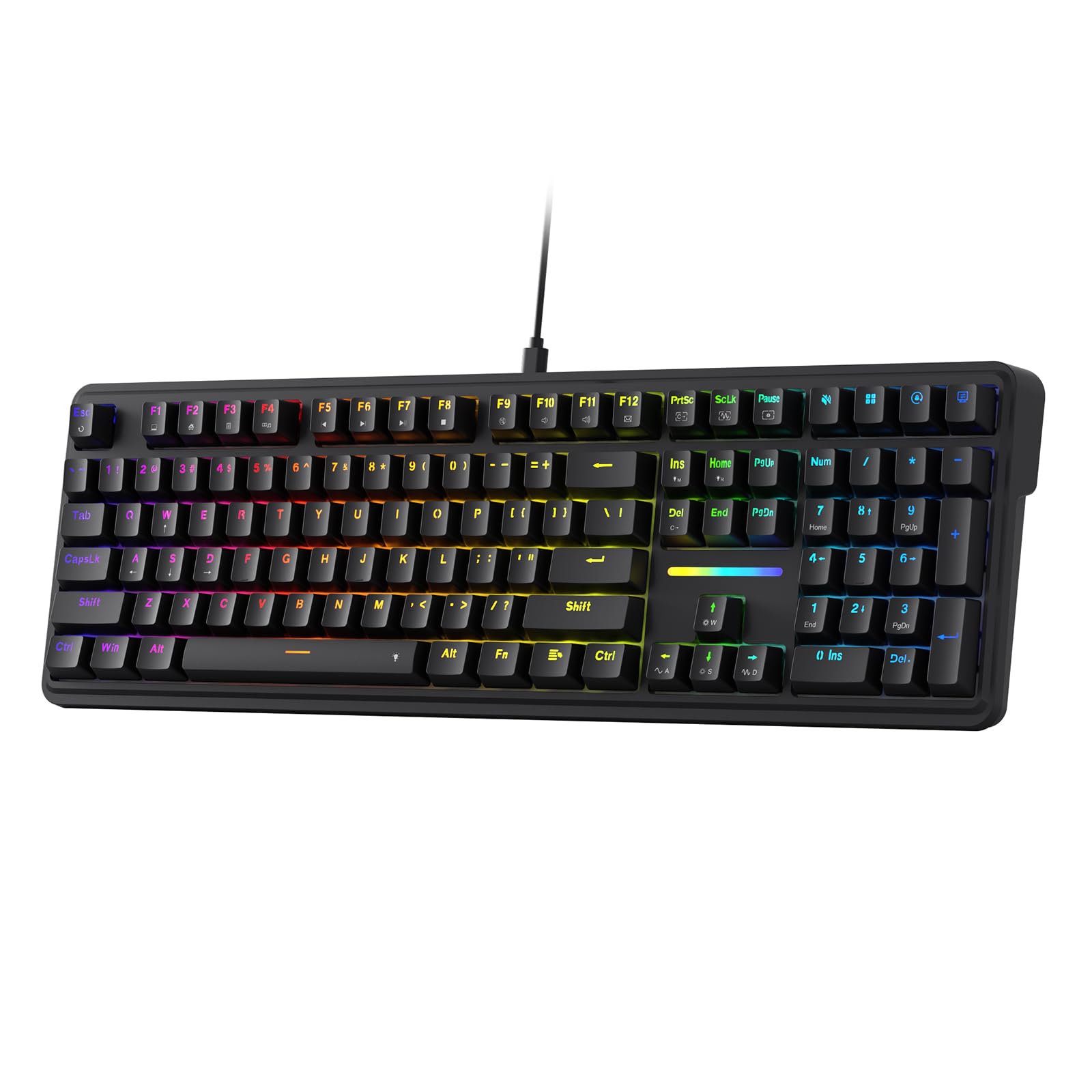
Redragon’s K745 proves that a full-size layout can still achieve a quiet, thocky character that rivals smaller enthusiast boards. The custom Dragon Chant linear switches are generously pre-lubed and paired with a gasket mount that isolates the plate from the bottom case, producing a muted sound signature that won’t echo through a shared office or late-night gaming session. The five-layer noise-dampening stack includes PO foam, IXPE switch foam, a PET sound pad, bottom socket foam, and a silicone bottom pad.
The 108-key configuration includes four dedicated media hotkeys that integrate directly with work and gaming workflows, and the two-stage adjustable feet let you dial in the typing angle. PBT double-shot keycaps with a three-color mix add visual interest while maintaining durability. Owners report that the board feels heavier than expected, which prevents sliding during intense gameplay, and the plug-and-play nature means no extra software is required.
Some buyers note that the RGB lighting effects, while vivid, can be difficult to configure without Redragon’s software download. The plastic enclosure feels sturdy but does not match the premium weight of an aluminum-frame board. At this price point the K745 offers one of the quietest full-size experiences available, making it a strong pick for typists who share their workspace.
Why it’s great
- Extremely quiet and thocky with minimal rattle
- Full numpad and 108 keys for productivity
- Heavy base keeps the board planted during use
Good to know
- Plastic body, not aluminum
- RGB software requires separate download
4. Womier M87 Pro Retro 75% Gaming Keyboard

The Womier M87 Pro brings a strong personality to the desk with its retro gray colorway, integrated OLED display, and multifunction knob that controls everything from volume to RGB mode to wireless connectivity. The OLED screen can display custom GIF images, Caps Lock status, battery level, and the active connection profile—a feature typically reserved for boards costing twice as much. The 75 percent layout keeps the F-row and arrow keys while trimming the numpad for a compact footprint.
Tri-mode connectivity covers USB-C wired, Bluetooth 5.1, and 2.4 GHz wireless with a dongle, making it effortless to switch between a desktop, laptop, and tablet. The hot-swappable PCB accepts both 3-pin and 5-pin switches, so the included Outemu White switches—which have a satisfying thunky sound—can be replaced with quieter or heavier options. Three internal foam layers and a dedicated space-bar dampener contribute to a clean, vibration-free typing sound.
Some units have reported intermittent key registration issues, particularly with the “B” key, and the stock software interface ships in Chinese, requiring English-language instruction steps for initial setup. The battery life sits around two to three days with RGB active, which is average for wireless boards in this tier. If the retro aesthetic and OLED functionality appeal to you, this is one of the most visually distinctive options on the market.
Why it’s great
- OLED screen and knob for status and control
- Tri-mode wireless with Bluetooth 5.1
- Hot-swappable PCB with three foam layers
Good to know
- Stock software interface is not English-friendly
- Battery life is modest with RGB on
5. RK ROYAL KLUDGE R98 Pro Creamy Mechanical Keyboard

The RK Royal Kludge R98 Pro steps into the mid-range segment with enthusiast-grade features that usually require a custom build. The MDA-profile PBT keycaps have a concave top surface that wraps around the fingertips, providing a more natural and comfortable typing arc than standard OEM profile caps. Pre-lubed beige tactile switches deliver clear keystroke feedback with a fast response, making this board equally suited for typing marathons and gaming sessions.
The gasket-mounted plate and five layers of sound-absorbing foam produce a creamy, thocky auditory signature that owners consistently praise. A detachable aluminum CNC volume knob sits at the top right, and four indicator lights clearly show Num Lock, Caps Lock, Win Lock, and Mac Mode status. The RK online driver enables key remapping, macro creation, and RGB customization without requiring a heavyweight installation.
Some users report that the RGB backlighting is less bright than on competing models, and the wireless version is not available—this is strictly a wired USB-C board. A few early production runs had slightly inconsistent stabilizer lubrication on the space bar, but recent batches appear smoother. If you want a premium typing experience that feels like a custom build without any soldering or tuning, the R98 Pro delivers immediately out of the box.
Why it’s great
- MDA-profile PBT keycaps for superior finger comfort
- Five foam layers produce a creamy, thocky sound
- Detachable CNC aluminum volume knob
Good to know
- No wireless or Bluetooth option
- RGB brightness is moderate
6. Keychron V6 Wired Custom Mechanical Keyboard

Keychron’s V6 is the go-to choice for users who want complete control over every key on their board. The full-size layout includes a dedicated volume knob, and the QMK/VIA firmware support means you can remap any key, create complex macros, and adjust lighting without proprietary software. This open-source approach makes it a favorite among programmers and writers who need custom shortcuts for their specific workflows.
The pre-lubed K Pro Brown switches offer a light tactile bump that provides typing feedback without being fatiguing over long sessions. The double-shot PBT keycaps have an OSA profile that is slightly taller than standard OEM caps, creating a more comfortable keywell for touch typists. A silicone sound-dampening pad and screw-in PCB-mounted stabilizers keep large keys like the space bar and shift stable and rattle-free.
Mac users should be aware that the board sends an “Option” command instead of “Command” by default and requires remapping via the VIA web app for macOS-native behavior. The south-facing RGB backlighting illuminates the desk rather than shining through keycap legends, which can be distracting in dark rooms. These quirks aside, the V6 offers a level of customization depth that no other board in this comparison can match.
Why it’s great
- Full QMK/VIA support for unlimited key remapping
- Screw-in stabilizers eliminate large-key rattle
- OSA PBT keycaps improve typing ergonomics
Good to know
- Mac users need VIA to swap modifier keys
- South-facing LEDs do not shine through legends
7. CORSAIR K70 CORE RGB Mechanical Wired Gaming Keyboard

The Corsair K70 CORE enters the list as the premium flagship option, bringing an aluminum top plate, a magnetic soft-touch palm rest, and pre-lubed MLX Red linear switches that deliver buttery-smooth actuation. Two layers of internal sound dampening reduce the pinging and resonance that can plague aluminum-framed boards, producing a clean and controlled typing sound that suits both gaming sessions and office work.
The multifunction rotary dial and dedicated media button give you tactile control over volume and playback, and the ABS double-shot keycaps are built to withstand heavy use without cracking. The iCUE software unlocks deep lighting customization and macro programming, though some users have reported occasional issues with iCUE failing to recognize the keyboard on system reboot. The fixed USB-A connection ensures zero input latency.
Some owners have experienced a double-letter input issue with the MLX Red switches, and the hard plastic wrist rest, while comfortable, can feel stiff compared to gel alternatives. The K70 CORE is heavier than most full-size boards, which is a plus for stability but a minus for portability. If you want a well-built, aluminum-reinforced gaming keyboard with a trusted brand name and premium media controls, this is the strongest candidate in the higher tier.
Why it’s great
- Aluminum top plate adds rigidity and premium feel
- Magnetic detachable palm rest for comfort
- Rotary dial and media button for handy control
Good to know
- iCUE software can have recognition issues
- ABS keycaps may shine faster than PBT
FAQ
Are linear or tactile switches better for a budget gaming keyboard?
Does a hot-swappable PCB affect keyboard durability at lower price points?
How many layers of sound-dampening foam are actually necessary?
Final Thoughts: The Verdict
For most users, the budget mechanical keyboard winner is the Aula WIN60 HE because its hall-effect switches and 8000 Hz polling rate deliver competitive gaming performance at an unmatched price. If you want creamy acoustics and a satisfying thocky sound, grab the HUO JI E-Yooso Z-99. And for full-size fans who need a quiet typing experience that won’t disturb a shared room, nothing beats the Redragon K745.