
Our readers keep the lights on and my morning glass full of iced black tea. As an Amazon Associate, I earn from qualifying purchases.
Specs are compiled from manufacturer listings and verified buyer reviews and can change over time — please confirm the key details on the product page before buying.
Your laptop has two USB-C holes and your desk has a keyboard, a mouse, a webcam, two hard drives, a card reader and a printer. A small hub bridges that gap: it plugs into one laptop port and hands you several extra ones. The trick is matching the plug to your laptop, counting the ports you actually need, and feeding enough power to keep every drive awake at once.
I’m Min — the founder and writer behind Gadgets Feed. This guide is built by comparing the manufacturers’ published specifications and the patterns across verified customer reviews, so you get each pick’s real strengths and trade-offs instead of marketing spin.
Before you buy, you need to check which connector your laptop has, how many devices you plan to run at once, and whether your external drives need extra power. Each of the nine picks below adds real ports for a different desk setup. Here are the additional usb ports for laptop worth putting on your desk.
Our Picks at a Glance

How To Choose The Best Additional USB Ports For Laptop
Two things decide whether a hub works for you: the shape of the plug that goes into your laptop, and how much power your gear draws. Get either wrong and the hub stalls your drives or refuses to plug in at all.
USB-A or USB-C — match the plug to your laptop
Look at the ports on your laptop before anything else. A USB-A hub only fits the older rectangular slot, so it is useless on a laptop that has only USB-C. A USB-C hub plugs into the smaller oval port and often carries video and charging too. Several picks here give you both kinds of plug on the same unit.
Port count is not everything — power is
A keyboard and a mouse barely sip power. A portable hard drive pulls much more, and two drives on one bus can stall a transfer. That is why some hubs carry a USB-C power port you feed with a cable, so your drives get steady current. Check that cable is included — some listings leave it out, and the hub then underperforms with hungry gear.
Speed is shared, not multiplied
A hub marked 10Gbps or 5Gbps usually splits that one figure across all its ports, not each one. Move one big file at a time and you see the full rate; run several at once and each slows down. If you regularly copy footage from two cards at the same time, plan for that. The hub still works fine — it just divides the total speed.
Quick Comparison
| Model | Best For | Connection | Data Speed | Ports | Amazon |
|---|---|---|---|---|---|
| UGREEN Revodok 7-in-1★ Best Overall | Best Overall | USB-C | 5Gbps | 7 | Amazon |
| ORICO 7 Ports USB 3.0Desk Anchor | Desk Jockey | USB-A | 5Gbps | 7 | Amazon |
| FORIDA Aluminum 8-PortLong Reach | Long-Reach Hub | USB-A | 5000Mbps | 8 | Amazon |
| GiGimundo 7-Port | Compact Value | USB-A | 5Gbps | 7 | Amazon |
| ABFCRTTW 4FT 7-Port | Mixed Connector | USB-A | 5Gbps | 7 | Amazon |
| Acer 10Gbps USB-C Hub | Fastest Transfer | USB-C | 10Gbps | 5 | Amazon |
| vantisan Powered 11-Port | Powered Multi-Device | USB-A | 5Gbps | 11 | Amazon |
| Mukiya Docking Stand 8-in-1 | Workspace Build | USB-C | 5Gbps | 8 | Amazon |
| Plugable USB-C 9-in-1 | Premium Pick | USB-C | 10Gbps | 9 | Amazon |
In‑Depth Reviews
1. UGREEN USB C Hub for Laptop Revodok 7 in 1 Dock
Our pick — 4.5+★ from 10,500+ verified ratings; the strongest balance of quality and price.
One plug gives you seven holes, a monitor feed and a laptop charge at once.
If your laptop is USB-C only, this is the hub that solves the most problems in one move. It takes that one small port and turns it into a 4K HDMI slot (a video out that carries a picture to a monitor), a 100W Power Delivery feed (a charging line that passes through to your laptop), two USB-A data ports, one USB-C data port, and an SD plus Micro SD card reader. That is the seven in the name.
The data side runs at 5Gbps — five gigabits per second, quick enough to move a folder of photos without a coffee break. The catch the listing states plainly is to connect two 2.5-inch hard drives at most, so this is not the hub for a four-drive backup rig. Card readers on the body make it a natural fit for a photographer or anyone who pulls files off a camera, and the aluminum shell handles heat on a long day of transfers.
What earns its place
- Seven connections from one USB-C plug, so the laptop stays tidy.
- 4K HDMI means a monitor and your files at the same time.
- 100W pass-through charging keeps the laptop topped while you work.
- Built-in SD and Micro SD readers cover camera cards without a dongle.
Where it asks for patience
- The 5Gbps bus is shared, so two big transfers at once slow each other.
- Two 2.5-inch drives is the stated maximum — not a multi-drive dock.
What owners respond to most is the feel and finish of the thing. The aluminum housing gets described as brushed metal, and that matters because a plastic hub on a desk flexes and creeps around. This one sits put. Note on the honest side: connectivity and charging capability draw a mixed reaction in the reviews — a few setups do not see the charging speed they expected, which usually traces back to the laptop or the charger in the chain rather than the hub itself.
It holds 4.5+ stars across 10,000+ owners, unusually deep feedback for a port expander. Against the Acer 10Gbps hub below, this UGREEN trades top speed for more ports and a card reader, which is the right trade for most desks.
Settle on this if: your laptop runs USB-C and you want the monitor, the cards, the drives and the charge all handled by one small brick.
Keep browsing if: you need to run three or four external drives off a single hub at the same time.
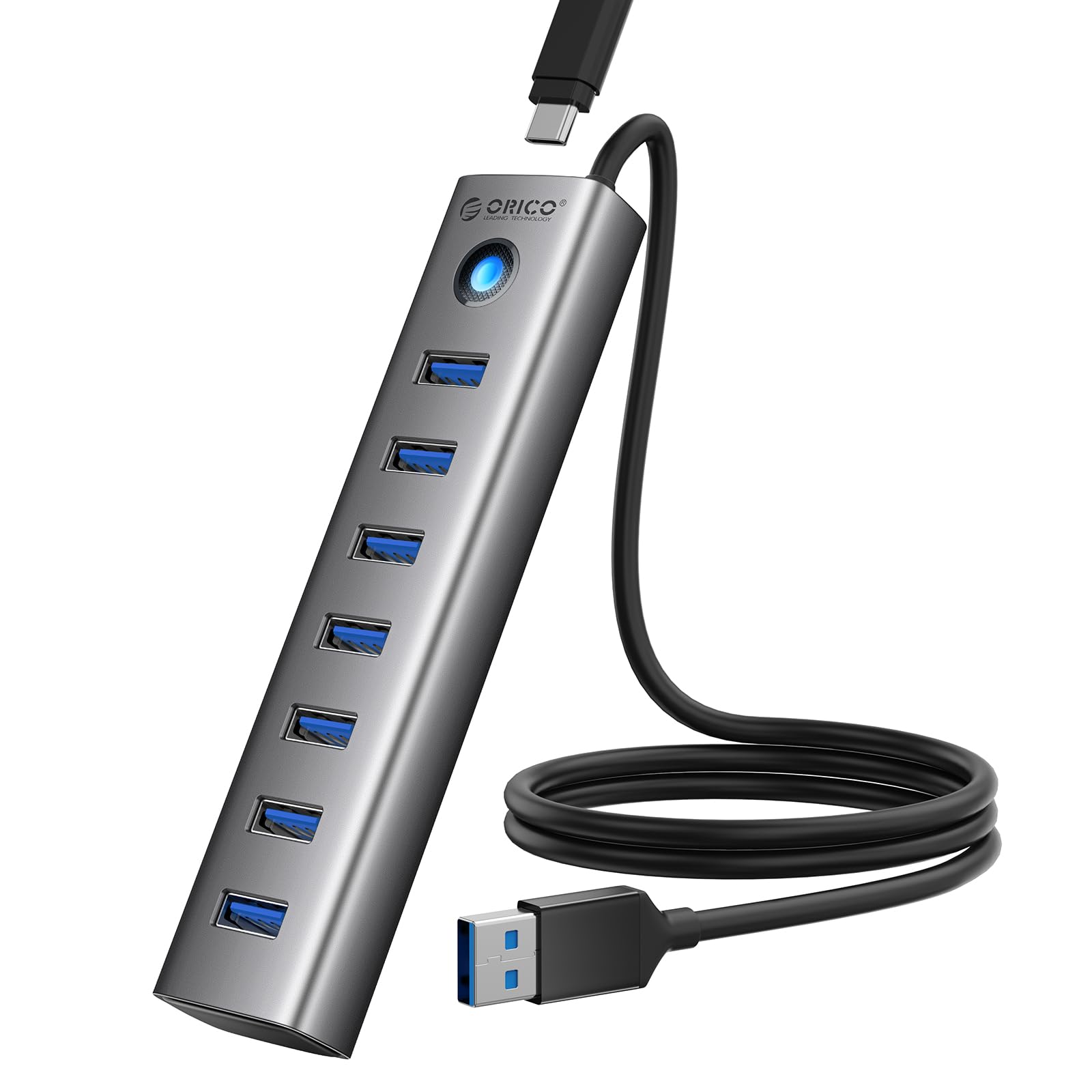
2. ORICO 7 Ports USB 3.0 Hub with 3.28FT Cable
Seven plain USB-A slots on a metal bar, built to live in one spot forever.
This one is for the desk that never moves. The ORICO runs a 3.28ft cable from your laptop to a metal block with seven USB-A 3.0 ports, so your keyboard, mouse, printer and flash drives all live on the same little slab. Ports are split across the bar rather than bunched on one face, and it transfers at 5Gbps — the same five-gigabits-per-second ceiling as most hubs here.
Its shape is the whole story: ORICO lists it at 0.59″ long by 1.38″ wide by 3.94″ tall, a thin upright stick rather than a flat puck. The GiGimundo hub below spreads across 5.54″ of length instead, so the ORICO takes far less desk footprint and stands where a flat hub would slide flat. There is a 5V/3A Type-C power port on the body for feeding hungry drives a steady supply — the cable for it is not in the box, so buy one if you plan to run external hard drives.
The one line you must read twice: those seven USB-A ports move data only and do not charge devices. Plug a phone in expecting a top-up and nothing happens. Owners find the build solid and the price fair, and the aluminum alloy shell is listed as moisture-resistant and corrosion-resistant. Value for money draws a mixed note in the review pages — some find it reasonable, some find it plain.
Owners rate its functionality and versatility highest: seven USB-A 3.0 ports at 5Gbps, no drivers, no fuss.
The honest read: a metal seven-port bar for a fixed desk, with a long cable to reach behind a monitor and no charging on any port.
Pick it for: an office or home desk where you want every peripheral plugged in permanently and never think about it again.
Pass if: you need ports that also top up a phone or tablet.
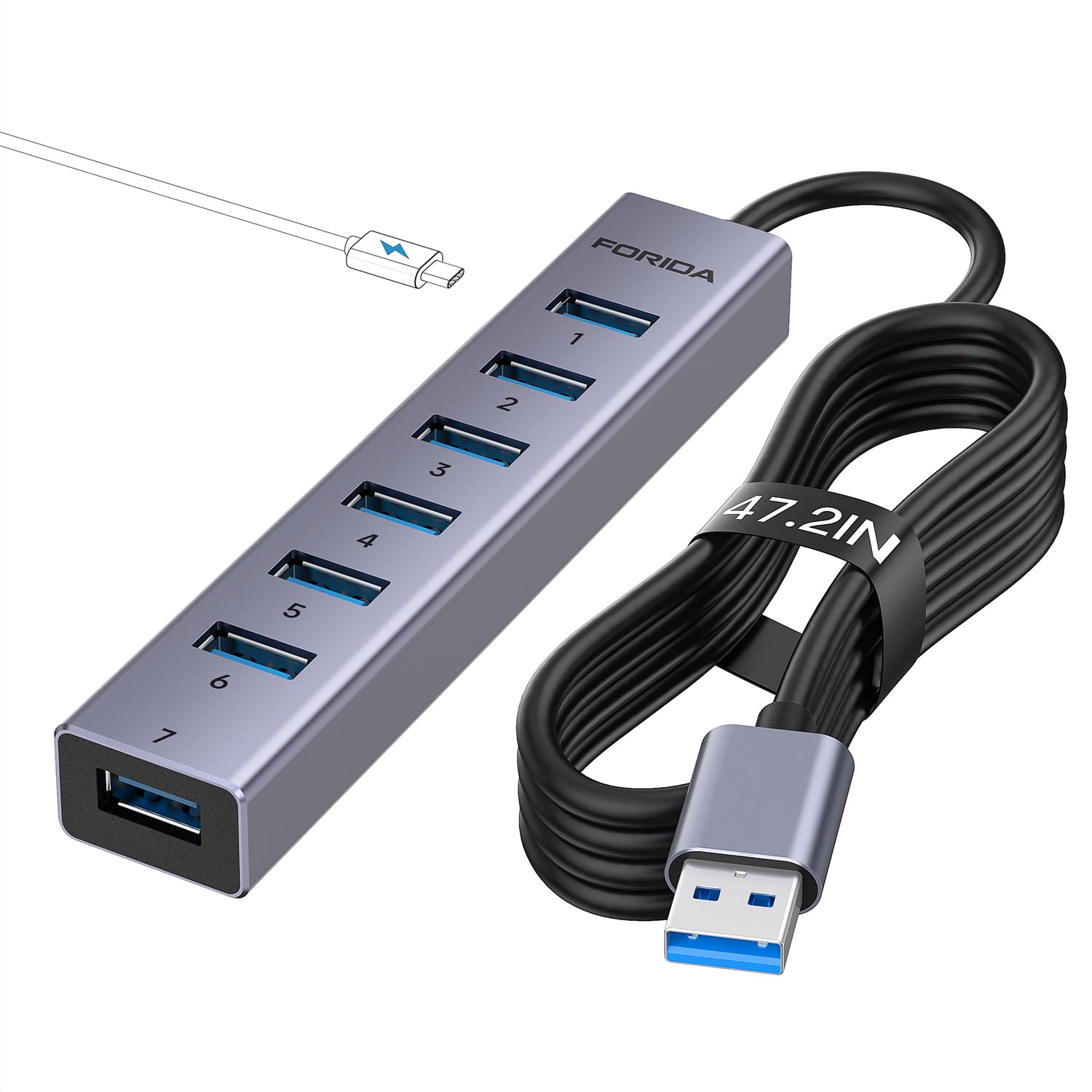
3. FORIDA Aluminum 8-Port USB Hub with Long Cable
The cable that reaches from your laptop bag to the far side of the room.
Picture a tower PC tucked under a desk, or a laptop on a stand with the drives over by the wall. The FORIDA answers that with a 47.2-inch cable — nearly four feet — so the hub can sit where your gear actually lives. It packs seven USB-A 3.0 ports plus a USB-C power port, so the total count is eight. Data flows at 5000Mbps (five gigabits per second), which the listing calls more than 10 times faster than USB 2.0.
It only powers the hub itself and does not charge the devices plugged in — and the 5V power cable is not in the package. Feed it a USB-C cable when you connect power-hungry devices and the ports hold steady. Skip that step and heavy drives can drop out mid-transfer. The aluminum body keeps the thing cool through a long work session.
On the review side, quality is the thing people notice first, and the port capacity gets real attention for fitting several USB 3.0 ports in one place. Cable length earns its own mentions — that reach is the whole reason to pick this over a short-cable unit. Durability is the one gripe that shows up, so treat the cable joint gently rather than yanking it out of your laptop by the wire.
Where it wins: the 47.2-inch reach plus eight ports means one hub can serve a whole corner of the room.
Good match for: a desktop tower or a laptop placed far from the drives and keyboard it needs to feed.
Think twice if: you expect the hub to charge your phone — it moves data only, and the power cable is a separate buy.
4. GiGimundo 7-Port USB 3.0 Hub
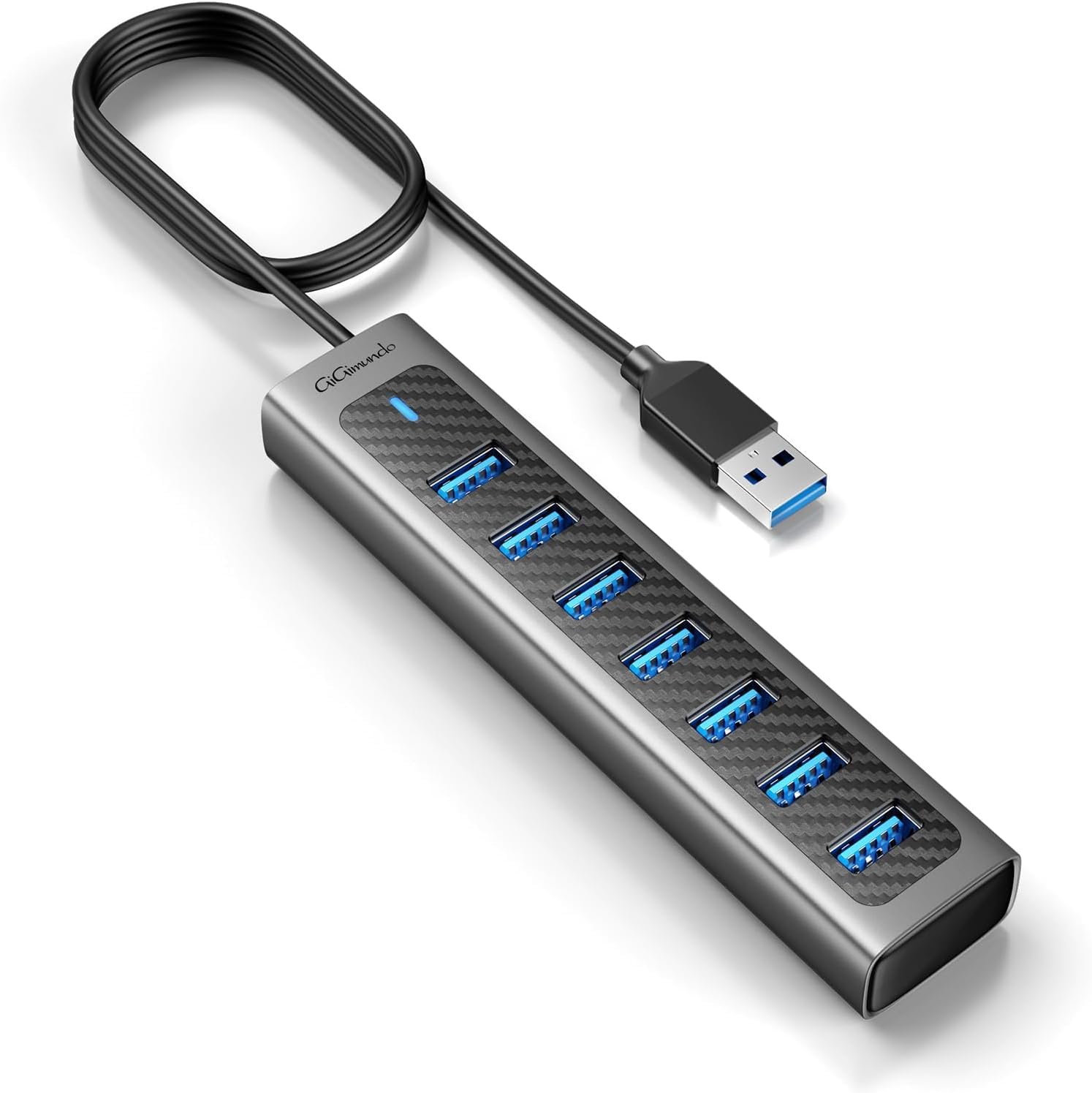
A palm-sized seven-port box with light-up indicators so you know what is live.
Small enough to toss in a bag, this GiGimundo hands your laptop seven USB-A 3.0 ports through a 3.3-foot cord. Data runs at 5Gbps, and it throws in a USB-C 5V/3A power interface for feeding high-draw devices — again, that cable is not included. Indicator lights sit on the body so you can see at a glance which port is carrying a device. The frame is a mix of ABS plastic and aluminum, keeping the weight light while the metal face does the heat work.
Compare the footprint: this one is 5.54″ long by 1.2″ wide by 0.74″ tall, a flat bar that tucks along the back of a keyboard. The ORICO above stands 3.94″ tall on the same desk, and that vertical shape can knock into a monitor arm. If your desk is cramped, the flat format is the friendlier one. The 3-ounce body disappears in a laptop sleeve.
Owners call it excellent equipment with lots of ports, and the price-to-port ratio reads strong in the reviews. No HDMI and no card reader, but for a keyboard, mouse, drive and printer it does the job without fuss.
Reach for this if: you want maximum ports for minimum desk space and do not need a monitor output.
Look elsewhere if: your work depends on routing a screen through the hub.
5. ABFCRTTW 4FT 7-Port USB Hub with 3 USB-C
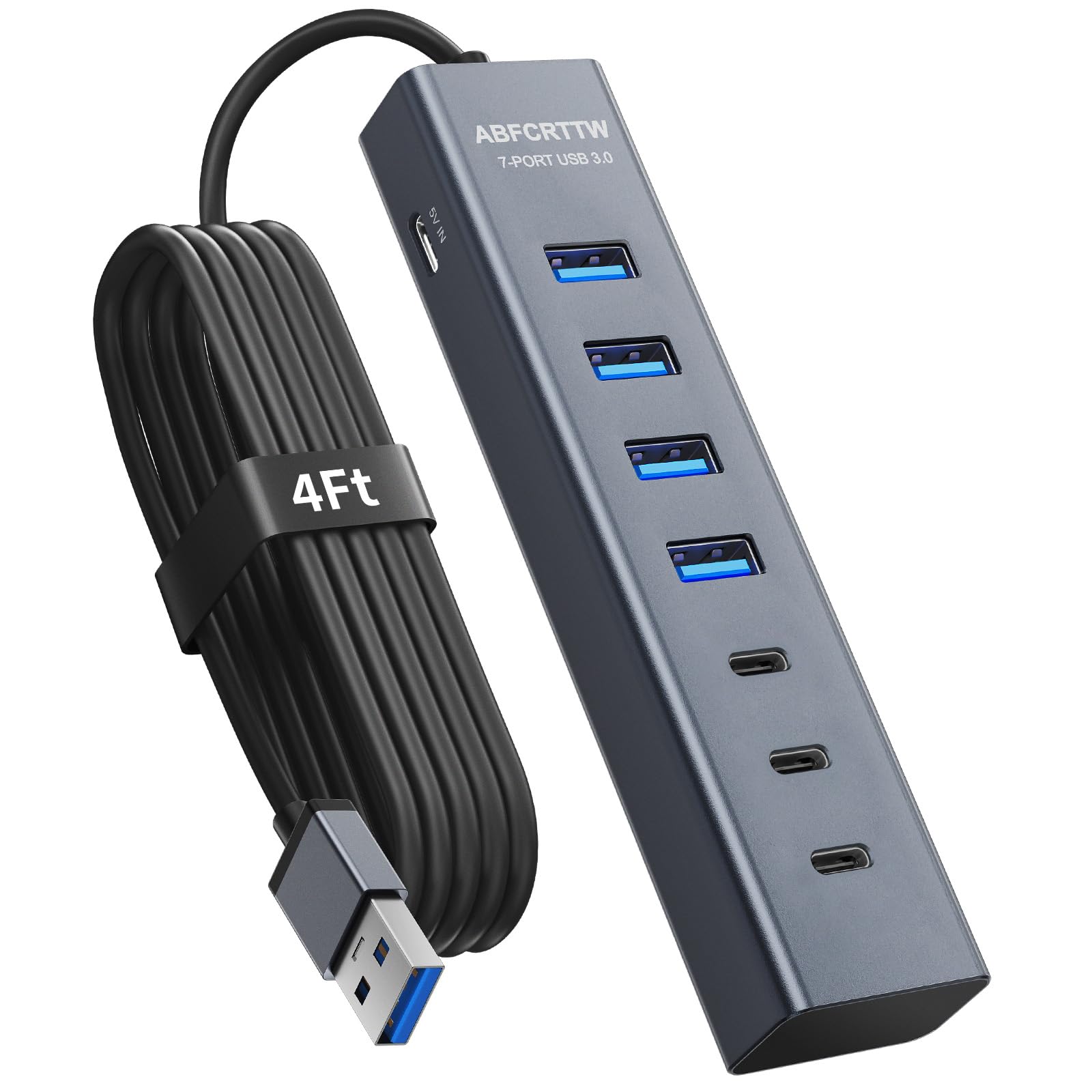
Four old-style slots and three new-style slots, so every cable you own has a home.
Most hubs pick a side. This ABFCRTTW splits its seven ports into four USB-A and three USB-C, which is the practical answer for a desk holding both old and new gear — a wired mouse in one slot, a modern phone cable in another. Data moves at 5Gbps, the cable runs 4 feet, and the aluminum shell keeps it cool.
Inside sits a dual-chip setup, which the listing ties to steadier multitasking across Windows, Mac and Linux. The 4-foot cable gets called out in the reviews as the reason it reaches cleanly to a desktop tower, and portability earns its own nods. Port quantity and value both land well in the pages, and the sleek appearance gets noticed too.
It weighs 3.2 ounces and measures 1″ by 0.66″ by 5.3″ — slim enough to run along the back edge of a monitor stand. The catch: three USB-C ports down at 5Gbps will not feed a high-refresh monitor, and there is no HDMI here. This is a data hub, not a video dock. For plugging in keyboards, mice, drives and a phone, that is exactly what you want.
Best suited to: the desk with a mix of USB-A and USB-C cables that all need power and data at once.
Rule it out if: you need to pipe a display through the hub.
6. Acer 10Gbps USB C Hub with 4 USB-C 3.2 Ports
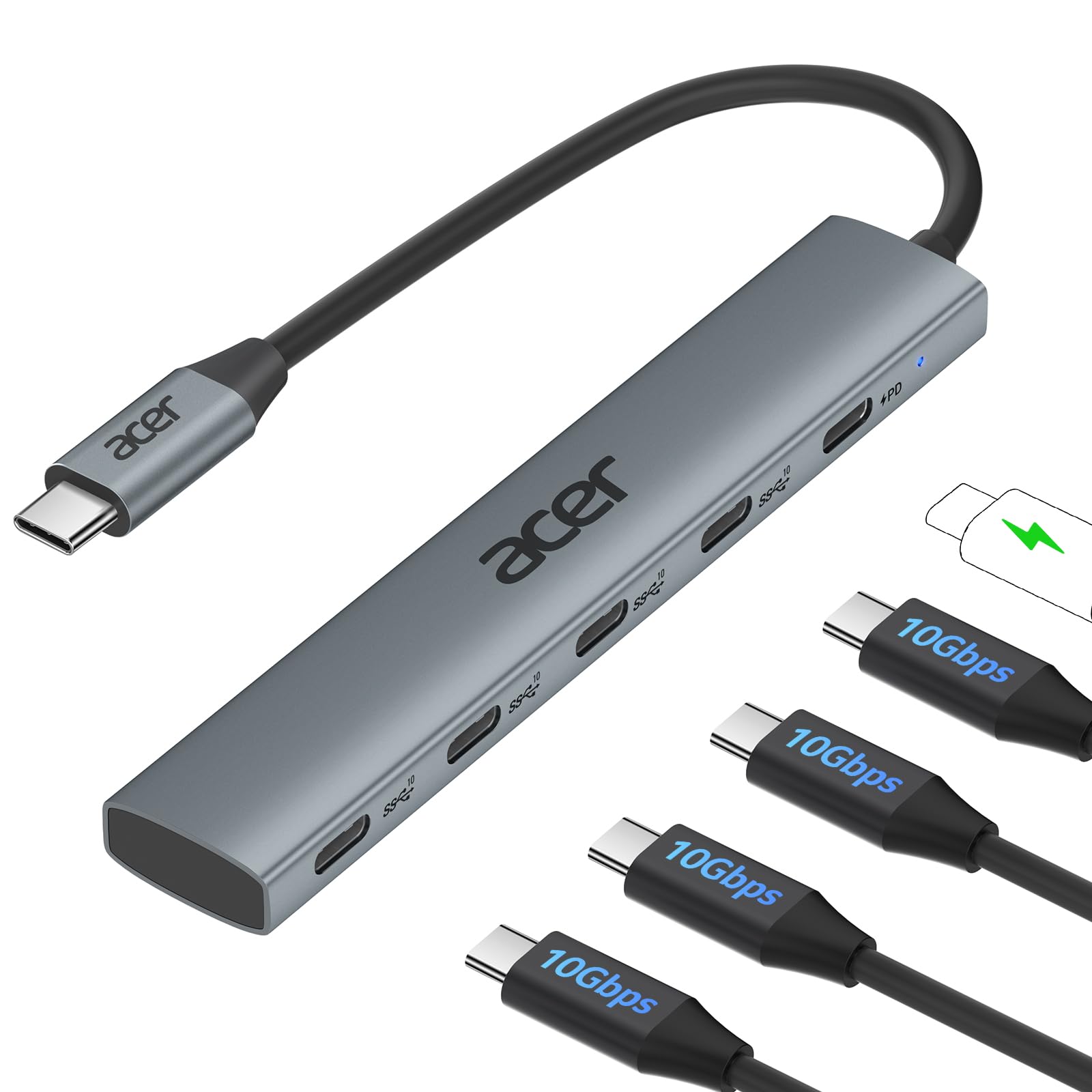
Four USB-C holes running at double the speed of most hubs on this list.
Here is the speed story. This Acer moves data at 10Gbps — ten gigabits per second — which the listing puts at 1GB per second. The UGREEN at the top of this list runs 5Gbps, so a big video file lands roughly twice as fast here in ideal conditions. If you shuttle footage or back up large folders daily, that gap is the reason to pay more.
All four data ports are USB-C 3.2 Gen 2, plus a 100W PD port that charges the laptop itself. Note the fine print: the 10Gbps is shared across all four ports, and the listing recommends connecting one or two external drives at a time. Your laptop also needs a USB-C port that supports PD and a 65W-plus charger to hit peak charge rates.
There is no USB-A slot and no video output, so a wired mouse or an HDMI monitor needs another route. What owners praise is the build and speed; what they flag is power delivery and port capacity — a few find the ports awkward to reach, and full speed lands on one port rather than four. Sizing that honestly: it is a fast, well-made hub for USB-C-only gear, not an everything dock.
Why it turns heads
- 10Gbps moves files at twice the rate of the 5Gbps hubs here.
- Four USB-C 3.2 Gen 2 ports suit modern cables only.
- 100W PD passes charge through to the laptop.
- Aluminum body handles heat across long transfers.
The fine print worth reading
- The 10Gbps is shared across all four ports.
- No USB-A and no HDMI — USB-C gear only.
- One or two external drives at a time is the stated suggestion.
Snap it up if: your laptop and all your accessories are USB-C and you move big files regularly.
Leave it be if: you still rely on USB-A cables or want a monitor output.
7. vantisan Powered 11-Port USB 3.0 Hub with Switches

Ten data slots and one charging slot, each with its own switch and light.
This is the hub for the desk that looks like a small network closet. Ten USB-A 3.0 data ports at 5Gbps, plus a dedicated smart charging port that pushes 2.4Amps, and it ships with a 5V/4A power adapter to feed all of it. Because it plugs into the wall, the ports stay steady even when several high-power devices are connected at once. That is the difference between this and the bus-powered hubs: no more devices dropping off when you connect the third drive.
The individual on/off switches are the feature you will use most. Each port has its own button and a LED indicator, so you can kill a device without unplugging it — handy for a printer that beeps at midnight or a drive you only need sometimes. The body measures 7.87″ by 2.13″ by 0.98″, so set aside a real strip of desk for it.
Now the honest part. Functionality is the most-discussed element in the review pages and it comes back mixed: some units run perfectly, while a few stop behaving after a couple of months. Power controls and the port count are the positives; build quality reads mixed. For a busy desk with many devices, the switches and the adapter are the draw — just keep your receipt.
Choose it when: you run many devices at once and want to switch each one off independently without reaching for cables.
Skip if: you want the simplest possible hub and expect it to run forever untouched.
8. Mukiya USB C Docking Station Stand 8-in-1
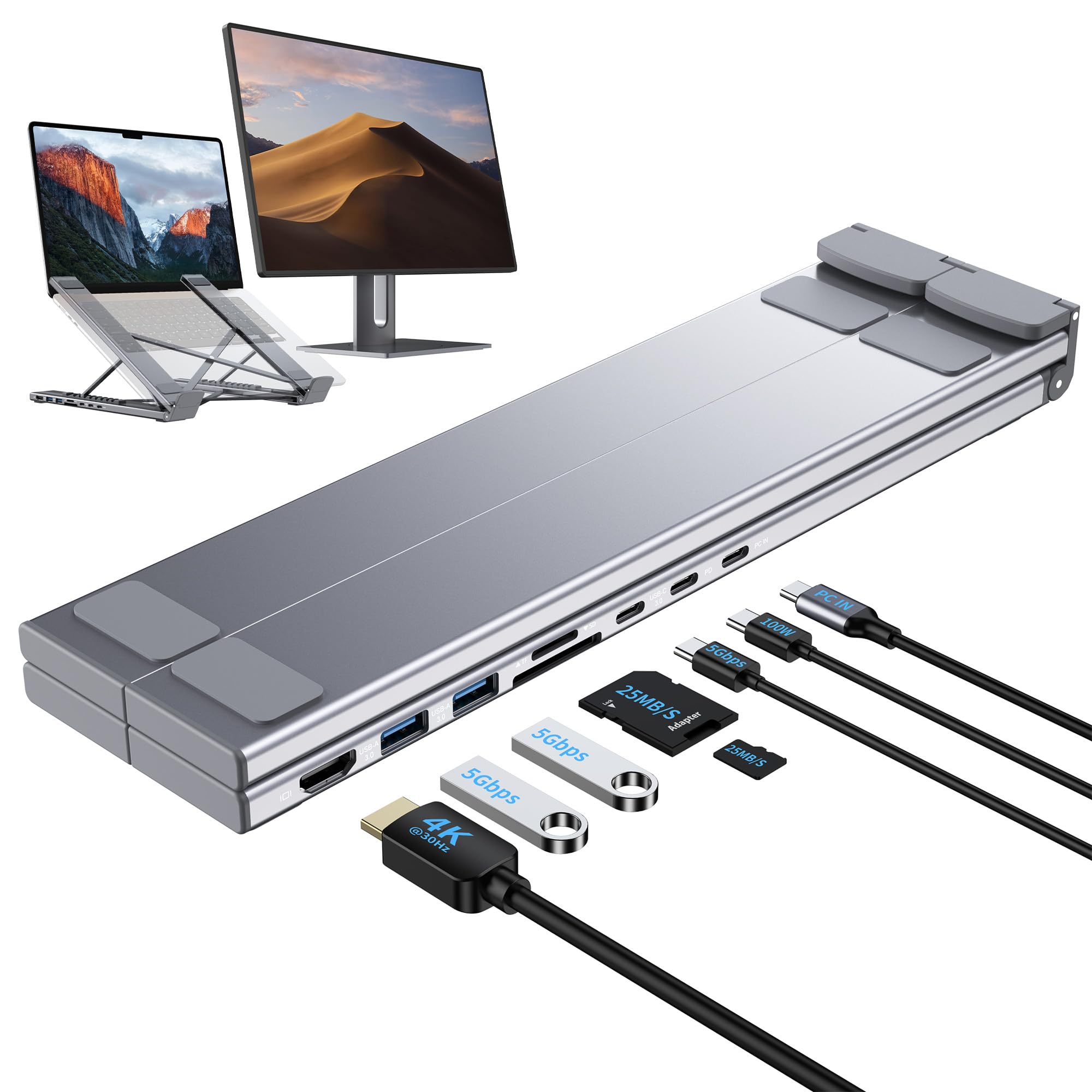
A hub that is also the stand your laptop sits on, lifting it to eye level.
This pick solves two desk problems at once. It is a USB-C hub with 4K HDMI, two USB-A 3.0 data ports, one USB-C PD 3.0 port, one USB-C data port and SD plus TF card slots. It is also a foldable aluminum stand with 9 levels of height adjustment, so your screen rises to a comfortable angle while your cables all run through it. The HDMI carries a 4K picture at 3840×2160 at 30Hz, fine for spreadsheets, video and everyday work.
Build details matter for a stand: it supports laptops up to 40 lbs without wobble, folds to 10.5″ by 2.2″ by 0.9″, and weighs 0.7 lbs. A storage bag comes in the box. It moves data at 5Gbps on the USB-A ports, with the SD and TF slots running up to 25MB/s, and the PD port passes up to 90W of charge to your laptop after reserving headroom for the other ports.
The one thing to verify before you buy: your laptop’s USB-C port must support video output, or DisplayPort Alt Mode. Plug in a port that only does data and the HDMI stays dark. Owners like the functionality and portability most — several note it folds small enough for a travel bag — while the adjustability draws a mixed note, with a few finding the hinge less firm than they hoped.
That 4K at 30Hz matters too: a 60Hz monitor will cap out here, so gamers should look elsewhere.
Two products in one: a laptop stand and a USB-C dock sharing a single aluminum body.
Right for: a tidy workspace where you want the screen raised and the cables routed through the stand.
Not for: laptops without DisplayPort Alt Mode, or users who need a 60Hz display feed.
9. Plugable USB-C 9-in-1 Hub with 140W PD Charging
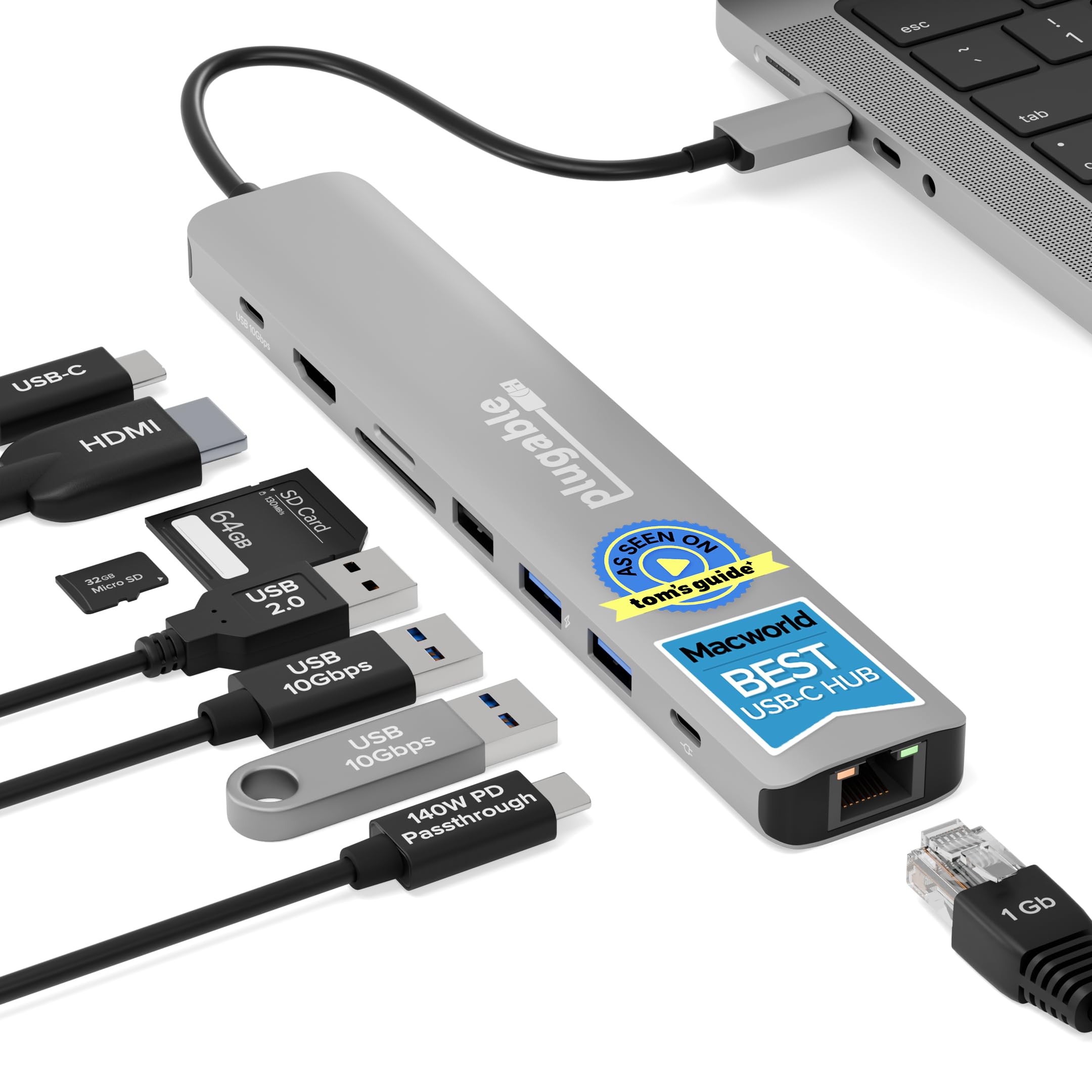
The hub that gives your laptop a 4K 60Hz screen and the most charging headroom here.
Premium setups live or die on the monitor. This Plugable pushes 4K at 60Hz over HDMI, which is the smooth, flicker-free picture a 30Hz dock cannot match — the Mukiya above tops out at 4K at 30Hz. Data runs at 10Gbps, the same fast rate as the Acer, but here you also get the display and a full spread of connections in nine ports.
The charging is the standout. It accepts up to 140W input and sends 125W to the laptop when paired with a PD 3.1 EPR charger and cable, using 15W to feed its own ports. Most PD 3.0 laptops will charge at up to 100W input to 85W host, so check what yours accepts. A 7.48-inch built-in cable keeps it close to the laptop — this is a desk hub, not a long-reach one.
Reliability is what people talk about most, followed by build quality and versatility, and the listing adds lifetime support from Plugable’s North American team. Two caveats worth knowing: the HDMI needs your laptop’s port to support DisplayPort Alt Mode, and heat and power delivery draw mixed notes — a few find it runs warm and delivers less charge than expected depending on the charger in the chain. That is the fair trade for a dock built to be a fixed desk anchor.
The long-view pick: a nine-port dock with 4K 60Hz and up to 125W of passthrough, made for a permanent desk setup.
Buy it for: a USB-C or Thunderbolt laptop that plugs into a 4K monitor and a power brick every morning.
Steer clear if: you need a long cable to reach across the desk, or your laptop lacks DisplayPort Alt Mode.
Understanding the Specs
Data transfer speed (Gbps and Mbps)
Gbps means gigabits per second — how much data the hub can push in one tick. The hubs here run 5Gbps or 10Gbps, and the listing may quote that in Mbps instead: 5000Mbps is the same as 5Gbps. Faster means a big video file or a folder of photos lands sooner. Just remember the figure is usually shared across all ports, not repeated on each one.
Power Delivery (PD) and the power port
PD is a charging standard that lets the hub pass power from your wall charger through to the laptop. A hub marked 100W or 140W input sends most of that onward while keeping a little for its own ports. A separate 5V/3A or 5V/4A power port feeds the hub itself, keeping drives steady — but some hubs leave that cable from the start, so budget for one.
FAQ
Will a USB-A hub work on a laptop that only has USB-C ports?
Can I plug a monitor into every hub on this list?
Why does a hub need a separate power cable?
Does 10Gbps mean four ports each run at 10Gbps?
Will these hubs charge my phone as well as move data?
How many external drives can I run on one hub safely?
What is DisplayPort Alt Mode and do I need it?
Will a long cable hub slow down my data speed?
Do I need to install drivers for any of these hubs?
Final Thoughts: The Verdict
For most buyers, the additional usb ports for laptop pick is the UGREEN Revodok 7-in-1, because it folds seven connections, a 4K HDMI out and 100W pass-through charging into one small aluminum brick. If raw transfer speed is what you are chasing, the Acer 10Gbps hub runs twice the throughput of the 5Gbps picks. And for a desk with many devices that all need steady current, the vantisan powered 11-port hub with its wall adapter and per-port switches is the one to reach for.
The UGREEN’s 4.5+ stars across 10,000+ owners is rare in this category, and that track record is why it beats flashier hubs.
How We Picked
We do not accept paid placement. Every pick is matched to a real buyer and a real use-case; we do not hands-on test units.
Sources & Methodology
Specifications: manufacturer listings and product documentation. Review insights: verified customer reviews, as of November 2026. Pricing: not shown on this page (it changes often); check the current price via the retailer link.
As an Amazon Associate, Gadgets Feed earns from qualifying purchases. This does not affect which products we feature.