
Our readers keep the lights on and my morning glass full of iced black tea. As an Amazon Associate, I earn from qualifying purchases.
Specs are compiled from manufacturer listings and verified buyer reviews and can change over time — please confirm the key details on the product page before buying.
The short answer: for most RTX 5070 builds, a properly seated 600W-rated 12V-2×6 cable with 16AWG wire is all you need, and the EZDIY-FAB 60cm sleeved cable is the safest all-round pick. The 5070 Power Connector question is really about two things — whether the cable actually carries the wattage your card draws, and whether it seats fully so the pins do not heat up. Get those two right and the rest is fitment.
I’m Min — the founder and writer behind Gadgets Feed. This guide is built by comparing the manufacturers’ published specifications and the patterns across verified customer reviews, so you get each pick’s real strengths and trade-offs instead of marketing spin.
You will see extension cables, full replacement cables, and one cable that watches its own temperature. Each one below fits a different PSU setup, so match the connector type to your power supply before anything else. Here is how the 5070 Power Connector options actually differ in the real world.
Our Picks at a Glance


How To Choose The Best 5070 Power Connector
Your RTX 5070 will not care about the brand name on the sleeve. It cares about three things: the connector shape, the wire gauge, and whether the cable is allowed to plug into your power supply at all. Sort those out first and the shortlist narrows fast.
Extension cable or replacement cable
An extension cable plugs into the cable your power supply already gave you — you never touch the PSU end. A replacement cable goes straight from a modular power supply into the graphics card. Look at the connector gender in the specs: male-to-female usually means an extension, while a male-to-male cable is typically a direct PSU run. Plugging an extension cable directly into a power supply is how people damage hardware.
Match the connector to your power supply ports
A 16-pin to 2×8-pin cable eats two 8-pin ports on your power supply. A 16-pin to 3×8-pin cable needs three free 8-pin ports. Count yours before you buy, because a cable that needs three ports will not run correctly on two — and running fewer than the cable requires can damage the system. Full modular supplies only, for the replacement style.
Why 16AWG wire and alloy copper terminals matter
Wire gauge (AWG) is the thickness of the copper inside — a lower number is thicker and carries current with less voltage sag. 16AWG is the thicker, higher-current option compared with standard 18AWG. Alloy copper terminals resist heat and wear at the plug, which is exactly the spot where a loose connection turns into a hot pin. In plain terms: 16AWG wire and alloy copper terminals hold voltage steady when the 5070 pulls a heavy gaming load.
Quick Comparison
| Model | Best For | Cable Type | Gauge | Rated Output | Amazon |
|---|---|---|---|---|---|
| EZDIY-FAB 12VHPWR PSU Sleeved Cable 60cm★ Best Overall | Most 5070 builds | Direct PSU to GPU | 16 | 600W | Amazon |
| EZDIY-FAB 16pin Sleeved ExtensionCleanest Look | Extension + cable combs | Male-to-female extension | 16 | 600W | Amazon |
| Bangfun 90 Degree 16Pin AdapterTight Case Pick | Tight cases | 16-pin to 2×8-pin, right angle | 16 | 300W–400W (peak 400W) | Amazon |
| Fasgear 12V-2×6 Extension, PCIe 5.1 | Non-ATX 3.0 supplies | 16-pin to 2×8-pin extension | 16 | 600W | Amazon |
| Fasgear 12VHPWR 3×8-pin Cable | Corsair/Great Wall/Thermaltake PSUs | 16-pin to 3×8-pin replacement | 16 | 600W | Amazon |
| Corsair ThermalProtect 12V-2×6 | Built-in heat shutoff | Native 12V-2×6 | — | 600W | Amazon |
| ASRock 12V-2×6 L-Type Cable | ASRock Taichi/Phantom PSUs | L-shaped GPU end | 16 | 600W | Amazon |
| COMeap 16-Pin to Dual 8-Pin Conversion | Dual 8-pin GPU ends | 16-pin female to 2×8-pin male | 16 | 600W | Amazon |
| AsiaHorse 12VHPWR Adapter Extension | Short white builds | Female-to-male extension | 16 | 600W | Amazon |
In‑Depth Reviews
1. EZDIY-FAB 12VHPWR PSU Sleeved Cable, 12V-2×6, 600W Support, 60cm, Black
Our pick — 4.5+★ from 200+ verified ratings; the strongest balance of quality and price.
One cable from the power supply to the card, with nothing extra to bend or hide.
If your RTX 5070 build lives inside a normal mid-tower case, this is the cable to buy. It carries power straight from a PCIe 5.0 or ATX 3.1 power supply into the card’s native 16-pin port, so you skip the chunky four-headed adapter that ships in the box. Fewer connections between the supply and the GPU means fewer places for a pin to sit loose.
At 60 centimeters it gives you real routing room — more than twice the run of the AsiaHorse adapter extension at 30 centimeters. That matters when your GPU sits low and the PSU shroud sits high, because you can curve the cable behind the motherboard tray instead of kinking it in mid-air. The five pre-installed cable combs are the part that wins people over: they hold the strands flat and parallel, which looks tidy and keeps each wire sitting where you routed it. The build itself is 16 gauge tinned copper wire with alloy copper terminals, rated for up to 600W.
The catch is the RTX 5090. EZDIY-FAB states plainly that this cable is not officially supported with the 5090’s extreme power draw, so if you are planning that upgrade later, buy with that in mind. For a 5070, 5070 Ti, 5080 or any 40-series card it is squarely in its lane. One more note worth knowing: several owners run it against a 5080 and report it handles the load without drama, and they single out the flexibility — it bends where you push it instead of tugging on the connector.
What earns the top spot
- Direct power supply to GPU run, so the messy 4-way adapter stays in the box
- 16AWG tinned copper wire with alloy copper terminals rated to 600W
- 60cm length gives real slack for routing behind the tray
- Five pre-installed combs for a flat, organized run
Where it stops
- Not officially supported on RTX 5090 due to that card’s power draw
- It is a full PSU-side cable, so it only suits a power supply with a native 12V-2×6 or 12VHPWR output
Buy this if: you have an ATX 3.1 or PCIe 5.0 supply and want one clean cable into a 5070-class card.
Look elsewhere if: you are already planning an RTX 5090 build.
2. EZDIY-FAB 16pin (12+4) 12VHPWR PCIe 5.0 GPU Power Sleeved Cable Extension, Male to Female, 16AWG with Cable Combs, Black
The tidy fix for the ugly four-headed adapter bundled with your graphics card.
Your 5070 either ships with a squid-like adapter that splits the 16-pin plug into several 8-pin tails, or you plug into a native PCIe 5.0 cable. This male-to-female extension sits between the two and turns that fat bundle into one sleeved run. It is rated for up to 600W through 16AWG tinned copper, with alloy copper terminals at the plug.
Read the product’s own warning carefully: this is an extension cable, not a modular cable, and it should not be plugged straight into your power supply. It goes on the end of a native 12+4 pin GPU cable or the original 1-to-4 adapter. EZDIY-FAB also advises a 1000W-or-higher supply when you are pairing it with the hungriest cards, so check your unit’s rating before you commit. Four cable combs are in the box, and the whole point is appearance — a flat, uniform run instead of four loose wires snaking across the case.
Where it divides opinion is length. Some builders find the run just right; others want more slack to reach a low-mounted card. If your case is deep, measure before ordering. It also will not fit 12-pin 30-series cards — only 12+4 pin GPUs like the 3090 Ti and 40-series are supported. For a 5070 with a native 16-pin cable already in hand, though, it does the cosmetic job well and holds up over long-term use.
The honest read: this is a looks-first part for the buyer who already has a working 16-pin power source. It smooths the appearance of a build without asking you to rewire the supply.
Double-check twice: the length. It is the one spec builders disagree on, and a short run in a big case means the cable curves sharply at the connector — exactly what you want to avoid.
Reach for it if: you want one neat sleeved line instead of a split adapter nest.
Pass if: your card uses a 12-pin plug rather than 12+4 pin.
3. Bangfun 16Pin GPU RTX 4070 Super Power Adapter Cable 90 Degree, PCIe 5.0, 13 Inch Black
When the side panel pushes on your 16-pin plug, a right-angle connector solves it.
A 90-degree connector turns the cable sideways the moment it leaves the card, so the wire does not have to bend against the side panel of a small case. Bangfun builds that angle into a 13-inch sleeve, which gives you room to curve it wherever the clearance is. The spec sheet shows 16AWG wire, alloy copper terminals, a nylon braid sleeve, and an amperage rating of 12 amps.
Here is the number you must check before buying: Bangfun rates this cable at 300W to 400W, with peak power up to 400W. That is the honest ceiling and it is lower than the 600W cables on this list. For a 5070 or 5070 Ti sitting inside that envelope it is fine, but if you plan to move to a 5080 or 5090 later, you want a 600W-rated cable instead. The combs are four transparent acrylic clips, and owners consistently report it works with both 4090 and 5070 cards and fits cleanly.
The build quality registers as the second thing people notice, and the flex is the reason — the high-density sleeve and nylon braid bend more easily than a stiff factory cord. Set against the EZDIY-FAB extension above, this one trades a higher wattage ceiling for the right-angle geometry. If panel clearance is your headache, that trade is worth it. If raw headroom is your priority, it is not.
What it fixes
- 90-degree plug eases side-panel pressure in small cases
- 13-inch braided sleeve with four acrylic combs included
- Flexible high-density sleeve routes around tight corners
The ceiling to know
- Rated 300W to 400W, peak 400W — not a 600W part
- Not built for 12-pin 3090-series cards
Best fit: compact builds where a straight plug rubs the panel and your card draws within 400W.
Step up instead: to a 600W cable if you expect to run a 5080 or 5090.
4. Fasgear 12V-2×6 Adapter Extension Cable, 12VHPWR, PCIE 5.1, White

A 16-pin cable for the power supply you already own, not the one you wish you had.
Plenty of good power supplies predate the 12V-2×6 port. This Fasgear cable runs from two 8-pin PCIe ports on your existing unit into the 5070’s 16-pin socket, which means no new PSU purchase. It is built to the PCIe 5.1 standard and the wire is 16AWG tinned copper, rated up to 600W output.
The requirement is strict and it matters: you need two free 8-pin PCIe ports on the power supply. Fasgear says connecting fewer than two may cause system damage, so do not try to run it from one. The 30cm run is longer than the original 10cm factory stub and comes with four transparent acrylic combs. There is also a helpful design detail in the connector — of the four smaller signal pins, two carry power wires and two are ground, which is how the card detects the cable.
What wins people over is reliability across a wide range of cards, including the 5070 Ti and aftermarket 5070 models. The recurring gripe is length again — some builders want a longer run for big cases. Note also that it will not fit 12-pin or 8-pin cards; it is strictly for 16-pin GPUs. Fasgear’s own advice is to use a 3×8-pin cable for a 5080 or 5090 instead, so this one is aimed squarely at the 5070-class buyer.
Why it belongs here: it is the pragmatic bridge between an older modular supply and a modern 16-pin card, with proper PCIe 5.1 labeling and 600W rating.
The line you cannot cross: two free 8-pin ports are non-negotiable. Count them before ordering.
Pick it when: your PSU has two spare 8-pin PCIe outputs and no native 16-pin socket.
Skip when: you only have one free 8-pin port or your card uses an 8-pin plug.
5. Fasgear 12VHPWR Cable 600W PCIe 5.1 16pin(12+4) GPU Power Cable

The heavy-duty run for a big modular supply, with three 8-pin plugs feeding one 16-pin head.
This is a replacement cable, not an extension — it goes straight from a modular power supply into the graphics card, which removes an entire connection point from your build. It pulls power from three 8-pin (4+4) ports on the supply and delivers up to 600W through 16AWG tinned copper wire, with alloy copper terminals and a 50-amp rating.
The compatibility list is narrow and you must read it: Corsair, Great Wall, or Thermaltake full-modular supplies only, and the unit needs CPU 8-pin (4+4) ports to plug into. It will not work on semi-modular or non-modular units. You also need three free 8-pin ports — Fasgear warns that fewer than three may damage the system. At 70cm it is by far the longest run on this list, which is why it turns up in big cases where a short cable has to snake awkwardly. Four transparent acrylic combs keep the strands aligned.
Buyers report it working across the 40-series and 50-series range, including a 1200W Thermaltake unit and a 4090 Founders Edition, and the cable management improves once the combs go on. The one thing that divides buyers is flexibility — the sleeve is stiffer than a bare braid, so it holds a shape rather than draping. In a roomy case that is an advantage; in a cramped one, less so.
Strong points
- True replacement cable — one continuous run from PSU to GPU
- 70cm length suits large cases with distant supplies
- 16AWG wire, alloy copper terminals, 600W and 50A rated
- Combs for a clean, aligned finish
Before you order
- Only for Corsair, Great Wall, or Thermaltake full-modular units
- Needs three free 8-pin ports
- Sleeve runs stiff and holds its bend
The match: a full-modular Corsair, Great Wall, or Thermaltake supply with three 8-pin ports to spare.
The mismatch: a semi-modular unit or a case too small for a stiff 70cm run.
6. Corsair ThermalProtect PCIe 5.1 600W 12V-2×6 Cable – Black
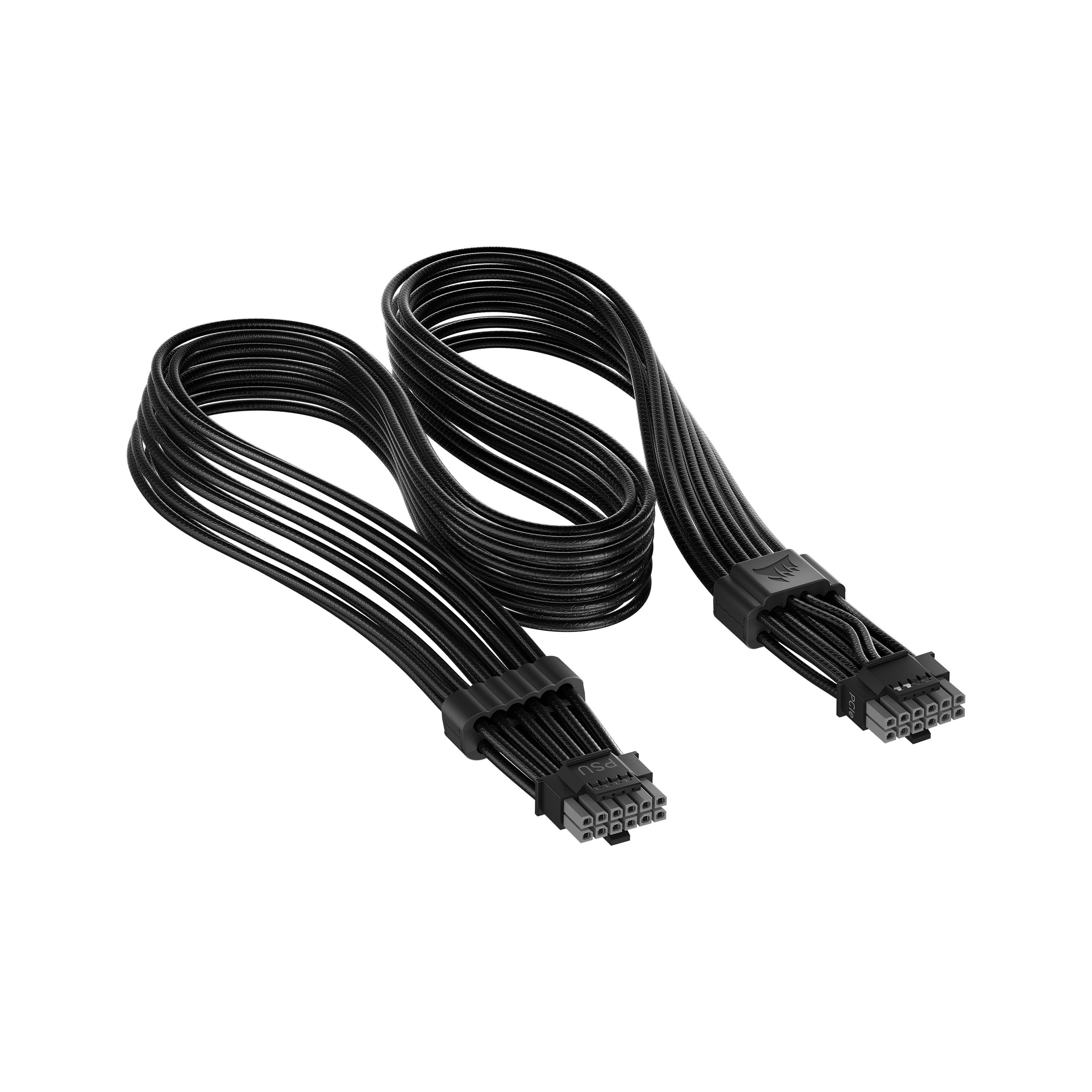
The cable that watches its own temperature and cuts power before a hot pin becomes a dead card.
This is the one pick with active protection. Built-in hardware monitors temperature and shuts off power to the GPU if a set threshold is exceeded, which is the cable doing the worrying so you do not have to. It is rated to 600W, handles a maximum of 50 amps at 12 volts, and measures 65cm.
The second clever bit is the dual-tone connector — grey ends that vanish from view once the plug is fully inserted. That gives you a visual confirmation of a secure seat, which is exactly the failure point on 16-pin connections. The cables are debossed for flexibility and the OTP sensor is tucked in with a stealth design so it does not spoil the look. It works with any power supply that has a native 12V-2×6 connection.
Build quality is the clear strength here; the reliability side is where sentiment splits, and it is worth sizing honestly. A cable with a built-in thermal cutoff is best for someone running a high-power card in a warm case who wants that safety layer. If your supply lacks a native 12V-2×6 port, it is not for you. For a 5070 build where the 16-pin plug sits buried under a shroud and you want the machine to protect itself, it earns its place.
The draw: the combination of over-temperature shutoff and a seating indicator addresses the two real risks of a 16-pin connection — heat and a partly inserted plug.
Know this: it only works with a native 12V-2×6 power supply port, so older supplies cannot use it without an adapter.
For you if: you run a hot card in a warm case and want the cable to shut itself down before damage.
Not for you if: your PSU has no native 12V-2×6 output.
7. ASRock 12V-2×6 600W Power Cable | ATX 3.1 & PCIe 5.1 | L-Shaped GPU Connector | 16AWG HCS Terminals

An L-shaped GPU end that tucks the cable out of sight without forcing a bend on the plug.
The L-type design turns the cable at the card, which simplifies routing in builds where a straight plug wants to poke into the side panel. It is ATX 3.1 and PCIe 5.1 compliant, delivering a 600W maximum, and it is backward compatible with 12VHPWR connectors. The wire is 16AWG with HCS terminals, housed in 94V-0 flame-retardant plastic.
There is an important qualifier in the listing: the cable over-temperature protection is designed for ASRock Taichi and Phantom Gaming power supplies, and it is intended for 750W-and-up units from that family. It is built to deliver power to high-end cards without voltage drops. Two things deserve your attention before you buy — the brand states outright that the cable may not be compatible with all graphics cards, and it is a single, specific part.
If you are running an ASRock Taichi or Phantom Gaming supply, the matching protection and the L-shaped connector make this the tidy choice. If you are on a different brand, the smart move is a cable built for your supply rather than this one. That is not a knock — it is a part built for one PSU family, and it does that job well. For a 5070 owner already inside the ASRock ecosystem, fit and finish line up neatly.
Where it shines: the L-shaped card-end connector paired with ASRock’s own over-temperature protection, for a compact, cable-light build.
Where it narrows: it is aimed at ASRock Taichi/Phantom Gaming supplies on 750W or more, so check your unit before ordering.
Right choice: an ASRock Taichi or Phantom Gaming build where the cable should disappear behind the card.
Wrong choice: a non-ASRock supply, where a matched cable is the safer route.
8. COMeap 12VHPWR Cable Extension, 16 Pin Female to Dual 8 Pin(6+2) Male PCIe Conversion GPU Power Cable, 11.8in (30cm) Black
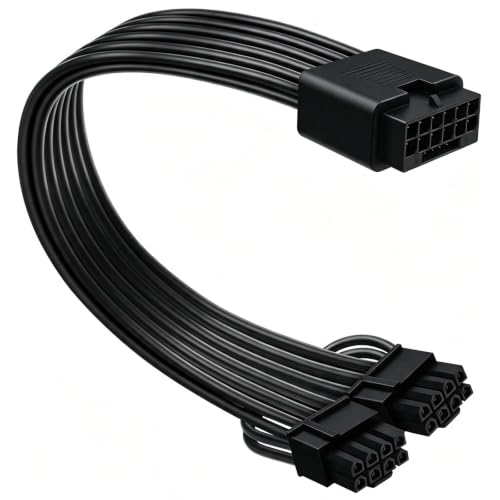
For cards that want two 8-pin feeds from a power supply with a 12VHPWR port.
This cable reverses the usual direction. The 16-pin female end plugs into the 12VHPWR output on your power supply, and the two 8-pin (6+2) male ends plug into the card. The 6+2 design lets each end act as a 6-pin or an 8-pin by sliding the extra two pins on or off, so it covers a wider range of cards.
It is 30cm long, uses 1007-16AWG tin-coated copper wire, and supports up to 600W. COMeap lists compatibility with Seasonic CORE GX and FOCUS GX units, Corsair SF1000L, TX1000, 850 and 750, Corsair HX1000i, 1200i and 1500i, and Phanteks AMP units — all power supplies that already have a native 12VHPWR output cable. Read this line closely: it is a conversion cable, not a modular cable. One self-adhesive tape piece is included.
Quality is the part that lands with owners; the secure connection is the aspect that draws mixed feedback, so treat the latch with care and confirm each 8-pin clicks home before you power up. It is the cable to pick if your power supply speaks 16-pin but your card takes two 8-pin connectors, which is less about the 5070 itself and more about the wider hardware you are matching it to.
When it is the one
- Converts a 12VHPWR supply output into two 8-pin (6+2) card feeds
- Each 8-pin end converts to 6-pin by sliding two pins off
- 1007-16AWG wire supporting up to 600W
Handle with care
- Secure connection draws mixed feedback — push until each 8-pin clicks
- Conversion cable only, not a modular cable
Fits: a 12VHPWR supply feeding a card that still takes dual 8-pin plugs.
Does not fit: builds needing a direct 16-pin to 16-pin run.
9. AsiaHorse 12VHPWR Adapter Cable Extension, 600 Watts Rated 12+4-Pin (16-Pin) Female to Male PCIe Extension, 30cm (Pure White)
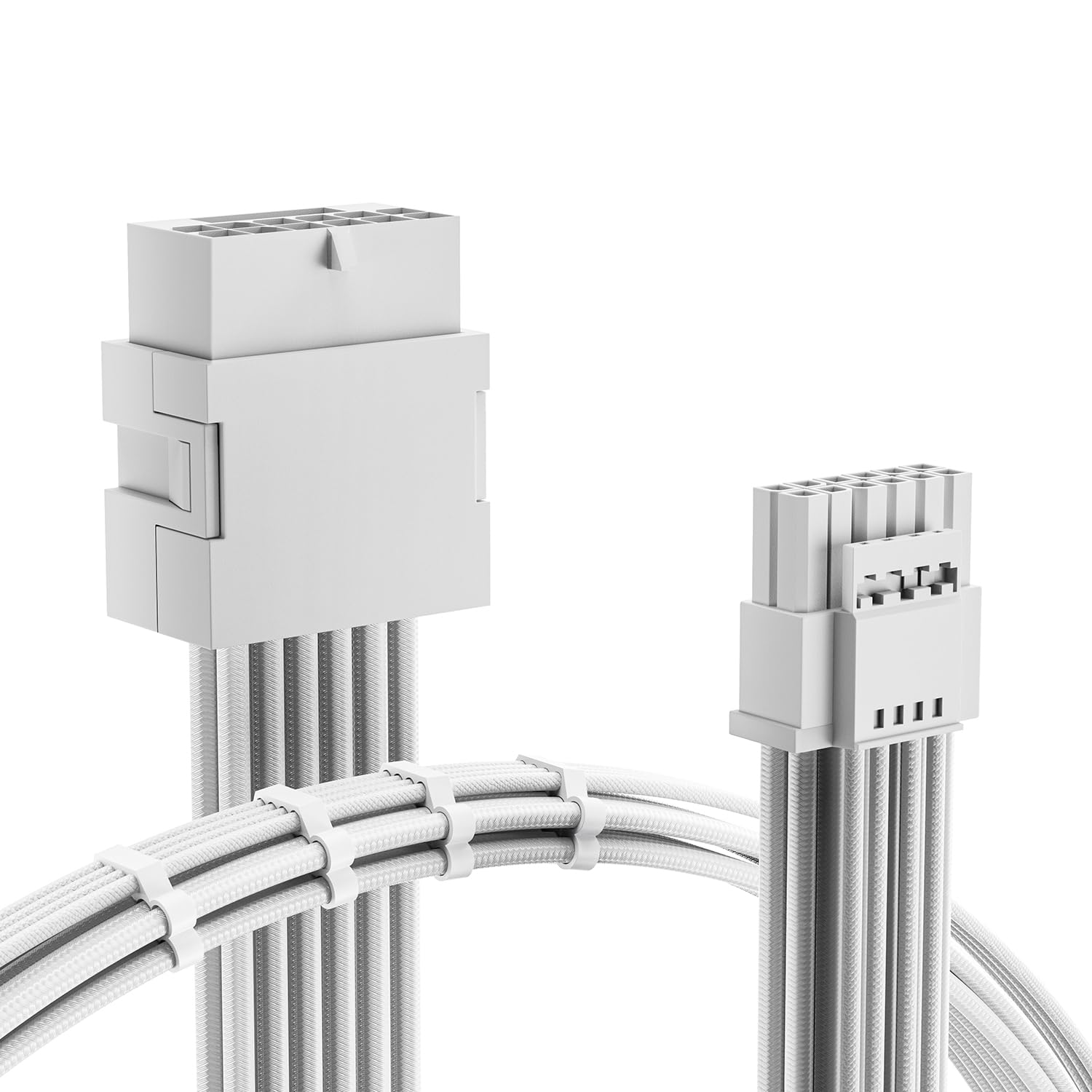
A short white extension that hides the adapter gap and matches a light-colored build.
White builds need white cables, and this AsiaHorse extension sits between your existing 16-pin cable and the card to keep the colour consistent. At 30 centimeters it is half the length of the 60cm EZDIY-FAB PSU cable, so it is an extension to a short run rather than a full replacement. It is rated to 600W through 16AWG tinned copper wire with alloy copper terminals.
What it solves is the gap. Standard crimp terminals let you seat the connection without the annoying small cable gaps that make your power supply cable and GPU pins hard to line up. The braided sleeve and four cable combs hold the strands uniform for a tidy look. It suits the 3090 Ti, 4070 Ti, 4080 and 4090 with 12+4 pin ports.
Owners who run it over months report no trouble, and it does the job it was designed to do. The honest limit is its purpose — it is a cosmetic adapter extension, so it only makes sense if you already have a 16-pin power source to extend. If you need a full run or more slack, start with one of the longer cables. If you want white sleeving over a short gap in a compact build, this is the finishing piece.
In your build: a 30cm braided white extension that keeps a light-colored case looking consistent and fills the gap between supply cable and GPU pins.
The trade: short by design, so it cannot replace a full-length PSU cable, and it only extends a 16-pin source you already own.
Go white: a compact build where you want clean white sleeving over a short gap.
Go longer: a deep case or a supply that needs a full-length run.
Understanding the Specs
Wire Gauge (AWG) and Terminal Material
AWG is the thickness of the copper core — a lower number means thicker wire that carries current with less heat. The cables here run 16AWG, thicker than standard 18AWG, which supports up to 600W on the higher-rated models. Alloy copper terminals resist wear and heat right at the plug. In plain terms: 16AWG wire and alloy copper terminals keep voltage from sagging when the 5070 works hard.
12V-2×6 vs 12VHPWR, and the 12+4 Pin Plug
You will see the connector called 12VHPWR, 12V-2×6, or 16-pin (12+4). They refer to the same physical power plug: a main 12-pin body with four smaller signal pins. 12V-2×6 is the updated PCIe 5.1 name for the connector. Some of the four small pins carry power and some are ground, which is how the card detects the cable. Check that a cable is labeled 12V-2×6 or PCIe 5.1 for current cards, and make sure the plug seats fully — a partly inserted 16-pin is the most common cause of heat at the connector.
Extension vs Replacement and Port Counts
An extension cable attaches to the cable your PSU already provides; a replacement cable runs from the PSU to the card directly. Extensions usually need a native 16-pin source or a 1-to-4 adapter. Replacements need specific free ports on the supply — 2×8-pin or 3×8-pin depending on the model. Running a cable on fewer ports than it requires can damage the system, so count before you buy and stick to full-modular units for the replacement style.
Rated Wattage and Over-Temperature Protection
Rated wattage is the ceiling the cable is built to deliver. Most here are 600W; the right-angle Bangfun is rated 300W to 400W with a 400W peak, which suits a 5070 within that envelope but not a heavier card. Over-temperature protection, found on the Corsair and ASRock cables, monitors heat and is designed to shut off the GPU if temperatures run high. It is a safety layer, not a boost, but on a 16-pin connection it is cheap insurance against a hot pin.
FAQ
Is the 5070 power connector the same as 12VHPWR?
Do I need an extension or a replacement cable for my 5070?
How many 8-pin ports does a 16-pin adapter need?
Will a 400W-rated cable work with an RTX 5070?
Why does my 16-pin connector get warm?
Is 16AWG better than 18AWG for a GPU cable?
Can I use a 12VHPWR cable with a non-ATX 3.0 power supply?
Does a right-angle connector fit every graphics card?
Should I use a white or black cable in my build?
How long should my 5070 power cable be?
Final Thoughts: The Verdict
For most RTX 5070 builds, the 5070 power connector winner is the EZDIY-FAB 12VHPWR PSU Sleeved Cable because it runs one clean 60cm line from an ATX 3.1 supply straight into the card, with 16AWG copper and a 600W rating. If your power supply has no native 16-pin port, grab the Fasgear 12V-2×6 PCIe 5.1 extension and feed it from two spare 8-pin ports. And for a small case where a straight plug fights the side panel, the Bangfun 90-degree adapter is the one to reach for — just keep your card’s draw within its 400W peak.
The EZDIY-FAB direct cable is the highest-scoring pick here at 4.5+ stars across 200+ ratings, which is the number to weigh if you are undecided between a full replacement and an extension.
How We Picked
We do not accept paid placement. Every pick is matched to a real buyer and a real use-case; we do not hands-on test units.
Sources & Methodology
Specifications: manufacturer listings and product documentation. Review insights: verified customer reviews, as of November 2026. Pricing: not shown on this page (it changes often); check the current price via the retailer link.
As an Amazon Associate, Gadgets Feed earns from qualifying purchases. This does not affect which products we feature.