
Our readers keep the lights on and my morning glass full of iced black tea. As an Amazon Associate, I earn from qualifying purchases.
Specs are compiled from manufacturer listings and verified buyer reviews and can change over time — please confirm the key details on the product page before buying.
An eight-button mouse only earns its keep if your thumb can find the right key without looking down. You want extra buttons for macros, browser navigation, and volume, but you do not want a mushy click or a layout that fights your grip. This guide separates the eight-button LED mice that hold up to months of daily clicking from the ones that only look good in product photos.
I’m Min — the founder and writer behind Gadgets Feed. This guide is built by comparing the manufacturers’ published specifications and the patterns across verified customer reviews, so you get each pick’s real strengths and trade-offs instead of marketing spin.
Every pick below carries exactly eight buttons, so the real question is how well they are placed and how the lighting and sensor hold up over months of clicking. For anyone wiring up a macro-heavy desk, knowing what an 8 button led mouse should cost you in compromises is half the battle won before checkout.
Our Picks at a Glance


How To Choose The Best 8 Button LED Mouse
Eight buttons is a specific number, not a marketing label. Six-button mice leave you short on macros; ten-button designs can crowd your thumb. Eight sits where most hands find a comfortable rhythm — two main clicks, a scroll wheel click, two side keys, and three more you can map. The real differences between the picks below come down to where those last few keys sit under your thumb and fingers.
Where the extra buttons actually sit
A good eight-button layout keeps your thumb on two side keys and lets the rest fall under index or middle finger. Poor placement causes accidental presses mid-game. Look for a description of which buttons are dedicated to forward, back, DPI, or macro duties, and decide whether that matches what you use most.
Sensor DPI and polling rate in plain terms
DPI is how far the cursor moves per inch of mouse travel. A 26,000 DPI sensor is not something you use at its top level — it is the headroom that keeps tracking smooth when you whip the mouse across a pad. Polling rate is how often the mouse reports to your PC, measured in Hz. Higher numbers mean less input delay, and that matters more in fast games than in a spreadsheet.
Wireless versus wired for eight-button work
Wireless frees your desk but adds a battery to manage. Wired removes charging entirely and typically adds weight. If you map heavy macros for design or office work, cable drag may bother you; if you game competitively, every millisecond of latency counts. Pick the connection that matches your daily work, not the one with the longer spec sheet.
Quick Comparison
| Model | Best For | Connection | Sensor / DPI | Battery Life | Amazon |
|---|---|---|---|---|---|
| 8Bitdo Mouse★ Best Overall | Retro-styled all-rounder | Bluetooth, 2.4G, USB-C | PAW 3395 Sensor | — | Amazon |
| Alienware AW720MLongest Runtime | Long-session gaming | 2.4GHz, Bluetooth 5.1, USB-C | 26,000 DPI | 140 hours (2.4GHz) | Amazon |
| Corsair Dark CORE RGB PROMost Flexible | Wireless flexibility | SLIPSTREAM, Bluetooth, USB | 18,000 DPI (PAW3392) | 50 hours | Amazon |
| Corsair M65 RGB Ultra | Wired precision | USB wired | 26,000 DPI (MARKSMAN) | — | Amazon |
| Razer Viper 8KHz | Competitive esports | USB wired | 20K DPI (Focus+) | — | Amazon |
| Redragon M690 PRO | Budget wireless RGB | 2.4GHz, USB-C | 8,000 DPI | 87 hours | Amazon |
| Verbatim Deluxe | Office comfort | 2.4GHz wireless | 800–1,600 DPI | — | Amazon |
| Acer Dual-Mode | Ambidextrous value | 2.4GHz, USB wired | 24,000 DPI | 40 hours | Amazon |
In‑Depth Reviews
1. 8Bitdo Mouse
Our pick — 4.5+★ from 850+ verified ratings; the strongest balance of quality and price.
Retro looks on the outside, a PAW 3395 sensor and 100-million-click switches on the inside.
The 8Bitdo Mouse is the pick that feels like a real piece of hardware, not a desk accessory. Its defining number is the Kailh Sword GM X micro switch rating: up to 100 million clicks. That is the part you actually feel — a crisp, deliberate click on every key, not the soft plunge you get on cheap office mice. The engine underneath is a PAW 3395 sensor, a gaming-grade optical unit that keeps tracking steady when you move fast.
Connectivity is unusually generous for this shelf. You get three routes: Bluetooth, 2.4G wireless, or wired USB-C. The charging dock doubles as a signal extender, so you can park the mouse on its stand and keep the wireless link strong across the desk. Eight buttons are programmable, and the shell is ambidextrous with a matte finish over metal and plastic.
Where it wins people over is build quality above all — the construction is the thing that keeps coming up as the standout. Functionality and ergonomics follow closely, and the charging dock draws steady praise for how easy it makes topping up. The catch is the button layout: a few owners find the extra keys awkward to reach without shifting their grip, and some report accidental presses. Weight also splits opinion, with part of the crowd wanting more heft. Neither issue is fatal — it is a fit question. At 4.5+ stars across 800+ ratings, this is the crowd favorite for good reason, and it carries the highest score in this lineup while the budget-friendly picks below have logged far more ratings. If your hand likes a lighter, retro-styled shell, this is the one to beat.
What earns its spot
- Kailh Sword GM X switches rated to 100 million clicks for a crisp, lasting feel.
- PAW 3395 sensor keeps tracking tight during fast movement.
- Three connection modes — Bluetooth, 2.4G, and wired USB-C — cover every setup.
- Charging dock doubles as a signal extender so wireless stays stable.
Where it asks for adjustment
- Extra buttons sit where some hands have to reach for them.
- Lightweight shell splits opinion — part of the crowd wants more mass.
Go for it if: you want a distinctive desk piece with gaming-grade tracking and a dock that keeps it charged.
Think twice if: you know your thumb needs every macro key within easy reach without regripping.
2. Alienware AW720M Tri-Mode Wireless Gaming Mouse
The one you charge on Sunday and forget about for a fortnight.
Start with the number that ends the charging routine: 140 hours on a 2.4GHz dongle connection, or 420 hours over Bluetooth, both with the LED off. Compare that to the Acer Dual-Mode below at 40 hours: 140 hours versus 40 hours. For anyone who has ever lost a firefight because the mouse died, that is the whole pitch.
The sensor is a 26,000 DPI unit with tracking up to 650 IPS and 50G max acceleration. In plain terms, it will follow a fast flick without losing the pointer. Connectivity is tri-mode: a USB-C wireless dongle, Bluetooth 5.1 for mobile devices, or a USB-C cord. A magnetic snap-on charging adapter means docking is one-handed rather than a tiny plug fumble. Eight programmable buttons and 3D-sculpted thumb grips round out the ambidextrous shell.
Performance is what earns the praise here — smooth, consistent, and reliable over long sessions. Battery life and ergonomics get their share of credit too, and the sculpted grips ease wrist strain during marathon play. The honest caveat is the left and right main clicks: they are not programmable, so your eight-button mapping has to live on the side and top keys. Some also report reliability variance between units. At 4.5+ stars across 300+ ratings, this is a premium wireless mouse for the player who refuses to think about charging.
Runtime that ends the ritual: 140 hours wired to the 2.4GHz dongle, or 420 over Bluetooth, dwarfs most of this list and makes the Acer’s 40 hours look like a coffee break.
The main-click caveat: left and right buttons cannot take custom assignments, so plan your macros around the side and top keys instead.
Built for: long-session gamers who want a premium, cable-free setup and never want to think about the battery icon.
Better skip if: you insist on mapping macros to the primary left and right clicks.
3. Corsair Dark CORE RGB PRO Wireless/Wired Gaming Mouse
Three ways to connect and two side grips, so it fits the hand you actually have.
The Dark CORE RGB PRO is the pick for anyone who refuses to be locked into one connection. You get sub-1ms SLIPSTREAM wireless, low-latency Bluetooth, or plain USB wired. The sensor is a custom PixArt PAW3392 rated at 18,000 DPI, adjustable in 1 DPI steps — finer control than the stepped presets on most budget mice. Hyper-Polling runs up to 2,000Hz, which keeps the cursor honest when you sweep fast.
Comfort is the big draw. The contoured shell ships with two interchangeable side grips, so you can tune the shape to your hand rather than the other way around. Charging runs through a reversible USB-C connector, which saves the usual plug-flipping. The eight buttons cover the macros, and RGB lighting lives in the shell.
Two honest notes. Battery life runs 50 hours, which is fine for desk use but not the marathon numbers of the Alienware above. And durability gets more mixed signals than the build quality would suggest, with the wireless dongle drawing some complaints. Nearly everyone loves the shape, though — and at 4.0+ stars across thousands of ratings, this is the one to try if a strange hand shape has always left you uncomfortable.
Why it fits odd hands
- Two interchangeable side grips let you tune the contour.
- Three connection modes: SLIPSTREAM, Bluetooth, or USB wired.
- 1 DPI resolution steps allow very fine sensitivity tuning.
Where it runs out of road
- 50-hour battery life falls well short of the long-runtime picks.
- Dongle reliability draws scattered complaints.
Easy recommendation for: players with unusual hand shapes or mixed wired/wireless habits who want shape flexibility.
Look past it if: you demand the longest possible battery or flawless dongle reception at distance.
4. Corsair M65 RGB Ultra Wired Gaming Mouse

An aluminium frame built for heavy-handed players who want the mouse to feel planted.
The M65 RGB Ultra is the wired pick for anyone who has cracked a plastic shell. The body sits in an anodized aluminium frame, which gives it a weighty, planted feel under the palm. The sensor is the CORSAIR MARKSMAN at a native 26,000 DPI with 650 IPS tracking — the same headroom as the Alienware’s sensor, but with no cable-free compromise.
The speed story here is the AXON hyper-processing tech, transmitting your inputs at a native 8,000Hz polling rate. Corsair calls that 8x faster than conventional gaming mice, and the practical effect is that clicks register almost the instant you make them. Left and right use optical switches for hyper-fast response and long service life. Sensor Fusion Control pairs a six-axis gyro with an accelerometer to keep lift-off distance low, so resets don’t cause cursor drift. Optional weights let you add or remove heft.
The build quality comes up more than anything else, with ergonomics drawing a solid second layer of praise — the buttons feel good and the shape is easy to live with. Durability and connection reliability run more mixed, with some units reported lagging. It is a right-handed, wired-only mouse, so lefties and wireless fans are ruled out. At 4.0+ stars across 700+ ratings, this is the choice for desk-bound precision, not desk-clear freedom.
Speed you can measure: an 8,000Hz polling rate over a native AXON pipeline means your clicks are reported eight times faster than a conventional mouse — competition-grade input, with no charging ever.
The grip that shapes it: right-handed only, wired only, and weightier than most — it plants on the desk, so it is not for cable-tangle avoiders or lefties.
Choose this if: you want a heavy, aluminium-framed wired mouse with esports-level polling and adjustable weights.
skip it if: you are left-handed or you will not tolerate a cable across your desk.
5. Razer Viper 8KHz Ultralight Ambidextrous Wired Gaming Mouse

A 71g frame that reports your position 8,000 times a second — no cable-free excuse needed.
The Viper 8KHz sells one thing above all: speed. Its 8,000Hz HyperPolling means the mouse communicates position and clicks to your PC up to 8,000 times a second. For competitive play, that translates into near-zero input latency. The sensor is the Razer Focus+ 20K, which tracks with zero spinouts and the pixel-level accuracy needed for headshot flicks.
Weighing 71g, the shell moves easily without feeling flimsy. The 2nd-gen Razer Optical Switches are rated for up to 70 million clicks and eliminate unintended double-clicking. A Razer Speedflex cable cuts drag so swipes stay smooth, and on-board memory holds up to 5 stored profiles for tournaments. Eight programmable buttons can be doubled through the Razer Hypershift function, so the layout stretches well past eight functions.
FPS performance is the main praise — it is a mouse that suits twitch shooters. The mixed note is the scroll wheel: a few reports of wheel trouble, including one breaking within 6 months. Durability otherwise holds up for most users. At 4.0+ stars across 120+ ratings, this is the wired choice for the esports-minded buyer who wants the fastest possible click reporting.
The speed case
- 8,000Hz HyperPolling reports input up to 8,000 times a second.
- Focus+ 20K sensor tracks without spinouts.
- 71g shell is agile without feeling weak.
- Optical switches rated up to 70 million clicks.
The honest questions
- Scroll wheel durability draws occasional complaints.
- Wired only — no wireless mode.
Best suited to: competitive FPS players who value input latency above cable freedom.
Not the one for: desk-clean setups that need a wireless signal, or buyers who want the longest wheel lifespan above all.
6. Redragon M690 PRO Wireless RGB Gaming Mouse

Budget wireless with RGB flair and a battery that keeps going for nearly four days.
The M690 PRO brings a to-the-point package. The 2.4GHz wireless link works up to 10 meters (roughly 30 feet) with little delay, so you can game from the couch without a cable. Five onboard DPI levels (500, 1000, 2000, 3000, 8000) put tracking control at your fingertips, and the onboard memory means you can switch on the fly without a driver open. Battery life runs 87 hours.
At 150 grams it is a substantial mouse, firmly in the heavier camp. Its shell measures 5″L x 2.9″W, which is slightly larger than the Acer’s 4.9″L x 2.7″W frame. Eight programmable buttons handle your keybinds and macros, with one rapid-fire and two side macro keys ready from the start. RGB lighting adds colour and the ergonomic shell suits long work or play sessions.
The colour and comfort of the shell earn the warmest response, and ergonomics round it out nicely. Performance, however, sits among the more mixed signals in this lineup — some users report the mouse simply stopping. Battery life and wireless connectivity are also called out as uneven by some buyers. It is fine for a budget wireless second mouse, but it is not the pick for a one-mouse desktop. At 4.0+ stars across 500+ ratings, plenty of people are happy with it as a value option.
The value read: 87 hours of wireless play, five DPI levels, and eight programmable buttons in a package that punches above its budget tier.
The reliable-mouse question: a portion of the crowd reports units failing or battery fading — so treat this as a smart secondary pick, not your single do-everything mouse.
Worth it if: you want a budget-friendly wireless RGB mouse for a second desk, TV setup, or casual gaming.
Hold off if: you need a single mouse that must be flawless for years of daily heavy use.
7. Verbatim Deluxe Wireless Desktop Mouse

An office workhorse with eight mapped buttons and batteries in the box.
The Verbatim Deluxe is the desk mouse for people who work more than they game. Eight buttons cover scroll, back, forward, zoom, DPI, and Windows Home, so you can navigate documents and webpages without reaching for the keyboard. The Blue LED optical sensor tracks on virtually any surface, and the DPI button cycles between 800, 1200, and 1600 DPI. Yes, that range is lower than the gaming mice, but for spreadsheets and email it is all you need.
Ergonomics is the real draw. The contoured shape and easy-grip surface keep the palm comfortable during long sessions, and the right-handed shell suits most office desks. The 2.4GHz connection is stable through the compact nano receiver, which stores inside the battery compartment when the mouse is packed away. Two AA batteries are included, so it works the moment you take it from the start.
Comfort and ergonomics are the most-mentioned points, and with good reason: the shape is built for eight-hour days. Battery life is healthy across the board. What’s mixed is responsiveness and button feel — scrolling and clicking draw some complaints, and the extra buttons can feel generic. It is not a gaming-grade sensor, and it is not ambidextrous. At 4.0+ stars across 400+ ratings, this is a work-first mouse that happens to sport eight buttons.
Where the office crowd wins
- Dedicated back, forward, zoom, and Home buttons speed office work.
- Blue LED optical sensor tracks on nearly any surface.
- Batteries and nano receiver included for instant setup.
Where it stays in its lane
- 800–1,600 DPI ceiling is fine for work, not for fast gaming flicks.
- Right-handed shell only.
For the desk worker: eight buttons that map to navigation and zoom, with a shape built for all-day comfort.
Not for the gamer: the sensor tops out at 1600 DPI, which will feel sluggish in fast-paced shooters.
8. Acer Dual-Mode 2.4GHz Wireless & Wired Gaming Mouse
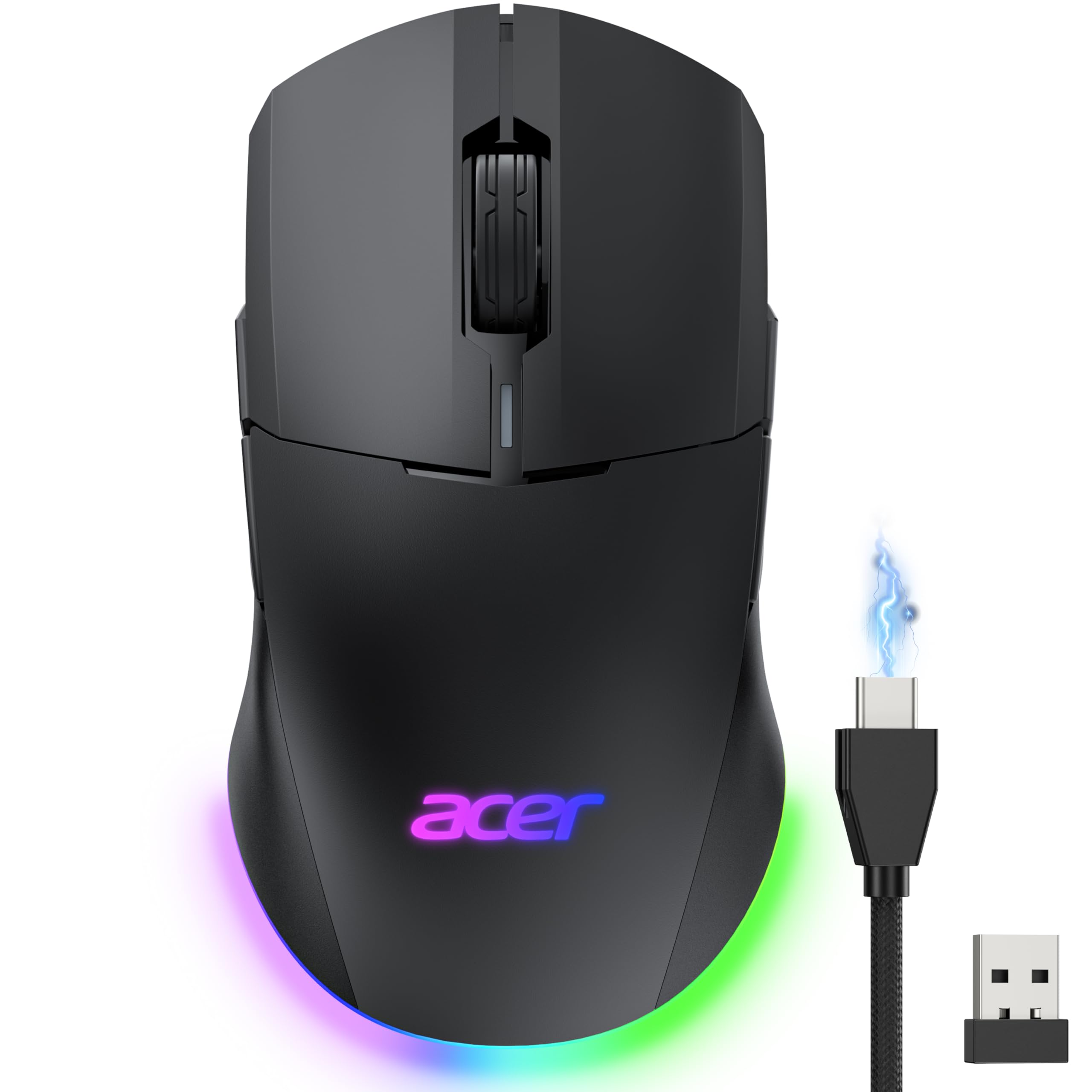
A 24,000 DPI sensor and a symmetrical shell for lefties — at a budget-conscious level.
The Acer Dual-Mode is the budget pick for left-handed gamers. Its symmetrical shape supports both left- and right-handed users, which is rare on this shelf. The 24,000 DPI optical sensor runs with 1000Hz polling and 35G acceleration — more than enough headroom for fast FPS action. Eight programmable buttons are fully editable through the driver, with dedicated Forward and Back side keys. A 650mAh rechargeable battery delivers up to 40 hours, and if it dies you can play while charging in wired mode.
RGB lighting rounds out the package with 9 dynamic modes and 16.8M colour effects. The shell measures 4.9″L x 2.7″W, a bit more compact than the Redragon’s 5″L x 2.9″W frame, so it suits smaller hands. Switch between 2.4GHz wireless and USB-A wired; Bluetooth is not supported, and the receiver stores under the back cover.
Ambidextrous quality is the honest strength, and the value is solid for a lefty-friendly design. The catch is the software: the driver download and button remapping draw complaints, and some buyers report the side buttons need careful configuration. Battery life is mixed too — some see great runtime, others don’t. The top-of-class sensor is the biggest win. At 4.0+ stars across 300+ ratings, this is the budget route for a left-handed gamer who can be patient with setup.
Left-hand heaven: the symmetrical frame supports both hands, and 24,000 DPI puts gaming-grade tracking on a lefty-friendly budget mouse.
Setup patience required: driver installation and button remapping can be fiddly — the hardware is strong; the software needs a little coaxing.
The smart buy for: left-handed gamers who want a high-DPI sensor and wireless/wired flexibility without a premium spend.
Give it a miss if: you want driver-free plug-and-play setup or Bluetooth connectivity.
Understanding the Specs
Button Count Versus Button Feel
Eight buttons only helps if the switches feel right. A micro switch is the tiny actuator under each key — the part that makes the click. Look for a stated lifespan like “100 million clicks” (on the 8Bitdo) or a named optical switch (on the Corsair M65). Cheap switches get mushy before they fail; good ones stay crisp for the long run.
DPI and Polling: Speed Decoded
DPI (dots per inch) is how far the cursor travels per inch of mouse movement. Higher DPI numbers give headroom for fast, precise movement, not everyday sensitivity. Polling rate, in Hz, is how often the mouse reports its position — 1000Hz and 8000Hz are the numbers to watch. A high polling rate means clicks register faster, which matters most in fast games.
Wireless Battery: Hours Versus Weight
Wireless battery life is quoted in hours of play, often with LED off. The Alienware claims 140 hours on a 2.4GHz dongle, while the Acer claims 40. More hours means fewer charging interruptions. Remember: lighting drains the battery faster, so if longevity matters, you can usually turn the RGB down or off in the driver.
LED Lighting: Show or Practicality
RGB lighting adds visual flair to your desk setup but eats battery on wireless mice. Wired mice can light up all day without a runtime cost. On wireless models, look for a driver toggle to dim or disable the lighting when you want maximum hours. Treat lighting as a nice extra, not a reason to pick one mouse over another.
FAQ
Is an 8-button LED mouse good for gaming or just office work?
How many extra buttons can I realistically get comfortable with?
Are wireless 8-button mice prone to lag compared with wired versions?
Can I use an 8-button mouse on a Mac?
How long does the battery last on a wireless 8-button LED mouse?
Do I need to install software to use all eight buttons?
What is polling rate and does it matter for an 8-button mouse?
Can I disable the LED lighting on an 8-button mouse?
Is a wireless 8-button mouse worth the extra over a wired one?
Final Thoughts: The Verdict
For most people, the 8 button led mouse that deserves your first look is the 8Bitdo Mouse, because it pairs a gaming-grade PAW 3395 sensor with 100-million-click Kailh switches and a charging dock that doubles as a signal extender. If long wireless runtime is what you actually chase, the Alienware AW720M runs 140 hours on its dongle and 420 over Bluetooth. And for wired, competition-focused speed, the Razer Viper 8KHz reports your input 8,000 times a second.
How We Picked
We do not accept paid placement. Every pick is matched to a real buyer and a real use-case; we do not hands-on test units.
Sources & Methodology
Specifications: manufacturer listings and product documentation. Review insights: verified customer reviews, as of November 2026. Pricing: not shown on this page (it changes often); check the current price via the retailer link.
As an Amazon Associate, Gadgets Feed earns from qualifying purchases. This does not affect which products we feature.