
Upgrading your desktop or laptop with budget ram is the single most cost-effective way to revive an aging system or stretch a new build further. The wrong stick, however, means wasted slots and a slower platform. Understanding the difference between DIMM and SODIMM, optimal frequency for your CPU, and whether to go single or dual-channel is the difference between a smooth upgrade and a frustrating bottleneck.
I’m Min — the co-founder and writer behind Gadgets Feed. I’ve spent hours analyzing price-to-performance curves, JEDEC compatibility tables, and real user benchmarks across dozens of memory modules to separate the true value picks from the spec-sheet traps.
This guide breaks down the best value DDR4 modules available today, covering both desktop and laptop form factors, so you can confidently choose the right upgrade. Let’s find the best fit for your system with a clear look at the best budget ram options available now.
How To Choose The Best Budget RAM
Selecting the right memory starts with two non-negotiable checks: your motherboard’s form factor (DIMM for desktop, SODIMM for laptop) and its supported generation (DDR3 vs DDR4 vs DDR5). Within DDR4, the budget sweet spot revolves around balancing speed, latency, and kit size to match your CPU’s memory controller.
Form Factor First: DIMM vs SODIMM
Desktop motherboards use 288-pin DIMM slots, while laptops and mini PCs use shorter 260-pin SODIMM slots. Physically forcing the wrong form factor can damage both the module and the slot. Verify your system’s spec before browsing — a desktop kit will never fit a laptop.
Speed vs Latency for Budget Builds
DDR4-3200 CL22 is the standard for most modern budget processors. Dropping to 2666MHz CL19 can save money but may cost 3-5% performance on Ryzen CPUs that benefit from faster Infinity Fabric. Intel systems are less sensitive to frequency, making 2666MHz a safe budget pick. CAS latency (CL) matters — lower numbers mean fewer clock cycles waiting for data.
Single Stick vs Dual-Channel Kits
Dual-channel memory can boost CPU-bound tasks by 10-30% compared to a single stick. A 2x8GB kit is the sweet spot for value — offering 16GB total with full bandwidth. If you start with one 8GB stick, your system runs in single-channel mode until you add a matching second stick.
Quick Comparison
On smaller screens, swipe sideways to see the full table.
| Model | Category | Best For | Key Spec | Amazon |
|---|---|---|---|---|
| Silicon Power 16GB Kit | Desktop | Best Overall Value | 3200MHz CL22 2x8GB | Amazon |
| PNY 16GB Kit SODIMM | Laptop | Premium Laptop Pick | 3200MHz CL22 2x8GB | Amazon |
| Samsung 8GB SODIMM | Laptop | Reliable OEM Grade | 3200MHz CL22 1Rx8 | Amazon |
| Crucial 8GB SODIMM | Laptop | Guaranteed Compatibility | 3200MHz CL22 1Rx16 | Amazon |
| Timetec 8GB SODIMM | Laptop | Budget Laptop Entry | 2666MHz CL19 Single | Amazon |
| OLOy 16GB Kit DIMM | Desktop | Entry Desktop Kit | 2666MHz CL19 2x8GB | Amazon |
| A-Tech 16GB DIMM | Desktop | Single 16GB Module | 2666MHz CL19 Single | Amazon |
In‑Depth Reviews
1. Silicon Power DDR4 16GB Kit (2x8GB) 3200MHz

The Silicon Power 16GB kit delivers the ideal mix of modern speed and reasonable pricing for a desktop upgrade. Running at JEDEC-standard DDR4-3200 with a CAS latency of 22, these 288-pin DIMMs hit the native memory controller speed of most Ryzen 5000 and Intel 12th/13th Gen processors without needing manual overclocking. The 1.2V voltage keeps thermals low even in compact cases.
This 2x8GB configuration enables full dual-channel bandwidth from the moment you boot, which is crucial for CPU-bound tasks like gaming or video encoding. Silicon Power backs these modules with a lifetime warranty, and the sticks undergo strict verification procedures. The low-profile design fits easily under large CPU air coolers without clearance issues.
For builders seeking the most performance per dollar in a desktop build, this kit covers all the essentials: modern speed, dual-channel architecture, and long-term reliability. It downsides? No RGB if that matters to you, and the heat spreaders are basic. But for pure functional value, it is hard to beat.
Why it’s great
- Full 3200MHz speed at JEDEC CL22 for broad CPU compatibility.
- Dual-channel kit offers substantial bandwidth advantage over single stick.
- Lifetime warranty with strict testing procedures.
Good to know
- No RGB lighting for those wanting aesthetic flair.
- Heat spreaders are basic; not intended for extreme overclocking.
2. PNY Performance 16GB Kit (2x8GB) DDR4 3200MHz SODIMM

The PNY 16GB SODIMM kit is the top-tier choice for laptop users who need a full 16GB dual-channel upgrade. Operating at 3200MHz with CL22 timings, this 260-pin memory is backward compatible with 2933MHz, 2666MHz, and lower frequencies, making it compatible with a wide range of modern and older laptops. The 1.2V voltage ensures no extra strain on laptop cooling.
PNY is a well-known name in DRAM modules, and this kit targets both enthusiasts and gamers using high-performance notebooks. With two matched sticks, you enable dual-channel mode, which significantly improves integrated graphics performance on AMD Ryzen laptops and Intel Iris Xe systems. Users report immediate XMP-free recognition at full speed on compatible systems.
This kit represents a premium step for laptop upgrades. It is slightly more expensive than single-stick alternatives, but the dual-channel advantage and reliable brand reputation justify the extra spend. If your laptop has two SODIMM slots, this is the definitive budget-to-mid-range upgrade path.
Why it’s great
- 16GB dual-channel kit delivers up to 30% better performance in CPU-bound tasks.
- 3200MHz speed with backward compatibility for older laptops.
- Reliable PNY quality assurance at a competitive price point.
Good to know
- Requires two SODIMM slots; not for laptops with soldered RAM.
- CL22 latency standard; not for low-latency overclocking.
3. Samsung 8GB DDR4 3200MHz SODIMM

Samsung’s OEM memory modules are found in many major brand laptops for a reason — they deliver consistent performance and near-zero compatibility issues. This 8GB stick runs at 3200MHz with CL22 latency and uses a single-rank x8 configuration for efficient memory management. The 260-pin SODIMM form factor fits most modern laptops and some mini PCs.
Being a Samsung B-Die variant, this stick is known for stable operation with tight timings at stock speeds. Users report that a simple BIOS update is sometimes needed for older platforms to recognize the full 3200MHz frequency, but it downclocks gracefully to 2666MHz or 2933MHz when needed. The 1.2V operation keeps it cool inside cramped laptop chassis.
This is an ideal pick if you need to add a single 8GB stick to an existing system for a capacity boost. It pairs well with other Samsung modules for dual-channel. The price premium over generic brands reflects Samsung’s rigorous factory testing and low failure rates.
Why it’s great
- OEM-quality Samsung B-Die ensures excellent stability and compatibility.
- 3200MHz speed with efficient 1.2V power draw.
- Downclocks gracefully if your laptop only supports 2666MHz.
Good to know
- Single 8GB stick only; buying two is required for dual-channel.
- More expensive than generic alternatives with similar specs.
4. Crucial 8GB DDR4 3200MHz SODIMM

Crucial’s reputation for seamless compatibility is well-earned, thanks to their system scanner tool that guarantees you order the right module for your specific laptop model. This 8GB SODIMM runs at 3200MHz with CL22, using Micron’s in-house DRAM. It automatically downclocks to 2933MHz or 2666MHz if your system requires it, no manual configuration needed.
The stick can be configured as 1Rx16, 1Rx8, or 2Rx8 depending on the production batch, which affects rank and performance. Single-rank modules are generally fine for most users, but dual-rank (2Rx8) can offer a slight performance edge in some workloads. Crucial backs this with 42 years of memory engineering and rigorous module-level testing.
For users who value absolute certainty in compatibility over hunting for the absolute lowest price, Crucial is the safe bet. The plug-and-play installation and Micron-level QA make this a reliable choice for upgrading a single slot or pairing with an existing stick.
Why it’s great
- Crucial System Scanner eliminates compatibility guesswork.
- 3200MHz speed with automatic downclocking for older platforms.
- Backed by 42 years of Micron memory engineering expertise.
Good to know
- Rank configuration (1Rx16/1Rx8/2Rx8) varies by production batch.
- No heat spreader for thermal dissipation in demanding use.
5. Timetec 8GB DDR4 2666MHz SODIMM
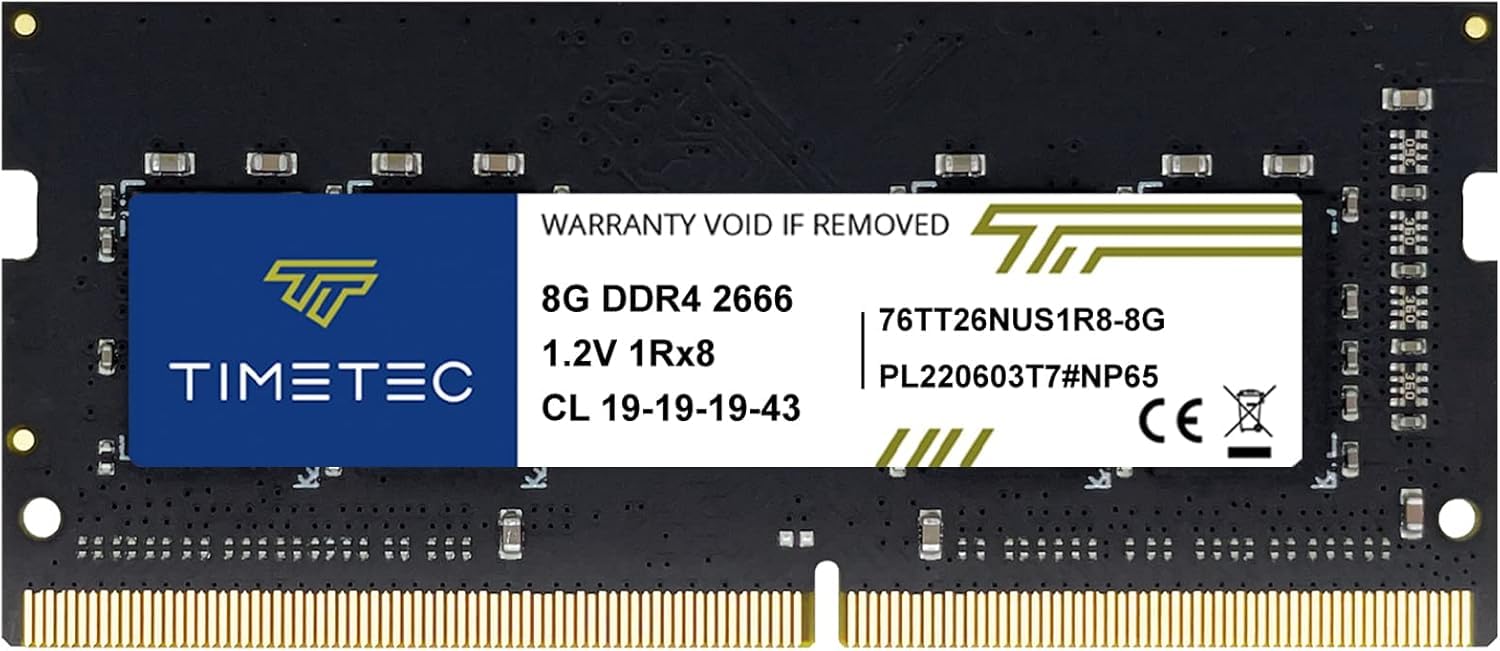
For laptops locked to a 2666MHz memory controller — common in 7th and 8th Gen Intel or first-gen Ryzen mobile — the Timetec 8GB stick is the most cost-effective upgrade. Running at 2666MHz with CL19 timings, it matches the platform’s native speed without any wasted potential. The PCB color and rank may vary (1Rx8, 2Rx8, or 1Rx16), but performance consistency is maintained.
Timetec is a brand that has carved out a strong niche for reliable budget memory, often using the same DRAM ICs as larger brands but at a lower price. Users report flawless compatibility with older ThinkPads, HP EliteBooks, and Dell Latitude lines. The 260-pin SODIMM design is plug-and-play, and Timetec provides a lifetime warranty with US-based support.
This stick is perfect for giving a slow old laptop a second life, especially if you pair it with an existing 8GB module for a total of 16GB. The savings over a 3200MHz stick are meaningful, and your system won’t even miss the extra frequency.
Why it’s great
- Excellent value for laptops with 2666MHz native memory support.
- Lifetime warranty with US-based technical support team.
- Plug-and-play installation works reliably in older business laptops.
Good to know
- Not recommended for systems that support 3200MHz — leaves performance on the table.
- PCB color and rank configuration may vary between shipments.
6. OLOy DDR4 RAM 16GB Kit (2x8GB) 2666MHz Black Owl

The OLOy Black Owl 16GB kit is a strong choice for entry-level desktop builds or older Intel platforms (like 6th-9th Gen) that top out at 2666MHz. This 2x8GB kit runs at CL19-19-19-43 timings on 1.2V, delivering stable dual-channel performance without requiring XMP or BIOS overclocking. The black heat spreaders add a subtle aesthetic touch.
OLOy is a lesser-known brand, but user reports show these sticks work reliably out of the box with both Intel and AMD platforms. They natively post at 2666MHz, avoiding the hassle of manual overclocking that some name-brand sticks require to hit rated speeds. This makes them a reliable option for budget system integrators or first-time builders.
The trade-off is the 2666MHz ceiling — this is not the kit for a Ryzen 5000 build that could benefit from 3200MHz+ speeds. But for an office PC, media server, or secondary gaming rig, the OLOy kit provides solid capacity and bandwidth at a very accessible price.
Why it’s great
- Native 2666MHz support without needing to enable overclocking in BIOS.
- Dual-channel 16GB kit provides excellent bandwidth for everyday tasks.
- Sleek black heat spreaders fit most build aesthetics.
Good to know
- Not ideal for Ryzen platforms that benefit from 3200MHz+ speeds.
- CL19 timings are standard, not optimized for aggressive latency tuning.
7. A-Tech 16GB DDR4 2666MHz UDIMM

When you need maximum capacity from a single slot — perhaps your second DIMM slot is blocked by a massive CPU cooler or simply absent — the A-Tech 16GB module is the right tool. This 288-pin desktop stick runs at 2666MHz with CL19 latency and can be configured as either single-rank (1Rx8) or dual-rank (2Rx8) depending on the batch. At 1.2V, it runs cool in any desktop chassis.
A-Tech specializes in reliable, no-frills memory upgrades, and this stick is a perfect match for office workstations, home servers, or older desktops that don’t need blazing speeds. Users report it works flawlessly in Dell Optiplex and HP ProDesk lines, making it a go-to for refurbished system upgrades. The 16GB capacity allows for heavy multitasking without hitting the page file.
The downside of a single 16GB stick is single-channel memory bandwidth. For most office work and light gaming, this is unnoticeable, but CPU-intensive tasks will take a slight hit. If your motherboard has two slots, a 2x8GB kit is generally a better choice for performance.
Why it’s great
- Single 16GB module maximizes capacity when only one DIMM slot is available.
- 2666MHz CL19 provides solid performance for office and server workloads.
- Lifetime warranty with accessible customer support.
Good to know
- Single-channel operation limits CPU-bound performance vs a dual-channel kit.
- Speed capped at 2666MHz; not for high-frequency builds.
FAQ
Can I mix two different brands of DDR4 RAM in my system?
Does 3200MHz RAM work on a motherboard that supports only 2666MHz?
Final Thoughts: The Verdict
For most users, the best budget ram winner is the Silicon Power 16GB Kit because it delivers the perfect balance of modern 3200MHz speed, dual-channel architecture, and low price for desktop builders. If you need a premium laptop upgrade, grab the PNY 16GB SODIMM Kit. And for reviving an older system locked to 2666MHz, nothing beats the value of the Timetec 8GB SODIMM.