
Our readers keep the lights on and my morning glass full of iced black tea. As an Amazon Associate, I earn from qualifying purchases.
Specs are compiled from manufacturer listings and verified buyer reviews and can change over time — please confirm the key details on the product page before buying.
You do not need a five-figure simulator bay to find out what your driver actually carries. The picks below all measure real ball flight with radar or camera tracking, and they cost a fraction of a club-fitting session. The trick is knowing which numbers each one can honestly give you — some read ball speed only, some track spin and launch angle, and the Garmin Approach G80 adds full GPS course maps on top.
I’m Min — the founder and writer behind Gadgets Feed. This guide is built by comparing the manufacturers’ published specifications and the patterns across verified customer reviews, so you get each pick’s real strengths and trade-offs instead of marketing spin.
Every option here has been sorted by what it measures, how much room it needs, and whether it charges you a subscription. That last point quietly separates the good deals from the expensive ones, so it is worth checking before you commit to any affordable golf launch monitor.
Our Picks at a Glance

How To Choose The Best Affordable Golf Launch Monitor
The single decision that shapes everything else is what you want the device to tell you. A speed trainer counts club head speed and ball speed and stops there. A full launch monitor adds launch angle, spin rate and apex — the numbers that actually explain why one shot flies 20 yards shorter than the next. Decide which camp you are in before you compare anything else.
Radar Needs Room, So Measure Your Space First
Doppler radar works by tracking the ball through the air, so it needs some flight to watch. One unit here states it plainly: indoor use requires at least 15ft of total space, with the device placed exactly 5ft behind the ball and 10ft of ball flight allowed. If your garage or basement is shorter than that, expect inconsistent reads rather than a broken unit. Camera-based systems tend to be more forgiving on space but bring their own setup quirks.
Subscriptions Quietly Change The Real Cost
A monitor can look like the smarter buy until you discover the good features sit behind a monthly fee. Some units here run a one-time download with lifetime access and no renewal. Others include a trial period for simulated courses, then ask you to keep paying for premium play. Neither approach is wrong — just check what is open up on day one versus day thirty.
The Numbers Worth Trusting Versus The Ones To Treat As A Guide
Ball speed and club head speed are the most reliable readings a consumer radar produces. Carry distance and spin are estimates, often calculated from those speeds plus an assumed launch. That is why one device can quote ±3% ball speed accuracy and ±5% carry distance accuracy in practice mode. Treat the first as close to fact and the second as a directional guide.
Quick Comparison
| Model | Best For | Key Metrics | Display / App | Battery | Amazon |
|---|---|---|---|---|---|
| TheStack Radar★ Best Overall | Speed training with the Stack system | Swing speed, ball speed, smash factor, estimated carry | App only (iOS / Android) | — | Amazon |
| Izzo Golf Swami Launch MasterBudget Champion | Budget range sessions with a readout screen | Club head speed, ball speed, smash factor, carry | LCD display | 4 AA batteries | Amazon |
| Swinora GX-03No-Fee Favorite | No-fee indoor and outdoor practice | Attack angle, launch angle, spin rate, ball speed, club speed | OLED plus app | — | Amazon |
| BLACK T SHOT5 | Screen-on-device simplicity | Carry, ball speed, club head speed, smash factor, total distance | 5-inch built-in display | — | Amazon |
| Voice Caddie SC300i | Long sessions with voice feedback | Swing speed, ball speed, carry/total, smash factor, launch angle, apex, spin | LCD plus voice, MySwingCaddie app | Up to 20 hours | Amazon |
| Garmin Approach G80 | One device for course GPS and range radar | Club head speed, ball speed, smash factor, swing tempo, estimated distance | 3.5-inch touchscreen | Up to 15 hours with GPS | Amazon |
| Garmin Approach R10 | Home practice with video and virtual rounds | Club head speed, ball speed, swing tempo, ball spin, launch angle | Garmin Golf app | Up to 10 hours | Amazon |
| Voice Caddie SC4 Pro | Simulator play plus range work | Ball and club head data via Prometrics engine | Built-in screen plus voice | — | Amazon |
| Rapsodo MLM2PRO | Full data and simulated courses | 15 metrics including spin rate, spin axis, club path | App with dual camera | — | Amazon |
In‑Depth Reviews
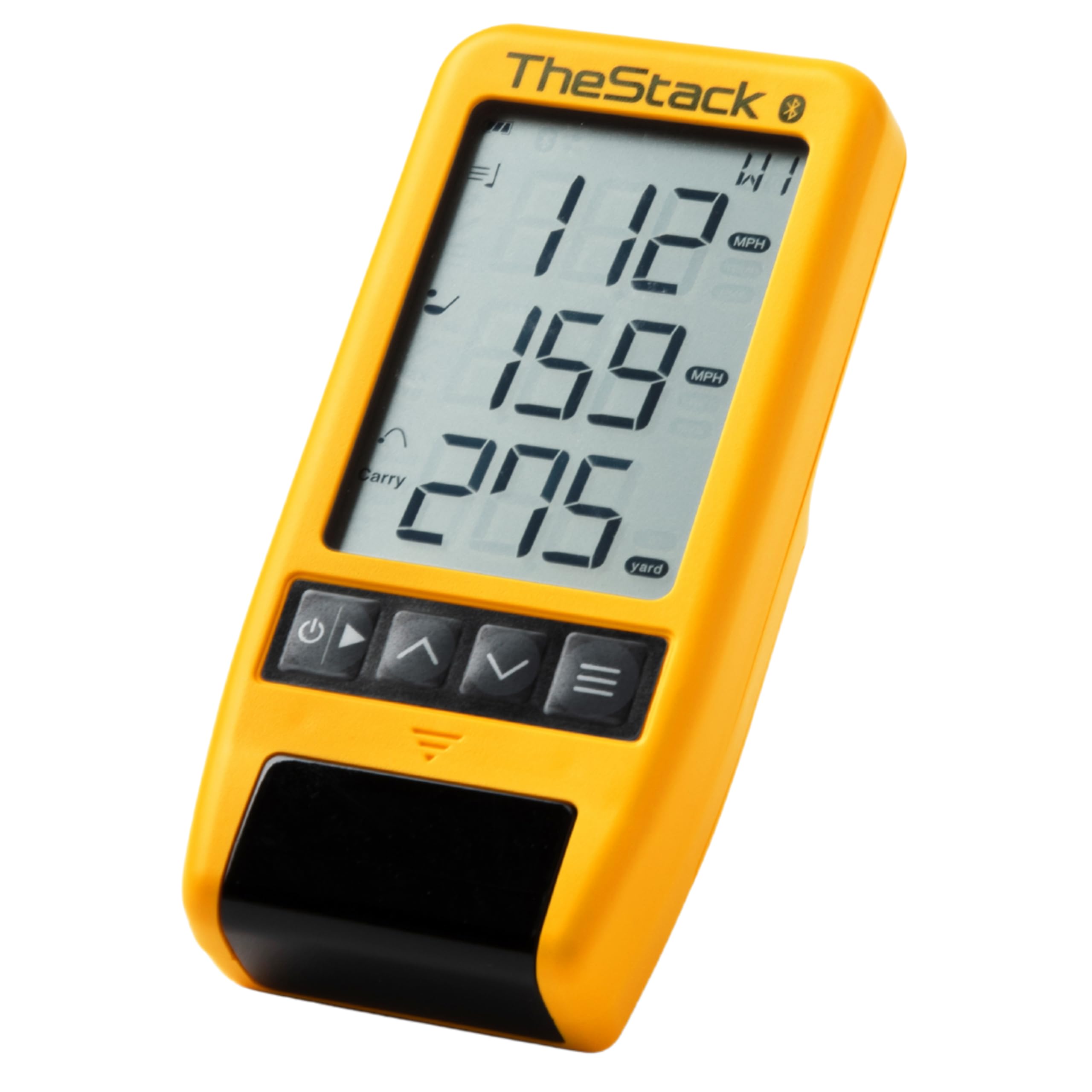
1. TheStack Radar — Portable Golf Launch Monitor, Swing Speed & Ball Tracker
Our pick — 4.5+★ from 60+ verified ratings; the strongest balance of quality and price.
Pocket-sized speed radar that talks straight to your phone.
The number that decides this one is the package weight: 0.14 kg. That makes it the lightest thing on this list by a wide margin — it beats the Voice Caddie SC300i’s 0.8 kg package by roughly five and a half times. In practice that means it disappears into a cart pocket or a golf bag side pouch and you forget it is there until you take it out.
What it measures is swing speed and ball speed, then calculates an estimated carry distance and smash factor — smash factor being the simple ratio of ball speed to club speed that tells you how cleanly you struck it. Data flows over Bluetooth straight into TheStack App on iOS 15.0 or later or on Android, so nothing needs to be typed in later. Speed training and range work are the core jobs here.
The honest catch is scope. This is a speed and training tool first, and its carry numbers are estimated rather than tracked through the air. Buyers also note the readings lean heavily toward ball speed in some sessions. If you want launch angle, spin rate and apex, this is not the unit for you — the Swinora GX-03 or the Rapsodo below cover that ground. What wins people over is how well the whole thing functions as a training companion, paired with the fact that 2022 US Open Champion Matt Fitzpatrick uses it for his Stack speed work and everyday range practice.
Where It Delivers
- 0.14 kg package weight — the lightest pick here, easy to carry on every range trip
- Bluetooth sync to TheStack App on both iOS and Android, with no manual logging
- Calculates estimated carry distance and smash factor from measured speeds
- Bundled Stack Wedging app and a 1-month free Stack Wedge Mode trial
Where It Stops Short
- No launch angle, spin rate or apex tracking — it is a speed radar at heart
- Stack Wedging is iOS only, and not yet available on Android
- Swing speed accuracy draws mixed feedback, with some sessions reading ball speed only
Made for: the golfer already running Stack speed training who wants their numbers captured without a notebook.
Think twice if: you need launch angle and spin data to diagnose ball flight — this one will leave you short.
2. Izzo Golf Swami Launch Master Golf Launch Simulator
Range radar that runs on four AA batteries and never asks for a password.
Plug-and-play is the whole pitch. It runs on 4 AA batteries — which come in the box along with a hard carry case — so there is no charging routine and no dead-unit surprise at the range. Power it on, hit a ball, read the LCD. That simplicity is why it earns the most praise of anything in its own feedback: setup and daily use are genuinely fuss-free.
The data set is club head speed, ball speed, smash factor and carry distance, produced by Doppler radar. You can enter your own club lofts so the results match your actual set, and an audible read-out will call your distance out loud after each shot — genuinely useful when your head is down over the ball and you do not want to break posture.
Where it lands is a value play, not a precision instrument. Accuracy draws split opinions across its feedback, so treat the carry figure as a rough guideband rather than gospel. It is also a compact screen unit rather than a data-rich app system, so there is no spin rate, no launch angle and no shot history to scroll through later. For what it costs, getting club speed, ball speed and smash factor from a single self-contained box is a fair trade.
Battery honesty: disposable AA cells mean you will eventually buy more, but you will never stand at the range waiting for a charge.
Read the manual once: lofts have to be entered per club to make the numbers meaningful — the audible call-out is only as good as what you told it.
Pick this if: you want basic swing and ball numbers with zero apps, accounts or charging cables involved.
Look past it if: you need spin data and launch angle to actually coach your ball flight.
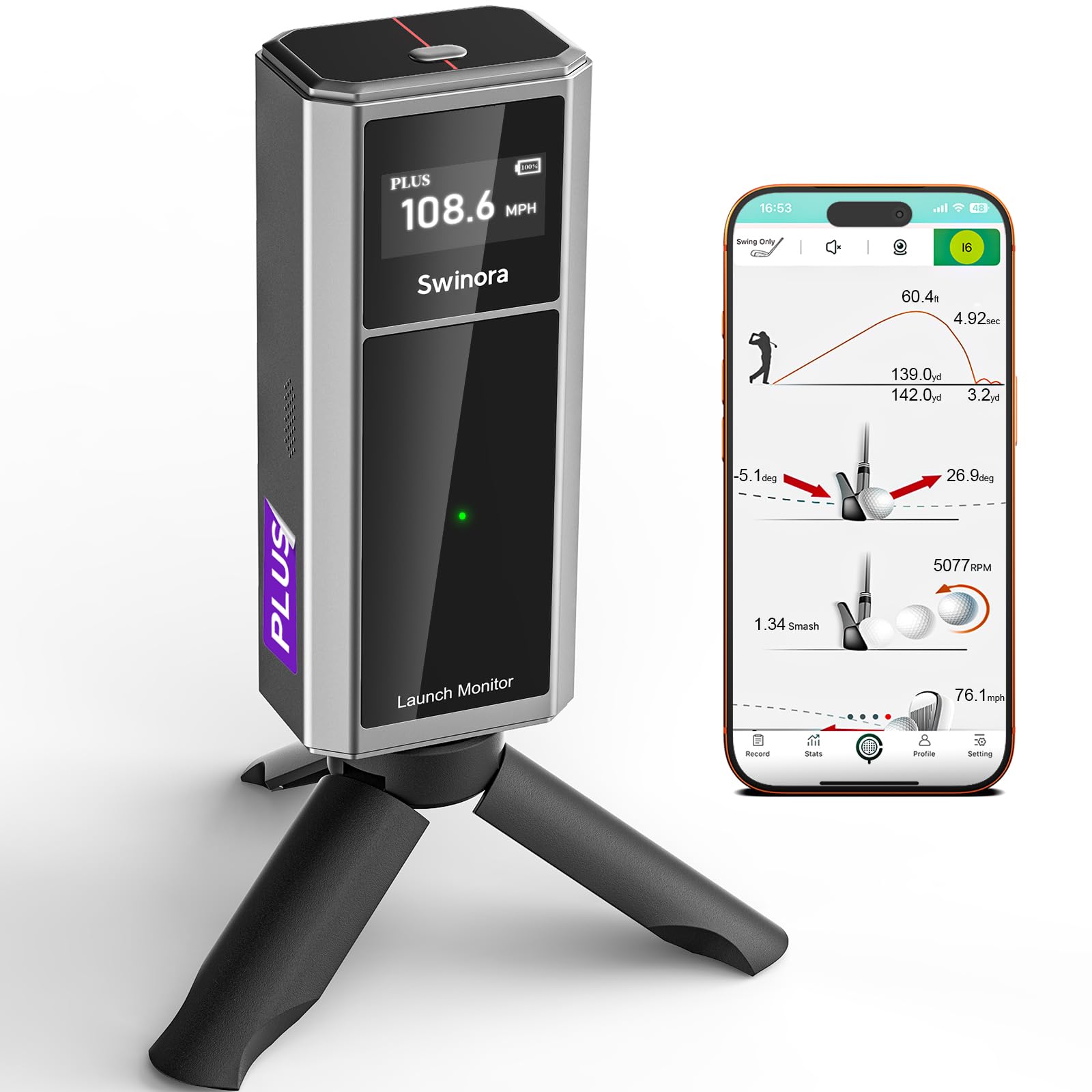
3. Swinora GX-03 Golf Launch Monitor & Portable Swing Analyzer
Five real metrics, an aluminum shell, and not one renewal notice.
Start with the money question, because it is the one that trips people up. This runs off a one-time download with lifetime use and no subscription — every feature opens on day one. That puts it in a different bracket from monitors that hand you a trial and then ask for a card. Build quality gets the loudest approval in its feedback, and the aluminum body with an OLED display explains why it feels less like a toy than some rivals.
On data, you get attack angle, launch angle, spin rate, ball speed and club speed — attack angle being the direction your club is travelling at impact, downward for a squeezed iron and upward for a driver. The app adds fixed multi-angle review at 45° and 90° plus a shot trajectory display. Built-in temperature, humidity and barometric pressure sensors adjust your shot data to real-time conditions, which is a genuine advantage when you practise outdoors and the air changes through the day.
Two things need saying plainly. It does not measure horizontal club face angle or swing path, so it will not tell you why you are missing right. And it needs space — at least 15ft indoors, with the unit 5ft behind the ball and 10ft of flight ahead of it. Tighten that and the radar struggles. Carry distance is quoted at ±1 yard tolerance under recommended alignment, and a distance compensation slider from 80% to 120% lets you match the numbers to what you actually see on course. Owners find it easy to carry around, and the outdoor driving range is where it settles in best.
The Case For It
- No subscription, ever — one download open up everything permanently
- Five tracked metrics including attack angle, launch angle and spin rate
- Aluminum body and OLED display backed by a 1-year manufacturer warranty
- Environmental sensors correct data for temperature, humidity and pressure
Plan Around This
- Indoor use needs 15ft of total space to track properly
- No horizontal club face angle or swing path measurement
Worth your attention if: you want spin and launch data without a monthly charge following you around.
Check your room first: a short basement will not give the radar the flight it needs.
4. BLACK T SHOT5 Golf Launch Monitor
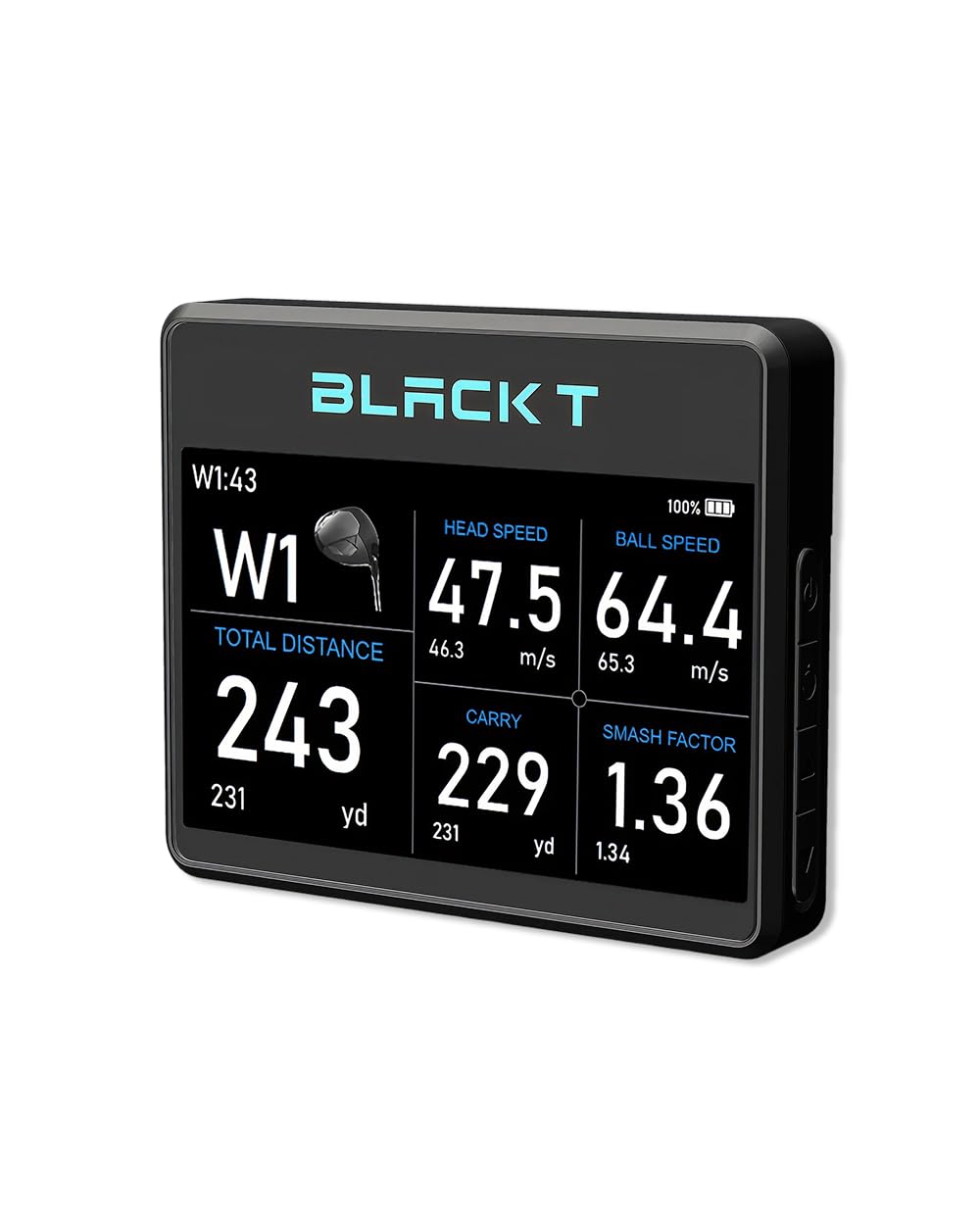
A wide built-in screen so you never dig for your phone mid-session.
Most monitors send you to a phone. This one puts a 5-inch display on the device itself, so the numbers land right in front of you and you stay in your setup between shots. Setup takes about 3 seconds — power on, place it behind the ball, swing — with no Bluetooth pairing and no app to launch first. For a range session where you want to hit forty balls without touching a screen, that is the whole argument.
It tracks 5 data points and only 5: carry distance, ball speed, club head speed, smash factor and total distance. The deliberate omission is the point — no metrics you will not act on, no clutter on the display. Physical size runs 9.45 x 6.3 x 2.76 inches in its package, which is noticeably bulkier than the TheStack Radar’s 6.89 x 3.23 x 1.38 inches, so it takes up more bag space than the smallest picks here. The unit itself weighs 6.3 oz (178 g).
What it will not do is spin or launch angle — the two numbers that explain a ballooning iron versus a driven one. It is a practical shot-decision tool, not a swing-diagnosis machine. Worth knowing too: there is no separate review history yet attached to this listing, so you are buying on the spec sheet alone. If a big on-device screen and instant readiness matter more to you than deep data, this is a clean fit.
Data restraint as a feature: five metrics on a large screen means faster decisions on the range and less time decoding a chart.
The honest gap: with no spin or launch angle, you can see the result but not the cause.
Built for: the golfer who wants distance and speed numbers visible instantly, with no phone involved.
Not for: anyone chasing spin rate or launch angle to fix ball flight.
5. Voice Caddie SC300i Portable Golf Launch Monitor
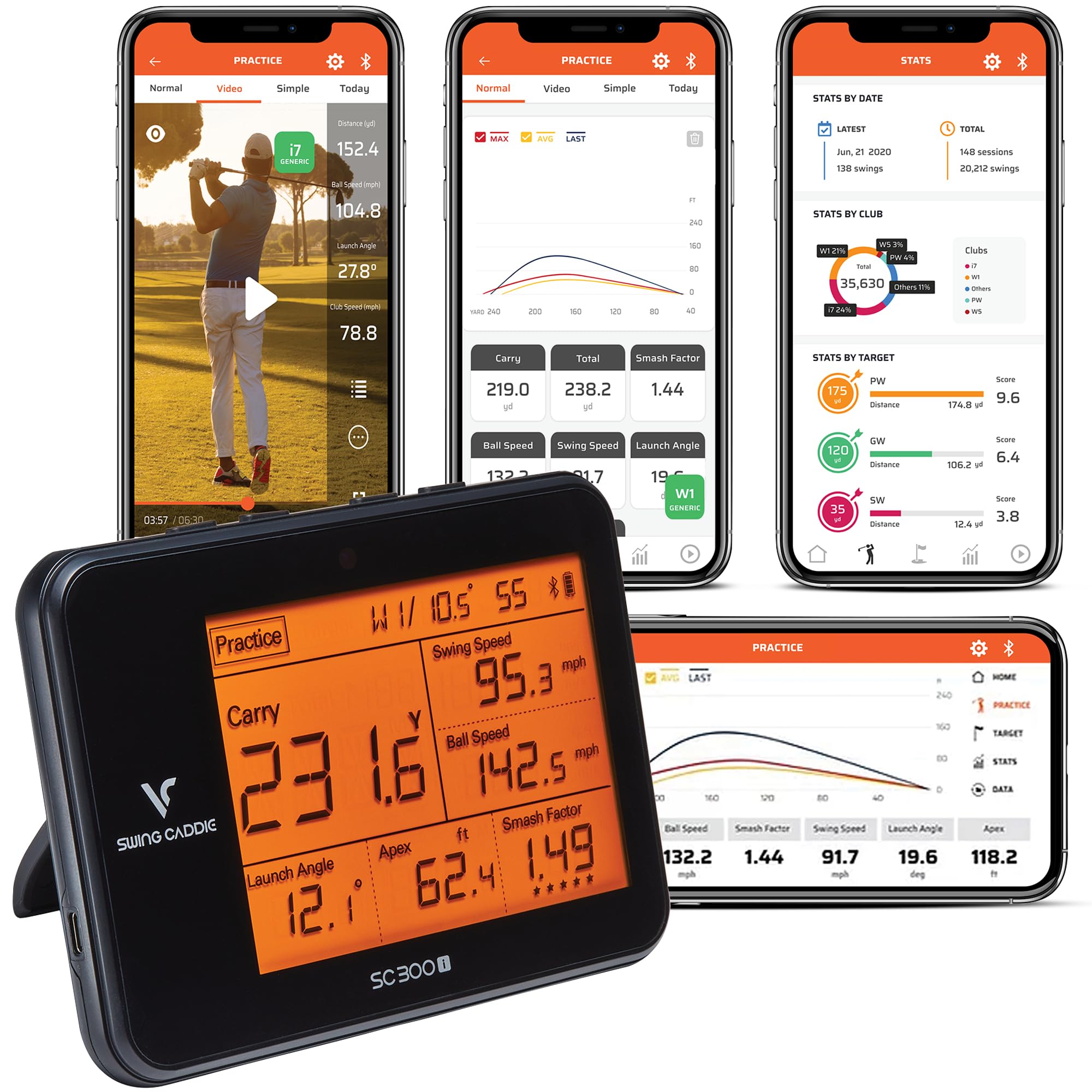
Twenty hours of battery and a voice that reads your distance out loud.
Runtime is the headline: up to 20 hours of battery life, which beats the Garmin Approach R10’s up to 10 hours by a clean double. For a season of range sessions that means charging is a monthly chore rather than a pre-practice ritual. The LCD handles the readout and a voice output calls your numbers in real time, so you can keep your head down and still hear the result.
This is the deepest metric set in the middle of the list — swing speed, ball speed, carry and total distance, smash factor, launch angle, apex and spin, with the spin figures landing in the My Swing Caddie app on iOS and Android. Voice Caddie quotes ±3% ball speed, ±3 yards carry distance in target mode and ±5% carry distance in practice mode. You can also adjust loft angles to simulate different club conditions. Owners consistently describe it as money well spent on their game.
The recurring gripe is consistency. Accuracy pulls in two directions across feedback, with some finding it extremely accurate and others hitting odd readings, and swing speed measurements split the same way. That is the trade for the depth of data and the long battery. Connecting to the phone app is the other half of the experience, and pairing tends to work cleanly once it takes.
Why It Earns Its Place
- Up to 20 hours of battery — the longest stated runtime among the battery-powered picks here
- Seven tracked metrics including launch angle, apex and spin
- ±3% ball speed and ±3 yards carry accuracy in target mode
- Voice output and LCD display keep your eyes off a phone screen
The Trade-Offs
- Accuracy is inconsistent across sessions — expect to cross-check some readings
- Full spin data only appears in the app, not on the unit
Best match for: a heavy practiser who wants deep metrics and does not want to charge the thing before every session.
Be realistic if: you need lab-grade repeatability — this measures well on speed, less predictably on the edges.
6. Garmin Approach G80 GPS Handheld with Integrated Launch Monitor

Two devices in one shell — a course GPS that also reads your swing on the range.
Here is the honest comparison nobody makes: this replaces a rangefinder and a launch monitor with one 4.16-ounce handheld. It carries more than 41,000 detailed colour course maps worldwide on a 3.5-inch sunlight-readable touchscreen, with a quick button that jumps straight to radar mode. Preloaded maps mean no phone signal needed on the back nine. That GPS-plus-radar pairing is why it holds the highest rating in this entire list.
In radar mode it tracks club head speed, ball speed, smash factor, swing tempo and estimated distance — swing tempo being the timing ratio between your backswing and downswing, which is the number most golfers never see. Practice and game modes let you build a target session. Battery runs up to 15 hours with GPS active, which covers several full rounds between charges.
The catch is that radar is the second job here, not the first. Accuracy feedback splits both ways, and distance and range accuracy carry the same mixed reputation. If launch monitor precision is your only goal, a dedicated unit will serve you better. If you want one charged device in your bag that gives yardages to the green all round and swing data at the range, this is the most useful single item on the page.
Two jobs, one gadget: 41,000+ preloaded course maps plus a radar mode accessed by a single button — genuinely less to carry and less to charge.
Know which job matters: as a GPS it is excellent; as a radar it is a handy extra rather than the main event.
Suits you if: you want real course yardages and some swing feedback from one pocketable device.
Pass if: you are buying purely for launch monitor data — a dedicated radar does that job more completely.
7. Garmin Approach R10 Portable Golf Launch Monitor
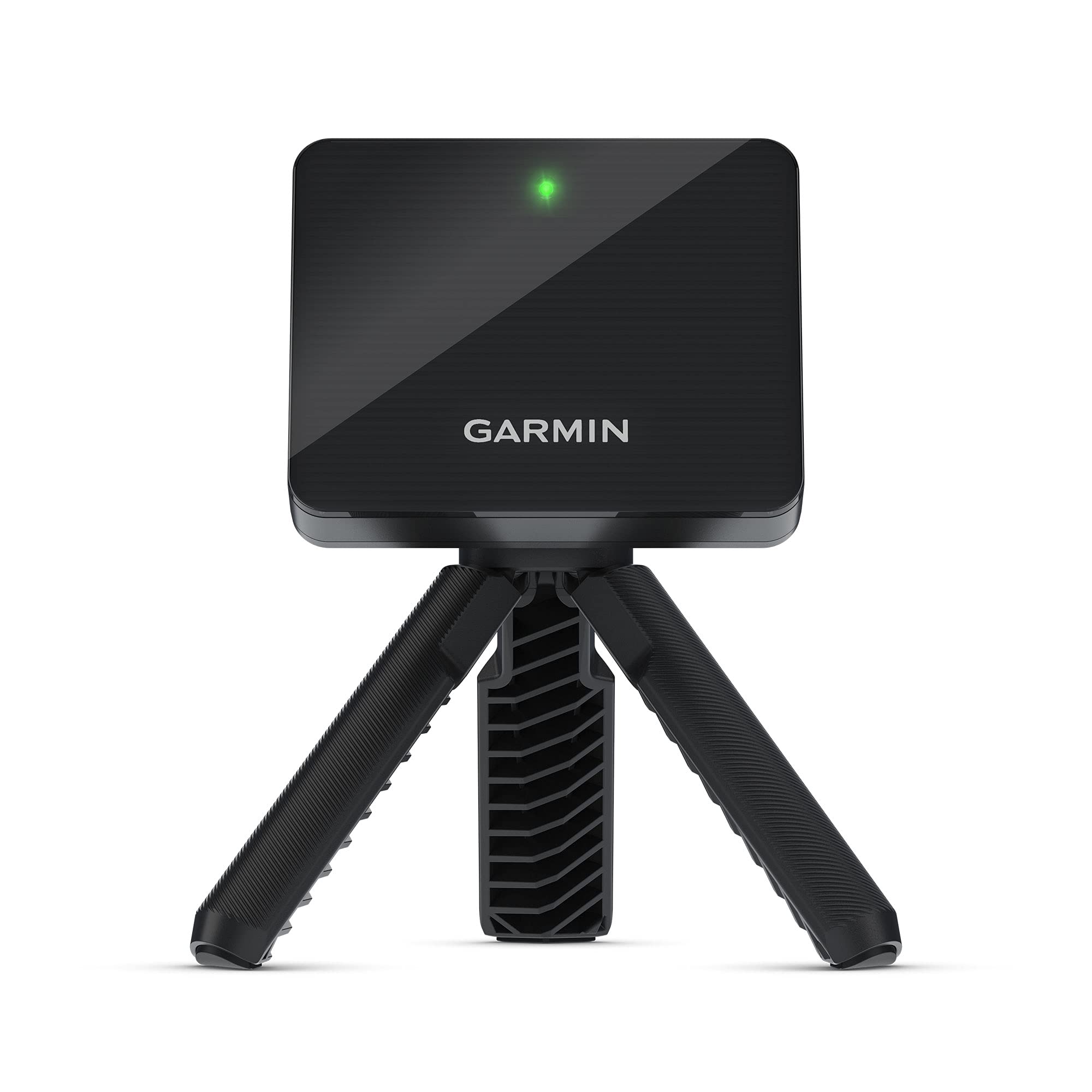
It films your swing and overlays the numbers on the video.
Nothing else here does this: pair it with the Garmin Golf app and the R10 automatically records video clips of your swing with that swing’s metrics baked into the frame. Seeing your club head speed sitting on top of the actual motion is a different kind of feedback to a number on a screen. It weighs 340 g and rates IPX7 — waterproof enough to survive rain or a dropped-in-the-wet-grass moment at the range.
Metric coverage is broad: club head speed, ball speed, swing tempo, ball spin and launch angle, all through the app. Training mode tracks stats per club and builds a shot dispersion chart from estimated ball flight, so you can see whether your miss is a left pattern or a right one. An active subscription open up virtual rounds on over 42,000 courses with a weekly tournament and a global leaderboard. Battery runs up to 10 hours, and the included phone mount clips to your bag for easier viewing.
Where buyers get frustrated is consistency — reliability draws mixed feedback, with some units performing better than expected and an occasional faulty one showing up. That is a caveat to size properly rather than a reason to walk: the functionality is what people praise most, and there is a clear value argument for what you get. The subscription is worth flagging too, since simulated rounds are not included without it.
The video edge: auto-recorded swing clips with live metrics overlaid — the only pick here that shows you the swing and the data together.
The fine print: virtual course play needs an active subscription, so budget for that separately.
Reach for this if: you learn better from video than from a column of numbers.
Look elsewhere if: you will not pay for a subscription — the virtual rounds stay locked without one.
8. Voice Caddie SC4 Pro Golf Launch Monitor & 3D Driving Range Simulator
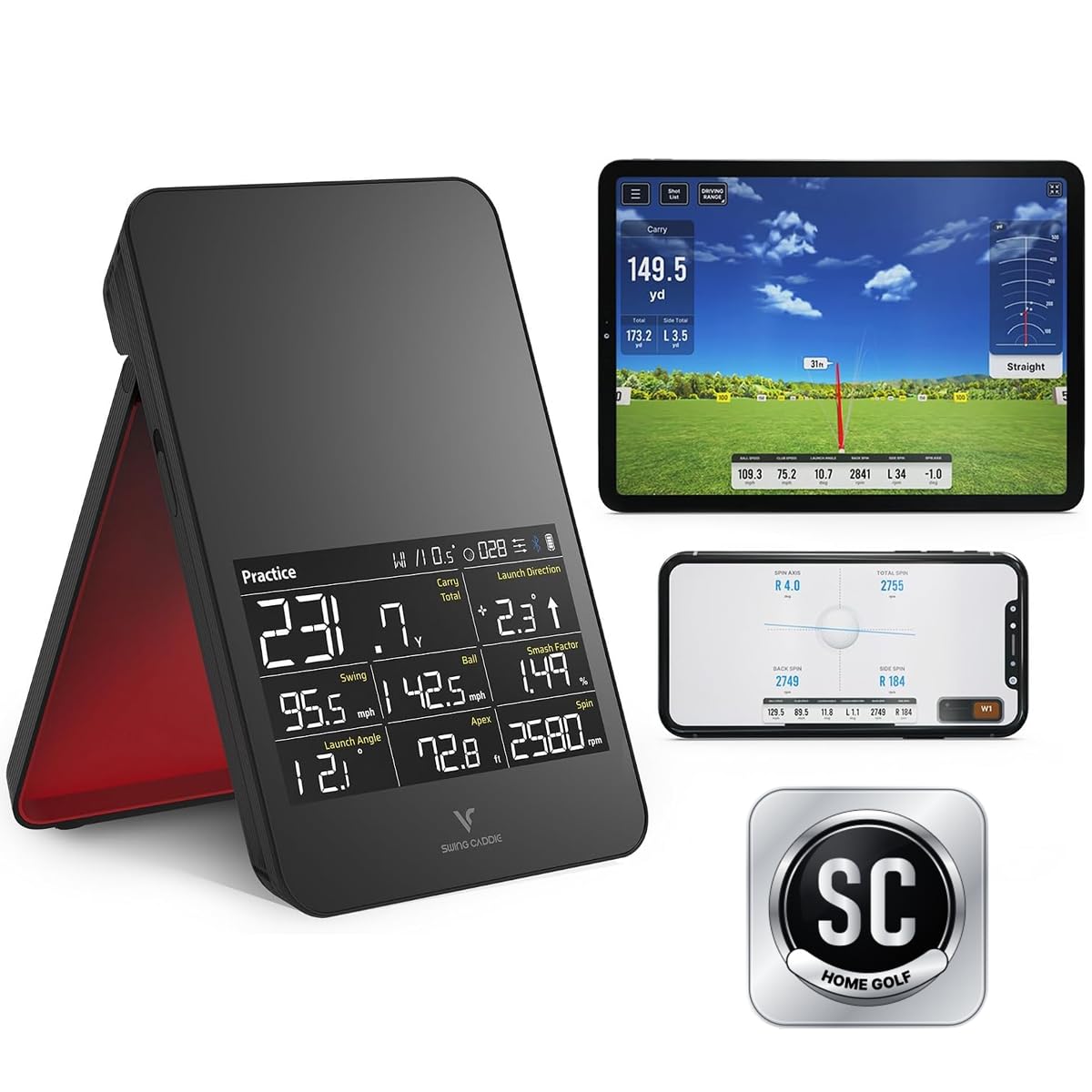
Indoor practice that feels like a round rather than a drill session.
A simulator you can actually play is what separates this from a plain radar box. The pack includes 5 free E6 Connect courses and a 1-year HomeGolf membership, so you get a 3D driving range and virtual play on day one rather than after an upgrade. No specially marked balls are needed either — standard golf balls work indoors or outdoors, which removes a recurring cost a lot of camera systems quietly introduce.
Underneath, the Prometrics engine tracks ball and club head data from swing through impact to ball flight, with practice, target and speed training modes to switch between. The built-in screen and voice output mean you get numbers without reaching for a phone, and the VOICECADDIE S app adds statistical analysis, distance calibration and swing speed radar. Weighing 590 g, it is a light unit to pack away.
The honest read: reliability and accuracy are the split points here, with some units working cleanly outdoors and others giving readings that do not match reality, and the value question follows the same pattern. It has not settled into a settled consensus yet. Buyers do agree it is easy to set up and genuinely engaging to use, which matters if boredom is what keeps you from practising. If you mainly want a fixed number you can trust, look at the SC300i above instead. If you want indoor practice that feels like play rather than a drill, that is precisely the gap this fills.
What You Get On Day One
- 5 free E6 Connect courses plus a 1-year HomeGolf membership
- 3D driving range, practice, target and speed training modes
- Works with standard golf balls — no marked or premium balls required
- Built-in screen and voice output keep it usable without a phone
Where To Be Careful
- Reliability feedback varies — some units read well, some do not
- Accuracy complaints mean you should sanity-check distances against on-course yardages
Choose it for: the indoor session you would otherwise skip — the simulator makes practice something you look forward to.
Hesitate if: you want a settled, repeatable data set and nothing else.
9. Rapsodo MLM2PRO Mobile Launch Monitor Golf Simulator
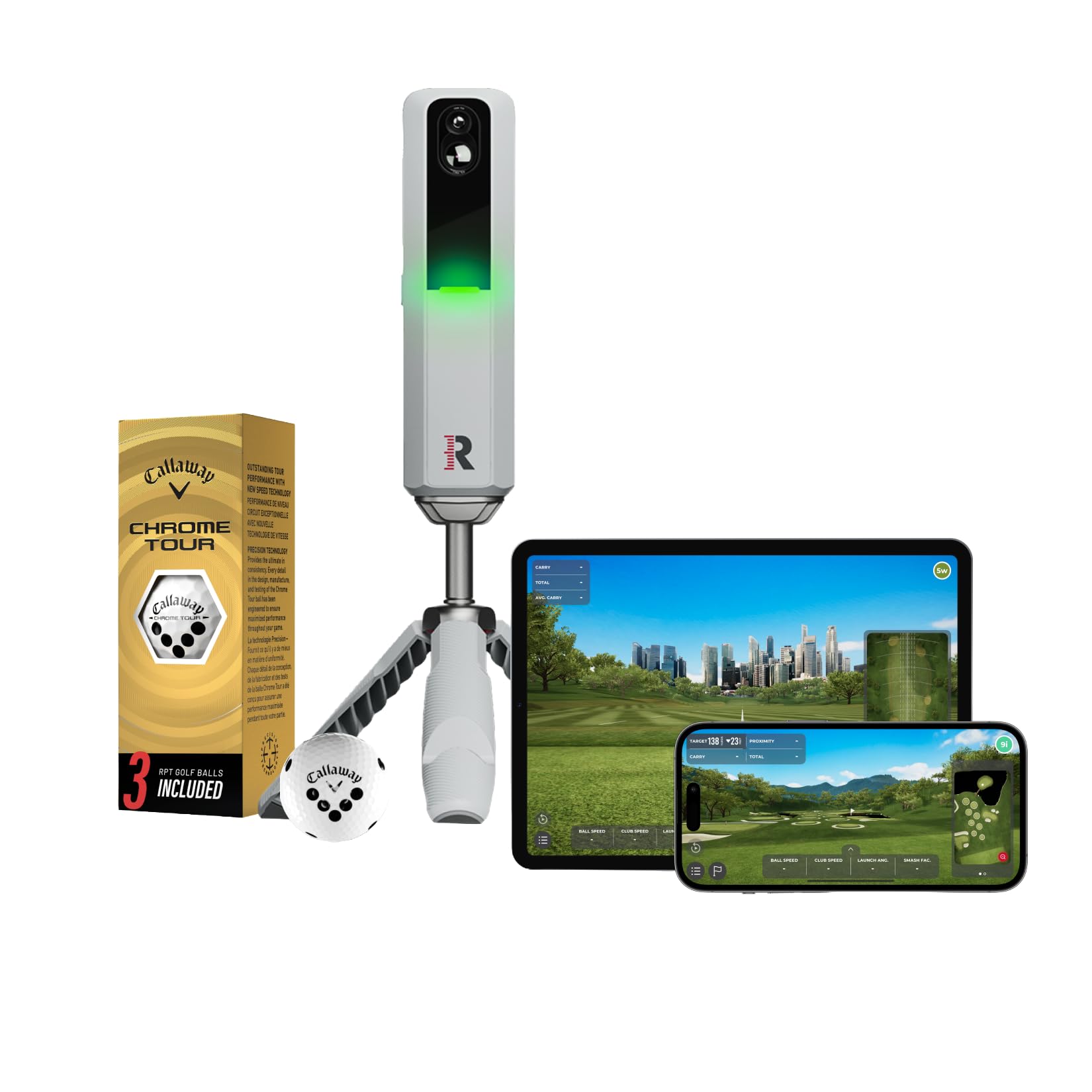
Doppler radar and a dual camera working the same shot from two directions.
Camera and radar together is the differentiator. Doppler radar tracks the flight while a dual camera setup watches impact, and the two cross-check each other. That is what allows 15 key metrics — spin rate, spin axis, carry distance, club speed, club path, launch angle and more — the deepest data set on this page by a distance. Spin axis in particular is the number that explains a slice rather than just describing it.
Impact vision is the feature owners single out most after the core functionality, showing club and ball contact in slow motion so you can see strike location. You can film your swing from any angle to spot patterns. A 21-day Premium/Core trial is included, and Premium open up 30,000+ home golf simulator courses plus third-party app integration, target range, Rapsodo Combine and speed training. The kit ships with a tripod, a carrying case, a charging cable and 3 Callaway RPT Chrome Soft X golf balls.
The complication is well documented: connectivity is the most-discussed topic in its feedback, with pairing issues showing up, and accuracy splits hard — some find it incredibly accurate, others report wildly off readings. Buyers who get a stable pairing call it one of their best investments. Set it up on a stable Bluetooth link and verify your distances before you trust a session to it.
Data depth worth paying for: 15 metrics including spin axis and club path — the analytics you would otherwise need a fitting bay to see.
The recurring snag: Bluetooth pairing is the most-discussed issue in its feedback, so plan for a minute of setup patience each time.
For the data-hungry: golfers who want spin axis and club path, and will use the trial to explore simulated courses.
Not the easy option: if you want plug-and-play with no phone pairing, the SHOT5 or Izzo will frustrate you less.
Understanding the Specs
Smash Factor Explained
Smash factor is ball speed divided by club head speed, and it measures how much energy made it into the ball rather than leaking into a glancing strike. A cleanly struck drive produces a higher figure than one caught off the heel. It is the most useful single number for judging contact quality, because it does not care how hard you swing — only how well you transferred it. Most monitors here calculate it automatically from the two speeds they measure.
Spin Rate And Launch Angle
Spin rate is how fast the ball is rotating in rpm, and launch angle is the upward angle it leaves the club at. Together they explain ball flight: high spin with a low launch produces a shot that climbs then stalls, while low spin with a high launch carries further. These two are estimates on most consumer radar units, calculated from measured speed rather than tracked directly, which is why a figure can look slightly off on a windy day. Camera-based systems that watch impact get closer to the real number.
Why Indoor Space Requirements Matter
Radar needs flight time to track a ball. A unit that demands 15ft of total space wants itself 5ft behind the ball and 10ft of travel ahead — shorten either and the reading degrades rather than fails outright. That is the number to check against your garage, basement or net setup before you buy. Camera systems are generally less room-hungry but need a clear view of the ball at impact and a stable phone position.
Battery, Apps And Subscriptions
Stated runtime ranges widely across this list, from up to 10 hours to up to 20 hours, and a couple of units run on disposable AA cells instead of a built-in battery. The other part of the equation is the app: some monitors give you every feature after a one-time download, while others include a trial period and then require a paid membership for simulated courses and advanced features. Add that ongoing cost to your decision, not just the up-front one.
FAQ
Do I need a subscription to use a golf launch monitor?
How much room do I need indoors for radar tracking?
Will a launch monitor work with standard golf balls or do I need marked ones?
Can a launch monitor measure my swing path and club face angle?
Does a radar launch monitor work with an Android phone?
How accurate are carry distances on an affordable launch monitor?
Can I use a launch monitor at a driving range without Wi-Fi?
Is a launch monitor better than a GPS rangefinder for practice?
How long does the battery last on these monitors?
What is the difference between ball speed and swing speed?
Final Thoughts: The Verdict
The affordable golf launch monitor that earns the top spot is the TheStack Radar, because it weighs almost nothing at 0.14 kg package weight, syncs straight to your phone over Bluetooth and captures the swing and ball speeds that drive every other number. It carries a 4.5+ star rating, ahead of the Voice Caddie SC300i’s 4.3 despite the SC300i’s far larger owner base.
If you want the deepest data with spin axis and club path, the Rapsodo MLM2PRO tracks 15 metrics and includes a 21-day trial. For one device that covers the course and the range, the Garmin Approach G80 carries more than 41,000 preloaded course maps plus integrated radar. And if you want no subscription following you around, the Swinora GX-03 open up everything on a one-time download.
How We Picked
We do not accept paid placement. Every pick is matched to a real buyer and a real use-case; we do not hands-on test units.
Sources & Methodology
Specifications: manufacturer listings and product documentation. Review insights: verified customer reviews, as of November 2026. Pricing: not shown on this page (it changes often); check the current price via the retailer link.
As an Amazon Associate, Gadgets Feed earns from qualifying purchases. This does not affect which products we feature.