
Our readers keep the lights on and my morning glass full of iced black tea. As an Amazon Associate, I earn from qualifying purchases.
Specs are compiled from manufacturer listings and verified buyer reviews and can change over time — please confirm the key details on the product page before buying.
If you are shopping for a board with two full-size graphics slots, the answer is simpler than the spec sheets make it look: buy for the slot wiring, not the slot count. Plenty of boards advertise two x16-length slots while only one of them runs at full bandwidth — so your second graphics card, capture card, or NVMe adapter ends up crawling. The seven boards below all carry two physical PCIe x16 slots, and each one is here because it does that job honestly at its own tier.
I’m Min — the founder and writer behind Gadgets Feed. This guide is built by comparing the manufacturers’ published specifications and the patterns across verified customer reviews, so you get each pick’s real strengths and trade-offs instead of marketing spin.
What follows is a slot-first breakdown: which board gives your second card real lanes, which one is the smart compact pick, and which ones are workstation tools you should only buy on purpose. The short version? The 2 pci express x16 slots motherboard decision starts with lane speed, not the number printed on the box.
Our Picks at a Glance


How To Choose The Best 2 PCI Express X16 Slots Motherboard
Two x16 slots is the easy part to check. The hard part is what those slots are wired to do. A board can physically accept two full-length cards and still starve the second one, so read the lane description before you read anything else.
Check the lane speed of the second slot, not its length
An x16 slot is a slot that is long enough for a full-size card. That does not mean it runs at x16 bandwidth. The ASRock B760M Pro RS, for example, pairs one PCIe 5.0 x16 slot with a second PCIe 3.0 x16 slot that runs in x4 mode — fine for a sound card or a network card, tight for a second graphics card. If the second slot is carrying real work, you want a board whose listing states full bandwidth for both.
Match the PCIe generation to what you plug in
PCIe 5.0 is the newest generation of the connector your graphics card and NVMe drives use. Each generation roughly doubles the data rate of the one before, and a Gen5 x16 slot moves data at a rate the newer cards can use. Gen4 is still plenty for most builds.
DDR4 or DDR5 — decide by budget, not by hype
DDR5 is the newer memory type, and boards that take it usually take more of it. DDR4 boards are the sensible route when you already own DDR4 sticks or you are building a tight-budget machine. Just accept that the memory ceiling is lower: the ASRock B760M Pro-A/D4 tops out at 128 GB, while several DDR5 boards here list 256 GB.
Form factor decides whether the board fits at all
Micro ATX is the compact standard size, ATX is the full-size standard, and E-ATX is the oversized workstation format. A Micro ATX board drops into almost any case. ATX needs a standard mid-tower. E-ATX needs a case that explicitly lists E-ATX support. Measure your case’s form-factor support and cooler clearance before ordering.
Quick Comparison
| Model | Best For | PCIe x16 Slots | Memory Type & Max | Form Factor | Amazon |
|---|---|---|---|---|---|
| ASRock B760M Pro RS★ Best Overall | Best all-round value | 2 (1× PCIe 5.0 x16, 1× PCIe 3.0 x16 in x4 mode) | DDR5, up to 256 GB | Micro ATX | Amazon |
| ASRock B760M Pro-A/D4 WiFiBudget Smart | Budget DDR4 build with Wi-Fi | 2 (both PCIe 4.0 x16) | DDR4, up to 128 GB | Micro ATX | Amazon |
| MSI B850 Gaming Plus WiFi | New AMD builds | 2 (1× PCIe 5.0 x16, 1× PCIe 4.0 x16) | DDR5, up to 256 GB | ATX | Amazon |
| MSI PRO Z890-S WiFi White | Intel Core Ultra builds | 2 (1× PCIe 5.0 x16, 1× PCIe 4.0 x16) | DDR5, up to 256 GB | ATX | Amazon |
| MACHINIST X99-D8-MAX | Cheap dual-CPU server build | 4 (PCIe 3.0 x16) | DDR4, up to 256 GB | E-ATX | Amazon |
| ASUS Pro WS W680-ACE | Workstation with ECC memory | 2 (both PCIe 5.0 x16) | DDR5, ECC supported | ATX | Amazon |
| ASUS Pro WS WRX90E-SAGE SE | Threadripper multi-GPU work | 7 (PCIe 5.0 x16) | DDR5 ECC R-DIMM, up to 2 TB | EEB | Amazon |
In‑Depth Reviews
1. ASRock B760M Pro RS Micro ATX Motherboard
Our pick — 4.5+★ from 400+ verified ratings; the strongest balance of quality and price.
The compact board that gives you a Gen5 slot and a second x16 without padding the bill.
The number that decides this one is the PCIe 5.0 x16 slot, the newest and fastest generation of the full-length graphics connector. That slot uses SMT design, meaning it is soldered straight through the board for a stronger hold on a heavy card. Your main graphics card gets current-generation bandwidth, and the board is built on Intel B760 with support for 14th, 13th, and 12th Gen Intel Core processors on the LGA1700 socket.
Where a lot of two-slot boards quietly cut corners is the memory and storage behind the slots. Here you get four DDR5 DIMM slots (the sockets the memory sticks click into) supporting up to 256 GB, with Intel XMP 3.0 profiles so a rated memory kit hits its advertised speed with one toggle in the BIOS. Three PCIe Gen4x4 M.2 sockets plus four SATA3 ports give you room for fast NVMe drives and older hard drives at the same time. It also carries Dragon 2.5G LAN through the Realtek RTL8125BG chip, with software that lets you prioritize a game or a stream over background traffic.
The second slot is the honest caveat, and you should read it before you buy. It is physically x16 length but runs in x4 mode on the PCIe 3.0 generation — enough for a capture card, a second network card, or an adapter, but not a second graphics card running at full tilt. Compared with the ASUS Pro WS W680-ACE, which offers two PCIe 5.0 x16 slots, this ASRock gives up second-slot bandwidth to keep the price down. What it does not give up is the basics: pre-installed I/O shield, ASRock’s Auto Driver Installer, and Realtek ALC897 7.1 audio with Nahimic.
What earns its keep
- PCIe 5.0 x16 with SMT reinforcement for your main card
- Four DDR5 slots up to 256 GB — far more ceiling than a DDR4 board of the same size
- Three Gen4x4 M.2 sockets plus four SATA3 ports, so storage never boxes you in
- 2.5G LAN with bandwidth-control software built in
- Pre-installed I/O shield and Auto Driver Installer cut build-day fiddling
Where it asks patience
- Second x16 slot runs x4 on PCIe 3.0 — not a second full-speed graphics slot
- Micro ATX (9.6″ x 9.6″) means checking cooler and card clearance first
- USB port selection is the weakest part of the package; plan your peripherals around the Type-C and Type-A mix
Buy this one for: a compact gaming or productivity build where the main card needs Gen5 speed and the second slot just needs to hold an add-in card.
Look elsewhere if: you plan to run two graphics cards at full bandwidth — go to the ASUS W680-ACE instead.
2. ASRock B760M Pro-A/D4 WiFi Micro ATX Motherboard
Both x16 slots run PCIe 4.0 here — a wired-slot promise the pricier ASRock above does not make.
If your reason for wanting two x16 slots is a second card that actually works, this board is the sleeper. It lists two PCIe 4.0 x16 slots and one PCIe 4.0 x1 slot, so the second full-length slot is on the modern generation rather than the older PCIe 3.0 of the Pro RS. That pairing is the real difference between the two ASRock Micro ATX boards, and it costs you DDR4 rather than DDR5.
Networking is unusually complete for an entry-level board. You get Dragon 2.5G LAN plus a Killer Wi-Fi 6E module with Bluetooth 5.3 — Wi-Fi 6E adds the cleaner 6 GHz band to the usual 2.4 and 5 GHz ones, which matters in a flat where every neighbour’s router is shouting on 5 GHz. Two Hyper M.2 slots take PCIe Gen4x4 NVMe drives, one with its own heatsink, and four SATA3 ports handle the rest. The 7+1+1 power phase with Dr.MOS keeps delivery stable for 14th, 13th, and 12th Gen Intel Core chips on LGA1700.
Memory is where you feel the budget trade. Four DDR4 DIMM slots support up to 128 GB at 5333+ (OC) with Intel XMP 2.0 — half the ceiling of the DDR5 boards here, which is the 128 GB vs 256 GB split the two ASRock boards represent. For gaming and everyday work that is plenty. For a memory-hungry workstation, it is the wrong buy. The 9.6-inch square footprint is the other thing to check: it fits almost any case, but a tall CPU cooler can crowd the top edge.
Slot wiring read: two PCIe 4.0 x16 slots is the standout spec at this tier, and it is why this board makes sense for a dual-card setup on a DDR4 budget.
Ceiling to accept: 128 GB max memory and DDR4 speeds, so this is a build you finish and leave alone rather than one you grow into.
Reach for it when: you already own DDR4 memory and want two working x16 slots plus Wi-Fi built in.
Skip the detour if: you are buying fresh DDR5 or need to go past 128 GB of RAM.
3. MSI B850 Gaming Plus WiFi Motherboard

A Gen5 graphics slot and a Gen4 second slot on the newest AMD socket, with networking that outruns the price.
This is the board for someone building on AMD’s AM5 socket with a Ryzen 9000, 8000, or 7000 processor. The pair of full-length slots is split sensibly: one PCIe 5.0 x16 slot at 128GB/s with Steel Armor reinforcement for the card you care about, and one PCIe 4.0 x16 slot for the second. Steel Armor is a metal sheath around the slot that stops a heavy graphics card from sagging over time.
The networking is the head-turner. A full-speed Wi-Fi 7 module with Bluetooth 5.4 sits alongside 5 Gbps LAN — that is a faster wired connection than the 2.5G ports on several boards here. Three M.2 connectors give you a Gen5 x4 slot at 128Gbps with the EZ M.2 Shield Frozr II heatsink, a Gen4 x4 slot, and a Gen4 x2 slot. Cooling is handled by 7W/mK MOSFET thermal pads, extra choke pads, and an extended heatsink, with a Combo-fan header rated 3A for a pump or case fan.
Memory headroom is generous — four DDR5 DIMM slots supporting 8200+ MT/s overclocked and up to 256 GB. Owners consistently report stable operation across a wide range of components once the build is assembled. The catch sits in connectivity: the Wi-Fi 7 and 5G LAN are excellent on paper, but Wi-Fi adapter recognition has been a rough spot on some builds, so have the driver package ready before you boot. At 13.6″ long it is a full ATX board, so it needs a mid-tower or larger case.
Reasons this lands the pick
- PCIe 5.0 x16 at 128GB/s with Steel Armor for a heavy card
- Wi-Fi 7 plus 5 Gbps LAN — the fastest networking in the mid tier here
- Gen5 M.2 with a dedicated heatsink to avoid thermal throttling
- 8200+ MT/s DDR5 ceiling across four slots
- 12 Duet Rail Power System with P-PAK VRM for the newest Ryzen chips
Before you commit
- Wi-Fi adapter recognition has needed troubleshooting on some builds
- Full ATX footprint at 13.6″ long — confirm case clearance
- AMD-only: this board will not take an Intel processor
Built for: a fresh AM5 build where you want current-gen graphics bandwidth and the best wireless available.
Not your board if: you are staying on Intel or your case tops out at Micro ATX.
4. MSI PRO Z890-S WiFi White Motherboard
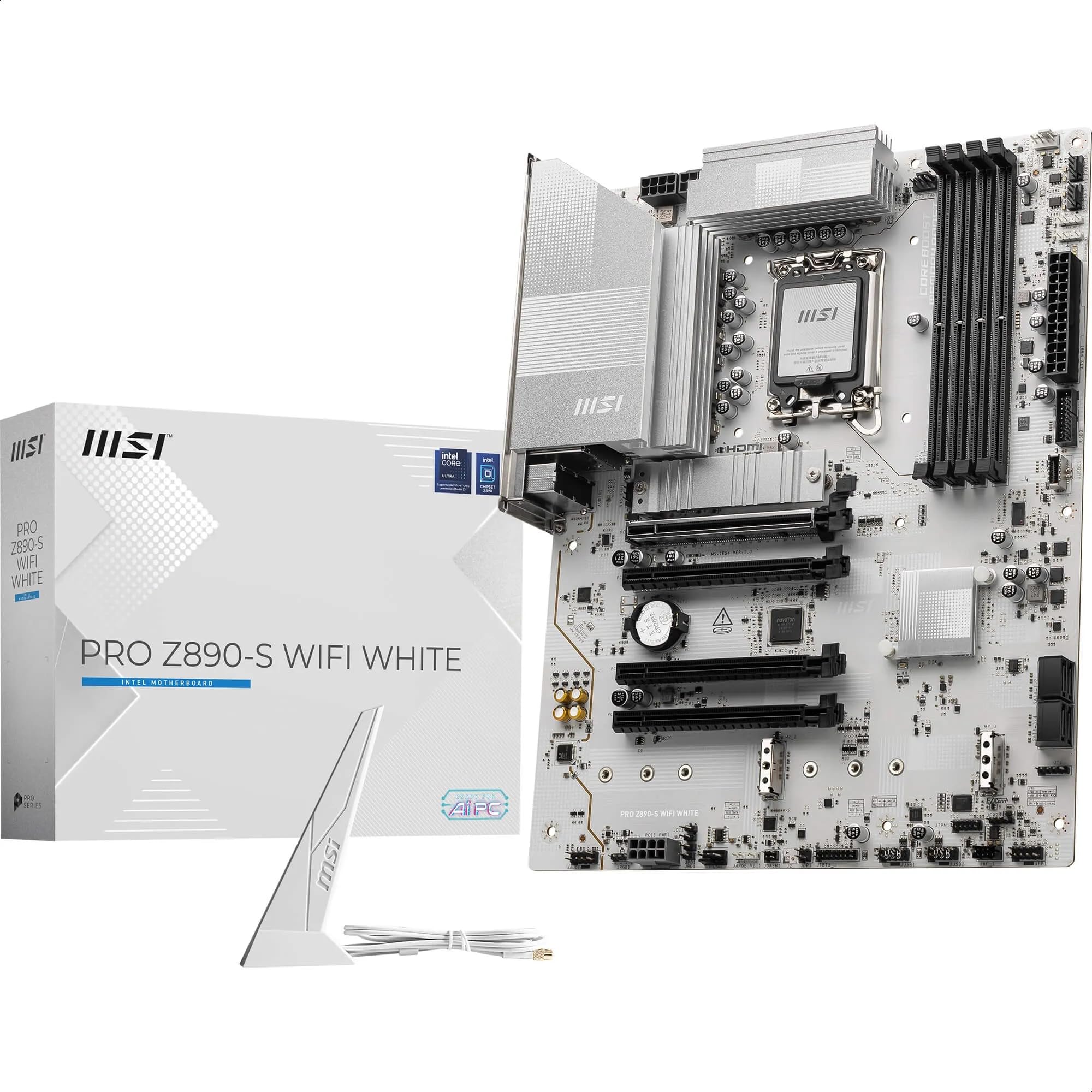
The white ATX board for a Core Ultra build that wants Gen5 graphics and Thunderbolt 4 in one shot.
Built on the Intel Z890 chipset with the LGA 1851 socket, this board takes Intel Core Ultra processors (Series 2) — the newer chip family, not the 14th or 13th Gen parts the ASRock boards above use. It also carries the highest memory speed in this group: four DDR5 DIMM slots rated for 8600+ MT/s overclocked, and up to 256 GB. Compared with the ASRock B760M Pro-A/D4’s 5333 MHz DDR4 ceiling, this is the fastest memory spec on the list.
Slots are the same sensible split as the MSI AMD board — one PCIe 5.0 x16 at 128GB/s with Steel Armor, and one PCIe 4.0 x16 behind it. Storage runs through one M.2 Gen5 x4 slot at 128Gbps with an M.2 Shield Frozr heatsink and two M.2 Gen4 x4 slots at 64Gbps. Cooling uses the same Frozr Guard setup as its AMD sibling: 7W/mK MOSFET thermal pads, extra choke pads, an extended heatsink, and a 3A Combo-fan header. Networking is Wi-Fi 7 with Bluetooth 5.4 and 2.5Gbps LAN, and the rear panel includes Thunderbolt 4 Type-C with display output.
One practical note on the listed dimensions: the spec sheet reads 2.8″L x 13.5″W x 10.6″H, which is a rotated measurement of a standard ATX board rather than a genuinely odd shape. Treat it as ATX and check your case accordingly. The white PCB and heatsink finish makes it a direct match for a white-themed build. Price-wise it sits at the premium end of the mainstream group, so the value case rests on the Thunderbolt 4 port and the memory ceiling.
The spec that carries it: 8600+ MT/s DDR5 support is the fastest memory rating here, and Thunderbolt 4 on the rear is a port the cheaper boards cannot offer.
The honest limit: LGA 1851 locks you to Core Ultra Series 2 chips, so there is no dropping in an older Intel CPU you may already own.
Your board if: you are building a white Core Ultra system and want Gen5 slots, Thunderbolt 4, and the top memory speed on this list.
Think twice if: you are reusing a 12th-14th Gen Intel chip — the socket will not accept it.
5. MACHINIST X99-D8-MAX Dual CPU Motherboard

Four x16 slots and two CPU sockets for the builder chasing cores on a tight budget.
Nobody buys this board for its slot count alone — they buy it for what sits behind the slots. It is an E-ATX dual-socket board on the Intel C612 chipset, taking Intel Xeon E5 V3 and V4 processors as well as Core i7 5th and 6th Gen chips. Four PCIe 3.0 x16 slots come with steel reinforcement, and the listing states a single card can reach 15.754 GB/s while a second card adds performance. That makes it the widest slot array here outside the Threadripper flagship — four x16 slots against the two on the ASRock B760M Pro RS.
Memory is where the dual-socket design pays off. Eight DDR4 slots across four channels support 2133 and 2400 MHz modules and a 256 GB maximum — double the four slots on the mainstream ASRock and MSI boards. There are dual M.2 slots, ten SATA 3.0 ports, four USB 3.0 and four USB 2.0 ports, plus dual network ports. Power comes through a 24+8+8pin connector arrangement and a 12 (CPU) + 4 (memory) + 1 (C612 chip) phase design, so you need a power supply built for dual-server boards.
Read the fine print before ordering, because this is a bare-board purchase. The box includes two CPU fan brackets, two SATA cables, an I/O baffle, and the board — no user manual, and the CR2032 battery has been removed, so you supply your own. Non-ECC memory is not compatible with E5 V4 processors. This is also a board for builders who are comfortable with the BIOS dance: it asks you to tap DEL repeatedly from the moment you power on, and the maker recommends Win 10 if you are hunting drivers.
Where the value hides: eight memory slots and four x16 slots at this tier is a lot of expandability — the 256 GB ceiling matches far pricier boards here.
Who should walk away: anyone expecting a manual, a CMOS battery, or plug-and-play setup. This is a project board, not a first build.
Suits: a tinkerer building a cheap many-core server or render box who is happy to source a battery and download the manual.
Not for: a first-time builder who wants everything in the box and a guided setup.
6. ASUS Pro WS W680-ACE Intel W680 LGA 1700 ATX Workstation Motherboard

Two PCIe 5.0 x16 slots, both at full generation — the only mainstream board here that makes that promise.
The headline here is the slot pairing: dual PCIe 5.0 Safeslots, both on the newest generation, plus two PCIe 3.0 slots for good measure. Safeslots are ASUS’s reinforced, stainless-steel-backed slot design built to hold heavy cards securely. Set that against the ASRock B760M Pro RS, whose second slot drops to PCIe 3.0 in x4 mode, and the difference for a two-card workflow is plain.
This is a workstation board, and the rest of the spec sheet follows. It runs the Intel W680 chipset on LGA 1700 with 13th and 12th Gen Intel Core support plus Pentium Gold and Celeron chips. Memory is DDR5 with ECC supported across four slots — ECC being memory that can detect and correct small data errors, which matters on machines running long jobs. Storage spans three M.2 PCIe 4.0 slots plus SlimSAS, and networking is dual Intel 2.5Gb Ethernet. There is a front-panel USB 3.2 Gen2x2 Type-C header, a Thunderbolt 4 header, TPM and LPT headers, and ASUS Control Center Express for USB port management and software blacklisting.
Power delivery uses DrMOS, a ProCool connector, alloy chokes, and durable capacitors, cooled by a large VRM heatsink, M.2 heatsinks, hybrid fan headers, and Fan Xpert 4. Reviews flag uneven early stability: most boards run flawlessly from the start, but a few have needed attention in the first days. Given the ECC support and dual full-speed Gen5 slots, that is a fair trade to weigh for a mission-critical build rather than a reason to dismiss it. At 13.4″ long, it is standard ATX.
Standout strengths
- Both x16 slots are PCIe 5.0 — the full-bandwidth dual-slot board of the mainstream group
- ECC DDR5 support for error-sensitive workloads
- Dual Intel 2.5Gb Ethernet plus a Thunderbolt 4 header
- Three M.2 PCIe 4.0 slots and SlimSAS for dense storage
- Control Center Express adds USB port management and software blacklisting
Honest trade-offs
- Early stability has been uneven for a small share of boards
- LGA 1700 caps you at 12th/13th Gen Intel — no Core Ultra
- Workstation pricing puts it well above the compact ASRock picks
The right call for: a two-card workstation that needs both slots on PCIe 5.0 and memory that corrects its own errors.
Elsewhere if: you want the newest Intel Core Ultra platform — this board stops at 13th Gen.
7. ASUS Pro WS WRX90E-SAGE SE EEB Workstation Motherboard

Seven PCIe 5.0 x16 slots and a 96-core ceiling — the board you buy when two slots is a starting point.
Start with the slot count, because it is the whole point: seven PCIe 5.0 x16 slots. Not five with two crippled, not four with adapters — seven full-length slots on the current generation. This is the board for someone running multiple graphics cards, several NVMe arrays, or a machine that is really a small render farm in a tower case. It sits on AMD’s sTR5 socket and supports Ryzen Threadripper PRO 7000 WX-Series processors up to 96 cores.
Memory and storage match the ambition. Eight memory slots support up to 2 TB of ECC R-DIMM DDR5 — registered DIMMs, which are the buffered memory modules workstation platforms use for very large capacities. That is far beyond the 256 GB ceiling of the mainstream boards here, including the MSI boards at 256 GB. There are four M.2 slots, two rear USB4 40Gbps Type-C ports, and SlimSAS NVMe support. Networking runs dual 10 Gb LAN, double the 5 Gbps on the MSI B850 and several times the 2.5G ports elsewhere.
Power and cooling are built for sustained load: 32 power stages with two 8-pin CPU connectors, massive VRM cooling, chipset and M.2 heatsinks with active fans, and M.2 thermal pads. There is server-grade IPMI remote management through a dedicated LAN port linked to an AST2600 BMC controller, plus ASUS Control Center Express for real-time monitoring. One ergonomic touch — PCIe Q-release Slim lets you pull a card straight up instead of hunting for a latch. Reviews split on build quality: most call it tank-sturdy, but a small share of buyers report defects. For a machine at this level, budget for a careful unbox and a burn-in test.
The spec that defines it: seven PCIe 5.0 x16 slots and 2 TB of ECC R-DIMM memory is a different class of machine from everything else on this list.
The fit note: this is an EEB workstation board — it needs a purpose-built case and a power supply sized for 32 power stages, so confirm both before you commit.
Made for: multi-GPU rendering, simulation, or AI work where seven Gen5 slots and 2 TB of ECC memory are the job requirement.
Look elsewhere if: you are building a gaming PC — this is more board, socket, and case than a normal build needs.
Understanding the Specs
x16 Slot Length vs x16 Bandwidth
A slot being x16 length means a full-size card fits. It does not mean the slot runs at x16 speed. Boards often wire a second long slot to fewer lanes — the ASRock B760M Pro RS runs its second x16 slot in x4 mode on PCIe 3.0. Check the lane note in the listing: a second card that needs real bandwidth wants a board that states full-speed wiring for both slots, like the ASUS W680-ACE with its dual PCIe 5.0 x16 slots.
PCIe Generation Explained
PCIe is the connector standard your graphics card and NVMe drives use, and each generation roughly doubles the data rate of the one before. Gen5 is the newest and gives the most headroom for current graphics cards and fast NVMe storage. Gen4 remains plenty for most builds and usually costs less. Match the generation to your parts: Gen5 costs more and only pays off if your card or drive uses it.
DDR4 vs DDR5 and Memory Ceiling
DDR5 is the newer memory type and typically supports higher capacities and speeds. Several boards here list a 256 GB ceiling on DDR5, while the DDR4 ASRock B760M Pro-A/D4 tops out at 128 GB. If you already own DDR4 sticks, a DDR4 board saves you money. If you want the longest runway for future upgrades, DDR5 boards like the MSI picks give you more room and faster rated speeds.
Form Factor and Case Fit
Micro ATX is the compact standard size and fits nearly any case. ATX is full-size and needs a standard mid-tower or larger. E-ATX and EEB are oversized workstation formats that require a case listing that specific support. Two boards here state Micro ATX, three are ATX, and the MACHINIST and ASUS WRX90E boards are the oversized workstation formats.
FAQ
Does a second PCIe x16 slot always run at full x16 speed?
Will a Micro ATX board with two x16 slots fit my case?
Is PCIe 5.0 x16 worth it over PCIe 4.0 for a second card?
Can I run two graphics cards on the MSI B850 Gaming Plus WiFi?
What does ECC memory support actually mean on a workstation board?
Do I need a special power supply for the MACHINIST dual-CPU board?
Is DDR4 still a sensible choice for a two-slot build?
Which processor families work with which board here?
How many M.2 drives can each board take?
Do these boards include Wi-Fi, or do I need an adapter?
Final Thoughts: The Verdict
For most builds, the 2 pci express x16 slots motherboard to beat is the ASRock B760M Pro RS — it gives your main card a PCIe 5.0 x16 slot with reinforced SMT mounting, backs it with four DDR5 slots up to 256 GB and three Gen4x4 M.2 sockets, and does it in a compact Micro ATX footprint. If you want both x16 slots on PCIe 4.0 and built-in Wi-Fi 6E for a DDR4 build, the ASRock B760M Pro-A/D4 WiFi is the smarter pick. And if two full-speed Gen5 slots plus ECC memory are the job requirement, the ASUS Pro WS W680-ACE is the workstation that delivers it.
The one nudge worth making: the Best Overall pick here outranks the higher-priced boards on this list for a mainstream build, so if your second slot only needs to hold an add-in card rather than a second graphics card, buying up gets you more board than you will use.
How We Picked
We do not accept paid placement. Every pick is matched to a real buyer and a real use-case; we do not hands-on test units.
Sources & Methodology
Specifications: manufacturer listings and product documentation. Review insights: verified customer reviews, as of November 2026. Pricing: not shown on this page (it changes often); check the current price via the retailer link.
As an Amazon Associate, Gadgets Feed earns from qualifying purchases. This does not affect which products we feature.