
Our readers keep the lights on and my morning glass full of iced black tea. As an Amazon Associate, I earn from qualifying purchases.
Specs are compiled from manufacturer listings and verified buyer reviews and can change over time — please confirm the key details on the product page before buying.
The module you are about to buy may not be the ER module you think it is. Every product here is a 10-gigabit SFP+ transceiver (a plug-in network module that moves data at 10 Gbps), but each one is built for a different cable type and distance. Plug a copper module into a fiber run, or pair a 1310nm long-reach module (1310nm is the light wavelength it transmits) with the wrong switch, and you end up returning the box. Below are the four real options, what each one does for you, and who each one fits.
I’m Min — the founder and writer behind Gadgets Feed. This guide is built by comparing the manufacturers’ published specifications and the patterns across verified customer reviews, so you get each pick’s real strengths and trade-offs instead of marketing spin.
What follows is a plain-English walkthrough of the plug-in modules that move 10-gigabit traffic between switches, routers, and servers, plus the compatibility notes that decide whether a module works in your gear. Read the specs section carefully and you will be able to pick the right 10gbase er sfp module for your own rack in a single pass.
Our Picks at a Glance

How To Choose The Best 10GBase ER SFP Module
The single most common mistake in this category is buying by brand name instead of by cable. A module is only useful if it physically matches the port on your switch and the cable you plan to run out of it. Match the port and the cable, and the coding and reach checks fall into place.
Match the module type to the cable you already own
You have two families to choose from. Fiber modules take a dual LC connector (a small two-strand fiber plug) and send light down a glass strand. Copper modules take a standard RJ-45 plug (the same clip-in plug as an Ethernet cable) and run 10-gigabit over CAT.6a or CAT.7 cable. If your building already has fiber between floors, pick a fiber module. If you are wiring a short run inside one rack with copper patch cables, the copper module saves you the optics entirely.
Check the reach against your actual distance
Reach is the maximum distance the module is rated to carry 10-gigabit traffic. The fiber module here is rated to 10 km over single-mode fiber. The copper modules are rated to 30 m over CAT.6a or CAT.7. Going past those numbers does not fail politely — you get link errors or no link at all, so measure your run before you buy.
Understand the “for Cisco” vs “for Ubiquiti” suffix
Many modules are sold in coded variants. The hardware is often the same, but the module is programmed to be recognized by a particular brand’s switch. Buying the wrong code is the fastest route to a module that shows up as unsupported. Check the exact switch model in your rack and read the listing’s compatibility list line by line before you order.
Quick Comparison
| Model | Best For | Connection Type | Max Reach | Data Rate | Amazon |
|---|---|---|---|---|---|
| 10Gtek 10GBase-LR SFP+ 4-Pack★ Best Overall | Multi-switch fiber links | Dual LC single-mode | 10 km | 10 Gbps | Amazon |
| QSFPTEK 10G SFP+ to RJ45 (Ubiquiti) | UniFi copper uplinks | RJ-45 copper | 30 m | 10 Gbps | Amazon |
| 10GBASE-T SFP+ to RJ45 (Cisco) | Cisco-coded copper links | RJ-45 copper | 30 m at 10G; 100 m at 1G | 10 / 5 / 2.5 / 1 Gbps | Amazon |
| 10Gtek SFP+ to RJ-45 10GBase-T | Mixed-brand copper installs | RJ-45 copper | 30 m | 10 Gbps | Amazon |
In‑Depth Reviews
1. 10Gtek 10GBase-LR SFP+ Transceiver 4-Pack
Our pick — 4.5+★ from 150+ verified ratings; the strongest balance of quality and price.
One box, four glass-strand links, and the widest compatibility list in this whole guide.
This one wins on reach. It is rated to carry 10 Gbps up to 10 km over dual LC single-mode fiber (one thin glass strand per direction) at a 1310nm wavelength. That is the standard long-reach recipe: the light source is tuned for glass runs that cross a building or a campus, not a single rack. Link switch closets between floors and 10 km of headroom means distance is never your limiter.
The second reason is the pack: four modules arrive together, exactly what you need for a two-ended fiber link plus a spare pair for the next run. The compatibility list is broad and spelled out: Cisco SFP-10G-LR, Meraki MA-SFP-10GB-LR, Fortinet, Ubiquiti UniFi UF-SM-10G, Mikrotik, Netgear, D-Link, TP-Link, Linksys, Broadcom, Supermicro and other open switches. Reviewers mostly report the modules linking up on the first try and staying up. An unusually high share of the feedback on this listing is about units that linked up and stayed up inside enterprise gear like Cisco and Juniper routers, not about setup drama.
Now the honest catch, and it is a specific one. 10Gtek states plainly that this module does not support interconnection between two Cisco Catalyst 1200 or 1300 switches, and points buyers to a differently coded version for that pairing. If your rack is a pair of those Catalyst units, check with the seller before ordering. Everyone else lands on the easy side of this one — 4.5+ stars across 160+ ratings is a strong signal in a category where a bad module shows itself immediately as a dead port.
What earns it first place
- 10 km reach at 1310nm over dual LC single-mode fiber — enough headroom for inter-building runs, not just in-rack links.
- Four modules per pack covers both ends of a link plus a spare pair.
- Compatibility is written out across Cisco, Meraki, Fortinet, Ubiquiti, Mikrotik, Netgear, TP-Link and more.
- Functionality and compatibility are the two things buyers talk about most, and both come back positive.
Where it stops
- Not supported between two Cisco Catalyst 1200 or 1300 switches — a different coded version is needed for that pairing.
- Single-mode fiber only; it will not help you on a copper run.
Buy this if: you are running fiber between switches and want four modules that cover both ends of a link and more.
Look elsewhere if: your link is a pair of Catalyst 1200 or 1300 units — this exact model is not the interoperable version for that job.
2. QSFPTEK 10G SFP+ to RJ45 Module for Ubiquiti

A copper module that slides into a UniFi SFP+ cage and turns it into a 10-gigabit Ethernet port.
This is the one to look at if your switch has an empty SFP+ slot but your cable is plain copper. It supports the 10GBase-T protocol at 10 Gbps and takes a standard RJ-45 plug, working with CAT6a and CAT7 cable up to 30 meters. No fiber, no optics, no LC connector to clean — you plug a network cable straight into the back of the module, which is exactly the upgrade path UniFi owners are usually after.
What the reviews keep circling back to is compatibility, and that starts with the coding. This unit is built for Ubiquiti UF-RJ45-10G and is also listed for Netgear AXM765, Cisco SFP-10G-T-S, MikroTik S+RJ10 and TP-Link TL-SM5310-T, so it covers the main switch brands in one SKU. It also adapts across 10G, 5G and 2.5G rates, which means it will not waste an older multi-gig port. QSFPTEK rates it at 2.5W of power draw, a low enough figure that you are not adding meaningful heat to the cage.
The trade-offs here are real but narrow. Heat is the most-discussed negative in this listing’s feedback, so give the switch some airflow rather than stacking another hot module beside it. Transfer speed splits opinions — some buyers report a clear improvement while others flag upload speeds as the weak point. A few units are reported failing around the eight-month mark, so treat the 3-year warranty as the actual safety net rather than decoration. None of that sinks it; it just means this module is best matched to a UniFi or Netgear cage and simple copper runs, not to a mission-critical core link you can never touch.
The plug-and-play payoff: the rotating buckle latch open up and pulls the module by hand, so you can swap it in a live switch without cutting power. For a quick port upgrade in a home lab or small office, that is the whole appeal.
The heat caveat: copper modules of this type warm up in use. If the cage sits beside other hot modules, leave space and let air move past it.
Right call for: a UniFi or Netgear switch owner with a copper patch cable and an empty SFP+ cage.
Think twice if: your link has to be absolutely fireproof uptime — the mixed durability reports make a spare worth keeping.
3. QSFPTEK 10GBASE-T SFP+ to RJ45 Copper Transceiver
The copper module that drops its speed to keep the link alive over longer, older cable.
This one is a 10G Ethernet copper module for a Cisco-coded cage, and its most useful trick is the rate ladder. Over CAT6a, CAT7 or CAT8 it holds 10 Gbps up to 30 meters. Push out to 50 meters and it drops to 5G or 2.5G, and at 100 meters it runs 1Gbps — and it works with Cat5e and above, not just the fancy cable. So if your run is a bit longer or your cable is a bit older than the ideal, this module still brings the link up instead of refusing it.
At 1.06 ounces it is the lightest module in this guide; the 10Gtek copper module is listed at 1.76 ounces. In a dense switch chassis that matters less than you would think, but it does make the module easy to handle without torquing the cage (the metal slot it slides into). The 90-degree rotating latch lets you open up and pull it by hand, and the metal casing shields the electronics. Every module is individually tested before shipping, and the vendor notes a normal operating temperature up to 50°C (122°F).
Read this before you order. Compatibility on this listing is genuinely mixed. It is listed for Cisco SFP-10G-T-S, Ubiquiti UF-RJ45-10G, Mikrotik, Supermicro, Fortinet, Netgear and TP-Link, but the 10Gtek-style clarity is absent, and the listing warns it is not compatible with Cisco Nexus or Meraki series. Owners mention it working with MikroTik switches but not in one Ubiquiti Dream Router setup, and a handful note weak upload speeds. That is a coding mismatch with specific switch models, not a faulty unit. Verify your exact switch model with the seller’s compatibility check before you buy, and it behaves like a sensible mid-range copper module.
Where it shines: the multi-rate fallback is the standout feature. A 30-meter 10G run, a 50-meter multi-gig run and a 100-meter gigabit run all live inside one module.
The fit note: the compatibility list is narrower than its sibling’s and depends on your exact switch model — check it first, then buy.
Worth it when: your copper run is longer than 30 m or your cable is older, and you need a module that steps down rather than drops out.
Not the one when: you are on a Cisco Nexus or Meraki switch — that pairing is explicitly unsupported.
4. 10Gtek SFP+ to RJ-45 10GBase-T Transceiver
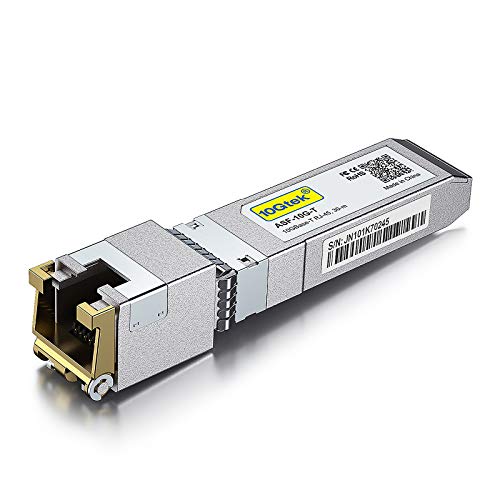
A copper module that names almost every switch brand you could own in a rack full of mixed gear.
A rack that mixes brands rather than one tidy ecosystem is where this module earns its place. It is a 10GBase-T SFP+ to RJ-45 copper transceiver (a module that turns the switch slot into a standard Ethernet port) that takes CAT.6a or CAT7 cable up to 30 meters. It is hot-pluggable with ESD protection (a static-discharge guard that stops a stray zap from killing the module or the switch port behind it). It needs no configuration or tooling — slide it into the cage and connect the cable.
The compatibility roster is the reason it is here. Cisco SFP-10G-T-S, Fortinet, Netgear, D-Link, TP-Link TL-SM5310-T, Linksys, Broadcom, Edge-core, EMC, F5, Meraki, Supermicro and other open switches are all listed. There is one caveat built into the listing: for Ubiquiti devices 10Gtek points buyers to a separate transceiver rather than this one. So if your rack is Cisco, Netgear or TP-Link, you are in the right place; if it is UniFi, pick the Ubiquiti-coded option instead.
Weigh it against the lighter QSFPTEK copper module above. At 1.76 ounces this 10Gtek is the heavier of the two, though the gap is small. What you are buying instead is the broader brand list, an ESD-protected chassis, and a 3-year warranty backed by a manufacturer of transceivers rather than a reseller. The flip side is the thin feedback footprint — 4.0+ stars across 100+ ratings, which is respectable but smaller than the long-running listings in this niche, so the picture is solid rather than exhaustive.
The mixed-rack advantage: Cisco, Fortinet, Netgear, D-Link, TP-Link, Linksys, Supermicro and more on one compatibility list — useful when your switches do not all carry the same badge.
Ubiquiti buyers turn the page: this variant is explicitly not the recommended one for Ubiquiti gear; 10Gtek sells a separate module for that.
Go with it if: your switch is Cisco, TP-Link, Netgear or another open-brand unit and you want ESD protection plus a 3-year warranty.
skip it if: you run UniFi hardware — the Ubiquiti-coded module is the one 10Gtek points you toward.
Understanding the Specs
Wavelength and Reach (1310nm, 10 km)
Wavelength is the colour of light the module fires down the fiber, measured in nanometers; 1310nm is the standard long-reach wavelength for single-mode glass. Reach is how far that light is rated to carry a full 10-gigabit signal — 10 km here. In plain terms, the wavelength tells you which cable type the module is built for, and the reach tells you whether your run fits. A module rated to 10 km gives you plenty of margin for building-to-building links; a module rated to 30 meters is for copper patch runs inside a rack. Exceed the reach and the link degrades into errors or drops entirely.
Fiber vs Copper Modules
A fiber module takes a dual LC connector and moves light down a glass strand. A copper module takes a standard RJ-45 plug and moves 10-gigabit over CAT.6a or CAT.7 twisted-pair cable. Copper is cheaper to install for short runs and plugs into the Ethernet ports you already know; fiber carries far greater distance and is immune to the electrical noise that can trouble copper in a busy equipment room. Copper wins on short in-rack runs; fiber wins on distance and electrical noise. Buying a copper module for a fiber run, or the reverse, is the most common and most expensive error here.
FAQ
Will an ER module work in my switch’s SFP+ port?
What is the difference between an ER module and an LR module?
Can I use a copper SFP+ module instead of a fiber one?
Why does my copper SFP+ module get hot?
Do these modules work at 5G and 2.5G as well as 10G?
Is a four-pack worth it if I only need one link?
Are Ubiquiti and Cisco modules interchangeable?
How long do these modules typically last?
Can I pull a module out while the switch is powered on?
What cable do I need for the single-mode fiber module?
Final Thoughts: The Verdict
For most people wiring fiber between switches, the 10Gtek 10GBase-LR four-pack is the pick: 10 km of reach at 1310nm, four modules that cover both ends of a link, and the widest fiber compatibility list in the guide. If your cable is copper and your rack is UniFi, the QSFPTEK Ubiquiti module plugs straight in. And for a mixed-brand rack where you want ESD protection and a 3-year warranty, reach for the 10Gtek copper module.
How We Picked
We do not accept paid placement. Every pick is matched to a real buyer and a real use-case; we do not hands-on test units.
Sources & Methodology
Specifications: manufacturer listings and product documentation. Review insights: verified customer reviews, as of November 2026. Pricing: not shown on this page (it changes often); check the current price via the retailer link.
As an Amazon Associate, Gadgets Feed earns from qualifying purchases. This does not affect which products we feature.