
Our readers keep the lights on and my morning glass full of iced black tea. As an Amazon Associate, I earn from qualifying purchases.
Specs are compiled from manufacturer listings and verified buyer reviews and can change over time — please confirm the key details on the product page before buying.
You want a wireless mouse that keeps up in a firefight without draining your bank account — and the short answer is that a budget pick can absolutely do it. The catch most buyers miss is that “budget” and “cheap sensor” are not the same thing — several picks here use the same sensor families as pricier mice. A handful of models in this tier carry the exact same sensor families you find in pricier mice, so the money you save goes to a plastic shell instead of your aim. The real deciding factors are weight in grams, battery hours between swaps, and whether the 2.4GHz link holds steady during a fast flick.
I’m Min — the founder and writer behind Gadgets Feed. This guide is built by comparing the manufacturers’ published specifications and the patterns across verified customer reviews, so you get each pick’s real strengths and trade-offs instead of marketing spin.
Some options here run on a single AA cell, others recharge over USB-C, and a few switch between 2.4GHz and Bluetooth so one mouse covers your desktop and your laptop. Below are picks sorted by how they feel and perform across a long session. Every pick here earns its place in a practical, genuinely affordable budget gaming wireless mouse shortlist.
Our Picks at a Glance


How To Choose The Best Budget Gaming Wireless Mouse
Shopping this shelf is about spending your money where it changes how the mouse feels in your hand, not where the box prints the biggest number. A 26,000 DPI headline sounds impressive, but your aim lives and dies on polling rate, sensor stability, and how much the shell weighs. Here is what actually separates a good cheap gaming mouse from a frustrating one.
Polling rate beats DPI every time
Polling rate is how many times per second the mouse sends its position to your PC. A 1000Hz rate means it updates a thousand times a second, so your crosshair moves the instant your hand does. That responsiveness — not a huge DPI figure — is what makes a flick feel connected. Several picks here run a full 1000Hz polling rate, which is the same report speed competitive mice use.
Weight decides your flick speed
Lighter mice are easier to whip across a mousepad and cause less wrist fatigue over a long evening. This list ranges from a 49g ultralight to a 90g mid-size shell. Ultralight models suit fast, low-sensitivity play; a slightly heavier body can feel more planted and stable for precise tracking. Neither is wrong — pick the weight that matches your grip and how far you move the mouse.
Power: AA cell or built-in battery
AA-powered mice mean you swap a battery and keep going, with no downtime tethered to a cable. Rechargeable models charge over USB-C but need a top-up every week or two depending on use. If you hate hunting for cables mid-session, a swappable AA cell is simpler; if you want one USB-C cable for charging and wired play, go rechargeable.
Quick Comparison
| Model | Best For | Sensor DPI | Weight | Battery | Amazon |
|---|---|---|---|---|---|
| Logitech G309 Lightspeed★ Best Overall | Best overall balance | HERO 25K | 86 g | 300 hours (AA) | Amazon |
| Logitech G305 LIGHTSPEEDCrowd Favorite | Proven crowd favorite | 12,000 DPI | 3.4 oz | 250 hours (AA) | Amazon |
| ASUS ROG Strix Impact IIILongest Runtime | Longest battery life | 36,000 DPI | 57 g | Up to 618 hrs | Amazon |
| Razer Orochi V2 | Compact travel pick | 18,000 DPI | Under 60 g | 950 hrs (BT) | Amazon |
| Redragon M916 | Featherweight budget | 26,000 DPI | 49 g | 150 hours | Amazon |
| ATTACK SHARK X3 | Ultralight + premium switches | 26,000 DPI | 49 g | — | Amazon |
| ATK VXE Dragonfly R1 SE+ | Lightest tri-mode option | 18,000 DPI | 55 g | 70 hours | Amazon |
| DIERYA M1 | RGB + multi-device | 24,000 DPI | 90 g | 180 hours | Amazon |
| AULA SC580 | Most connections | 12,000 DPI | 82 g | 288 hours | Amazon |
In‑Depth Reviews
1. Logitech G309 Lightspeed Wireless Gaming Mouse
Our pick — 4.5+★ from 800+ verified ratings; the strongest balance of quality and price.
Two wireless links, a sub-micron sensor, and a battery you’ll forget about for weeks.
What you get for your money here is a mouse that skips the cable entirely and still tracks with real precision. The HERO 25K sensor is rated to track to the sub-micron with zero smoothing, which in plain terms means your crosshair goes exactly where your hand sends it — no artificial jitter filtering between your movement and the screen. You can hook it up over LIGHTSPEED (Logitech’s low-latency wireless) or Bluetooth, so it earns its keep both at the desk and on a laptop.
Battery endurance is the headline that separates it from the pack. On a single AA cell it runs 300 hours, and if you add the POWERPLAY wireless charging system it never needs a swap at all. Compare that to the ATK VXE Dragonfly R1 SE+ at 70 hours — and the G309 still takes a standard AA cell. The included grip tape is a small touch that helps if your desk runs warm.
The trade-off is weight. At 86 g with the battery in, it is noticeably heavier than the ultralight shells on this list — the ATK sits at just 55 g by contrast. That extra heft can feel planted and stable, but if you play at low sensitivity and whip the mouse across a big pad, a featherweight will feel quicker. What wins people over is the overall build quality, and the crowd backs it up at 4.5+ stars across 800+ ratings. As buyers report, the clicking has a solid, satisfying mechanical action, and the LIGHTFORCE optical-mechanical switches (which combine an optical trigger with a mechanical feel) are built to take a beating.
What earns it the crown
- 300 hours on one AA battery — and unlimited runtime if you add POWERPLAY charging
- HERO 25K sensor tracks to the sub-micron with zero smoothing for precise aim
- Dual LIGHTSPEED and Bluetooth links cover desktop and laptop
- 6 programmable buttons for custom binds and shortcuts
Where it makes you compromise
- 86 g is heavy next to 49–55 g ultralight rivals
- POWERPLAY charging system is a separate add-on, not included
- Right-hand ergonomic shell only, not ambidextrous
Reach for this if: you want one reliable wireless mouse that runs for weeks, works on both PC and laptop, and tracks precisely — without paying for a flagship.
Pass if: you compete at very low sensitivity and want the lightest possible shell, where the featherweights below pull ahead.
2. Logitech G305 LIGHTSPEED Wireless Gaming Mouse, Hero 12K Sensor
The budget mouse that quietly became the default choice for a whole generation of players.
If a single number tells you why this one is so trusted, it is the 1 ms report rate: the mouse tells your PC where it is with one-millisecond responsiveness, so your aim stays glued to your hand during a fast swipe. The next-generation HERO sensor delivers up to 12,000 DPI sensitivity and up to 400 IPS precision — that IPS figure is the speed the sensor can track before it loses the plot, so hard flicks don’t smear your aim off target.
Endurance is just as practical. It runs 250 hours of continuous play on one AA battery, and switching to Endurance mode through Logitech’s G HUB software stretches that to as much as 9 months of normal use. As owners mention, plenty of owners simply don’t have to think about replacing the battery yet. The built-in nano-receiver storage is a small but genuinely useful detail — the dongle tucks inside the shell, so it travels with the mouse instead of getting lost in a bag.
Where it splits opinion is size and the long-term click. The compact shape is a joy in smaller hands and a bit tight in larger ones — the fit is the question, not the sensor. Some heavier users also note the click can develop a double-click over time, which is worth knowing if you’re rough on buttons. None of that has dented its standing: at 4.5+ stars across tens of thousands of owners, this is the benchmark budget gaming wireless mouse that everything else here gets measured against.
The honest read: for most new buyers this is the safest first gaming mouse you can pick — proven sensor, proven wireless, and a battery story that means you rarely think about power.
Think twice if: you have large hands, where the compact shell feels cramped, or you want a rechargeable built-in battery instead of AA swaps.
Who it suits: first-time wireless gamers and small-to-medium hands who want zero setup drama and near-zero battery worry.
Who should look on: big-handed players who want more palm room, and anyone who’d rather plug in a USB-C cable than swap a cell.
3. ASUS ROG Strix Impact III Wireless Gaming Mouse
A 57g shell with a sensor that reads to 36,000 DPI and a battery rated past 618 hours.
The precision here is aimed squarely at people who chase pixel-perfect tracking. The ROG AimPoint optical sensor is rated to 36,000 DPI with industry-leading less-than-1% deviation, meaning the cursor lands where you intend it to rather than drifting off line. If you play anything where a tiny correction decides the round — a headshot, a last-second peek — that tight tolerance is the spec that matters, not the headline DPI number on its own.
The endurance is the standout. ASUS rates it at up to 618 hours of battery life, and ROG SpeedNova wireless tech is tuned to keep the 2.4GHz link efficient so it lasts. You get Bluetooth as a second radio too, pairing up to 3 devices, and the ROG Omni Receiver lets one dongle connect multiple supported peripherals. At only 57 grams with a compact ambidextrous form, it slips into either hand and stays light through a long session.
What seals it for tinkerers is the replaceable-switch design — you can swap the main switches if a click ever wears out, rather than retiring the whole mouse. Responsiveness is what owners praise most, with the mouse performing like far pricier models in day-to-day use. The catch is a smaller user base than the giant names here, so there’s less independent feedback to lean on. Still, at 4.5+ stars the people who own it are happy.
Why it earns the premium slot: you’re paying for a 36,000 DPI sensor, a 57g ambidextrous body, and a rated 618-hour battery that together cover both competitive play and daily desk duty.
The friction: the replaceable switches and Omni Receiver appeal to enthusiasts, but the compact shell and smaller review base mean less hand-holding for a first-timer.
Best for: precision-focused players who want top-tier tracking and battery that rarely needs charging, and don’t mind a compact ambidextrous grip.
Skip if: you want the biggest, most-reviewed safety net, since this has a smaller owner base than the Logitech picks.
4. Razer Orochi V2 Wireless Gaming Mouse

A pocketable shell that runs up to 950 hours on Bluetooth — charge it and forget it for a month.
For anyone who games on a laptop and moves between desks, the number that jumps out is the endurance: up to 950 hours on Bluetooth, or up to 425 hours on Razer HyperSpeed Wireless for competitive play. You get both radios in one mouse, so you can use the efficient Bluetooth link for work and switch to the low-latency HyperSpeed connection when a match matters. The compact shape is engineered to feel right in small-to-medium hands and slip into a bag without bulking it out.
The 5G Advanced 18K DPI optical sensor is built to track with zero spinouts — that’s the cursor refusing to suddenly fly off when you whip the mouse fast — so hard flicks stay controlled. Under 60g excluding the battery, it feels quick to move, and the hybrid battery slot runs on a single AA or AAA cell, letting you bias toward lighter or longer-running depending on which battery you drop in. The 2nd Gen Razer Mechanical Mouse Switches are rated up to 60 million clicks, and their gold-plated contact points are there to keep the response steady over years of use.
The honest wrinkle: the responsiveness and wireless link get a mixed reception among owners, and some note double-clicking over time. What people clearly love is the build and the hand feel — it’s the weight and the size that win the room. Treat the switches gently and it rewards you with months of battery between charges.
Reasons it travels well
- Up to 950 hours on Bluetooth, 425 on HyperSpeed — weeks between charges
- Under 60g excluding battery for quick swipes on the go
- Runs on AA or AAA for flexible weight and endurance
- Switches rated up to 60 million clicks
What to keep in mind
- Responsiveness and wireless get mixed feedback from owners
- Some report double-clicking as switches age — handle with care
- Compact shell fits small-to-medium hands best
Pick this if: you want one light, battery-guzzling-never mouse that jumps between your laptop and desktop without complaint.
Look elsewhere if: you want the longest, most consistent click reliability and prefer a rock-solid wired-feel wireless link above all else.
5. Redragon M916 Wireless 49G Ultra-Light Gaming Mouse

A 49g body built to make every swipe feel like the mouse is barely there.
The defining number is 49 grams — this is a shell light enough that a fast flick costs almost nothing, which is exactly what low-sensitivity players chase. It runs on the PAW 3395 sensor, a chip family known for precise tracking, and offers 5 redefinable DPI levels (1000/2000/4000/8000/26000 default) with finer tuning between 50–26,000 through the software. Three connection modes — Bluetooth and 2.4GHz nano receiver, plus wired — mean it travels between devices easily.
What owners praise most is simply how light it feels in the hand, and they pair that with strong value. Battery life comes in at 150 hours, which is comfortable for weeks of play. The 5 programmable buttons are all remappable through Redragon’s software, with the default two side buttons covering your hotkeys, so you can set up binds without needing a deck of macros.
The recurring gripe is the plastic. Build quality and durability get mixed feedback, with some finding the shell feels cheap and shows scuffs and scratches over time. That’s a fair trade at this weight — going this light usually means thinner material. If you look after your gear, the lightness is worth the handling care.
The draw: 49g of well-tracked, PAW 3395-powered movement with three connection modes and 150-hour battery for players who value pure speed over finish.
The cost of lightness: the plastic shell scuffs and feels less premium, so this is one to handle with a little care rather than toss in a bag.
Made for: low-sensitivity players who want the absolute lightest shell and don’t mind a plainer, plastic build.
Not for: anyone who prioritizes a premium-feeling, scratch-resistant finish over sheer low weight.
6. ATTACK SHARK X3 Lightweight Wireless Gaming Mouse

Ultralight weight meets the kind of switches enthusiasts usually pay flagship prices for.
Two parts of this build punch above the price. First, the 49g shell — light enough that it reduces palm sweat and wrist fatigue through a long session, and shaped to support several grip styles. Second, the Kailh Black Mamba GM8.0 micro switches, rated to an 80 million click lifespan, paired with a TTC scroll wheel encoder for precise positioning. In plain terms, you get a crisp, fast-rebound click that’s built to survive heavy use.
The PAW3395 optical sensor reaches up to 26,000 DPI, so you have all the tracking range you’d want for anything from tracking-heavy play to office work. Three connection modes — USB-C wired, 2.4G wireless, and Bluetooth 5.2 — let you connect up to 4 devices at once and switch with a button, so it moves cleanly between your PC and laptop. The 5 programmable buttons can be set for DPI, polling rate, LOD (lift-off distance — how high you can lift the mouse before tracking stops), shortcuts, and macros through the driver.
On the downside, the responsiveness feedback is split — some find it crisp while others say the scroll moves slowly for their taste. Battery life also draws mixed notes, so plan around a recharge rhythm rather than expecting endless runtime. What owners clearly like is the lightness and the solid, crisp-click build, which lands it at 4.0+ stars.
Choose it: if you want 49g speed plus enthusiast-grade Kailh switches and a 26K sensor, and you’re happy to keep an eye on charge levels.
Choose another if: you want the most predictable battery life or dislike any variance in scroll feel.
7. ATK VXE Dragonfly R1 SE+ Wireless Gaming Mouse
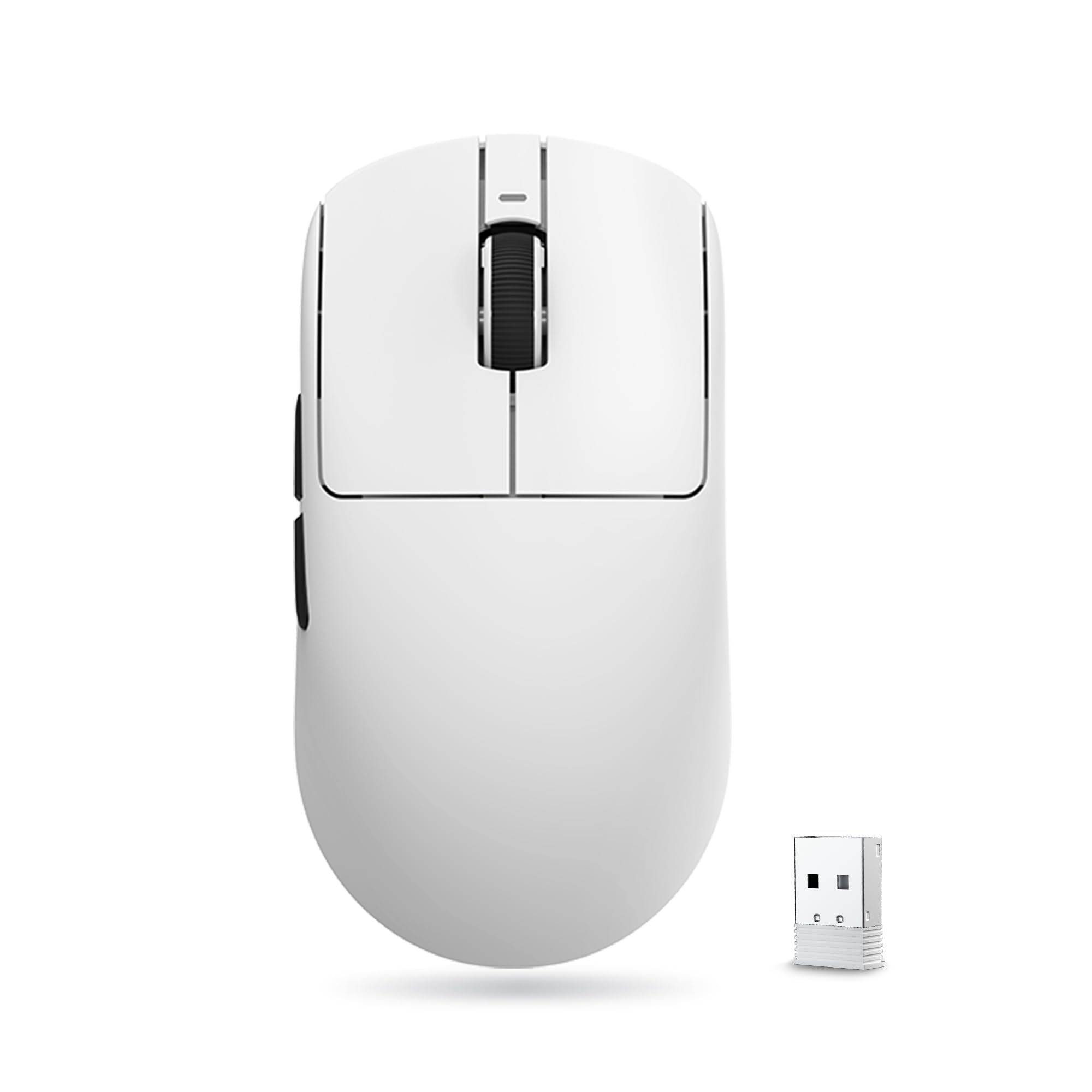
55 grams, three connection modes, and a symmetrical body that suits small and medium hands.
This is a straightforward promise: a 55g symmetrical shell that cuts hand fatigue through long sessions, in a size that fits medium and small hands well. The PAW3395 SE sensor is adjustable from 10 to 18,000 DPI with 10 DPI fine stepping, and the BEKEN chip with Smart Speed X wireless transmission keeps the signal stable. It supports both wired and wireless at a 1K polling rate, so it stays responsive whether you’re gaming or working.
You get tri-mode flexibility — wired, 2.4G wireless, and Bluetooth — for switching between devices, and the Huano Blue Glow V2 microswitches are built with crisp rebound to head off double-click trouble. Standard Swift PTFE feet (the low-friction pads underneath) help it glide smoothly, and all side and main buttons are programmable through the driver. The 520mAh rechargeable battery is rated for up to 70 hours of continuous use at 1000Hz, and customers note it lasting up to three weeks on a charge in normal play.
Two honest notes. The wireless link gets mixed feedback, so keep the dongle well-placed for a stable connection. And running at full 70-hour-rated endurance means watching your polling settings. Value is where it shines — you’re getting a light tri-mode body with a capable sensor for very little outlay.
Where it wins: a 55g symmetrical shell, 18K sensor, and tri-mode connectivity at a price that undercuts the big brands, with weeks of battery between charges.
Keep an eye on: the mixed wireless feedback means a clean line of sight to the dongle matters for the steadiest link.
Ideal for: small-to-medium hands wanting a genuinely light tri-mode mouse with a strong sensor and little spend.
Reconsider if: you need the most bulletproof wireless reliability or prefer AA-battery simplicity over recharging.
8. DIERYA M1 Wireless Gaming Mouse
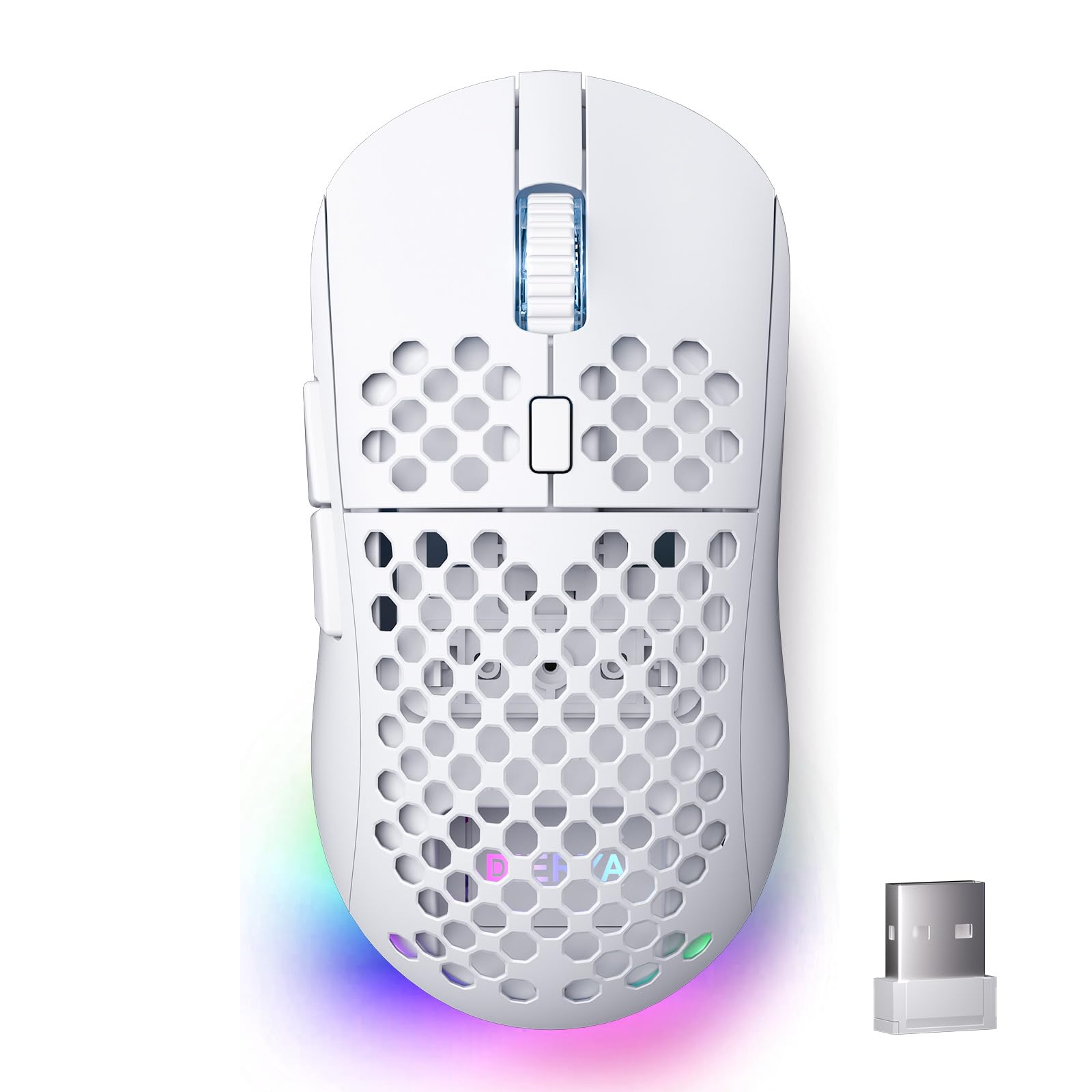
Four-device tri-mode switching and a light show, in a roomier 90g shell.
The spec that stands out is multi-device flexibility: 2.4GHz at 1000Hz, Bluetooth 5.2 with dual-device pairing at 125Hz, and USB-C wired at 1000Hz, saving up to 4 device profiles you switch with a dedicated button. The sensor customizes from 200 up to 24,000 DPI across six preset levels (400/800/1600/3200/4800/6400), with an adjustable report rate from 125 to 1000Hz and speeds up to 300 IPS. For a work-and-play setup that moves between a phone, tablet, and PC, that’s a lot of switching power.
Battery is a 1000mAh rechargeable unit rated up to 180 hours in ECO mode, or 48 hours with full RGB on, and a fast charge tops it up in about an hour. The RGB side is serious — 13 lighting effects across 16.8 million colors. The 90g shell is a symmetrical mid-size with a sweat-resistant honeycomb texture, and the Huano microswitches are rated to 20 million clicks.
The catch is reliability at the extremes. Functionality and battery get mixed feedback, with some owners reporting issues where the mouse refuses to work unless plugged in, or takes a long time to charge. For most it works well, but it’s the pick where you’re most likely to hit a teething issue. That said, quality and the light weight are what people appreciate most.
Good match for: gadget-lovers juggling several devices who value RGB and profile switching, and don’t mind occasional charging quirks.
Better to skip if: you want the most reliable no-drama power setup and prefer proven long-term dependability.
9. AULA SC580 Wireless Gaming Mouse

Three radios, up to four devices, and a battery that stretches into the hundreds of hours.
If you constantly hop between a desktop, laptop, and tablet, the SC580’s three connection modes — 2.4G wireless, Bluetooth 5.0, and USB-C wired — cover all of them and save up to 4 devices you flip between with a bottom switch. The 6 adjustable DPI levels (800/1600/2400/3200/6400/12,000) plus a 1000Hz polling rate give you low-latency, non-jumping tracking, so the cursor stays smooth when you push it fast.
Battery is a big selling point: the 500mAh rechargeable cell is rated to last 10–14 days with 5 hours of daily use, and the specs list a battery average life of 288 hours. As reviewers point out, it lasts a long time and even arrives fully charged. The right-handed 82g ergonomic body with the included non-slip stickers keeps your grip secure during long work and play sessions, and the 10-million-click lifespan means it holds up over time.
The honest caveat: while the 8-button layout supports programming, the driver only works on Windows and only in 2.4GHz or wired mode — so Bluetooth users lose the macro customization. Functionality and responsiveness also draw mixed notes. For pure plug-and-play multi-device duty, though, it’s hard to argue with the price.
Best if: you want one cheap mouse to rule several devices and value long endurance and an 8-button layout.
Look elsewhere if: you need full macro programming over Bluetooth or on a Mac, since the driver is Windows-only.
Understanding the Specs
Polling rate (Hz)
This is how many times per second the mouse reports its position to your PC. A 1000Hz rate means a thousand updates a second, so the cursor tracks your hand almost instantly — which is what makes a quick flick feel connected rather than laggy. Lower rates like 125Hz are fine for office work but can feel sluggish in fast games.
DPI and sensor speed
DPI is sensitivity — how far the cursor travels per inch of physical movement. A 12,000 DPI mouse tracks plenty for most players; 26,000 or 36,000 gives more headroom for high-resolution screens. Just as important is how fast the sensor can track before it loses grip (measured in IPS, inches per second), and whether it avoids jitter.
Weight (grams)
Lighter mice are quicker to whip and less tiring over a long evening. Ultralight shells (49–57g) suit fast, low-sensitivity play, while a heavier 82–90g body can feel more planted for precise tracking. Match the weight to your grip style and how much wrist movement you rely on.
Battery life (hours)
Runtime is listed in hours of use. An AA-powered mouse lets you swap a cell and keep going with no cable downtime; a rechargeable one charges over USB-C but needs topping up weekly or so. Longer ratings like 618 hours mean weeks between charges for most players, while 150 hours is a comfortable multi-week rhythm.
FAQ
Is a budget gaming wireless mouse good enough for competitive play?
Will a wireless gaming mouse work with my Mac or laptop?
How long does the battery last on a budget wireless gaming mouse?
Is a lighter mouse always better for gaming?
What does tri-mode connectivity mean on a gaming mouse?
Should I pick an AA battery or a rechargeable gaming mouse?
Do I need 26,000 DPI or is 12,000 DPI enough?
Can a budget wireless mouse handle both gaming and office work?
What is lift-off distance and does it matter on a cheap mouse?
Final Thoughts: The Verdict
For most people hunting a budget gaming wireless mouse, the Logitech G309 Lightspeed is the one to start with — a sub-micron HERO 25K sensor, dual LIGHTSPEED and Bluetooth wireless, and 300 hours on a single AA cell give you precision and endurance without a single compromise in daily use. If what you actually want is the most proven, most-reviewed safety net in the tier, the Logitech G305 is the value champion with a 1 ms report rate and a monster review base. And for the collector who wants the longest rated runtime on the shelf, the ASUS ROG Strix Impact III brings a 36,000 DPI sensor and up to 618 hours of battery to the party. Whichever you choose, prioritize the weight and wireless link that match how you play.
How We Picked
We do not accept paid placement. Every pick is matched to a real buyer and a real use-case; we do not hands-on test units.
Sources & Methodology
Specifications: manufacturer listings and product documentation. Review insights: verified customer reviews, as of November 2026. Pricing: not shown on this page (it changes often); check the current price via the retailer link.
As an Amazon Associate, Gadgets Feed earns from qualifying purchases. This does not affect which products we feature.