
Our readers keep the lights on and my morning glass full of iced black tea. As an Amazon Associate, I earn from qualifying purchases.
Specs are compiled from manufacturer listings and verified buyer reviews and can change over time — please confirm the key details on the product page before buying.
If your calls keep starting with “sorry, can you hear me?”, the fix is usually the microphone, not the meeting app. Business headphones live or die on one job: making your voice arrive clean while the dog, the keyboard, and the open-plan chatter stay out of the call. Below you’ll find nine headsets that do that job at three different price tiers, sorted by who each one actually fits.
I’m Min — the founder and writer behind Gadgets Feed. This guide is built by comparing the manufacturers’ published specifications and the patterns across verified customer reviews, so you get each pick’s real strengths and trade-offs instead of marketing spin.
You’ll see where a wired connection still beats Bluetooth for reliability, why a boom mic beats an inline one, and which battery figure actually matches a full workday. The short answer on the best business headphones: match the mic and the connection type to how you work, not the biggest spec number.
Our Picks at a Glance


How To Choose The Best Business Headphones
Start with the microphone, because that is the part your colleagues actually judge you on. A rotatable boom mic that sits near your mouth picks up your voice far better than a mic buried in the earcup, and the noise-cancelling version of that mic filters the room around you.
Match the connection to your desk
A USB dongle (a small plug that creates its own wireless link) skips your computer’s Bluetooth entirely, so you get a stable connection on older machines and full mute control from the PC. Bluetooth alone is fine if you move between a laptop and a phone all day. A wired USB-C or 3.5mm set never needs charging, which is the simplest answer for a fixed desk.
Read talk time honestly
Talk time is the battery figure that matters for calls — music playback usually runs longer. A headset rated for 30 hours of talk time covers several shifts between charges. Anything with a quick-charge feature buys you a working session back from a short top-up.
Decide how much head pressure you’ll accept
Over-ear models with memory foam pads spread weight across your head, while on-ear and open-ear designs sit lighter but seal less. If you wear a headset for back-to-back meetings, weight in grams and pad material decide whether hour eight feels fine or painful.
Quick Comparison
| Model | Best For | Connection | Talk Time | Weight / Driver | Amazon |
|---|---|---|---|---|---|
| AOC Wireless Headset with Mic for Work★ Best Overall | All-day office calls | Bluetooth, wired, wireless | 45 hours | 40mm drivers | Amazon |
| TECKNET Wireless Headset 6.0 ENCBest for Drivers | Truckers and hybrid single/dual ear | Bluetooth 6, USB-C | 30 hours | On-ear | Amazon |
| Yealink UH44Best Wired Pick | Fixed desk, no charging | Wired USB-C/A | — | 5.7 oz / 35mm | Amazon |
| OTYHVV Wireless Headset with Mic | Dock-charging hybrid workers | Bluetooth 5.2, USB dongle | 40 hours | 40mm drivers | Amazon |
| Logitech Zone 305 | Teams deployments at scale | Bluetooth 5 | — | 122g / 30mm | Amazon |
| Lenovo Wireless VoIP Headset | Teams-certified multipoint | Bluetooth 5.3, USB-A receiver | 31 hours | 140g | Amazon |
| Poly Blackwire 5220 | Platform-certified desk work | Wired USB-C, USB-A, 3.5mm | — | Over-ear | Amazon |
| SHOKZ OpenComm2 UC | Open-ear mobile workwear | Bluetooth 5.1, USB-C dongle | 16 hours | 35g / bone conduction | Amazon |
| Logitech Zone Vibe Pro | Premium sound plus ANC | Wireless, multipoint | 30 hours playback | 40mm drivers | Amazon |
In‑Depth Reviews
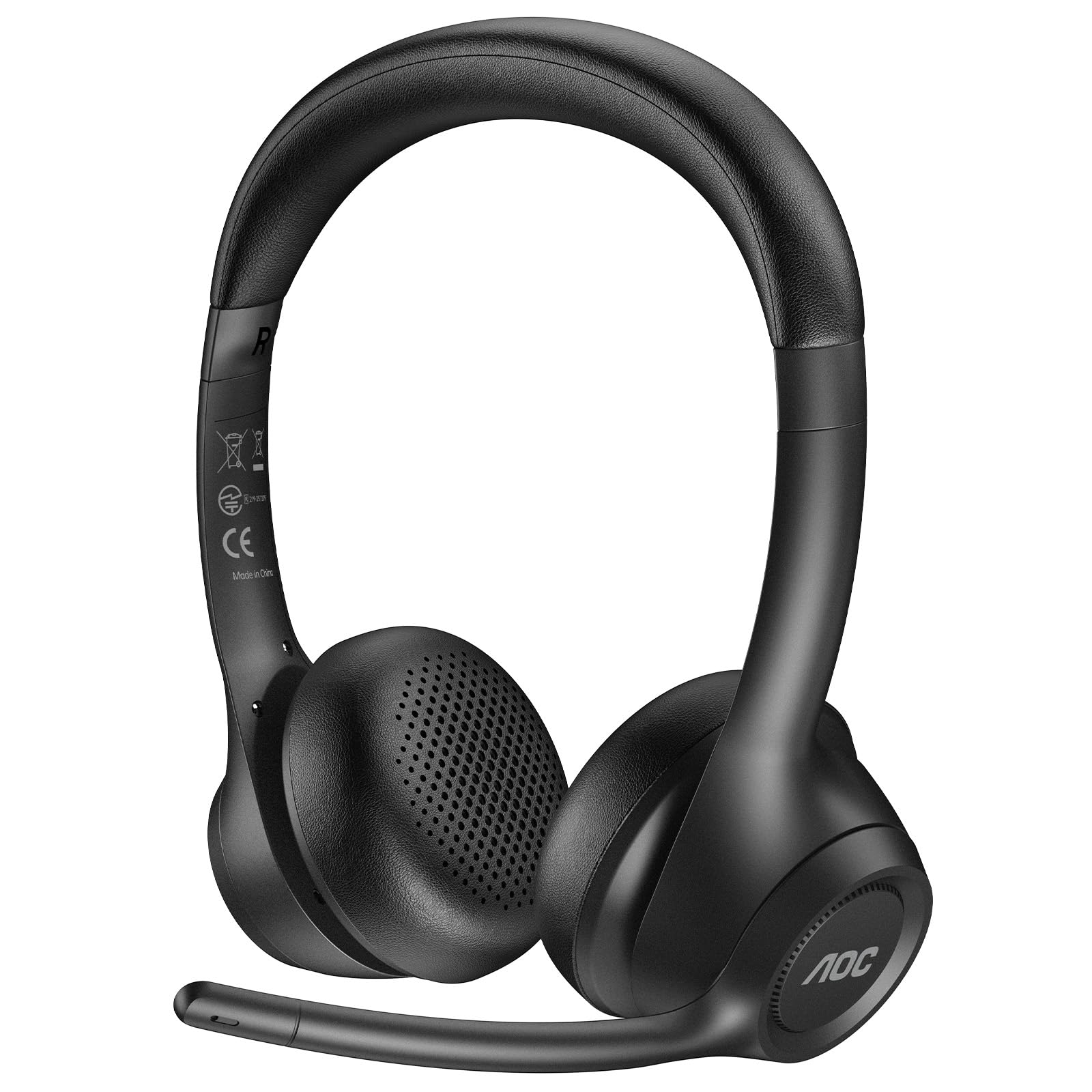
1. AOC Wireless Headset with Mic for Work, ENC Noise Cancelling Mic
Our pick — 4.5+★ from 450+ verified ratings; the strongest balance of quality and price.
A 45-hour talk-time headset with a rotating AI-ENC boom mic for back-to-back calls.
The number that earns this the top spot is 45 hours of talk time. That figure comes from a 450mAh battery, and it means you can go a whole week of typical meetings without hunting for a cable. A 2-hour recharge refills it, and charge-and-play means you can plug in mid-call and keep talking.
On the mic side, this one uses an AI-powered noise-cancelling boom that the maker claims filters out up to 99% of background noise. The boom rotates 90 degrees, so you can swing it up out of the way when you’re not speaking. Audio runs through 40mm drivers (the speaker units), and the protein memory foam pads are built for 8+ hour workdays.
The catch is connection detail. Bluetooth range is listed at 10 meters, so wandering to the kitchen mid-meeting will drop you. There’s a 20ms audio latency figure (the delay between sound arriving and you hearing it), which is fine for calls but tells you this is a headset first and a music device second. Wired mode and a Type-C to 3.5mm adapter are in the box if you want a cable as backup.
Where it pulls ahead
- 45 hours of talk time dwarfs the TECKNET’s 30 hours per the manufacturer’s figures.
- The 90° rotating noise-cancelling boom handles open-plan chatter and keyboard clatter.
- Charge-and-play plus a 2-hour full recharge keeps it alive during a critical session.
- Works with Windows, macOS, iOS and Android and is tuned for Zoom, Teams and Skype.
Worth knowing first
- 10-meter Bluetooth range is a room-level leash, not a whole-office one.
- Gunmetal is the only color listed.
- Push-button controls rather than touch, which some buyers prefer for feel.
Made for the calendar-full desk: 45-hour talk time and a boom mic make it the safe default for anyone on calls most of the day.
Look elsewhere if: you need to walk the building while staying live — the 10-meter range will cut you off.
2. TECKNET Wireless Headset, 6.0 ENC Bluetooth Headset with Microphone
A Bluetooth headset that switches between single-ear and dual-ear mode for drivers.
Truckers and anyone working with one ear on the real world get something genuinely unusual here: you can run it single-ear for situational awareness on a call, or switch to dual-ear for stereo sound. That single/dual mode switch is the whole reason this model exists, and it’s why it’s the pick for drivers rather than desk workers.
The Bluetooth 6 connection holds up to 33 feet / 10 meters, and the 270° rotating mic (which the maker also claims cancels outside noise) lets you aim the boom across either cheek. Power is honest for the money: 30 hours of talk time at 70% volume, 55 hours of music, and 500 hours of standby, with a 2-hour charge via the base or a Type-C cable.
Compare that to the AOC above, which lists 45 hours of talk time against this model’s 30 hours — the TECKNET gives up battery life in exchange for the dual-mode chassis. The catch is the on-ear fit: it’s a lighter, less sealed design than the over-ear pick, so heavy noise around you won’t be blocked the same way. A 36-month warranty covers registered buyers, which is rare at this tier.
Driver-first design: the single/dual-ear flip is a real safety feature, and 30 hours of talk time covers a couple of shifts between charges.
Worth knowing first: on-ear cushions seal less than over-ear pads, so a loud cab or depot will leak into your call more than the sealed picks will.
Reach for this if: you split work between calls and moving around — the one-ear mode keeps you aware.
Skip the swap if: you sit at one quiet desk all day; you’re better served by the longer talk time of the AOC.
3. Yealink UH44 Wired USB Headset for Work
A wired USB headset with a dual-mic array that filters keyboard clatter and nearby voices.
The defining spec is the dual-microphone array. Two mics instead of one let the headset filter keyboard clatter and nearby voices more effectively, which is the single thing that separates a clear call from a muddled one. The 35mm drivers run a 20Hz–20KHz frequency range, and an auto-equalizer switches between call and music modes.
Comfort is where this earns a desk spot. The frame weighs 5.7 oz with larger ear pads, and the maker says the ergonomic shape supports up to 12 hours of comfortable wear. Rotatable ear cups fit both sides, and a 280° rotating mic boom means you don’t have to worry about left or right placement. A single-sided red busy indicator goes on during a call to keep coworkers from interrupting.
The line control handles mute, volume, and answer/end from the cable, with a 2.15m USB-C/A adapter for a laptop or PC and a carrying case included. The trade-off is obvious: no battery, but also no wire-free mobility. You’re tethered to the desk. That’s a feature for anyone who hates charging and a dealbreaker for anyone who paces on calls.
The tether is the point: dual mics and a 15-foot-or-so cable make it the cleanest choice for a fixed desk job.
Pass it over if: you take calls while walking — a corded set can’t leave the computer.
4. OTYHVV Wireless Headset with Mic for Work, Bluetooth Headset with Microphone for PC
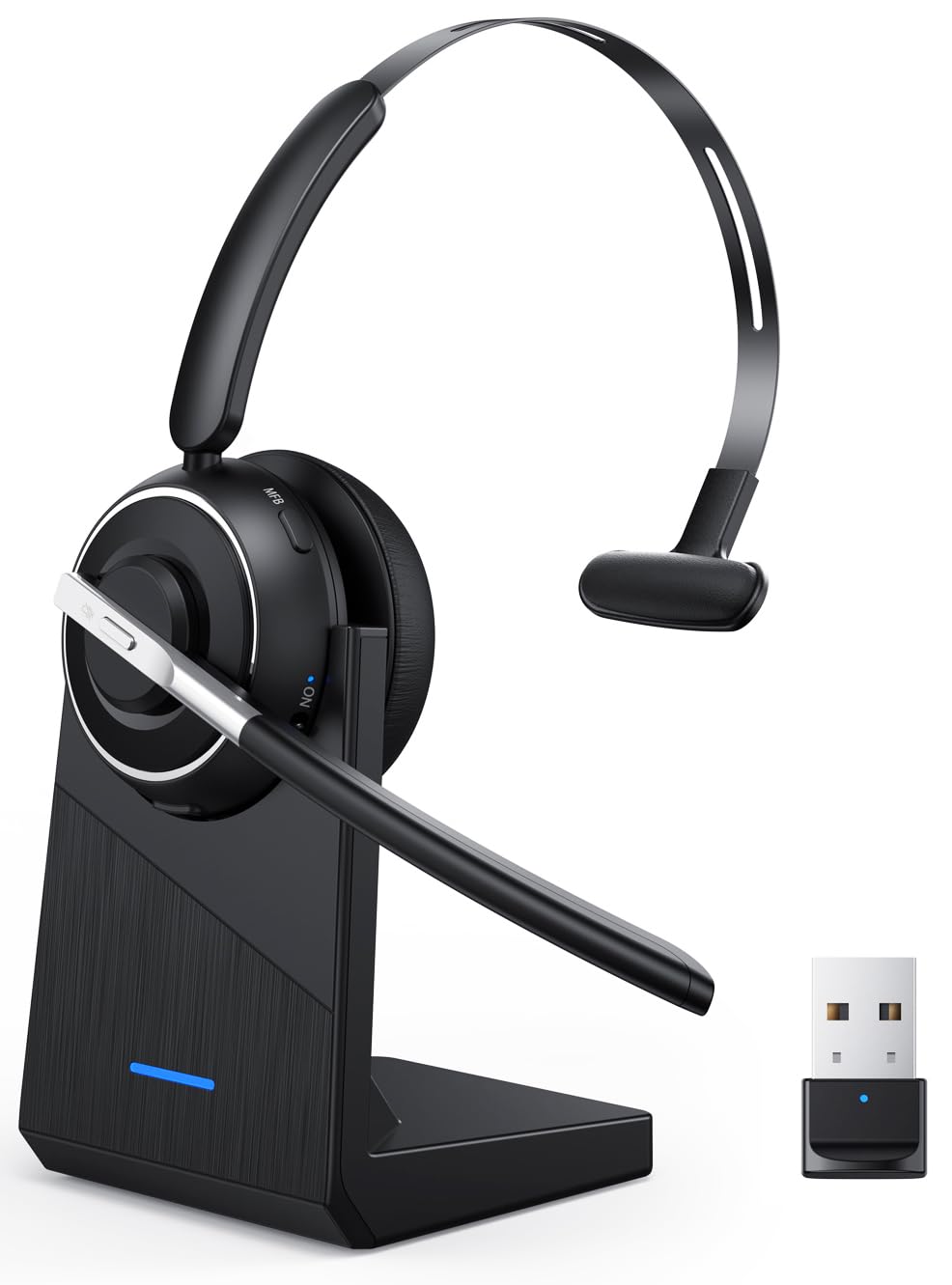
A wireless headset with a charging dock and a USB dongle that skips your PC’s Bluetooth.
What wins people over here is the combination of a USB dongle and a charging dock. Plug the dongle in and the headset connects without drivers, even on a computer with no Bluetooth at all, and the dock keeps it topped up between calls. The physical on/off toggle is the other smart bit — flip it once and the headset reconnects to your device automatically.
Battery is listed at 40 hours of talk time with a 2-hour recharge, or up to 45 hours battery average life in the spec sheet. The 40mm drivers and AI noise-cancelling mic with a 270° rotating boom are aimed squarely at open-plan and home-office noise. The mute button sits on the boom and announces “Mute on” / “Mute off” out loud, and PC mute works through the dongle rather than Bluetooth.
The catch is the latency: 180ms is a noticeable lag, fine for calls where you’re not reacting to audio in real time, but it’s not a gaming headset. Bluetooth 5.2 gives a 33-foot range, so you can move around a home office. The dock is the real selling point — it eliminates the cable scramble and protects the charging port.
What it does well
- USB dongle means plug-and-play on computers without Bluetooth, plus full PC mute control.
- 40 hours of talk time on a 2-hour recharge, and the dock keeps it ready.
- Voice prompts confirm mute status, so no “you’re on mute” embarrassment.
- Physical toggle switch beats holding a button to power on.
Where it gives ground
- 180ms latency rules out real-time gaming or audio work.
- Bluetooth 5.2 is a generation behind the Lenovo’s 5.3.
- Charge time of 2 hours is standard, not a standout.
Built for the hybrid desk: the dock and dongle make it the least fiddly wireless option for someone who moves between home and office.
Not for you if: you need low-latency audio — the 180ms delay rules it out for anything beyond calls.
5. Logitech Zone 305 for Business Wireless Bluetooth Headset

A 122g Teams-certified Bluetooth headset that connects without a dongle.
At 122g, this is the sort of headset you forget you’re wearing through a long meeting block. The padded headband and earcups keep it comfortable, and the 30mm drivers are tuned for video conferencing rather than music. It’s certified for Microsoft Teams over native Bluetooth, which is the reason IT departments roll it out at scale.
The dual noise-cancelling mics sit on a flip-to-mute boom, so dropping the boom mutes you instantly — a genuinely useful habit for calls you take back-to-back. Logitech Sync lets admins monitor usage and push firmware updates, which is why it fits a company deployment rather than a single desk.
Be clear-eyed about the fit. The spec sheets and owner feedback disagree on the noise cancellation, and the honest caveat here is that this is a business headset first — if you expect deep active noise blocking, look at the Zone Vibe Pro instead. Bluetooth 5 gives a 30-meter range, which is generous. What the spec sheet doesn’t do is impress on raw audio, so buy it for the weight and the Teams integration.
The IT-friendly angle: Teams certification plus Sync management makes it easy to deploy across a team.
The fit note: noise cancellation is the weakest story here — treat it as a comfortable call headset, not a quiet-focus pair.
Choose this if: you want the lightest over-ear call headset for a Teams-heavy office where the company manages the fleet.
Think twice if: strong noise blocking is your priority — the Zone Vibe Pro handles that far better.
6. Lenovo Wireless VoIP Headset Teams Certified

A Teams-certified headset with a three-mic array and 31 hours of talk time.
The three-mic noise suppression array is the star here. Three mics work together to isolate your voice and reject the room, and that’s the spec that matters when a customer is trying to hear you over background noise. The headset is certified for Microsoft Teams Open Office and works with the included USB-A receiver for full Teams functionality.
Battery is generous: 31 hours of talk time or up to 60 hours of music playback on a single charge, with a 2-hour recharge. At 140g with adjustable memory foam earcups, it’s light enough for a long workday. Bluetooth 5.3 with multipoint means you can switch between two devices at once, so a laptop and a phone can share the headset without re-pairing.
The honest trade-off is durability and connectivity. The spec lists connectivity as mixed, so treat the USB-A receiver as the reliable path and Bluetooth as the backup. The 140g frame is heavier than the 122g Logitech Zone 305, so if pure featherweight wear is the goal, that Logitech is the lighter pick. For a Teams-certified desk phone companion, the multipoint plus the receiver is hard to argue with.
For the Teams-first office: three-mic clarity, 31 hours of talk time, and multipoint switching make it a strong desk companion.
Look past it if: you need the absolute lightest frame — the Zone 305 beats it on weight.
7. Poly Blackwire 5220 Wired Headset

A wired headset with USB-C, USB-A and 3.5mm connectors for any laptop or phone.
The reason to pick this Poly is the connection set: USB-C, a tethered USB-A adapter, and a 3.5mm jack all in one box. That means it connects to a modern laptop, an older PC, and a phone with a headphone socket without buying an adapter. It’s certified for Microsoft Teams and Zoom, and the dynamic EQ switches voice and multimedia sound based on what you’re doing.
The noise-cancelling boom mic and conforming ear cushions provide passive noise isolation — that’s physical blocking, not electronic cancellation. The flexible boom lets you place the mic exactly where you want it. A retractable cable and carrying case round out the desk-set package.
What’s worth flagging: this is a passive-isolation set, so truly loud rooms will still bleed in. The comfort with soft ear cups is a genuine strong point, and the platform certification is the reason it’s the safest plug-and-play choice for a company laptop. If you want active noise cancellation, look at the Zone Vibe Pro; if you want a cable that never runs out, this is your pick.
What stands out
- Three connection options — USB-C, USB-A and 3.5mm — cover almost any computer.
- Certified for Microsoft Teams and Zoom for plug-and-play reliability.
- Dynamic EQ tunes voice and media sound automatically.
What to weigh
- Noise isolation is passive only, so a loud room still leaks in.
- No battery means no wire-free walking.
- Cable-bound design limits movement on calls.
Go wired without worry: three connectors and Teams/Zoom certification make it the lowest-friction desk set for a company laptop.
Not the one for: a noisy open office where you need electronic noise blocking — this set isolates passively.
8. SHOKZ OpenComm2 UC Open-Ear Headset

A 35g bone-conduction headset that keeps your ears open to the office.
Bone conduction is the whole point here: the headset sends sound through your cheekbones instead of your ear canal, so your ears stay open and you hear both the call and the office. That’s why 35g of weight, a flexible frame, and an IP55 water-resistant soft silicone finish add up to a headset you can wear for hours without pressure. For mobile workers who move around all day, the open design is the reason to pick it.
Call stability comes from the Shokz Loop120 USB-C wireless adapter, which keeps a PC or Mac connection steady, and the headset is Zoom-certified. Shokz’s 7th generation bone conduction and PremiumPitch 2.0 audio carry the sound, with a noise-cancelling mic and DSP (digital signal processing, which cleans the mic input) on the boom. Physical buttons handle volume, mute, and play/pause.
The one figure to plan around is 16 hours of talk time and 8 hours of listening per charge, with a 5-minute quick charge giving 2 hours of talk time. That’s shorter than the 45-hour AOC, so this is a headset you charge daily rather than weekly. It’s the right pick if open ears and light weight matter more than maximum battery.
Why it earns its spot: 35g plus bone conduction keeps your ears open, so you can hear the room and the call at once.
The trade-off: 16 hours of talk time means daily charging — this isn’t the set for a week away from a cable.
Best if you’re always moving: open-ear comfort, a Zoom-certified dongle, and 35g of weight suit a mobile workday.
Consider a different pick if: you want maximum talk time without charging — the 45-hour AOC lasts far longer.
9. Logitech Zone Vibe Pro Wireless Over-Ear Headphones

The one that turns call time into something closer to a music session.
Adaptive noise cancellation plus AI-powered voice isolation is the headline: the headset builds a “sound bubble” so you hear and are heard cleanly. The 40mm drivers are tuned for music, movies, and podcasts with strong bass and lower distortion, so this is the model you reach for when the same headset has to carry calls and downtime.
Comfort is handled by a flexible strap that spreads pressure and dual-layer earpads that cushion your ears. Multipoint Bluetooth lets you switch between devices, with a wireless range up to 50 meters (about 170 ft) — far more slack than the room-level sets. Battery runs up to 30 hours with ANC on, and a USB-C cable keeps it going while it charges.
The premium details are what you’re paying for here: replaceable earpads and headband, an tune charging option to extend battery lifespan, firmware updates through Logi Tune, and plastic parts made with a minimum of 29% post-consumer recycled material. The honest catch is it’s the priciest tier — if you only make calls, the AOC covers that job. If you want one headset for calls and music, this is the deep end.
For the all-day audio user: adaptive ANC, 40mm drivers, and 30-hour playback make it a genuine two-in-one for work and music.
Money better spent elsewhere if: you only need clear calls — the dedicated call headsets handle that for far less.
Understanding the Specs
Talk time vs. playback time
Talk time is the battery hours a headset manages while the microphone is live on a call, which drains power faster than music playback. A headset rated for 30 hours of talk time often lists a much longer music figure. When you’re comparing, check the number that matches how you use it — call-heavy workers should read the talk-time figure first.
Noise-cancelling tiers
There are two kinds of quiet. Passive isolation is physical — ear pads and cushions that block sound. Active noise cancellation (ANC) uses electronics to cancel ambient sound. A boom mic with noise cancellation cleans your voice on the other end. A headset can have great mic noise cancellation and no ANC at all, so decide which kind of quiet you need before you buy.
USB dongles and multipoint
A USB dongle creates its own wireless connection, bypassing your computer’s Bluetooth entirely — useful on older machines and for full mute control. Multipoint Bluetooth lets one headset hold two device connections, so a laptop and phone share it. If you juggle both, multipoint is the convenience feature that saves the most re-pairing.
Weight and head pressure
Weight in grams and pad material decide comfort over a long day. Lighter frames (35g, 122g) sit softly but often seal less; heavier over-ear sets with memory foam pads spread pressure better. There’s no single right number — match the weight to how many hours you’ll wear it and how much noise you need sealed out.
FAQ
Do I need a USB dongle if my laptop already has Bluetooth?
Will a business headset work with Zoom, Teams and Google Meet?
What is the difference between passive and active noise cancellation?
How many hours of talk time do I need for a full workday?
Is a wired headset better than wireless for work calls?
Can a business headset pair with both my phone and laptop?
Will a noise-cancelling mic stop my coworkers hearing my dog?
Does an open-ear headset leak sound to people nearby?
How long does a business headset battery last before it degrades?
Can I wear a business headset over my glasses comfortably?
Final Thoughts: The Verdict
For most people, the business headphones winner is the AOC Wireless Headset because 45 hours of talk time and a rotating noise-cancelling boom cover the calls-and-charging basics without drama. If you work from a fixed desk, grab the Poly Blackwire 5220 and skip the charging routine altogether. And for noisy offices where you need the room to go quiet, the Logitech Zone Vibe Pro is the one to reach for.
How We Picked
We do not accept paid placement. Every pick is matched to a real buyer and a real use-case; we do not hands-on test units.
Sources & Methodology
Specifications: manufacturer listings and product documentation. Review insights: verified customer reviews, as of November 2026. Pricing: not shown on this page (it changes often); check the current price via the retailer link.
As an Amazon Associate, Gadgets Feed earns from qualifying purchases. This does not affect which products we feature.