
Our readers keep the lights on and my morning glass full of iced black tea. As an Amazon Associate, I earn from qualifying purchases.
Specs are compiled from manufacturer listings and verified buyer reviews and can change over time — please confirm the key details on the product page before buying.
Your monitor is almost certainly sitting too low, and your neck is paying for it every afternoon. The fix is a platform that can actually change height — not a fixed wooden box that pins your screen in one spot forever. Every pick below adjusts, from button-press leg changes to twist knobs and clamp-on designs for tiny desks.
I’m Min — the founder and writer behind Gadgets Feed. This guide is built by comparing the manufacturers’ published specifications and the patterns across verified customer reviews, so you get each pick’s real strengths and trade-offs instead of marketing spin.
One honest note before you scroll: this list uses flexible, human-like matching, so not every pick is the exact model you pictured — the nearest same-type riser serves the same purpose. What matters is whether it lifts your screen to eye level and holds it there, which is what the adjustable monitor riser for desk rundown below helps you check.
Our Picks at a Glance


How To Choose The Best Adjustable Monitor Riser For Desk
Most people buy a riser by looking at the photo and guessing. That is how you end up with a shelf that sits two inches too low and a monitor you keep tilting upward like a dinner plate. Start with three numbers instead: your eye height when seated, your monitor’s weight, and how much desk room you can give away.
Match the height range to your body, not the box
A riser only helps if its lowest and highest settings bracket your eye line. A stand that lifts from 3.4 to 4.9 inches works fine for a tall chair and a low desk. A tall stand that reaches 13.8 inches suits someone who wants the screen well above a laptop. Measure your seated eye height once, then check that figure falls inside the stand’s range — that single check solves most of the guesswork.
Then check the load number
The load capacity in pounds (how much weight the shelf holds safely) tells you what the stand is built for. A 13-pound limit is meant for one light panel. A 44-pound or 50-pound platform can carry a heavier display, a laptop, or even a printer. Do not assume a metal stand automatically means heavy-duty — the published number is the only figure that counts.
Decide how much desk space you can spare
Four legs and a full platform give you storage underneath but eat real estate. A rear single column gives you more usable surface because there is no leg in the way. A clamp-on design hangs off the edge and frees the space beneath entirely. Choose based on how cluttered your desk already is, not on how the stand looks in a listing photo.
Quick Comparison
| Model | Best For | Height Adjustment | Load Capacity | Material | Amazon |
|---|---|---|---|---|---|
| WALI Dual Monitor Stand (2 Pack)★ Best Overall | Two-monitor setups on a budget | 3.9 / 4.7 / 5.5 in | 44 lb | Metal | Amazon |
| Dual Monitor Stand Riser AX WABERWidest Span | Wide dual-screen desktops | 3.4 – 4.9 in | 100 lb | Wood | Amazon |
| BoYata Monitor StandTwist Control | Twist-knob height control | Twist knob adjustable | 33.1 lb | Metal | Amazon |
| ELIVED 2 Pack with Drawer | Decluttering a shared office | 4.0 / 4.8 / 5.6 in | 44 lb | Metal | Amazon |
| Mu Guang Clamp-On Riser | Tiny desks with nowhere to spare | 5.5 – 13.8 in | 30 lb | Metal | Amazon |
| Uncaged Ergonomics WorkEZ | Standing-height screen work | 2 – 18 in | 13 lb | Aluminum | Amazon |
| Nillkin Monitor Stand | Small desks and Apple setups | 4.3 – 7.1 in (3 levels) | 15 kg | Aluminum | Amazon |
| NIFBANG Riser with Drawer & Phone Holder | One-handed knob lift with storage | 5.7 – 6.5 in | 50 lb | ABS plastic | Amazon |
| NIFBANG Riser with Cellphone Holder | Wide desks that need organizer space | 4.4 – 5.7 in | 50 lb | ABS plastic | Amazon |
In‑Depth Reviews
1. WALI Dual Monitor Stand for Desk, Adjustable Laptop Riser, up to 44 lbs
Our pick — 4.5+★ from 17,500+ verified ratings; the strongest balance of quality and price.
Two metal stands, three height settings each, and a shelf that swallows a printer without a creak.
You get two complete stands in the box, each with a 14.6 x 9.3 inch metal shelf rated for up to 44 lbs (20kg) — enough that a monitor, a laptop, or a small printer all sit safely. The legs click into three positions: 3.9 inches, 4.7 inches, or 5.5 inches off the desk. That spread covers the common office-chair eye line without you shimming anything with a book.
What wins people over is the build itself. The quality of the metal is the thing buyers single out more than anything else, followed closely by how little effort setup takes — legs screw in by hand, no tools required. The powder-coated black finish blends into a work desk instead of shouting at it, and the vented holes in the platform let a warm laptop breathe instead of roasting on a solid slab.
The honest catch is the shelf footprint. At 14.6 inches wide, each stand is sized for one display or one laptop — this is not a single wide platform for a dual-screen array. If you run two monitors side by side on one shared shelf, the AX WABER below is the better shape. Buy this pair when you have two separate stations or want one under the screen and one under a printer.
Where the WALI earns its keep
- Three discrete heights (3.9, 4.7, 5.5 in) with no tools needed
- 44 lb capacity per stand holds a display, laptop, or printer
- Vented steel shelf keeps electronics running cooler
- Two stands included for the price of one typical riser
What to weigh first
- Each shelf is one-display wide, not a shared dual-screen span
- Height steps are fixed — no continuous fine-tuning between them
Reach for it if: you want two sturdy height-adjustable platforms and hate assembling things.
Look past it if: you need one continuous shelf wide enough to span two monitors on the same level.
2. Dual Monitor Stand Riser, Monitor Stand with Adjustable Length and Angle, Wood
A shelf that stretches from 29.2 to 42.5 inches wide and tilts the whole monitor forward.
Here is the strongest load figure on this list by a wide margin. This steel-footed wooden platform carries up to 100 lbs (45kg), while the clamp-on Mu Guang riser below tops out at 30 pounds — a 3.3x gap between the two. That means two monitors on one continuous shelf, or a monitor plus a printer, with no sag in the middle.
The length slides out from 29.2 to 42.5 inches to match your screen spread, and the whole top tilts forward 0 to 15 degrees. That tilt is the feature people underrate: it brings the screen face down toward your eye line instead of forcing you to sit up straighter all day. Legs adjust from 3.4 to 4.9 inches, and the assembly is four screws and two side frames — roughly a two-minute job.
Quality is the headline in owner feedback, with sturdiness running right behind it — the platform holds a monitor without wobble once built. Appearance draws compliments in shared offices, which is rare for a desk accessory. The trade-off is surface area: a shelf this wide needs a genuinely wide desk, and the 2.84 kg frame is heavier than the BoYata’s 2.63 kg, so moving it around is a two-hand job.
The real selling point: one continuous shelf that both expands and tilts — most risers make you choose between width and angle.
Measure before buying: 42.5 inches fully extended is wider than many writing desks, so check your desk edge first.
Built for: dual-monitor users who want one shared, tiltable platform instead of two separate pods.
Think twice if: your desk is narrow — this shelf at full stretch needs room.
3. BoYata Monitor Stand, Adjustable Height Metal Desktop Riser, Black
A twist knob instead of preset clicks — set the height exactly where your eyes land.
Fixed steps annoy people more than they expect. This stand replaces them with a single adjustment knob, so you dial in whatever height suits you rather than picking the closest of three. Two metal base plates and a support rod carry up to 33.1 lbs without bending or denting, and a skidproof pad underneath keeps the whole thing planted.
The metal build is what holds up over time, and owners consistently rate it sturdy and well-made straight from the start. It holds a monitor without wobble and does not tip forward, which matters once the platform rises. Assembly is a screwdriver job — one is included — with each plate carrying a fixed hole to line up.
Where it differs from the WALI above is space underneath. The gap between the plates is deliberately open, so a keyboard or notebook slides in and disappears. The limit is the shelf itself: it is sized for a single display, and the knob adjusts height only — there is no tilt, so the screen angle stays fixed while the height moves.
The case for the BoYata
- Continuous twist-knob height, not three fixed stops
- 33.1 lb capacity in a metal frame that resists bending
- Open underside for stashing a keyboard or notebook
- Screwdriver included, so setup needs nothing extra
The fair caveat
- Height only — no forward tilt to angle the screen face down
- One display wide; dual screens need two of these
The right call for: anyone who wants exact height control rather than stepping between preset levels.
Skip if: you need a tilt adjustment or a shelf wide enough for two monitors together.
4. ELIVED 2 Pack Monitor Stand Riser with Metal Drawer, 3 Height Adjustable

The riser that also swallows your paperwork — a slide-out mesh drawer under each platform.
Most risers give you empty air underneath and call it storage. This one ships a metal mesh drawer that slides out, so pens, cables, sticky notes, and loose papers have an actual home instead of a pile. You get two complete stands, each with a 14.57 x 9.25 inch platform rated for up to 44 lbs.
Height changes by pressing a button on each leg — the platform lifts or drops to 4.0, 4.8, or 5.6 inches. That button design makes adjustment a one-hand job once the stand is loaded, which is handy if you share a desk and want the screen higher for one person and lower for another. The mesh top plate and drawer both let air through, so a laptop underneath does not bake.
Functionality is what people notice first, with the storage drawer drawing the next wave of appreciation — the adjustable legs also let you tuck a laptop out of the way entirely. Assembly is four legs screwed in by hand plus the drawer, done in minutes. The honest note: the drawer is shallow, so it handles stationery rather than files, and the two-pack format means you commit to two stands.
Why it stands out: a real drawer is a step up from open air, and you get two of them.
Size the drawer correctly: it is built for office supplies and small items, not document folders.
Pick this for: a shared office or two-desk setup where clutter keeps creeping back.
Not ideal if: you need just one stand or want deep file storage underneath.
5. Adjustable Clamp-On Monitor Riser for Desk, Height Adjustable with Space-Saving Design
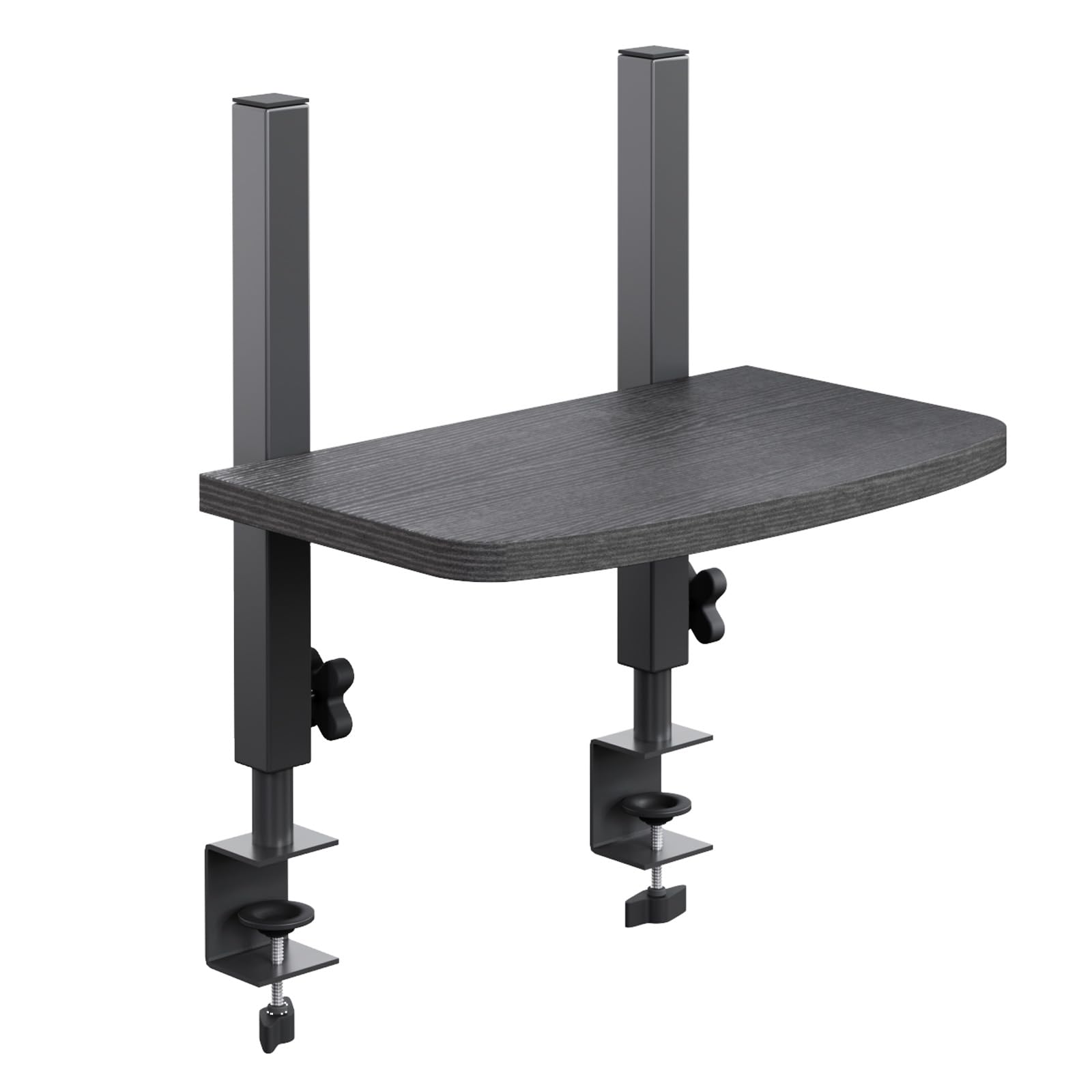
It clamps to the desk edge and climbs to 13.8 inches — space underneath stays yours.
This is the pick for a genuinely cramped desk. Instead of standing four legs on your work surface, two hand-tightened clamps bite onto a desktop edge up to 1 inch thick and hold the platform in the air. Everything below stays free for a keyboard, mouse, and notebooks. The 15.8 x 9.5 inch MDF shelf handles up to 30 lbs when properly installed.
The height range is the widest on this list after the WorkEZ: it adjusts from 5.5 all the way to 13.8 inches, so it can raise a screen well above a laptop lid or lift it for a taller seated position. Two tall rear posts create a backstop behind the monitor to help limit backward movement, and the whole structure gives a defined support frame instead of a floating slab.
Be clear about what it is not. The maker states plainly that this 6.4 lb stand is not intended for printers, TVs, or other oversized equipment — the 30 lb limit is the lowest here alongside the WorkEZ’s 13 lb, and it is meant for one compatible monitor. If you need to park a printer on top, this is the wrong shape regardless of how good the clamp design is.
Best suited to: small desks, study nooks, and home-office corners where every inch of surface counts.
Rule it out if: you plan to put a printer, a TV, or oversized gear up there — it is a monitor platform only.
6. Uncaged Ergonomics WorkEZ Adjustable Monitor Stand Riser for Desk, Black
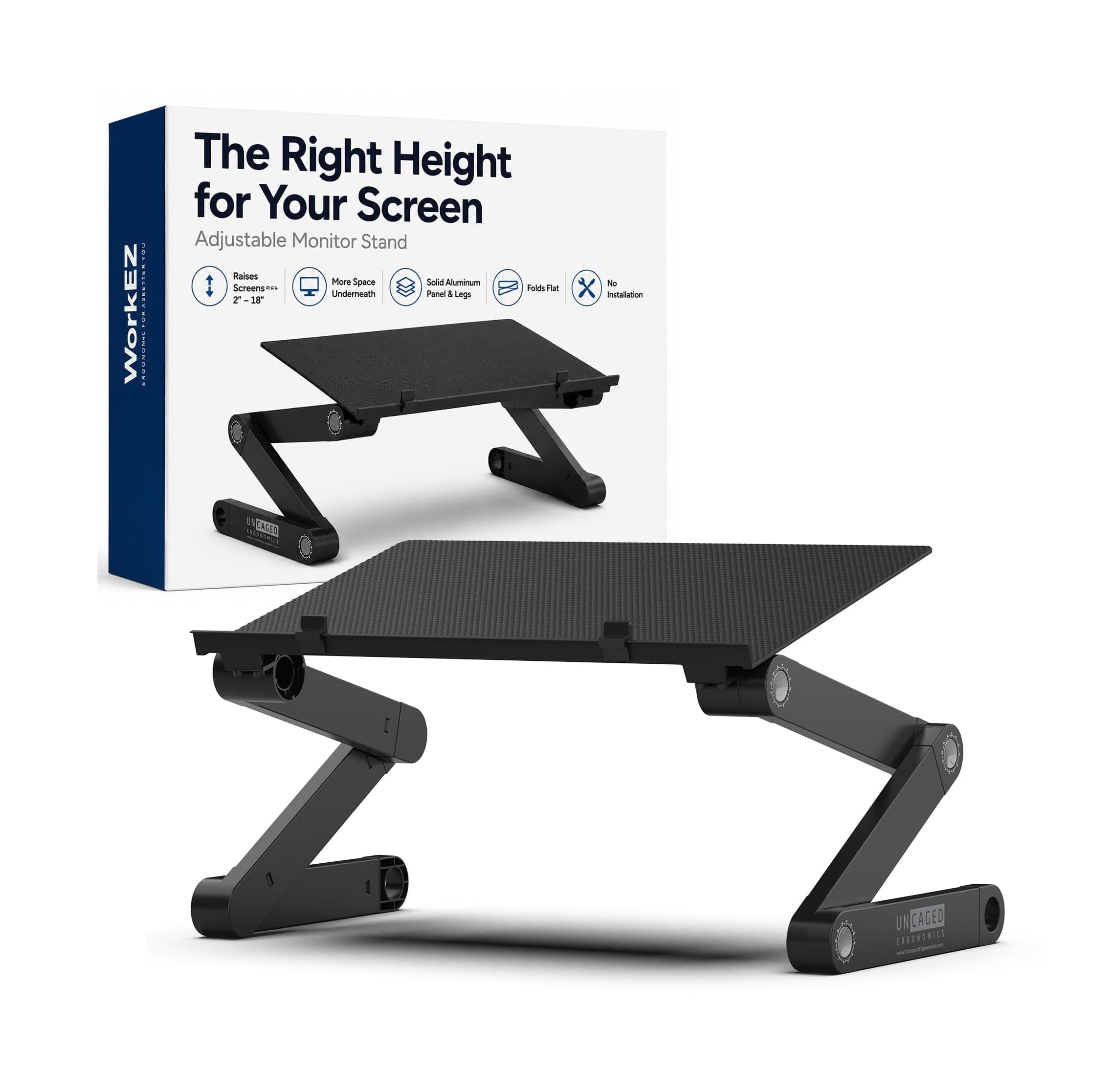
Legs that open across 16 inches — tall enough to put a screen at standing height.
No other stand on this list goes as high. The legs open across a 16 inch range, lifting the screen from 2 inches up to 18 inches off the desk, which means at the top of its travel it can put a display at standing height on an ordinary desk. The panel also turns a full circle and locks every 15 degrees, so you can swing the screen toward someone sitting beside you and click it straight back.
Aluminum construction keeps the whole thing at 3.1 lb and lets it fold flat, and the 16 x 11 inch top panel supports the full base of a large screen rather than one edge. Two stands sit side by side if you run more than one display. Setup is straightforward, and the wide height spread is the feature that lands with buyers.
The catch is stability at the top end. Feedback on this one is genuinely split: some find it sturdy and easy to adjust, while others say it is not sturdy enough for standing use and that dialing in the settings takes some fiddling. The 13 lb load limit is the lowest here, so it suits a single light panel, not a heavy display or a printer. Treat it as a tall-position stand for a single light panel and it delivers; load a heavy monitor at full height and you will feel the wobble.
What it does better than any rival
- 2 to 18 inch height range — the tallest travel on this list
- Full 360 degree swivel locking every 15 degrees
- Folds flat at 3.1 lb for storage or travel
- 16 x 11 inch panel supports a large screen’s whole base
Where it asks for patience
- 13 lb limit — one light panel only
- Stability at full standing height draws split feedback
- Getting the settings dialed in takes some trial and error
Choose it when: you want to work on your feet for a stretch without buying a converter.
Pass on it if: your monitor is heavy or you need rock-solid support at maximum height.
7. Nillkin Monitor Stand for Desk, Adjustable Height Computer Monitor Stand


A rear single column that frees the whole desktop while lifting a screen to 7.1 inches.
Where bulky four-leg risers eat your work surface, this one puts a single support column at the back and leaves the rest open. That means a full-size mechanical keyboard, a notebook, a USB hub, or a hard drive slides underneath without a leg in the way. The top plate measures 11.4 x 9 inches and the bottom plate 10.6 x 7.9 inches — compact enough for a bedroom workstation.
Height twists up in 3 levels across 4.3 to 7.1 inches, which the maker points out reaches higher than the 5.1 to 5.5 inches most competitors top out at. The CNC-machined aluminum alloy frame carries up to 33 lbs without wobble, and a 5.5 lb solid-metal body with anti-slip rubber pads keeps it planted. Assembly is about three minutes with two plates, one column, six screws, and an included screwdriver.
Sturdiness is the attribute that earns the most consistent praise, and the matte metal finish draws its own compliments — it looks at home next to an iMac or a MacBook without drawing attention. The limit worth naming: the twist knob gives you three steps, not a smooth glide, so if your perfect height falls between two levels you will be choosing the nearer one.
The design payoff: a rear column turns unused under-desk air into real storage without a leg in your way.
The honest limit: three fixed levels leave a gap if your ideal height sits in between.
For the small-desk perfectionist: compact footprint, tall lift, and a finish that suits Apple gear.
Not for dual screens: the 11.4 inch top plate carries one display.
8. NIFBANG Computer Monitor Stand Riser with Storage Drawer & Phone Holder
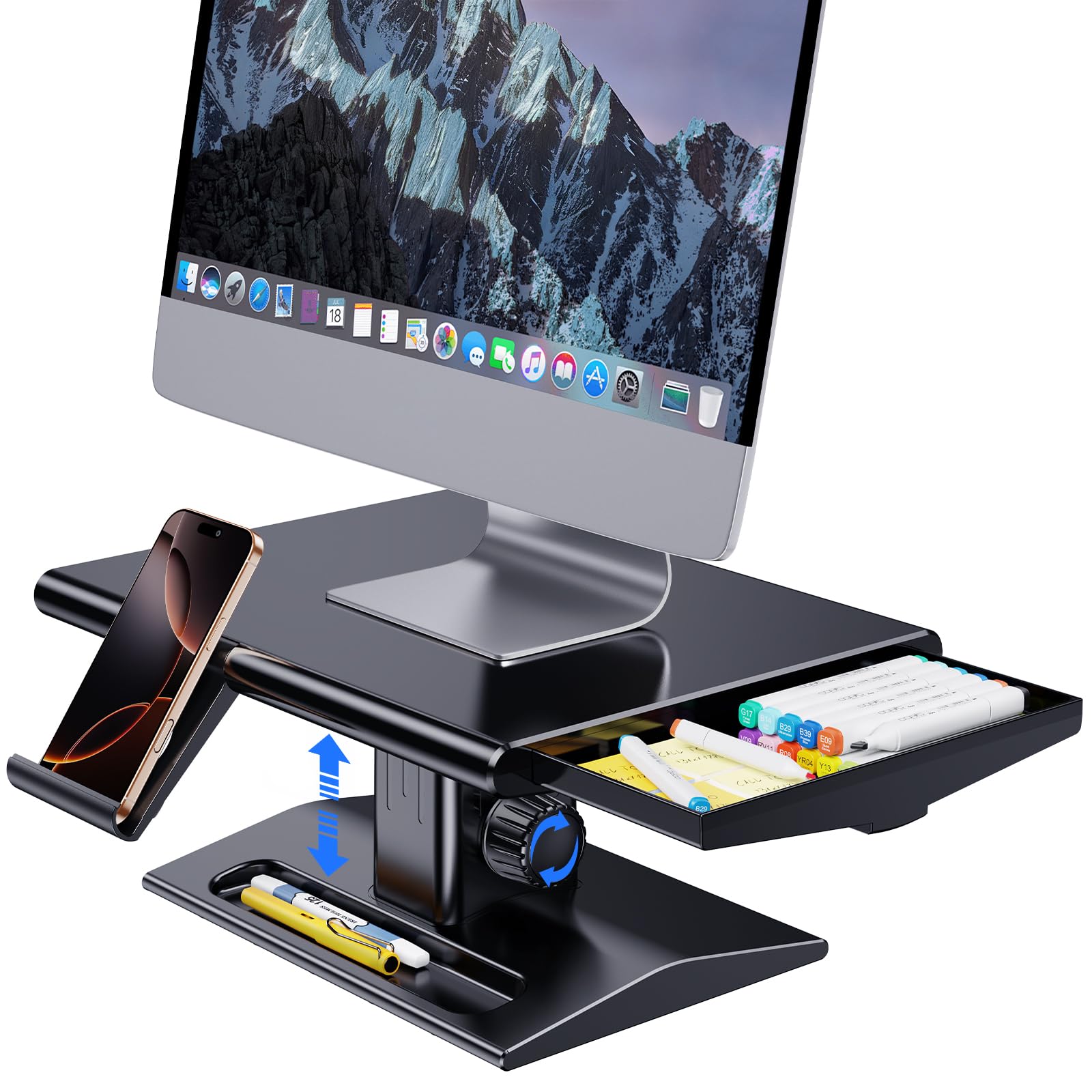
A side drawer, a recessed tray, and a phone holder hidden in one plastic riser.
Adjust it one-handed with the monitor still on top. The knob lift moves freely between 5.7 and 6.5 inches, so you can raise or lower the screen without lifting it off and repositioning. The ABS hard plastic body carries up to 50 lbs and fits monitors up to 32 inches, with anti-slip silicone pads on the base to stop it sliding.
Storage is where this one earns its place. A hidden drawer slides out from the side and lifts out entirely, the base has a recessed compartment, and a retractable holder at the front takes a phone or tablet so you can glance between the two. Everything is rounded at the corners to protect your desk surface, and it arrives fully assembled — unbox and set it down.
The range is the trade-off. If you want a taller lift, the WorkEZ (2–18 in) or the Mu Guang clamp-on (5.5–13.8 in) covers a far wider span.
Works best for: desks that need organizing as much as raising — drawer, tray, and phone slot in one.
Check your height first: under an inch of adjustment means it only suits screens already near that level.
9. NIFBANG Computer Monitor Stand Riser with Cellphone Holder, Freely Height Adjustable
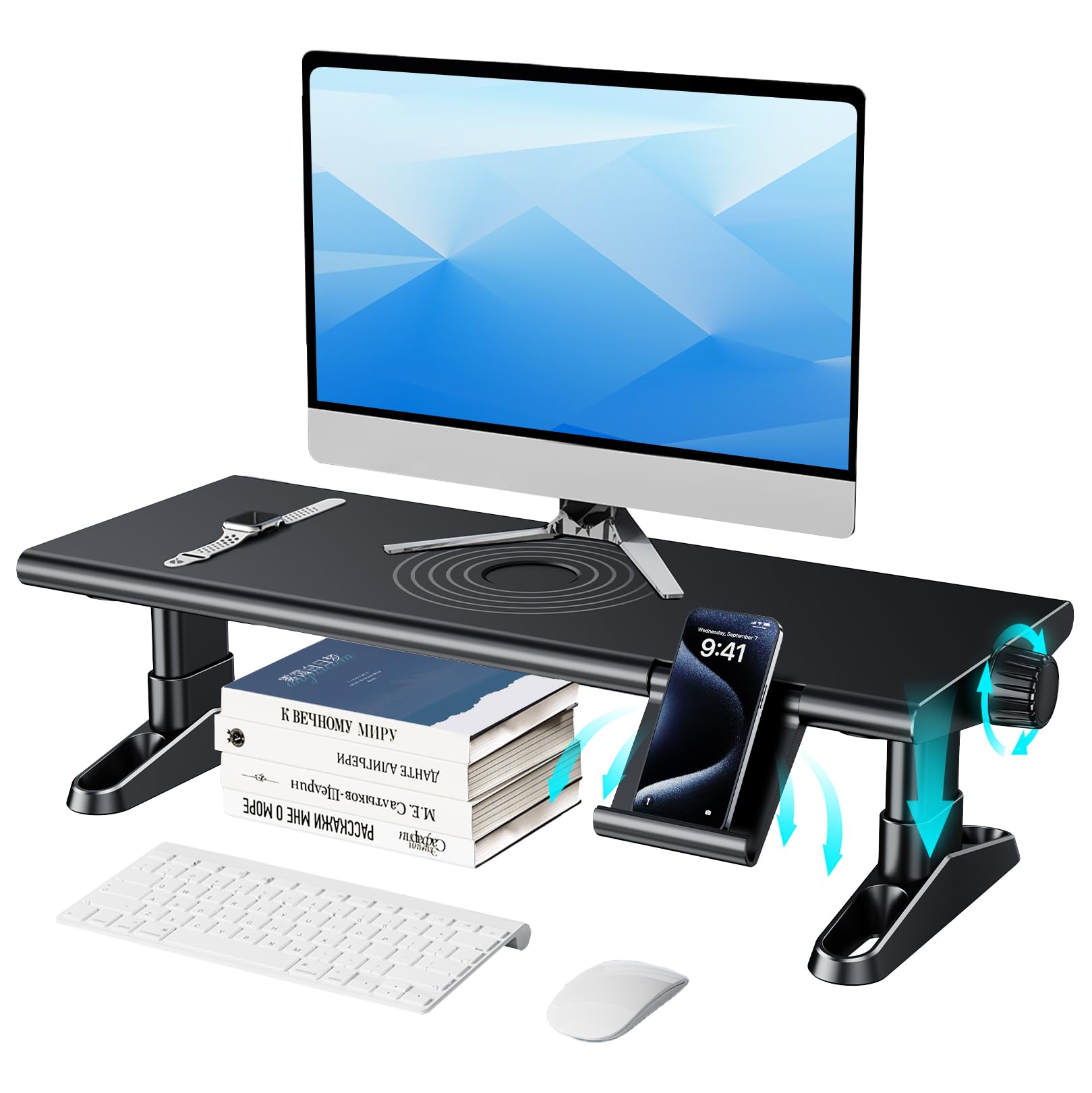
Free sliding height between 4.4 and 5.7 inches, and room underneath for speakers.
The knob on the side slides the deck smoothly through the whole range instead of snapping between fixed stops — pull it one-handed with the monitor still in place. The thick ABS body takes up to 50 lbs without shaking, and the maker lists it for speakers, printers, coffee machines, and TVs as well as monitors and laptops. A hidden phone holder retracts into the front when you are not using it.
Owners praise the build and the smooth knob lift, and the height adjustment eases neck strain once you set it to your eye line. It also frees up real desk area because you can stack items above and below the platform. The rounded corners and non-slip silicone base are small touches that keep it planted and safe on a polished desk.
Height feedback here is mixed — the 4.4 to 5.7 inch band is a narrow window, and if your seated eye line falls outside it the stand cannot bridge the gap. That is a fit issue, not a defect. If you sit tall or want a substantial lift, the AX WABER (3.4–4.9 in) or WorkEZ (2–18 in) reach much further; this one suits a standard chair and desk pairing.
What lands well: smooth one-handed height sliding plus enough top surface to double as an organizer shelf.
The catch: a 4.4 to 5.7 inch band is a narrow slice of the height spectrum.
Fits you if: you have a standard desk-and-chair pairing and want organizer space built in.
Keep looking if: you need a dramatic lift or a wide range to cover different users.
Understanding the Specs
Height adjustment range (inches)
This is the distance between the stand’s lowest and highest setting, and it decides whether the screen can reach your eye line. A stand that lifts only to 5.5 inches suits a low desk and a tall chair; one that climbs to 13.8 inches can put a screen above a laptop lid. Fixed-step stands like three-position legs are easy to adjust but leave gaps between settings. A twist knob or sliding lift gives you continuous control, which matters if your ideal height falls between the obvious steps.
Load capacity (pounds)
The rated weight the shelf can hold safely, and the only reliable guide to what belongs on it. A 13-pound limit is designed for one light panel. A 44-pound or 100-pound platform can carry a heavier monitor, a second screen, or a printer. Metal is not automatically stronger than wood — the published pound figure is what tells you. If you plan to stack a monitor plus a laptop, or two monitors on one shelf, choose the higher number.
Platform and footprint
How much desk surface the stand physically takes up. A full four-leg platform gives storage underneath but covers both width and depth. A rear single column frees the surface in front of the screen because no leg blocks your keyboard. A clamp-on design removes the footprint from the desk entirely by hanging off the edge. A 14.6 inch shelf handles one display; a platform that stretches to 42.5 inches can span two. Match the footprint to your desk size before you match the height.
Material and ventilation
Metal, aluminum, wood, and hard ABS plastic all show up in this category, and each behaves differently. Vented platforms let a warm laptop breathe, which helps if the stand sits over a machine that runs hot. Solid wood gives a warmer desk look but traps heat. Aluminum keeps weight down without flexing. Plastic is the lightest and often the cheapest, but check it carries a strong pound rating if you plan to put a printer up there.
FAQ
How high should my monitor sit on an adjustable riser?
Can an adjustable monitor riser hold a dual monitor setup?
Is a clamp-on monitor riser as stable as a freestanding one?
Will a monitor riser help with neck strain?
Can I put a laptop or printer on an adjustable riser instead of a monitor?
Do vented monitor stands really keep devices cooler?
How much weight can the strongest monitor riser here carry?
What is the difference between a riser with a drawer and one without?
Can I adjust the height with my monitor already on the stand?
Will a tall riser work for standing at my desk?
Final Thoughts: The Verdict
The crowd favorite is the WALI Dual Monitor Stand — 4.5+ stars across 17,000+ owners, three height settings, and two 44 lb shelves in one box. You get the height lift without a tool in your hand, and the vented steel keeps things cool. If you run two screens on one shared surface, the AX WABER Dual Monitor Stand Riser is the shape you want: 100 lbs of capacity and a 29.2 to 42.5 inch span that tilts forward 15 degrees. And when the desk is too small for legs at all, the Mu Guang Clamp-On Riser clamps to the edge and gives you 5.5 to 13.8 inches of lift with the surface below left clear.
How We Picked
We do not accept paid placement. Every pick is matched to a real buyer and a real use-case; we do not hands-on test units.
Sources & Methodology
Specifications: manufacturer listings and product documentation. Review insights: verified customer reviews, as of November 2026. Pricing: not shown on this page (it changes often); check the current price via the retailer link.
As an Amazon Associate, Gadgets Feed earns from qualifying purchases. This does not affect which products we feature.