
Our readers keep the lights on and my morning glass full of iced black tea. As an Amazon Associate, I earn from qualifying purchases.
Specs are compiled from manufacturer listings and verified buyer reviews and can change over time — please confirm the key details on the product page before buying.
Your tablet is rarely the problem when typing gets frustrating. The keyboard underneath it is: the one that flips flat mid-sentence, the one with keys so cramped your thumbs collide, or the one that needs a fresh charge every other evening. This guide focuses on what fixes those three problems. You can pick a keyboard that holds your tablet at a workable angle, gives your fingers real keys, and keeps running long enough to finish the job.
I’m Min — the founder and writer behind Gadgets Feed. This guide is built by comparing the manufacturers’ published specifications and the patterns across verified customer reviews, so you get each pick’s real strengths and trade-offs instead of marketing spin.
You will see case-style keyboards that wrap the tablet like a folio, standalone boards that sit on a desk, and folding models that slip into a jacket pocket. My aim is simple: to help you find an android tablet keyboard that fits your tablet size, your typing habits, and where you actually work.
Our Picks at a Glance
How To Choose The Best Android Tablet Keyboard
The right keyboard for an Android tablet matches how you hold the tablet, not the longest feature list. A student typing essays at a desk needs something different from someone answering emails on a train. Start with the two questions below and most of the shortlist narrows itself.
Does it physically fit your tablet, or is it universal?
A universal keyboard case fits a range of tablet sizes, often 9.7 to 11 inches, and holds your tablet with rubber corner straps or a magnetic back. That flexibility helps if you change tablets often. The trade-off: a universal shell cannot have a perfectly placed camera hole or an exact cutout for every port, and several universal models in this guide say so plainly. A model made for one specific tablet, such as the Samsung Galaxy Tab A9+ or the Tab S10+, fits like a shell and often adds a dedicated stylus slot. Check the model number on the back of your tablet before you order either kind.
Do you need a touchpad, or just keys?
A touchpad lets you move a cursor and click without carrying a separate mouse, which is the difference between a tablet and a small laptop in practice. On Android, a touchpad usually works straight away; on iPadOS you often have to switch on AssistiveTouch first. If you mostly type documents and rarely point at things, a keyboard without a trackpad is lighter and simpler. If you edit spreadsheets or long emails, the trackpad earns its place.
How much backlight do you actually use?
Backlit keys are the feature people underrate until they type in a dark room. The models here range from a single white backlight with adjustable brightness to rainbow effects with several colors on the keyboard at once. Light costs power, so a keyboard with the backlight blazing will run down faster than the same keyboard with it switched off. If you type mostly in daylight, treat backlighting as a bonus rather than a reason to buy.
Quick Comparison
| Model | Best For | Tablet Fit | Touchpad | Backlight | Amazon |
|---|---|---|---|---|---|
| Universal Keyboard Case for 9.7″–11″★ Best Overall | All-in-one folio with mouse | 9″–11″ tablets | No | 6-color RGB, 3 brightness levels | Amazon |
| Arteck Universal Backlit Bluetooth KeyboardBudget Workhorse | Cheap standalone board for any tablet | Any Bluetooth tablet | No | 7 colors, 2 brightness levels | Amazon |
| Universal Touchpad Keyboard CaseTrackpad Value | Budget case with a real trackpad | 9.7″–11″ tablets | Yes, multi-finger | Rainbow, 3 colors at once | Amazon |
| Logitech K480 | Desk board shared across three devices | Any Bluetooth tablet | No | None | Amazon |
| Samsers Foldable with Large Touchpad | Travel typing with a full-size layout | Any Bluetooth tablet | Yes, multi-touch | None | Amazon |
| ROOFEI for Galaxy Tab A9+/A11+ | Galaxy Tab A9+ owners who want a trackpad case | Tab A9+/A11+ 11″ only | Yes, multi-finger | 7 colors, 3 brightness levels | Amazon |
| Dexnor for Tab A11+/A9+ Plus | Long battery life for a Galaxy Tab A9+ | Tab A11+/A9+ 11″ only | Yes | Single-color white, adjustable | Amazon |
| Logitech Keys-to-Go | Throwing in a bag with almost no weight | Any Bluetooth tablet | No | None | Amazon |
| Samsung Galaxy Tab S10+ Book Cover Keyboard | Galaxy Tab S10+ owners building a laptop | Tab S10+ 12.4″ | Yes | Marked negative in owner feedback | Amazon |
In‑Depth Reviews
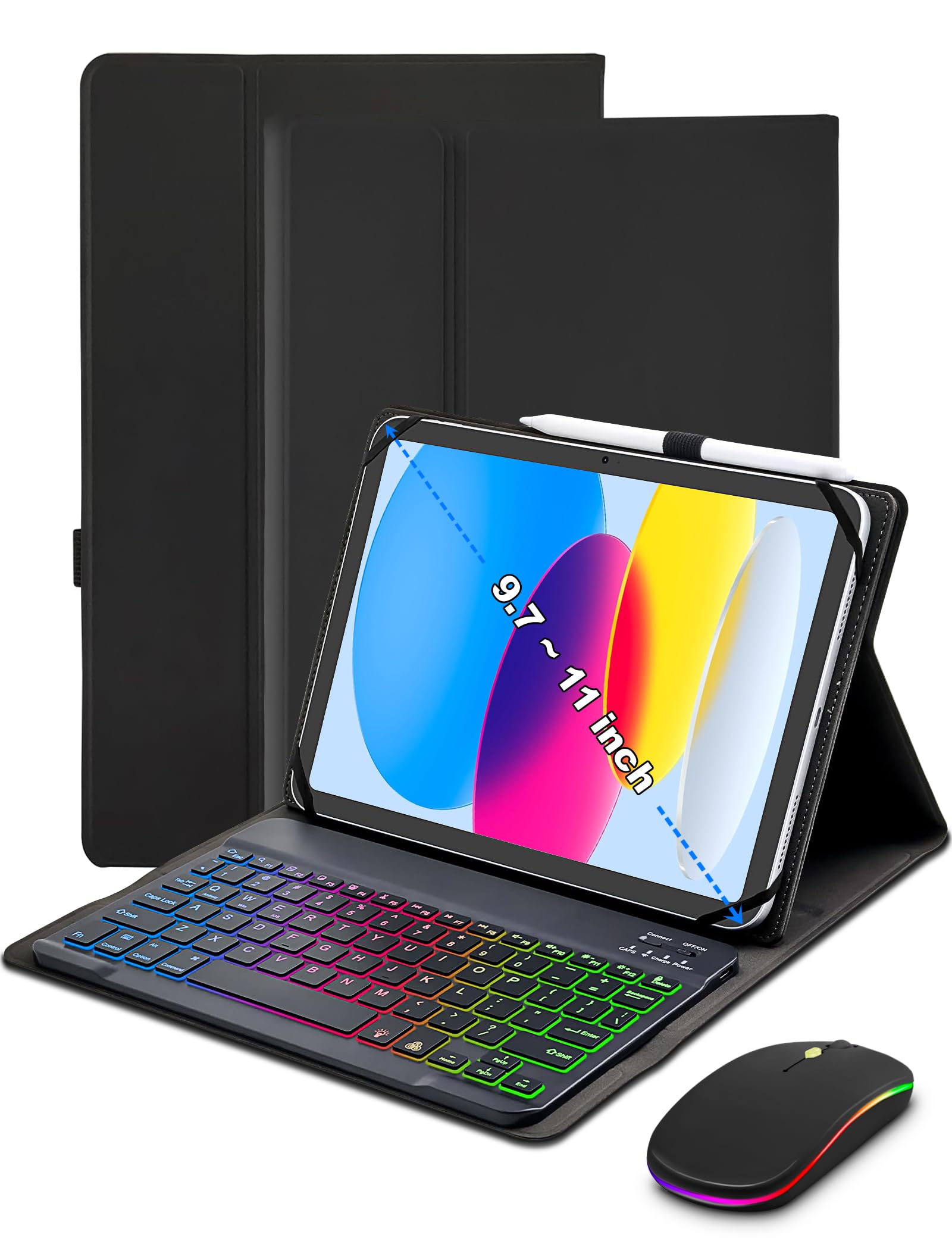
1. Universal Keyboard Case for 9.7″, 10.1″, 10.2″, 10.5″, 10.9″, 11″
Our pick — 4.5+★ from 450+ verified ratings; the strongest balance of quality and price.
A folio that turns almost any 9-to-11-inch Android tablet into a small laptop, mouse included.
Three anti-slip grooves are the reason this one wins. They hold the tablet at a set angle instead of letting it slide down a smooth back, so you can type on a couch or on your lap without the screen flopping backward. Those grooves are the difference between a case you use daily and one that lives in a drawer.
The kit is unusually complete for its tier: the case, the keyboard, a mouse, a USB-C charging cable and a guide all arrive together. The keyboard itself has a 6-color rainbow backlight with adjustable white light and three brightness levels, plus pulsing and steady-on modes, which is genuinely handy if you write after dark. Faux leather on the outside and flexible rubber corner straps keep the tablet locked in without over-tightening, and the magnetic book-style closure makes it look like an ordinary cover when shut. Bluetooth pairing is what most people end up talking about, and it is the part that just works for them.
The honest caveat is universal sizing. This is a universal shell built for a spread of sizes, so it will not have a perfect camera cutout on every tablet, and a handful of owners find the magnetic hold less than absolute. Owners are split on the overlying functionality, with some units reported to stop working and some tablets not securing as firmly as they would like. Measure your tablet against the listed size range first; if it sits at the edge of that range, a model made for your exact tablet will serve you better. On balance the crowd verdict is warm — 4.5+ stars across 450+ ratings — and the versatility is what most people call out.
What earns it the top spot
- Three anti-slip grooves give a stable typing angle on soft furniture
- Case, keyboard, mouse and USB-C cable ship as one bundle
- 6-color backlight with three brightness levels and a pulsing mode
- Rubber corner straps grip the tablet and leave ports open
Where it asks you to check first
- Universal sizing means cutouts are approximate, not exact
- Magnetic hold divides opinion; a few units reportedly stop working
- At 0.88 kg the whole bundle is not a featherweight
Buy it for: one purchase that covers typing, pointing and protection across a 9-to-11-inch tablet.
Look elsewhere for: a tablet at the very top of that size range that needs a precise, made-for-it shell.
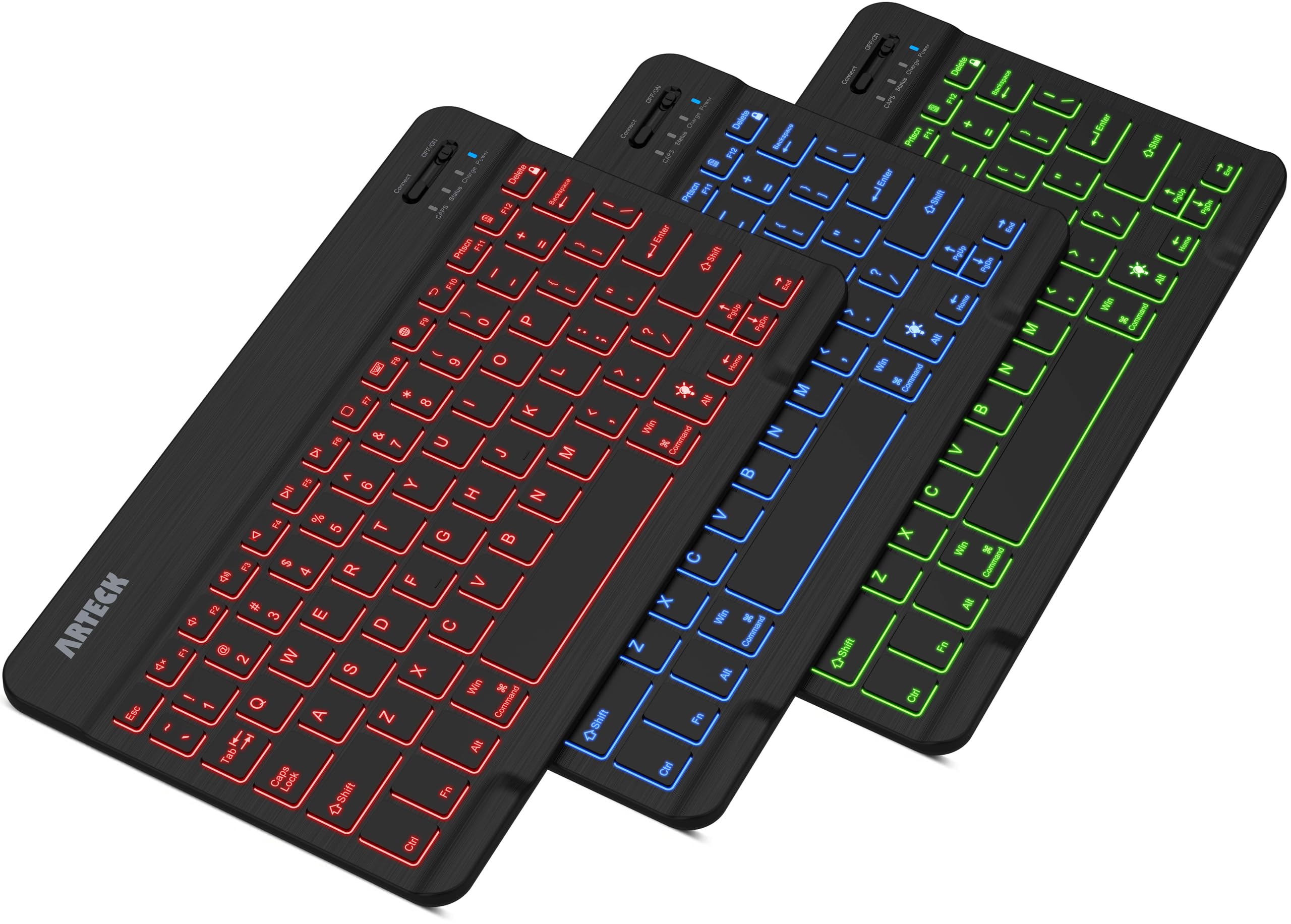
2. Arteck Universal Backlit Wireless Bluetooth Keyboard
Six months between charges, and it folds into a messenger bag without a bulge.
Six months of battery life is the headline, and it is measured honestly: two hours of non-stop typing a day with the backlight switched off. Switch the 7-color LED backlight on and that number drops, which is why the brightness setting has two levels and an auto-sleep feature to stop it draining while you are reading rather than typing.
Compare the footprint with the universal case above and the gap is obvious. This Arteck measures 9.7 by 5.9 by 0.24 inches and weighs 0.37 lb, while that case measures 10.35 by 7.8 by 0.71 inches. The case simply takes up more room in a bag, and it carries a mouse and a tablet shell as part of that bulk. The Arteck is just a keyboard, so it slides into a backpack pocket and pairs with whatever Bluetooth tablet you already own. It covers iOS, Android, Mac OS and Windows, which matters if your household mixes devices.
What wins people over is how naturally it types. The 78 keys are well spaced for a board this thin, and the low-profile keys with hotkeys and media keys let you jump tracks or adjust volume without reaching for the screen. The recurring gripe is battery consistency once the backlight is in play, so treat the six-month figure as a backlight-off number. And because there is no stand or case, you still need something to prop your tablet against.
Desk versus lap: a flat board is brilliant on a table and useless on a cushion, so pair it with a case or stand if you type away from a desk.
The honest read: the value here is charge endurance, not extras.
The clean pick if: you already have a stand or case and want a light, long-running board to type on.
Not your match if: you need the keyboard to double as a protective cover for the tablet.
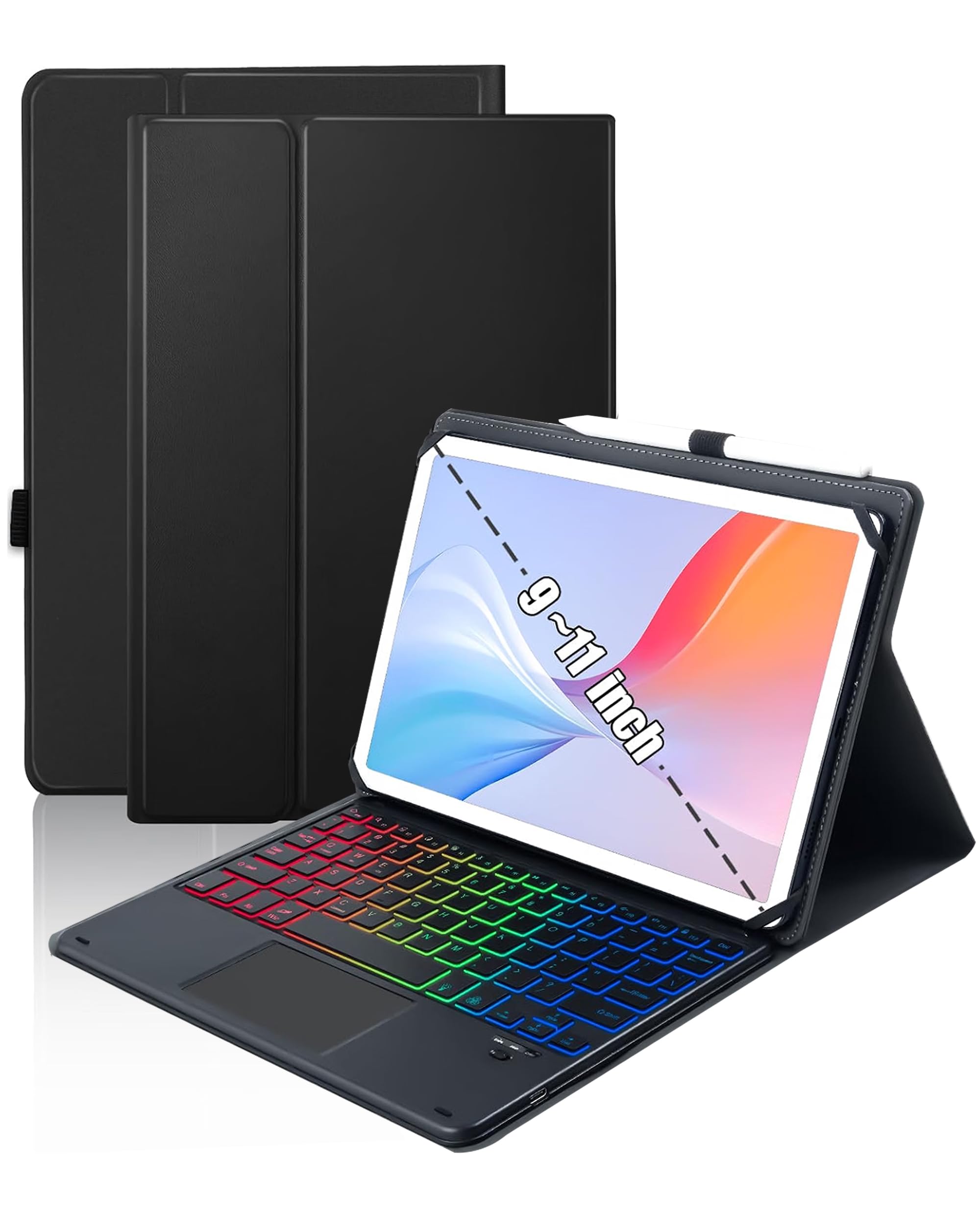
3. Universal Touchpad Keyboard Case
The keyboard lifts out of the case, so you can type with the tablet propped separately.
Removability is the feature that earns this case its place. Take the 78-key board out of the PU leather cover and you can type on your lap with the tablet resting wherever suits your eyes. Leave it in and everything folds into a folio with a magnetic buckle stopping the tablet from tumbling out. That single design choice makes it more flexible than a keyboard that is stitched permanently into its case.
The touchpad is the other reason to look here. It handles multi-finger gestures and replaces a mouse entirely, so you can click through menus and scroll long documents without carrying a second device. It works across Android, Windows and iOS 13 and above, though iPad users must switch on AssistiveTouch before the cursor appears. Around the keys, a rainbow backlight can show three colors at once with a breathing mode, which is pleasant in a dark room and light enough to leave running. Build quality is the thing owners talk about most, with the function set close behind.
Two limits are worth knowing before you order. There is no camera hole in the shell and no automatic sleep/wake function, so you wake the tablet yourself. Compatibility also causes friction: several owners of 11-inch tablets report it does not work for them, which suggests the fit sits tighter in that range than the marketing implies. Do not simply match your screen size; match your tablet’s physical dimensions against the case.
Best fit: a 10-inch or 10.5-inch Android tablet where the 9.7-to-11-inch span sits comfortably in range.
The trade-off: no auto sleep/wake and no camera cutout, which are real conveniences you are giving up for the flexible design.
Choose it when: you want a trackpad and the option to lift the keys free of the case.
Walk past when: your tablet is right at 11 inches and needs an exact fit.
4. Logitech K480 Wireless Multi-Device Keyboard

A dial on the left edge swaps your typing between three devices without repairing anything.
That dial is what makes the K480 different from everything else here. Turn it and you go from tablet to phone to laptop in one click, across Windows, macOS, Chrome OS, Android and iPadOS. If you write on a tablet but answer messages on a phone, this removes the constant pairing dance that standalone boards inflict on you.
The built-in cradle holds your tablet or phone at a readable angle while you type, fitting devices up to 0.4 inches thick and 10 inches wide. It runs on two pre-installed AAA batteries rated for up to 24 months, with an indicator light so you are not caught out. The board is also spill-resistant, which is a small mercy if you type next to a coffee cup. Owners resoundingly single out the overall quality, with everyday functionality close behind in their feedback.
The width is where some patience is needed. At 11.8 inches across, this is a full desk keyboard rather than something you toss into a bag, and size plus weight both draw mixed reactions. That width is deliberate: the K480 is built to stay on a desk. If you need something that travels, a slim board or a folding model serves you better; if you want one keyboard for the whole desk, this is the logical pick.
Why a shared desk likes it
- Easy-Switch dial swaps between three Bluetooth devices instantly
- Integrated cradle props your tablet at a typing angle
- Two AAA batteries rated up to 24 months, indicator light included
- Spill-resistant build for a coffee-adjacent desk
Why travellers should pause
- 11.8-inch width is a desk footprint, not a bag footprint
- Weight draws mixed feelings from buyers
- No backlight for late-night typing
The one for you if: the tablet shares a desk with a laptop and phone.
Keep shopping if: the keyboard has to leave the house with you.
5. Samsers Full-Size Foldable Bluetooth Keyboard with Large Touchpad

Full-size keys that fold in half, then vanish into a back pocket at 9.3 ounces.
Open it and you get a 13.5 by 4.5 inch layout with 0.63 inch keys, which is genuine standard-size territory rather than the shrunken keys most travel boards force on you. The metal hinge joins the two halves without a visible seam in the middle of the typing area, and the scissor-switch keys stay quiet enough for a train carriage or a shared office.
Battery life is where it walks away from the pack. A single two-to-three-hour charge gives up to 70 hours of use or 120 days on standby, which comfortably covers a short business trip without the charger coming out of the bag. The large multi-touch trackpad handles mouse duties, so you leave the travel mouse at home, and Bluetooth 5.1 links three devices at once with a key to switch between them. The blue PU leather on the bottom keeps it from skating across a café table.
What owners praise most is raw performance, followed closely by how easily it connects. The full-size layout and the way it folds both come up again and again, and portability is a running theme because it fits easily in a back pocket. Two honest notes: the touchpad takes a little learning, and value is the most debated point — some consider it well worth it, others less convinced. Neither undercuts the core appeal of a real keyboard that folds small.
Where it shines: a 70-hour charge and a 9.3-ounce frame make it the obvious bag companion.
What to expect: a trackpad that responds well but rewards a light touch while you adjust.
Pack it if: you type on the move and refuse to lose key size for portability.
Leave it if: you only ever type at one desk and want a fixed case around the tablet.
6. ROOFEI Keyboard Case for Galaxy Tab A9+ / A11+ 11 inch
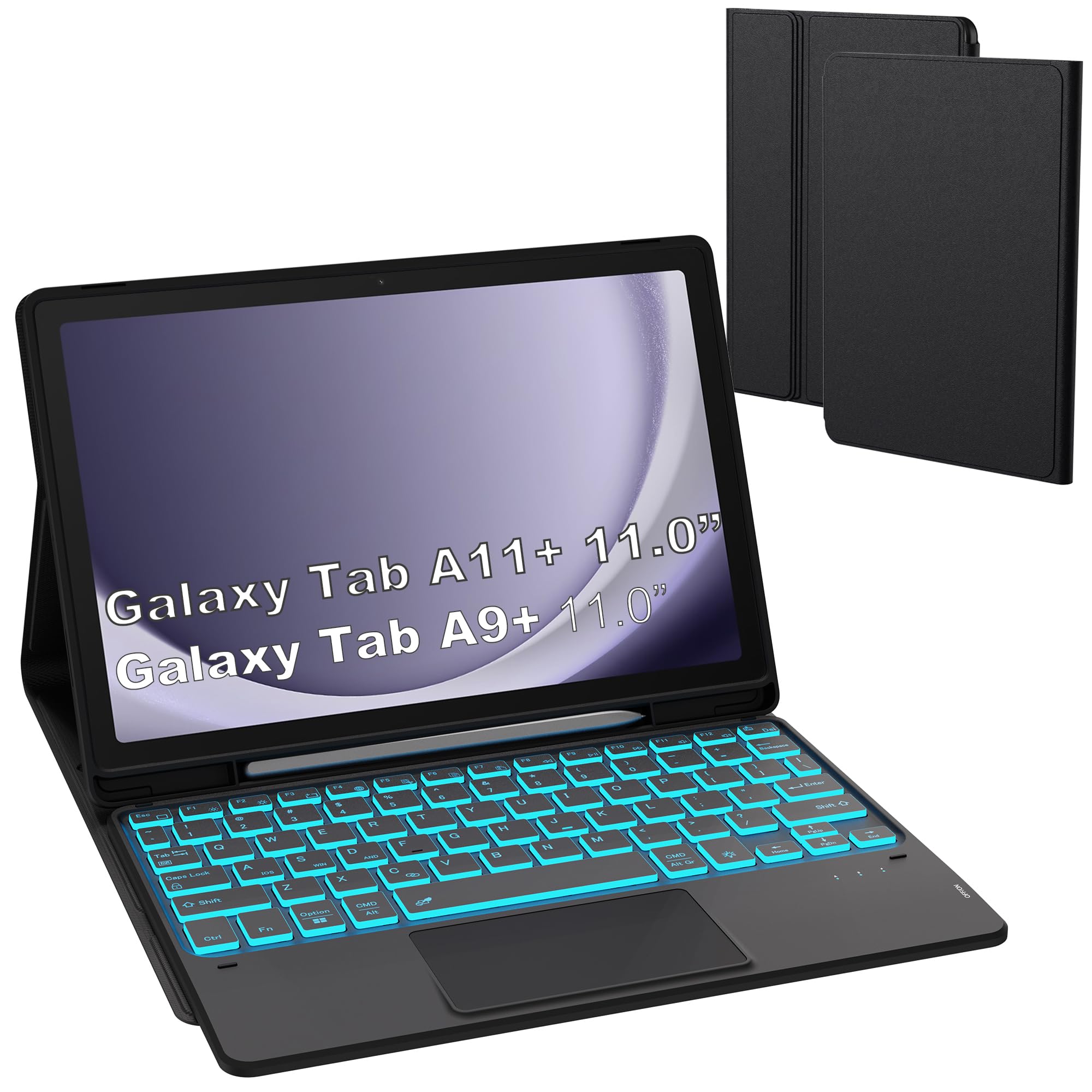
Built for one tablet only — the Galaxy Tab A9+ or A11+ 11-inch — and everything is sized to it.
This is a made-for model rather than a universal one, and it shows in the details. The pencil slot holds your S Pen so it does not wander off, and the shell fits the A9+ / A9 Plus 5G and A11+ models (SM-X210, X216, X218) specifically. The TPU back is a honeycomb mesh pattern, which spreads heat rather than trapping it during a long session.
The keyboard lifts free of the leather case on magnets, and you get a multi-touch trackpad with multi-finger gestures to replace a mouse, laid out in US QWERTY. The 7-color backlight has three brightness levels, so late-night typing stays visible without washing out the room. A built-in three-angle stand handles the viewing position, and when you are done the whole thing closes like a book.
Owners judge it on looks first — the appearance is what most people comment on, with ease of use trailing close behind. The magnet that holds the tablet draws a mixed response: several are pleased with how securely it grips, while others find the touchpad less precise than they would like. That is worth knowing if you plan to use gestures heavily for design or spreadsheet work rather than simple browsing and email.
Good reasons to pick it
- Exact fit for Galaxy Tab A9+/A11+ 11-inch models
- Dedicated S Pen slot keeps the stylus with the tablet
- Multi-finger trackpad over a detachable QWERTY keyboard
- Honeycomb TPU back for heat dissipation
Fair reasons to hesitate
- Usable only with those two Galaxy Tab models
- Touchpad precision divides opinion among owners
- Magnetic tablet hold is not unanimously loved
Worth it for: Galaxy Tab A9+ or A11+ owners who want a case, stand, trackpad and pen slot in one.
Wrong shape entirely for: an iPad or a tablet from another brand.
7. Dexnor for Samsung Galaxy Tab A11+ / A9+ Plus Case with Keyboard
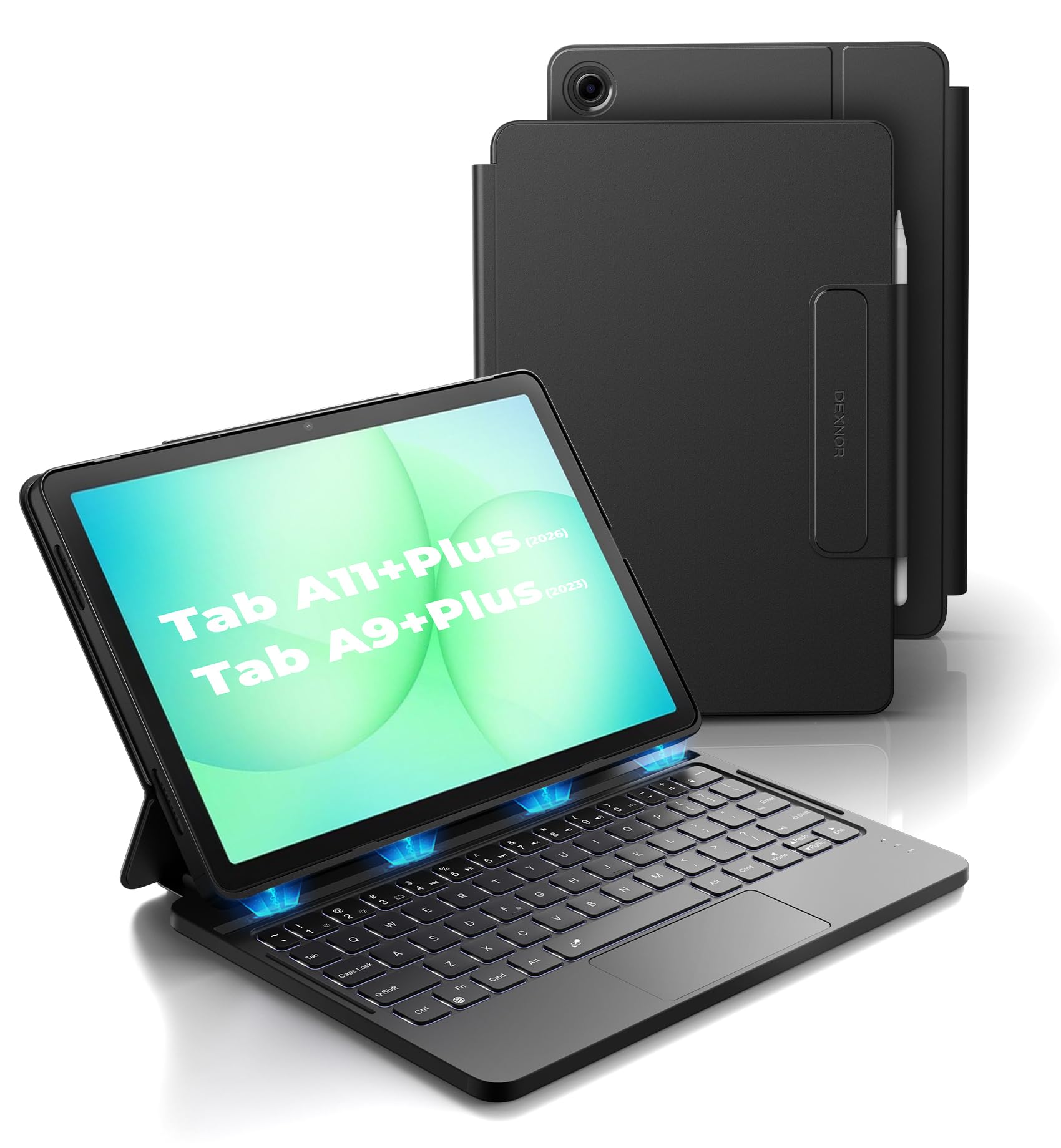
720 hours of standby on a 650mAh battery, and a lid that wakes the tablet as you open it.
The battery spec deserves to be read in full, because it tells you how the keyboard behaves in different modes. That 650mAh lithium polymer cell is rated for up to 720 hours of standby, 200 hours of typing without the backlight, or 10 hours of continuous work with the brightest backlight on. A full charge takes 3 hours, so one evening at the socket covers weeks of ordinary use.
Two power-saving tricks do the rest. Opening the case wakes the keyboard and tablet together, and closing it puts both to sleep; the keyboard itself drops into sleep after 30 minutes idle and switches the backlight off after 45 seconds. The white backlight is adjustable in brightness, and the 120-degree viewing angle keeps the screen readable while you type on a lap or a desk.
The single-color backlight is the clear trade-off against the rainbow models above, and sturdiness is the other point people debate — some find the stand steady when open, others want more rigidity. The keyboard cannot fold around to the back, and this is not a floating cantilever design, so the screen stays level with the base rather than hovering. Build quality is what the feedback consistently praises. At 1.36 lbs it is light enough to carry but still substantial in the hand.
The battery wins: 200 hours of backlight-off typing is roughly a month of normal evening use between charges.
Set expectations: a single white backlight and a non-folding keyboard are the compromises for that endurance.
Reach for this if: you own a Galaxy Tab A9+ or A11+ and hate charging accessories.
Look elsewhere if: you want color backlighting or a keyboard that folds back out of the way.
8. Logitech Keys-to-Go Bluetooth Keyboard for Windows and Android

Coin-cell batteries rated for three years, and a cover that protects the keys in transit.
Three years is the number that makes this board interesting. It ships with pre-installed coin cell batteries rated for up to three years of use, so you never think about charging it. The built-in cover guards the compact keys when it is in a bag, which is the difference between a keyboard that survives a commute and one that arrives with crumbs between the switches.
It works across Windows, Android, ChromeOS and Googlebook OS, and pairs with up to three devices, swapping between them with a tap of a key. The scissor keys are spaced for a comfortable typing feel despite the slim body, and a full row of shortcut keys handles volume, media and screen brightness without leaving the keyboard. Owners describe it as a small keyboard that fits 10.5-inch and 11-inch tablets neatly, and portability is the trait it is loved for most.
There is a catch for anyone who types for hours: this board has no kickstand or cradle, so you supply the tablet stand yourself. Connectivity is also the most divided topic in owner feedback — many pair it without fuss, while others hit persistent connection problems worth testing during the return window. Durability and long-term reliability attract scrutiny too, so treat a brand-new unit’s first week as the real audit.
The everyday win: no charging cable, no battery anxiety, and a cover that keeps the keys clean.
The honest limit: with no kickstand or cradle, you supply the tablet stand.
Lean toward it if: you want the lightest possible board to pair with a stand you already own.
Try something else if: you rely on rock-solid Bluetooth every single day and cannot risk a pairing hiccup.
9. SAMSUNG Galaxy Tab S10+ Book Cover Keyboard with AI Key

A dedicated AI key, DeX Mode, and a hinge that folds back to 150 degrees.
The AI key is the one feature nothing else here offers. Tap it, type a prompt, and Bixby or Gemini handles the query; pairing that with DeX Mode turns the Tab S10+ into a desktop-style workspace with full-size keycaps, function keys and a trackpad. That is the most complete laptop-replacement experience in this group, provided you own the matching tablet.
The hinge swings back to 150 degrees, so you can push the screen away for comfortable reading or pull it closer for typing. The magnetic design lets you detach the back cover and reattach it as the day shifts, and Wireless Keyboard Sharing lets you type across compatible Galaxy devices using the same keyboard. At 1.1 pounds it is not the lightest board here, but it is balanced for a 12.4-inch tablet.
Two things keep this from being the automatic recommendation. It is made exclusively for the Galaxy Tab S10+, and the backlight is the most criticized feature in owner feedback — the keys are not illuminated the way many expect at this tier. Price is also the most debated point, which is fair given that a dedicated case commands its own premium. Buy it for the integration with the Tab S10+, not for the lighting.
What justifies the top tier
- Dedicated AI key for Bixby and Gemini prompts
- Full-size keycaps, function keys and trackpad with DeX Mode
- 150-degree hinge for adjustable viewing
- Wireless Keyboard Sharing across compatible Galaxy devices
What buyers push back on
- Locked to the Galaxy Tab S10+ only
- Keyboard backlighting is the weakest point in feedback
- Value is the most disputed part of the purchase
Built for: Tab S10+ owners who want a laptop-style setup that integrates with Galaxy features.
Think twice if: backlit keys matter to you for night work.
Understanding the Specs
Battery ratings and what they actually mean
A tablet keyboard’s battery figure is only useful if you know the mode it was measured in. The Arteck states six months based on two hours of typing a day with the backlight off. The Samsers quotes 70 hours of use and 120 days of standby, while the Dexnor separates its 200 hours of backlight-off typing from 10 hours with the brightest backlight on. Turn the lights up and every one of these numbers shrinks. Read the two figures separately rather than treating the biggest number as the whole story.
Tablet fit versus universal sizing
A universal case covers a range, often 9.7 to 11 inches, and fits a spread of tablets using rubber straps or magnetic backs. That flexibility comes with approximate cutouts — the third pick here says outright that there is no camera hole and no auto sleep/wake. A made-for case like the ROOFEI or Dexnor fits one model family (Galaxy Tab A9+, A11+, or S10+) with slots sized for that device. Check the model number on the back of your tablet and its physical dimensions before ordering either type.
Backlight types and brightness levels
Backlighting ranges across this group. Some keyboards offer a single white backlight with adjustable brightness, like the Dexnor, which is the most power-efficient choice. Others offer 7 colors with 2 brightness levels, or rainbow effects that can light three colors at once. Color backlights are about preference and visibility more than function: they make keys readable in a dark room and dress up the desk, but each level pushes the battery harder.
Touchpad versus mouse versus neither
A touchpad replaces a mouse by letting you move a cursor and click through Android menus. Some trackpads support multi-finger gestures, which is useful for scrolling and switching apps. On iPadOS you may need to enable AssistiveTouch first. If you only type documents, dropping the trackpad saves weight and battery. If you edit spreadsheets or long emails, the trackpad pulls its weight — just confirm your tablet’s screen supports cursor control in the apps you use.
FAQ
Will a universal keyboard case fit my 11-inch Android tablet?
Do Android tablet keyboards need Bluetooth, or can they plug in?
How long does a tablet keyboard battery last before I charge it?
Does the touchpad work with Android apps?
Will a case keyboard protect the tablet if I drop it?
Can I use a Samsung keyboard case with a non-Samsung tablet?
Is a folding keyboard as good as a full-size one?
Do backlit tablet keyboards drain the battery faster?
What is the difference between a keyboard case and a standalone keyboard?
Will a keyboard case add much bulk to my tablet?
Final Thoughts: The Verdict
For most Android tablet owners, the android tablet keyboard to start with is the Universal Keyboard Case. Its three anti-slip grooves lock the tablet at a usable angle, and the bundle already includes a mouse and USB-C cable — a full kit in one order. If you want a light standalone board with long backlight-off runtime, the Arteck weighs 0.37 lb and pairs with any Bluetooth tablet. For Galaxy Tab A9+ or A11+ owners, the Dexnor is the one to reach for. Its 650mAh battery is rated for 200 hours of typing with the backlight off.
How We Picked
We do not accept paid placement. Every pick is matched to a real buyer and a real use-case; we do not hands-on test units.
Sources & Methodology
Specifications: manufacturer listings and product documentation. Review insights: verified customer reviews, as of November 2026. Pricing: not shown on this page (it changes often); check the current price via the retailer link.
As an Amazon Associate, Gadgets Feed earns from qualifying purchases. This does not affect which products we feature.