
Our readers keep the lights on and my morning glass full of iced black tea. As an Amazon Associate, I earn from qualifying purchases.
Specs are compiled from manufacturer listings and verified buyer reviews and can change over time — please confirm the key details on the product page before buying.
You want a white loop that cools a hot CPU without turning your build into a wind tunnel. That balance is the whole game here. Some white all-in-one coolers in this list run quiet but leave you short on thermal headroom. Others cool hard but hum. The picks below split cleanly into three jobs: quiet daily builds, high-load gaming rigs, and show-piece systems where the screen on the pump matters as much as the temperatures. Start at the top if you want the safest all-rounder.
I’m Min — the founder and writer behind Gadgets Feed. This guide is built by comparing the manufacturers’ published specifications and the patterns across verified customer reviews, so you get each pick’s real strengths and trade-offs instead of marketing spin.
Every cooler here is genuinely white, from the radiator to the fans. What separates them is how each handles the noise-to-cooling trade-off. Here is the honest breakdown so you can pick the right white AIO cooler for your case and your CPU.
Our Picks at a Glance


How To Choose The Best White AIO Cooler
The white finish is the easy part. What actually decides whether you are happy six months in is radiator size, pump acoustics, and whether the block clears your RAM and your case. Get those three right and the lighting is a bonus.
Match the radiator to your CPU, not to the photo
A 360mm radiator spreads heat across three 120mm fans’ worth of fins, so it sheds more of it per minute than a 240mm unit. That matters most with a power-hungry CPU running long gaming or encoding sessions. A 240mm or 280mm unit can cool the same chip, but it has less headroom when the room gets warm. Check your case’s radiator support before you fall in love with a 360mm pick.
Read noise as two separate numbers
Fan noise and pump noise behave differently. Fans ramp up under load and settle when the desktop idles. The pump runs whenever the PC is on, so a tick or bubble from the block is audible at idle, while fan noise only appears under load. Look for the quoted decibel figure and, more importantly, for patterns in owner feedback about pump character.
Check sockets and RAM clearance first
Every cooler here lists its supported sockets, so confirm yours is on the list — AM5, AM4, LGA 1700 and LGA 1851 are the current common ones. Then think about the pump block. A tall block or a big screen on top can foul tall RAM sticks or a tight case roof, so measure before you commit.
Quick Comparison
| Model | Best For | Radiator Size | Max Fan Speed | Quoted Noise | Amazon |
|---|---|---|---|---|---|
| be quiet! Light Loop 360mm White★ Best Overall | Quiet all-round builds | 360mm | 2100 rpm | 36.8 db | Amazon |
| MSI MAG Coreliquid A13 360 WhiteBudget Champion | Budget-conscious first builds | 360mm | 5200 rpm | 14.4 db | Amazon |
| Thermalright FW 360 White ARGBScreen Value Pick | Screen on a tighter budget | 360mm | 3000 rpm | 23 db | Amazon |
| NZXT Kraken Plus 240 RGB | Compact cases | 240mm | 2800 rpm | 31.9 db | Amazon |
| CORSAIR NAUTILUS 360 RS LCD | Big radiator, low pump noise | 360mm | 2100 rpm | 20 db | Amazon |
| Lian Li HydroShift II LCD-C 360TL | Wireless, cable-light builds | 360mm | 2600 rpm | 33 db | Amazon |
| NZXT Kraken Elite 280 RGB | Display-first mid-towers | 280mm | — | 34.5 db | Amazon |
| ASUS ROG Strix LC 360 White | ROG-themed show builds | 360mm | 2200 rpm | 37.6 db | Amazon |
| TRYX Panorama SE 360mm | Curved-screen statement builds | 360mm | 3600 rpm | 27.86 db | Amazon |
In-Depth Reviews
1. be quiet! Light Loop 360mm White CPU Liquid Cooler
Our pick — 4.5+★ from 400+ verified ratings; the strongest balance of quality and price.
The cool head in the room — a 360mm white loop built to stay inaudible under a heavy load.
If your priority is a fast CPU that does not announce itself, start here. The Light Loop 360mm White pairs a high-density fin cold plate with a metal jet plate that speeds up coolant flow, so heat leaves the chip quickly. The practical result is stable temperatures during long gaming and encoding sessions. What wins people over most is exactly that cooling muscle — it is the trait buyers bring up again and again.
Noise is the second thing owners notice, and it is the reason this sits at the top. A progressive controller chip inside the motor cuts switching noise, so the pump stays at a low hum rather than a whine. The three Light Wings LX 120mm PWM fans carry 16 LEDs each across the blades, and the pump block adds its own glow for 64 LEDs in total. One ARGB-PWM hub drives up to 6 PWM fans and 6 ARGB components, so a single motherboard header pair covers the whole loop.
Here is the practical catch: the radiator measures 15.69 inches long, one of the longer 360mm units in this list, so measure your case roof and front clearance before ordering. The refill port is a genuine long-term bonus — you can top the loop up instead of replacing it — but it is one more thing to check at install. Mounting is straightforward and many owners compare it to fitting an SSD. At 4.5+ stars with a deep review base, this is the crowd favorite of the whole group.
What earns it first place
- High-density fin cold plate with a metal jet plate for fast heat transfer on flagship CPUs.
- Progressive motor chip keeps pump noise low even under sustained load.
- Single ARGB-PWM hub drives up to 6 fans and 6 ARGB components from one header pair.
- Refill port lets you maintain the loop over time instead of replacing it.
Where it asks for room
- The 15.69-inch radiator needs a case that actually supports a long 360mm unit.
- 36.8 db is the highest quoted noise figure among the quiet-focused picks here — though that is a fan-load ceiling, not idle hum.
Best for: anyone building a white rig around a hot CPU who wants quiet cooling and customisable lighting from a single hub.
Think twice if: your case lists only a short 360mm mount — the 15.69-inch length rules it out before noise even enters the picture.
2. MSI MAG Coreliquid A13 360 White
The entry ticket to a 360mm white loop that punches well past its price tier.
A full 360mm radiator for a budget price is the headline, but the internals deserve a look. MSI builds the aluminium radiator around a split-flow water system with an integrated three-phase pump, and pairs it with a motor rated up to 5200 rpm. For reference, the be quiet! Light Loop above is rated at 2100 rpm — this thing is built to move coolant fast when the chip gets hot.
You get a wide socket fit without buying extra brackets: AM5, AM4, FM2, FM2, FM1, AM3 and AM2 on the AMD side, plus Intel LGA 1150 through 1700, 1366, 2011, 2011-3 and 2066, with LGA 1851 supported from the start. The tubing is triple-layered netted plastic under reinforced mesh to keep water inside the closed loop. Thermal paste comes in the box, and the fans arrive preconnected, which shortens the cable work. Buyers consistently call out build quality first, and no-issues cooling on a 9800X3D comes up in owner feedback too.
The honest trade-off is that this is a value pick, not a silence specialist. Its quoted 14.4 db figure looks superb next to louder coolers, but treat the spec as a best-case number and expect some fan presence when the CPU is pinned. Owners of the top pick would notice a little more air noise here. Still, for a first white build or a budget second rig, the feature list is hard to argue with.
Where the money goes: a 360mm radiator, a three-phase pump and a wide socket list — not fancy extras. That is exactly the right budget trade.
Reach for this if: you want a true 360mm white loop with broad socket support without stretching the budget.
Look elsewhere if: your goal is whisper-quiet operation above all — the quiet-focused picks up the list do that better.
3. Thermalright FW 360 White ARGB
A 2.4-inch LCD on the pump, without the flagship price tag attached.
Want a screen on the block but not ready to spend big? The FW 360 White puts a 2.4-inch IPS LCD on the pump, and it is magnet-mounted, so it pops off for swapping images and drops back on without fuss. It runs 320 x 240 resolution and shows static or animated pictures, plus system readouts pushed from the software. Owner feedback on the display is positive, and adding custom videos or GIFs comes up as a favourite feature.
The cooling side holds up too. A 360mm radiator carries three TL-P12W-S pressure fans spinning to 2000 rpm, moving 70.84 cfm of air, while the pump runs at 3000 rpm ±10% and keeps operating noise at 23 dBA or below. The fans use S-FDB bearings rated for 20,000 hours of service, which is why they resist blade shake in a vertical mount. Compared with the NZXT Kraken Plus 240 below, this cooler has a longer 360mm radiator and the same screen idea at a lower tier.
The catch is the software. The display gets its power and data from the motherboard’s 9-pin USB header, and you download the control app from Thermalright’s site — that setup step catches people out. Buyers rate the software side mixed for that reason. The installation itself is simple thanks to per-platform mounting fasteners for AM4, AM5, Intel LGA 1150 through 1700, 2011 and 2066. Plan ten minutes for the screen wiring and it all goes smoothly.
Reasons it earns a spot
- Magnet-mounted 2.4-inch IPS LCD at 320 x 240 puts a real display on the pump.
- S-FDB fan bearings rated for 20,000 hours resist blade shake in vertical mounts.
- 70.84 cfm airflow from three pressure fans on a 360mm radiator.
Sizing up the trade-off
- The LCD needs a 9-pin USB header and a download from Thermalright’s site before it works.
- Software experience is rated mixed — expect a fiddly first-time setup.
balance: you want a pump display without a high checkout price.
Skip if: you want the screen to just work with zero manual software hunting — the USB setup is not plug-and-play.
4. NZXT Kraken Plus 240 RGB
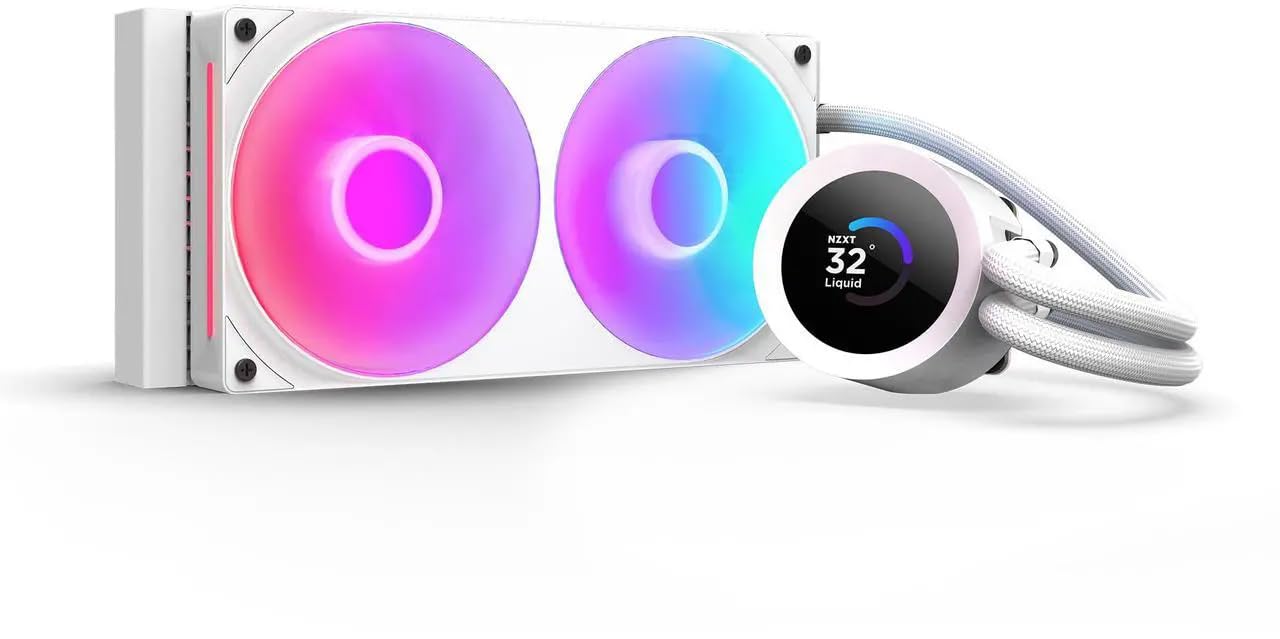
A 240mm loop for case owners who simply do not have room for three fans.
This is the short radiator in the lineup, and that is the whole reason it exists. At 240mm it fits mid-tower roofs and front mounts that cannot take a 360mm unit, so it opens up white cooling for smaller builds. The NZXT Turbine pump is built for high flow and head pressure, which keeps temperatures in check when the CPU is working hard. Reliability is the trait owners value most here — it is a set-and-forget part in their eyes.
The block wears a bright 1.54-inch square LCD that you customise through NZXT CAM software — real-time temps, animated GIFs, custom images, or web integrations such as Spotify and YouTube. The RGB Core single-frame fan threads its cable once, and the pump breaks out through one lead, so cable management stays tidy. Pre-applied thermal paste removes a step at install. Tool-free mounting covers the latest sockets, including AM5 and LGA 1851.
Be realistic about the screen: it measures 1.54 inches, and display size is the one point buyers call out with a shrug — smaller than some expect from the product shots. It is a lovely glanceable panel, not a full dashboard. The second caveat is that a 240mm radiator carries less thermal headroom than the 360mm picks here, so it suits mid-range CPUs better than a fully overclocked flagship. For a compact white build it is a tidy, dependable pairing.
The compact case answer: when 360mm will not fit, this keeps the white look, adds an LCD, and mounts with tool-free brackets.
Screen reality check: 1.54 inches is genuinely small — useful for a temp readout, tight for fancy visuals.
Good match for: smaller cases and buyers who want a screen on the pump without a 360mm footprint.
Pass on it if: you plan to push a power-hungry flagship chip — a 240mm radiator has less headroom.
5. CORSAIR NAUTILUS 360 RS LCD
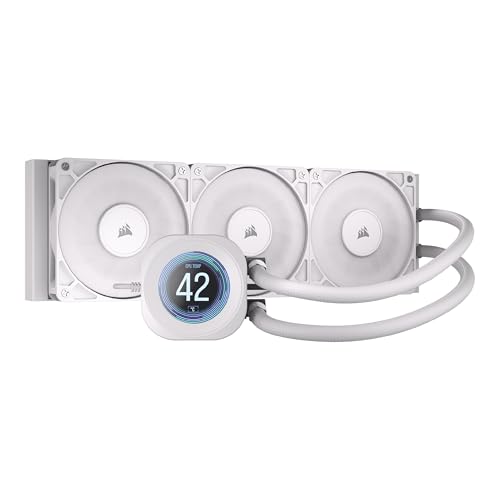
A full 360mm loop that keeps the pump whisper-quiet and still mounts a 2.1-inch screen.
For a quiet high-performance build, the pump keeps coolant flowing at a high rate while staying at 20 dBA (a measure of sound; lower is quieter). The MSI MAG Coreliquid A13 lists 14.4 db, which only looks quieter on paper — read the specs of each against its own fan load — but in practice the Nautilus is engineered for low pump noise, which is the noise you hear all day. The three RS120 fans use CORSAIR AirGuide and Magnetic Dome bearings to push air through the radiator without adding a drone.
A slightly convex cold plate presses into the CPU’s heat spreader for strong contact, and thermal paste comes pre-applied so you skip that step. On top sits a 2.1-inch IPS LCD for a custom image or system readout. The daisy-chain wiring and single 4-pin connector keep the inside clean. Cooling performance is the standout in owner experience, and the clean white appearance draws steady praise in feedback too.
The honest note is about noise character, not volume as a whole. Some buyers report the fans run quiet while others catch a bubbling sound from the pump — a reminder that a loop can arrive with a little air trapped. A gentle tilt-and-run after install usually clears it. At 4.5+ stars across a strong review base, the overwhelming picture is a capable, good-looking 360mm cooler with a built-in display. Just do not buy it expecting the pump to be completely silent from the very first minute.
What you are paying for
- 20 dBA pump rated for high flow — the low-noise all-day part.
- Convex cold plate and pre-applied paste for strong contact from the start.
- 2.1-inch IPS LCD plus daisy-chain fans and a single 4-pin connector.
What to watch for
- A pump bubbling sound turns up in some owner feedback — clear trapped air after install.
- Fan noise is uneven across user reports, so case airflow matters.
For the quiet-first builder: a big 360mm radiator, a low-noise pump and a display, all in white.
Look elsewhere if: you want guaranteed silence with no setup — a trapped-air bubble can show up and needs clearing.
6. Lian Li HydroShift II LCD-C 360TL Wireless

The cable-light showpiece — wireless fans and a round LCD that makes a build look curated.
This one is for the builder who hates visible wiring behind the fans. The HydroShift II ships as the original TL Wireless edition with three UNI FAN TL120 Wireless ARGB fans, so there are no fan cables running back to the board. A 400 x 122 x 24 mm radiator keeps the profile slim, and concealed wiring with side-mounted tubing plus an adjustable sliding tube clamp sharpens the fit. Quality is the trait owners rate highest, and the clean look earns its own following — some describe the result as looking like a NASA computer.
The round screen is the visual centerpiece: a 2.1-inch IPS panel at 480 x 480 resolution and 500-nit brightness with a 60Hz refresh rate. A rotatable outer ring lets you flip themes and lighting in Offline Mode without touching software. Cooling comes from a 2000–2500 RPM pump working with three TL120 fans rated up to 2600 rpm, 90.1 cfm airflow and 3.97 mmH2O static pressure. You control it three ways — Offline Mode for coolant and pump monitoring, L-Wireless for screen and lighting, or USB Streaming for full L-Connect 3 media customisation.
Now the honest part, and it is a real one for some buyers. Connectivity and mounting both show up as pain points in feedback, and the software side is rated mixed, so budget time for the wireless pairing and the control app. It carries a 6-year AIO warranty to offset that. If you accept the setup learning curve, this is the coolest-looking white loop on the list for a cable-tidy build.
The aesthetic payoff: wireless fans plus a 480 x 480 round display is a look you cannot match with cabled fans, and the 400mm radiator stays slim.
The setup tax: wireless pairing, mount fit and software are the recurring friction points — plan for them up front.
Made for: show-piece builds where a clean interior and a round LCD are the whole point.
Not for you if: you want zero setup friction — wireless pairing and app control are part of the deal.
7. NZXT Kraken Elite 280 RGB
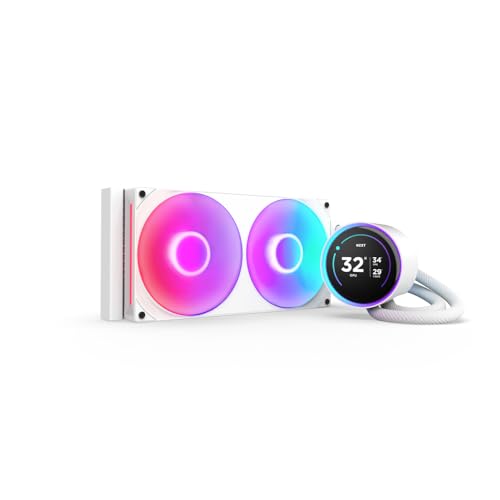
A 280mm loop for the builder who wants the pump screen to be the star of the show.
The Kraken Elite takes the display idea further than the Plus model above. The pump block shows your favourite GIF or image, live system performance, and integrated content from Google Photos, Spotify and YouTube. An RGB LED ring around the screen syncs with what is on the display and with other RGB parts in the case for one cohesive look. Cooling performance is what the majority of owners talk about, and the appearance runs a close second.
The custom NZXT Turbine pump is built to move coolant efficiently through heat-prone CPUs, and the manufacturer states a 10% performance boost with less noise. Take that figure as NZXT’s own claim rather than a lab result. Installation stays easy with pre-applied paste, a single breakout cable and tool-free brackets for AM5, AM4, LGA 1851/1700 and 1200/115X. It is a 280mm radiator, so it sits between the compact 240mm and the full 360mm picks in surface area.
The fair warning is noise character. Some owners describe it as super quiet while others pick up ticking from the pump at lower rpm, and that inconsistency matters on a premium-tier part. Value is also called into question by a share of buyers. The screen is described as insanely clear, which is the draw — you are paying for the display as much as the cooling. Buy it because you want a big, loud-in-a-good-way visual statement, not because it is the cheapest way to cool a chip.
What it does beautifully
- A large pump display with GIFs, live temps and integrations like Spotify and YouTube.
- An RGB ring that syncs with on-screen content and other RGB hardware.
- Tool-free mounting for AM5, AM4, LGA 1851/1700 and 1200/115X.
What the premium does not guarantee
- Pump ticking at low rpm turns up in some feedback — noise is not fully consistent.
- Spending more here buys the screen and styling, not a silent guarantee.
Best suited to: mid-tower builds where the pump screen should command the glass panel.
Consider twice if: you want the quietest possible loop for the money — the screen is the premium here, not silence.
8. ASUS ROG Strix LC 360 White Edition

Built to sit at the center of a white ROG board and match it part for part.
If you have an ASUS ROG motherboard, this cooler was designed to complement it. The pump wears an NCVM-coated finish — a metallic vapour-coating process that gives a polished, mirror-like surface — with individually addressable RGB on the block. The three ROG-designed 120mm fans are tuned for airflow and static pressure, giving a full 360mm radiator. Cooling performance is the strongest point in owner feedback, with plenty of range at idle and steady control under load.
The build is meant to last. Reinforced, sleeved tubing adds durability where a cheap loop wears, and ASUS backs the whole cooler with a 6-year warranty. Fans spin to 2200 rpm and the quoted noise figure is 37.6 db — a bit higher than the quiet-focused 360s here, so if silence is your only goal, the be quiet! unit up top beats it on quoted noise, 36.8 db vs 37.6 db. It supports desktop builds through standard mounting hardware, with the white finish carrying the theme through the radiator and fans.
Two honest points before you commit. This cooler is older than most picks here, and its feedback shows a split — plenty of owners mention it works reliably, while a smaller share report units that fail or run loud. That variance is the reason it sits mid-list, not higher. Buy it for the ROG-matched look and the long warranty, and make sure your case has room for a traditional 360mm radiator.
The theme argument: addressable RGB, an NCVM-coated pump and a 6-year warranty make this a coherent piece of a white ROG build.
Worth it for: ROG loyalists who want a matching white 360mm loop with a long warranty.
Look elsewhere if: you want the quietest or the most consistently praised cooling — the feedback here is divided.
9. TRYX Panorama SE 360mm AIO White
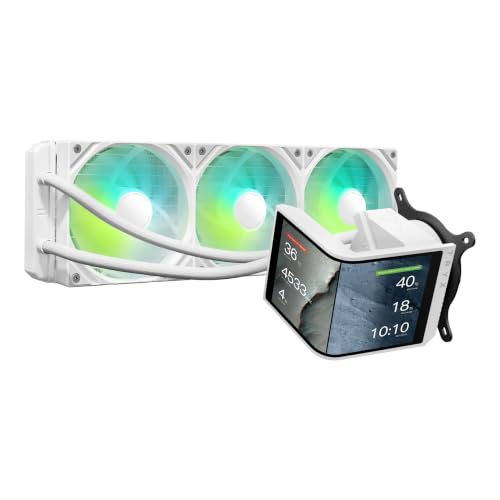
The curved AMOLED showstopper — a 6.67-inch display that dwarfs every other block on this list.
No other cooler here puts this much screen in your case. The Panorama SE wears a 6.67-inch curved AMOLED panel running 2K resolution at a 60Hz refresh rate and 400-nit brightness. The pixel density reaches 372PPI with a 1,000,000:1 contrast ratio, which is why the visuals carry real depth next to a standard LCD. The screen rotates through multiple angles to line up with its preset Waterfall 3D animation, and the KANALI software links natively to GIPHY, so you can pull GIFs straight from the library without downloading files first.
The cooling hardware behind that screen is serious. TRYX uses an Asetek Adela cooling system with a 27mm high-density fin radiator and matched ARGB fans, rated for 280W of total TDP cooling capacity. Three 120mm ROTA ARGB fans with FDB bearings arrive preinstalled, and four-corner damping pads help cut vibration noise. Quoted operating noise stays under 27.86 dBA even under full load, which is lower than the be quiet! Light Loop at 36.8 db. Mounting hardware is full all-metal for balanced pressure, compatible with Intel LGA 1851/1700/1200/1151/1150/1155 and AMD AM4/AM5.
The caveat is the premium and the software. At the top of the price ladder, this is a buy made with your heart as much as your CPU temps, and some owners question whether the sticker is justified while others call it worth it. A few also bump into occasional display glitches. As a statement piece for a glass-sided showcase build, few cases look better — but it is a luxury display first and a cooler second.
Why it turns heads
- 6.67-inch curved AMOLED at 2K and 372PPI — the biggest, sharpest screen on the list.
- Asetek Adela system rated for 280W TDP with preinstalled FDB ARGB fans.
- Native GIPHY integration in KANALI for instant GIF browsing.
- Quoted load noise under 27.86 dBA with four-corner damping pads.
Set against the price
- Premium-tier cost — you pay for the AMOLED as much as the cooling.
- Occasional display glitches surface in owner feedback.
Pick this for: a showcase white build where the pump screen is the centerpiece and 280W of cooling headroom matters.
Think hard if: you want max performance per dollar — a lot of this price buys the curved display.
Understanding the Specs
Radiator size and what it buys you
The radiator is the metal block that air passes through to carry heat away, and its size sets how much heat the loop can shed. A 360mm unit takes three 120mm fans and gives the most surface area, which is why heavy-load builds lean that way. A 240mm radiator takes two fans and fits smaller cases, but it has less room to shed heat when the room warms up. A 280mm sits in between. Match this to your case’s listed radiator support before anything else.
Pump speed, fan speed and the decibel figure
The pump is a small motor that pushes coolant around the loop, and its rpm tells you how hard it works — a 5200 rpm motor moves more coolant than a 2100 rpm one. Fan rpm is the separate figure for the propellers that blow air through the radiator. The decibel (dB) number is a measure of how loud the part is, but treat any single dB figure as a best-case number quoted by the maker. The character of the sound — a clean whoosh versus a pump tick — matters more than the raw number.
Cold plate, thermal paste and contact
The cold plate is the flat metal surface that presses onto your CPU to pull heat into the loop, and how well it makes contact decides a lot of your temperatures. A high-density fin design, like the one on the be quiet! unit, speeds heat transfer. Some coolers, such as the Corsair Nautilus, use a slightly convex plate to press into the CPU’s heat spreader. Pre-applied thermal paste — the grey compound that bridges tiny gaps between metal surfaces — saves a step at install.
Socket support and screen specs
Socket support decides whether the cooler’s mounting bracket actually fits your motherboard, so check for your socket: AM5, AM4, LGA 1700 and LGA 1851 are the common modern ones. Screen specs matter only if you want a display on the pump block. Resolution (such as 480 x 480 or 320 x 240), brightness in nits, and panel type (IPS LCD versus AMOLED) set how crisp it looks. A higher pixel density figure means sharper detail at the same size.
FAQ
Will a 360mm white AIO fit my case if it fits a black 360mm model?
Does a white AIO cooler give the same performance as a black one?
Is a 360mm radiator better than a 240mm for a modern CPU?
How do I stop the pump making bubbling or ticking sounds?
Does a screen on the pump block hurt cooling performance?
What does the decibel rating on a white AIO actually tell me?
Do I need a special motherboard header to run ARGB fans and a pump?
Which sockets do these white AIO coolers support?
Can I top up or refill an AIO cooler?
Is a 280mm radiator a good middle ground for a white build?
Final Thoughts: The Verdict
For most builders, the white aio cooler winner is the be quiet! Light Loop 360mm White because it pairs strong cooling with genuinely low pump noise and a single hub for all the lighting and fans. If you want a full 360mm loop on a tighter budget, the MSI MAG Coreliquid A13 360 White gives you the radiator and socket coverage without the premium. And for a showcase buildwhere the pump screen is the star, the TRYX Panorama SE 360mm is the one to reach for.
One honest nudge before you close the tab: the top pick holds the highest rating of the group at 4.5+ stars across 400+ ratings, and its cooling-first design is exactly why. Whatever your budget, match the radiator size to your case and your CPU, confirm your socket is on the list, and plan a few minutes for any screen or wireless setup. Do that and any pick here will keep a white build cool and quiet for the long run.
How We Picked
We do not accept paid placement. Every pick is matched to a real buyer and a real use-case; we do not hands-on test units.
Sources & Methodology
Specifications: manufacturer listings and product documentation. Review insights: verified customer reviews, as of November 2026. Pricing: not shown on this page (it changes often); check the current price via the retailer link.
As an Amazon Associate, Gadgets Feed earns from qualifying purchases. This does not affect which products we feature.