
Our readers keep the lights on and my morning glass full of iced black tea. As an Amazon Associate, I earn from qualifying purchases.
Specs are compiled from manufacturer listings and verified buyer reviews and can change over time — please confirm the key details on the product page before buying.
You have an empty SFP+ port and a copper switch that needs a 10-gigabit uplink. A plug-in SFP+ module solves it without replacing the switch. The real decision is if you need a copper module that runs over ordinary Ethernet cable or a fiber module that shoots a laser down a strand — and how far you need it to go.
I’m Min — the founder and writer behind Gadgets Feed. This guide is built by comparing the manufacturers’ published specifications and the patterns across verified customer reviews, so you get each pick’s real strengths and trade-offs instead of marketing spin.
Distance is the first fork in the road: copper modules typically top out around 30 meters while fiber modules reach far further, so measure your cable run before you buy. That single question is what separates the right pick from a return label in this list of the 10g sfp transceiver options that actually work.
Our Picks at a Glance


How To Choose The Best 10G SFP Transceiver
An SFP+ transceiver is a small hot-swappable module that slides into a matching port and converts that port into a different kind of connection. You are choosing between two families: copper RJ45 modules for ordinary Ethernet cable, and fiber LC modules for optical cable. Pick the wrong family and the module will not link, whatever its other specs say.
Copper or fiber — match the module to the cable you already have
A copper RJ45 module turns an SFP+ port into a standard Ethernet jack. That means you can run a normal network cable from a switch, router, or server without buying fiber. The trade-off is reach: the copper modules here are built for short runs, commonly up to 30 meters.
A fiber module instead takes an LC connector and drives light down a multimode strand. It reaches much further and burns less power, but only if you already have fiber in the wall or are willing to run it. For two switches in the same rack, a copper RJ45 module avoids fiber terminations entirely.
The cable grade sets the speed you actually get
On copper modules, the cable in the wall decides the result. Full 10-gigabit over 30 meters generally calls for Cat 6a or better. Drop to Cat 5e and you are usually looking at lower negotiated speeds, which is fine if your gear only needs them.
Check what is printed on your existing cable jacket before you order. Cat 6a or Cat 7 on the jacket supports full 10 Gbps over the 30-meter copper run. If it is older cable, plan for the module to negotiate down rather than deliver 10 Gbps.
Heat is the honest cost of copper
Pushing 10 gigabits through copper takes more power than pushing it through glass, and that power turns into warmth inside a tiny metal shell. Almost every copper module in this list runs warm in normal use.
Ventilate the switch bay and leave space around the module. Give the module a ventilated switch bay and room around it, and treat a warm-to-the-touch case as expected rather than a fault. Fiber modules avoid the issue almost entirely because they draw far less power.
Confirm the vendor compatibility list before you buy
Many switch makers lock their SFP+ ports to modules they recognise. A module that works perfectly in one brand can be ignored by another, even though both use the same physical slot.
Check the listing’s compatibility notes against your exact switch model. Several makers here name specific switches they do not support, and those exclusions matter more than any headline spec when you are buying for one particular switch.
Quick Comparison
| Model | Best For | Connector | Max Reach | Data Rate | Amazon |
|---|---|---|---|---|---|
| Omada SM5310-T★ Best Overall | Copper uplink on ordinary Ethernet | RJ45 | 30 m at 10G | 10 Gbps | Amazon |
| GIQITCK SFP+ to RJ45Best Value | Low-power copper on a tight budget | RJ45 | 30 m at 10G | 10 Gbps | Amazon |
| Wiitek SFP-10G-TMost Compatible | Broad switch compatibility | RJ45 | 30 m at 10G | 10 Gbps | Amazon |
| H!Fiber 10Gb SFP+ RJ45 | Mixed-speed copper links | RJ45 | 30 m at 10G | 10 Gbps | Amazon |
| 10Gtek 10GBase-SR | Long fiber runs on a budget | LC multimode | 300 m | 10 Gbps | Amazon |
| Cable Matters 2-Pack | Fiber links needing a spare | LC multimode | 300 m | 10 Gbps | Amazon |
| Elfcam 10G SFP+ RJ45 | Premium copper build | RJ45 | 30 m | 10 Gbps | Amazon |
| 10Gtek 10GBase-T | Popular open-switch copper | RJ45 | 30 m | 10 Gbps | Amazon |
| MikroTik S+RJ10 | MikroTik SFP+ hardware | RJ45 | 10 Gbps copper | 10 Gbps | Amazon |
In‑Depth Reviews
1. Omada 10G Base-T SFP+ to RJ45 Module (SM5310-T)
Our pick — 4.5+★ from 350+ verified ratings; the strongest balance of quality and price.
Turns a lonely SFP+ slot into a standard Ethernet jack without a single fiber strand in sight.
This is the pick that makes the most sense for the widest range of home labs and small offices. It converts your SFP+ port into an RJ45 jack you can feed with ordinary copper cable — no fiber terminations, no new patch leads. Data moves between that port and your copper gear at up to 10 Gbps, and you simply plug it in and go, with no software install or configuration step.
Reach depends on the cable you bring. At 10 Gbps the module is rated for up to 30 meters over UTP Cat 6a or above, and up to 100 meters when you drop to 2.5G, 1G, or 100Mbps over Cat 5e or above. That longer figure matters: it lets the same module serve a distant switch at a lower speed without a second purchase. The metal casing is built to hold a stable connection, and the hot-pluggable design means you can swap it without shutting the network down.
The honest catch is heat, and it is the one point reviewers split on — some say it stays cool, others find it warm in service. Real-world feedback on actual throughput is what carries this module: it slots into Ubiquiti Dream Machine SE setups and 2.5G/10G switches and holds the link at the speeds advertised. That reliability under load is why it lands at the top here. What wins people over is simply that it performs — the network-connection side of this module is the aspect owners praise most by a wide margin.
Where it earns its keep
- Full 10 Gbps over Cat 6a, dropping to 100 m reach at 2.5G/1G — one module, several scenarios
- Plug-and-play with zero configuration and hot-swap support so uptime is never interrupted
- Metal housing holds a stable link in mixed environments
- Works with most SFP+ switches, media converters, and routers
What to plan around
- Runs warm for some owners — ventilate the switch bay
- 10 Gbps needs Cat 6a or better cable, not older Cat 5e
- 30-meter ceiling on the 10G link
Reach for this if: you want to light up an SFP+ port with the copper cable already in your walls, at full 10 Gbps or at a lower speed over a longer run.
Look elsewhere if: your run exceeds 30 meters at 10 Gbps or you have no SFP+ port to plug into.
2. GIQITCK SFP+ to RJ45 10GBase-T Module
A metal-shelled copper module that keeps its power draw down to 2.5 watts.
If you are wiring a small switch and want the least fuss, this is the entry point. It auto-negotiates across 2.5G, 5G, and 10G over its RJ45 jack, reaching up to 30 meters with Cat 6a or Cat 7 cable. It is hot-pluggable and MSA compliant, with no configuration step.
The spec that does the most work here is the power figure: it draws 2.5 watts or less. Lower power means less heat to shed inside a cramped switch bay, and the heat-conducting gasket is there to move that warmth away from the electronics. It is built to standards — IEEE 802.3an, IEEE 802.3az, and SFF-8431/8432 — and its operating range of 0 to 70°C (32 to 158°F) covers a normal equipment closet comfortably.
The catch is the compatibility list. It names Cisco, Ubiquiti UniFi (including UDM Pro), MikroTik CRS310 and CRS309-1G-8S+, Fortinet, D-Link, TP-Link, Linksys, Supermicro, Broadcom, and Meraki, plus other open equipment — so check your exact switch model against that list before ordering. A whole-metal housing keeps electromagnetic interference down, which helps when the module sits beside other powered gear. For a budget-first build that still wants 10 Gbps, it is a sensible start.
The power play: a 2.5-watt ceiling means less heat and less strain on a small switch, which is exactly what a tight enclosure needs.
Check first: confirm your switch appears on the stated compatibility list — this is where a cheap module is most likely to disappoint.
Suits you if: you are building on a budget and need a short 10G copper hop with minimal heat output.
Back away if: your switch brand is not named in the compatibility list or your cable run is longer than 30 meters.
3. Wiitek 10G SFP+ to RJ45 Transceiver (SFP-10G-T)
Built around a Marvell chip and tested on the switch before it ever ships.
A copper module lives or dies by compatibility, and this one is aimed squarely at that worry. It is listed as compatible with Cisco SFP-10G-T-X, Ubiquiti UniFi UF-RJ45-10G and uacc-cm-rj45-mg, D-Link, TP-Link, Netgear AXM766, and MikroTik S+RJ10, plus other open switches. Each module is individually tested on a 10G SFP+ to Ethernet setup before delivery — an unusual step at this tier.
On the numbers, it handles 10G over Cat 6a or better up to 30 meters, 5G and 2.5G over Cat 6a/7, and 1000Base-T over Cat 5e or better. The built-in Marvell chip keeps power draw under 2.0W at the 30-meter mark, which is lower than most copper modules and helpful in a warm enclosure. It is hot-swappable and plug-and-play, so you can install or replace it without powering the switch down. It is also SFF-8431 and SFF-8432 compliant and IEEE 802.3az compliant.
What owners consistently report is speed — full 10GB delivery is the thing this module is praised for most, with MikroTik support called out as a real win. The mixed note is heat, which splits opinion the same way it does across copper modules generally. Weighing the individual pre-shipment testing and the low power ceiling against a slightly lower star score than the fiber picks, this is the copper module to choose when your switch brand is the variable you cannot change. The 30-day return window and 1-year quality assurance soften the compatibility gamble.
Why it stands out
- Individually tested on a live 10G SFP+ setup before packing
- Under 2.0W at 30 meters — low heat for a copper module
- Long compatibility roster spanning Cisco, Ubiquiti, Netgear, and MikroTik
The fair caveat
- Heat is a mixed report — some run cool, some warm
- 10G still needs Cat 6a or better to hit full speed
- Not a fiber replacement for runs beyond 30 meters
The one to grab: when your switch brand is fixed and you want a copper module that was checked on real hardware first.
Think twice: if your run is longer than 30 meters at 10 Gbps — this is copper, not fiber.
4. H!Fiber 10Gb SFP+ RJ45 Transceiver
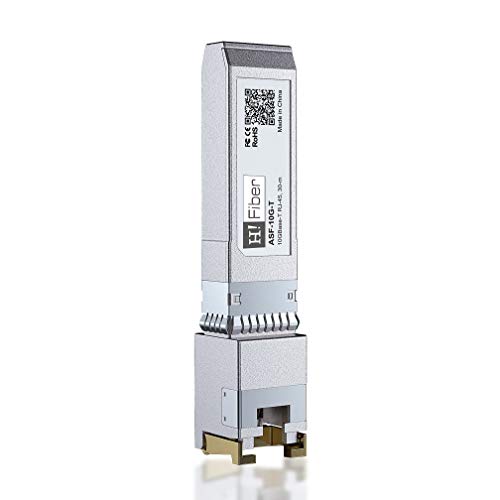
A metal-bodied copper module that will talk to almost any switch — except two Ubiquiti models it openly flags.
For a home lab with a mix of gear, this module’s honest spec sheet is its best feature. It handles 10 Gigabit over Cat 6a/7/8 cable up to 30 meters (98ft), and 5Gb/2.5Gb/1Gb over Cat 5e or better up to 50 meters (164ft). The dual distance figures mean it can serve a longer run at a lower speed without a second buy, which is a practical edge over single-speed rivals.
It names a long compatibility list: Cisco SFP-10G-T-S, Ubiquiti, UniFi, Fortinet, Meraki, MikroTik, TP-Link TL-SM5310-T, Netgear, D-Link, Broadcom, QNAP, Linksys, Supermicro, Edge-core, EMC, F5, and Nokia. But the listing also says plainly that it is not compatible with Ubiquiti US-48-500W and UDM-Pro — and suggests a different model for those. Read that twice if you own either switch. Each module is individually tested before packing, hot-pluggable, and plug-and-play.
Owners most often report reliability — it holds a stable link across Cat6a cable and integrates with QNAP switches — and it delivers the speed it advertises. The trade-off is a warm running case, a common copper trait that shows up in the mixed notes here. There is also a genuine compatibility split: it works for many switches but not all, so the exclusions matter. It is a heavier unit at 2.08 ounces versus the 0.32-ounce 10Gtek fiber module — more metal, but also more thermal mass to warm up. If your switch is on the list, it is a dependable copper choice.
Reach in two steps: 30 m at full 10G, stretching to 50 m at lower speeds — handy when one cable run is just too long for a pure 10G link.
Read the fine print: the Ubiquiti US-48-500W and UDM-Pro are explicitly excluded, so check the exclusions before you commit.
Worth it for: mixed-speed home labs where the same module may need to serve a near and a far port.
Skip if: you own the two excluded Ubiquiti switches — pick a module that lists your model as supported.
5. 10Gtek 10GBase-SR SFP+ Fiber Transceiver (2-Pack)

Fiber speed and 300-meter reach, with a spare module in the box.
Once your run goes past the 30-meter copper ceiling, this is the crossover point. It is a 10GBASE-SR SFP+ to LC multimode fiber module running at 850nm, and it reaches up to 300m — versus the 30 m ceiling on copper modules like the Omada above. If the two ends of your link are on different floors or across a building, fiber is not a luxury, it is the requirement.
It supports OM1, OM2, OM3, and OM4 fiber, includes DDM, and is rated for less than 1.05 watt of power draw with a low EMI design. That low power is the quiet win over copper: less heat to manage in a crowded rack. It is fully hot-pluggable with ESD protection, SFP MSA compliant, and IEEE 802.3ae compliant. You get two 100% tested modules, a 30-day money-back guarantee, and a 3-year warranty.
The weight tells the story of the difference: 0.32 ounces versus the 2.08-ounce H!Fiber copper module — there is simply less metal and no copper heat to shed. Compatibility spans Cisco SFP-10G-SR, Meraki MA-SFP-10GB-SR, Ubiquiti UniFi UF-MM-10G, Fortinet, MikroTik, Netgear, D-Link, Supermicro, and TP-Link. Grandstream switches and short-run Ubiquiti UniFi links are the setups buyers report working well, and the quality read is positive throughout. It carries the strongest rating of the group, so if fiber is in the plan this is where the track record sits.
What fiber buys you
- 300 m reach versus the 30 m copper ceiling of the Omada module
- Under 1.05W draw keeps the rack cool
- Two modules per pack, plus a 3-year warranty
- Supports OM1 through OM4 multimode cable
Before you commit
- Needs LC-terminated fiber cable — not ordinary Ethernet
- Overkill for two switches sitting in the same rack
- You pay for a second module whether or not you need it
Best matched to: any link longer than 30 meters, where fiber is the only way to keep full 10 Gbps.
Not your pick if: you have copper cable in the wall and no fiber to terminate.
6. Cable Matters 2-Pack 10GBASE-SR SFP+ LC Fiber Transceiver

A fiber pair with real-time diagnostics built in, so you can see what the link is doing.
This is the module for someone who wants to know a fiber link is healthy, not just guess. It supports DDM/DOM diagnostics under SFF-8472, which reports on the optical link in real time — useful when you are troubleshooting a run between floors. It connects a switch, server, or NIC with an SFP+ port to a 10 Gigabit fiber link over duplex LC multimode cable, reaching up to 300m just like the 10Gtek fiber module above.
Line rates go up to 11.3 Gb/s (multirate) at an 850nm VCSEL, and it works with OM1, OM2, OM3, or OM4 fiber in 62.5µm or 50µm core. Power draw is under 1.0W with minimal EMI — below the 2.5W of the GIQITCK copper module, so a dense rack runs cooler. It is hot-pluggable with ESD protection, IEEE 802.3ae and SFP+ MSA (SFF-8431/8432) compliant, and cross-compatible with MSA gear from Cisco, HPE Aruba, Ubiquiti, TP-Link, Netgear, MikroTik, D-Link, and Supermicro.
Fresh from the start, it is picked up immediately after booting, with reliable performance and successful links to MikroTik switches and Mellanox NICs called out. One important limit: it is not for proprietary vendor-locked SFP+ ports, so a switch that insists on its own modules will not accept it. Two modules come in the pack, which suits equipping a pair of switches or keeping a spare in the field. It sits just below the 10Gtek on rating, but adds diagnostics the cheaper fiber pick does not spell out.
Diagnostics make the difference: DDM/DOM readout means you can check link health in software instead of swapping modules blind.
The lock caveat: vendor-locked SFP+ ports will reject it — confirm your switch takes MSA-compliant modules first.
Choose this when: you want a matched fiber pair and the ability to monitor the link from your management software.
Pass if: your switch uses proprietary module locking or you have no multimode fiber to connect.
7. Elfcam 10G SFP+ Transceiver Module with RJ45 Port

The top-rated copper module here — built on Marvell Alaska chips with NBASE-T on the spec sheet.
If rating is your tiebreaker, this is the one at the front of the pack. It is a 10GBase-T SFP+ copper RJ45 module rated for 10GB over a Cat7 or Cat8 Ethernet cable, reaching up to 30 meters. It is built on Marvell Alaska PHYs, hot-pluggable, and plug-and-play, and it meets IEEE 802.3bz and the NBASE-T specification, which is what lets it negotiate the intermediate 2.5G and 5G speeds cleanly.
Compatibility spans Cisco SFP-10G-TS, Ubiquiti UF-RJ45-10G, Netgear AXM765, D-Link DEM-440XT, Supermicro, Linksys, Delta, and other open switches — plus Freebox Ultra is named among its compatible devices. The locking ring is a small detail that helps: turn it downwards at a 90-degree angle to open up and pull the module out, so it seats and releases cleanly without a fight.
Two honest notes. First, the case is listed as plastic, which trades some of the metal-shell feel of the H!Fiber and Wiitek modules for a lighter body. Second, this is a small-sample product — it holds the highest score here but with far fewer owners behind it than the mid-pack workhorses, so you are trusting a short but strong record. It is 30 g and ships as a single module. For a premium build with NBASE-T on the label, it is the copper pick to consider when the switch matches.
What lifts it up
- Marvell Alaska PHY chips with NBASE-T support for clean 2.5G/5G stepping
- Highest rating of any module in this list
- 90-degree locking ring makes removal easy
- Broad compatibility including Freebox Ultra
Weigh these first
- Plastic case rather than metal
- Fewer owners behind the score than the mid-pack picks
- 30-meter limit, Cat7/Cat8 cable required for 10G
Point it at: a copper 10G link where the highest rating and NBASE-T speed stepping matter most.
Hold off if: you want a proven record across a large owner base, or a metal-shell module in a hot rack.
8. 10Gtek 10GBase-T SFP+ to RJ45 Transceiver

The widely used copper module — but read the exclusion list before you assume it fits your switch.
This is the copper module most people land on by default, and its spec sheet is straightforward: 10G data rate, RJ45 interface, Cat 6a or Cat 7 cable, up to 30 meters. It is built on the Marvell AQR113C chip, and the maker is upfront that it may get hot while working — the suggested ambient ceiling is below 50°C.
The compatibility list is long but carries real exclusions. It covers Cisco, Fortinet, Netgear, D-Link, TP-Link, Linksys, Broadcom, Edge-core, EMC, F5, Meraki, Nokia, QTC, and Supermicro — but explicitly not HP-ProCurve, HP-H3C, HP-Aruba, Intel, Arista, Mellanox, Dell Force10, Extreme, Brocade, or Juniper. For Ubiquiti, the maker points you to a different module entirely. It also will not interconnect two Cisco Catalyst 1200/1300 switches. Those lines decide the buy as much as any speed figure.
Functionality is the standout in real use — MikroTik switches, UDM Pro Max, and Asus RT-AX89X routers all come up working, and plug-and-play is the norm. Speed reports split, with some seeing download speeds up to 2Gbps and others limited on upload. Heat and durability also draw mixed notes, which is the price of a copper module pushed hard. With 900+ ratings behind it, this is by far the most-reviewed module here — but it holds 4.0+ against the fiber pick’s 4.5+, so the crowd size does not equal the ceiling.
The default for a reason: it lights up most open switches without fuss, and price-wise it keeps copper within reach.
Where it bites: a long exclusion list including most HP, Intel, Arista, and Juniper gear, plus mixed heat and speed reports.
Fits you if: you run an open switch brand from its supported list and want the most widely used copper module.
Don’t bother if: your switch is on the HP, Intel, Arista, or Juniper exclusion list.
9. MikroTik S+RJ10 6-Speed RJ-45 Module

The module made by the switch maker itself — no compatibility guessing if you run MikroTik.
This one is for a specific buyer: someone with MikroTik hardware that has SFP+ ports. It slides into that port and turns it into a copper connection that runs up to 10 Gbps over familiar twisted-pair cable, so you can upgrade the link without installing any optical fiber. It is a six-speed RJ-45 module built on Cat 6a cable.
MikroTik’s own guidance is to use it in a device with active cooling. It will run in passively cooled gear, but may need extra cooling — the heat point is central here, not incidental. Tested ambient range is -20°C to 60°C, and it ships as a single copper-coloured module. Storage is listed at 256 KB of flash — that is module firmware storage, not something you use directly, but it shows this is a small computer, not a passive connector.
The trade-off is price tier: this is the premium pick on this list, and its value depends entirely on you owning MikroTik gear with an SFP+ port. If you do, it removes the compatibility lottery entirely — the maker of your switch made the module. If you do not, its numbers do not do anything another copper module here will not. Reach is rated at 10 Gbps copper, and the native match to MikroTik hardware is the whole reason to choose it.
Why it exists
- Made by MikroTik for MikroTik SFP+ hardware — no vendor guesswork
- Runs 10 Gbps over ordinary twisted-pair cable
- Wide -20°C to 60°C tested ambient range
Straight talk
- Needs active cooling for reliable service
- Premium tier for a single module
- Little point outside MikroTik equipment
The right call for: MikroTik owners with a cooled SFP+ device who want the maker’s own module.
Wrong call for: anyone without MikroTik hardware or with a passively cooled enclosure that cannot shed extra heat.
Understanding the Specs
Max Reach and Cable Grade
Reach is how far the signal stays clean. Copper RJ45 modules here are rated to about 30 meters at full 10 Gbps, and some hold 100 meters at lower speeds. Fiber modules go much further — 300 meters is common among the LC multimode picks. The cable in the wall decides whether you hit 10 Gbps or negotiate down, so read the jacket before ordering.
Power Draw and Heat
Power consumption in watts becomes heat inside a tiny metal shell. Copper modules draw more — one here is rated at 2.5W, others under 2.0W — because pushing 10 gigabits through copper takes energy. Fiber modules draw less than around 1.05W. Lower watts mean less heat to shed, which matters most in a dense, poorly ventilated rack. Give any copper module airflow.
FAQ
Will a copper SFP+ module work in my SFP+ switch port?
Do I need fiber cable or is copper Ethernet enough?
Why does my 10G copper module get hot?
What cable do I need for full 10 Gbps over copper?
Is a fiber module better than a copper module for a short link?
Can I swap an SFP+ transceiver while the switch is running?
Will a 10G SFP+ module work in a 1G SFP port?
Why does one switch brand reject a module that works in another?
Do I need one module or two for a link between two switches?
Final Thoughts: The Verdict
For most people wiring an SFP+ port with cable already in the wall, the Omada SM5310-T is the safest buy — it delivers full 10 Gbps over Cat 6a and drops to 100 meters at lower speeds, so it covers more than one scenario. If compatibility with a fixed switch brand is the worry, the Wiitek SFP-10G-T keeps its power draw under 2.0W and is individually tested before shipping. And once your run passes 30 meters, stop looking at copper and take the 10Gtek 10GBase-SR — 300 meters of reach, under 1.05W, and two modules in the pack.
One honest nudge before you order: confirm the module and your switch agree on compatibility, because a supported model that runs cool beats a higher-rated one your switch refuses to see.
How We Picked
We do not accept paid placement. Every pick is matched to a real buyer and a real use-case; we do not hands-on test units.
Sources & Methodology
Specifications: manufacturer listings and product documentation. Review insights: verified customer reviews, as of November 2026. Pricing: not shown on this page (it changes often); check the current price via the retailer link.
As an Amazon Associate, Gadgets Feed earns from qualifying purchases. This does not affect which products we feature.