
Stacks of dusty 8mm video cassettes sit in closets, their magnetic tape slowly degrading with every passing season. The playback heads on old camcorders seize up, belts snap, and the unique analog charm of those family memories flickers closer to being lost forever. Capturing that signal before the media rots requires a dedicated converter that bridges the gap between aging RCA outputs and modern digital storage.
I’m Min — the co-founder and writer behind Gadgets Feed. My research process involves digging into hours of customer reports to separate reliable video transfer hardware from frustrating gizmos that lose sync or corrupt files mid-capture.
This guide focuses on the hardware that pulls analog video from vintage 8mm camcorders and VCRs, converting it into playable MP4 files. We evaluated standalone digitizers, film scanners, and capture boxes to find the most dependable solutions for rescuing aging tape collections, compiling the best list of hardware for your 8 millimeter video cassette player conversion needs.
How To Choose The Best 8 Millimeter Video Cassette Player Converter
Not every converter handles the signal quirks of 8mm and Hi8 tape. Choosing the right capture hardware means focusing on input compatibility, recording stability, and playback monitoring. Ignoring these three areas often results in lost footage or hours of wasted effort.
Input Connections: RCA vs. S-Video
Most 8mm camcorders output composite video through a single yellow RCA jack or a multi-pin A/V port. S-Video, common on Hi8 decks, separates luminance and chroma for a sharper image. A good converter accepts both RCA and S-Video, letting you choose the cleanest signal your source device provides. If your camcorder only has a proprietary A/V jack, you will need the specific breakout cable for that model.
Standalone Operation vs. Computer Dependence
USB capture dongles require a computer with compatible software, drivers, and sufficient processing power. Standalone digitizers record directly to a USB flash drive or SD card, freeing you from PC glitches. For batch transfers of many 8mm tapes, a standalone unit with a built-in preview screen saves significant time and avoids software compatibility headaches.
Recording Resolution and File Format
Standard-definition converters output at 640×480 or 720×480 pixels. Neither upscales your 8mm footage to true HD, but a clean SD capture preserves the original detail without adding compression artifacts. MP4 format is essential for broad playback compatibility on modern devices and streaming platforms. Avoid converters that lock you into proprietary file formats.
Quick Comparison
On smaller screens, swipe sideways to see the full table.
| Model | Category | Best For | Key Spec | Amazon |
|---|---|---|---|---|
| ClearClick 3.0 | Standalone Digitizer | Audio & Video Transfer | 5″ LCD, built-in battery | Amazon |
| RVT Digitizer 3.0 | All-in-One Kit | Included USB & Adapter | 1080p, 32GB USB included | Amazon |
| ClearClick 2.0 | Standalone Digitizer | Reliable SD Recording | 3.5″ screen, 1-year warranty | Amazon |
| PowerPlay DVR | Portable Recorder | Field Recording & FPV | 60fps capture, 2.4″ screen | Amazon |
| Portta Converter | Budget Digitizer | Simple VHS & Hi8 Capture | 1080p, HDMI output | Amazon |
| SoundBeast Capture Box | Value Capture Box | Audio & Video MP4 Recording | 3″ LCD, auto-stop timer | Amazon |
| KODAK REELS Digitizer | Film Scanner | 8mm/Super 8 Film Reels | 5″ screen, 9″ reel support | Amazon |
| Magnasonic FS81 | Dedicated Film Scanner | Super 8/8mm Film Conversion | 1080p, 7″ reel capacity | Amazon |
| Eyesen Film Scanner | Film Digitizer | Small Reel Conversion | 1080p, 32GB SD included | Amazon |
In‑Depth Reviews
1. ClearClick Video to Digital Converter 3.0

The ClearClick Video2Digital 3.0 is the most refined standalone converter for 8mm tapes. Its 5-inch preview screen is significantly larger than the 2.4- or 3-inch displays on competing units, making it easier to confirm focus and framing before committing to a full tape transfer. The addition of a built-in rechargeable battery means you can set up your 8mm camcorder and converter away from a wall outlet, ideal for digitizing at a table where your old playback gear lives.
This third-generation model also introduces audio source recording, allowing you to capture cassette tapes or vinyl records alongside your video transfers — a useful bonus if you are digitizing a mixed media collection. It records at 720×480 or 640×480 in MP4 format directly to a USB flash drive or MicroSD card up to 512GB. The custom auto-stop timer lets you enter an exact number of minutes, preventing wasted blank footage at the end of a tape.
User reports highlight its intuitive menu system and exceptional reliability during long recording sessions. The occasional minor color flicker on certain tapes is worth noting, but overall it delivers consistent, watchable captures from Hi8 and standard 8mm sources. The two-year warranty provides extra confidence compared to the typical one-year coverage.
Why it’s great
- Largest preview screen in its class for monitoring tape capture
- Built-in battery allows placement away from outlets
- Customizable auto-stop timer for exact tape lengths
Good to know
- Does not upscale source material beyond 720×480 resolution
- Some users report rare frame hiccups during long captures
2. RVT VHS to Digital Converter Kit (Digitizer 3.0)
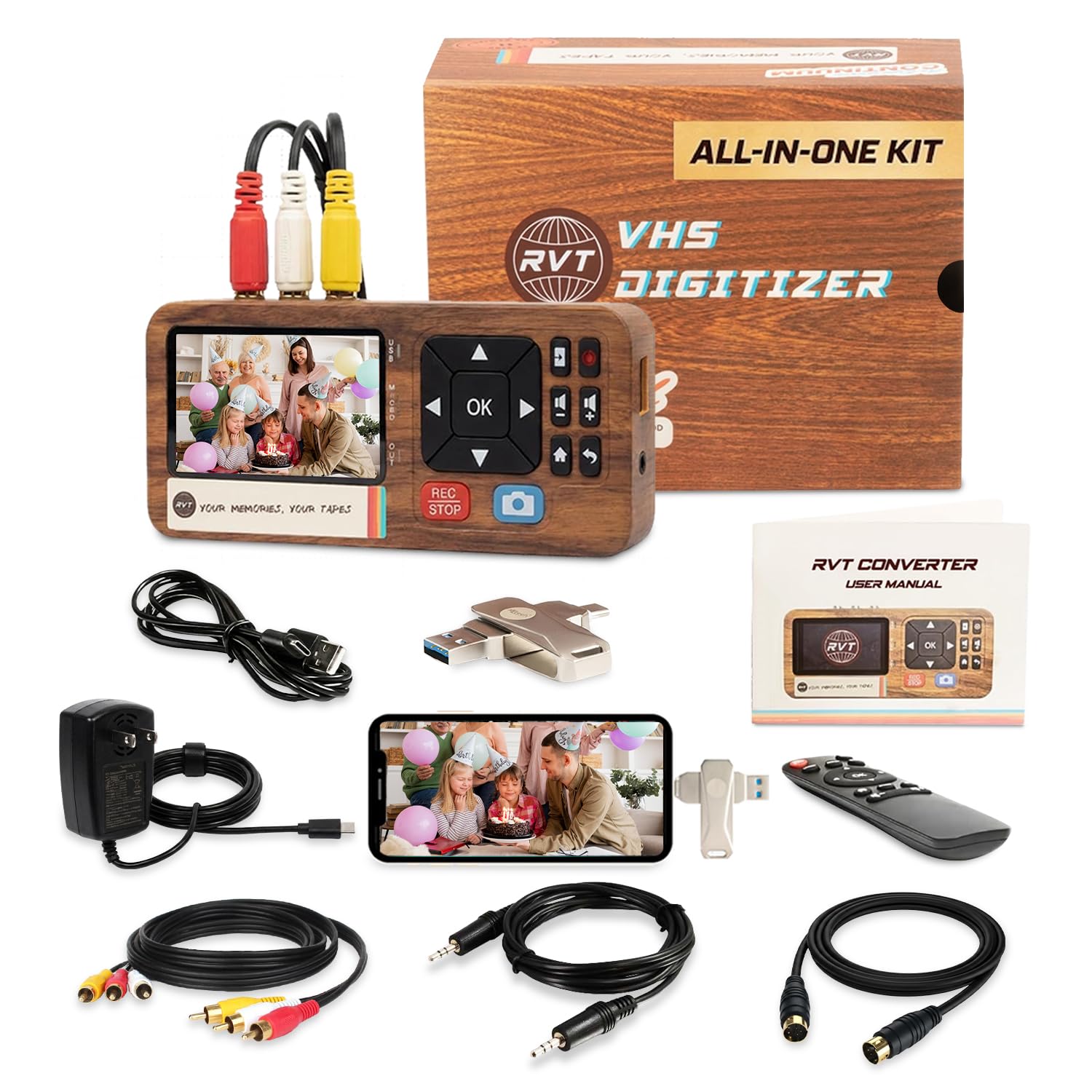
The RVT Digitizer 3.0 takes a different approach, bundling everything you need in one box — including a pre-formatted 32GB USB drive and a USB-C adapter for direct connection to modern smartphones. This eliminates the two biggest friction points: hunting for compatible storage and figuring out how to view your files on a phone. It records at 1080p from RCA and S-Video sources, though it is important to remember this is an upscale from the native SD signal of an 8mm tape.
The unit is powered by a wall adapter instead of USB bus power, which provides more stable current during transfers. Unstable power is a common cause of mid-recording dropouts, and this design choice addresses that directly. The 3.5-inch LCD screen is adequate for monitoring, and the remote control lets you start and stop recording without touching the device — useful when your camcorder is positioned far from the converter.
Customers praise the reliability over multiple tape transfers and the ability to plug the included USB-C adapter straight into an iPhone 15 or Android device for immediate playback and sharing. The wood-grain aesthetic is a polarizing design choice, but the functionality is solid. One caveat: the kit does not include the specific proprietary A/V cable needed for some vintage camcorders, so check your camera’s output port before ordering.
Why it’s great
- Comes with 32GB USB drive and USB-C phone adapter for instant sharing
- Wall-powered design eliminates dropouts from unstable USB power
- Includes remote control for hands-free operation
Good to know
- Upscales source signal to 1080p rather than capturing native SD
- Does not include proprietary camcorder breakout cables
3. ClearClick Video to Digital Converter 2.0

The ClearClick Video2Digital 2.0 is the predecessor to the 3.0 model and remains an excellent value for 8mm tape transfer. It features a 3.5-inch LCD screen, which is still larger than many budget converters, and records in SD MP4 format at 640×480 or 720×480 pixels. The auto-stop function offers presets of 60, 90, 120, and 150 minutes, which map well to the typical lengths of 8mm and Hi8 cassettes.
One standout feature is the improved audio/video sync protection, a common failure point in cheaper digitizers. Users consistently report that the 2.0 maintains lip-sync accuracy throughout full-length recordings, even on degraded tapes with tracking issues. It also includes a pause/resume function, allowing you to skip blank or corrupted sections without creating separate files.
The device requires a separate USB flash drive or SD card (up to 256GB, though some users successfully use 512GB). It is powered via USB, so you will want to use a reliable wall adapter rather than a computer port. A few users note the auto-stop timer can run a few minutes short, so adding a buffer of a few minutes to your tape length estimate is wise.
Why it’s great
- Proven sync protection prevents audio drift on long transfers
- Pause/resume function allows seamless tape section skipping
- Straightforward operation with no computer or software needed
Good to know
- Auto-stop presets may run slightly short of the dialed-in time
- USB-powered design requires a quality wall adapter for stable operation
4. PowerPlay DVR Video Recorder
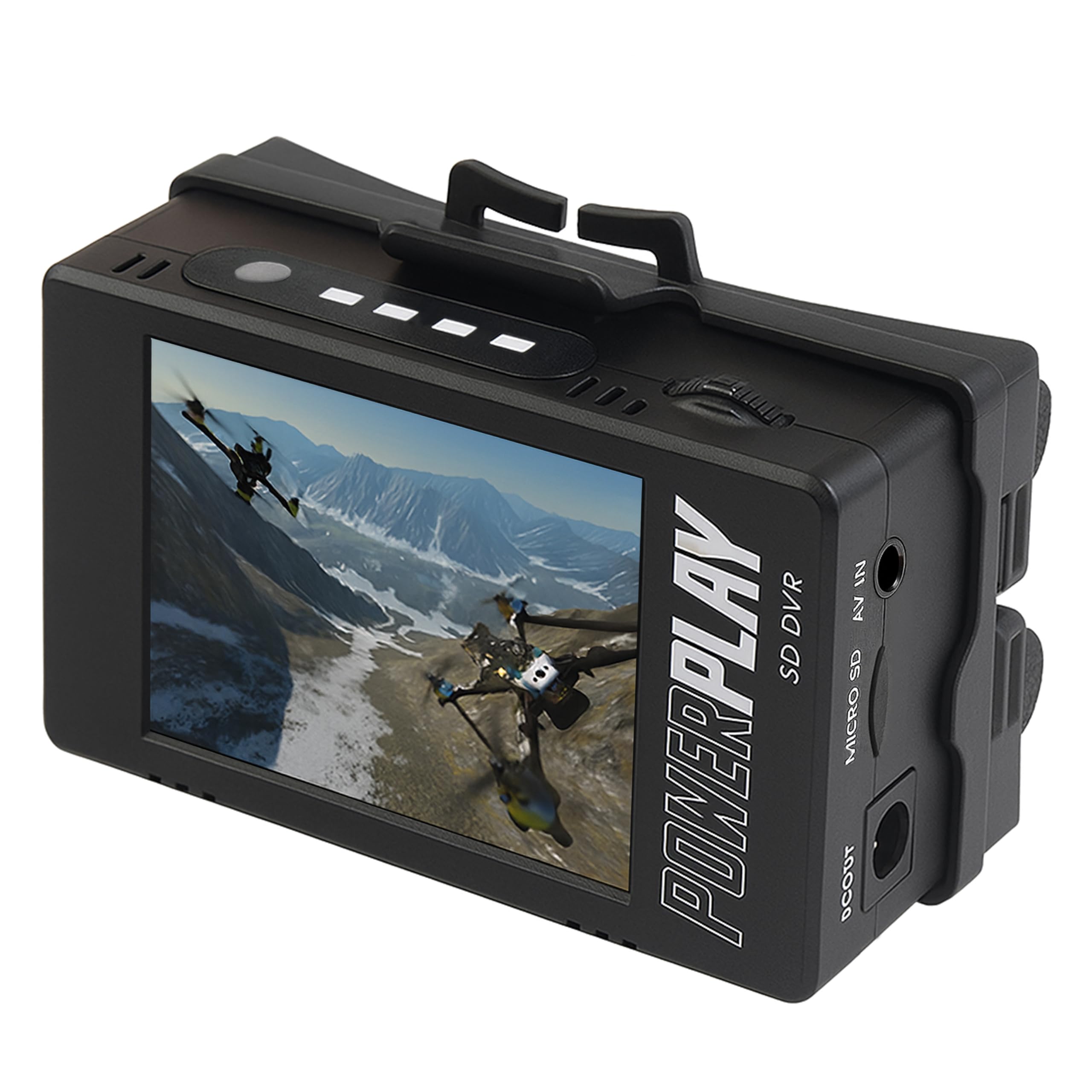
The PowerPlay DVR stands out for its high frame rate capture, recording at 60fps in NTSC mode (720×480) and 50fps in PAL (720×576). This makes it a unique option for 8mm transfer if your source footage contains a lot of motion, such as sports or action shots. The higher frame rate reduces motion blur compared to the standard 30fps converters. It records to MicroSD cards up to 512GB in MP4 format with AAC audio.
The unit is exceptionally compact and includes a clip mount, allowing you to attach it directly to a belt or bag for field recording. It is powered by two 18500 Li-ion cells (not included), making it fully portable. The 2.4-inch 640×480 RGB screen is small but functional for verifying that your 8mm camcorder is outputting a stable signal.
Customer feedback highlights excellent performance with vintage camcorders, particularly for users who want to record directly without a computer. The main drawbacks are the need for separate batteries and a specific 3.5mm A/V cable pinout for FPV use, though the included AV cable works for standard RCA connections. Some users experienced SD card compatibility issues, so using a Class 10 card is strongly recommended.
Why it’s great
- 60fps capture reduces motion blur on active 8mm footage
- Small size and clip mount make it easy to transport and set up
- Battery-powered operation allows use away from outlets
Good to know
- Requires separate 18500 batteries not included in the box
- SD card compatibility can be picky; Class 10 cards work best
5. Portta VHS to Digital Converter

The Portta converter offers a compelling set of features at a mid-range price point. It records video at 1080p 30Hz from RCA and S-Video sources, and it is one of the few converters in this class to include an HDMI output for direct connection to a modern TV. This lets you preview your 8mm tape on a larger display in real time before committing to recording, which is helpful for checking tracking or head condition.
The unit accepts NTSC and PAL formats, making it suitable for tapes from different regions. It records to USB flash drives or TF cards with no practical capacity limit, though high-capacity drives may require their own power supply. The 3-inch LCD screen provides a basic preview, and the included remote control makes navigation through the menu system convenient.
Users report crisp audio and video captures with minimal setup, though some note that the 1080p recording is an upscale of the SD source rather than native HD. The compact form factor and included cables (RCA and 3.5mm audio) mean you can be up and running within minutes. The two-year warranty and lifetime technical support add reassurance.
Why it’s great
- HDMI output allows real-time preview on a large TV screen
- Supports both NTSC and PAL video standards
- Generous two-year warranty with lifetime support
Good to know
- 1080p recording is an upscale, not native HD from SD sources
- High-capacity USB drives may need external power to work reliably
6. SoundBeast Video Capture Box 2.0

The SoundBeast Video Capture Box 2.0 is an entry-level solution for digitizing 8mm tapes without breaking the bank. It records video from RCA and S-Video sources to MP4 format and also captures audio from 3.5mm sources to MP3, making it a dual-purpose device for mixed-media archives. The 3-inch LCD screen provides a basic preview, and the built-in speaker lets you verify audio without external speakers.
One of its most useful features for 8mm transfer is the auto-stop timer, which can be set to a preset time to automatically end recording. This is handy when you know the exact runtime of a tape and want to walk away during the transfer. It records directly to a USB flash drive or MicroSD card, and no computer or software is needed at any step.
Real-world users report that it works well for batch transfers, though a few experienced occasional freezing during very long recordings. Restarting the device resolves the issue. The USB power input means you should pair it with a quality wall adapter, as computer USB ports may not provide consistent power for lengthy transfers.
Why it’s great
- Dual-purpose capture for both video and audio sources
- Auto-stop timer simplifies unattended tape transfers
- Very affordable entry point for 8mm digitization
Good to know
- May freeze on very long recordings; requires manual restart
- USB-powered design needs a stable wall adapter for reliability
7. KODAK REELS 8mm & Super 8 Digitizer

The KODAK REELS digitizer is designed for 8mm and Super 8 film reels, not video cassettes, making it a distinct but relevant tool for anyone with a mixed collection of motion picture film. It features a large 5-inch LCD screen with touch buttons for navigating settings, and it can handle reels up to 9 inches in diameter. The 8.08-megapixel sensor captures frame-by-frame scans at 1080p resolution.
The digitizing process is fully automated: load the film onto the universal supply reel, follow the on-screen prompts, and the scanner sends the converted MP4 files directly to an SD card. It includes film reel adapters for 3, 5, and 7-inch cores, plus a 7-inch empty take-up reel. The frame-by-frame capture method ensures each frame is individually digitized, resulting in high clarity for its class.
Users consistently note that the process is slow — approximately 30 minutes for a 3-inch reel and up to 5 hours for a 7-inch reel — and requires babysitting to handle potential film jams at splice points. The output frame rate of 20fps is slightly faster than the native 16-18fps of most home movies, so post-processing to slow the footage is recommended. Image quality is praised as excellent for the price point, though some units exhibit flicker on high-contrast scenes.
Why it’s great
- Handles large reels up to 9 inches in diameter
- High-resolution 8MP sensor captures exceptional frame detail
- Large 5-inch touch screen interface is user-friendly
Good to know
- Very slow scan times; 30 minutes for a standard 3-inch reel
- Requires constant supervision to clear film splices and jams
8. Magnasonic Super 8/8mm Film Scanner FS81

The Magnasonic FS81 is a dedicated film scanner for 8mm and Super 8 movie reels, converting them to digital MP4 files without needing a computer. It accepts 3, 5, and 7-inch reels and scans at 1080p resolution. The 2.3-inch LCD screen is on the smaller side, but the unit also includes an RCA video out cable for viewing scans on a larger TV or monitor.
The scanner features adjustable brightness, sharpness, and framing directly on the device, allowing you to tweak the image before saving. It saves directly to an SD card up to 32GB (not included). The automatic scanning process is straightforward, though users emphasize the need for patience during initial setup and alignment.
Customers who have scanned hundreds of reels report that once aligned correctly, the FS81 produces consistent, high-quality results. The main gripe is the tendency for film splices to cause jams and the requirement to manually rewind reels using a rod. The scan time is roughly 35-40 minutes for a 50-foot reel. It outputs at 20fps, which can be slowed in editing software to match the original 16fps playback speed. No sound capture is supported.
Why it’s great
- Produces clean 1080p MP4 files from 8mm and Super 8 film
- On-device brightness and sharpness adjustments save post-processing time
- Fully automated scanning process once initial alignment is set
Good to know
- SD card not included; maximum capacity is 32GB
- Film splices frequently cause jams requiring manual intervention
9. Eyesen 8mm & Super 8 Film Scanner

The Eyesen film scanner offers an all-in-one kit for converting 8mm and Super 8 reels into 1080p MP4 digital files. It supports reels from 3 inches up to 9 inches in diameter and includes a 32GB SD card for immediate storage, as well as a TV cable for external viewing. The 2.4-inch LCD screen is functional for monitoring but small for detailed review.
The scanner uses a frame-by-frame conversion process at 1080p and 20fps, saving directly to the included SD card. It is fully automated — no computer or software is needed. The unit also includes an adapter for mounting 8mm reels, and the LED light source provides consistent illumination across the film surface.
User experiences are mixed. Those who have successfully scanned multiple reels praise the image quality, but also note the process is extremely slow (a 3-minute reel takes about 30 minutes) and requires active monitoring for film jams. A significant concern reported by several users is that the device can corrupt SD cards after repeated scans, requiring reformatting. The power supply has also been reported as a failure point on some units. It is best suited for users with small reel collections who are comfortable with a manual process.
Why it’s great
- Includes 32GB SD card and TV cable for immediate setup
- Frame-by-frame capture preserves maximum detail from film
- Supports large reels up to 9 inches in diameter
Good to know
- Very slow digitization; budget significant time per reel
- Reports of SD card corruption and power supply failures
FAQ
Can I connect an 8mm camcorder directly to these converters?
Why does my converted 8mm video look grainy or have color noise?
Do I need a separate VCR or can these converters play tapes independently?
How long does it take to convert a 120-minute 8mm tape?
Final Thoughts: The Verdict
For most users handling mixed 8mm and Hi8 tape collections, the 8 millimeter video cassette player conversion winner is the ClearClick Video to Digital Converter 3.0 because it combines the largest preview screen, built-in battery freedom, and the ability to capture both video and audio sources in one reliable device. If you want an all-inclusive kit with a pre-loaded USB drive and phone adapter for instant sharing, grab the RVT Digitizer 3.0. And for owners of 8mm film reels alongside their video cassettes, the KODAK REELS Digitizer offers the most versatile reel size support and a generous 5-inch screen for monitoring frame-by-frame conversions.