
The single most irritating thing about a cheap wireless mouse isn’t the battery life—it’s the clatter. A loud, hollow click echoes across a quiet library, an open-plan office, or a late-night desk session. The whole category has moved past that, but not every mouse claiming to be budget-friendly delivers on the promise of silence and reliable tracking. The real challenge is finding a unit that balances a near-silent switch mechanism, a comfortable sculpt for your hand, and a battery that lasts months rather than weeks—all while staying under a strict spending ceiling.
I’m Min — the co-founder and writer behind Gadgets Feed. I’ve spent countless hours cross-referencing decibel ratings, DPI sensitivity ranges, battery life claims, and connectivity protocols across dozens of models to find the mice that actually deliver on their spec sheets for budget-conscious buyers.
This guide breaks down the best options available right now and helps you choose the right one for your workflow without wasting money on a clicky, uncomfortable, or short-lived dud. Here is the definitive list of the best budget wireless mouse options for quiet, reliable productivity.
How To Choose The Best Budget Wireless Mouse
The market is flooded with cheap plastics, vague battery claims, and mice that feel like toys. To avoid a dud, you need to look past the brand name and focus on three critical areas: connectivity latency, switch noise, and physical ergonomics. A mouse that feels good for five minutes in the box can cause hand fatigue after an hour of real work.
Connectivity: Bluetooth vs. 2.4GHz vs. Dual Mode
A 2.4GHz USB receiver offers near-zero latency and works on any device with a USB-A port, but it occupies a port. Bluetooth 5.x frees up that port and works with tablets and phones, but some implementations have a slight delay. The best budget wireless mice offer dual-mode connectivity (Bluetooth + 2.4GHz), letting you switch between devices with a button press. If you frequently swap between a laptop and a tablet, dual-mode is a must-have feature.
Switch Noise: The Decibel Difference
A standard mouse click measures around 40-50 decibels. A “silent” mouse should reduce that by 90 percent, bringing it under 30 decibels—roughly the sound of a whisper. Look for mice explicitly advertising “silent click” or “quiet click” technology. In shared spaces, this single spec is worth more than a higher DPI range.
DPI and Sensor Accuracy
DPI (dots per inch) determines how fast the cursor moves relative to your hand movement. For general office work and web browsing, 1600 DPI is sufficient. For dual-monitor setups, graphic design, or casual gaming, look for 3200-4800 DPI. More important than the peak number is the sensor’s tracking reliability—a mouse with 800 DPI that tracks perfectly is better than one with 4800 DPI that jitters.
Battery Life and Power Source
Battery life claims are often tested under ideal conditions. Look for a stated battery life of at least 12 months on a single AA or AAA battery. Rechargeable mice are convenient, but their built-in batteries degrade over time and often cannot be replaced, making the entire mouse disposable. For pure longevity, a mouse powered by a single AA battery that lasts 18 months is a better long-term investment than a rechargeable unit that lasts 3 months per charge.
Quick Comparison
On smaller screens, swipe sideways to see the full table.
| Model | Category | Best For | Key Spec | Amazon |
|---|---|---|---|---|
| TECKNET Bluetooth Mouse | Dual Mode | Multi-Device Users | 18-month battery life | Amazon |
| RAPIQUE Bluetooth Mouse | Slim Design | Travel & Style | 480-hour battery life | Amazon |
| Logitech M340 | Compact | Portable Everyday Use | 18-month battery life | Amazon |
| Logitech M330 Silent | Ergonomic | Right-Handed Comfort | SilentTouch Technology | Amazon |
| SHARE SUNSHINE Mini | Ultra-Portable | Pocket Carry & File Transfer | 27g weight | Amazon |
| TECKNET Rechargeable Mouse | Premium Value | Ergonomic Office Work | Side scroll wheel | Amazon |
| E-YOOSO X45 Vertical | Ergonomic Vertical | Wrist Pain Relief | 70° vertical angle | Amazon |
In‑Depth Reviews
1. TECKNET Bluetooth Mouse
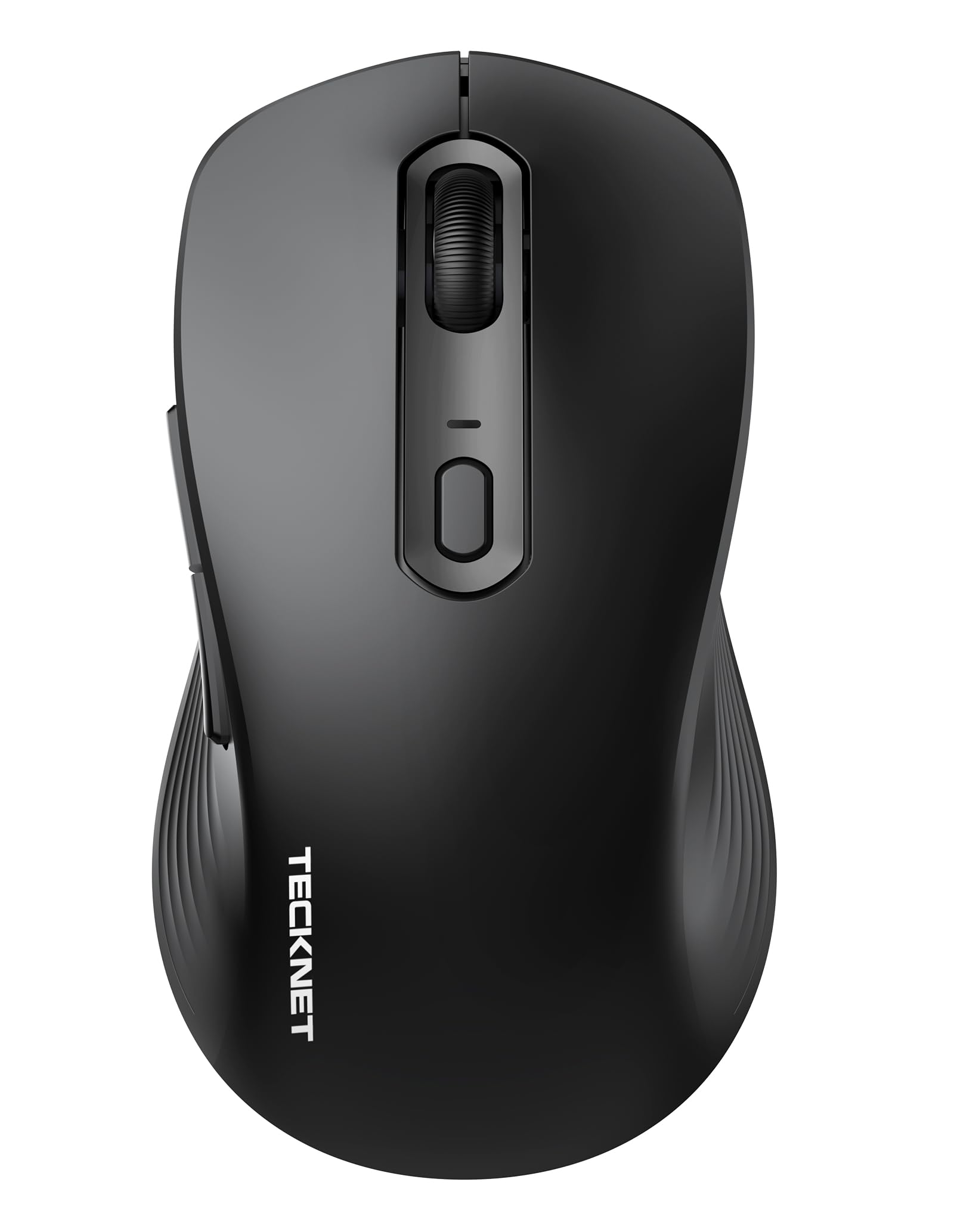
The TECKNET hits a rare sweet spot in the budget tier by offering dual-mode Bluetooth 5.0/3.0 and USB-A connectivity that can handle three different devices with a single click. The ergonomic contour is sculpted to promote a neutral wrist posture, and the 6-level DPI range from 800 to 4800 means you can dial in the right sensitivity for anything from spreadsheet navigation to image editing. The 18-month battery life claim on two AAA batteries is among the best in class, and the silent-click technology reduces noise by roughly 90 percent.
User reports confirm the quiet clicks are legitimately satisfying, with several long-time TECKNET owners praising the build quality over more expensive Logitech units. The mouse feels well-constructed despite the low price point, and the plug-and-play compatibility across Windows, macOS, Linux, Chrome OS, iPad OS, and Android makes it a universal tool. The side buttons are present for forward/back navigation, though some users note they are sensitive enough to trigger accidentally if you grip the mouse tightly.
The main trade-off is that the mode switch button for USB/BT1/BT2 is located on the bottom of the mouse, requiring you to flip it over to change connections. It is a minor inconvenience for a device that otherwise delivers premium-tier features at a budget price. The included USB receiver stores neatly inside the battery compartment, preventing loss during travel.
Why it’s great
- True dual-mode for 3 devices with seamless switching
- 18-month battery life on 2 AAA batteries
- Silent clicks with 6-level adjustable DPI up to 4800
Good to know
- Mode switch and pairing button located on the bottom
- Side buttons may be accidentally pressed by some grips
- Batteries not included
2. RAPIQUE Bluetooth Wireless Mouse

The RAPIQUE R306 stands out for its ultra-slim, low-profile design that mimics the aesthetic of an Apple Magic Mouse but costs a fraction of the price. It ships with Bluetooth 5.1 and a 2.4GHz USB receiver, allowing you to pair and switch between two devices—say a laptop for work and a tablet for media. The 1600 DPI optical sensor is fixed rather than adjustable, but for standard office tasks and web browsing, it provides accurate, responsive tracking on most surfaces including glass tables.
Battery life is rated at 480 hours on a single AA battery, which translates to months of moderate daily use. Users consistently report excellent battery longevity, with some claiming 6-9 months when the mouse is turned off after each session. The clicks are genuinely quiet with over 90 percent noise reduction, and the broad rubber scroll wheel operates silently as well. The matte finish resists fingerprints and feels pleasant to hold for extended periods.
There are only three buttons (left, right, scroll wheel click), so there are no side buttons for forward/back navigation. The scroll wheel moves only vertically, not horizontally. Some units have experienced Bluetooth failure after a few days, though the customer service response in those cases has been prompt with replacements or refunds. Overall, it is an excellent choice if you prioritize portability and a clean desk aesthetic.
Why it’s great
- Remarkably slim and lightweight for easy travel carry
- 480-hour battery life on a single AA battery
- Dual-mode BT5.1 and 2.4GHz with one-click switching
Good to know
- Fixed 1600 DPI — not adjustable
- No side buttons for forward/back navigation
- Bluetooth pairing quality can be inconsistent on some units
3. Logitech M340 Wireless Mouse

Logitech’s M340 brings the brand’s reliable engineering to an ultra-compact, travel-friendly form factor. It uses a single 2.4GHz USB receiver (no Bluetooth) for a plug-and-play connection that works up to 10 meters away. The Silent Touch technology reduces click noise by 90 percent, making it suitable for libraries and shared workspaces. Despite its small footprint, the ambidextrous shape is comfortable for most hand sizes during extended use.
The battery is included in the box—a single AA that Logitech claims lasts 18 months. The auto-sleep power-saving mode kicks in after a few minutes of inactivity, and a quick click wakes it instantly. The build uses at least 42 percent post-consumer recycled plastic, which is a nice sustainability touch in this price bracket. The optical tracking is smooth on most surfaces, and the cursor feels responsive without any noticeable lag.
The most common complaint is that the colored top lid does not latch securely. If the mouse is dropped or knocked off a desk, the lid can pop off and the battery may eject. This is a design oversight that Logitech has not addressed across multiple generations. For desktop use where the mouse stays on a pad, it is a non-issue, but for frequent travelers, it is worth noting.
Why it’s great
- Ultra-compact and lightweight for portable use
- Battery included with up to 18-month life
- Made with recycled plastic materials
Good to know
- Top lid does not latch securely and can pop off
- No Bluetooth connectivity — USB receiver only
- No side buttons for forward/back navigation
4. Logitech M330 Silent Wireless Mouse

The Logitech M330 Silent is the gold standard for quiet office mice in the budget segment. Unlike the ambidextrous M340, the M330 is sculpted specifically for right-handed users with contoured plastic grips that reduce hand fatigue during long sessions. The SilentTouch technology is noticeably quieter than many competitors—both the main clicks and the scroll wheel operate at a whisper level. The optical tracking is precise and responsive, with a wireless range of up to 33 feet.
Battery life is rated at 18 months on a single AA battery, and a physical on/off switch on the bottom prevents accidental battery drain during transport. The USB receiver stores inside the battery compartment, making it easy to keep everything together. Users consistently praise the consistent, lag-free performance, with some reporting over 14 months of battery life even with heavy daily use. The build quality feels durable, though the sides lack the rubberized grip of the older M310 model.
The main limitation is the lack of Bluetooth connectivity—this is a pure 2.4GHz mouse, so it requires a free USB-A port on your device. The scroll wheel is not a free-spinning type, so long documents require more finger motion. For right-handed users who want a reliable, silent desk mouse with exceptional battery life, the M330 is hard to beat.
Why it’s great
- Extremely quiet clicks and scroll wheel operation
- 18-month battery life with included AA battery
- Comfortable right-handed ergonomic design
Good to know
- No Bluetooth — 2.4GHz USB receiver only
- Sides lack rubberized grip material
- Smaller size may not suit users with large hands
5. SHARE SUNSHINE Mini Bluetooth Mouse
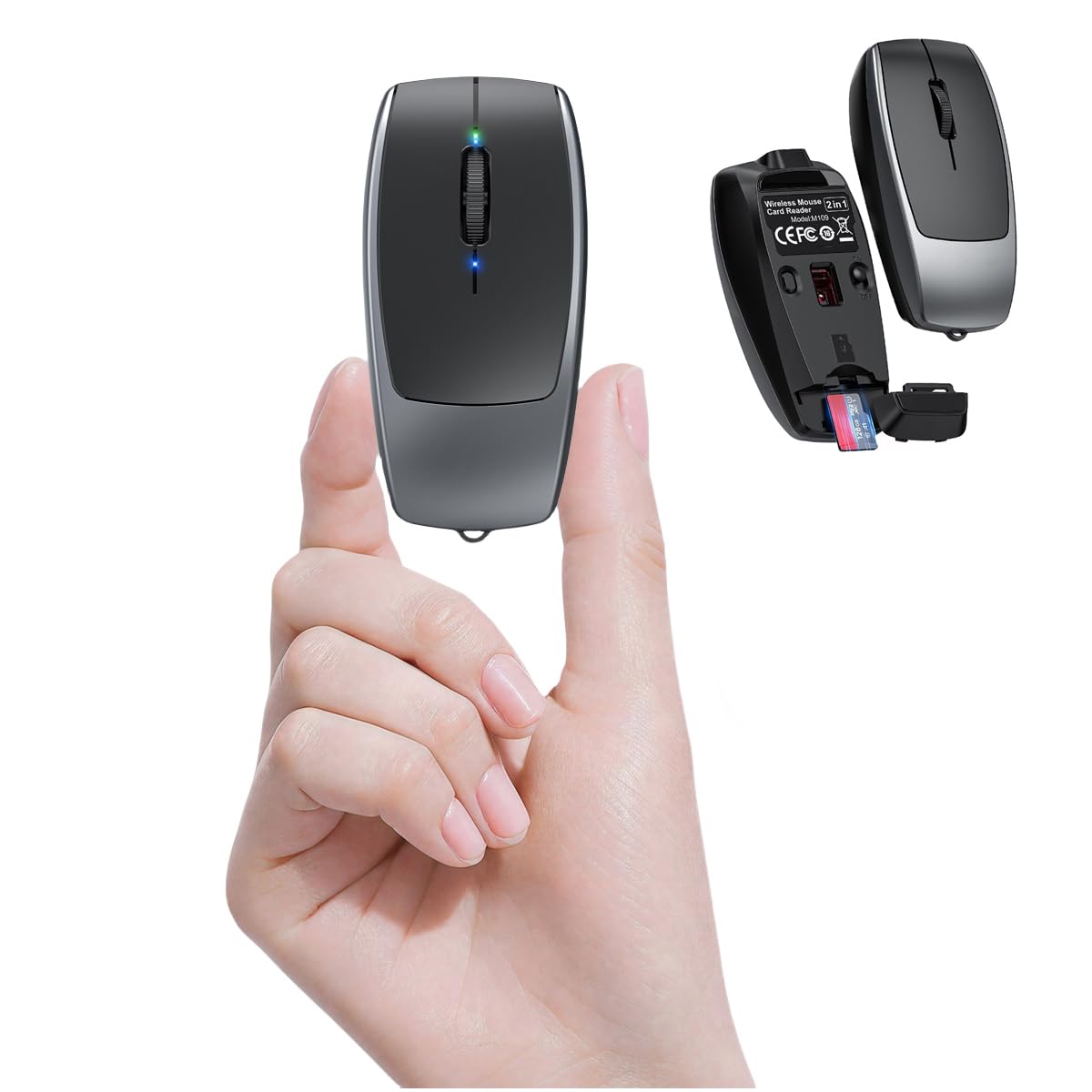
The SHARE SUNSHINE mini mouse is an engineering curiosity—it weighs only 27 grams and measures just 7.8 cm in length, making it the most portable option on this list. It connects via Bluetooth 5.1 and includes a built-in TF card reader that supports microSD cards up to 2TB with read/write speeds of 20MB/s. This allows direct file transfers without needing a separate USB hub, a genuinely useful feature for photographers, students, or anyone who frequently moves files between devices.
The silent switches are rated for up to 3 million clicks, and the adjustable DPI supports three settings (800/1200/1600). The matte finish and anti-slip frosted shell provide a decent grip despite the tiny size. A metal key ring is included so you can attach the mouse to a keychain or bag loop. The built-in rechargeable battery charges via USB-C, and the mouse works across Windows, macOS, Linux, iOS, and Android devices.
The extreme miniaturization comes with ergonomic sacrifices. Users with medium to large hands report hand cramping after about two hours of use, and the pairing process requires holding a hidden button for 10 seconds with a blunt object like a pen cap. The TF card reader functionality is present only on certain color variants (Green and White), so double-check the listing before purchasing if that feature matters to you.
Why it’s great
- Incredibly light at 27g with built-in TF card reader
- Rechargeable via USB-C with silent click switches
- Bluetooth 5.1 works with nearly any device
Good to know
- Too small for comfortable long-term use with large hands
- TF card reader only in specific color variants
- Pairing process is unintuitive and requires a tool
6. TECKNET Rechargeable Wireless Mouse
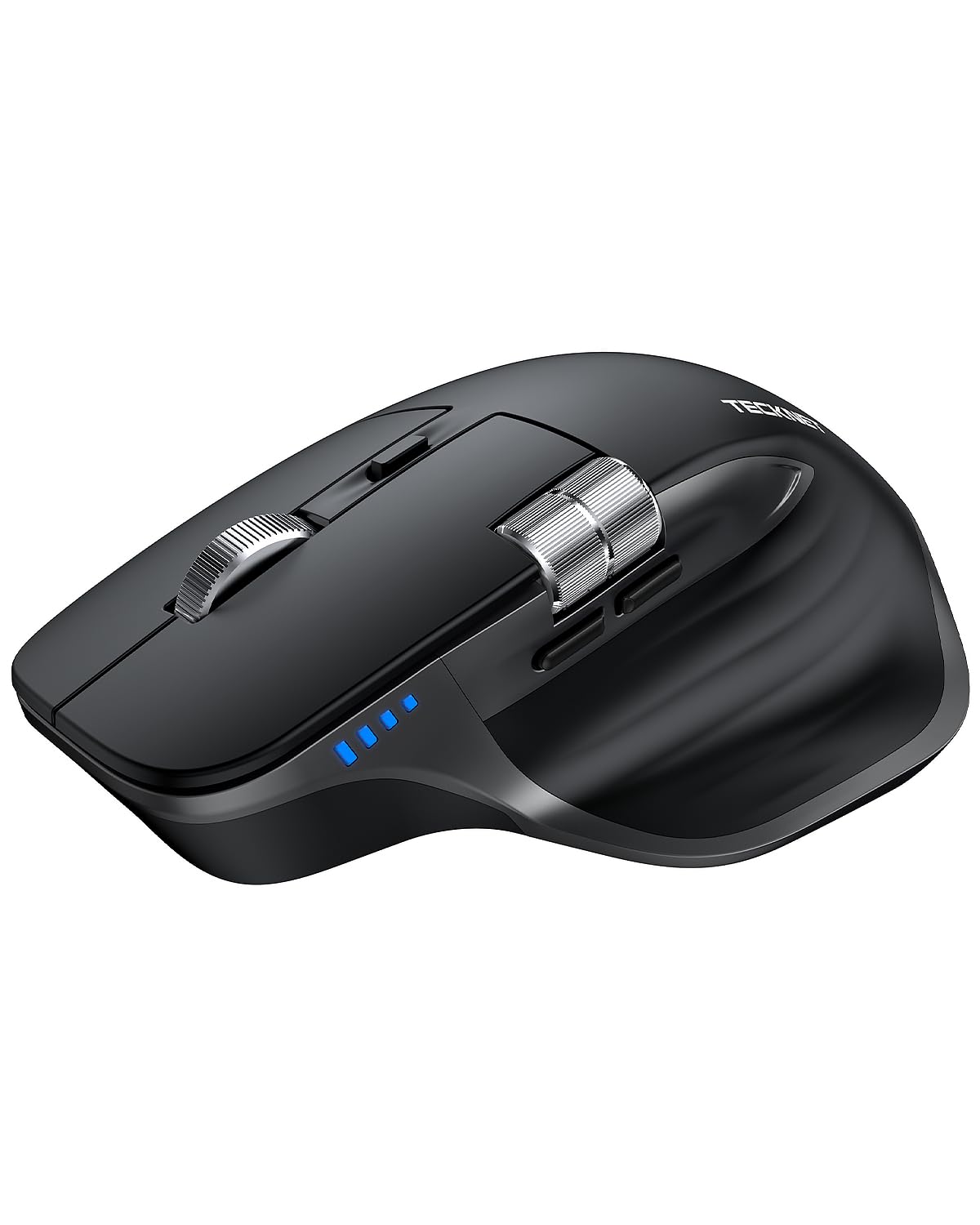
The TECKNET rechargeable mouse is a feature-packed alternative that borrows the shape and layout of premium ergonomic mice like the Logitech MX Master series while costing significantly less. It supports Bluetooth 5.3, Bluetooth 5.0, and 2.4GHz USB-A connectivity, allowing you to switch between three devices with a bottom-mounted button. The precision metal scroll wheel feels premium and durable, and the side-mounted scroll wheel enables effortless horizontal navigation through spreadsheets and design canvases.
The 6-level DPI adjustment (800/1200/1600/2400/3200/4800) uses an LED indicator to show the current setting, and the rechargeable battery lasts roughly three months with two hours of daily use, charging fully in 1.5-2 hours via USB-C. The quiet clicks are genuinely silent, and the overall build quality uses a mix of metal and matte plastic that feels more substantial than its price suggests. The 36-month warranty (registration required) provides long-term peace of mind.
The shape is right-handed only, and the side buttons are non-programmable. The polling rate maxes out at around 260Hz over the dongle, which is fine for office work but not suitable for competitive gaming. Some users find the thumb indentation too deep, though this can be mitigated with a small piece of putty. As a rechargeable device, the internal battery is not user-replaceable, so the mouse has a finite lifespan.
Why it’s great
- Triple connectivity with 3-device switching
- Rechargeable with 3-month battery life per charge
- Side scroll wheel for horizontal navigation
Good to know
- Non-replaceable internal battery
- Right-handed design only
- Polling rate insufficient for competitive gaming
7. E-YOOSO X45 Vertical Ergonomic Mouse
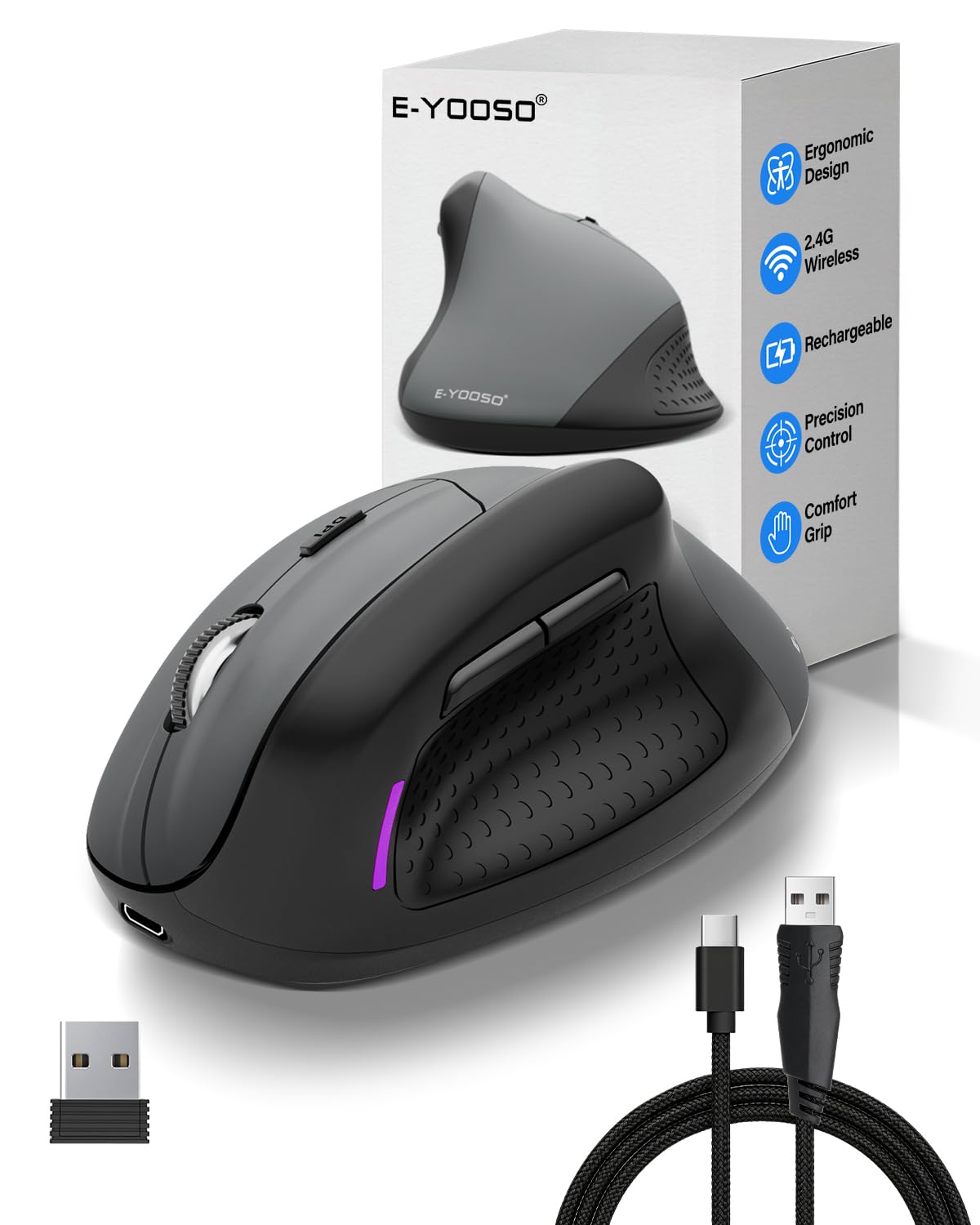
The E-YOOSO X45 is the only vertical mouse on this list, featuring a 70-degree angle that promotes a natural handshake position. This design significantly reduces wrist and forearm strain compared to traditional flat mice, making it a strong choice for users with existing repetitive strain injuries or those who spend 8+ hours at a computer. It offers tri-mode connectivity—Bluetooth, 2.4GHz dongle, and USB-C wired—so you never lose functionality even if the battery dies mid-session.
The rechargeable battery provides up to 100 hours of continuous use on a single charge, and the included 4.9-foot USB-C cable can also be used to charge phones or tablets. The 5-level DPI adjustment ranges up to 4800, suitable for both precision work and casual gaming. The silent switches are rated for 8 million clicks, and the click noise is measured at under 25 decibels—genuinely quiet. The size is best suited for medium to large hands.
The vertical shape has a learning curve—most users adapt within a few days, but it can feel awkward initially. The build uses lightweight plastic that feels less premium than the Logitech options, and the clicks, while quiet, have a slightly mushy feel that some reviewers note. The sensor accuracy is adequate for office work but not exceptional for graphic design. For users with wrist pain who need ergonomic relief at a budget price, the X45 is an effective tool.
Why it’s great
- 70° vertical angle reduces wrist strain significantly
- Tri-mode connectivity (BT, 2.4G, USB-C wired)
- 100-hour battery life with fast USB-C charging
Good to know
- Vertical shape requires an adjustment period
- Plastic build feels less premium than competitors
- Clicks are mushy despite being quiet
FAQ
What is the difference between Bluetooth and 2.4GHz wireless mice for budget models?
How long should a budget wireless mouse battery last?
Final Thoughts: The Verdict
For most users, the best budget wireless mouse winner is the TECKNET Bluetooth Mouse because it combines dual-mode connectivity for three devices, a comfortable ergonomic shape, 18-month battery life, and silent clicks at a price that undercuts most competitors. If you want a slim, travel-friendly design that slips into any bag, grab the RAPIQUE Bluetooth Mouse. And for wrist pain relief during long workdays, nothing on this list beats the ergonomic vertical design of the E-YOOSO X45.