
Running three external monitors from a single laptop USB-C port is the defining challenge for multi-monitor workstation builders. The search for a reliable 3 HDMI docking station that delivers full 4K@60Hz across all displays without glitches or bandwidth bottlenecks separates a productive command center from a daily troubleshooting session.
I’m Min — the co-founder and writer behind Gadgets Feed. I’ve spent countless hours dissecting chipset compatibility, DisplayLink vs. native MST architectures, and real-world bandwidth allocation across dozens of triple-display USB-C hubs to build this guide around actual performance data from the field.
Whether your workflow involves financial charts, video editing timelines, or software development across three panels, this guide evaluates the expandability, charging power, and video output stability of every serious contender for the title of best 3 hdmi docking station.
How To Choose The Best 3 HDMI Docking Station
Selecting a triple-monitor dock hinges on three pillars: your operating system, your laptop’s USB-C video capabilities, and the chipset architecture behind the dock’s video outputs. A mismatch here means returns and lost productivity.
Native MST vs. DisplayLink
Windows laptops with a full-featured USB-C port supporting DisplayPort Alt Mode can drive three monitors through native Multi-Stream Transport (MST) — the dock acts as a pure signal repeater. Macs generally need DisplayLink-based docks because Apple’s M-series chips limit external displays natively. DisplayLink docks install a driver and compress video data over USB; this enables triple 4K on Macs but introduces minor overhead.
Bandwidth and Resolution Ceilings
A single USB-C 3.2 Gen 2 (10 Gbps) connection must split bandwidth across all three video streams. Docks using the SM770 or DL-6950 chipsets can drive three 4K@60Hz monitors simultaneously, but only if the host port supports USB 3.2 Gen 2 and DisplayPort 1.4 with Display Stream Compression (DSC). Without DSC, expect dual 4K@60Hz plus one 4K@30Hz ceiling.
Power Delivery for Sustained Workloads
A triple-monitor setup draws significant laptop power. Docks offering 85W to 100W pass-through charging keep your laptop topped off under load. Check that the dock ships with an adequate power adapter — many require a separate 100W+ USB-C charger for full PD passthrough.
Quick Comparison
On smaller screens, swipe sideways to see the full table.
| Model | Category | Best For | Key Spec | Amazon |
|---|---|---|---|---|
| Plugable 12-in-1 | Premium | Universal triple 4K@60Hz | 3X HDMI + 3X DP, 100W PD | Amazon |
| TobenONE DisplayLink | Premium | Mac triple 4K with 120W adapter | 3X HDMI + 3X DP, 120W PD | Amazon |
| WAVLINK SM770 | Premium | Latest chipset triple 4K Mac/PC | 3X HDMI + 2X DP, 2.5GbE | Amazon |
| Anker Nano 13-in-1 | Mid-Range | Modular hub for travel + desk | Detachable 6-in-1, 100W PD | Amazon |
| Acer Premium 13-in-1 | Mid-Range | Windows triple display, 110W adapter | 2X HDMI + 1X DP, 85W PD | Amazon |
| MOKiN Triple Display | Mid-Range | Versatile port combos + LCD screen | 3X HDMI + 2X DP, 100W PD | Amazon |
| LIONWEI 16-in-1 | Budget | Entry-level triple 4K on Windows | 3X HDMI, 100W PD | Amazon |
In‑Depth Reviews
1. Plugable 12-in-1 USB C Triple Monitor Docking Station

The Plugable UD-6950PDZ stands as the most versatile triple-display dock available, offering three HDMI and three DisplayPort outputs for ultimate monitor cable flexibility. Its DisplayLink chipset enables true triple 4K@60Hz on both Windows and macOS systems, including M1/M2/M3 MacBooks that natively restrict external displays. The dock integrates six USB 3.0 ports and a 3.5mm audio jack, all powered by a single upstream USB-C cable that also delivers 100W pass-through charging to the host laptop.
Real-world users report smooth 1440p@144Hz performance on MacBook Air M1 systems after installing DisplayLink drivers, though the Ethernet port has experienced compatibility issues with macOS 12.3 updates — Plugable actively offers free workaround adapters. The dock’s anodized aluminum chassis dissipates heat effectively during extended triple-monitor sessions, and the integrated 2-year warranty plus lifetime North American support provides confidence for professional buyers investing in a long-term workspace foundation.
Where the Plugable excels is its raw expandability: three DisplayPort outputs alongside three HDMI ports means you can connect any modern monitor without dongle adapters. The 100W PD keeps high-wattage laptops like Dell XPS 15 and HP ZBook adequately charged under load, though users with 240W gaming laptops should note the power delivery ceiling. For a universal, future-proof solution that respects both Windows and macOS ecosystems equally, this dock sets the benchmark.
Why it’s great
- Triple HDMI plus triple DisplayPort eliminates adapter hunting
- 100W PD keeps demanding laptops charged under triple-monitor loads
- Lifetime support and 2-year warranty from a trusted brand
Good to know
- Ethernet port has known driver issues with specific macOS versions
- DisplayLink driver installation required for triple displays on Mac
- Does not support high-refresh-rate gaming above 144Hz
2. TobenONE DisplayLink Docking Station 3 Monitors

The TobenONE delivers 18 ports including triple HDMI, triple DisplayPort, two USB-C, and four USB 3.2 ports — all powered by a generous 120W power adapter that provides up to 100W (96W certified) to the laptop. This makes it one of the most powerful charging docks in the category for users running MacBook Pro 16-inch or Dell Precision workstations under sustained multi-monitor workloads. The DisplayLink architecture supports triple 4K@60Hz on macOS, enabling financial traders and video editors to drive three independent panels from a single USB-C cable.
User feedback highlights excellent customer support with proactive replacement policies, though a recurring quirk involves the dock not properly detecting a closed-lid MacBook — requiring a manual lid open/close cycle to wake external displays. The dock runs cool during operation thanks to its metal housing, and the front-facing SD and microSD slots are positioned for easy access. The 10 Gbps USB ports handle large video file transfers from SSDs without bottlenecking, and the Ethernet port delivers stable gigabit throughput for network-reliant workflows.
The included 120W adapter is a genuine differentiator — most docks at this tier require you to supply your own charger. The TobenONE charges a MacBook Pro at full speed while simultaneously powering the dock’s internal DisplayLink processor. For Mac users who need reliable triple 4K without bandwidth negotiation headaches, this dock provides the most complete out-of-box power solution. The only notable restriction is that Netflix and other DRM-protected streaming services may not display over DisplayLink due to screen recording protections.
Why it’s great
- 120W power adapter included for full charging overhead
- 18 ports with triple HDMI and triple DP flexibility
- Excellent customer support with proactive replacement service
Good to know
- Closed-lid MacBook detection can be inconsistent
- Cannot stream Netflix due to DisplayLink DRM limitations
- Requires manual power-on button after initial setup
3. WAVLINK SM770 Docking Station 3 Monitors
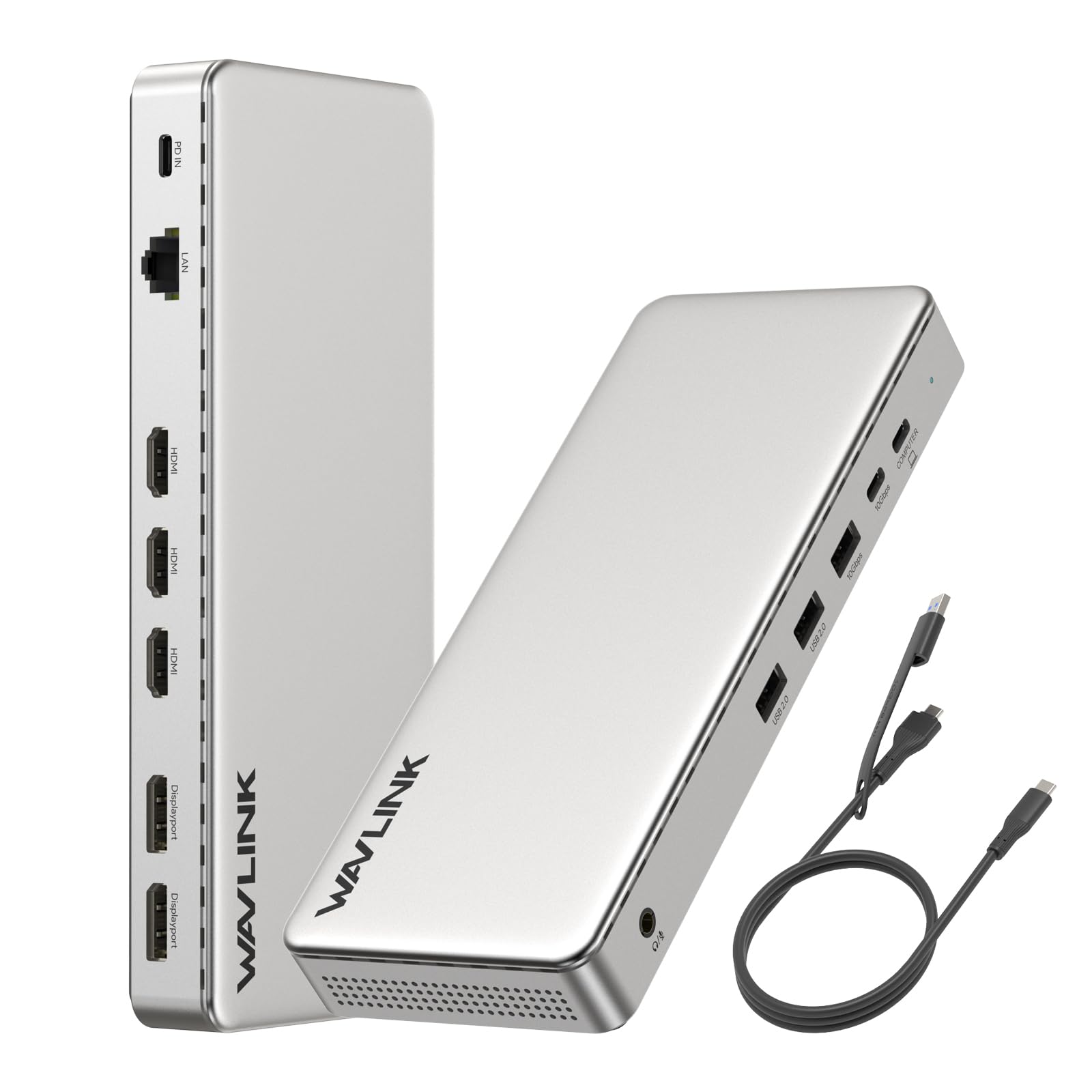
The WAVLINK SM770 represents the latest generation of triple-display docking silicon, using the Silicon Motion SM770 chip to break through Apple’s native two-display limit on MacBook Neo and Intel/Apple Silicon Macs. It provides three HDMI and two DisplayPort outputs, all capable of 4K@60Hz, plus a 2.5 Gigabit Ethernet port for network-intensive workflows. The dock requires a USB 3.2 Gen 2 host port and an SMI driver installation — it is not plug-and-play, but the driver unlocks true independent extended desktop mode across three monitors.
Customer reports confirm flawless triple FHD and QHD operation on Mac Mini M4 systems after following the manual’s driver installation steps. The aluminium enclosure stays cool, and the 10 Gbps USB-A and USB-C ports handle large file transfers without stuttering. Users note that the dock requires an external 20V/5A power adapter (not included), adding to the overall investment. The 100W PD input delivers 85W to the laptop, sufficient for most ultrabooks and MacBooks but tight for high-power workstations.
Where the SM770 truly shines is its future-proofing: the chipset supports DisplayPort 1.4 with DSC, meaning triple 4K@60Hz is achievable even on single-Link USB-C laptops. The 2.5Gb Ethernet port is a rare inclusion at this price tier, benefiting users who transfer large project files over local networks. For professionals who need the latest display silicon and are comfortable with a driver-based setup, this dock delivers best-in-class video bandwidth at a competitive mid-range price point.
Why it’s great
- SM770 chipset enables triple 4K@60Hz on recent Macs
- 2.5 Gigabit Ethernet for high-speed network transfers
- Flexible port selection — three HDMI and two DisplayPort
Good to know
- Requires SMI driver installation and USB 3.2 Gen 2 host
- Power adapter not included — must supply 20V/5A charger
- Not compatible with laptops drawing more than 85W
4. Anker Nano 13-in-1 Laptop Docking Station
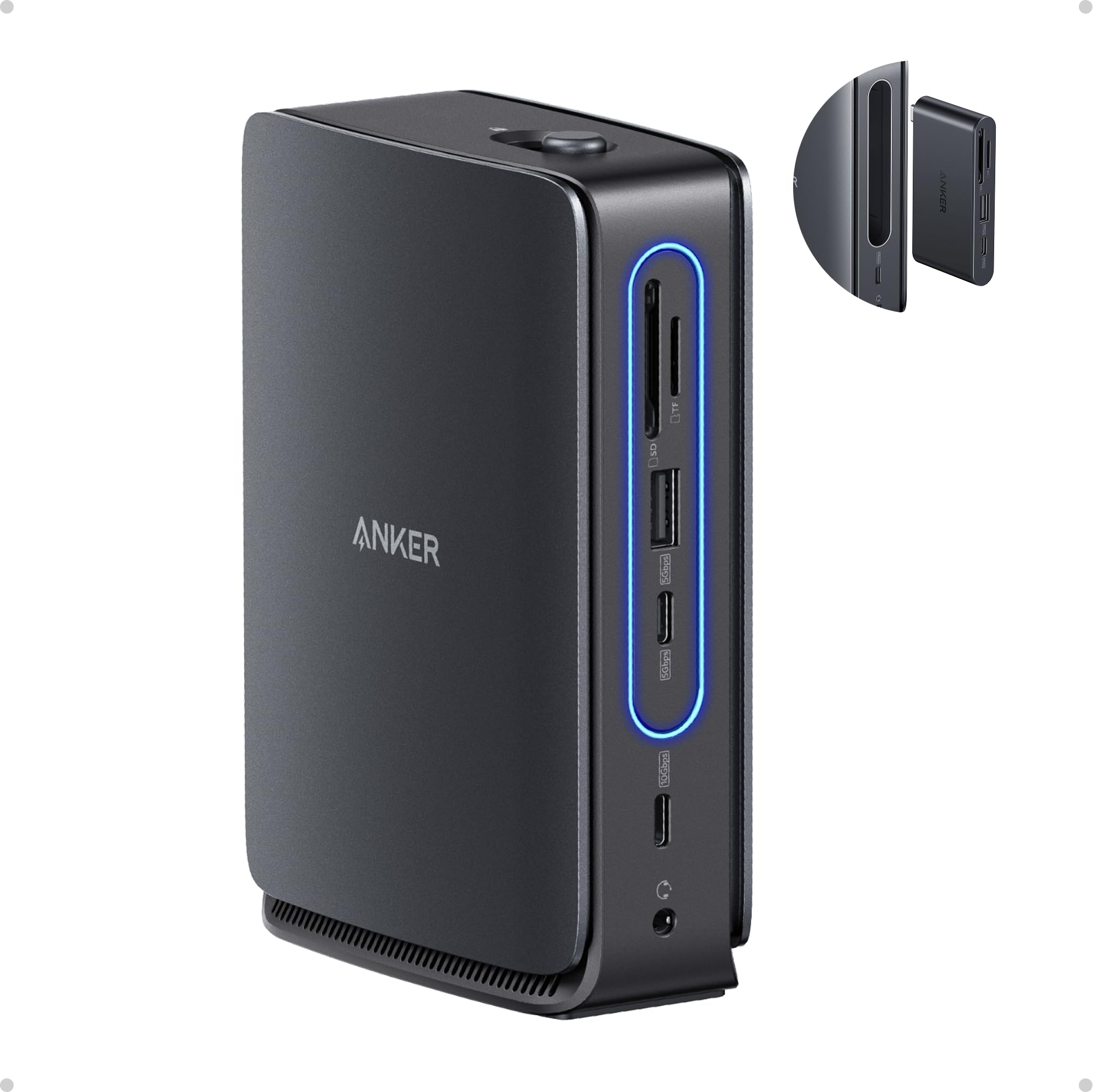
The Anker Nano 13-in-1 introduces a genuinely modular concept: the main dock supports triple-display setups via two HDMI and one DisplayPort, while a detachable 6-in-1 hub pops off for on-the-go use with a single HDMI port and essential I/O. This design lets you leave the full dock at your desk and take only the hub portion when traveling. The included 140W power adapter delivers up to 100W PD to the laptop, with the remaining 40W reserved for the dock’s internal components, ensuring stable power delivery even with all ports occupied.
User feedback confirms reliable performance with Dell, HP, and Lenovo laptops, driving dual 4K monitors without flickering. The detachable hub works well for quick coffee-shop setups, though some users note the hub can pop out of the main dock easily on cluttered desks. The blue LED power strip only activates when a laptop is connected, providing a clean visual cue. The 10 Gbps USB-C data ports transfer large files quickly, and the SD/TF card slots are conveniently positioned for photographers.
Anker’s reputation for build quality carries this dock — the metal housing stays cool, the included 140W adapter is genuinely generous, and the modularity adds a layer of utility that competing docks lack. For users who split time between a multi-monitor home office and mobile setups, this dock eliminates the need to buy a separate travel hub. The plastic build of the detachable portion feels lighter than the main dock, but the convenience trade-off is well worth it for its target audience.
Why it’s great
- Detachable 6-in-1 hub for travel flexibility
- 140W power adapter included for ample charging headroom
- Reliable dual 4K performance with Windows laptops
Good to know
- Plastic build on the detachable hub feels less premium
- MacOS mirror mode limitation applies to all displays
- Detachable hub can disconnect unintentionally on bumpy desks
5. Acer Premium 13-in-1 Docking Station
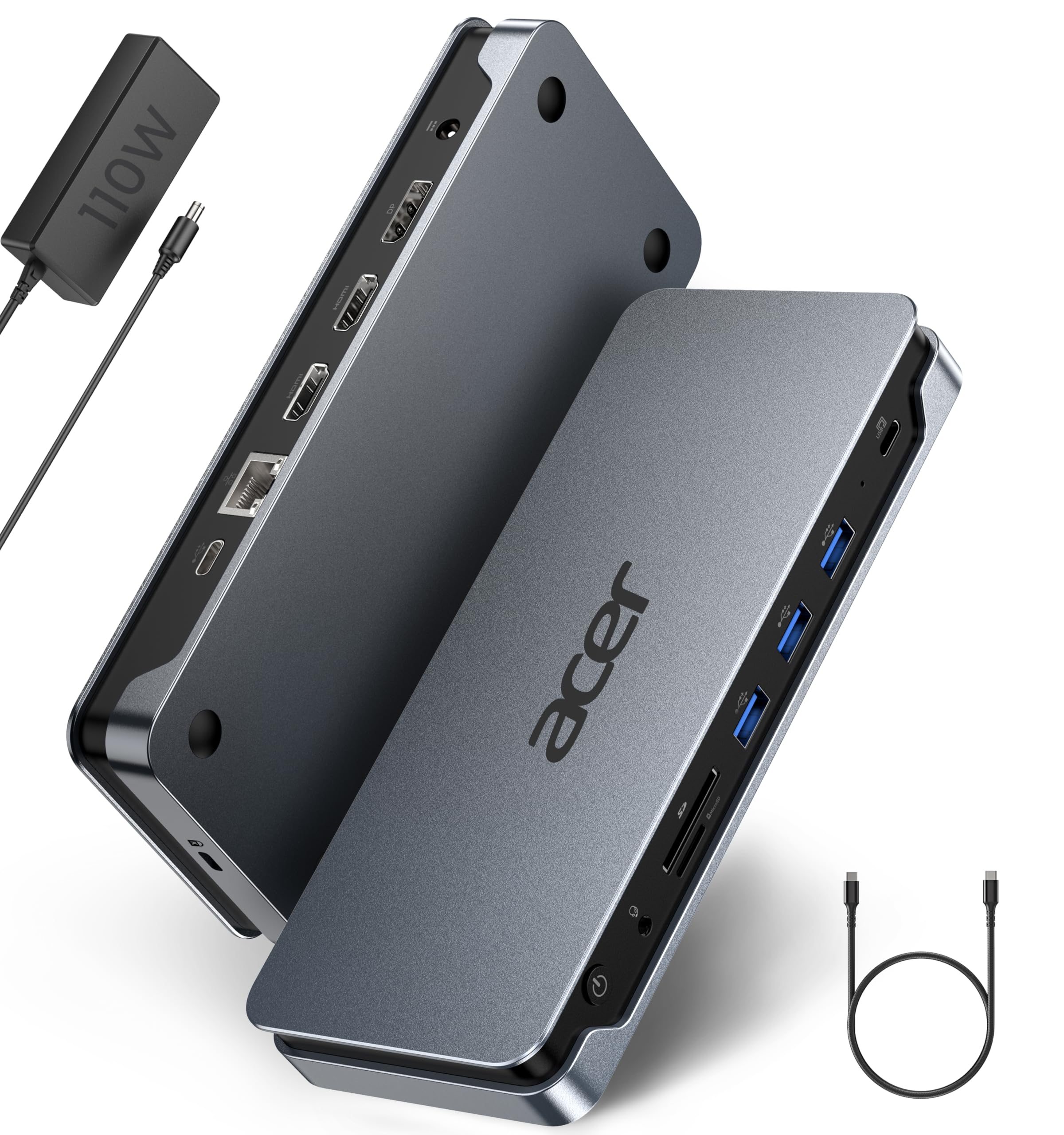
The Acer Premium 13-in-1 is a purpose-built Windows triple-display dock that ships with its own 110W power adapter — a rarity at this price segment. It supports three independent screens via 2x HDMI and 1x DisplayPort using MST technology, with triple 4K@30Hz achievable on Windows laptops with Display Stream Compression (DSC). The aluminium chassis keeps the dock running cool even during prolonged sessions, and the integrated security slot allows physical locking to your desk, making it suitable for shared office environments.
Customer reviews highlight solid Ethernet performance delivering nearly 980 Mbps, smooth dual 4K monitor operation, and reliable audio jack functionality for conference calls. Linux compatibility has been confirmed on distributions like Zorin and Mint, with full USB, SD, and video support out of the box. The dock includes a USB 4.0 Type-C cable and clearly labeled ports, reducing setup confusion. However, the SD card reader is notably slow compared to dedicated readers, and macOS users remain limited to mirror mode across multiple displays.
The 85W PD passthrough from the 110W adapter is sufficient for most ultrabooks and business-class laptops, but power users with high-TDP workstations may need to supplement charging. The Acer dock does not support triple displays on Mac at all — this is strictly a Windows-focused device. For corporate environments standardizing on Dell, HP, or Lenovo hardware, this dock provides a secure, reliably powered, and aesthetically cohesive solution that matches modern workstation aesthetics.
Why it’s great
- 110W power adapter included ensures full PD performance
- Security slot for physical theft deterrence in offices
- Solid Ethernet and dual 4K performance on Windows and Linux
Good to know
- No triple-display support for MacOS — mirror mode only
- SD card reader is slower than standalone options
- Requires DSC-capable laptop for triple 4K@30Hz
6. MOKiN Triple Display Docking Station
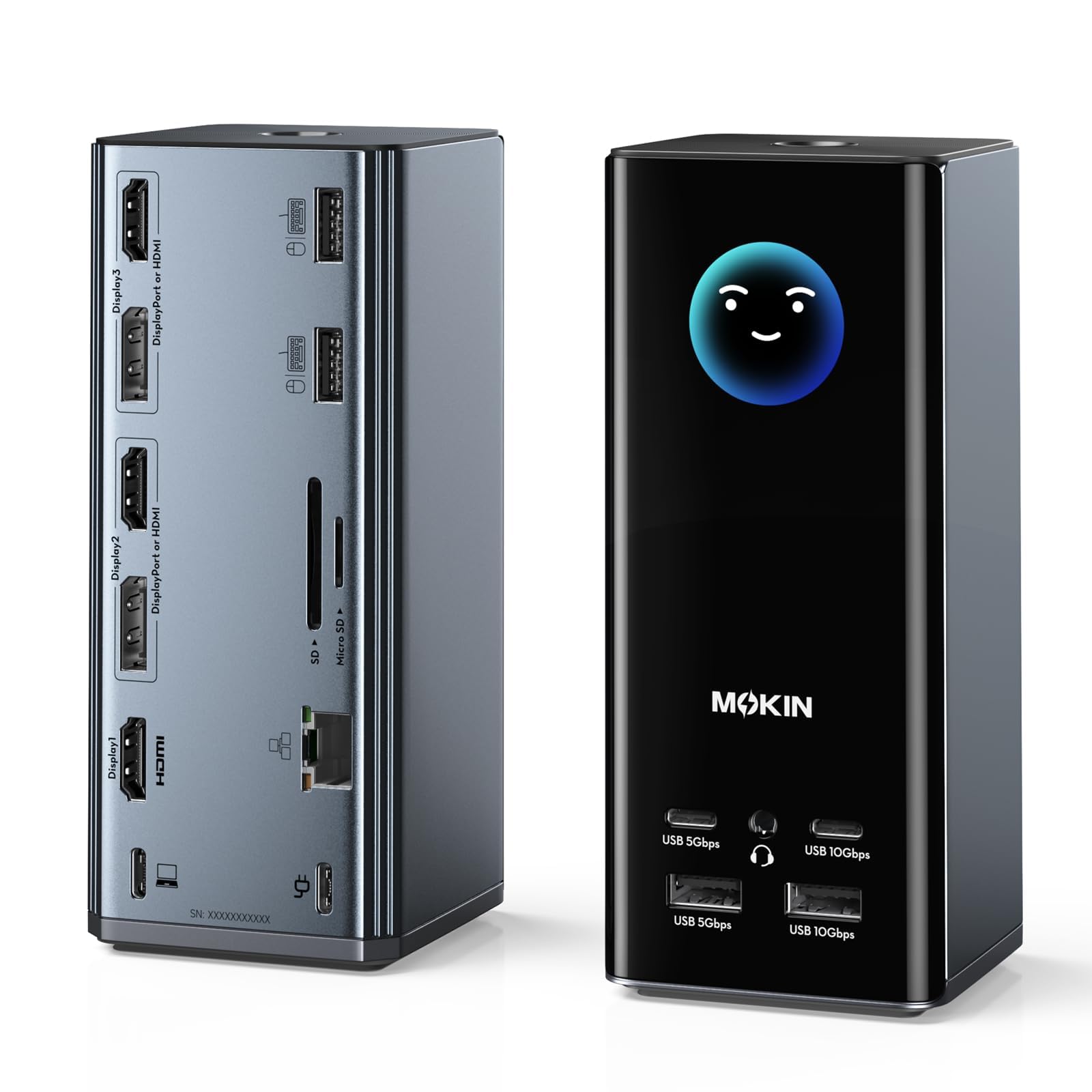
The MOKiN docking station differentiates itself with an integrated LCD screen that displays real-time charging wattage, monitor resolutions, port connection status, and even a weather forecast via built-in WiFi. This visual intelligence lets you instantly verify that all three HDMI and two DisplayPort outputs are running at their intended resolutions and refresh rates without opening system settings. The 17-port layout includes 10 Gbps USB-C and USB-A ports, 2.5 Gigabit Ethernet, and silicone suction cups on the base for stable desk placement.
User experiences are mixed — many report flawless three-monitor Windows operation with 4K@60Hz over multiple port combinations, while some encountered complete dock failure after one month. The built-in WiFi for weather display has raised security concerns: one security-conscious reviewer discovered the dock broadcasts an open SSID with direct access to its internal server. The two-tap privacy lock button that blanks all screens is a thoughtful addition for open-plan offices, and the compact tower design saves desk footprint compared to flat-laying docks.
The MOKiN dock includes two USB-C cables but no power adapter — you must supply your own 100W+ USB-C charger to unlock the full 85W laptop passthrough. For Windows power users who want granular real-time monitoring of their dock’s performance and enjoy having a weather display on their desk, this is a uniquely feature-dense option. However, the reliability questions and the smart display’s WiFi security issues mean this dock is best suited for enthusiasts who enjoy tinkering and can accept potential quirks.
Why it’s great
- LCD screen shows real-time resolution, wattage, and weather data
- 17 ports with flexible HDMI/DisplayPort combos
- Privacy screen lock button protects sensitive information
Good to know
- Power adapter not included — requires separate 100W+ charger
- WiFi weather feature has reported security vulnerabilities
- Some units fail within weeks, raising reliability concerns
7. LIONWEI 16-in-1 USB C Docking Station

The LIONWEI 16-in-1 offers the most affordable entry point into triple HDMI docking without compromising on port count. It provides three HDMI outputs, nine USB ports across USB 3.1 (10 Gbps), USB 3.0, and USB 2.0 tiers, plus Gigabit Ethernet, SD/microSD slots, and a 3.5mm audio jack. The 100W PD port supports pass-through charging up to 87W safe output, though no power adapter is included — you must supply your own 87W+ USB-C charger for full function.
Customer reports confirm reliable triple-monitor operation on Windows laptops, with one user noting the dock worked flawlessly for three years. Mac compatibility exists but is limited to SST (mirror) mode, meaning all external displays will duplicate content rather than extend. The plastic enclosure is lightweight at 7 ounces and runs warm after eight hours of continuous use, but has proven durable over extended periods. The plug-and-play setup requires no driver installation for basic functionality on Windows, making it a truly accessible option for less technically inclined users.
Where the LIONWEI makes trade-offs are in video bandwidth and build materials. The triple HDMI ports max out at 4K@30Hz when using two or three displays simultaneously, and the plastic housing lacks the premium feel of aluminium alternatives. However, for users on a strict budget who need to drive three monitors for productivity tasks like stock trading, programming, or document management — and who do not require full 4K@60Hz across all screens — this dock delivers remarkable multi-monitor capability at a price that leaves room for monitor investments.
Why it’s great
- Most affordable triple HDMI dock with 16 ports
- No driver installation required for Windows plug-and-play
- Proven long-term reliability — some units last three years
Good to know
- Triple displays limited to 4K@30Hz without DSC
- Plastic build feels less durable than metal alternatives
- Power adapter not included; requires separate 87W+ charger
FAQ
Can a MacBook Pro M3 drive three external monitors from a single USB-C port?
Why do some 3 HDMI docks require a separate power adapter while others don’t?
What happens if my laptop’s USB-C port doesn’t support USB 3.2 Gen 2?
Can I use a 3 HDMI docking station with a gaming laptop for triple 144Hz displays?
Why do my external monitors only show the same content in mirror mode on macOS?
Final Thoughts: The Verdict
For most users, the best 3 hdmi docking station winner is the Plugable 12-in-1 because it offers the most flexible port configuration with triple HDMI and triple DisplayPort, reliable 100W PD charging, and outstanding manufacturer support across both Windows and macOS. If you want a full triple 4K Mac setup with the power adapter included, grab the TobenONE DisplayLink Dock. And for budget-conscious shoppers who need basic triple-monitor function on Windows, nothing beats the value of the LIONWEI 16-in-1.