
Production lines and warehouses live and die by the legibility of a single batch number. A smeared or missing expiration date on a shipping carton can halt a shipment, trigger a compliance audit, or confuse a customer receiving mixed lots. The right batch code printer stamps crisp, durable marks onto cardboard, plastic, metal, and shrink wrap at production speed — no smudges, no misreads, no reprints.
I’m Min — the co-founder and writer behind Gadgets Feed. I’ve spent countless hours analyzing print head resolutions, ink-cartridge yields, and software workflow integrations to separate high-volume industrial coding machines from underpowered labeling tools that fail under real-world conditions.
Batch code printers split into two distinct camps: thermal-transfer desktop units for precision label printing and handheld inkjet guns for direct marking on uneven or curved surfaces. This guide evaluates five models across both categories to help you find the best batch code printer for your specific packaging workflow.
How To Choose The Best Batch Code Printer
Selecting the right coding machine starts with matching the printing method to your substrate and throughput. Thermal transfer printers deliver permanent, high-resolution labels for flat, consistent surfaces, while handheld inkjet guns print directly onto curved or irregular packaging without needing a label applicator. The decision tree also depends on how often batch numbers change — dynamic data workflows favor models with database import and variable data capabilities.
Print Resolution and Drop Size
Batch codes that include tiny lot numbers or 2D barcodes require 300 DPI minimum for reliable scanner readability. At 300 DPI, a 7x7mm QR code prints with clean module edges; at 600 DPI, the same code shrinks by half without losing data density. Inkjet printers also advertise dot pitch — smaller drop sizes (measured in picoliters) produce sharper edges on non-porous surfaces like coated cardboard or foil pouches.
Ink System and Substrate Compatibility
Fast-drying solvent-based inks bond to glossy, non-absorbent materials like plastic wrap, aluminum cans, and shrink film within one to three seconds. Water-based inks work well on porous corrugated boxes but smear instantly on polyethylene bags. For thermal printers, the ribbon formulation — wax, wax/resin, or pure resin — determines abrasion resistance and chemical durability. Resin ribbons survive sterilization and chemical wipe-downs in pharmaceutical and food production environments.
Connectivity and Data Workflow Integration
Batch code printers that receive variable data directly from an ERP system reduce manual entry errors. The ideal connectivity stack includes USB for local setup, Ethernet for network queue management, and optional Wi-Fi or Bluetooth for mobile tablet control. For inline production, a photoelectric sensor input triggers automatic printing at precise conveyor positions — essential for consistent code placement on moving cartons.
Quick Comparison
On smaller screens, swipe sideways to see the full table.
| Model | Category | Best For | Key Spec | Amazon |
|---|---|---|---|---|
| UPRINTJET BT-HH6205B | Handheld Inkjet | Versatile direct marking on mixed surfaces | 600 DPI, 42ml ink, 200K+ characters | Amazon |
| Brother TD-4550DNWB | Thermal Desktop | High-volume label & barcode batches | 300 DPI, 6 ips, Wi-Fi + Bluetooth | Amazon |
| LABELWORKS Epson LW-PX800 | Desktop Thermal | Industrial label creation with lifetime warranty | 1.5″ tape, 300 DPI, 35 ppm | Amazon |
| Brother PT-E510VP | Handheld Thermal | Portable cable & patch panel labeling | 24mm tape, dual auto-cutter, USB-C | Amazon |
| UPRINTJET BT-HH6105B2 | Handheld Inkjet | Inline automated batch coding | 600 DPI, photoelectric sensor, 450g | Amazon |
In‑Depth Reviews
1. UPRINTJET BT-HH6205B
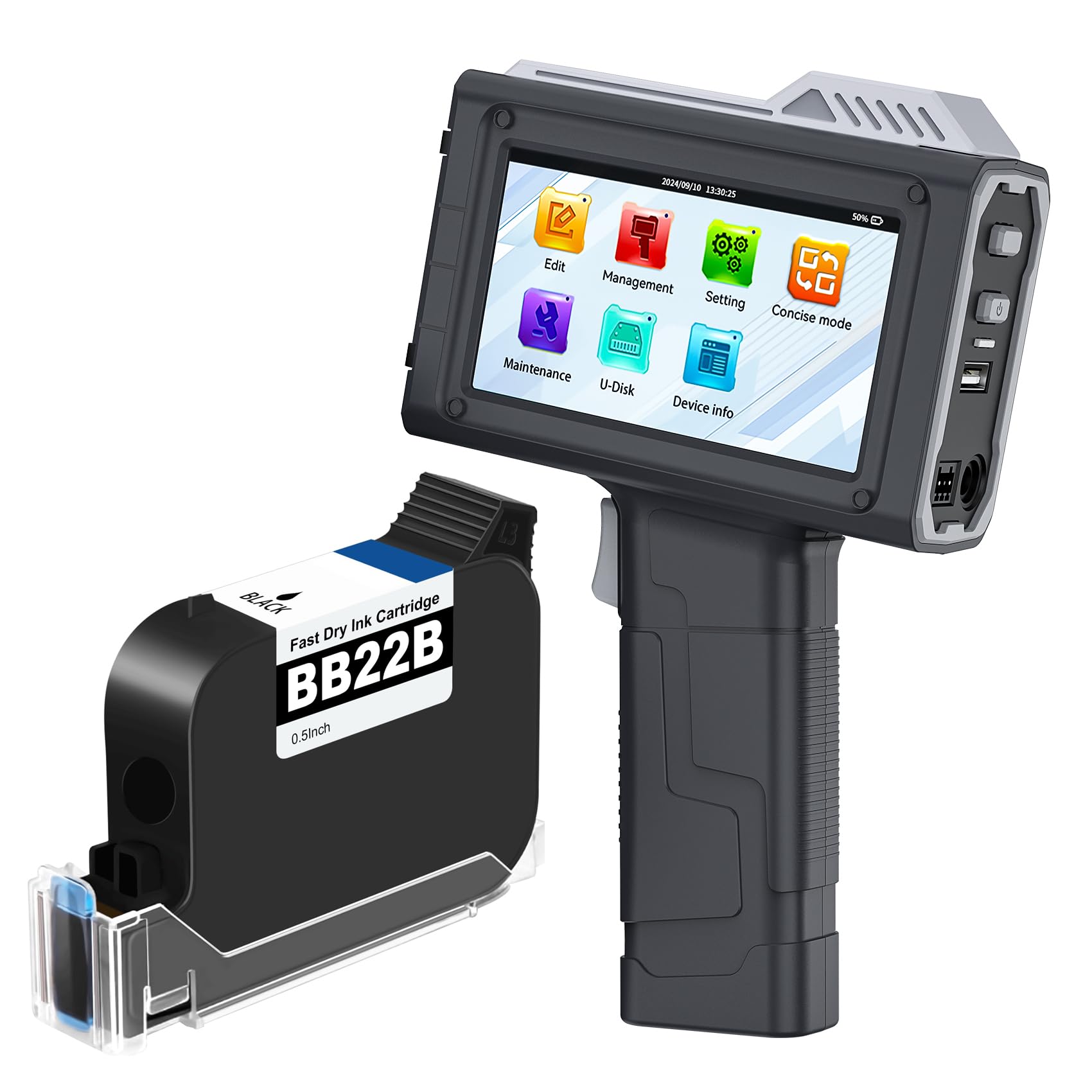
This handheld inkjet gun hits the sweet spot for operations that mark batch codes across multiple substrates — cardboard, plastic, steel pipe, and aluminum cans all accept the fast-drying solvent ink without smearing. The 600 DPI resolution prints 12.7mm-tall characters and nested QR codes that survive warehouse humidity and shipping vibrations. Five built-in guide rollers maintain a consistent gap from uneven surfaces, so each pass delivers uniform density from the first character to the last.
The 42ml cartridge yields roughly two million characters at 2.5mm font size, which translates to thousands of cartons before a swap. Variable data import from a USB drive lets you load CSV-based batch and expiry fields directly into the edit queue, eliminating manual re-entry during product changeovers. The capacitive touchscreen responds to gloved fingers — a small detail that prevents production line friction.
At 410 grams, the gun geometry sits balanced in hand for extended shifts, and the menu layout exposes 18 language options and adjustable print height from 2.5mm to 12.7mm. One trade-off: the proprietary ink cartridge runs roughly per replacement, though real user reports confirm it lasts several months under moderate daily use. For mid-volume operations that need one device to handle paper, plastic, and metal packaging, this is the most versatile entry point.
Why it’s great
- 600 DPI print head delivers sharp variable data and barcodes on five surface types
- Five guide wheels stabilize print distance on curved or corrugated stock
- USB data import reduces manual entry errors during batch switches
Good to know
- Proprietary ink cartridge is expensive — plan consumable budget per cartridge yield
- Maximum single print length of 406mm limits continuous runs on very long cartons
2. Brother TD-4550DNWB

When production demands hundreds of identical barcode labels per shift, a desktop thermal printer beats any handheld gun for speed and consistency. The TD-4550DNWB prints at six inches per second at 300 DPI — crisp enough for 10-mil barcodes that scan reliably at first pass. The spindle-less media holder accepts any 4-inch-wide roll stock without proprietary cartridges, so your per-label consumable cost drops dramatically compared to dedicated cartridge systems.
The connectivity suite covers every integration scenario: USB 2.0 for direct wiring, serial for legacy PLC interfaces, Ethernet for network print queues, plus built-in Wi-Fi and Bluetooth for mobile label printing from handheld scanners or tablets. The LCD panel and button interface allow basic configuration without a computer, but the real time-saver is AirPrint support for iOS users who need ad-hoc labels from the warehouse floor.
Thermal transfer printing uses wax or resin ribbons — wax for general shipping labels, resin for chemical-resistant tags that survive freezer storage or solvent exposure. The TD-4550DNWB handles both without hardware modification. One caution: the peeler mechanism and wireless connection reliability have mixed user feedback; some report recurring error clearing during long runs. For high-uptime facilities, the Brother TD-4550DNWB is a fast, low-cost-per-label workhorse when dialed into the right label stock.
Why it’s great
- Non-proprietary label stock keeps per-label consumable cost very low
- 6 ips at 300 DPI handles high-throughput barcode printing without queue jams
- Connectivity covers USB, serial, Ethernet, Wi-Fi, and Bluetooth for any workflow
Good to know
- Wireless setup can be finicky — Ethernet or USB is more reliable for production critical jobs
- Print head replacement runs -300 if a dead line develops over time
3. LABELWORKS Epson LW-PX800

The LW-PX800 sits as a desktop thermal label workstation designed for environments that need compliant safety tags, heat shrink cable wraps, and self-laminating wire markers from a single device. It prints up to 36mm wide on over 180 PX tape color and material combinations — standard vinyl for shelf labels, flexible nylon for cable flags, and heat shrink tubing for permanent wire identification. The 300 DPI thermal print engine produces small text and barcodes with clean edge definition on specialty materials that handheld inkjets cannot handle.
The workflow advantage lies in the Label Editor software: you import Excel spreadsheets for batch variable data, define static text fields for barcodes, and pipeline the job to the printer over Wi-Fi or USB. The desktop form factor means the printer stays docked at a labeling station rather than moving down the line. For facilities labeling multiple asset types daily, the software’s template memory reduces repetitive setup per label batch.
The factory lifetime warranty is the strongest risk reduction in this category — Epson replaces the unit outright if it fails, no questions asked. The trade-off is a fully proprietary ecosystem: PX cartridges cost to each versus generics at half the price, and the printer uses a custom AC adapter, undocumented UDP protocol, and Windows-only network config. For operations that standardize on a single tape ecosystem and value no-hassle replacement over consumable flexibility, the LW-PX800 offers unmatched peace of mind.
Why it’s great
- Full-service lifetime warranty covers the printer with no questions asked
- 36mm tape width and over 180 materials handle industrial cable, patch panel, and safety labeling
- Direct Excel import streamlines high-volume batch variable data printing
Good to know
- Proprietary PX tape cartridges are expensive and no generic third-party options exist
- Network configuration requires Windows and a USB cable — no IPP or web UI support
4. Brother PT-E510VP
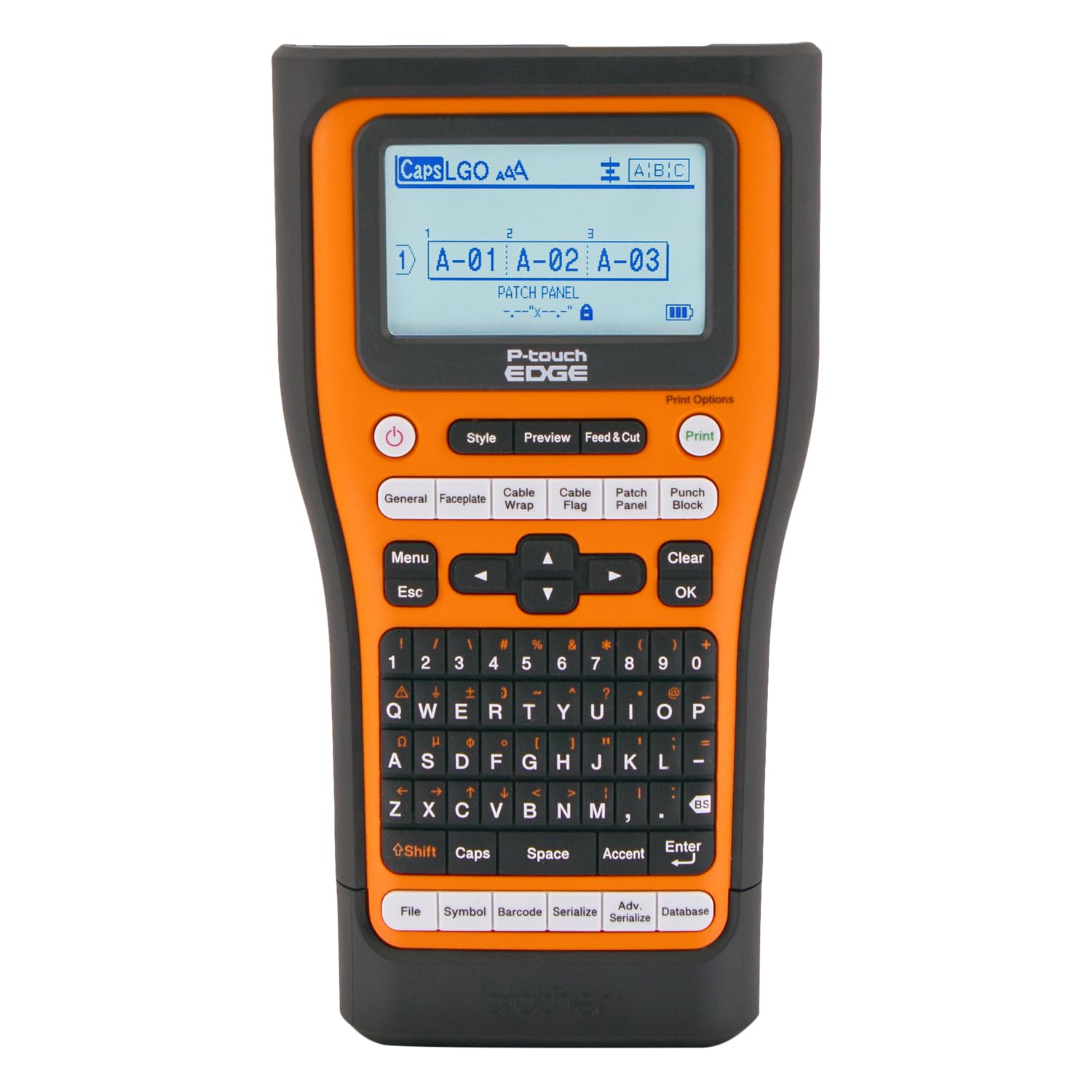
Field technicians who terminate cables in data closets or patch panels need a portable label printer that prints heat-shrink tubing and self-laminating wraps on the spot. The PT-E510VP accepts tapes from 3.5mm to 24mm wide — the 24mm flexible ID tape prints large cable labels that remain legible after pulling through conduit. The dual auto-cutter scores the tape backing while cutting through the laminate, creating peel-and-apply labels without separate tear strips or scissors.
Quick application keys for cable wrap, cable flag, patch panel, and faceplate templates reduce the number of button presses per label from ten to three. The built-in memory stores databases and templates so repeat jobs like “patch panel UDP-01 through UDP-48” print without re-typing. The rechargeable battery charges via USB-C, a notable upgrade over older 12V DC barrel plugs, and the ambidextrous hand strap with drop-protection utility ring makes one-handed labeling possible while balanced on a ladder.
The PT-E510VP accepts third-party TZe-compatible tape cartridges, giving users an escape from Brother’s first-party pricing. The trade-off is purely physical — this unit is large and heavy for a handheld labeler, and the keypad menu system requires a learning curve before you internalize the multi-step formatting workflows. For low-voltage techs and electricians cranking out hundreds of cable IDs per job site, the durability and tape flexibility justify the size premium.
Why it’s great
- Accepts third-party TZe tape cartridges — lowers long-term consumable costs
- Quick application keys cut label creation steps for common industrial label types
- USB-C charging replaces the older barrel plug standard
Good to know
- Large and heavy for a portable unit — bulk may be inconvenient for smaller hands or tight toolbags
- Learning curve for the keypad menu system; expect some training time for new users
5. UPRINTJET BT-HH6105B2

The BT-HH6105B2 stands apart from standard batch guns by integrating a photoelectric sensor that triggers automatic printing when a carton passes a fixed point on a conveyor. This turns the handheld coder into a semi-automated inline system — the user mounts the printer on a jig above the line, the sensor detects the leading edge of each box, and the print head fires at the precise moment for consistent code placement within millimeters.
Print parameters mirror the BT-HH6205B: 300 or 600 DPI resolution, 2.5mm to 12.7mm print height, and up to five lines of variable text, QR codes, barcodes, or imported images. The Android-based operating system provides a responsive 4.3-inch touch interface, file management via USB disk, and support for 17 display languages. The 450-gram body includes the same ergonomic grip as the lighter BT-HH6205B but adds the sensor optical window on the print head carriage.
Manual operation works identically to the BT-HH6205B for facilities that don’t have conveyor integration yet, making the BT-HH6105B2 a future-proof upgrade path. The same 42ml cartridge and replacement cost apply, and the photoelectric sensor adds a small learning curve for trigger distance calibration. For growing operations that want to evolve from manual batch coding to automated inline marking without buying an entirely new system, this is the strategic choice.
Why it’s great
- Built-in photoelectric sensor enables automatic print triggering on conveyor-fed lines
- Doubles as a manual handheld gun — no need to buy separate systems for different workflows
- Android touch interface with USB import supports complex variable data jobs
Good to know
- Proprietary ink cartridges cost each and are the only consumable option
- Sensor calibration for trigger distance requires initial setup per conveyor line
FAQ
Can a handheld batch code printer print on curved or uneven surfaces?
What is the real-world life cost difference between thermal and inkjet batch coding?
How do I ensure barcode readability from a batch code printer?
Final Thoughts: The Verdict
For most users, the best batch code printer winner is the UPRINTJET BT-HH6205B because it combines 600 DPI clarity, a 42ml high-yield ink system, and substrate versatility in a lightweight handheld form. If you need high-speed automated barcode labels for hundreds of cartons per shift, grab the Brother TD-4550DNWB. And for inline conveyor-fed batch coding with future automation potential, nothing beats the UPRINTJET BT-HH6105B2.