
Staring at a unit circle while your current calculator misplaces a decimal is a specific kind of academic frustration. Trigonometry demands not just computation, but understanding of inverse functions, radian-degree conversions, and graphing periodic waves — and the wrong tool turns a simple sine evaluation into a guessing game.
I’m Min — the co-founder and writer behind Gadgets Feed. I’ve spent weeks analyzing the function libraries, display technologies, and keystroke logic of the most popular scientific and graphing models to determine which ones actually serve students wrestling with sine, cosine, tangent, and their inverses.
Whether you’re preparing for the SAT, working through AP Calculus, or grinding through a college pre-calc course, choosing the right tool matters. This guide breaks down the specs and real-world usability to help you find the ideal calculator for trigonometry.
How To Choose The Best Calculator For Trigonometry
Trigonometry is unique among math subjects because it requires constant toggling between angle modes (degrees vs. radians), evaluating inverse trig functions, and often visualizing sine/cosine waves over a defined interval. A calculator that handles these seamlessly can save hours of frustration. Here are the critical factors to consider.
Natural Textbook Display vs. Line Display
A Natural Textbook Display shows fractions, exponents, square roots, and trig functions exactly as they appear in a textbook or on a whiteboard. For trig equations like sin(π/4) or tan⁻¹(√3), this means you see the entire expression before pressing enter — drastically reducing input errors. Line displays force you to track parentheses placement mentally, which is especially error-prone with nested trig functions.
Graphing Capability vs. Pure Scientific
A pure scientific calculator (like the Casio fx-991ES) can evaluate any trig function and convert between polar and rectangular coordinates. A graphing model adds the ability to plot y = sin(x), y = cos(x), or parametric trig curves, which is essential for visualizing amplitude, period, and phase shift. If your course requires sketching trig functions or identifying asymptotes on a graph, a graphing model is the better choice.
Inverse Trig and Hyperbolic Functions
Not all scientific calculators include dedicated keys for arcsin, arccos, and arctan (sin⁻¹, cos⁻¹, tan⁻¹). If your class covers solving for angles using inverse functions, verify the keypad layout supports direct access to these. Similarly, hyperbolic trig functions (sinh, cosh, tanh) are important for higher-level math and physics but are often omitted on entry-level models.
Quick Comparison
On smaller screens, swipe sideways to see the full table.
| Model | Category | Best For | Key Spec | Amazon |
|---|---|---|---|---|
| Texas Instruments TI-84 Plus CE | Graphing | Color graphing & matrix trig | Full-color backlit display | Amazon |
| Casio fx-9750GIII | Graphing | Exam-safe Python integration | Natural Textbook Display | Amazon |
| iPepul Graphing Calculator | Graphing | Budget graphing for trig | 10 function modes incl. Graphic | Amazon |
| Texas Instruments TI 83 Plus | Graphing | Proven graphing reliability | Long battery life | Amazon |
| Nadex Scientific (Black) | Scientific | AP-friendly formula graphing | 360+ functions | Amazon |
| Casio fx-991ES Plus 2 | Scientific | Natural display trig precision | 417 functions | Amazon |
| Nadex Scientific (Pink) | Scientific | Student-friendly linear trig | 3 operating modes | Amazon |
In‑Depth Reviews
1. Texas Instruments TI-84 Plus CE Color Graphing Calculator, Black

The TI-84 Plus CE is the benchmark graphing calculator for trigonometry-heavy curriculums. Its high-resolution color backlit display makes it easy to distinguish between multiple trig graphs — plot y = sin(x) in red and y = cos(x) in blue on the same screen — without squinting. The rechargeable battery is a major upgrade from the older AAA-powered models, and the slim profile fits in a standard pencil case.
Trig-specific performance is outstanding: the calculator handles polar-to-rectangular conversions, parametric equations, and angle mode toggling (Degrees/Radian) with dedicated quick keys. The MathPrint feature displays fractions, exponents, and trig functions in textbook format, reducing the chance of input errors when evaluating something like sin(π/6) + cos(π/3). Preloaded apps include periodic table tools and probability distributions, useful for physics and stats courses that overlap with trig units.
The only friction point is the learning curve. The menu system is deeper than Casio’s, and new users should plan to spend a weekend working through tutorials. However, once mastered, the TI-84 CE offers the most versatile platform for any student progressing from Algebra 2 through Calculus II.
Why it’s great
- Color screen makes multi-graph comparison intuitive for sine/cosine waves
- Rechargeable battery eliminates the hunt for AAA replacements
- Exam-approved for SAT, ACT, AP, and IB tests
Good to know
- Steeper learning curve for menu navigation compared to Casio models
- Premium price point; significant investment for a single semester course
2. Casio fx-9750GIII Graphing Calculator

The Casio fx-9750GIII brings a Natural Textbook Display to the graphing category, which is a game-changer for trig work. When you type sin(π/4), the screen shows the expression exactly as it would appear in a textbook — fraction bar, π symbol, and all — so you can verify your input before executing. This alone prevents countless mistakes when dealing with nested inverse trig functions or complex fraction arguments.
Beyond the display, the fx-9750GIII supports Python programming, allowing advanced students to write custom trig function solvers or plot iterative sequences. It includes built-in graph plotting, vector calculations, and probability distributions. The keypad layout is more intuitive than Texas Instruments’ menu-heavy approach, making this a strong choice for students who want graphing capability without the steep learning curve.
Battery life is excellent — four AAA batteries last through a full school year with regular use. The calculator is also approved for AP, SAT, ACT, and IB exams. The main trade-off is that the screen is monochrome, so you cannot color-code graphs, but the clarity of the Natural Textbook Display compensates for this limitation in most classroom scenarios.
Why it’s great
- Natural Textbook Display shows trig expressions exactly as written
- Python programming enables custom analytical tools for advanced coursework
- Intuitive interface with shorter learning curve than TI alternatives
Good to know
- Monochrome display limits multi-graph color differentiation
- Graphing depth is less than the TI-84 CE for very complex functions
3. iPepul Graphing Calculator

The iPepul Graphing Calculator punches well above its price segment by offering a dedicated Graphic mode alongside nine other function modes including Equation, Table, and Vector. For trigonometry students, the Graphic mode allows you to plot sine, cosine, and tangent curves over custom intervals, while the Table mode generates discrete x,y coordinate pairs — extremely useful for identifying asymptotes and period shifts by hand before graphing.
The 2.88-inch LCD screen is clear enough for classroom use, and the ABS plastic body feels sturdy against daily backpack abuse. The calculator runs on four AAA batteries (included) and includes a slide-on hard cover. It supports complex number calculations, which matter when trigonometry intersects with electrical engineering or physics coursework.
However, the instruction manual is dense and the menu layout is less polished than Casio or TI designs. Users accustomed to brand-name interfaces will need to invest time learning the iPepul’s logic. For the price, this is a capable graphing tool for a student who needs visual trig analysis but cannot justify the expense of a TI-84 or Casio graphing model.
Why it’s great
- Dedicated Graphic and Table modes for trigonometric function analysis
- Excellent value for entry-level graphing functionality
- Includes hard cover and batteries, ready to use out of the box
Good to know
- User manual is confusing and menu navigation has a learning curve
- Graphing depth does not match premium TI or Casio models
4. Casio fx-991ES Plus 2 Scientific Calculator
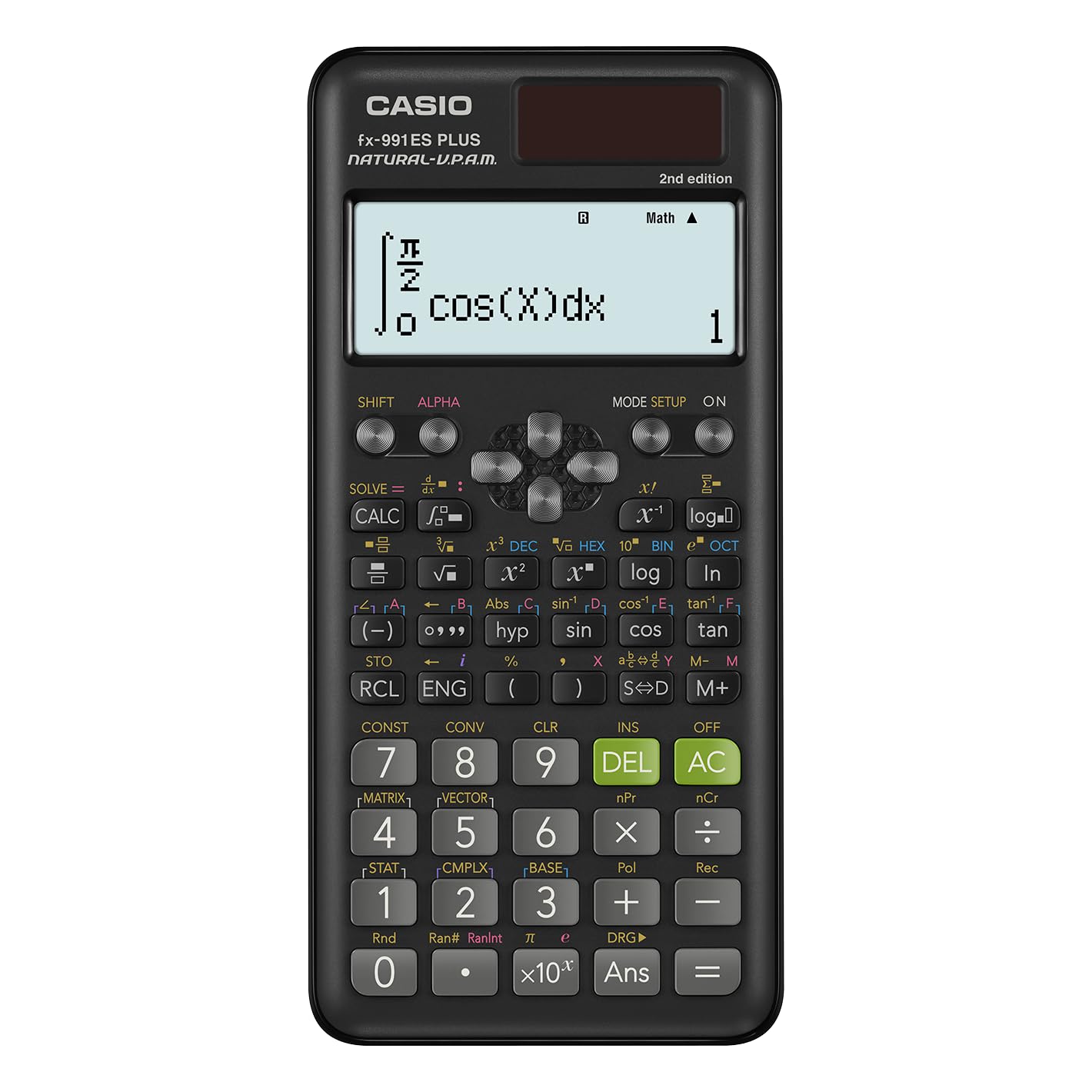
The Casio fx-991ES Plus 2 is the definitive scientific calculator for pure trig computation. Its 417-function library includes dedicated sin⁻¹, cos⁻¹, tan⁻¹ keys, hyperbolic trig functions, and polar-to-rectangular coordinate conversion — everything needed for a full semester of pre-calculus or college trigonometry, without the bulk or cost of a graphing model. The Natural Textbook Display is the star feature here: it renders fractions, π, and exponents exactly as they appear in your textbook.
The dual solar/battery power source means the calculator never dies mid-exam, and the slide-on hard case protects the keypad in a chaotic backpack. The 24-level bracket system lets you chain complex expressions like (sin(π/3) + cos(π/6)) / tan(π/4) without running out of nesting room. The device weighs only 95 grams, making it pocket-portable.
The limitation is the lack of graphing. You cannot visualize a sine wave or identify amplitude shifts graphically. For pure computation and exam situations where graphing is prohibited or unnecessary, this is the most reliable and cost-effective choice on the market. It is approved for most standardized exams, though you should check your specific test’s policy.
Why it’s great
- Natural Textbook Display eliminates trig input errors with fraction/π rendering
- Dedicated inverse trig and hyperbolic function keys for advanced coursework
- Solar/battery dual power ensures reliability during exams
Good to know
- No graphing capability — pure computation only
- Small screen limits readability for extremely long expressions
5. Texas Instruments TI 83 Plus Graphics Calculator

The TI-83 Plus is a time-tested graphing workhorse that still holds relevance for trigonometry. Its strength lies in straightforward function graphing: you can enter y = sin(x) and zoom in on specific intervals to analyze period and amplitude. The calculator supports up to 10 graph equations simultaneously, and the trace function lets you read precise coordinate values at any point on the wave — critical for understanding maximums, minimums, and intercepts.
Battery life is legendary among graphing calculators — four AAA batteries can last over a year with moderate daily use. The plastic body is durable, and the keypad offers dedicated graphing, table, and window keys that keep the most important trig functions accessible without deep menu diving. It is approved for the SAT, ACT, and AP exams.
The main drawbacks are the monochrome display and the lack of a Natural Textbook input mode. Expressions appear in a single-line format, so nested trig functions require careful parentheses tracking. It also cannot handle non-base-10 logarithms, which may limit its utility in some higher-level courses. For students who need reliable graphing on a strict budget and do not require color differentiation, the TI-83 Plus remains a solid choice.
Why it’s great
- Exceptional battery life — lasts over a year on four AAA cells
- Trace function allows precise coordinate reading on trig graphs
- Proven durability and widespread exam approval
Good to know
- Line display requires careful parentheses management for complex trig
- Cannot handle non-base-10 logarithms; limited for advanced courses
6. Nadex Scientific Calculator with Graphing (Black)

The Nadex Scientific Calculator (black variant) targets the budget-conscious student who needs more than basic computation but does not want to pay for a full graphing unit. It offers over 360 functions including complex number calculations, linear regression, and standard deviation — solid support for the statistical components that often appear alongside trigonometry in AP courses. The three operating modes (Calculation, Angular Measurement, and Display) streamline the workflow between degrees and radians.
The large screen can display a formula graph for visual reference, though this is not a full graphing calculator in the TI or Casio sense — it visualizes a single equation rather than offering multi-graph comparison. The inclusion of a carrying case is a thoughtful touch, as the case doubles as a pencil holder. The calculator is solar-powered with a backup battery included in the chamber, so power failure during an exam is unlikely.
Users report that the manual is accurate and functions are generally accessible, though the keypad layout takes some orientation. The 2.5-inch LCD is adequate but not as crisp as premium models. For a student who needs a reliable scientific calculator with basic graph visualization for trig homework, this is a strong mid-range option.
Why it’s great
- 360+ functions including trig, stats, and regression analysis
- Comes with a carrying case that doubles as a pencil holder
- Solar-powered with backup battery for exam reliability
Good to know
- Graph function is limited to single-equation visualization, not full graphing
- Display resolution is lower than Casio’s Natural Textbook Display models
7. Nadex Scientific Calculator with Graphing (Pink)

The pink Nadex Scientific Calculator shares the same 360-function engine and 2.5-inch LCD as its black counterpart but arrives in a more distinctive color that appeals to students who want personalization in their school supplies. It is approved for PSAT/NMSQT, SAT, ACT, and AP exams, making it a viable alternative to the Casio fx-991ES for test-takers who just need basic trig computation under strict testing conditions.
The three operating modes (Calculation, Angular Measurement, Display) make it easy to switch between degrees and radians — a necessity when moving from a geometry problem to a pre-calculus trig problem in the same study session. The graph function allows for formula visualization, which helps students confirm the shape of a sine wave or the asymptote of a tangent curve without needing a dedicated graphing model. The included secondary battery in the chamber provides peace of mind during long exam sessions.
The primary limitation is the non-graphing nature of the device — it cannot plot multiple equations simultaneously or trace coordinates on a graph. The display is monochrome and lower contrast than the Casio Natural Display. However, for the budget-conscious student taking a single trigonometry course who wants a reliable, exam-approved calculator in a fun color, this is the most accessible entry point.
Why it’s great
- Approved for all major standardized exams including SAT and ACT
- Three operating modes simplify degree/radian toggling for trig work
- Available in fun colors that stand out in a classroom setting
Good to know
- Graph function is single-equation visualization only, not a full graphing calculator
- Display contrast and resolution trail behind Casio’s Natural Display models
FAQ
Can I use a basic four-function calculator for trigonometry class?
What is the difference between a scientific and graphing calculator for trig?
Why does my calculator give a different answer for sin(30) than my textbook?
Are graphing calculators allowed on the SAT and ACT for trig problems?
Final Thoughts: The Verdict
For most students, the best calculator for trigonometry is the Texas Instruments TI-84 Plus CE because its color graphing, rechargeable battery, and exam approval make it the most versatile tool for any course that covers sine, cosine, and tangent functions. If you want a Natural Textbook Display that virtually eliminates input errors, grab the Casio fx-9750GIII. And for pure computation on a budget where graphing is unnecessary, nothing beats the value of the Casio fx-991ES Plus 2.