
The RDNA 2 and RDNA 4 architectures have redefined what a mid-range GPU can do, delivering 1440p gaming performance and 16GB of VRAM at prices that were unthinkable just two generations ago. The AMD 6000 series, including the RX 6600 and the newer RX 9060 XT, offers a serious alternative to Nvidia’s offerings, particularly for gamers who prioritize raw rasterization power and high frame rates at 1080p and 1440p without the ray tracing tax.
I’m Min — the co-founder and writer behind Gadgets Feed. For this guide, I analyzed hundreds of user benchmarks and technical specifications across nine different models to isolate the best 6000 graphics card options for every build scenario and budget, from compact ITX upgrades to high-refresh-rate 1440p monsters.
Whether you are building a new rig or reviving an old one, understanding the subtle differences in clock speeds, cooling solutions, and VRAM requirements is critical, which is why I have compiled this deep dive into the best 6000 graphics card options available right now.
How To Choose The Best 6000 Graphics Card
The AMD 6000 series spans multiple generations and performance tiers, from the budget-friendly RX 6600 to the flagship RX 6950 XT. Understanding the technical markers that separate these chips is essential to making a smart purchase that fits your monitor resolution and power supply.
VRAM Capacity: 8GB vs 16GB
8GB VRAM is still sufficient for 1080p gaming and most esports titles, but modern AAA games at 1440p high textures are already exceeding this limit, causing stuttering. 16GB VRAM, found on the RX 9060 XT and RX 6950 XT, provides future-proofing for texture-heavy mods, 1440p ultra settings, and local LLM workloads. For a pure 1080p build, 8GB is fine; for anything higher, prioritize the 16GB models.
Architecture Generation: RDNA 2 vs RDNA 4
RDNA 2 cards (RX 6600, RX 6650 XT, RX 6950 XT) offer mature drivers and excellent price-to-performance at 1080p, but lack AV1 encoding and the newer FSR 4 upscaling technology. RDNA 4 cards (RX 9060 XT, RX 9070 XT) bring PCIe 5.0 support, improved ray tracing efficiency, and the AV1 hardware encoder, making them better suited for content creators and those wanting the latest features.
Cooling Solutions and Physical Dimensions
Dual-fan designs (like the ASRock RX 6600) are compact and fit most cases, but they run warmer and louder under sustained loads. Triple-fan designs (XFX Speedster, ASUS Prime) run cooler and quieter but are longer than 300mm, which will not fit in small form-factor cases without careful measurement. Always check your case clearance and PSU wattage before buying.
Quick Comparison
On smaller screens, swipe sideways to see the full table.
| Model | Category | Best For | Key Spec | Amazon |
|---|---|---|---|---|
| ASUS Prime RX 9070 XT | Premium | 1440p Ultra / 4K Gaming | 3030 MHz Boost Clock | Amazon |
| PowerColor Red Devil RX 9070 XT | Premium | Silent High-FPS Builds | Triple 8-pin Power | Amazon |
| AMD RX 6950 XT | Premium | Mac Pro / Linux Builds | 16GB GDDR6 256-bit | Amazon |
| ASUS Prime RX 9060 XT | Mid-Range | 1440p High Settings | PCIe 5.0 + 16GB VRAM | Amazon |
| PowerColor Reaper RX 9060 XT | Mid-Range | SFF / Small Case Builds | 200mm Length | Amazon |
| Sapphire Pulse RX 9060 XT | Mid-Range | Linux / LLM Workloads | 3290 MHz Game Clock | Amazon |
| XFX Speedster RX 6600 XT | Mid-Range | 1080p Ultra 60fps | 2607 MHz Boost Clock | Amazon |
| Sapphire Pulse RX 6650 XT | Budget | 1080p Max Settings | 17.5 GHz Memory Clock | Amazon |
| ASRock Challenger RX 6600 | Budget | 1080p Esports / Entry | 8GB GDDR6, RDNA 2 | Amazon |
In‑Depth Reviews
1. ASUS Prime AMD Radeon RX 9070 XT White OC Edition
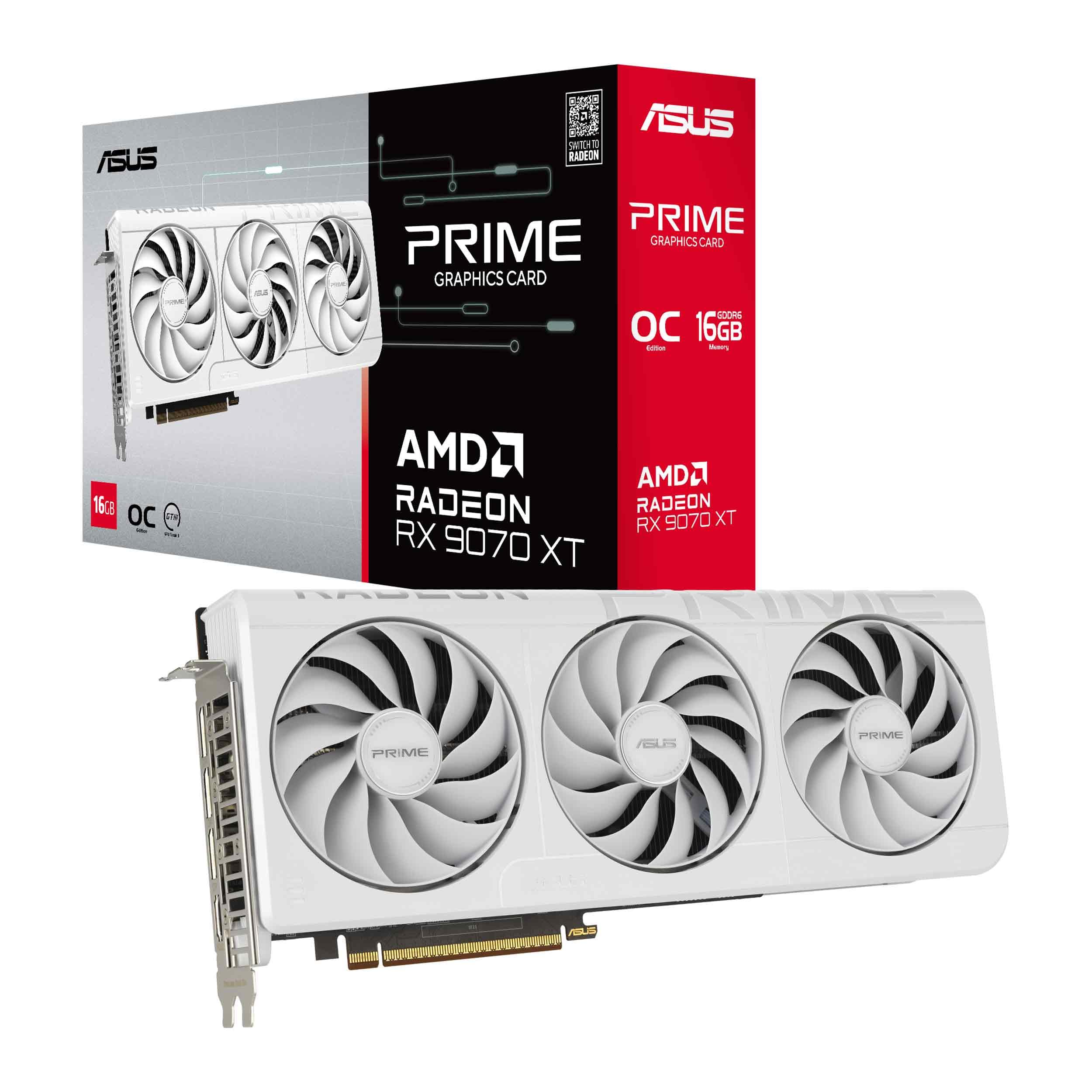
The ASUS Prime RX 9070 XT represents the pinnacle of what a 6000 series graphics card can achieve, featuring a massive 3030 MHz boost clock that delivers 100-180 FPS at 1440p and a respectable 60-80 FPS in native 4K. The axial-tech triple-fan design and phase-change GPU thermal pad keep edge temperatures around 50°C under load, making this one of the coolest running high-end cards on the market.
With 16GB of GDDR6 memory and PCIe 5.0 support, this card is built to handle the next generation of gaming. The dual-ball fan bearings and dual BIOS switch (Quiet vs Performance) give you fine-grained control over noise levels. It does require an anti-sag stand due to its weight, and it demands at least an 850W power supply, so plan your PSU upgrade accordingly.
For users building a white-themed gaming rig or anyone who wants the absolute best price-to-performance ratio at the high end, this card is the clear winner. It runs silently, stays cool, and delivers frame rates that rival significantly more expensive Nvidia counterparts, all without the RGB bloat.
Why it’s great
- 3030 MHz boost clock provides exceptional 1440p and 4K gaming performance
- Phase-change thermal pad and triple-fan cooling keep temps below 60°C under load
- PCIe 5.0 interface and 16GB VRAM ensure future-proofing
Good to know
- Heavy card requires an anti-sag bracket or stand
- Recommend a minimum 850W power supply
2. PowerColor Red Devil AMD Radeon RX 9070 XT 16GB

The PowerColor Red Devil RX 9070 XT is an absolute beast for enthusiasts who demand the highest frame rates at ultrawide 3440×1440 resolutions, with users reporting around 200 FPS in games like Warframe. The three 8-pin PCI Express power connectors and a 900W minimum system power requirement tell you immediately that this card is built for raw, unadulterated performance, not power efficiency.
Measuring 340mm in length, this is one of the largest cards in the 6000 series lineup. The triple-fan cooler and large heatsink allow it to run incredibly quiet even under sustained load, with edge temperatures staying cool. However, the size creates compatibility issues: it does not work well in vertical GPU mounts (like the Thermaltake Tower 500) due to restricted airflow, which causes overheating.
This card is the ideal choice for users building a full-sized ATX case with a 9800X3D or similar high-end CPU, who prioritize silent operation and blistering performance over compactness. It is not subtle, but it delivers exactly what it promises: the best 9070 XT cooling on the market.
Why it’s great
- Exceptionally quiet operation with massive triple-fan heatsink
- Delivers absurd FPS at 3440×1440 ultrawide resolution
- Excellent build quality with premium components
Good to know
- 340mm length requires a very large case
- Vertical mounting causes overheating in some cases
- Requires a 900W PSU
3. AMD Radeon RX 6950 XT 16GB

The AMD reference RX 6950 XT is a unique entry in the 6000 series lineup because it is the highest-performing card natively supported in the Mac Pro 2019 chassis, requiring a specific boot ROM downgrade for compatibility. With a 256-bit memory bus and 16GB of GDDR6 clocked at 18 Gbps, this card delivers excellent rasterization performance that beats the RX 6800 XT by a solid 50% margin in Windows benchmarks.
For Linux users, this card is plug-and-play with open-source drivers, and FSR 2 provides a massive performance boost in Steam games. The 850W PSU requirement and 10.51-inch length make it relatively standard for a high-end card, but the reference blower-style cooler can run louder than aftermarket alternatives. It also has known compatibility issues with older DirectX 9/10 era games, requiring manual workarounds.
This card is the absolute best choice for Mac Pro 2019 users wanting a GPU upgrade, and it is a solid pick for Linux gamers who want great out-of-box driver support. For pure Windows gamers, the newer RDNA 4 cards offer better features, but the RX 6950 XT remains a powerful brute-force option.
Why it’s great
- Best natively supported AMD card for Mac Pro 2019 tower
- Excellent plug-and-play support on Linux with open-source drivers
- 256-bit bus and 16GB VRAM provide strong 4K performance
Good to know
- Compatibility issues with older DX9/10 games may require tweaks
- Reference cooler runs louder than third-party models
4. ASUS Prime AMD Radeon RX 9060 XT 16GB OC Edition

The ASUS Prime RX 9060 XT hits the sweet spot in the mid-range 6000 series with 16GB of GDDR6 VRAM and a PCIe 5.0 interface, all packed into a 2.5-slot design that fits most standard ATX cases. It scored an average of 3,731 points in 3DMark Steel Nomad, translating to around 37 FPS in that demanding benchmark, putting it firmly in 1440p capable territory.
The axial-tech triple-fan cooling system with dual-ball bearings and a 0dB mode means the fans stop completely under light loads, making this an excellent choice for quiet daytime productivity builds that can handle gaming at night. The dual BIOS switch lets you toggle between Quiet and Performance profiles depending on whether you value silence or a few extra frames. At certain price points, this card has represented incredible value per frame.
For gamers targeting stable 1440p high settings with FSR 4 support and AV1 encoding, this card is a perfect match. It lacks the raw horsepower of the RX 9070 XT for 4K, but for the price difference, the 1440p performance delta is minimal, making this the smarter buy for most users.
Why it’s great
- PCIe 5.0 interface and 16GB VRAM future-proof the build
- 0dB mode and dual BIOS offer excellent noise control
- Strong 1440p high settings performance with FSR 4
Good to know
- 12-inch length may be tight in some mid-tower cases
- Performance at 4K is limited; best for 1440p
5. PowerColor Reaper AMD Radeon RX 9060 XT 16GB

The PowerColor Reaper RX 9060 XT stands out for its tiny 200mm length and 658-gram weight, making it the smallest card in the entire 6000 series lineup to pack a full 16GB of GDDR6 VRAM. This is the card you want for a living room PC build or a compact ITX chassis, delivering 4K 60 FPS in titles like Arch Raiders at native resolution without upscaling.
It requires only a single 8-pin PCI Express power connector and a 500W PSU, which is remarkably low for a 16GB card. The dual-fan cooler is effective for its size, but it does run warmer under load (hotspot temps around 88-91°C in demanding games). Some users noted a coil whine out of the box, though this diminished over time. It also lacks the dual BIOS feature of more expensive models.
For users building ultra-compact systems on a budget who do not want to sacrifice VRAM capacity, this is the clear winner. It crushes anything below 4K resolution and handles 4K native with adjusted settings. Just ensure your case has adequate ventilation, as the small cooler needs a good airflow path.
Why it’s great
- Incredibly compact 200mm length fits almost any case
- 16GB VRAM in a tiny footprint is unique in the market
- Very low power draw with single 8-pin connector
Good to know
- Hotspot temps can reach 88-91°C under sustained load
- Some units may exhibit coil whine initially
- No dual BIOS switch for profile toggling
6. Sapphire Pulse AMD Radeon RX 9060 XT Gaming OC 16GB

The Sapphire Pulse RX 9060 XT is a well-rounded mid-range card that excels in versatility, offering a 3290 MHz core clock speed and 20 Gbps memory clock on a full PCIe 5×16 interface. This bandwidth headroom makes it ideal for compute-heavy tasks like Blender rendering and local LLM inference (ComfyUI), where users report completely plug-and-play performance on Linux (Devuan) without any driver tinkering.
The dual-fan Pulse cooler is compact and efficient, keeping edge temperatures in the mid-50s°C under gaming loads. The card draws power from a single 6+2 pin connector, requiring only a modest PSU. The small footprint (it is much smaller than the ASUS Prime models) makes it easy to install in most cases, though the backplate is thick and may cause a tight fit against the motherboard tray in some builds.
This is the best option for Linux users who want a high-performance 16GB card that works out of the box, and for gamers upgrading from an RX 570 or GTX 1060 who want a massive performance jump without needing a new PSU. The 1440p high settings performance is excellent across the board.
Why it’s great
- Excellent out-of-box Linux support with open-source drivers
- 16GB VRAM ideal for local LLMs and Blender workloads
- 3290 MHz core clock delivers strong 1440p gaming
Good to know
- Thick backplate may cause tight clearance in some builds
- Single 6+2 pin connector limits power headroom
7. XFX Speedster QICK308 Radeon RX 6600 XT 8GB

The XFX Speedster QICK308 RX 6600 XT is the premium 1080p gaming card in the 6000 series, offering a 2607 MHz boost clock and triple-fan cooling that keeps it whisper-quiet and running at just 78-80°C under 90% GPU utilization in demanding titles like Apex Legends and Call of Duty. For users stuck on a GTX 970 or GTX 1650 Super, this card represents a generational leap, delivering solid 60+ FPS at Ultra settings in any 1080p game.
The Speedster QICK308 design features a driver CD included (rare these days) and three DisplayPort outputs alongside one HDMI 2.1 port. It works cleanly on both Windows 10 and Arch Linux. The card does have weak ray tracing performance, which is expected at this price point, and the 3DMark suite fails on the final two tests on some driver revisions, though this does not affect gaming.
This is the card for the dedicated 1080p gamer who wants high refresh rates without drama. It pairs perfectly with a Ryzen 5 5600X processor and handles modern titles with ease. If you are gaming at 1080p and do not care about ray tracing, this is a fantastic value that will last for years.
Why it’s great
- Triple-fan cooling maintains low noise and 80°C max temps
- Excellent 1080p Ultra 60fps performance across all modern titles
- Works out-of-box on Windows and Linux
Good to know
- Ray tracing performance is weak compared to Nvidia alternatives
- 3DMark suite may fail on final two tests with certain drivers
8. Sapphire Pulse AMD Radeon RX 6650 XT 8GB

The Sapphire Pulse RX 6650 XT is RDNA 2 refined, offering 17.5 GHz GDDR6 memory on a 128-bit bus that delivers excellent bandwidth for 1080p gaming. It performs on par with a MSI RTX 3070 in pure rasterization, which is impressive for this price tier. The 2.2-slot ATX design is compact, and the dual-fan cooler keeps peaks around 75-79°C under stress testing without excessive noise.
This card lacks any flashy extras like RGB or RGB software, which keeps the cost down. It does run warm in cases with poor airflow, and the zero RPM fan mode needs to be disabled or tuned via AMD Adrenaline to prevent passive overheating in tight builds. For users with older CPUs (like an FX 8350), this is the fastest GPU you can pair without significant bottlenecking at 1080p.
For the budget-conscious 1080p gamer who wants 60+ FPS on modern AAA titles at max settings, this is a no-brainer. It is also a great backup card or secondary build component. Just ensure your case has good airflow, and consider a custom fan curve to manage temperatures.
Why it’s great
- Rasterization performance on par with RTX 3070
- Compact 2.2-slot design fits most cases easily
- Great value for 1080p max settings gaming
Good to know
- Runs warm in poorly ventilated cases
- Zero RPM fan mode may cause passive overheating
- No RGB or extra aesthetic features
9. ASRock AMD Radeon RX 6600 Challenger D 8GB

The ASRock RX 6600 Challenger D is the entry-point to the 6000 series, offering solid 1080p gaming performance with RDNA 2 efficiency at a very compelling price. Users upgrading from an RX 570 report roughly double the performance after tuning, with undervolting results showing a stable 2700 MHz core at just 1100mV, drawing only 135W while improving 1% lows by 20 FPS. The dual-fan Challenger cooler is quiet under 65% fan speed and keeps temperatures around 56°C under gaming loads.
This card is an excellent choice for reviving older systems, with verified compatibility with 2012-era Intel platforms (i7-3770K) where it runs World of Tanks at Ultra settings flawlessly. It also works out-of-box on Linux (Mint) and runs titles like modded Skyrim, Fallout 4, and Baldur’s Gate 3 well. The only quirks are occasional Minecraft shader instability and a slightly tricky power cord installation.
For the budget builder or anyone looking to give an old PC a second life with modern gaming capability, this is the best bang for the buck. It trades blows with the GTX 1660 Ti and RTX 2060, making it a smarter buy for pure 1080p gaming than more expensive cards.
Why it’s great
- Excellent value for 1080p esports and AAA gaming
- Very low 135W power draw with good undervolting headroom
- Works out-of-box on Linux with open-source support
Good to know
- Some Minecraft shaders may crash or glitch
- Power cord installation can be fiddly
- 8GB VRAM limits texture quality in newer titles
FAQ
Should I get an 8GB or 16GB 6000 series card for 1440p gaming?
Can a 6000 series card support ray tracing well?
Do I need a specific power supply for these cards?
Final Thoughts: The Verdict
For most users, the best 6000 graphics card winner is the ASUS Prime RX 9060 XT because it delivers the ideal balance of 16GB VRAM, PCIe 5.0 bandwidth, and 1440p gaming performance at a fair price. If you want maximum silent performance and high FPS at 1440p, grab the ASUS Prime RX 9070 XT. And for compact builds that still need 16GB VRAM, nothing beats the PowerColor Reaper RX 9060 XT.