
A cluttered desk with two monitors sitting on their original stands eats up valuable real estate and forces your neck into an unnatural angle. The right arm lifts both screens, reclaims surface area, and lets you dial in a ergonomic position that keeps you comfortable through long work sessions. The challenge is finding a setup that handles the weight of two monitors without flexing or sagging — especially when you are shopping on a tighter budget.
I’m Min — the co-founder and writer behind Gadgets Feed. I’ve spent countless hours dissecting the technical specs, load capacities, and pneumatic mechanisms behind dozens of monitor arms to separate the genuinely sturdy options from the ones that droop after a few weeks.
This guide covers the most reliable budget dual monitor arms that deliver solid gas spring performance and full articulation without forcing you into premium pricing territory.
How To Choose The Best Budget Dual Monitor Arms
Not all monitor arms are built the same, and the price tag alone does not tell you whether the gas springs will hold your specific monitors without drifting. Focus on weight capacity per arm, the mounting method, and the range of motion to avoid ending up with a wobbly setup that defeats the purpose of buying an arm in the first place.
Weight Capacity Per Arm
Every arm has a minimum and maximum weight range. If your monitor is too light, the gas spring will push it upward and refuse to stay down. If it is too heavy, the arm will sag over time. Check your monitor’s exact weight — not just the screen size — and pick an arm where your monitor falls comfortably in the middle of the rated range.
Mounting Type and Desk Thickness
C-clamp mounts work for most desks with a flat rear edge, but some desks have a thick apron or support beam that blocks the clamp. Grommet mounts pass through a hole in the desk surface, which solves the apron problem but requires drilling if no hole exists. Measure your desk thickness and check the product’s acceptable thickness range before buying.
Cable Management Design
Built-in cable routing along the arm keeps wires tidy and prevents them from snagging when you adjust the monitor position. Some arms use plastic snap-on covers that can break during installation, while others have integrated channels that are more durable. Look for arms with removable covers that give you access to the channel without disassembling the entire arm.
Full Motion vs. Fixed Height
Full-motion arms allow tilt, swivel, rotation, and height adjustment, which is essential for ergonomic positioning. Fixed-height poles only let you change the height by loosening a set screw and sliding the monitor up or down — convenient if you rarely move your screens, but less flexible if you share the desk or alternate between sitting and standing.
Quick Comparison
On smaller screens, swipe sideways to see the full table.
| Model | Category | Best For | Key Spec | Amazon |
|---|---|---|---|---|
| VIVO STAND-V200O | Premium | Ultrawide screens up to 35″ | 26.4 lbs per arm | Amazon |
| ErgoFocus Heavy Duty | Premium | Large screens up to 43″ | 33.1 lbs per arm | Amazon |
| VIVO STAND-V002K | Mid-Range | Standard 17-32″ monitors | 19.8 lbs per arm | Amazon |
| Mount-It! MI-1882BLK | Mid-Range | Independent arm positioning | 17.6 lbs per arm | Amazon |
| MOUNT PRO B0FCM83HFV | Mid-Range | Larger 39″ monitors | 26.5 lbs per arm | Amazon |
| MOUNTUP B0DJLRKTTJ | Budget | Easy installation and clean look | 22 lbs per arm | Amazon |
| MOUNT PRO B0DX6VS454 | Budget | Vertical stacking with tall pole | 22 lbs per arm | Amazon |
In‑Depth Reviews
1. VIVO Dual Pneumatic Arm Ultra-Wide Monitor Mount (STAND-V200O)
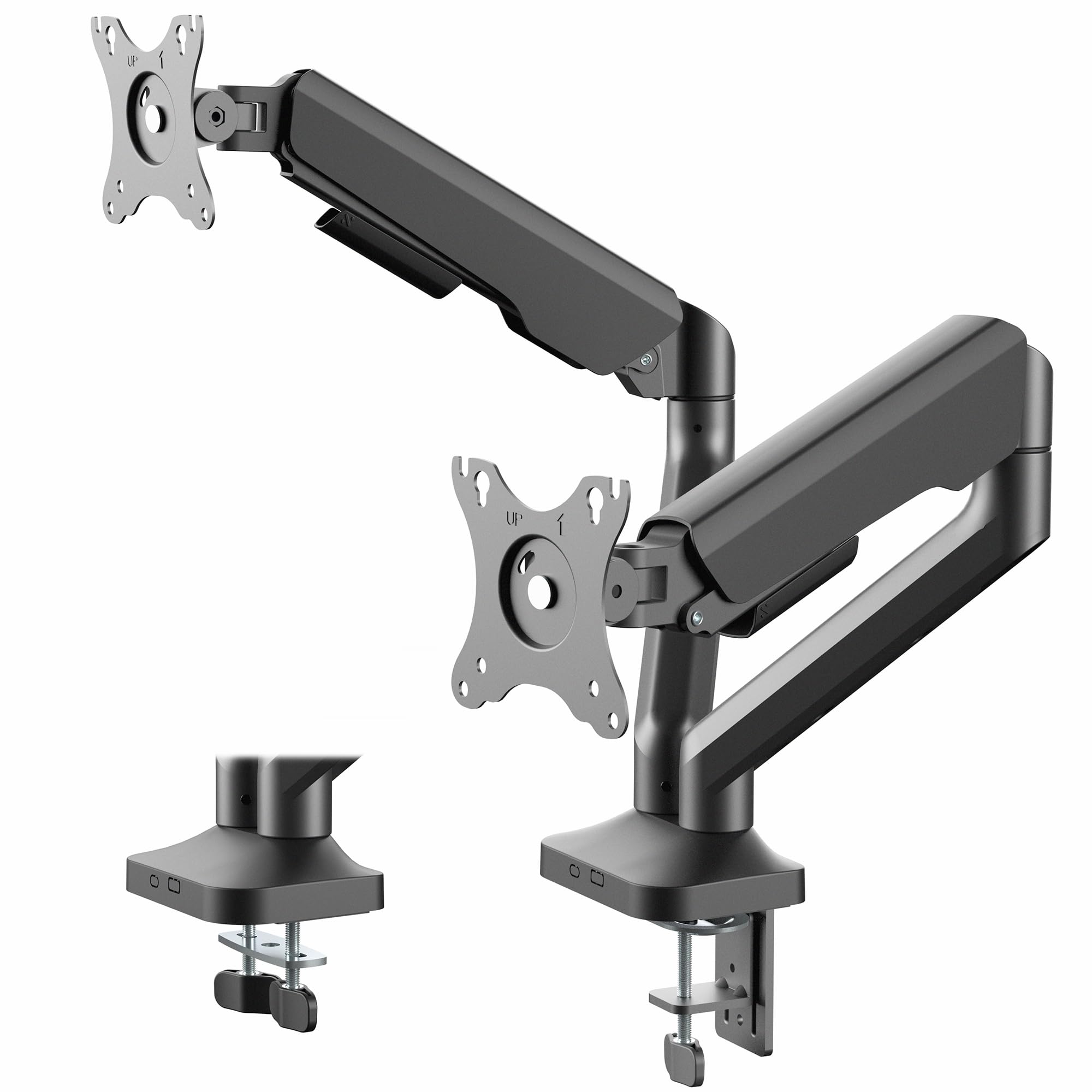
The VIVO STAND-V200O is built specifically for ultra-wide monitors up to 35 inches, with each pneumatic arm rated for a substantial 26.4 pounds. That capacity puts it in a different league than most budget-friendly options, which typically top out around 22 pounds. The detachable VESA plates simplify installation — you attach the plate to the monitor first, then click it onto the arm, avoiding the awkward balancing act of holding the screen while tightening bolts.
The pneumatic springs deliver smooth vertical adjustment with 10.8 inches of travel. The tilt range spans from +90° to -90°, which gives you full rotation from portrait to landscape and anything in between. Users report zero droop with 34-inch ultrawide monitors, and the heavy-duty C-clamp grips desks up to 3.15 inches thick without wobble. The grommet mount is also included for desks with a pre-drilled hole.
Cable management runs through the arms with snap-on covers that keep wires hidden during adjustments. The instruction manual is straightforward, and most users complete the setup in 20-30 minutes. The only trade-off is the weight — at over 11 pounds, the stand itself is heavy, but that heft translates directly into the stability that holds large screens firmly in place.
Why it’s great
- Handles 35″ ultra-wide monitors without sagging
- Detachable VESA plates simplify single-person installation
- Wide 90° tilt range for portrait and landscape modes
Good to know
- Heavier build at 11+ pounds may require a sturdy desk
- Snap-on cable covers can be tricky to reattach after routing
2. ErgoFocus Heavy Duty Dual Monitor Mount

The ErgoFocus arm is the heavyweight contender in this roundup, supporting monitors up to 43 inches and a maximum load of 33.1 pounds per arm. That makes it the only entry here designed with genuine 34-inch and 35-inch ultra-wide dual setups in mind — not just as a stretch goal but as the primary use case. The gas springs have undergone 20,000 fatigue test cycles, and the upgraded tilting head design uses two limit screws to prevent the monitor from sagging forward over time.
The articulation range is generous: tilt, swivel, and 360° rotation are all on the table. The arm extends up to 20.87 inches and can be raised 22.4 inches from the desktop, which is taller than most pole-based stands in this price bracket. The lower arm even has a built-in storage compartment for the Allen keys, a thoughtful detail that keeps the adjustment tool accessible instead of lost in a drawer.
Installation supports both C-clamp and grommet methods, and the clamp fits desks up to 3.15 inches thick. Users consistently praise how easy it is to adjust the tension dial to match the specific weight of their monitors. Some note that the top-bottom angle can drift slightly with very heavy ultra-wides, but the limit screws mitigate this issue effectively if tightened properly during setup.
Why it’s great
- Highest weight capacity of any arm on this list at 33.1 lbs
- 20.87-inch extension provides ample reach for wide screens
- Integrated Allen key storage in the lower arm is a smart touch
Good to know
- Top-bottom tilt can drift with very heavy monitors if limit screws are not tightened
- Pole height may be excessive for smaller 24-inch setups
3. VIVO 17 to 32 Inch Dual Mechanical Monitor Mount (STAND-V002K)
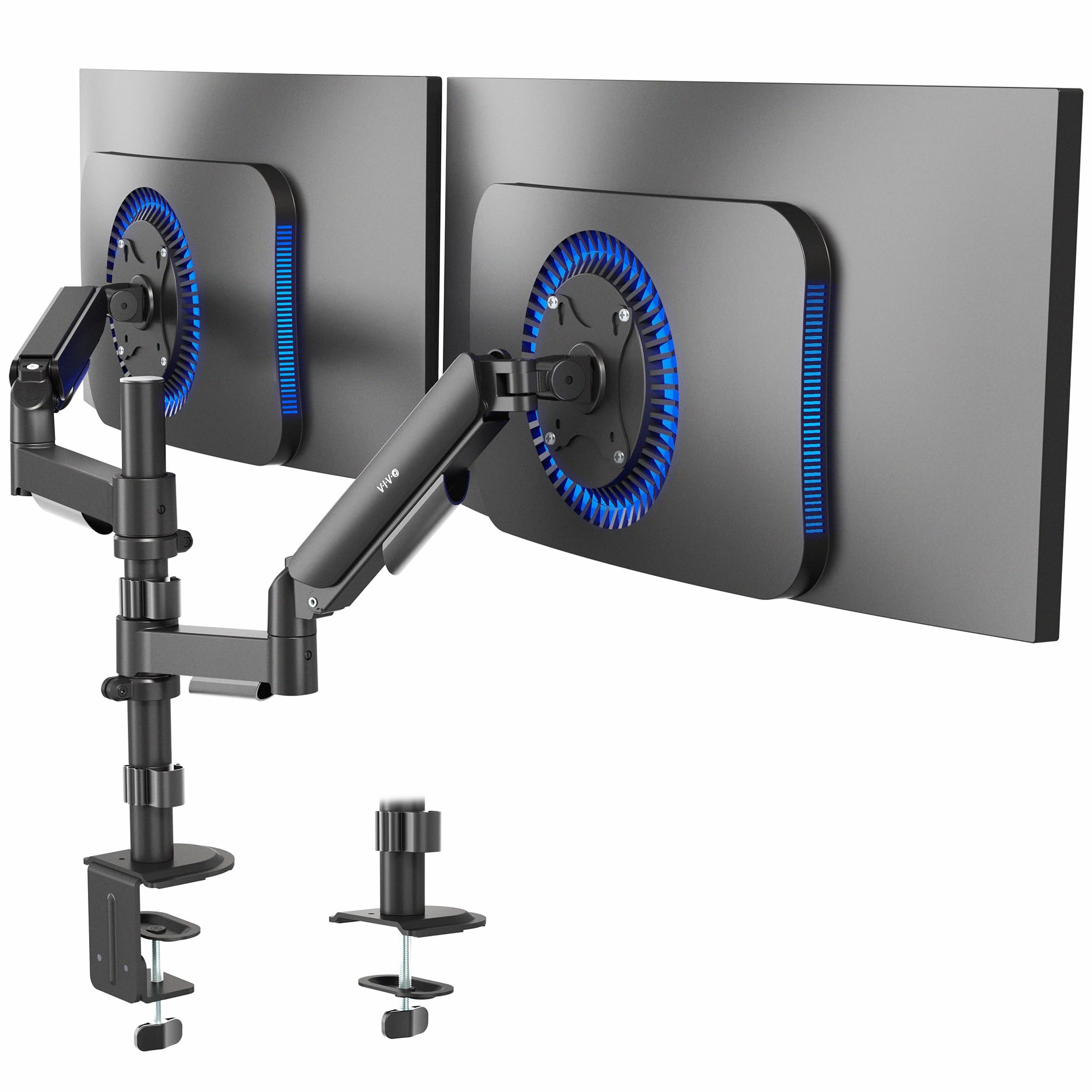
The VIVO STAND-V002K uses dual mechanical springs instead of a pneumatic cylinder to counterbalance monitor weight. That distinction matters because mechanical springs are more predictable at lower price points — they do not lose gas pressure over time and are easier to tension for monitors on the lighter end of the spectrum. Each arm supports up to 19.8 pounds, which comfortably covers most 24-inch to 27-inch monitors.
The arms offer smooth tilt, swivel, and full 360° rotation. The tension adjustment bolts are located at the elbow joints, and users report that a few turns with the included hex key dials in the perfect resistance for their specific screen weight. Assembly is consistently rated as straightforward, with most builders finishing in 15 to 20 minutes using the printed instructions or the online video guide.
The C-clamp accommodates desks up to 3.3 inches thick, and the grommet mount option is equally robust. Cable management runs through removable covers along the arms, though some users note that routing thicker display cables requires a bit of patience. The overall build quality — alloy steel construction — feels dense and inspires confidence when supporting two 27-inch monitors at full extension.
Why it’s great
- Mechanical springs offer consistent tension without gas pressure degradation
- Alloy steel construction feels durable and sturdy
- Compatible with desks up to 3.3 inches thick
Good to know
- Small tension screws can fall out during shipping if packaging is rough
- Cable management covers are simple but require careful alignment to snap back on
4. Mount-It! Dual Monitor Desk Mount (MI-1882BLK)

The Mount-It! MI-1882BLK stands out because it uses two completely independent gas spring arms with no shared pole or bracket. Each arm mounts directly to the desk via its own base, which gives you total freedom to position the left and right monitors at different heights, distances, and angles without the compromise that comes with a central pole design. This is the best choice if your monitors have different sizes or if you want one screen closer than the other.
Each arm supports 13- to 32-inch screens up to 17.6 pounds. The full-motion control is comprehensive: +90°/−45° tilt, ±90° swivel, and 360° rotation. The gas springs provide smooth height adjustment with a hex tension dial to dial in the resistance for your specific monitor weight. Users appreciate that the C-clamp fits desks from 0.4 to 4.53 inches thick — one of the widest ranges available — which makes it compatible with thick standing desks and workbenches.
The lifetime warranty and US-based technical support add peace of mind that is rare at this price point. Construction uses high-strength steel and aluminum, and the arms feel solid even when fully extended. The only notable complaint involves the cable management clips — some users find them fragile and prone to snapping if over-tightened. A careful hand during routing solves the issue.
Why it’s great
- Fully independent arms allow completely separate positioning
- Widest clamp range — fits desks up to 4.53 inches thick
- Lifetime warranty with dedicated US-based support
Good to know
- Cable management clips are plastic and can break if forced
- 17.6 lb capacity limits compatibility with heavier 32-inch monitors
5. MOUNT PRO Dual Monitor Desk Mount (B0FCM83HFV)
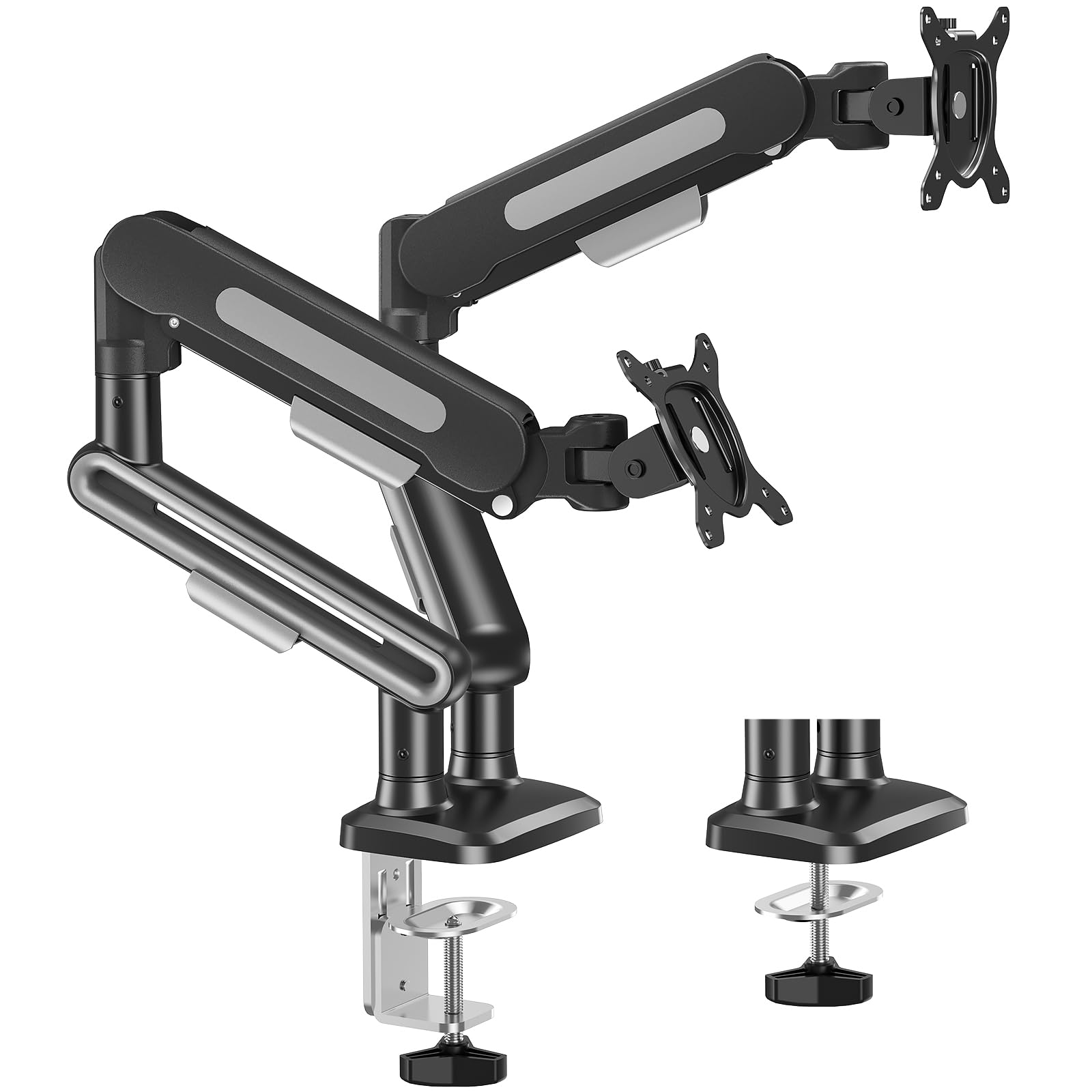
The MOUNT PRO B0FCM83HFV is designed to accommodate monitors up to 39 inches with a per-arm weight capacity of 26.5 pounds, placing it in the same heavy-duty territory as the VIVO STAND-V200O and ErgoFocus models. The key difference is the price — this arm delivers that high capacity at a significantly lower cost, making it the most accessible option for users with 32-inch or 34-inch ultra-wide displays on a tight budget.
Swivel reaches 180° and rotation is a full 360°. The gas springs use a pneumatic mechanism that users describe as smooth out of the box, with easy tension adjustment via the hex key. The C-clamp fits desks from 0.39 to 3.35 inches thick, and the grommet option works for desks up to 2.76 inches.
The built-in cable management channels run along the arms and effectively hide cables from view. Users consistently comment on the sturdy construction and how much desk space is freed up compared to the original monitor stands. Assembly is straightforward with the included manual, though some users note that running two 32-inch monitors leaves little room for angling — the arms are long enough, but the monitors themselves take up most of the available space.
Why it’s great
- High 26.5 lb capacity at a budget-friendly price point
- Supports monitors up to 39 inches for larger setups
- Smooth pneumatic gas spring height adjustment
Good to know
- Not compatible with 1000R/1500R/1800R curved screens
- Two 32-inch monitors leave little room for angling on the arms
6. MOUNTUP Dual Monitor Stand (B0DJLRKTTJ)
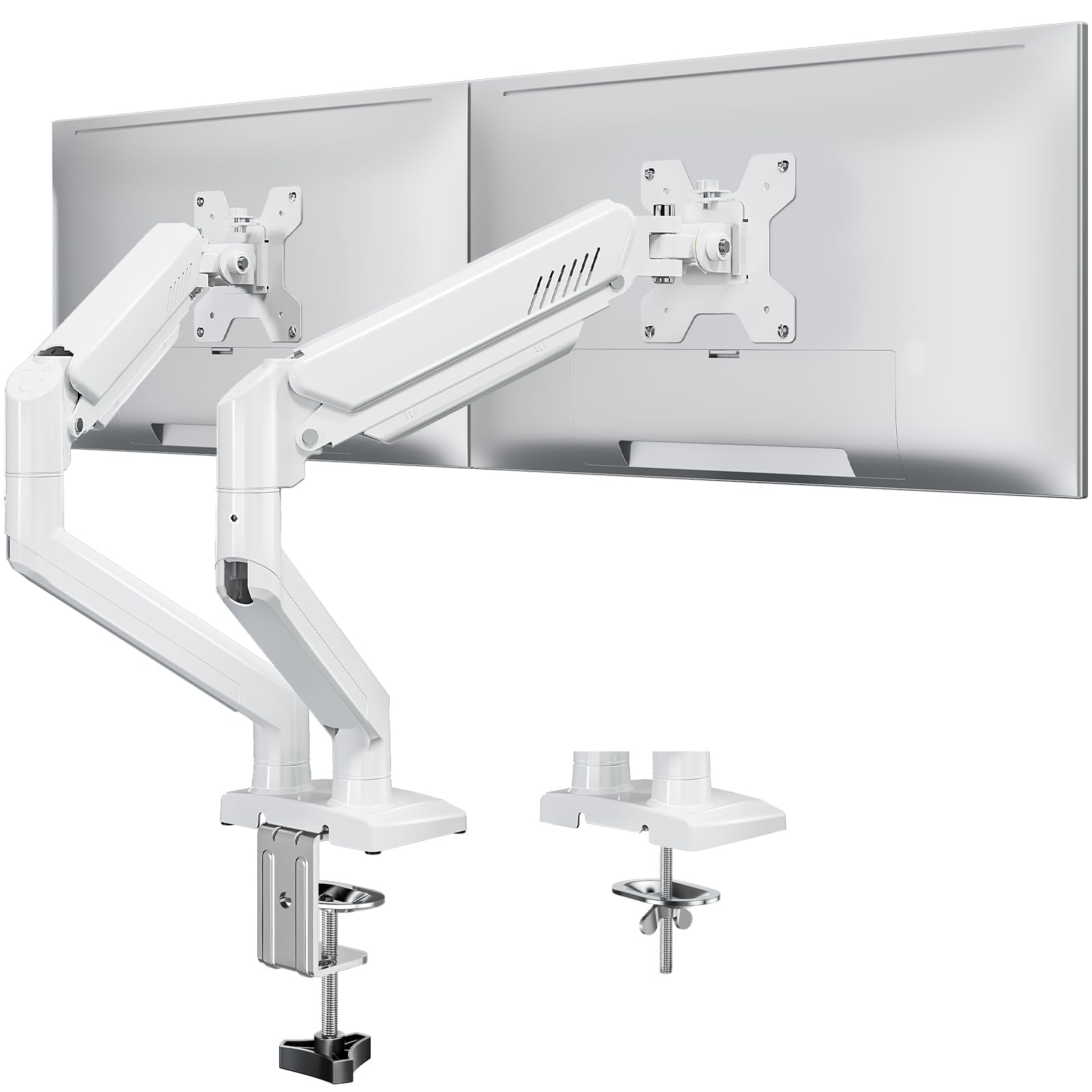
The MOUNTUP B0DJLRKTTJ is a rare find in the budget category — a dual monitor arm available in a white finish that matches lighter desk setups and home offices. Each arm supports 22 pounds and screens from 22 to 32 inches. The gas springs provide smooth height adjustment with a generous 70° upward tilt and -45° downward tilt, which is useful for positioning screens above eye level or for shared viewing.
The extension reaches 19.3 inches and the height rise is 17.3 inches, giving you enough range to stack monitors vertically or place them side by side at different heights. The C-clamp and grommet options both accommodate desks up to 2.76 inches thick. Installation is fast — users report 15-minute setups using the included video guide rather than the printed manual, which some find less clear.
The cable management channels are built into the arms and keep wires hidden effectively. Some users note that the 360° rotation joint is stiff initially and requires some force to turn, which makes switching to portrait mode a two-handed operation. The tension adjustment for the gas springs works well for monitors in the 10- to 15-pound range, but very light monitors under 4.4 pounds may need additional weight to achieve proper height hold.
Why it’s great
- White finish option blends with light-colored desks and decor
- Fast 15-minute installation with video guidance
- 19.3-inch extension provides good reach for wide setups
Good to know
- 360° rotation joint is stiff and may require two hands to turn
- Cable management is functional but not as tidy as premium arms
7. MOUNT PRO Dual Monitor Stand (B0DX6VS454)
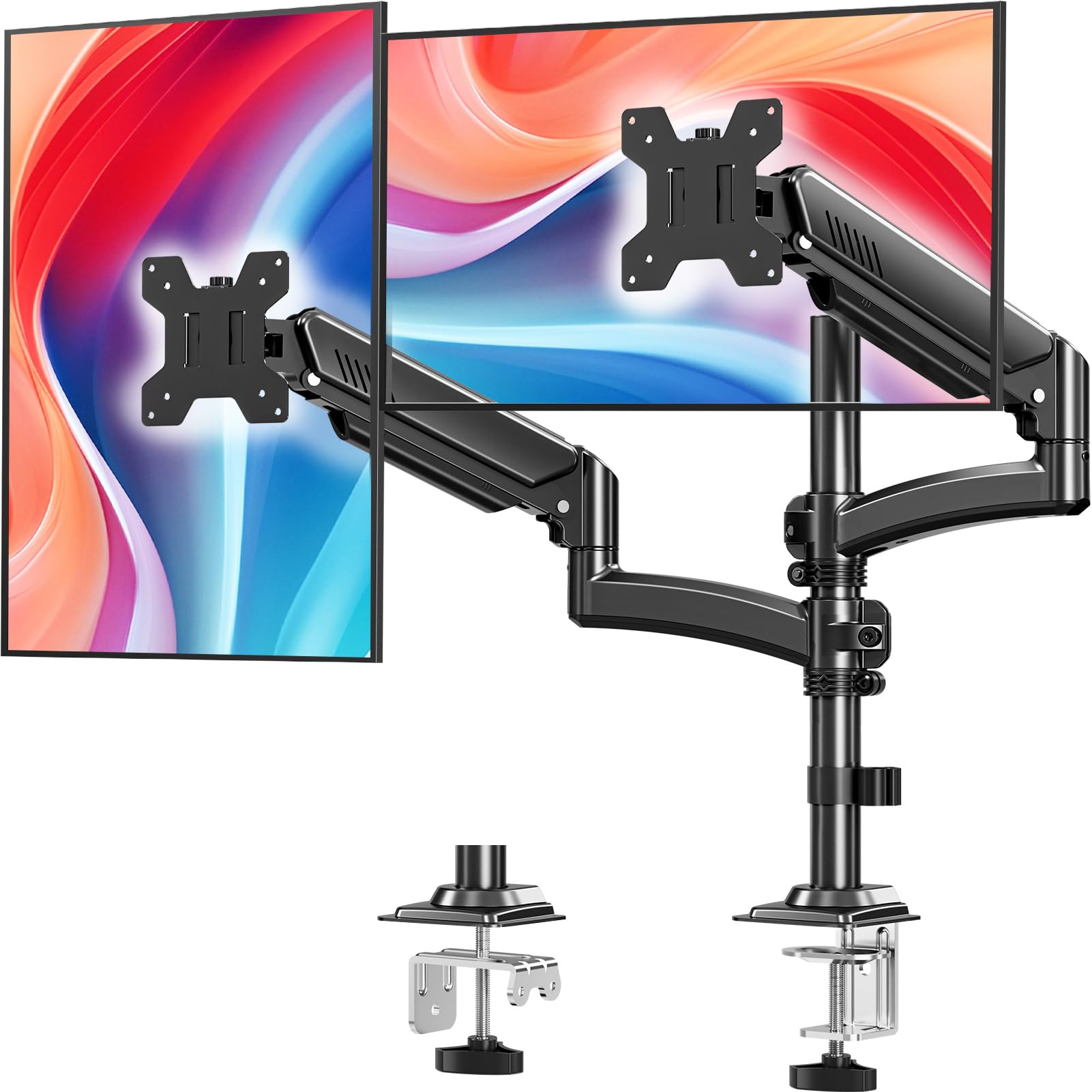
The MOUNT PRO B0DX6VS454 uses a pole-based design with an additional 16.5-inch column extension that allows you to raise the VESA center up to 26.6 inches above the desktop. That makes it the strongest option for vertical stacking — putting one monitor above the other — which is ideal for deep workstations where horizontal space is limited. Each arm supports 22 pounds and screens from 13 to 32 inches.
The full-motion adjustability includes ±90° swivel, +70°/−45° tilt, and 360° rotation. The dual pneumatic springs on each arm are tested for 20,000 motion cycles, and users confirm that the gas springs hold position reliably after adjustment. The C-clamp fits desks 0.39 to 2.76 inches thick, and the grommet mount works for desks up to 1.97 inches thick. Installation is straightforward with clearly labeled parts and a detailed manual.
The cable management runs through the pole and arms, which keeps the vertical stacking setup looking clean. Users with larger monitors (32 inches) note that stacking two of them leaves little vertical clearance if the desk is not tall enough, but for 24- to 27-inch screens the setup is perfect. The arm is not compatible with 1000R/1500R/1800R curved screens, so verify your monitor’s curvature before purchasing.
Why it’s great
- Tall 16.5-inch column allows effective vertical monitor stacking
- 20,000-cycle tested pneumatic springs ensure long-term reliability
- Quick and easy installation with labeled parts
Good to know
- Not compatible with 1000R/1500R/1800R curved monitors
- Stacking two 32-inch monitors requires a tall desk to maintain eye level
FAQ
Can I stack two 32-inch monitors vertically with a budget dual monitor arm?
Why does my monitor arm keep drifting down after I set the height?
Final Thoughts: The Verdict
For most users, the budget dual monitor arms winner is the VIVO STAND-V200O because it combines a high 26.4-pound per-arm capacity with smooth pneumatic adjustment and ultra-wide monitor support at a price that undercuts most competitors. If you need to support monitors larger than 35 inches, grab the ErgoFocus Heavy Duty Mount. And for a white finish that matches lighter desk setups without sacrificing performance, nothing beats the MOUNTUP B0DJLRKTTJ.