
A live stream lives or dies on its video quality. Grainy, blurry, or poorly-focused footage drives viewers away faster than any audio glitch, yet most streamers rely on webcams with tiny sensors that struggle the moment the lighting drops. The right camera for live streaming separates professional-looking broadcasts from amateur productions, and the choice comes down to sensor size, autofocus reliability, and connectivity options that match your workflow.
I’m Min — the co-founder and writer behind Gadgets Feed. I’ve spent countless hours researching sensor performance, autofocus systems, and streaming protocol compatibility across dozens of camera models to build this guide based on real technical specifications and verified customer feedback.
Whether you’re starting a YouTube channel, hosting a corporate webinar, or broadcasting live events, choosing the best camera for live streaming means understanding how sensor size, frame rates, and output connections affect your final picture.
How To Choose The Best Camera For Live Streaming
Buying a streaming camera involves balancing image quality against workflow convenience. A full-frame mirrorless delivers cinematic depth of field, while a dedicated PTZ camera offers remote movement control. Your choice depends on your space, budget, and whether you stream solo or with a production team.
Sensor Size and Low-Light Performance
A larger sensor captures more light, producing cleaner video with less noise when your lighting isn’t perfect. Full-frame and APS-C sensors found in mirrorless cameras outperform the smaller 1/1.3-inch or 1/2.8-inch sensors in webcams and PTZ units. If your streaming space has variable lighting, prioritize a 1-inch or larger sensor for consistent quality.
Autofocus Speed and Reliability
Phase-detection autofocus systems lock onto faces and track movement without the hunting behavior common in older contrast-based systems. For streaming, eye-tracking autofocus keeps you sharp as you move around your desk or stage. PTZ cameras with AI tracking add the ability to physically follow you, which is ideal for presentation-style broadcasts.
Connectivity and Output Options
USB-based cameras with UVC support plug directly into your computer without a capture card, making them the simplest option for solo streamers. NDI-capable PTZ cameras stream over your local network, eliminating cable runs in multi-camera setups. HDMI and SDI outputs give you the flexibility to route video through switchers for professional production workflows.
Quick Comparison
On smaller screens, swipe sideways to see the full table.
| Model | Category | Best For | Key Spec | Amazon |
|---|---|---|---|---|
| Sony a7 III | Mirrorless | Cinematic full-frame streaming | 24.2MP Full-Frame BSI Sensor | Amazon |
| Canon EOS R6 Mark II | Mirrorless | Hybrid stills and video streaming | 24.2MP Full-Frame + 6K Oversampled 4K | Amazon |
| Panasonic LUMIX S5IIX | Mirrorless | Unlimited recording and IP streaming | 24.2MP Full-Frame + Built-in Fan | Amazon |
| Canon EOS R7 | Mirrorless | Action and sports streaming | 32.5MP APS-C + 30fps Electronic Shutter | Amazon |
| Sony Alpha ZV-E10 | Mirrorless | Budget APS-C vlogging and streaming | 24.2MP APS-C + Product Showcase Mode | Amazon |
| Prisual Ultra 4K PRO NDI PTZ | PTZ | Church and event multi-camera setups | 1/1.8″ Sensor + 20x Optical Zoom | Amazon |
| OBSBOT Tail Air NDI | PTZ | Portable NDI streaming on location | 4K 30fps + 320° Pan Rotation | Amazon |
| OBSBOT Tiny 3 | PTZ Webcam | AI tracking without a capture card | 1/1.28″ Sensor + 1080p 120fps | Amazon |
| Insta360 Link 2 Pro | PTZ Webcam | Desktop streaming with gesture control | 1/1.3″ Sensor + AI Tracking | Amazon |
In‑Depth Reviews
1. Sony a7 III

The Sony a7 III remains a benchmark for live streaming because its 24.2MP back-illuminated full-frame sensor delivers 15 stops of dynamic range and exceptional low-light performance that webcams simply cannot match. The 693-point phase-detection autofocus covers 93% of the frame, keeping you sharp even when you move around your streaming space. USB streaming direct from the camera eliminates the need for a separate capture card in most setups.
Real-world battery life measures around 710 shots per charge, which translates to hours of continuous streaming when using USB power delivery. The 4K 30fps video oversampled from the full sensor readout produces clean, detailed footage with natural skin tones. The kit 28-70mm lens provides a versatile starting focal length, though upgrading to a prime lens with a wider aperture improves background separation significantly.
Some users note the menu system can be complex to navigate initially, and the 8-bit internal recording limits color grading flexibility compared to newer 10-bit cameras. For pure streaming quality straight out of the box, the a7 III’s combination of sensor performance and reliable autofocus makes it a top choice for creators who prioritize image fidelity over advanced video features.
Why it’s great
- Full-frame sensor produces clean, low-noise video in dim lighting
- Phase-detection AF with eye tracking keeps you sharp during movement
- USB streaming without a capture card simplifies your desk setup
Good to know
- Menu system has a learning curve for new Sony users
- 8-bit internal recording limits color grading flexibility
2. Canon EOS R6 Mark II

The Canon EOS R6 Mark II takes everything streamers loved about the original R6 and refines it with a 24.2MP full-frame sensor paired with Canon’s Dual Pixel CMOS AF II. The 6K oversampled 4K 60p video delivers noticeably sharper detail than standard 4K capture, and the 8-stop in-body image stabilization removes the last traces of hand-shake from desk-mounted setups. The electronic shutter reaches 40fps, which is overkill for streaming but useful if you also shoot photo content.
Subject detection features dedicated modes for people, animals, vehicles, and trains, giving you flexible tracking options for different stream formats. The vari-angle touchscreen helps you compose shots from awkward angles, and built-in 5GHz Wi-Fi enables wireless file transfers. The USB-C port supports 10Gbps transfers and direct connection to your streaming PC.
Battery life improved noticeably over the original R6, lasting through extended recording sessions without swapping packs. The weather-sealed magnesium alloy body adds durability for on-location streaming. The lack of an internal ND filter means you may need external control for bright studio lighting, and the higher price point places it firmly in premium territory.
Why it’s great
- 6K oversampled 4K delivers exceptional sharpness and detail
- 8-stop IBIS eliminates shaky footage from desk mounts
- Fast, reliable Dual Pixel AF with multiple subject detection modes
Good to know
- No built-in ND filter requires external light management
- Premium price reflects the hybrid stills and video capability
3. Panasonic LUMIX S5IIX

The Panasonic LUMIX S5IIX solves the single biggest problem for long-format streamers: overheating. A built-in fan and high-efficiency heat sink enable unlimited 4:2:2 10-bit recording and live streaming without thermal shutdown, a critical advantage over competitors that cap out after 30 minutes. The 24.2MP full-frame sensor with phase hybrid autofocus keeps focus locked reliably, addressing the historical weakness of Panasonic’s contrast-only systems.
IP streaming over wired or wireless networks gives you direct-to-platform output without a computer in the middle. The 5.8K ProRes internal recording and RAW over HDMI provide professional-grade capture options for creators who edit their streams later. Active I.S. further stabilizes handheld walking footage, useful for mobile streaming scenarios.
Battery life runs shorter than some competitors, so ordering a spare pack or using USB power is recommended for full-day streaming sessions. The camera body leans heavier than entry-level mirrorless units, though the included 20-60mm f/3.5-5.6 kit lens offers a versatile wide to standard range. For streamers who need reliability over hours-long broadcasts, the S5IIX’s thermal management makes it the clear choice.
Why it’s great
- Built-in fan allows unlimited recording without overheating
- Phase hybrid AF finally brings reliable autofocus to Panasonic
- IP streaming capability reduces computer dependency
Good to know
- Battery drains quickly during extended use
- Heavier build compared to compact mirrorless options
4. Canon EOS R7

The Canon EOS R7 brings 32.5 megapixels of APS-C resolution to the streaming world, offering more cropping flexibility than typical 24MP sensors. Dual Pixel CMOS AF with 651 autofocus zones provides near-100% frame coverage, ensuring your face stays tack-sharp even during dynamic movements. The 15fps mechanical shutter and 30fps electronic shutter make it ideal for action-oriented content like gaming with physical reactions or product demonstrations involving motion.
The 5-axis in-body stabilization compensates for handheld shake, producing smooth footage without a gimbal for static desk streams. 4K video recording exceeds the 30-minute limit found on older Canon bodies, supporting longer broadcast sessions. The lightweight and compact form factor fits easily into tight streaming setups, and the RF mount provides access to Canon’s growing lens lineup.
Third-party lens compatibility can introduce focus inconsistencies, so sticking with native RF glass or approved adapters yields the best results. The APS-C sensor means background blur won’t match full-frame cameras, but the increased depth of field can actually benefit streams where you want more of your set in focus.
Why it’s great
- 32.5MP APS-C sensor offers high resolution and cropping headroom
- Fast 30fps electronic shutter captures split-second moments
- 5-axis IBIS provides smooth handheld streaming
Good to know
- Third-party lenses may have autofocus compatibility issues
- APS-C sensor delivers less background blur than full-frame
5. Sony Alpha ZV-E10
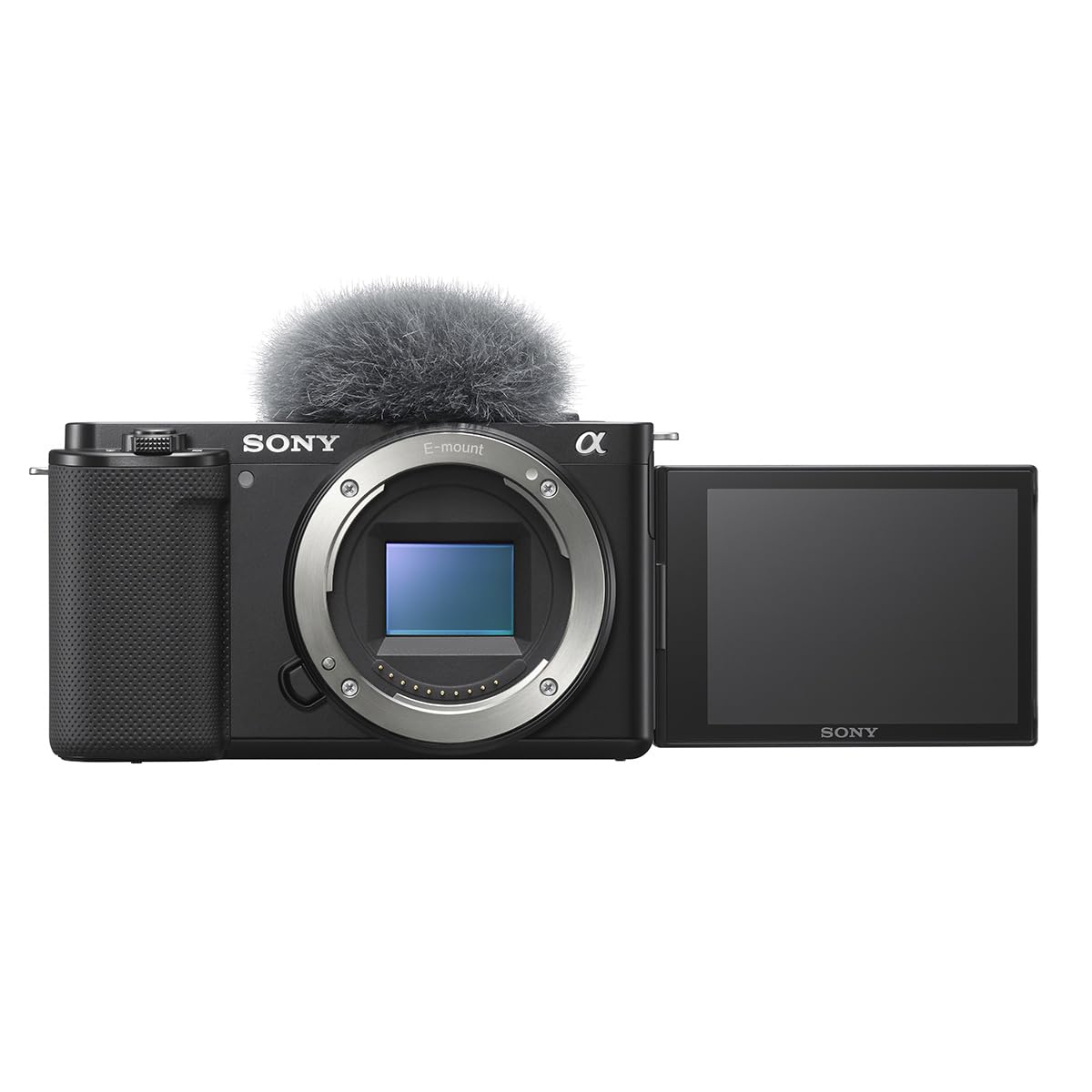
The Sony Alpha ZV-E10 distills the video capabilities of Sony’s APS-C lineup into a body designed specifically for content creators. The 24.2MP Exmor CMOS sensor oversamples 4K from a 6K readout, delivering sharp footage without the pixel binning artifacts that plague lower-end cameras. The Real-Time Eye AF tracks your eyes with reliable precision, and the Product Showcase setting smoothly transitions focus from your face to an object you hold up.
USB streaming requires only a single cable, eliminating capture card expenses for entry-level setups. The Background Defocus button instantly toggles between blurry and sharp backgrounds without diving into menus. The flip-out screen faces forward, making it easy to monitor your framing while streaming solo.
Severe rolling shutter makes fast panning movements look warped, and the lack of in-body stabilization means you’ll need a tripod or gimbal for steady footage. The tiny LCD screen is difficult to see from a distance, and 4K 30p recording disables face and eye detection. Battery life runs around 25 minutes of continuous 4K recording, so external power is essential for long streams.
Why it’s great
- Product Showcase mode transitions focus instantly to objects
- USB streaming simplifies setup without a capture card
- Real-Time Eye AF keeps sharp focus during movement
Good to know
- Severe rolling shutter limits fast motion capture
- No image stabilization requires stable mounting
6. Prisual Ultra 4K PRO NDI PTZ Gen 5
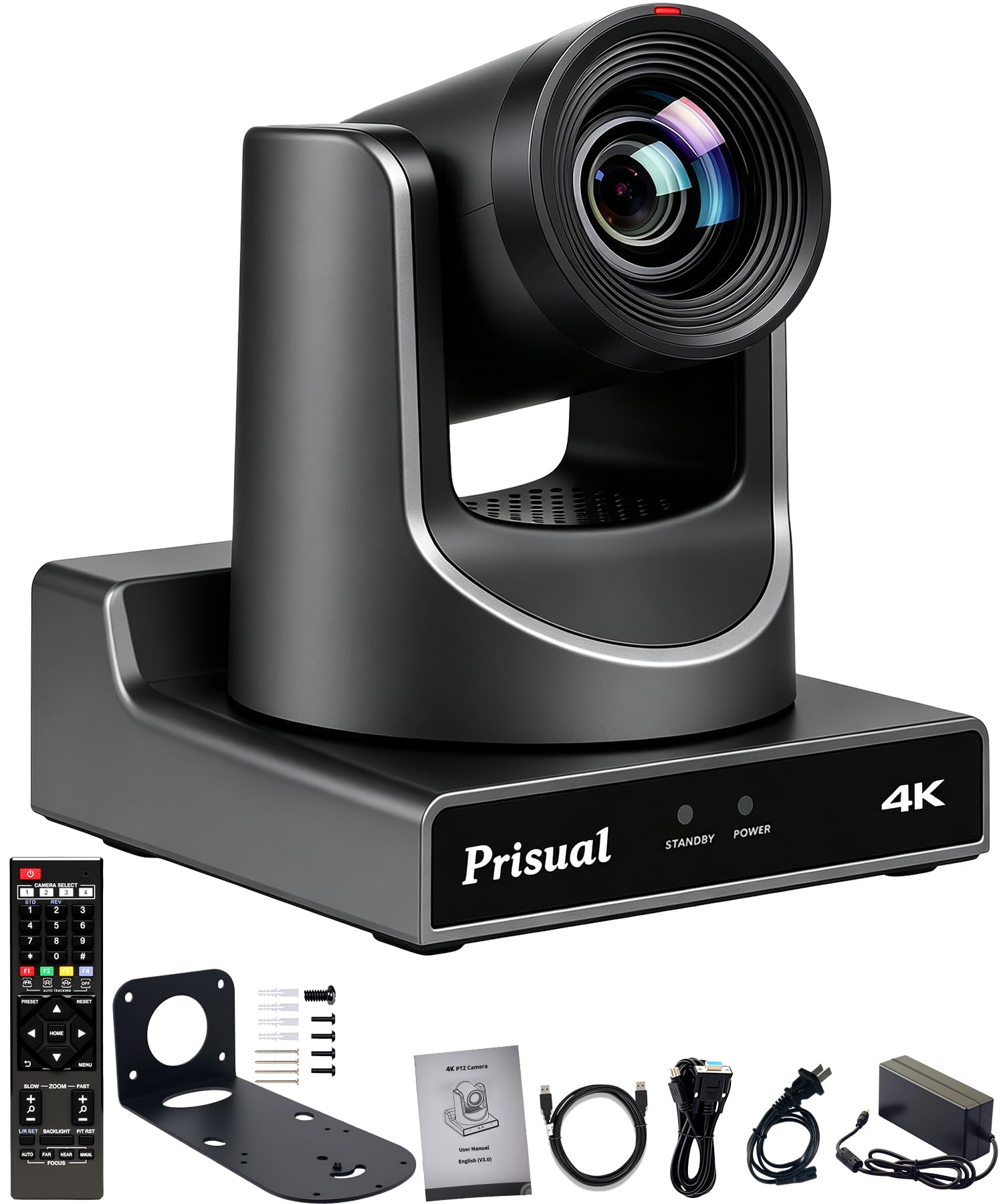
The Prisual Ultra 4K PRO NDI PTZ Gen 5 is an officially NewTek-certified NDI camera, meaning it reliably streams 4K 60fps video over your local network without the compatibility issues that plague uncertified alternatives. The 1/1.8-inch UHD CMOS sensor with 8.42MP and 20x optical zoom delivers sharp close-ups from across a room, making it ideal for church services, conference halls, and theater productions. PoE support lets power, control, and video travel over a single Ethernet cable.
Gen5 AI tracking automatically follows presenters, remembers up to four different zones, and adjusts framing from wide shots to close-ups based on movement. The synchronous belt drive operates silently, avoiding mechanical noise during quiet moments in worship or presentations. HDMI 2.0, SDI, and IP outputs give you flexible routing to mixers and streaming software.
Some users report needing to purchase a separate NDI license for advanced features, and the embedded software can feel glitchy during initial configuration. Tech support operates from China, introducing a time zone difference, but response quality is generally high. The metal body construction promises durability over extended use in fixed installations.
Why it’s great
- Official NDI certification ensures reliable network streaming
- 20x optical zoom captures detail from across large venues
- Silent belt drive avoids audio interference during broadcasts
Good to know
- Advanced NDI features may require a separate license purchase
- Setup software can be glitchy during first-time configuration
7. OBSBOT Tail Air NDI Streaming Camera

The OBSBOT Tail Air NDI packs PTZ functionality into a body smaller than a cola can, making it the most portable streaming camera in this lineup. The 23mm f/1.8 lens captures 4K 30fps or 1080p 60fps video, and the 320-degree horizontal rotation with 180-degree vertical rotation covers an entire room from a single mount point. NDI compatibility streams video over your local network, reducing cable clutter in portable setups.
AI tracking extends beyond humans to animals and objects, giving you flexibility for non-traditional streaming content. Four connectivity options including Micro HDMI, USB-C, Ethernet, and wireless provide redundancy for different streaming environments. The companion Obsbot Start app gives full control over ISO, shutter speed, and preset positions from your phone.
A known battery design flaw means the camera cannot function without the built-in battery, which degrades over 12 to 18 months. When the battery dies, the camera becomes unusable with no available replacement. Several units have also experienced early hardware failures requiring warranty replacements. For short-term use, the Tail Air offers impressive features, but longevity concerns make it a riskier long-term investment.
Why it’s great
- Ultra-compact size fits in bags for on-location streaming
- NDI and wireless connections reduce cable complexity
- AI tracking works with animals and objects beyond humans
Good to know
- Non-replaceable battery failure bricks the camera after 12-18 months
- Early hardware failure rates are concerning based on owner reports
8. OBSBOT Tiny 3

The OBSBOT Tiny 3 shrinks its predecessor’s footprint by 48 percent while upgrading to a larger 1/1.28-inch CMOS sensor for improved low-light performance. The dual all-pixel PDAF system intelligently switches focus modes based on lighting conditions, maintaining sharpness across varying brightness levels. The 1080p 120fps mode captures buttery-smooth motion for fast-paced content like unboxings or cooking streams.
AI Tracking 2.0 identifies and locks onto over 200 types of objects, and the triple-mic array with spatial audio captures professional-quality sound without external microphones. Voice and gesture control allow hands-free operation, letting you zoom, track, and switch presets mid-stream without touching a button. The OBSBOT Center software provides access to beauty mode, background blur, and professional calibration tools like exposure gamma curve adjustment.
Mounting on wide monitors can be difficult and may require adhesive solutions. The camera runs hot during extended use, which is expected for a PTZ webcam of this size but worth noting for 8-hour streaming sessions. The built-in mic is sufficient for basic use, but serious streamers will want an external microphone for optimal audio quality.
Why it’s great
- 1080p 120fps mode delivers ultra-smooth motion capture
- Large 1/1.28-inch sensor improves low-light performance
- Voice and gesture control enable hands-free operation
Good to know
- Mounting struggles with wide monitors may need adhesive
- Runs hot during extended streaming sessions
9. Insta360 Link 2 Pro

The Insta360 Link 2 Pro upgrades its predecessor with a 1/1.3-inch sensor that captures cleaner 4K video with realistic bokeh effects, bridging the gap between traditional webcams and mirrorless cameras. The physical AI tracking system pans and tilts the camera head to follow your movements around the room, keeping you framed without digital cropping that reduces image quality. DeskView and Whiteboard modes adapt the camera to different presentation scenarios automatically.
Elgato Stream Deck integration lets you switch modes, trigger presets, and control multiple Link cameras from a single button panel, streamlining complex multi-camera workflows. The directional dual-mic system with beamforming reduces background noise pickup in busy home office environments. Gesture control allows you to start tracking, zoom in, or switch modes without touching your computer.
The included USB-C cable is disappointingly short, limiting placement flexibility without an extension. The camera is not compatible with ARM-based Windows systems or Windows Hello face recognition, which may matter for hybrid work setups. The magnetic mount is convenient but may not hold securely on vertical monitor backs without a flat metal surface.
Why it’s great
- Physical PTZ tracking keeps you framed without digital cropping
- Stream Deck integration enables powerful multi-camera control
- DeskView and Whiteboard modes adapt to different stream formats
Good to know
- Short included USB-C cable limits placement options
- No support for ARM-based Windows or Windows Hello
FAQ
Do I need a capture card for mirrorless cameras?
What is NDI and do I need it for my stream?
Can I use a PTZ camera as my main streaming cam?
How important is in-body image stabilization for streaming?
Final Thoughts: The Verdict
For most users, the best camera for live streaming winner is the Sony a7 III because its full-frame sensor, reliable phase-detection autofocus, and USB streaming without a capture card combine to deliver professional video quality in a straightforward workflow. If you need unlimited recording without overheating, grab the Panasonic LUMIX S5IIX with its built-in fan and IP streaming capability. And for multi-camera event streaming, nothing beats the Prisual Ultra 4K PRO NDI PTZ Gen 5 with its official NDI certification and silent 20x zoom.