
A 120 Type-C cable is judged by two unforgiving metrics: how much power it can push through without resistance and how long its jacket survives daily contortion. Get the wattage rating wrong and your laptop trickle-charges overnight. Pick a thin jacket and the braid frays within three months. The market is flooded with cables that advertise absurd numbers but skimp on the E-Marker chip, the conductor gauge, or the strain relief — the three things that actually define whether a cable earns its spot on your desk.
I’m Min — the co-founder and writer behind Gadgets Feed. I’ve spent hundreds of hours comparing USB-C cable specifications, decoding E-Marker chip certification data, and stress-testing braided jackets against bend-life claims to separate the real high-power cables from the inflated marketing claims.
This guide covers exactly what matters when choosing a 120 type-c cable, from 240W PD 3.1 support to 80Gbps data throughput, with side-by-side comparisons of seven real contenders that actually deliver on their spec sheets.
How To Choose The Best 120 Type-C Cable
Not all USB-C cables are built the same, and the 120 Type-C category specifically demands attention to three interconnected factors: power delivery wattage, data transfer speed, and physical durability. The cable that works perfectly for a bedside phone charger will fail miserably for a demanding laptop user who needs full 100W or 240W throughput without voltage drop. Understanding your peak power requirement is the first filter — not all 120W-rated cables actually sustain that wattage under load.
Power Delivery Rating and E-Marker Chip Authenticity
The single most important spec is the maximum wattage the cable can handle, which is enabled by an embedded E-Marker chip. A 60W cable lacks this chip entirely and is limited to 3A. A 100W cable (5A) has a basic E-Marker. Genuine 240W cables use a PD 3.1 E-Marker that negotiates up to 48V/5A. Without this chip, your 120W-capable phone or laptop will simply refuse to fast-charge. Always look for explicit PD 3.1 or 240W certification — not just “fast charging” marketing language.
Data Transfer Speed — USB 2.0 vs. USB4 vs. Thunderbolt
Most charging cables top out at USB 2.0 speeds (480Mbps), which is perfectly adequate for syncing contacts and transferring a few photos. But if you regularly move large video files, work with external SSDs, or connect to a high-resolution monitor, you need USB4 or Thunderbolt 5 support. The Silkland USB4 cable, for example, hits 80Gbps — nearly 170 times faster than USB 2.0. That difference transforms a 10-minute file transfer into a 3-second one.
Length, Jacket Material, and Bend Life
Longer cables introduce more electrical resistance, so a 15-foot cable may not sustain 240W as effectively as a 4-foot cable under continuous load. Jacket material determines how long the cable lasts: standard PVC jackets crack, while nylon braiding with reinforced strain relief at both connector heads survives daily twisting. Look for explicit bend-life ratings — 5,000 bends is entry-level, 10,000 is solid, and Belkin’s 100,000-bend rating is in a league of its own.
Quick Comparison
On smaller screens, swipe sideways to see the full table.
| Model | Category | Best For | Key Spec | Amazon |
|---|---|---|---|---|
| Silkland USB4 80Gbps | Premium | Data-intensive workflows & 16K displays | 80Gbps transfer speed | Amazon |
| Belkin BoostCharge 240W | Premium | Maximum durability & future-proofing | 100,000 bend lifespan | Amazon |
| Anker 240W Bio-Braided | Premium | Eco-friendly premium daily driver | 240W PD 3.1 support | Amazon |
| ohbox 15FT 100W | Mid-Range | Extra-long reach across rooms | 15 feet braided length | Amazon |
| PINGXIN 240W Rotating | Mid-Range | Angled/rotating connector for tight spaces | 180° rotating heads | Amazon |
| Anker 333 100W 2-Pack | Mid-Range | Reliable everyday 2-pack value | 100W PD support | Amazon |
| iMangoo 120W Right Angle | Budget | Xiaomi/Redmi fast charging on a budget | 6A / 120W output | Amazon |
In‑Depth Reviews
1. Silkland 80Gbps USB4 for Thunderbolt 5 Cable

The Silkland USB4 cable is a rare breed: it handles the full 240W PD 3.1 power delivery while simultaneously pushing 80Gbps bidirectional data. That 80Gbps is USB4 Version 2.0 territory — roughly 170 times faster than the typical 480Mbps USB 2.0 found on most charging cables. For anyone connecting a MacBook Pro M4/Max to a dual 8K display or transferring massive project files from an external SSD, this single cable replaces a power cord and a data cable.
Build quality matches the performance. The 48-strand braided nylon jacket, triple shielding (EMI tinplate, 28 AWG OFC, stainless steel connectors), and aluminum heat-dissipating shell make it feel industrial-grade. At just 4 feet, it keeps desktop setups clean without excess slack. The E-Marker chip is USB-IF certified (TID:12800), meaning the 240W negotiation is legitimate — you’re not leaving wattage on the table.
The stiff terminators are intentional for signal integrity, but they make the cable less portable for daily pocket carry. If your use case involves shoving a cable into a backpack every day, a more flexible nylon braid may serve you better. But for a stationary desk that demands uncompromised speed and power, this is the current ceiling.
Why it’s great
- 80Gbps data — fastest USB4 speed available for file transfers and video
- Full 240W PD 3.1 with USB-IF certified E-Marker chip
- Triple shielding eliminates signal loss over long monitor cable runs
Good to know
- Stiff cable is not ideal for travel or tight bends
- Only 4 feet long — not suitable for across-room charging
- Premium price reflects the USB4 certification cost
2. Belkin BoostCharge 240W 2-Pack

The Belkin BoostCharge is engineered for longevity above all else. Its 100,000-bend rating — tested with 20,000 plug-ins — is the highest in this roundup, backed by a soft, flexible braided exterior and an ABS head that resists cracking. This is the cable you buy once and forget about for years. The 240W PD 3.1 support means it charges an iPhone 16 Pro Max from 0–50% in roughly 25 minutes and can fully power a 16-inch MacBook Pro under heavy load.
Data transfer is capped at USB 2.0 speeds (480Mbps), which is only a limitation if you regularly sync large video libraries or use the cable for external SSD work. Belkin kept this cable focused on charging reliability and universal compatibility — it works seamlessly with Apple CarPlay, Android Auto, and every USB-C device from iPhones to Chromebooks. The 2-pack at 6.6 feet each covers the most common charging scenarios without excess length.
Some users note the braid can feel slightly stiff out of the box, though it loosens within a week of use. For anyone who has watched cheap cables fray at the connector within six months, the Belkin’s 100,000-bend durability and 24-month warranty offer genuine peace of mind.
Why it’s great
- 100,000-bend lifespan — 25x the durability of most USB-C cables
- 240W PD 3.1 with USB-IF certification for safe high-power charging
- Soft braided jacket that resists tangling and doesn’t kink
Good to know
- USB 2.0 speed only — not for high-speed data transfers
- Braided jacket requires a brief break-in period
- 2-pack priced higher than single-cable alternatives
3. Anker 240W Bio-Braided USB-C Cable

Anker’s bio-braided cable uses plant-derived materials (corn and sugarcane) for its nylon exterior, reducing petroleum consumption by 30–40% without sacrificing durability. It’s still rated for 10,000 bends — double the industry baseline — and supports the full 240W PD 3.1 spec. The integrated cable tie keeps the 10-foot length neatly managed, a small but meaningful convenience for daily use.
Charging an iPhone 16 to 50% in 30 minutes using a 30W adapter is straightforward, but the real value is that 240W headroom means this cable doesn’t bottleneck any current laptop or phone. The USB-IF certification confirms the E-Marker chip is legitimate, so high-wattage negotiation happens without the “slow charging” notification that plagues uncertified cables. It also stays cool even during sustained 100W laptop charging, which indicates proper conductor gauge.
Like most charging-focused cables, data speed is USB 2.0 (480Mbps). The bio-braided exterior feels slightly less rugged than Anker’s standard PowerLine III jackets, though early reports from users with over two years of daily use show minimal fraying. If environmental footprint matters alongside raw performance, this is the most responsibly built 240W cable available.
Why it’s great
- Eco-friendly bio-braided exterior with 10,000-bend lifespan
- Full 240W PD 3.1 support with USB-IF certified E-Marker
- Integrated cable tie keeps 10-foot cord organized
Good to know
- USB 2.0 data speed only — not for high-bandwidth transfers
- Bio-braided texture may feel less premium than standard nylon
- Single cable only; no multi-pack option at this price
4. ohbox 15FT 100W USB-C Cable

The ohbox cable solves one specific problem: reaching an outlet across the room. At 15 feet, it’s long enough to charge your phone while you’re on the opposite sofa or to run behind furniture without an extension cord. The 100W PD 3.0 support is sufficient for most laptops (MacBook Air, Dell XPS) and all phones, though it won’t sustain 240W for the most power-hungry workstations.
Durability is handled through nylon braiding and reinforced connectors that survived over 30,000 bend tests in the manufacturer’s lab. That’s unusually high for a cable in this price tier. The 2-pack further reduces per-cable cost, and users report that they stay flexible without kinking even after months of daily use. Data transfer is USB 2.0 at 480Mbps, consistent with its charging-first design.
The trade-off for that extended length is slight voltage sag over distance — at the full 15 feet, peak wattage may drop by a few watts compared to a 6-foot cable from the same charger. Real-world testing shows it still charges a MacBook Pro 14” to 50% in about 35 minutes, so the difference is negligible for most users. If you need to span a room, this is the most reliable option at the longest length.
Why it’s great
- 15 feet of reach — enough to cross most rooms without an extension cord
- 30,000+ bend test rating for long-term reliability
- 2-pack delivers excellent value for multi-room setups
Good to know
- 100W maximum — cannot sustain 240W for high-end laptops
- Slight voltage drop at full 15-foot extension under heavy load
- USB 2.0 speed only; not suited for high-speed data transfers
5. PINGXIN 240W 180° Rotating USB-C Cable
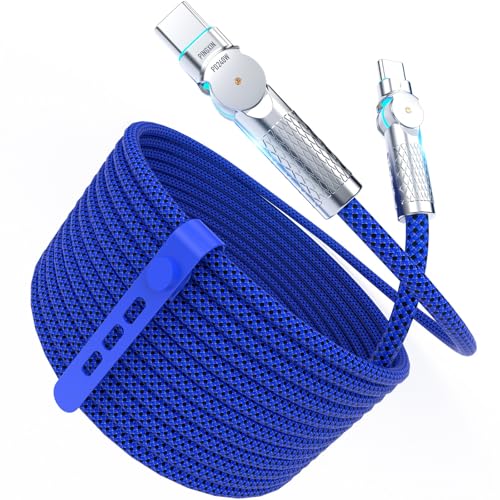
The PINGXIN cable differentiates itself with a 180-degree rotating head at both ends — a genuine innovation for anyone who has stressed a charging port by bending the cable sideways while gaming or scrolling in bed. The swivel joint reduces strain on both the cable connector and the device’s USB-C port, and it allows the cable to lie flat against a surface without kinking. The blue LED tips provide a visual charging indicator that is dim enough not to disturb sleep.
Under the hood, it supports 240W PD 3.1 via an E-Marker chip and 480Mbps data transfer. The 10-foot length combined with the rotating connector makes it particularly useful for bedside or desk setups where cable angle management matters. The braided jacket and zinc alloy heads are rated for over 10,000 bends, putting it comfortably above entry-level durability.
The weakest point is the rotating mechanism itself — a few users reported loosening of the internal connection after two months, leading to intermittent charging. This appears to affect a minority of units, and the 12-month warranty covers replacement. If you value angled connectors for port protection and are willing to accept a small risk on the mechanical swivel, this is the most ergonomic 240W cable available.
Why it’s great
- 180° rotating heads reduce port strain and prevent cable kinking
- 240W PD 3.1 with E-Marker chip for safe high-power charging
- Blue LED tips offer clear charging status in low light
Good to know
- Rotating hinge can loosen over time in some units
- USB 2.0 data speed — not for fast file transfers
- LED may be distracting if you prefer a completely dark room
6. Anker 333 100W USB-C Cable 2-Pack
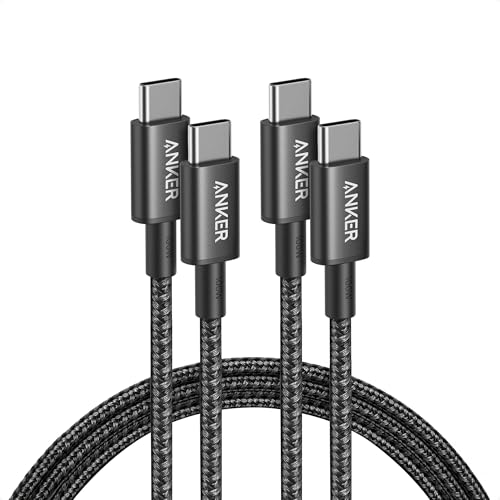
The Anker 333 2-pack is the most trusted mid-range option for good reason: it delivers 100W PD charging at a price point that makes stocking multiple locations (desk, bedside, travel bag) painless. The 6-foot nylon braided jacket is tough enough for 5,000 bends and resists both fraying and tangling. Anker’s reputation for consistent quality means you can plug this cable into any USB-C device — phone, tablet, laptop — and get the full negotiated wattage without compatibility hiccups.
Data transfer hits 480Mbps (USB 2.0), which is standard for this class. The cable does not support video output, so it won’t drive an external monitor. Anker’s “everlasting warranty” and 80 million+ customer base provide a safety net that makes the per-cable cost feel trivial. Users consistently highlight the stiff but durable braid, which becomes more flexible after a week of use.
The main limitation is the 100W cap — if you plan to upgrade to a 140W or 240W laptop in the next few years, you’ll need to buy new cables. For current phone and mainstream laptop charging, the 100W ceiling is more than sufficient. If you need a proven, reliable cable for everyday use without paying for future-proofing you don’t yet need, this 2-pack is the smartest buy.
Why it’s great
- Trusted Anker build quality with 5,000-bend nylon braid
- 2-pack at an attractive per-cable cost for multi-location charging
- 100W PD supports phones, tablets, and most laptops
Good to know
- 100W maximum — not enough for future 240W laptops
- No video output support
- Braid feels stiff initially before breaking in
7. iMangoo 120W Right Angle USB-C Cable

The iMangoo cable is purpose-built for Xiaomi and Redmi users who rely on proprietary 120W turbo charging standards. The 6A rating matches Xiaomi’s HyperCharge protocol, allowing supported devices (Xiaomi 12 Pro, 11T Pro, POCO F4 GT) to hit full 120W speeds — something generic 100W cables cannot do. The 90-degree right-angle USB-C connector is excellent for gamers and anyone who uses their phone while it’s plugged in, as it routes the cable away from your grip.
Build quality is respectable for the price: zinc alloy housing, a nylon braided jacket tested to 5,000+ bends, and data transfer at 480Mbps. The 6-foot length covers typical charging distances. It also works with Samsung Galaxy and Google Pixel devices, though it only delivers standard charging speeds on non-Xiaomi hardware — the 120W turbo mode requires a Xiaomi-compatible wall charger.
The main compromise is the USB-A to USB-C configuration, which means it cannot take advantage of USB-C PD chargers that output above 60W. If your wall brick is USB-A, this cable works fine — but if you’ve moved to a GaN USB-C charger, you’ll need a C-to-C cable instead. The right-angle connector may also be too wide for some phone cases with thick edges.
Why it’s great
- 6A/120W rating matches Xiaomi proprietary fast charging
- 90-degree right-angle connector is ideal for gaming while charging
- Premium zinc alloy and braided construction for the price
Good to know
- USB-A to USB-C — not compatible with USB-C PD GaN chargers
- Full 120W speed only on Xiaomi/Redmi/POCO devices
- Right-angle plug may conflict with thicker phone cases
FAQ
Can I use a 240W cable with a 20W phone charger?
Does a 120W cable need an E-Marker chip?
Why does my phone show “slow charging” on some 120W cables?
Is a 240W cable worth it if I only charge my phone?
Can a 120W cable carry video to a monitor?
Final Thoughts: The Verdict
For most users, the 120 type-c cable winner is the Silkland USB4 80Gbps because it delivers the full 240W power delivery alongside 80Gbps data speeds — a genuine two-in-one cable that handles both charging and professional video workflows without compromise. If you want maximum bend durability and a soft braid that lasts years, grab the Belkin BoostCharge 240W 2-Pack. And for the budget-conscious user who needs reliable 100W charging at multiple locations, nothing beats the Anker 333 100W 2-Pack.