
Your 10G NAS, gaming PC, and WiFi 7 router are screaming for a network backbone that won’t collapse under load. An 8-port 10G switch is the only way to unlock full-duplex, non-blocking throughput across every device in your rack without manual port swapping or cabling spaghetti.
I’m Min — the co-founder and writer behind Gadgets Feed. I’ve sifted through hundreds of spec sheets, customer benchmarks, and real-world iperf results to separate the unmanaged plug-and-play units from the fully managed L2+ enterprise iron that belongs in a serious homelab or small business.
Whether you need copper RJ45, fiber SFP+, or PoE+ power delivery, this guide to the best 8-port 10g switch will walk you through every critical spec, management tier, and real-world trade-off you must consider before buying.
How To Choose The Best 8-Port 10G Switch
An 8-port 10G switch is a significant investment in your network infrastructure. The wrong choice means bottlenecked file transfers, overheating SFP+ modules, or a management interface that drives you to CLI nightmares. Focus on these three decision points before you add to cart.
Port Type: SFP+ Fiber vs. RJ45 Copper
SFP+ ports let you choose your transceiver — DAC, fiber optic, or copper RJ45 modules — giving you flexibility for distance and media type. RJ45 copper ports are simpler: plug Cat6A or Cat7 directly and you get 10G at up to 100 meters. Pure SFP+ switches like the TP-Link SX3008F are cheaper per port but require buying transceivers; all-RJ45 units like the Real HD SW8-10G-RJ45-V are plug-and-play for copper drops but run hotter and consume more power per port.
Management Depth: Unmanaged, Smart, or L2+
Unmanaged switches work out of the box — no config, no VLANs, no QoS. Smart managed (web GUI) switches let you set VLANs, link aggregation, and IGMP snooping without a steep learning curve. Fully managed L2+ switches add static routing, ACLs, 802.1X authentication, and SNMP monitoring for enterprise-grade control. If you need Omada SDN integration or Cisco-like CLI, you must buy into the managed tier — no amount of firmware will turn an unmanaged unit into a managed one.
Cooling and Acoustics
10G ports generate significant heat, especially when using RJ45 copper modules. Fanless designs are silent but may throttle under sustained full-port loads in warm racks. Switches with 3200 RPM low-noise fans strike a balance — like the SICSOLINK unit — while some premium models (TP-Link SG3210XHP-M2) use high-speed fans that are loud enough to demand a remote closet. Check the fan dB rating and chassis vent design if the switch sits in your office or living space.
Quick Comparison
On smaller screens, swipe sideways to see the full table.
| Model | Category | Best For | Key Spec | Amazon |
|---|---|---|---|---|
| SICSOLINK 8-Port | Unmanaged | Plug-and-play 10G backbone | 6×RJ45 + 2×SFP+, 160Gbps | Amazon |
| TP-Link Omada SX3008F | Managed L2+ | SDN-integrated fiber backbone | 8×10G SFP+, Omada SDN | Amazon |
| MikroTik CRS309-1G-8S+in | Managed | Flexible dual-boot RouterOS/SwOS | 8×SFP+, 1×RJ45 mgmt | Amazon |
| TRENDnet TL2-F7080 | Managed L2 | NDAA/TAA compliant small biz | 8×SFP+, 160Gbps, lifetime warranty | Amazon |
| TP-Link SG2210XMP-M2 | Smart Managed PoE+ | 2.5G PoE+ with 10G uplinks | 8×2.5G PoE+, 2×10G SFP+, 160W | Amazon |
| Real HD SW8-10G-RJ45-V | Web Managed | Full 10G copper with VLAN control | 8×RJ45 10G, 160Gbps, web GUI | Amazon |
| YuanLey 8-Port PoE | Unmanaged PoE | 10G PoE+ for cameras and APs | 8×10G PoE+, 110W budget | Amazon |
| TP-Link SG3210XHP-M2 | Managed L2+ PoE+ | High-power 2.5G PoE+ with Omada | 8×2.5G PoE+, 240W, 2×10G SFP+ | Amazon |
In‑Depth Reviews
1. TP-Link Omada SG3210XHP-M2

The TP-Link SG3210XHP-M2 is the most feature-dense 8-port multi-gig switch in this roundup. It combines eight 2.5G PoE+ ports with two 10G SFP+ uplinks and a massive 240W total PoE budget — enough to power eight high-consumption Wi-Fi 6E access points or pan-tilt-zoom cameras simultaneously. The L2+ feature set includes static routing, 802.1Q VLAN, ACL, and full Omada SDN integration for centralized cloud management across multiple sites.
Real-world iperf tests confirm the 2.5G ports sustain line-rate throughput to clients while the 10G SFP+ slots handle non-blocking uplink aggregation. The metal chassis is rackmount-ready, and the 5-year manufacturer warranty backs the investment. The loud fan is the primary trade-off — users report it remains audible even at idle, making this switch best suited for a basement rack or comms closet rather than a quiet office.
For anyone building an Omada-based network with PoE+ cameras, APs, and phones, this switch delivers the highest port-density and power budget available in the 8-port form factor. Just plan your physical placement around the fan noise.
Why it’s great
- 240W total PoE+ budget — class-leading for 8 ports
- Omada SDN integration with cloud remote access
- L2+ static routing and full ACL suite
Good to know
- Fan is loud even at idle; needs remote placement
- 2.5G access ports — not native 10G on all eight
2. TP-Link Omada SX3008F

The SX3008F is a fully managed L2+ switch built entirely around eight 10G SFP+ ports — no RJ45 copper ports on the front panel. This pure-fiber design keeps per-port costs low and power consumption minimal while delivering a 160Gbps switching fabric. The Omada SDN platform adds cloud-based management, VLAN segmentation, IGMP snooping, and 802.1X authentication, making it a natural fit for homelabbers and SMBs already invested in TP-Link’s ecosystem.
Customer benchmarks confirm sustained 10Gbps throughput across all eight ports with jumbo frame support. The CLI is similar enough to Cisco IOS that network engineers feel at home, and the web UI handles day-to-day VLAN and QoS configuration without SSH. Keep in mind that SFP+ transceivers are sold separately — plan for DAC cables or fiber modules depending on your distance requirements. The unit runs silent in operation with no fan noise.
If your backbone is fiber and you want enterprise-class management without the enterprise price tag, the SX3008F delivers the lowest per-port cost for a fully managed 10G SFP+ switch in this list.
Why it’s great
- Silent, fanless operation
- Cisco-like CLI and full L2+ feature set
- 5-year manufacturer warranty
Good to know
- No RJ45 copper ports — SFP+ transceivers required
- No out-of-band management port
3. MikroTik CRS309-1G-8S+in

The MikroTik CRS309 is the Swiss Army knife of 10G switching. It offers eight SFP+ cages plus a dedicated 1G RJ45 management port, dual-boot capability between RouterOS and SwOS, and the flexibility to run as a simple L2 switch or a full L3 router with firewall rules. Users consistently report 5GB/s peak throughput in lab tests and a 20% reduction in UPS load compared to previous-gen switches — testament to its energy-efficient design.
The learning curve is real: RouterOS configuration requires reading manuals and understanding MikroTik’s unique interface. Many users spend their first few days just getting VLANs and DHCP working correctly. SwOS simplifies this dramatically for pure switching tasks, but the initial setup still involves finding the password printed on the device label (it is not blank). The rack ears feel flimsy, and some units produce a brief squeal on power-up.
For power users who want the deepest configuration flexibility — including L3 routing, firewall rules, and MPLS — the CRS309 is unmatched at its price point. Beginners should expect a steep initial time investment.
Why it’s great
- Dual-boot RouterOS/SwOS for extreme flexibility
- Very low power draw — 20% less than comparable switches
- Silent, fanless operation with full 10G throughput
Good to know
- Steep learning curve — not for plug-and-play users
- Rack ears are flimsy
4. SICSOLINK 8-Port 10G Unmanaged
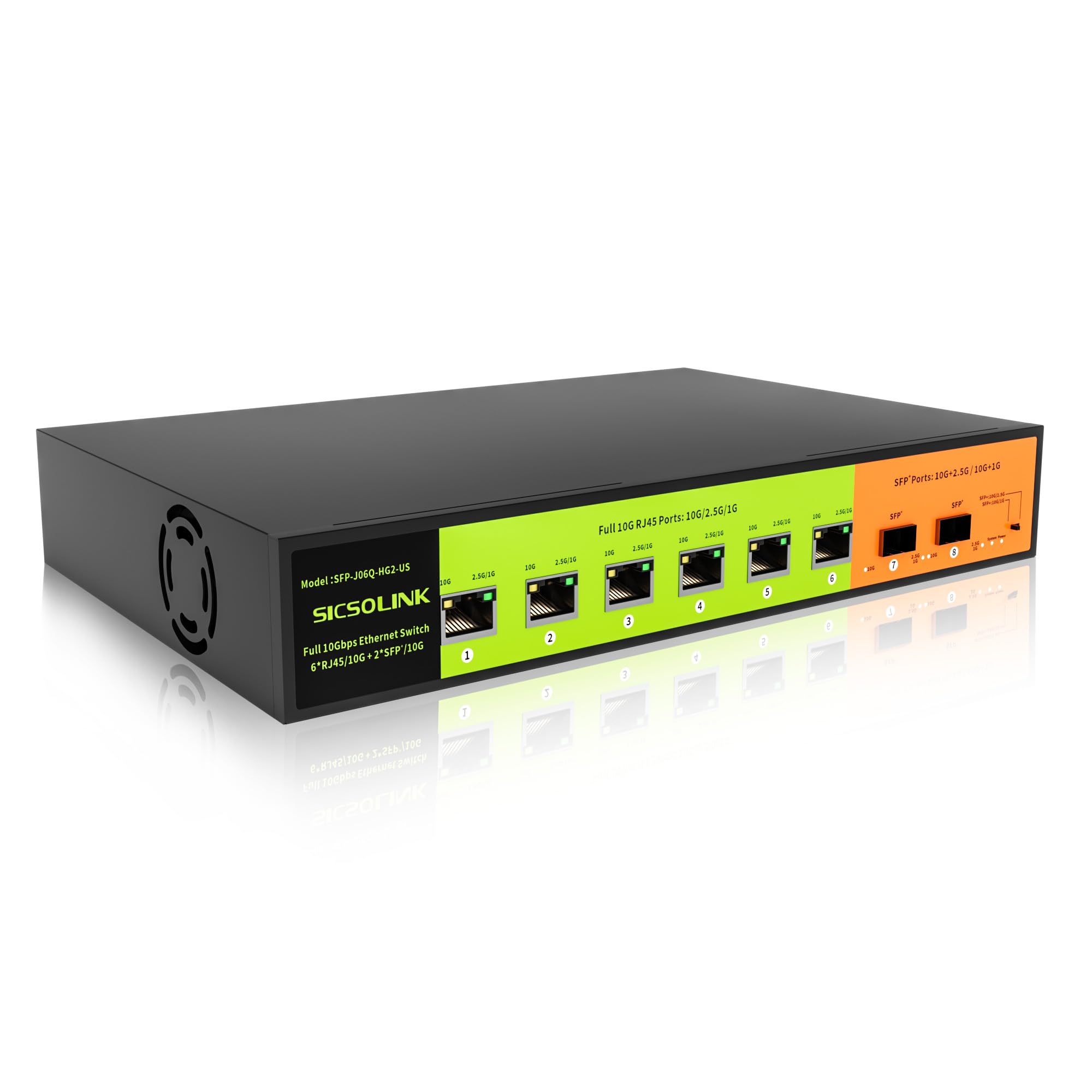
The SICSOLINK 8-port unmanaged switch is the purest expression of what most buyers actually need: six 10G RJ45 copper ports for NAS, gaming PC, and WiFi 7 router, plus two 10G SFP+ cages for uplink or long-distance fiber runs — all in a single 160Gbps non-blocking fabric. The 3200 RPM fan is noticeably quieter than the standard 5000 RPM units, and the 6KV surge protection adds real peace of mind for home networks in lightning-prone areas.
Customer reviews confirm 9.4Gbps iperf throughput between NAS and compute clusters. The unit auto-negotiates 10G/5G/2.5G/1G on every RJ45 port, so mixed-speed environments are handled transparently. Rack ears are included, and the compact 1.29-inch height makes it easy to slide into any 19-inch rack above or below other gear. The switch runs hot under full load — expect chassis temperatures that feel warm to the touch after sustained 10G transfers.
If you want pure plug-and-play performance with no VLAN config, no subscription, and no learning curve, this is the switch that delivers full 10G throughput on every port without breaking the bank.
Why it’s great
- Hybrid port layout — 6×RJ45 + 2×SFP+ covers almost any scenario
- Very quiet fan operation for a 10G switch
- 6KV surge protection included
Good to know
- Runs hot under sustained load
- No management features — unmanaged only
5. TRENDnet TL2-F7080
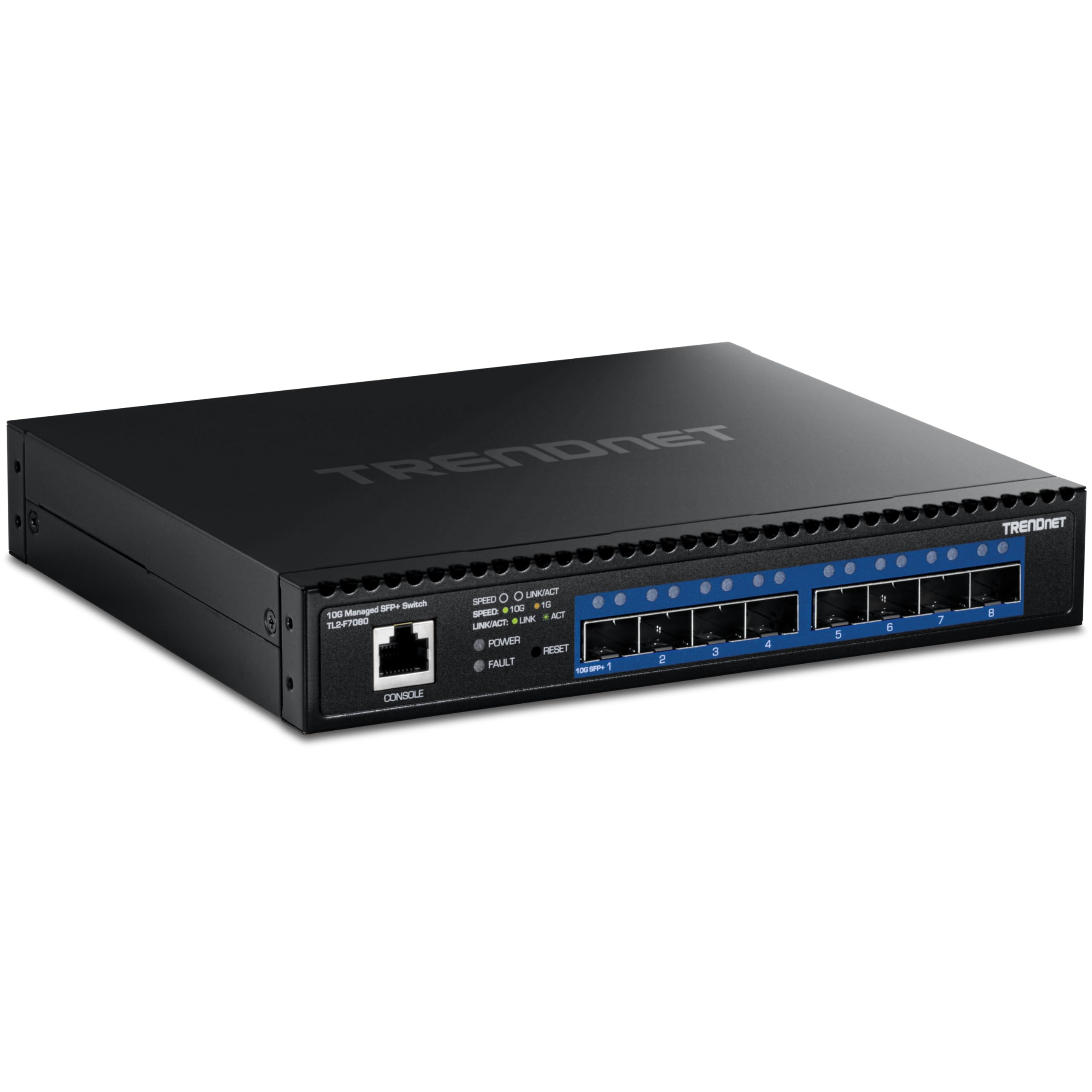
TRENDnet’s TL2-F7080 is a fully managed L2 switch built around eight 10G SFP+ ports with an out-of-band RJ45 console port for CLI management. The 160Gbps backplane is non-blocking, and the switch supports the full L2 feature checklist: 802.1Q VLAN, 802.1ax link aggregation, RSTP/MSTP, IGMP snooping, IPv4/IPv6 ACL, and 802.1X authentication. NDAA and TAA compliance makes it suitable for government and education procurement.
The 40mm fan is surprisingly quiet — several users describe it as inaudible over a NAS — though a minority report chirping fan noise that suggests variable quality control. The switch is not vendor-locked: generic SFP+ modules from FS.com, 10Gtek, and others work without compatibility issues. Firmware quirks exist: one port’s SFP+ status may report 10GbE even when connected at 2.5GbE, requiring manual speed negotiation.
For small businesses or government contractors who need a managed 10G fiber switch backed by a lifetime manufacturer warranty, the TL2-F7080 is the most compliance-friendly option in this roundup.
Why it’s great
- NDAA and TAA compliant for government use
- Lifetime manufacturer warranty from TRENDnet
- Vendor-neutral SFP+ compatibility
Good to know
- Occasional chirping fan noise on some units
- Firmware speed negotiation reporting can be inaccurate
6. TP-Link SG2210XMP-M2

The SG2210XMP-M2 bridges the gap between 2.5G access and 10G uplinks elegantly. It provides eight 2.5GBASE-T PoE+ ports delivering up to 30W per port (160W total) for Wi-Fi 6/6E APs, cameras, and VoIP phones, plus two 10G SFP+ slots for trunking to your core switch or NAS. The Omada smart management interface handles VLANs, link aggregation, and QoS without the complexity of a full L2+ CLI.
The fanless chassis runs cool and silent — a rarity for any multi-gig PoE switch — and the metal casing is built to survive years in a rack. Users report months of uptime without a single reboot. Omada’s SDN integration allows cloud-based remote management, though the switch also works perfectly in standalone mode for those who prefer local web GUI control.
If your devices are 2.5G-capable (most modern Wi-Fi 6 APs and cameras are) and you want PoE+ power with a future-proof 10G uplink, this switch delivers the best ratio of features to noise in the PoE+ category.
Why it’s great
- Fanless and silent — perfect for office or living area
- 160W PoE+ budget with 30W per port
- Omada SDN integration for cloud management
Good to know
- Access ports are 2.5G, not native 10G
- Only 2 SFP+ uplink slots — limited expansion
7. Real HD SW8-10G-RJ45-V

The Real HD SW8-10G-RJ45-V is one of the few switches offering eight native 10G RJ45 copper ports with web-based management at a budget-friendly price point. The 160Gbps switching fabric ensures every port runs at full line rate simultaneously, and the built-in fan keeps the copper modules cool under sustained load. VLAN tagging, QoS, and port mirroring are configurable via the web interface — enough for basic segmentation without needing a dedicated controller.
User benchmarks show sustained 10Gbps iperf throughput across all ports. The web interface has quirks: some users report having to save configurations twice for changes to persist, and the lack of DHCP on the management VLAN can cause confusion during initial setup. The power cable is reported as short and stiff, and the chassis runs warm — these are trade-offs for the compact form factor. Customer support from the Chicago-based seller is responsive.
For homelab users who need full 10G copper connectivity with VLAN support but want to avoid the complexity of RouterOS or Omada, this switch offers the simplest path to a managed 10G network.
Why it’s great
- Eight native 10G RJ45 ports — no transceivers needed
- Basic web management with VLAN and QoS
- Responsive US-based tech support
Good to know
- Web interface sometimes requires double-saving configs
- Short power cable and warm chassis under load
8. YuanLey 8-Port 10G PoE Unmanaged
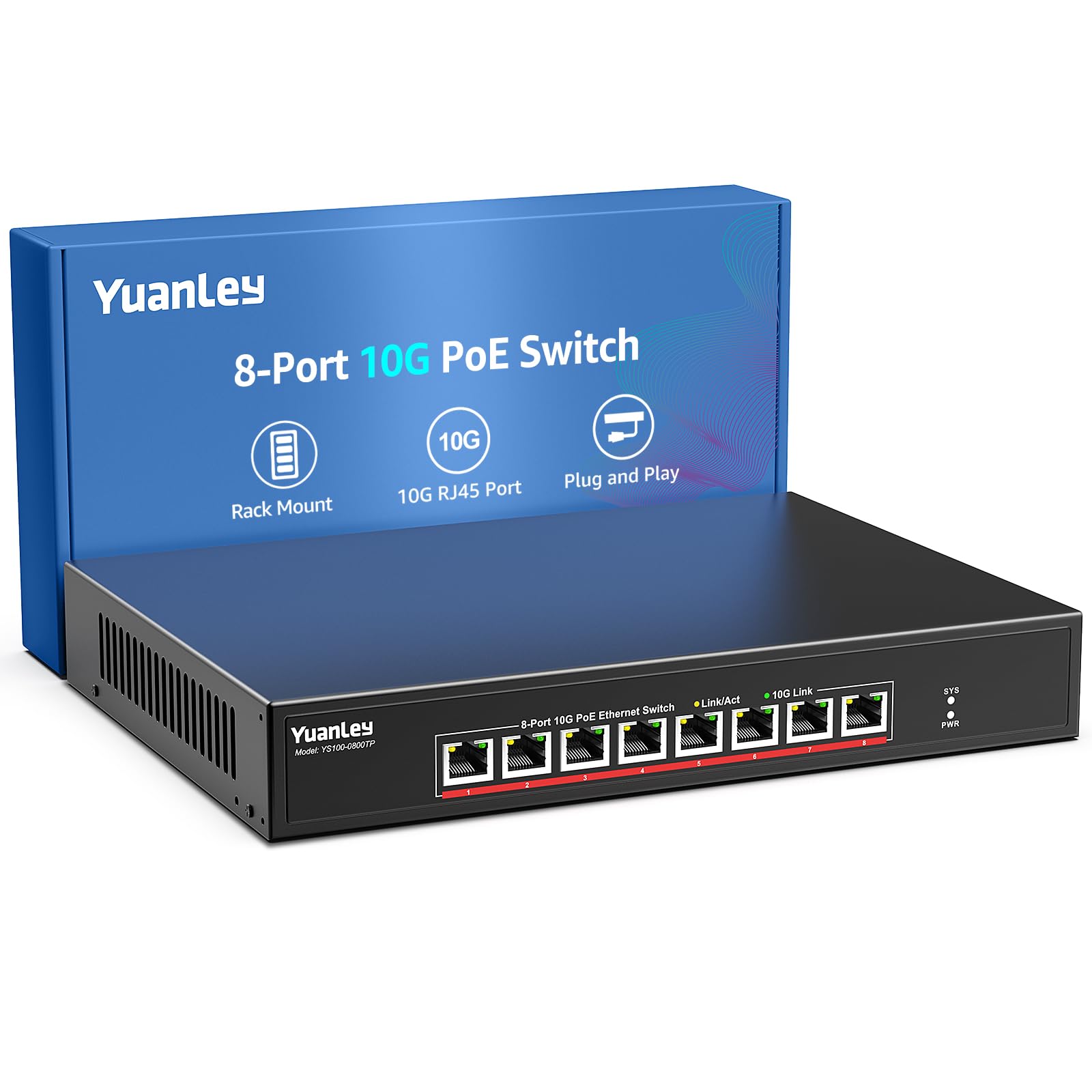
The YuanLey 8-port PoE switch is the only unit in this roundup offering native 10G on all eight RJ45 ports with IEEE 802.3af/at PoE+ power delivery built in. The 110W total PoE budget (30W per port) is enough to power eight 10G-capable cameras, access points, or IoT gateways without external injectors. The unmanaged design means true plug-and-play operation — connect power and Ethernet, and every device negotiates its link speed automatically.
The metal chassis includes 4KV lightning protection, a 24dB cooling fan, and dual-side ventilation for reliable operation in temperatures up to 45°C. Users running Reolink cameras and high-bitrate streaming setups report near-zero packet loss even when saturating six ports simultaneously. The switch supports rackmount and wall-mount placement. The 110W budget is sufficient for most small-to-medium PoE deployments, but power-hungry pan-tilt-zoom cameras may need careful budgeting across ports.
If you need 10G PoE+ without management complexity, this switch delivers power and data over a single cable at the lowest entry price in the PoE category.
Why it’s great
- All eight ports support 10G PoE+ — unique in this roundup
- True plug-and-play, no configuration needed
- 4KV surge protection and rackmount included
Good to know
- 110W total PoE budget limits high-power devices
- No management features — unmanaged only
FAQ
Can I use Cat5e cable for 10G on an 8-port switch?
What SFP+ transceivers are compatible with the TP-Link SX3008F?
Do I need a managed switch for a simple home NAS connection?
Final Thoughts: The Verdict
For most users, the best 8-port 10g switch winner is the SICSOLINK 8-Port Unmanaged because it delivers six RJ45 copper ports and two SFP+ uplinks with quiet fan operation and 6KV surge protection at a price that undercuts most competitors. If you need full Omada SDN management with PoE+ power for APs and cameras, grab the TP-Link SG3210XHP-M2. And for pure fiber backbone flexibility with dual-boot RouterOS/SwOS control, nothing beats the MikroTik CRS309-1G-8S+in.