
Connecting an old security camera, a retro game console, or an analog VCR to a modern HDMI-only TV is a puzzle with a single correct solution: the proper adapter. The market is split between boxes that convert CVBS security camera feeds and units that demodulate raw VHF/UHF RF signals from vintage hardware, and grabbing the wrong type means you are staring at a blue screen with no path forward.
I’m Min — the co-founder and writer behind Gadgets Feed. I have spent hundreds of hours combing through technical specifications, customer test results, and compatibility matrixes to determine which adapter truly bridges the analog-to-digital gap without introducing lag, signal loss, or confusing setup steps.
Whether you are reviving a home CCTV system or dusting off an Atari 2600, picking the right hardware is critical. That is why I built this guide to the best coaxial to hdmi adapter across every common use case.
How To Choose The Best Coaxial To HDMI Adapter
The single biggest mistake buyers make is assuming any coaxial port is the same. A security camera outputs a CVBS signal over a BNC connector, while a retro console outputs a raw RF signal over a standard F-type coax connector. These two signals require completely different conversion hardware, and buying the wrong one is a guaranteed failure.
Match Your Source Signal: CVBS vs. RF
If your source is an analog CCTV camera, a DVR, or any composite video source using a BNC connector, you need a CVBS-to-HDMI converter. These devices accept the video signal from the coax cable and output a clean 720p or 1080p image over HDMI. If your source is a vintage game console (Atari 2600, NES, Intellivision) or a VCR/Betamax that outputs a raw modulated RF signal on channel 3 or 4, you need an RF demodulator that converts the analog UHF/VHF signal into digital HDMI. The two adapter types are not interchangeable.
Resolution and Output Format
Most CVBS-to-HDMI converters support a 720p or 1080p output resolution, which is sufficient for surveillance cameras. RF demodulators, however, typically output between 480p and 720p because the source signal is inherently low-resolution. Some high-end RF demodulators offer upscaling, but do not expect 4K output from an analog source. Pay attention to NTSC vs. PAL support — if your source is PAL, a NTSC-only adapter will only produce a rolling image or no signal at all.
Audio Handling and Inputs
With CVBS converters, audio is typically handled through a separate 3.5mm auxiliary input. If your security camera records audio, ensure the adapter you choose has that 3.5mm jack. With RF demodulators, the audio is embedded in the RF signal — no extra cable is required. Some budget adapters omit audio input entirely, so check the connector list carefully if sound is critical for your setup.
Quick Comparison
On smaller screens, swipe sideways to see the full table.
| Model | Category | Best For | Key Spec | Amazon |
|---|---|---|---|---|
| AoeSpy RF Demodulator | RF Demodulator | Retro Game Consoles & VCRs | NTSC & PAL, VHF/UHF Full Band | Amazon |
| AoeSpy HDMI to RF Modulator | RF Modulator | HDMI Sources to Old Analog TVs | NTSC-M, PAL-BG/I/DK, 480p Output | Amazon |
| VQP HDM61 RF Modulator | RF Modulator | HDMI Sources to CATV Systems | 1080p PLL Control, CH3 / CH4 | Amazon |
| OWERSLYN Digital Converter Box | ATSC Tuner | OTA Antenna to HDMI | 1080p, DVR Recording, USB Media | Amazon |
| ZJBOX Digital Converter Box | ATSC Tuner | OTA Antenna to HDMI | 1080p, DVR Recording, 2-in-1 Remote | Amazon |
| Meekwds BNC to HDMI | CVBS Converter | Surveillance Cameras to TV | 720p/1080p, Auto PAL/NTSC | Amazon |
| ADRFClub BNC to HDMI | CVBS Converter | DVRs & CCTV to Monitor | 1080p, 3D Compensation, Low Power | Amazon |
In‑Depth Reviews
1. AoeSpy RF Demodulator Coax to HDMI

The AoeSpy RF Demodulator is the definitive solution for anyone trying to bring classic gaming hardware into the HDMI era. It accepts raw RF signals from the Atari 2600, NES, Magnavox Odyssey, Intellivision, ColecoVision, Commodore 64, and virtually every VCR or Betamax deck, scanning across the full VHF and UHF band to lock onto channel 3 or 4 automatically. With support for both NTSC and PAL formats, it handles hardware from any region without manual tuning.
The unit outputs a digital signal over HDMI that is clean and stable, with no noticeable latency for gameplay. The auto-scan feature means you press a button and the box finds the active channel signal — no hidden menus. The included remote adds convenience features like timer shutdown and parental controls, and the compact beige chassis sits unobtrusively next to any TV. Buyers report excellent results with the NES and Atari, though the Famicom proved incompatible in one test.
The only consistent complaint is the sparse instruction manual, which lacks detail for troubleshooting. The power supply is a standard North American Type A plug with a 2-pin format, so international buyers will need an adapter. If you have a shelf full of vintage consoles or a stack of VHS tapes you want to digitize, this is the adapter that delivers on its promise.
Why it’s great
- Full VHF/UHF band auto-scan detects channel 3/4 automatically
- Works with NTSC and PAL formats for global compatibility
- Powered by included AC adapter, no USB dongle dependency
Good to know
- Instructions are very basic and offer minimal troubleshooting help
- Some vintage consoles (Famicom) may not be detected reliably
2. AoeSpy HDMI to RF Modulator Coax Converter

This is the reverse of the typical coax-to-HDMI use case: it takes an HDMI source and outputs an analog RF signal over an F-type coax connector. That makes it the perfect tool for feeding a modern Fire Stick, Roku, PS5, or Nintendo Switch into a classic CRT television that only has a coaxial input. The unit supports four TV formats — PAL-BG, PAL-I, PAL-DK, and NTSC-M — so you must match it to your television’s accepted standard.
The picture quality is inherently SD (roughly 480p) due to the analog RF pathway, but for retro setups and long-distance transmission (running video to a TV in another room), this is a proven solution. The remote allows adjustment of horizontal and vertical size, brightness, contrast, saturation, and hue, giving you fine control over the displayed image. One reviewer successfully connected a Raspberry Pi running Plex to a 1960 Zenith black-and-white set with excellent results.
The main drawback is that the video settings reset every time the unit loses power, requiring re-adjustment each session. Some buyers also experienced a “no signal” issue that was resolved by plugging in the power before connecting the HDMI source. For its intended purpose of connecting new HDMI gear to old analog televisions, it performs reliably and the adjustable image controls are genuinely useful.
Why it’s great
- Fine control over Hsize, Vsize, brightness, contrast, saturation, and hue via remote
- Four output TV formats (NTSC-M, PAL-BG, PAL-I, PAL-DK) cover most analog TVs
- Strong RF signal output enables long-distance coax runs
Good to know
- Picture settings are not saved and reset after power loss
- Must power on the unit before connecting the HDMI source to avoid “no signal”
3. VQP HDM61 HDMI to RF Modulator
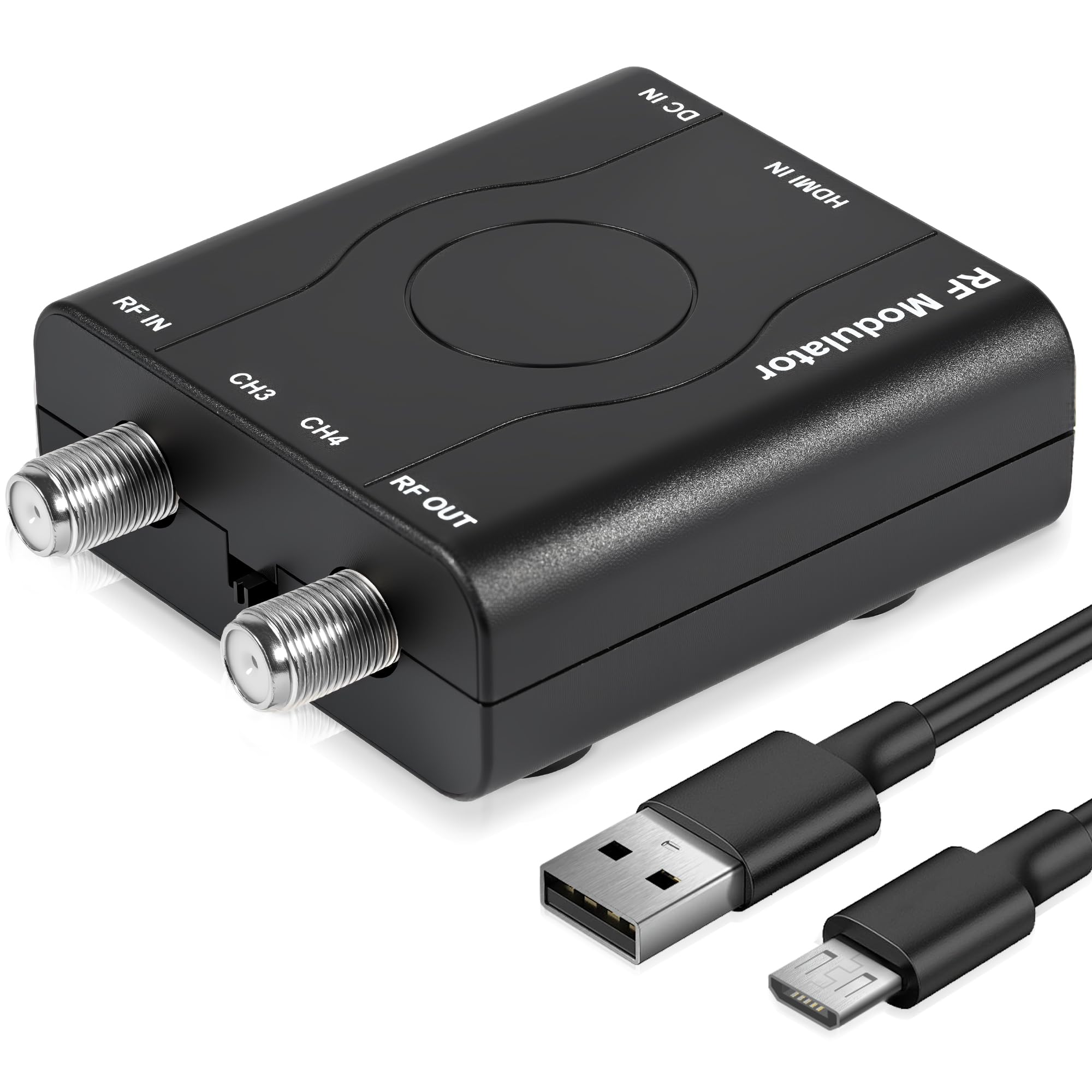
The VQP HDM61 is a budget-friendly alternative to the AoeSpy HDMI-to-RF modulator, designed specifically for the North American NTSC market. It operates on channel 3 (61.25 MHz) and channel 4 (67.25 MHz), supporting 1080p/1080i/720p/576p/480p input resolutions. The PLL control keeps the carrier frequency locked and stable, preventing the drift that cheap modulators suffer from.
Setup is genuinely plug-and-play — no drivers, no software, just connect the HDMI input, attach a coax cable from the RF output to your TV, and tune the TV to channel 3 or 4. The unit draws power via a USB-C port (adapter not included, but a USB-C cable is), and can often be powered directly from a USB-C to HDMI adapter from a laptop. The ABS housing is sturdy and the compact dimensions (5 x 4 x 1.1 inches) fit easily behind a TV.
Build quality is a concern: one reviewer reported a poor RF port connection that caused a snowy picture unless the coax connector was positioned just right, and the manufacturer was unresponsive. The text legibility is also very poor — subtitles are readable, but any on-screen text smaller than an inch is a blur. For someone on a tight budget who needs to send an HDMI signal to an old NTSC TV, it works, but the quality control is inconsistent.
Why it’s great
- PLL-controlled frequency avoids signal drift on analog TVs
- Supports 1080p input resolution for cleaner source processing
- Plug-and-play setup with no complex configuration required
Good to know
- Reported QC issues with loose RF ports causing snowy picture
- On-screen text is nearly illegible unless displayed very large
4. OWERSLYN Digital Converter Box
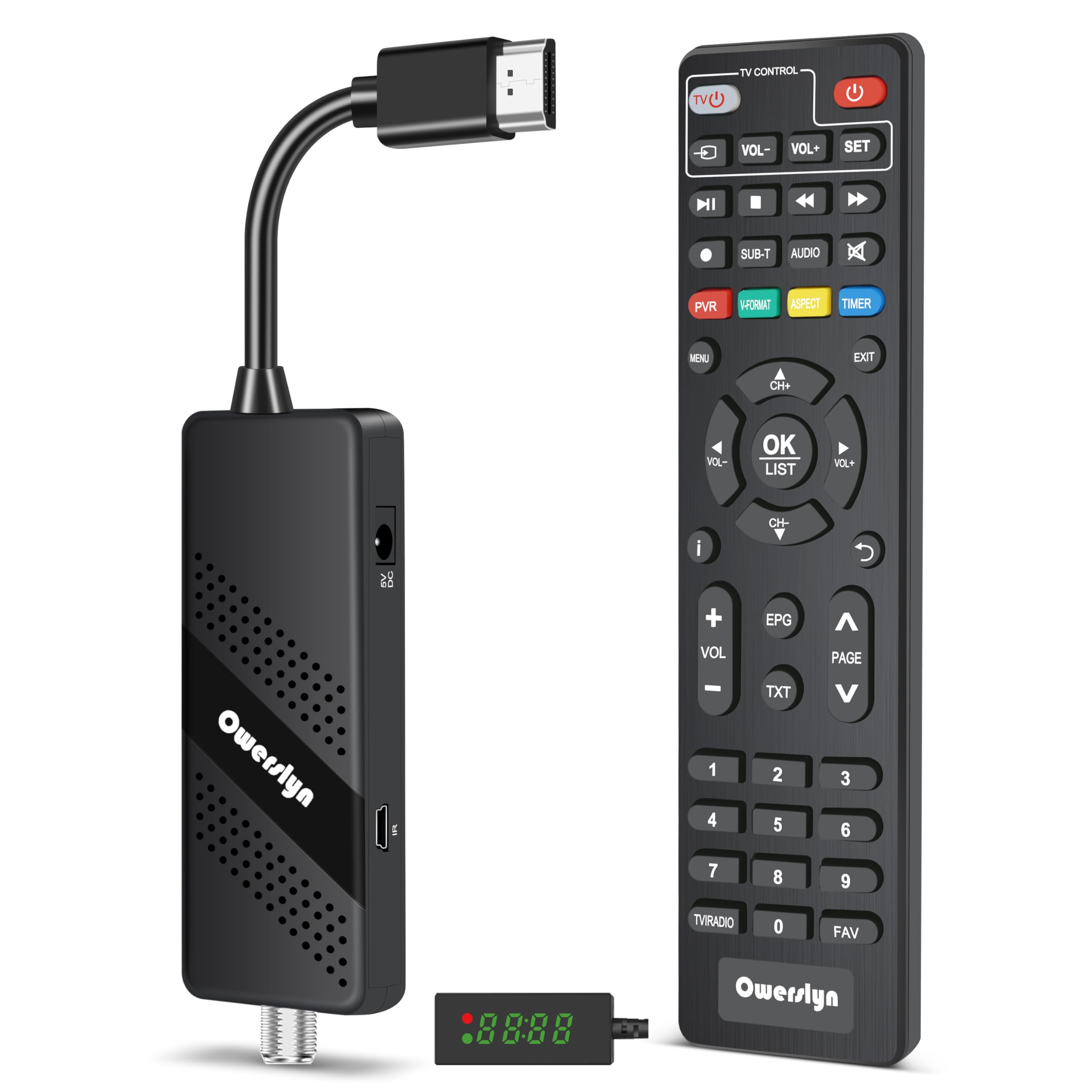
The OWERSLYN is a modern ATSC digital converter box that accepts an antenna or cable RF input and outputs clean 1080p video over HDMI. It is 75 percent smaller than traditional tuner boxes, shaped like a stick that plugs directly into the TV’s HDMI port, and is powered by the TV’s USB port or an included 5V USB charger. It is designed to be hidden completely behind a wall-mounted TV.
Picture quality for over-the-air broadcasts is excellent, with several reviewers noting it outperforms the built-in tuners on their Roku TVs. The 2-in-1 remote features a learning function that can control both the converter box and the TV, reducing clutter. The USB media player supports MP4, MOV, AVI, MKV, MP3, and JPEG playback, and the DVR function lets you record live TV to a USB drive. The IR receiver is on a cable, so you can place the sensor where the remote can reach it.
DVR functionality is the weak point. Scheduled recordings are unreliable, often capturing a partial show or failing entirely. The EPG only shows 23 hours ahead, and stopping a recording requires a manual action. Favorites drop from the list, and the device occasionally hangs overnight. For a primary live-TV tuner, it is excellent; for a recording device, it is frustrating. Verify your USB drive draws less than 800 mA or use a powered hub.
Why it’s great
- Exceptionally compact stick design hides behind the TV cleanly
- Superior OTA picture quality compared to many built-in tuners
- 2-in-1 remote with learning function controls both box and TV
Good to know
- DVR scheduled recording is unreliable (partial captures, missed shows)
- USB drive must draw under 800 mA or must use a powered external hub
5. ZJBOX Digital Converter Box

The ZJBOX functions identically to the OWERSLYN as an ATSC tuner, converting an over-the-air antenna or cable RF signal into 1080p HDMI output. It also supports 3RCA composite and component outputs, making it backwards-compatible with older TVs. The package includes both an HDMI cable and a 3RCA cable, plus a USB power adapter, so you do not need to buy any extra accessories.
The 2-in-1 remote is a strong feature — it has four programmable buttons (SET, TV/AV, VOL-, VOL+) that can learn commands from your TV’s original remote, effectively replacing two remotes on the coffee table. The DVR function supports external drives up to 4TB in FAT32 format, and the media player handles common file types. One reviewer used it successfully with the coax output from a broken TV to feed an HDMI monitor, getting an excellent picture.
The biggest complaint is that the schedule recording function is unreliable. Recordings drop channels like ABC and PBS, the device shuts down randomly, and the guide only shows programming for 23 hours ahead. Audio/video sync can drift, and pixelation appears even on strong signals. It works as a basic live-TV tuner and media player, but relying on it for consistent DVR duties is a gamble.
Why it’s great
- Includes both HDMI and composite cables plus a power adapter in the box
- Programmable remote can control both the box and the TV
- Dual output (HDMI + RCA) works with newer and older displays
Good to know
- DVR schedule drops recorded channels and audio/video sync drifts
- Random shutdowns and pixelation on strong signal reported by buyers
6. Meekwds BNC to HDMI Converter

The Meekwds converter is a dedicated CVBS-to-HDMI adapter designed for analog security cameras and DVRs. It accepts a BNC coaxial input and a 3.5mm auxiliary audio input, then outputs 720p or 1080p video over HDMI. It automatically detects PAL or NTSC signals — no manual switching required. The output resolution can be toggled between 720p and 1080p, and the aspect ratio switch between 4:3 and 16:9 ensures compatibility with modern widescreen monitors.
The unit is extremely small and lightweight (0.06 kg), and is powered via a USB cable. Note that the power adapter is not included — you will need a standard USB power brick. The connection order is critical: attach the power and BNC cable first, then connect the HDMI cable last. One reviewer confirmed it worked perfectly for their home camera setup, providing a clean live feed straight to a TV with no latency.
A significant number of buyers reported “blue screen no signal” when the connection order was not followed, or when using an incompatible camera type (AHD, TVI, CVI, or SDI cameras are not supported). The packaging contains no instructions, which compounds the confusion. This converter is strictly for CVBS analog cameras — if you have a modern HD-over-coax camera, it will not work.
Why it’s great
- Auto-detects PAL and NTSC signals with no user intervention
- Clean 1080p output works well for real-time live camera monitoring
- Lightweight and small, fits easily into any cable management setup
Good to know
- No instructions included, and connection order is critical to function
- Does NOT work with AHD, TVI, CVI, or SDI cameras
7. ADRFClub BNC to HDMI Converter

The ADRFClub converter is a budget-focused CVBS-to-HDMI adapter for CCTV and DVR systems that uses a new-generation low-power digital chip for 24/7 operation with minimal heat buildup. It supports 3D compensation technology that handles motion optimization, color correction, and digital noise reduction, which noticeably improves the image from older or lower-quality cameras. It detects PAL and NTSC automatically and outputs up to 1080p at 50/60 Hz.
The adapter includes a 3.5mm audio input port for injecting audio signals from cameras that support sound. The BNC connector is compatible with standard 13.5mm 75-ohm CCTV connectors, but be aware that it is not compatible with TNC or RF-style coax plugs. The connection sequence is standard: BNC and power first, then HDMI to the display. Users report it works as designed for avoiding the cost of a dedicated CCTV monitor.
The main limitation is the same as all CVBS converters: it is for analog CVBS signals only. It will not work with AHD, TVI, CVI, SDI cameras, or with any over-the-air antenna or cable TV input. One reviewer reported a complete failure (blue screen) despite testing the camera on another monitor first. For the price, the 3D compensation and low-power design make it a competent entry-level solution for basic surveillance display.
Why it’s great
- 3D compensation (motion, color, noise reduction) improves image quality
- Low-power chip allows 24-hour continuous operation with low heat
- Works as a cost-saving alternative to buying a dedicated CCTV monitor
Good to know
- Completely incompatible with AHD, TVI, CVI, or SDI cameras
- Some units arrive DOA with a persistent blue screen
FAQ
Can I use a BNC-to-HDMI converter for my over-the-air antenna?
Why do I get a blue screen when I plug in my CVBS converter?
Does a coaxial to HDMI adapter add input lag for gaming?
Final Thoughts: The Verdict
For most users, the best coaxial to hdmi adapter winner is the AoeSpy RF Demodulator because it handles retro consoles and VCRs with full VHF/UHF auto-scan and NTSC/PAL support. If you want a dedicated surveillance camera adapter, grab the Meekwds BNC to HDMI Converter. And for converting modern HDMI sources to an old analog TV, nothing beats the AoeSpy HDMI to RF Modulator.