
Our readers keep the lights on and my morning glass full of iced black tea. As an Amazon Associate, I earn from qualifying purchases.
Choosing a motherboard for your AMD Ryzen build is the single decision that dictates your entire upgrade path, memory speed ceiling, and storage configuration for years. With a mature platform offering chipsets from B550 to X570, the right AM4 board balances VRM thermal capacity, PCIe lane allocation, and I/O density without blowing your component budget.
I’m Min — the co-founder and writer behind Gadgets Feed. I’ve spent countless hours analyzing VRM phase designs, cross-referencing customer voltage and thermal reports, and mapping PCIe lane sharing across every major AM4 chipset to identify which boards actually deliver stable power under sustained loads without hidden lane bottlenecks.
This guide cuts through the spec sheet noise to find the best am4 motherboard for your specific Ryzen build, whether you need PCIe 4.0 storage, integrated Wi-Fi, or a budget-friendly foundation for a general-use PC.
How To Choose The Best AM4 Motherboard
Every AM4 motherboard serves the same socket, but the chipset, power delivery, and feature set vary dramatically. Your choice ultimately determines whether your Ryzen processor will hit its boost clock consistently under sustained workloads and how many high-speed NVMe drives you can run without compromising GPU bandwidth.
Match the Chipset to Your CPU Generation
B550 boards offer PCIe 4.0 for the primary x16 slot and one M.2 slot, while the chipset itself connects via PCIe 3.0 to the CPU. X570 boards provide full PCIe 4.0 lanes across the chipset, enabling more simultaneous Gen4 devices but requiring an active chipset fan. For most builders pairing a Ryzen 5 or Ryzen 7, B550 delivers the best value. Only step up to X570 if you need multiple Gen4 NVMe drives or plan to populate all M.2 slots.
VRM Quality Isn’t Just About Phase Count
A board with eight cheap power stages can run hotter and deliver noisier voltage than a well-implemented six-phase design with DrMOS. Look for real-world thermal data rather than raw phase numbers, especially if you plan to overclock a Ryzen 9 or use power-hungry CPUs like the 5900XT. Heatsink surface area and airflow over the VRM area often matter more than the component count alone.
Understand Storage Lane Sharing
Many AM4 boards disable specific SATA ports or a PCIe slot when you install a second M.2 drive. Check the manual’s lane-sharing diagram before buying. On B550 boards, the second M.2 slot typically shares bandwidth with two SATA ports. On X570, more lanes are available, but the chipset fan adds noise and a potential failure point over several years of operation.
Quick Comparison
On smaller screens, swipe sideways to see the full table.
| Model | Category | Best For | Key Spec | Amazon |
|---|---|---|---|---|
| GIGABYTE B550M AORUS Elite AX | mATX B550 | Compact Wi-Fi 6E Builds | 5+3 DrMOS, Wi-Fi 6E, BT 5.3 | Amazon |
| MSI MPG B550 Gaming Plus V1 | ATX B550 | Gaming with Ryzen 5000 | Extended VRM heatsink, 2oz PCB | Amazon |
| ASUS ROG Strix X570-E Gaming | ATX X570 | Multi-Gen4 NVMe Workstations | 2.5GbE + Wi-Fi 6, Active PCH | Amazon |
| ASUS ROG Strix X570-F Gaming | ATX X570 | High-End Ryzen 9 Overclocking | 8mm heatpipe VRM, 2x M.2 heatsinks | Amazon |
| ASUS Prime B550-PLUS AC-HES | ATX B550 | Reliable ATX with 6 SATA Ports | 8+1 DrMOS, Wi-Fi 5, 6x SATA | Amazon |
| MSI MPG B550 GAMING PLUS | ATX B550 | No-Frills Value Gaming Rig | DDR4 up to 4400MHz, 128GB | Amazon |
| ASRock B550 PG Riptide | ATX B550 | Lots of Rear USB for Peripherals | 9 rear USB, 2x M.2, 8-phase DrMOS | Amazon |
| ASUS Prime B550M-A WiFi II | mATX B550 | Budget mATX with Integrated Wi-Fi | Wi-Fi 6, 4x DIMM, 128GB | Amazon |
In‑Depth Reviews
1. GIGABYTE B550M AORUS Elite AX (rev 1.3)

The GIGABYTE B550M AORUS Elite AX sits at the sweet spot of the AM4 market, delivering Wi-Fi 6E and Bluetooth 5.3 in a compact mATX format without sacrificing power delivery. The 5+3 DrMOS VRM configuration runs cool enough to handle a Ryzen 9 5900X under sustained all-core loads, making this board surprisingly capable for its size and thermal envelope.
Dual M.2 slots give you one PCIe 4.0 x4 connection and one PCIe 3.0 x4 lane, while Q-Flash Plus lets you update the BIOS without installing a CPU, RAM, or GPU — a lifesaver if you buy a Ryzen 5000 series chip that needs a newer firmware revision. The integrated I/O shield simplifies installation, and the refreshed BIOS interface offers intuitive overclocking controls for DDR4 tuning up to 4733 MHz.
Customer reports note that the front panel IO headers could be better labeled, and the board lacks a USB-C front panel header, but these are minor concessions at this tier. The Wi-Fi 6E implementation delivers stable throughput with minimal dropouts, and the enlarged MOSFET heatsink keeps VRM temperatures manageable even in cases with limited top airflow.
Why it’s great
- Wi-Fi 6E and Bluetooth 5.3 integrated at a reasonable cost
- Q-Flash Plus enables BIOS updates with no CPU installed
- Stable 5+3 DrMOS power delivery for Ryzen 7 and Ryzen 9 chips
Good to know
- No front panel USB-C header on the mATX board
- May require BIOS update for Ryzen 5800X3D support out of box
- Second M.2 slot shares bandwidth with two SATA ports
2. MSI MPG B550 Gaming Plus V1

The MSI MPG B550 Gaming Plus V1 takes everything that worked in the original Gaming Plus and refines the thermal solution with an extended heatsink and a 7W/mk choke thermal pad. This board supports Ryzen 5000 series out of box for most revisions, and the 2oz thickened copper PCB improves heat dissipation across the entire board under heavy GPU and CPU loads.
Dual channel DDR4 memory overclocking reaches 4400 MHz with proper configuration, and the Lightning Gen4 M.2 slot with M.2 Shield Frozr keeps NVMe drives from thermal throttling during large file transfers. The all-black aesthetic and built-in I/O shield make for a clean build, while Mystic Light RGB provides customizable LED effects with 16.8 million colors.
A BIOS update is required for full Ryzen 5600X compatibility, and the board does not include Wi-Fi — you’ll need an Ethernet cable or a PCIe Wi-Fi card. The USB-C header is present for modern cases, and the seven rear USB ports provide plenty of connectivity for peripherals. The box only includes basic accessories, but the board itself delivers reliable power and straightforward installation.
Why it’s great
- Extended VRM heatsink with high-performance thermal pad keeps temperatures low
- Lightning Gen4 M.2 slot with dedicated heatsink prevents SSD throttling
- USB-C header and seven rear USB ports offer strong connectivity
Good to know
- No integrated Wi-Fi — requires Ethernet or add-in card
- BIOS may need updating for Ryzen 5600X compatibility
- Box includes minimal accessories compared to premium ASUS bundles
3. ASUS ROG Strix X570-E Gaming
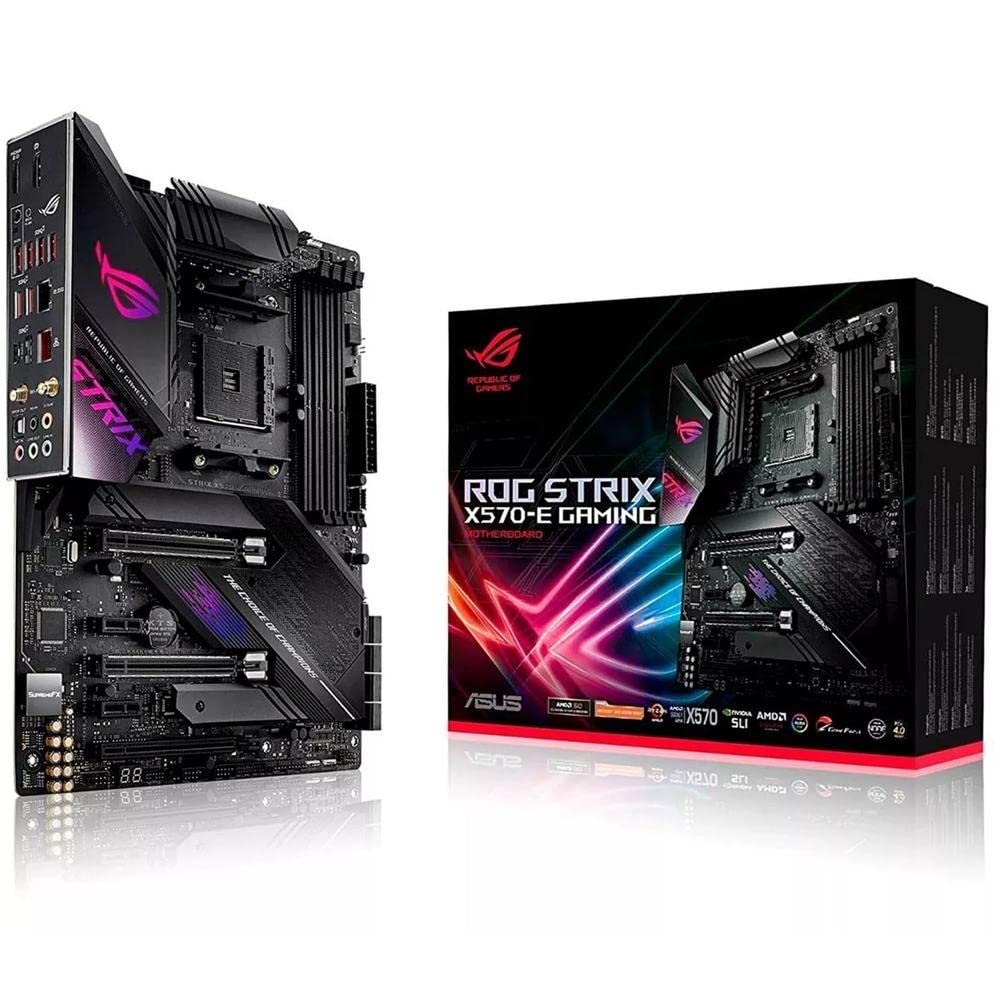
The ASUS ROG Strix X570-E Gaming is the benchmark for high-end AM4 motherboards, combining full PCIe 4.0 lane allocation across the chipset with a comprehensive thermal solution that includes an active PCH heatsink and an 8mm heatpipe connecting the VRM heatsink. This board supports Ryzen 5000 series with the latest BIOS and offers dual networking with 2.5GbE Realtek and Intel Gigabit Ethernet for failover or link aggregation.
Wi-Fi 6 with MU-MIMO provides strong wireless performance, and the dual M.2 slots both include dedicated heatsinks to prevent thermal throttling on Gen4 NVMe drives. The Aura Sync RGB ecosystem extends to addressable Gen 2 headers, giving you granular control over LED zones. The board’s Q-Code diagnostic LEDs provide immediate POST feedback, which is invaluable for troubleshooting first-boot issues.
Customer feedback highlights that the board POSTed on first try for most builds, but the BIOS flash button can be fragile — one user reported a broken button on the first unit. The RGB LEDs default to on at boot, which may annoy users seeking a dark build. The long Wi-Fi antenna cables and chipset cover screws that block M.2 heatsink removal are minor ergonomic frustrations on an otherwise outstanding board.
Why it’s great
- Dual LAN (2.5GbE + Intel Gigabit) for advanced networking setups
- Active PCH heatsink with 8mm heatpipe keeps X570 chipset cool
- Dedicated M.2 heatsinks prevent Gen4 NVMe thermal throttling
Good to know
- Active chipset fan adds a potential noise source over time
- RGB LEDs default to on at power-up
- BIOS flash button quality reported as fragile by some users
4. ASUS ROG Strix X570-F Gaming

The ASUS ROG Strix X570-F Gaming delivers much of the same DNA as the X570-E but omits the integrated Wi-Fi and 2.5GbE in favor of a slightly lower price point while retaining the robust VRM thermal solution. The MOS heatsink connected via an 8mm heatpipe provides excellent passive cooling, and the active PCH heatsink ensures the X570 chipset stays within operating range even during prolonged gaming sessions.
Dual M.2 slots with dedicated heatsinks support PCIe 4.0 x4 speeds, and the board’s Aura Sync RGB headers allow synchronization across ASUS components. The Intel Gigabit Ethernet with LANGuard provides surge protection, and GameFirst V software prioritizes gaming traffic. Memory overclocking reaches 4400 MHz with proper DIMM configuration, and the board handled a 16-core Ryzen 9 without VRM thermal throttling in customer tests.
Some users reported POST failures that required reseating the CMOS battery or using the jumper cables included with the board. The AURA and Armoury Crate software can cause driver conflicts if not properly installed, and the manual provides poor English documentation that references a different model. The lack of Wi-Fi means you’ll need a wired connection or a separate wireless adapter.
Why it’s great
- 8mm heatpipe VRM heatsink provides excellent passive thermal capacity
- Active PCH cooling keeps X570 chipset stable under load
- Dedicated M.2 heatsinks prevent NVMe drive throttling
Good to know
- No integrated Wi-Fi — requires Ethernet or PCIe add-in card
- AURA software can cause driver conflicts if not installed correctly
- Manual references a different model with poor English documentation
5. ASUS Prime B550-PLUS AC-HES

The ASUS Prime B550-PLUS AC-HES targets builders who need ample SATA connectivity without moving to an X570 platform. With six SATA 6 Gbps ports and an 8+1 DrMOS power stage configuration, this ATX board provides enough storage expansion for a home server or a workstation with multiple hard drives while still supporting PCIe 4.0 for the primary GPU and one M.2 slot.
Integrated Wi-Fi 5 and 1Gb Ethernet cover basic networking needs, and the rear I/O includes USB 3.2 Gen 2 Type-C and Type-A ports for fast peripheral connectivity. The front USB 3.2 Gen 1 Type-C header supports modern cases, and the Aura Sync RGB header allows LED customization. The CEC Tier II readiness ensures compatibility with future USB power delivery standards.
Customer feedback indicates that around one in five units may arrive with no video output on a discrete GPU, requiring a replacement. One user specifically chose this board for the six SATA ports and reported the replacement unit worked well with plenty of PCIe slot spacing. The 8+1 DrMOS power delivery is sufficient for Ryzen 7 chips but may run warm with a Ryzen 9 under all-core loads in a case with limited top airflow.
Why it’s great
- Six SATA 6 Gbps ports provide extensive storage expansion options
- 8+1 DrMOS power stages deliver stable voltage for Ryzen 7 chips
- Front USB-C header and rear USB 3.2 Gen 2 Type-C offer modern connectivity
Good to know
- Some units arrive with no video output, requiring replacement
- Wi-Fi 5 is slower than current-gen Wi-Fi 6 standards
- VRM may run warm with Ryzen 9 chips under sustained load
6. MSI MPG B550 GAMING PLUS

The MSI MPG B550 GAMING PLUS is the no-frills entry point into the B550 ecosystem that still provides PCIe 4.0 for GPU and one M.2 slot, plus DDR4 memory support up to 4400 MHz. The board lacks the extended heatsink of the V1 revision, but the standard VRM solution still handles Ryzen 5 and Ryzen 7 chips without thermal issues in well-ventilated cases.
BIOS support for Ryzen 9 out of the box is confirmed by customer reports, and the single RGB strip on the lower right edge is subtle enough to be hidden by a GPU. The board supports dual M.2 slots and four SATA ports, and both NVMe slots achieved read speeds above 2500MB/s in real-world testing. The BIOS interface is well-organized with clear virtualization options.
Customer reviews note that the board works well with Ubuntu and other Linux distributions when Secure Boot is disabled for the AMDGPU driver. The board’s lack of built-in Wi-Fi and limited RGB lighting may disappoint users looking for a flashy build, but for a pure gaming rig or productivity machine, the Gaming Plus delivers reliable performance at a competitive price.
Why it’s great
- PCIe 4.0 support for modern GPUs and NVMe storage at a low cost
- DDR4 memory overclocking up to 4400 MHz for Ryzen performance tuning
- BIOS supports Ryzen 9 out of box with no update needed
Good to know
- No integrated Wi-Fi — requires Ethernet or add-in card
- Limited RGB lighting with only one strip hidden by GPU
- Second M.2 slot shares bandwidth with two SATA ports
7. ASRock B550 PG Riptide

The ASRock B550 PG Riptide prioritizes rear I/O density above all else, offering nine rear USB ports including USB 3.2 Gen2 Type-A and Type-C, plus a front USB 3.2 Gen1 Type-C header. The eight-phase DrMOS with Digi Power delivers clean voltage to Ryzen 5000 series processors, and the board supports DDR4 overclocking up to 4933 MHz for aggressive memory tuning.
Dual M.2 slots include one Hyper M.2 with PCIe Gen4 x4 connectivity, while the second slot supports PCIe Gen3 x2 and SATA3 modes. A dedicated M.2 Key E slot allows you to add your own Wi-Fi module — many users pair it with an Intel AX200 for under . The board includes Nahimic Audio with a Realtek ALC897 codec for decent onboard sound quality.
The most significant risk with this board is the reported factory BIOS corruption issue — multiple customer reports indicate boards arriving with corrupted BIOS that fails to recognize any Ryzen CPU. ASRock’s support process for this issue has been criticized as difficult. Buyers should verify return policies before purchasing or ensure the seller has a generous replacement window.
Why it’s great
- Nine rear USB ports provide unmatched peripheral connectivity
- 8-phase DrMOS with Digi Power for stable CPU voltage delivery
- M.2 Key E slot for adding cheap Wi-Fi modules like Intel AX200
Good to know
- Factory BIOS corruption issue reported by multiple customers
- No integrated Wi-Fi — requires separate M.2 module purchase
- Limited 3-year warranty and difficult RMA process
8. ASUS Prime B550M-A WiFi II

The ASUS Prime B550M-A WiFi II packs a surprising amount of value into its mATX footprint, integrating Wi-Fi 6 and Bluetooth directly on board while retaining four DIMM slots supporting up to 128GB of DDR4 memory. The PCIe 4.0 x16 SafeSlot provides reinforced GPU support, and the dual M.2 configuration includes one Gen4 x4 slot for fast NVMe storage.
The 5X Protection III suite includes LANGuard, DRAM overcurrent protection, and SafeSlot Core safeguards, giving entry-level builders peace of mind. The ASUS OptiMem memory trace layout allows higher frequency memory kits to run at lower voltages, and the VRM heatsink with PCH heatsink provides adequate cooling for Ryzen 5 and Ryzen 7 processors. HDMI 2.1 supports 4K at 60Hz for integrated graphics use.
One user reported a defective unit where a rear USB port short caused instant power-off whenever a device was plugged in. The graphics card port may partially block a PCIe slot if installed in the wrong position. The board only has one USB 3.0 bus and no USB-C front panel e-connector, so you’ll need a PCIe card for front USB-C case headers. Despite these issues, most buyers report excellent build quality and reliable Wi-Fi performance.
Why it’s great
- Integrated Wi-Fi 6 and Bluetooth at a budget-friendly price
- Four DIMM slots support up to 128GB DDR4 memory
- PCIe 4.0 x16 SafeSlot for modern GPU reinforcement
Good to know
- No front USB-C e-connector header
- GPU port position may block access to a PCIe slot
- Some units arrive with defective rear USB ports causing power issues
FAQ
What is the difference between B550 and X570 for gaming?
Will a B550 board support a Ryzen 9 5950X?
Does PCIe 4.0 matter for gaming performance?
How do I check if the BIOS supports my CPU out of box?
Final Thoughts: The Verdict
For most users, the best am4 motherboard winner is the GIGABYTE B550M AORUS Elite AX because it combines Wi-Fi 6E, strong 5+3 DrMOS power delivery for Ryzen 7 and Ryzen 9 chips, and Q-Flash Plus for easy BIOS updates, all in a compact mATX format that fits most cases. If you need full PCIe 4.0 lane allocation for multiple Gen4 NVMe drives and premium networking features, grab the ASUS ROG Strix X570-E Gaming. And for a budget-friendly mATX build that still includes integrated Wi-Fi 6, nothing beats the ASUS Prime B550M-A WiFi II.