
A 3 extruder 3D printer isn’t just about adding more nozzles — it’s about unlocking true color and material freedom in a single print job, eliminating the hours you used to spend gluing separately printed parts together or trying to hide a seam. Whether you’re prototyping multi-material mechanical assemblies or creating full-color display pieces, the jump from single-extruder to a multi-material or multi-toolhead system changes how you design, assemble, and finish every project.
I’m Min — the co-founder and writer behind Gadgets Feed. By comparing the motion systems, nozzle switching speeds, and filament purge algorithms across dozens of these machines, I’ve identified the ones that genuinely deliver on the promise of seamless multi-extrusion without turning each print into a troubleshooting marathon.
This guide cuts through the noise to help you find the best 3 extruder 3d printer for your specific workshop, studio, or production line needs.
How To Choose The Best 3 Extruder 3D Printer
A 3 extruder 3D printer isn’t a standard appliance — it’s a production tool where the wrong spec can turn a multi-color masterpiece into a stringy, oozed-out mess. Focus on the motion architecture, the switching mechanism, and the filament management system before you even look at the build volume.
Motion System: CoreXY vs. Cartesian
CoreXY frames like those on the Creality K2 Combo or the Prusa CORE One keep the toolhead lighter and allow faster accelerations (20,000 mm/s² or higher) without sacrificing print quality. Traditional Cartesian bedslingers like the Bambu Lab A1 can still hit high speeds, but the moving bed introduces resonance that can blur fine layer detail in multi-color prints. For a 3 extruder 3D printer, a rigid CoreXY chassis with vibration compensation is almost always the better foundation.
Toolhead Switching and Filament Management
There are two main approaches: a single extruder with a palette-style filament switcher (like the AMS lite or CFS), or multiple independent toolheads (like the Prusa XL). The former is cheaper and simpler for up to four colors, but every color change purges some filament into a wipe tower. Independent toolheads eliminate that purge waste but cost significantly more. Decide whether material efficiency or upfront cost matters more for your workflow.
Heated Chamber and Material Compatibility
Printing with ABS, polycarbonate, or nylon-based filaments in a 3 extruder 3D printer demands an actively heated chamber (55°C to 65°C). Machines like the QIDI Max4 Combo and the Prusa CORE One offer this, while open-frame options like the ELEGOO Centauri Carbon rely on good ambient conditions. If you plan to use engineering-grade materials in multi-material prints, an enclosed heated chamber isn’t optional — it’s essential.
Quick Comparison
On smaller screens, swipe sideways to see the full table.
| Model | Category | Best For | Key Spec | Amazon |
|---|---|---|---|---|
| Original Prusa XL 5 Independent Toolhead | Premium | Professional multi-material production | 5 independent toolheads, 360 mm³ build volume | Amazon |
| QIDI Max4 Combo | Premium | Engineering-grade filaments at large size | 65°C heated chamber, 30,000 mm/s² accel | Amazon |
| Snapmaker Artisan | Premium | Multi-tool (3DP + laser + CNC) versatility | Dual extrusion, 400 mm³ build volume | Amazon |
| Original Prusa CORE One | Premium | Reliable enclosed CoreXY for hobbyists | 55°C active chamber, 250×220×270 mm | Amazon |
| Creality K2 Combo (Official) | Mid-Range | 16-color printing with CFS scalability | 600 mm/s, CFS up to 16 colors | Amazon |
| Creality K2 Combo (A) | Mid-Range | Quiet operation with fast auto-leveling | 260 mm³ build, step-servo motors | Amazon |
| Anycubic Kobra S1 Combo | Mid-Range | Integrated filament drying with ACE Pro | 600 mm/s, dual-PTC filament drying | Amazon |
| Bambu Lab A1 Combo | Mid-Range | Out-of-box simplicity with AMS lite | 10,000 mm/s² accel, active flow compensation | Amazon |
| ELEGOO Centauri Carbon 2 Combo | Mid-Range | CoreXY speed at an entry-level price | 500 mm/s CoreXY, 350°C nozzle | Amazon |
| Creality K2 SE Combo | Mid-Range | Compact multi-color on a stable metal frame | 500 mm/s, die-cast aluminum frame | Amazon |
| Anycubic Kobra 3 Max Combo | Value | Extra-large build volume without breaking the bank | 420×420×500 mm, 600 mm/s | Amazon |
In‑Depth Reviews
1. Original Prusa XL 5 Independent Toolhead

The Prusa XL is the gold standard for professional multi-material printing. With five fully independent toolheads, you can switch between PLA, PETG, TPU, and soluble supports without any purging or wipe towers — the toolhead simply parks and the next one engages. The 360 mm³ build volume and segmented heated bed (only heats the zone you’re printing on) make it incredibly efficient for large multi-color parts.
CoreXY kinematics keep the motion stable at high speeds, and the open-source Prusa ecosystem gives you full control over firmware and slicer settings. The segmented bed also reduces warping on wide ABS prints since only the active area is heated. This printer is designed for daily production, not occasional tinkering.
The assembly requires some attention — the toolheads and LCD ship separately — but Prusa’s documentation and community support are among the best. The cost is high, but for a shop producing end-use parts with multiple materials, the XL pays for itself in reduced waste and post-processing time.
Why it’s great
- Zero purge waste with independent toolheads
- Segmented heated bed is energy-efficient and reduces warping
- Fully open-source with Prusa Connect for remote monitoring
Good to know
- Very high price; not for casual hobbyists
- Extruders and LCD require half a day of assembly
2. QIDI Max4 Combo

The QIDI Max4 Combo delivers a 390×390×340 mm build volume with a 65°C actively heated chamber, making it one of the few machines in this price tier that can reliably print PPA-CF and PPS-CF alongside standard materials. The closed-loop stepper motors on X and Y axes maintain position accuracy even at 800 mm/s, and the 40 mm³/s high-flow hotend keeps material moving smoothly through multi-color transitions via the QIDI BOX.
Users report excellent print quality with carbon-fiber nylons and polycarbonate right out of the box. The Polar Cooler peripheral (sold separately) improves part cooling for PLA overhangs, but even without it, the build volume stability is impressive. The machine weighs 120 pounds — it’s a permanent fixture once placed.
Some units arrived with warped beds, but QIDI responded quickly with replacement parts and guided repair. The machine is nearly 100% open-source, giving advanced users access to Klipper configurations. The large build volume and high-temp capability make it a standout for engineering workshops.
Why it’s great
- 65°C active chamber ideal for engineering-grade filaments
- Closed-loop motors maintain precision at 800 mm/s
- Expandable to 16 colors with QIDI BOX
Good to know
- 120-pound weight requires a dedicated table
- Polar Cooler must be purchased separately for PLA
3. Snapmaker Artisan

The Snapmaker Artisan is a 3-in-1 fabrication platform that includes dual-extrusion 3D printing, a 40W laser engraver, and a 200W CNC module. The 400×400×400 mm build volume is one of the largest in this list, and the quick-swap toolhead system lets you switch functions in under five minutes. The planetary-gear dual extruder provides consistent flow for two materials, supporting easy-to-remove supports and multi-color PLA prints.
Build quality is excellent — industrial-grade linear rails and a one-piece die-cast base plate keep the frame rigid during high-speed CNC operations. The 7-inch touchscreen is responsive and shows live print status. The software suite is powerful but has a learning curve, especially for the CNC and laser modules.
Some users report issues with the right extruder clogging after months of use, and the calibration can drift if the enclosure is bumped. The Artisan is best for makers who need a multi-tool system and accept that 3D printing is just one of its three functions.
Why it’s great
- Three fabrication tools in one rigid frame
- Dual extrusion with quick-swap module design
- Large 400 mm³ build volume
Good to know
- Right extruder can clog after extended use
- Calibration can drift if the machine is moved
4. Original Prusa CORE One

The Prusa CORE One brings an enclosed heated chamber (55°C) and CoreXY motion to the Prusa ecosystem. The 250×220×270 mm build volume is modest, but the print quality is exceptional right out of the box. It includes a 1 kg spool of Prusament PLA and runs on Prusa’s proven firmware, which delivers consistent first layers and active temperature control across the chamber.
The all-steel exoskeleton frame is extremely rigid, supporting accelerations high enough that print speeds are limited more by filament cooling than by machine vibration. The printer supports PLA, PETG, ASA, PC, and nylon without needing an external enclosure. The multi-color add-on (which uses a single toolhead filament switcher) is delayed, so consider this a premium single/nozzle machine for now.
Some early units had tight Z screws and loose XY motor set screws, but Prusa support resolved these cases quickly. The CORE One is a low-maintenance workhorse for users who prioritize reliability and material versatility over large build sizes.
Why it’s great
- Prusa-grade print quality with minimal tuning required
- 55°C active chamber for high-temp materials
- Open-source firmware and lifetime support
Good to know
- Multi-color add-on not yet available
- Build volume is smaller than competing CoreXY machines
5. Creality K2 Combo (Official)

The Creality K2 Combo is a direct competitor to the Bambu Lab X1C, offering a 260×260×260 mm build volume and the ability to scale up to 16 colors by daisy-chaining four CFS units. The step-servo motors on the extruder and XY axes adjust torque dynamically in under a millisecond, keeping extrusion consistent at 600 mm/s. The 80W high-flow hotend delivers 40 mm³/s flow rate, which is excellent for large single-color bases that switch to multiple colors later in the print.
The automatic bed leveling probes only the area where the model sits, cutting leveling time significantly. Users who upgraded from Enders report the K2 is “quiet as a laptop” in silent mode, thanks to the dynamically balanced fans and vibration-compensated motors. The enclosure is well-sealed for ABS and PETG.
Some units shipped with the power supply set to 230V (needs 115V in the US), causing resets until corrected. The CFS requires spools with specific dimensions — standard cardboard reels may need adapters (4-5 hours to print). Best for users who want Creality’s proven ecosystem with easy multi-color expansion.
Why it’s great
- Step-servo motors for ultra-smooth extrusion at 600 mm/s
- Scalable CFS supports up to 16 colors
- Very quiet during silent mode operation
Good to know
- Power supply voltage may need manual switching
- CFS spool compatibility requires printed adapters for many brands
6. Creality K2 Combo (A)

The Creality K2 Combo (A) shares the same CFS multi-color system as the official version but at a slightly lower entry point. It features a 260×260×260 mm build volume and the same step-servo motors for near-silent operation. The smart auto-leveling probes only the print area, and the AI camera monitors for spaghetti failures and idling, pausing the print automatically.
Print quality is excellent — users report vibrant 4-color prints with smooth layer transitions and no stringing when using the CFS filament dryer. The machine comes 95% pre-assembled; you just install the screen and attach the CFS. The included dry box on the CFS keeps PLA and PETG moisture-free during long multi-color jobs.
Some users experienced severe vibration on the Y-axis at high speeds, and the CFS feeder slot #2 had feeding issues on one unit. The documentation lacks dedicated K2 Combo tutorials, relying on generic Creality guides. Still, for the price, it offers a compelling multi-color experience that rivals machines costing nearly twice as much.
Why it’s great
- Quiet step-servo motors for minimal noise
- AI camera detects and pauses printing failures
- CFS includes filament drying storage
Good to know
- CFS feeder slots can have feeding issues with certain spools
- Documentation lacks model-specific tutorials
7. Anycubic Kobra S1 Combo

The Anycubic Kobra S1 Combo is built around the ACE Pro filament dryer, which uses dual PTC heating modules and 360° hot-air circulation to dry filaments before and during printing. This is a major advantage for PETG and nylon users who need consistent moisture-free material for multi-color prints. Printing speed peaks at 600 mm/s with 20,000 mm/s² acceleration, and the onboard Gyroscope-sensor vibration compensation keeps layer quality high.
The ACE Pro supports 4-color printing natively, and combining two units enables 8-color prints. The Kobra OS includes flow compensation to reduce virtual waste and minimize material overflow during color changes. The Anycubic App allows one-click printing and multi-plate document parsing. Setup takes about 30 minutes with clear instructions.
Early units had issues with extruder failures and sensor problems, but updated hardware (metal sensor tabs, PTFE-free hot end) has resolved most of these. Some users find the ACE Pro noisy in drying mode. Still, for under , this is one of the most complete multi-color packages available.
Why it’s great
- Integrated ACE Pro filament drying eliminates moisture issues
- Up to 8-color support with dual ACE units
- Excellent price-to-feature ratio for multi-color
Good to know
- ACE drying mode is noticeably loud
- Early units needed hardware replacement to resolve issues
8. Bambu Lab A1 Combo

The Bambu Lab A1 Combo delivers the easiest multi-color experience for entry-level users. The AMS lite system manages up to four filaments with automatic switching, and the full-auto calibration handles bed leveling, Z-offset, and flow rate compensation without any manual tweaking. The 10,000 mm/s² acceleration is fast enough for most hobbyist projects, and the ≤48 dB noise level makes it suitable for shared spaces.
The included LED Lamp Kit module turns compatible prints into functional lighted decorations — a nice touch for creative projects. Users report running the printer nonstop for weeks with only one or two user-error failures. The onboard camera provides live view and timelapse capture through the Bambu Handy app.
The build volume is on the smaller side, and the AMS lite only works with certain spool sizes (adapters are available for other brands). The setup instructions are sparse beyond physical assembly, so first-timers may need to watch online guides. Still, for pure out-of-box multi-color printing, the A1 Combo is the most forgiving option.
Why it’s great
- Full-auto calibration makes setup nearly effortless
- AMS lite multi-color system is reliable and easy to load
- Very quiet at ≤48 dB
Good to know
- Small build volume limits large multi-color projects
- AMS may need printed adapters for some spool brands
9. ELEGOO Centauri Carbon 2 Combo

The ELEGOO Centauri Carbon 2 Combo offers CoreXY speed in a price bracket usually reserved for Cartesian bedslingers. With a 350°C nozzle and 500 mm/s print speed, it handles ABS, PETG, and even some nylon blends through its 4-color Canvas system. The automatic calibration covers bed leveling, Z-offset, and vibration compensation, so first prints are consistently good.
The Canvas system supports auto-refill and tangle detection, reducing the chance of mid-print filament failures. The build volume (256×256×256 mm) is standard for this tier, but the CoreXY frame makes the footprint relatively compact. The full-metal construction and rigid aluminum frame minimize ghosting at higher accelerations.
Some users experienced catastrophic failures — bed adhesion loss, software hangs, and firmware update issues — within the first few days. ELEGOO’s closed-ecosystem approach (proprietary slicer, limited network connectivity) frustrates experienced users who prefer standard Klipper. For beginners on a strict budget who want CoreXY speed, the Centauri Carbon is a capable, if occasionally flawed, entry point.
Why it’s great
- CoreXY speed at a budget price point
- 350°C nozzle handles engineering-grade materials
- Canvas multi-color system with tangle detection
Good to know
- Some units have early-life failures (software bugs, bed adhesion)
- Closed-ecosystem slicer and network limitations
10. Creality K2 SE Combo
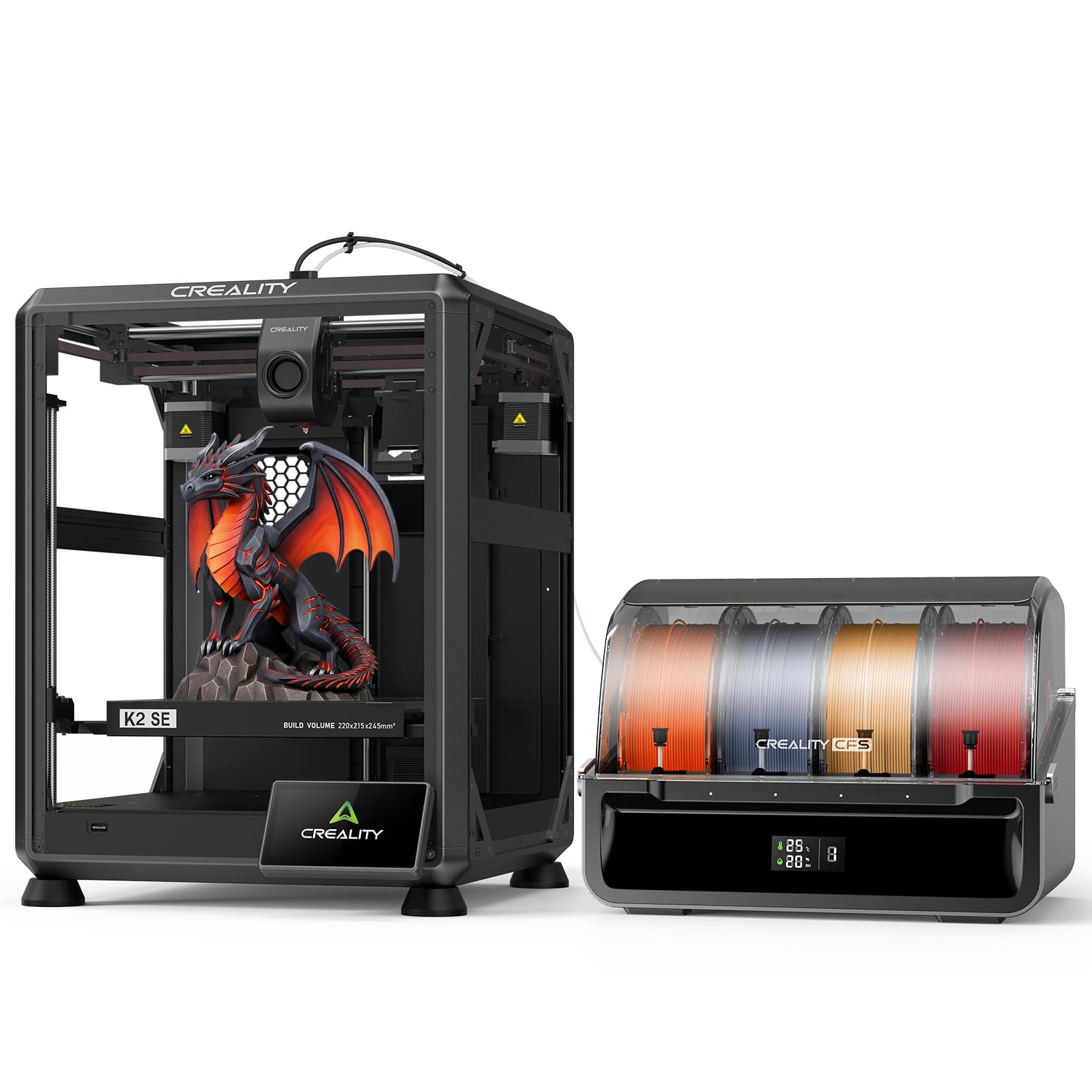
The Creality K2 SE Combo packs multi-color printing into a smaller footprint (220×215×245 mm build volume) without sacrificing structural rigidity. The die-cast aluminum alloy frame with reinforced gussets and crossbeams minimizes vibration, delivering consistent print quality even at 500 mm/s. The CFS unit provides automatic filament switching and moisture-proof storage.
The smart auto-leveling probes only the required print area, speeding up preparation. The modular direct-drive extruder with a quick-swap nozzle makes maintenance straightforward. Users report reliable performance with PLA and PETG, and the quiet operation is suitable for home offices. The Creality OS supports LAN multi-printer control and cloud printing.
Some users experienced app connectivity issues and confusing firmware updates. The stock cooling fans are slightly underpowered for high-speed overhangs. The build volume is small enough that large multi-color models may need to be split into parts. Ideal for beginners or makers with limited desk space who still want multi-color capability.
Why it’s great
- Compact size fits easily on smaller desks
- Die-cast aluminum frame provides solid stability
- CFS moisture-proof storage for filaments
Good to know
- App connectivity and firmware updates can be finicky
- Stock cooling fans are weak for extreme overhangs
11. Anycubic Kobra 3 Max Combo

The Anycubic Kobra 3 Max Combo offers a massive 420×420×500 mm build volume — large enough for life-size prototypes or multiple parts in a single run. It supports multi-color printing through Anycubic’s ACE system, and the 600 mm/s speed with G-sensor vibration compensation keeps layer quality high despite the large moving mass. The dual-sided PEI spring steel plate ensures excellent adhesion and easy print removal.
The all-metal hotend reaches 300°C, supporting PLA, PETG, and TPU. The filament runout sensor and power-loss resume function make it reliable for 24-hour prints. Users who upgraded from smaller beds praise the ability to print full-size helmets and furniture components without splitting the model.
Some units experience frequent jams at fast print settings, and random settings changes can cause failures mid-print. The lack of an enclosure means ABS printing is difficult without an aftermarket enclosure (ambient temperature sensitivity caused warping for some users). Customer support has been slow for some. Best for users who prioritize build volume above all else and are willing to dial in settings for speed.
Why it’s great
- Massive 420×420×500 mm build volume
- G-sensor compensation keeps large prints stable
- Dual-sided PEI plate for reliable adhesion
Good to know
- Jams and settings resets reported at high speeds
- No enclosure limits ABS printing
FAQ
Does a 3 extruder 3D printer require different slicing software?
How much filament is wasted during color changes on a 3 extruder 3D printer?
Can I use soluble support material with a 3 extruder 3D printer?
Final Thoughts: The Verdict
For most users, the 3 extruder 3d printer winner is the Original Prusa XL 5 Independent Toolhead because it eliminates purge waste entirely with five independent toolheads, supporting true multi-material production at a professional level. If you want a heated chamber for engineering filaments at a lower price, grab the QIDI Max4 Combo. And for entry-level multi-color printing without the complexity, the Bambu Lab A1 Combo offers the smoothest out-of-box experience.