
The space behind your motherboard and the underside of your graphics card is prime real estate for both aesthetic flair and functional cooling. A 3D computer backplate is no longer just a dust cover — it is a canvas for addressable RGB lighting, a structural brace against GPU sag, and even an active heatsink for toasty memory modules. Today’s best options integrate digital temperature readouts, multi-axis adjustability, and synchronized lighting that ties your entire build together.
I’m Min — the co-founder and writer behind Gadgets Feed. I’ve spent countless hours breaking down the technical specifications of PC hardware accessories, comparing thermal pad thicknesses, ARGB pinout compatibility, and bracket load capacities to separate genuine build upgrades from decorative fluff.
This guide focuses on five distinct approaches to decking out your rig’s rear armor, from active cooling radiators to halo-effect light panels, to help you find the best 3d computer backplate for your specific build needs and performance goals.
How To Choose The Best 3D Computer Backplate
Not every PC builder needs a backplate, but if you are chasing thermals or a cohesive RGB theme, the choice comes down to three main factors: the physical fit inside your chassis, the type of lighting or display you want, and the thermal load your components produce. A backplate that blocks airflow or conflicts with your motherboard’s VRM heatsinks will do more harm than good.
Check Clearance and Mounting Points
Many decorative backplates rely on the motherboard’s standoff screws or purpose-drilled holes in the chassis. Before buying, measure the distance between your motherboard tray and any protruding components. The GSCOLER X6 bracket, for example, requires five mounting holes on your case — two for GPU fixation and three for the bracket itself — so a cramped mini-ITX build may not have the real estate.
Match ARGB Connector Standards
Most modern RGB backplates and brackets use a 5V 3-pin ARGB header (often labeled +5V, Data, Ground). Plugging a 5V device into a 12V 4-pin RGB header will instantly fry the LEDs. Products like the Formulamod ATX Backplate and the EZDIY-FAB GPU bracket explicitly warn against connecting to 4-pin 12V headers. Verify your motherboard’s pinout in its manual before committing.
Evaluate Thermal Needs
If your GPU runs hot — especially high-end RTX 3090 or 4090 cards with rear-side memory modules — an active cooler like the PANO-MOUNTS backplate radiator with dual 70mm PWM fans can drop VRAM temperatures by 10–15°C. For builds that simply need to prevent sag, a sturdy all-metal bracket with silicone pads is sufficient and quieter.
Quick Comparison
On smaller screens, swipe sideways to see the full table.
| Model | Category | Best For | Key Spec | Amazon |
|---|---|---|---|---|
| GSCOLER Z-X6 ARGB Bracket | GPU Bracket + Temp Display | Real-time temp monitoring & RGB sync | 2K resolution temp screen, 130mm slide range | Amazon |
| Formulamod ATX Backplate | Motherboard Halo Light | Ambient behind-board ARGB glow | 94 diffused LEDs, 5V 3-pin ARGB | Amazon |
| EZDIY-FAB Slide Bracket | Stretchable GPU Support | Adjustable anti-sag for long GPUs | 174–280mm slide range, dual foot design | Amazon |
| PANO-MOUNTS GPU Cooler | Active VRAM Heatsink | Cooling rear-side memory modules | Dual 70mm PWM fans, 6061 aluminum | Amazon |
| MSI MPG X870E Carbon | Premium Motherboard | OLED display & tool-free M.2 | Wi-Fi 7, 5GbE, 14+2+2 power stages | Amazon |
| GIGABYTE X870E AORUS PRO X3D | Full-Coverage Backplate Board | Integrated rear armor & 3x Gen5 M.2 | 18+2+2 power phase, sensor panel HDMI | Amazon |
| Lian Li GA II Trinity 360 | AIO with LCD Pump Cap | CPU cooling with backplate-mounted pump | 2.88-inch LCD, 45° swivel tubes | Amazon |
In‑Depth Reviews
1. GSCOLER Z-X6 ARGB GPU Bracket
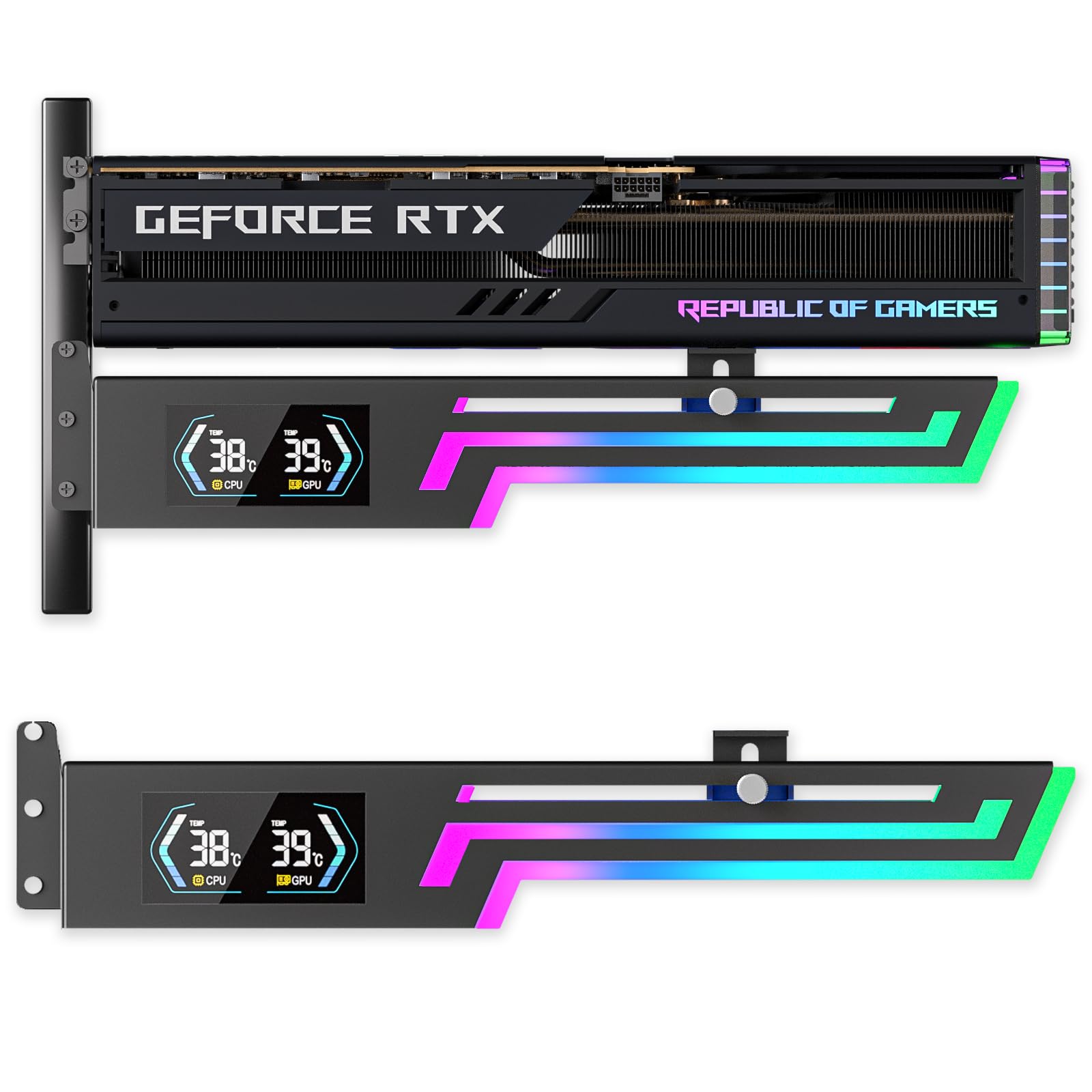
The GSCOLER Z-X6 is the rare accessory that combines structural GPU support, a pixel-dense 2K temperature display, and 16.8-million-color ARGB in a single unit. The metal frame offers 130mm of lateral slide and 30mm of vertical adjustment, accommodating anything from a compact RTX 4060 to a chunky RTX 4090. The built-in software reads CPU and GPU thermals in real time, displaying them on a crisp screen that eliminates the need to alt-tab mid-session.
Its 5V 3-pin ARGB strip supports motherboard sync via AURA, RGB Fusion, and Polychrome, with eight lighting modes including music-reactive patterns. The silicone contact pads on the bracket absorb vibration and prevent scratching your GPU’s backplate. Note that the temperature monitoring software only works on Windows 10 or later and requires ERP power-saving mode enabled in BIOS if you want the display to turn off with the PC.
Some users report that the thumb screw can loosen over time and that the lever design may not fully secure the heaviest cards without careful tensioning. A dab of thread-locker or adhesive pads on the feet solves the issue. For under mid-range pricing, you get a sag bracket, a digital dashboard, and synchronized lighting — a rare value trifecta.
Why it’s great
- Real-time GPU/CPU temp display with 2K clarity
- Wide 130mm slide range fits nearly any card length
- Metal frame with shock-absorbing silicone pads
Good to know
- Temperature software is fragile and requires precise installation
- Thumb screw may loosen; needs periodic re-tightening
- Requires five mounting holes on the case
2. Formulamod ATX Motherboard ARGB Backplate

The Formulamod backplate takes a different approach: instead of bracing a GPU, it sits behind the motherboard itself, casting a diffused halo glow outward through its 94 densely packed LEDs. The acrylic panel is mounted using standard ATX standoff screws, so it disappears behind the board once installed. The result is a floating ring of light that frames the entire motherboard, visible through side-panel windows and tempered glass cases.
The lighting is powered by a 5V 3-pin ARGB header and works with motherboard sync software including SignalRGB, AURA, and Mystic Light. The included 3-pin passthrough and 4-pin pigtails allow for clean cable routing. The diffuser produces an even, non-glare illumination that avoids the harsh pinpoint look of bare LED strips. Builders report that the backplate adds a showpiece-quality glow without distracting from the CPU cooler or GPU.
The main caveat is fitment interference. Many modern motherboards have large VRM heatsinks that protrude behind the PCB, and the acrylic may require cutting or filing to clear those components. The panel is also a single ATX-specific shape — it will not work with E-ATX or mATX boards without significant modification. Plan for a 20-minute fitment check before reaching for the screwdriver.
Why it’s great
- 94 addressable LEDs create a smooth, diffused halo effect
- Easy installation using motherboard standoff screws
- Fully compatible with SignalRGB and major sync software
Good to know
- VRM heatsinks on modern boards may block fitment
- ATX-only form factor; not compatible with E-ATX or mATX
- Acrylic may require trimming for clearance
3. EZDIY-FAB ARGB GPU Holder Bracket

The EZDIY-FAB slide-type GPU bracket uses a stretchable aluminum mechanism that expands from 174mm to 280mm, covering everything from two-fan RTX 4060s to triple-fan RX 7900 XTX cards. Its key innovation is the dual-foot base: two separate support feet that can be installed together as a single wide base or spaced apart for extra stability on uneven case floors. The anodized sandblasted finish resists fingerprints and matches premium motherboard heatsinks.
The ARGB lighting connects via a standard 5V 3-pin header and works with motherboard sync software. The bracket itself is all-metal, with silicone pads on both contact points to protect the GPU’s backplate and the case floor. Users report that the bracket provides the sturdiest sag support they have used, with the removable arms offering orientation flexibility for cards with uneven weight distribution.
Installation can be finicky — achieving a perfectly parallel alignment requires patience. One reviewer noted that the dual PCIe slot teeth may wobble if your case has wide slot spacing. The bracket also extends only up to 280mm, so oversized cards like the RTX 4090 Strix (357mm) will not fit within the slide range. Measure your GPU length before ordering.
Why it’s great
- Expandable 174-280mm range fits most standard GPUs
- Dual-foot design provides superior stability
- All-metal construction with protective silicone pads
Good to know
- Alignment requires careful adjustment; not always parallel
- Does not support GPUs longer than 280mm
- PCIe slot teeth may be loose on some cases
4. PANO-MOUNTS GPU Backplate Cooler

For builders running RTX 3090 or 4090 cards where rear-side GDDR6X memory can exceed 100°C, the PANO-MOUNTS cooler is a targeted thermal solution. It straps a 180x90mm aluminum heatsink with two 70mm PWM fans directly onto the GPU’s backplate using elastic latches. The fans spin from 1500 to 2800 RPM and produce only 16–20 dBA, making them barely audible inside a standard case. The included 1.2mm 7W/mK thermal pad transfers heat from the backplate to the aluminum radiator.
Real-world results are dramatic. Users report VRAM temperature drops of 8–15°C on Zotac RTX 3090s and idle reductions from 75°C to 40°C on MSI RTX 4090 Suprim cards. The 4-pin PWM connector allows the motherboard to control fan speed dynamically, or you can set a manual curve in software. The 6061 aviation aluminum construction keeps weight manageable at just under 14 ounces.
Fitment is the primary concern. The 70mm fans overhang shorter PCBs like the RTX 3050, and the elastic latch design is not universally compatible — users report the straps feel flimsy and may not apply even pressure. Some RTX 3090 models with tall backplate nibs may require repositioning the straps to avoid blocking a fan intake. Replacing the included thermal pad with a higher-quality 1.5mm 12W/mK pad improves performance further.
Why it’s great
- Drops VRAM temps by 8-15°C on high-end cards
- Dual 70mm PWM fans with low 16-20 dBA noise
- Lightweight aluminum construction with elastic latch
Good to know
- Fans overhang shorter PCBs; check card length
- Elastic latches feel cheap and may not apply even pressure
- Included 7W/mK thermal pad benefits from upgrade
5. MSI MPG X870E Carbon WiFi

The MSI MPG X870E Carbon is more than just a motherboard — its rear I/O armor and chipset heatsink function as an integrated 3D backplate system with a built-in OLED display and extensive RGB zones. The 14+2+2 power stage design with dual 8-pin CPU power is ready for Ryzen 9000 series overclocking, while the EZ PCIe Release button and tool-free M.2 Shield Frozr heatsinks make installation effortless. The rear of the board features a plated MOSFET heatsink with heat-pipe and 7W/mK thermal pads that double as structural stiffening.
Connectivity is loaded: dual LAN with 5GbE and 2.5GbE ports, Wi-Fi 7, Bluetooth 5.4, and USB 40Gbps via USB4. The memory overclocking support reaches 7800MHz, and the board handled G.Skill DDR5 6000 CL30 at stock voltage out of the box. The BIOS receives frequent updates — weekly or bi-weekly — which improves stability with new Ryzen 9000 SKUs.
Some users find the MSI Center software bloated and note that the LED settings can revert after cold boot, requiring a background process to maintain custom lighting. The top M.2 slot’s RGB connection is finicky to align. At its price point, it is a direct competitor to the ASUS ROG X870E-E. MSI buyers trade a slightly thicker software layer for superior LAN options and more reliable memory training.
Why it’s great
- Dual LAN with 5GbE + 2.5GbE for pro networking
- EZ PCIe Release and tool-free M.2 installation
- Frequent BIOS updates for Ryzen 9000 stability
Good to know
- MSI Center software is resource-heavy
- LED settings may revert after cold boot
- Top M.2 RGB header alignment is tedious
6. GIGABYTE X870E AORUS PRO X3D
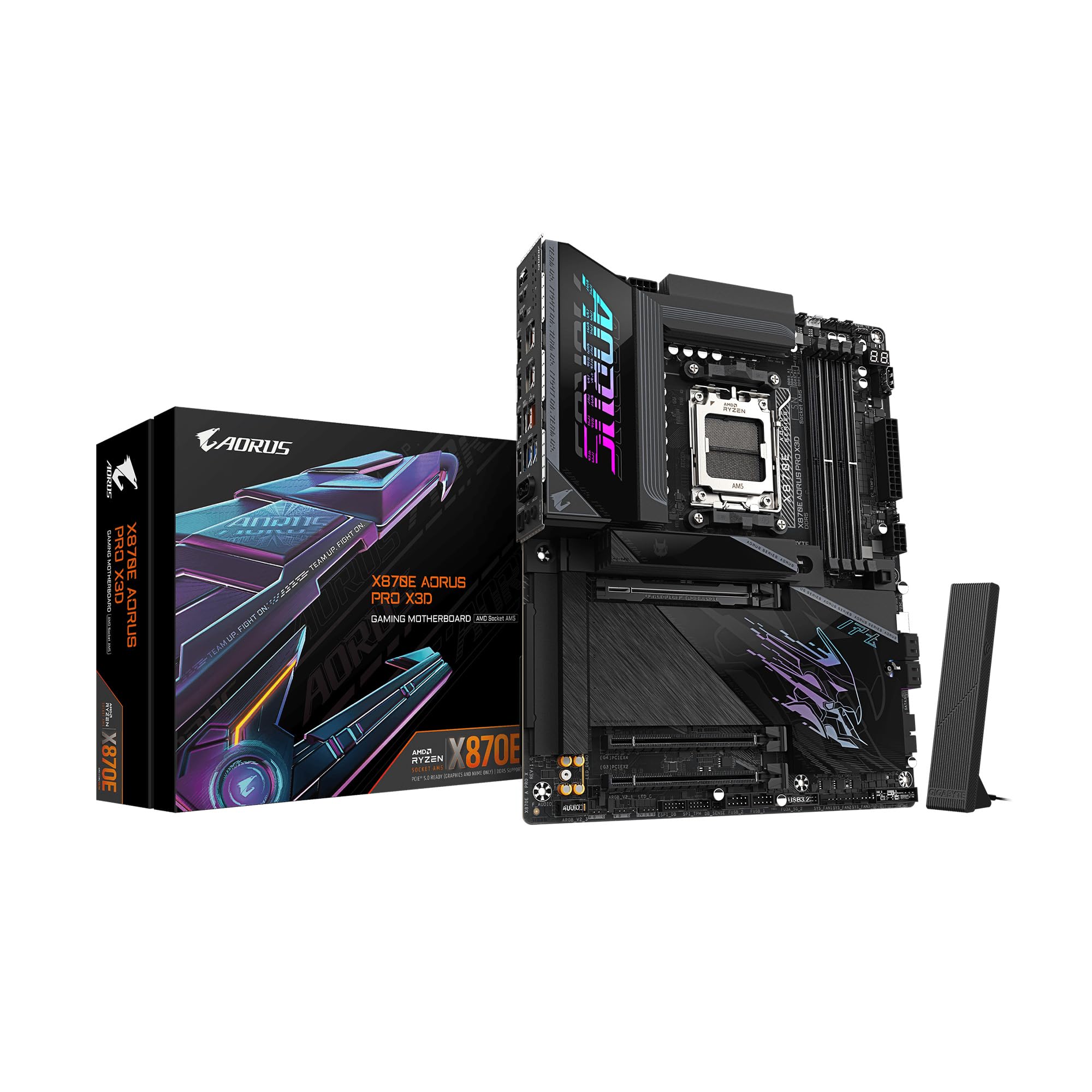
The GIGABYTE X870E AORUS PRO X3D is built for the Ryzen 9000X3D series and ships with a full-coverage backplate installed out of the box — not just a cosmetic plate, but a structural reinforcement that also houses thermal pads for the rear-side VRM components. The 18+2+2 digital power phase design with an 8-layer PCB provides one of the most stable power delivery systems on AM5. The board’s rear armor extends to the I/O cover and chipset area, creating a unified 3D backplate look when mounted in a windowed case.
Storage is a highlight: three Gen5 M.2 slots (two PCIe 5.0, one shared lane) plus two Gen4 slots, all with tool-free EZ-Latch heatsinks. The rear I/O packs dual USB4 Type-C ports with DP Alt mode, Wi-Fi 7 with a 320MHz channel, and a Sensor Panel Link HDMI port for an in-chassis monitoring display. The 5-year warranty and Q-Flash Plus for BIOS updates without a CPU installed make this a long-term platform investment.
The board is heavy — the heaviest in its class, according to multiple users — and the full backplate adds noticeable weight. First boot may take 15 minutes for DDR5 memory training, especially with non-approved RAM kits. The front USB-C port supplies 65W charging, but the USB4 performance is slightly slower than dedicated Thunderbolt 4 implementations.
Why it’s great
- Full-coverage rear backplate with thermal pads
- Three PCIe 5.0 M.2 slots for ultra-fast storage
- 5-year warranty and hassle-free Q-Flash Plus
Good to know
- Heaviest motherboard in its class; handle with care
- First boot memory training can take 15 minutes
- USB4 performance lags behind dedicated Thunderbolt 4
7. Lian Li GA II Trinity SL-INF 360

While not a traditional backplate, the Lian Li GA II Trinity SL-INF 360mm AIO cooler integrates a 2.88-inch LCD display into the pump cap that sits on the CPU backplate — effectively turning your CPU socket area into a customizable 3D display element. The pump cap is interchangeable with three different designs, each featuring individually controllable dual-ring ARGB. The 27mm-thick radiator and Asetek pump deliver top-tier thermal performance, keeping an i9-14900K below 80°C under load.
The 45-degree tubing connector rotates 360 degrees, simplifying routing in tight cases. The included SL-INF 120mm fans daisy-chain with a single cable and use fluid dynamic bearings for quiet operation. The L-Connect 3 software allows full control over the LCD (custom images, GIFs, real-time temps) and fan curves. Builders report the pump is nearly silent at default speeds (around 1690 RPM) and only produces a faint hum at maximum 3200 RPM.
Software reliability is the main weak point. L-Connect 3 can cause stuttering in games and VR, and the LCD has been reported to flicker or develop burn-in within 6–8 months of continuous use. RMA replacements ship only the LCD module, not the entire cooler. For pure CPU cooling and visual flair, the hardware is excellent, but the software experience requires patience and occasional troubleshooting.
Why it’s great
- Customizable 2.88-inch LCD pump cap with GIF support
- Excellent cooling for i9 and Ryzen 9 CPUs
- 45° swivel tube connector for flexible routing
Good to know
- L-Connect 3 software can cause game stuttering
- LCD burn-in reported after 6-8 months
- RMA only covers LCD module, not full cooler
FAQ
Can I install a 3D backplate on any motherboard?
Will a backplate cooler void my GPU warranty?
How do I sync RGB across different backplate brands?
Final Thoughts: The Verdict
For most users, the 3d computer backplate winner is the GSCOLER Z-X6 ARGB Bracket because it marries genuine structural anti-sag support with a useful temperature display and full ARGB sync at an accessible price. If you want to cool hot VRAM on a high-end GPU, grab the PANO-MOUNTS GPU Backplate Cooler. And for a motherboard that ships with premium rear armor already installed, nothing beats the GIGABYTE X870E AORUS PRO X3D.