
A 512GB DDR5 RAM configuration is not a casual upgrade. You are populating four 128GB modules or eight 64GB sticks on a workstation motherboard built for a specific memory topology. The goal is sustained bandwidth for 3D rendering, large language model inference, or virtual machine sprawl. The wrong kit — mismatched ranks, incompatible XMP/EXPO profiles, or inadequate cooling — will leave you troubleshooting boot loops instead of building.
I’m Min — the co-founder and writer behind Gadgets Feed. This guide is the result of combing through hundreds of technical datasheets, checking module pinouts, PMIC configurations, and On-die ECC support across eleven different kits to isolate exactly which sticks are stable at full density and which are prone to training failures.
Whether you are assembling a Threadripper rendering node or a dual-slot AMD workstation, the following breakdown of the best 512gb ddr5 ram options focuses exclusively on real-world stability at rated speeds and the trade-offs between high-frequency bins and tight timings at massive capacity.
How To Choose The Best 512GB DDR5 RAM
Filling four slots with 128 GB each or eight slots with 64 GB each is fundamentally different from a typical 32 GB kit. You are fighting signal integrity, thermal density, and the motherboard’s memory trace topology. Every choice — speed bin, latency, voltage, and heatsink design — shifts the probability of a stable POST at rated frequency.
Memory Rank and Module Density
Dual-rank modules allow the memory controller to interleave access across two independent 64-bit sub-channels within a single DIMM. At 512 GB system capacity, every module is typically dual-rank or even quad-rank. A kit listed as 64 GB per stick almost always uses 16 Gbit or 24 Gbit DRAM dies with two ranks. Verify that your motherboard’s QVL explicitly supports 64 GB modules at your target speed; many consumer boards cap training at 5600 MT/s with four 64 GB sticks.
On-die ECC vs. Registered ECC
All DDR5 DIMMs include On-die ECC, which corrects single-bit errors inside the memory cell before data reaches the memory controller. This is not the same as Registered ECC (RDIMM) used in servers. For a 512 GB unbuffered desktop kit, On-die ECC improves reliability under heavy thermal load but does not protect against multi-bit channel errors. If your workflow requires true ECC protection, you need a workstation platform with RDIMM support.
Voltage and PMIC Thermal Behavior
DDR5 modules carry a Power Management IC (PMIC) directly on the DIMM. At a 512 GB density, the PMIC generates more heat than the DRAM chips themselves during sustained read/write cycles. Kits with a 1.40 V to 1.45 V XMP/EXPO target require active airflow across the DIMMs. Passive heatsinks alone may cause memory temperature to exceed 85°C, which triggers On-die ECC correction overhead and can eventually cause training failure at boot.
Quick Comparison
On smaller screens, swipe sideways to see the full table.
| Model | Category | Best For | Key Spec | Amazon |
|---|---|---|---|---|
| G.SKILL Flare X5 256GB (4x64GB) | Desktop | Massive workstation density | 6000 MT/s, CL36, 1.25V | Amazon |
| TEAMGROUP T-Create 96GB (2x48GB) | Desktop | High capacity per DIMM | 6400 MT/s, CL32, 1.35V | Amazon |
| G.SKILL Trident Z5 Neo 64GB CL26 | Desktop | Lowest latency at 6000 MT/s | 6000 MT/s, CL26, 1.45V | Amazon |
| G.SKILL Trident Z5 Neo 64GB CL28 | Desktop | AMD EXPO sweet spot | 6000 MT/s, CL28, 1.40V | Amazon |
| Kingston FURY Beast 64GB (2x32GB) | Desktop | Balanced RGB kit | 6400 MT/s, CL32, 1.35V | Amazon |
| XPG Lancer Blade 32GB (2x16GB) | Desktop | Compact low-profile | 6000 MT/s, CL30, 1.35V | Amazon |
| CORSAIR Vengeance 32GB (2x16GB) | Desktop | iCUE voltage control | 6400 MT/s, CL36, 1.35V | Amazon |
| Acer Predator Pallas II 32GB (2x16GB) | Desktop | Hand-selected IC quality | 6000 MT/s, CL30, 1.35V | Amazon |
| Lexar ARES Gen2 32GB (2x16GB) | Desktop | RGB sync + PMIC efficiency | 6400 MT/s, CL30, 1.40V | Amazon |
| A-Tech 32GB (2x16GB) | Desktop | Entry-level JEDEC kit | 5600 MT/s, CL46, 1.1V | Amazon |
| Crucial 128GB (2x64GB) Laptop SODIMM | Laptop | High-density notebook upgrade | 5600 MT/s, CL46, 1.1V | Amazon |
In‑Depth Reviews
1. G.SKILL Flare X5 256GB (4x64GB) 6000 MT/s
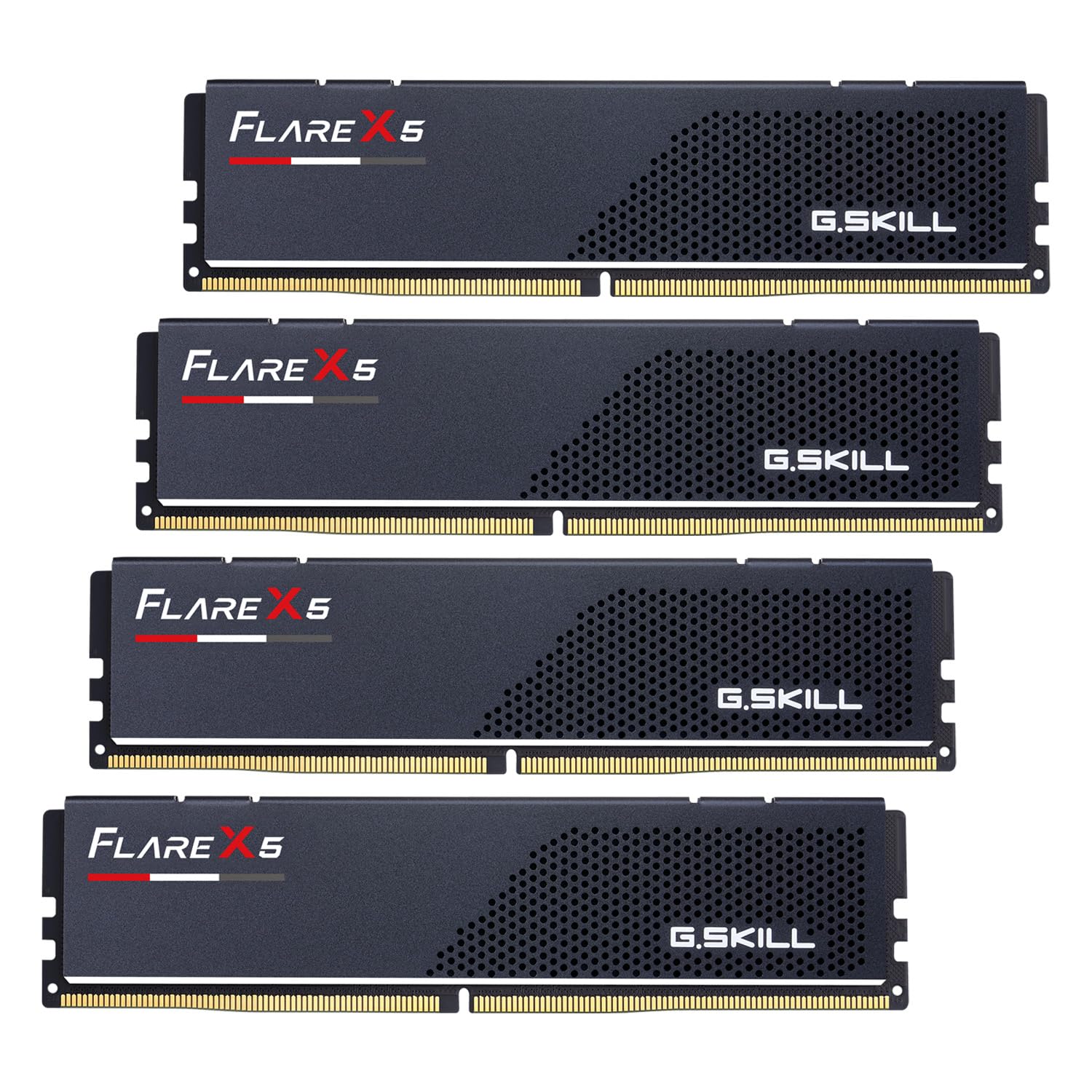
This is the only kit on the market delivering 256 GB at 6000 MT/s from a single four-stick package, purpose-built for AMD X870 and B850 platforms. Each module is a 64 GB dual-rank DIMM running at a conservative 1.25 V with CL36-44-44-96 timings. The low voltage is strategic — it keeps PMIC and DRAM thermals manageable when all four sticks are populated in close proximity.
In practice, the Flare X5 requires a motherboard BIOS dated 2025 or newer with explicit 64 GB module support. Users report successful EXPO training at 6000 MT/s on MSI X870 Tomahawk and ASUS Strix X870 E-E boards after a firmware update. The matte black heat spreaders are low-profile enough to clear large air coolers, though active case airflow over the DIMMs is still advised during sustained workloads.
Build quality is consistent with G.SKILL’s binning standards. Early adopters note that the 256 GB kit was available before the recent memory market price surge, making it a particularly strong choice for anyone building a 128 GB or 256 GB workstation today. The On-die ECC on each die provides a safety net against random bit flips during long rendering or VM host sessions.
Why it’s great
- Only native 4x64GB 6000 MT/s EXPO kit currently shipping
- Low 1.25V keeps thermal load under control in dense quad-stick setups
- On-die ECC per die improves long-run stability for workstation tasks
Good to know
- Requires 2025 BIOS with 64GB module support — check motherboard QVL first
- Price jumped significantly after initial launch window
- Not rated for higher frequencies; 6000 MT/s is the ceiling at this density
2. TEAMGROUP T-Create Expert 96GB (2x48GB) 6400 MT/s

Built with SK Hynix M-Die ICs, this 96 GB kit (2×48 GB) runs at 6400 MT/s with CL32-39-39-102 timings at 1.35 V. The non-binary 48 GB module density is enabled by 24 Gbit DRAM dies, providing more capacity per stick than the standard 32 GB dual-rank configuration. For a 512 GB build using four of these sticks, the TEAMGROUP kit offers a higher aggregate bandwidth ceiling than a 6000 MT/s kit, provided your motherboard can train all four at 6400 MT/s.
Real-world reports show excellent overclocking headroom — users on Z790 and X870 boards have pushed past 6400 MT/s with relaxed timings or tightened tCL at stock speed. The heatsinks are low-profile aluminum with no RGB, which simplifies airflow routing in dual-fan tower coolers. The module is also notable for its stability on AMD platforms after a BIOS update, contrary to earlier Z690 incompatibilities.
Quality control appears strong based on the Hynix M-Die binning, though a small number of units have reported failure to POST at JEDEC speeds. The lifetime warranty and TEAMGROUP’s support responsiveness counterbalance this risk. For users who need 96 GB to 192 GB range at 6400 MT/s without the voltage overhead of CL30 kits, this is the most cost-effective high-density option.
Why it’s great
- SK Hynix M-Die delivers strong overclocking potential above rated speed
- 6400 MT/s CL32 provides higher bandwidth than 6000 MT/s kits
- Low-profile heatsink fits under large air coolers
Good to know
- Not RGB — no lighting elements for aesthetic builds
- Some early units experienced POST failures at JEDEC speeds
- Non-binary 48 GB modules may have compatibility gaps on older BIOS revisions
3. G.SKILL Trident Z5 Neo 64GB (2x32GB) CL26

At 6000 MT/s with CL26-36-36-96 at 1.45 V, this kit holds the tightest primary latency rating currently available at 64 GB capacity. The low tCL directly reduces memory access latency for memory-bound workloads such as V-Ray rendering, large spreadsheet calculations, and gaming at high frame rates on Ryzen X3D processors. The 1.45 V voltage rail demands good case airflow — on an open bench or with a direct fan, the DIMMs stay below 50°C even during stress testing.
EXPO training is stable on X870 and B650 boards with current BIOS versions. Users have pushed to 6200 MT/s CL26 at stock voltage with a 2067 MHz FCLK, achieving performance beyond the rated bin. The matte black heat spreader and smooth RGB diffusion give it a clean look without the garish glow of older Trident designs.
G.SKILL’s binning ensures that every kit ships as a matched pair, preventing the stick-to-stick voltage variance that can cause EXPO instability. The premium pricing reflects the hand-selection process required to hit CL26 at 6000 MT/s on 32 GB modules. For users building a 128 GB system with four sticks, expect to run at JEDEC speeds unless you invest in active RAM cooling.
Why it’s great
- CL26 is the tightest primary latency available at 64 GB capacity
Good to know
- 1.45V requires active airflow to maintain thermal stability
- EXPO training may need slight timing loosening on four-stick configurations
- Premium pricing reflects high binning yield cost
4. G.SKILL Trident Z5 Neo 64GB (2x32GB) CL28

Rated for DDR5-6000 CL28-36-36-96 at 1.40 V, this kit drops two ticks on tCL compared to the more common CL30 standard while keeping voltage at a manageable 1.40 V. EXPO enables instantly on X870 and B650 platforms with Ryzen 9000 series chips. Users report sub-40 ns latency in AIDA64 at 6000 MT/s with FCLK locked to 2000 MHz — a meaningful improvement for CPU-bound tasks like compiling code or real-time audio processing.
The matte white heat spreader on this variant is a visual standout, but the performance character is what drives the recommendation. At 1.40 V, the PMIC runs cooler than the CL26 variant, making this a safer pick for four-stick builds if you are willing to drop to 5600 or 5200 MT/s for stability. The 64 GB capacity leaves room to scale to 128 GB later by adding another identical kit, though G.SKILL advises against mixing kits for guaranteed stability.
A common user report confirms that EXPO-1 at 6000 CL28 passes 24-hour stress tests on ASUS X870E Hero with a 9950X3D. The build quality matches G.SKILL’s reputation — consistent timings across two sticks, no voltage drift at load. This is the kit to buy if CL26 is outside your budget but you still want single-cycle latency improvement over the market’s broad CL30 pool.
Why it’s great
- CL28 at 6000 MT/s offers a measurable latency reduction over CL30
- 1.40V is safe for four-stick builds with moderate airflow
- EXPO enables instantly on current AMD platforms
Good to know
- Not recommended to mix two kits for 128 GB — train at JEDEC if you do
- Premium price over standard CL30 kits
- White heat spreader may not suit all system color schemes
5. Kingston FURY Beast 64GB (2x32GB) 6400 MT/s CL32

Kingston’s FURY Beast series runs at 6400 MT/s with CL32-38-38 at 1.35 V, offering a 400 MT/s clock advantage over the 6000 MT/s kits at a competitive price point. The module uses Kingston’s patented Infrared Sync Technology to synchronize RGB lighting without software overhead — the LED strips across the top of the DIMM pulse in unison without CPU polling.
On an MSI X870E platform with a Ryzen 9 9950X3D, EXPO-2 (6000 MT/s CL30) proved more stable than EXPO-1 (6400 MT/s) in extended stress tests, suggesting the 6400 MT/s bin may require BIOS maturity on AM5 boards. The heat spreader is thicker than most aluminum cladding on DDR5 kits, adding thermal mass that helps buffer transient loads but does not substitute for active airflow at sustained 6400 MT/s.
User feedback highlights excellent warranty support from Kingston — a two-year-old kit with LED color mismatch was replaced with a matching set without hassle. The 64 GB capacity makes this a drop-in upgrade for anyone currently running 32 GB who wants room for virtual machines or multi-GPU rendering without swapping motherboards.
Why it’s great
- 6400 MT/s at CL32 provides higher peak bandwidth than 6000 MT/s kits
- Patented infrared RGB sync works without software bloat
- Thick heat spreader buffers transient thermal spikes
Good to know
- 6400 MT/s EXPO may not be stable on all AM5 boards — EXPO-2 at 6000 is safer
- Kingston FURY CTRL software has been reported to corrupt LED states at boot
- Price fluctuates significantly; bought at , later rose to +
6. XPG Lancer Blade 32GB (2x16GB) 6000 MT/s CL30

The XPG Lancer Blade’s defining trait is its low-profile heat sink — only 32.7 mm tall, it clears top-mounted AIO radiators and large dual-tower air coolers like the Noctua NH-D15 without clearance issues. Rated at 6000 MT/s CL30-38-38 at 1.35 V with XMP 3.0 and AMD EXPO support, it delivers the standard sweet-spot frequency for Ryzen 7000 and 9000 series processors.
The PMIC on each module manages voltage regulation independently. Users on X870 TUF with a 9800X3D report fast EXPO training and stable operation at rated speed. The single-rank 16 GB modules are ideal for dual-stick builds but will require four sticks to reach higher capacities — at which point the clock speed may drop to 5200 or 4800 MT/s depending on motherboard memory topology.
RGB reproduction shows visible LED hotspots rather than the diffused glow shown in marketing images. This is a minor visual compromise given the compact size. For workstation builds where every millimeter of heatsink clearance matters — especially in mini-ITX or SFF cases — the Lancer Blade remains one of the few CL30 options that physically fits.
Why it’s great
- Ultra-low 32.7mm height fits under any top-mount radiator or large air cooler
- CL30 at 6000 MT/s is the sweet-spot for AMD Ryzen platforms
- PMIC provides stable independent voltage per DIMM
Good to know
- RGB diffusion shows individual LED hotspots — not a fully smooth glow
- Single-rank 16GB modules limit four-stick frequency to 5200 MT/s on most boards
- Lightweight build may feel less premium than heavy aluminum-clad kits
7. CORSAIR Vengeance 32GB (2x16GB) 6400 MT/s CL36
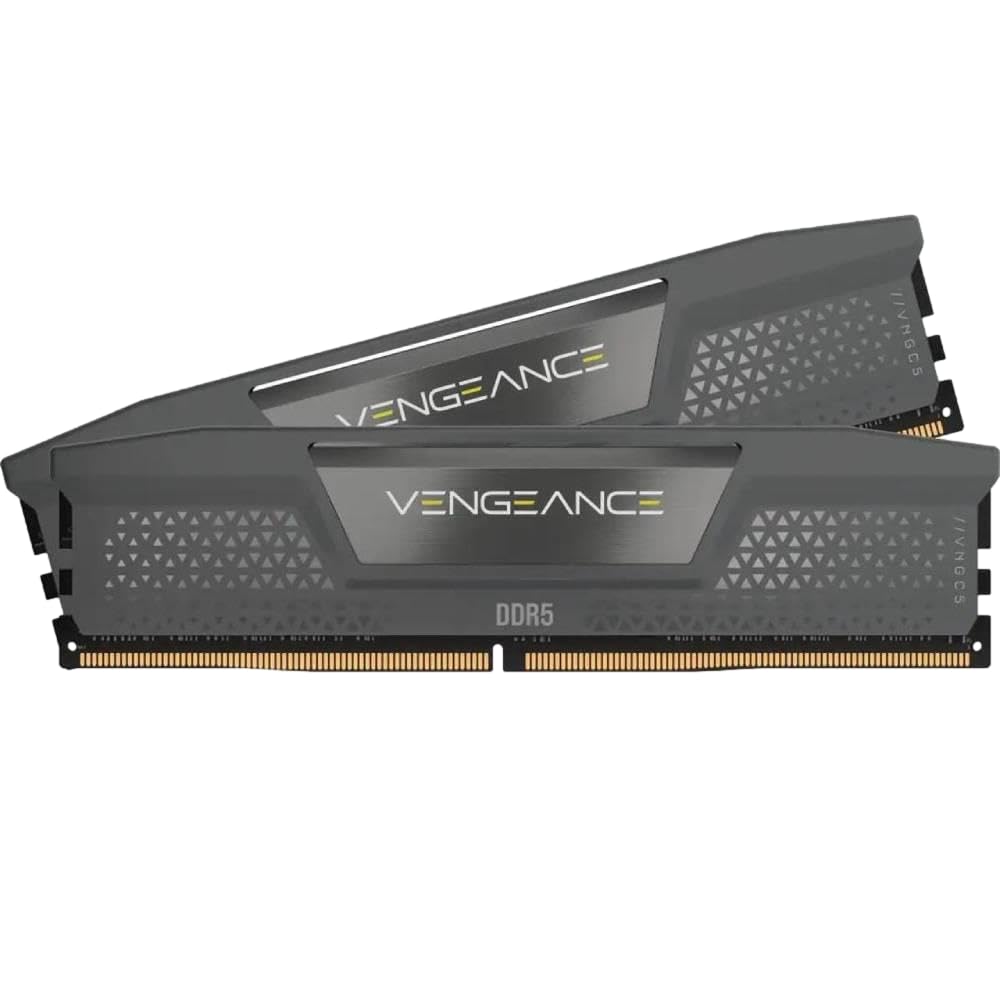
CORSAIR’s Vengeance DDR5 kit runs at 6400 MT/s with CL36-48-48-104 at 1.35 V. The CL36 latency is looser than the CL30 and CL28 competition, but the focus here is on iCUE software integration — users can monitor real-time frequency and adjust onboard voltage regulation directly from the OS without BIOS restarts.
On an ASUS Crosshair X870E Hero with a Ryzen 9950X3D, EXPO-1 enabled at 6400 MT/s without any manual adjustment. The gray aluminum heat spreaders are understated, without RGB, appealing to builders who prefer a clean, muted aesthetic. The 32 GB total capacity makes this a starter kit suitable for testing DDR5 platforms before committing to a larger density.
The main trade-off is the CL36 timings, which result in slightly higher memory access latency compared to CL30 kits at the same frequency. For gaming and general productivity, the difference is marginal, but for memory-sensitive applications like compression algorithms or database queries, tighter kits will have an edge. The Vengeance line is best for users who value software-controlled tuning over raw latency numbers.
Why it’s great
- iCUE software provides real-time voltage and frequency monitoring
- 6400 MT/s at 1.35V offers good bandwidth per watt
- Clean, non-RGB heat spreader suits minimalist builds
Good to know
- CL36 latency is higher than competing 6400 MT/s kits
- Only 32 GB capacity — requires four sticks for workstation-level density
- Onboard voltage regulation may conflict with motherboard-level VDD control
8. Acer Predator Pallas II 32GB (2x16GB) 6000 MT/s CL30

Acer’s Predator Pallas II distinguishes itself through manual IC selection — each module uses DRAM dies hand-picked from original manufacturers for consistent overclocking potential. The kit runs at 6000 MT/s with CL30-38-38-76 at 1.35 V and includes both Intel XMP 3.0 and AMD EXPO profiles.
User reports are generally positive, with XMP enabling cleanly on Intel 14th Gen and EXPO on Ryzen 7000 series. One outlier report of a stick refusing to train past 3600 MT/s appears to be an isolated defect rather than a systematic issue. The matte black design includes a subtle LED strip along the top edge, keeping lighting effects restrained compared to fully illuminated RGB modules.
The On-die ECC and PMIC design mirror the industry standard for DDR5, but the manual IC binning sets it apart from off-the-shelf kits. For users who want the assurance of tested dies without stepping up to the premium pricing of G.SKILL’s highest bins, the Pallas II sits in a middle ground that balances cost and consistency.
Why it’s great
- Hand-selected ICs guarantee tighter manufacturing tolerances
- Dual-profile support for both XMP 3.0 and AMD EXPO
- Restrained LED design avoids excessive RGB brightness
Good to know
- One user reported a defective stick that would not train above 3600 MT/s
- CL30 is standard — no latency advantage over competing CL30 kits
- 32 GB capacity only; no higher-density module SKU available
9. Lexar ARES Gen2 32GB (2x16GB) 6400 MT/s CL30

Lexar’s ARES Gen2 brings 6400 MT/s CL30-38-38-76 at 1.40 V with full RGB lighting controlled via Lexar RGB Sync software. The 1.88 mm aluminum heat spreader is thicker than average for this price tier, designed to dissipate heat from the PMIC and DRAM dies simultaneously. SK Hynix A-die is used in many retail units, giving this kit overclocking headroom that rivals more expensive G.SKILL sticks.
Users on both Intel and AMD platforms report success — one user ran 6000 CL26 in 1:1 mode on a 9950X3D, and 8000 CL34 in 2:1 mode, demonstrating silicon quality that punches above its price. The RGB lighting is synchronized through the motherboard ARGB header rather than requiring proprietary software, simplifying integration into existing lighting ecosystems.
The only notable downside is packaging inconsistency — one user reported receiving an open-box or refurbished unit when ordering new. Lexar’s customer service compensated for the issue, but it highlights the importance of purchasing from Amazon rather than third-party sellers. For the price, this is the best-performing CL30 6400 MT/s kit currently available.
Why it’s great
- SK Hynix A-die provides headroom up to 8000 MT/s in 2:1 mode
- 6400 MT/s CL30 at 1.40V is a strong frequency/timing ratio
- Thick aluminum heat spreader cools both DRAM and PMIC
Good to know
- Some units arrived with damaged or repackaged packaging
- RGB Sync software may conflict with motherboard lighting utilities
- 32 GB capacity only — no 64 GB module option at this speed
10. A-Tech 32GB (2x16GB) 5600 MT/s CL46

The A-Tech 32 GB kit runs at 5600 MT/s with CL46-45-45 at 1.1 V — strictly JEDEC specification with no XMP or EXPO profile. This is not a kit for enthusiasts chasing low latency. It is, however, one of the most affordable ways to add 32 GB of DDR5 to a Dell Precision workstation or a budget AM5 build where plug-and-play reliability matters more than memory overclocking.
Users report successful installation in Dell EBT2250 and Precision 3680 systems where branded kits sometimes fail to train. The 1.1 V voltage ensures that the PMIC stays cool even without case airflow directly over the DIMMs. A-Tech’s customer service is notably responsive — one user received a replacement within five minutes of calling after a module failed after five months of use.
The main limitation is the loose CL46 latency, which adds roughly 12–15 ns to memory access time compared to a 6000 CL30 kit. For file servers, office workstations, and non-memory-sensitive applications, the difference is negligible. For any task that benefits from memory bandwidth — gaming at high FPS, CAD rendering, or scientific computing — the latency penalty is noticeable.
Why it’s great
- JEDEC-standard 1.1V runs cool even in poorly ventilated cases
- Dell OEM compatibility confirmed by multiple users
- Responsive customer support with quick replacement turnaround
Good to know
- CL46 latency is significantly higher than CL30/CL32 kits
- 5600 MT/s is below the 6000 MT/s sweet spot for AM5
- No XMP or EXPO — maximum speed is JEDEC-locked
11. Crucial 128GB Kit (2x64GB) DDR5 5600 MHz SODIMM
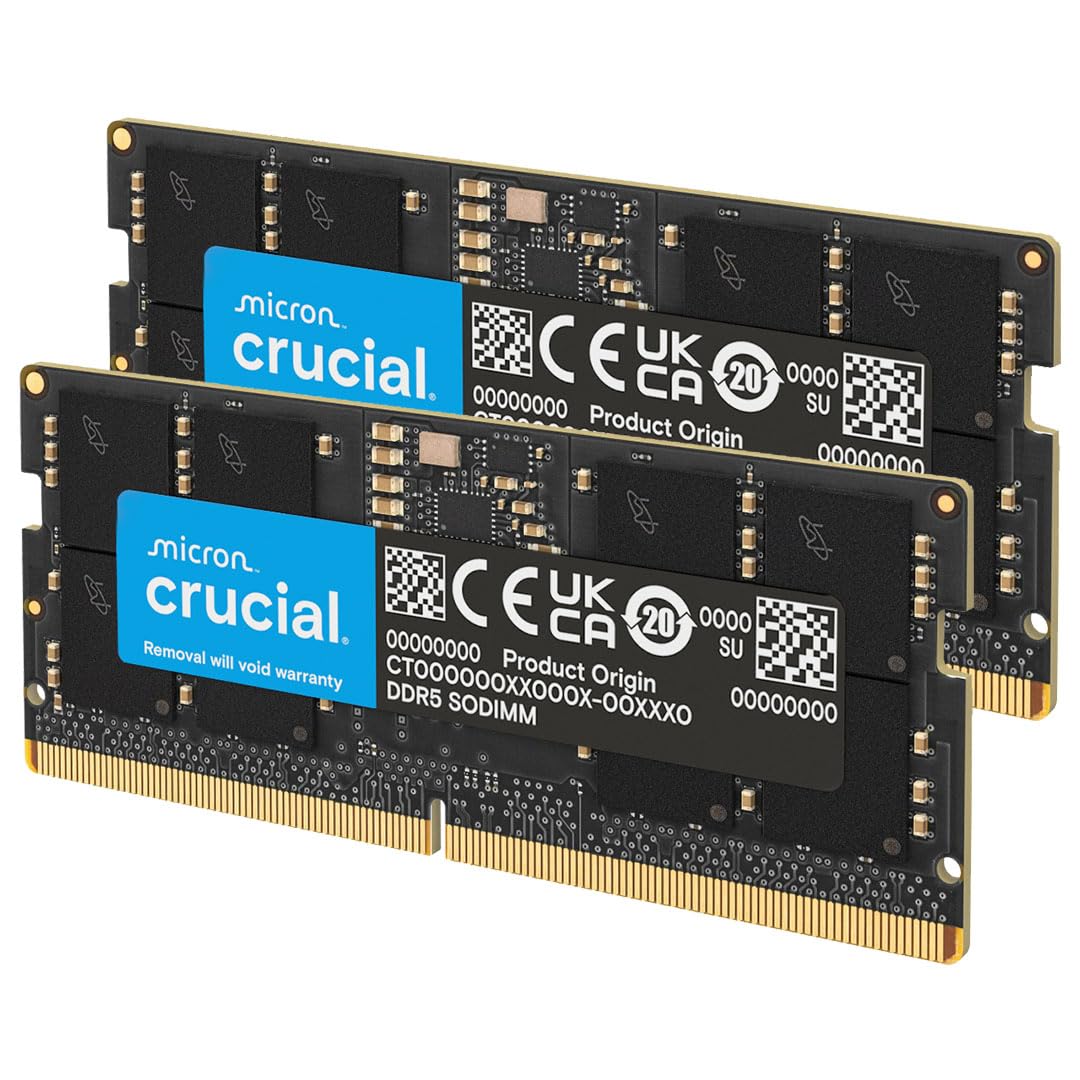
This is the only laptop memory kit on the list, and it demands attention because 128 GB in a notebook is no longer a pipe dream. Crucial’s 2×64 GB SODIMM kit runs at 5600 MT/s with CL46 at 1.1 V, and it auto-negotiates down to 5200 MT/s or 4800 MT/s if the CPU memory controller cannot sustain the higher speed. It is compatible with Intel Core Ultra and AMD Ryzen 8000 series and newer notebooks.
Users report immediate detection in Lenovo and Dell laptops without any BIOS configuration. The On-die ECC on each die reduces the probability of memory errors during large data set processing on the go. The 64 GB module density requires a BIOS update on some platforms — check your laptop manufacturer’s support page before ordering.
The trade-off is speed. 5600 MT/s is slower than the 6000 MT/s and 6400 MT/s desktop kits, and the CL46 latency compounds this. For mobile workstation tasks like 4K video editing, Photoshop layer-heavy files, or running multiple Docker containers, the capacity gain far outweighs the bandwidth loss. For gaming laptops, two 32 GB sticks at 5600 CL46 would serve better.
Why it’s great
- 128 GB total capacity turns a laptop into a mobile workstation
- Auto-negotiates to platform-supported speed without manual intervention
- On-die ECC adds reliability for long-running notebook workloads
Good to know
- 5600 MT/s CL46 is slower than desktop DDR5 sweet spots
- Requires a recent BIOS update for many laptop models
- 64 GB modules are physically larger — verify laptop clearance
FAQ
Can I install four 64 GB DIMMs from the same kit and expect 6000 MT/s on an X670 motherboard?
What is the difference between single-rank and dual-rank DDR5 modules at 512 GB capacity?
Will 512 GB of DDR5 run at full speed on a Threadripper PRO 7000 workstation?
Why do my four 64 GB sticks boot at 3600 MT/s instead of 5600 or 6000?
Does On-die ECC mean I do not need Registered ECC for a file server?
Final Thoughts: The Verdict
For most users building a best 512gb ddr5 ram configuration, the winner is the G.SKILL Flare X5 256GB Kit because it is the only four-stick kit validated at 6000 MT/s with 64 GB modules, keeping voltage low enough to manage thermals in dense workstation builds. If you want the lowest latency at a more accessible density, grab the G.SKILL Trident Z5 Neo 64GB CL26 Kit. And if you are upgrading a mobile workstation to 128 GB, nothing beats the Crucial 128GB SODIMM Kit for plug-and-play reliability in a high-capacity notebook.