
When you press a button on your controller and see the character react on your stream a full frame later, that gap in responsiveness is the enemy of every competitive streamer and content creator. The difference between a smooth broadcast and a frustrating, desynced mess comes down to the hardware translating your HDMI signal into a clean USB or PCIe data stream—your capture card.
I’m Min — the co-founder and writer behind Gadgets Feed. I’ve spent hundreds of hours dissecting technical specifications, cross-referencing user latency tests, and analyzing a range of models to separate the cards that genuinely deliver uncompressed, low-lag video from those that choke under high-bitrate loads.
Whether you are building a single-PC setup for Twitch or a multi-camera production for events, finding the right capture card for streaming determines how your audience experiences every frame of your gameplay.
How To Choose The Best Capture Card For Streaming
Not all capture cards handle the same workload. A card that works perfectly for a single-consume streaming setup may choke when asked to handle multiple camera feeds or high-refresh-rate passthrough. Focus on three critical areas to narrow your search.
Passthrough vs. Capture Resolution
The passthrough resolution determines what you see on your gaming monitor, while the capture resolution dictates what your stream software records. For a smooth gaming experience, you want passthrough that matches your monitor’s native refresh rate — 4K@60Hz or 1440p@120Hz are common targets. Meanwhile, the capture side can be lower (e.g., 1080p60) because most streaming platforms cap your broadcast bitrate anyway. Prioritize a card that doesn’t force your gameplay into a lower resolution just to record.
Interface Type: USB vs. PCIe
USB 3.0 cards offer plug-and-play convenience and work with laptops, but they are more susceptible to bandwidth bottlenecks that limit color sampling (forcing you into MJPEG instead of YUY2). PCIe internal cards, like the Elgato 4K Pro or the AVMATRIX VC42, provide dedicated 2.5GB/s lanes, resulting in uncompressed, sub-millisecond latency transfers. If you have a desktop PC with an available PCIe slot, internal cards generally deliver cleaner video and lower CPU overhead.
Audio Handling and Channel Options
Streaming audio can be trickier than video. Cards with dedicated 3.5mm jacks — like the UGREEN model with its triple-port design — let you route a separate microphone, headphone, and line-in mixer directly through the capture device. This prevents the common digital noise and sync drift issues seen on cards that only pass audio over HDMI. Check user reports for crackling or dropped channels before buying a card that relies solely on HDMI audio extraction.
Quick Comparison
On smaller screens, swipe sideways to see the full table.
| Model | Category | Best For | Key Spec | Amazon |
|---|---|---|---|---|
| Elgato 4K Pro | Internal PCIe | Competitive console gamers | 8K60 passthrough / PCIe | Amazon |
| AVerMedia GC553 | External USB 3.1 | Mac users & Switch streamers | 4K60 passthrough / USB-C | Amazon |
| ASUS TUF CU4K30 | External USB-C | PS5 & Xbox Series X | 4K30 capture / HDR passthrough | Amazon |
| Magewell USB HDMI Gen 2 | External USB 3.1 | Pro AV & Linux rigs | 2048×1080 capture / FPGA | Amazon |
| AVMATRIX VC42 | Internal PCIe | Multi-camera production | 4x 1080p60 / PCIe 2.0 | Amazon |
| UGREEN 4K Capture Card | External USB 3.0 | Beginners & quick setups | 1080p240 capture / VRR | Amazon |
| Blackmagic DeckLink Duo 2 | Internal PCIe | Broadcast & church media | 4x 3G-SDI / genlock | Amazon |
In‑Depth Reviews
1. Elgato 4K Pro

The Elgato 4K Pro is the only internal card on this list that supports HDMI 2.1 passthrough at 8K60, future-proofing your streaming setup for the next generation of consoles. Variable Refresh Rate (VRR) passthrough eliminates screen tearing on high-refresh monitors, a feature external USB cards generally lack. The PCIe x4 interface delivers uncompressed video with virtually zero perceivable latency — competitive Splatoon and fighting-game players have reported flawless performance during high-intensity ranked matches.
Installation requires a spare PCIe x4, x8, or x16 slot on your motherboard, but it eliminates the cable clutter and bandwidth caps of USB-based cards. The included utility software manages capture libraries, color adjustments, and Flashback recording up to four hours. For dual-PC streaming setups, the Elgato 4K Pro shines by offloading all encoding overhead to the streaming machine.
A notable quirk: the card can be picky about HDMI cables, with some users reporting split-screen artifacts when using older or non-certified cables. Also, after several hours of continuous use, a small number of units require a Windows Explorer restart to prevent the video preview from crashing, particularly when loading DRM-protected content from streaming apps.
Why it’s great
- True 8K60 passthrough with VRR support
- No perceivable latency for competitive gaming
- Clean, uncompressed video over dedicated PCIe bandwidth
Good to know
- Requires a spare PCIe slot (not compatible with x1 slots)
- HDMI cable quality can cause signal splitting
- Rare software crashes after extended sessions
2. AVerMedia Live Gamer Ultra GC553

The AVerMedia GC553 remains a reliable external workhorse for streamers who need a proven card that works across Windows and macOS. It offers 4K60 HDR passthrough and captures up to 4K30, 1440p60, or 1080p120. Mac users have successfully used it via USB-C with QuickTime for 1080p60 capture and SwiftCapture for 4K30 H.264 recording, despite AVerMedia officially only supporting Windows 10 x64.
Its ultra-low latency design lets you play through the passthrough monitor without any noticeable lag, and the small, USB-powered form factor makes it easy to pack for LAN events or mobile setups. The bundled HDMI 2.0 cable and CyberLink PowerDirector license add tangible value for first-time streamers. Users report that the card never gets hot during extended sessions, a common issue with cheaper USB capture dongles.
One weak point is its pickiness with USB cables — using a cable other than the supplied USB-C to Type-A one can cause connection drops. Audio can also drift out of sync if you don’t disable HDCP via the RECentral software before opening OBS. Additionally, it lacks native G-Sync or FreeSync passthrough support, which can be a dealbreaker for PC gamers with adaptive-sync monitors.
Why it’s great
- Reliable 4K60 HDR passthrough with low heat
- Works on macOS with QuickTime and SwiftCapture
- Plug-and-play with OBS after disabling HDCP
Good to know
- Does not support G-Sync or FreeSync passthrough
- Firmware updates can fail without recovery utility
- Audio config requires manual setup to avoid sync issues
3. ASUS TUF Gaming Video Capture Card (CU4K30)

The ASUS TUF CU4K30 delivers a rugged, fanless design that prioritizes stability for single-PC streamers. It passthroughs video up to 4K HDR at 60Hz while capturing at 4K30 or 1080p60 with full HDR support. The card is OBS Studio certified, meaning it is recognized instantly without additional drivers — a quick setup that competitive shooter players appreciate when swapping between consoles.
Its durable alloy shell and slim footprint make it easy to integrate into tight desks or ITX streaming builds. The USB 3.2 Type-C interface provides enough bandwidth for uncompressed 1080p60 YUY2 capture, and the included controller and headset connectivity lets you share in-game team audio with your audience — a critical feature for co-op and tactical shooters.
Reliability concerns surface in the audio department. Several users report a constant -35dB noise floor on the left channel and crackly audio that requires OBS filters to mitigate. The USB-C adapter has also been called fragile, with one user experiencing a broken adapter that rendered the card unusable. These audio issues make the CU4K30 less suitable for commentary-heavy streams where crisp sound matters as much as video.
Why it’s great
- Rugged metal build with OBS plug-and-play
- Supports 1440p120 passthrough for Xbox Series X
- Audio pass-through for team chat sharing
Good to know
- Left channel audio noise requires filtering
- USB-C adapter is fragile and prone to breakage
- Firmware stability can be inconsistent across units
4. Magewell USB Capture HDMI Gen 2
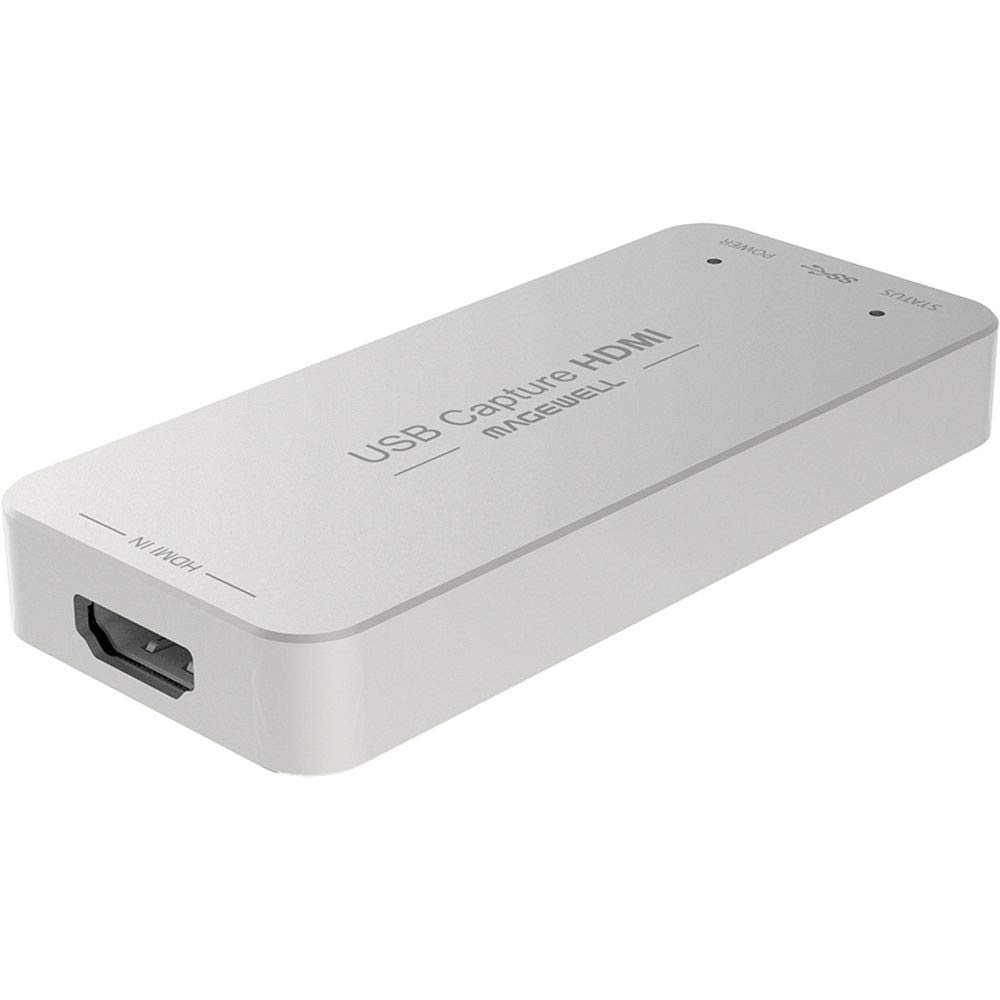
Magewell’s USB Capture HDMI Gen 2 is engineered for professionals who demand absolute signal integrity and flexibility. Its FPGA-based processing handles cropping, scaling, de-interlacing, color conversion, and mirroring directly on the device, offloading all that work from your CPU. This makes it ideal for churches, esports tournaments, and live production environments where the host PC cannot be burdened with video processing.
The card supports HDMI input resolutions up to 2048×1080 at 60fps with 4:4:4 color sampling, and it uses standard UVC/UAC protocols for plug-and-play compatibility on Windows, macOS, Linux, and Chrome OS. The included USB Capture Utility allows granular control over EDID, custom resolutions, frame rates, and firmware updates. Power users can even map multiple devices by serial number for reliable multi-camera setups.
Its metal case runs hot to the touch during 24/7 operation — Magewell designed it that way for passive cooling, but you should ensure adequate airflow. There is no on/off switch, so you may want to add a USB extension cable as a convenient disconnect point. At a premium price point, it lacks native 4K60 capture, which limits its appeal for console streamers who need 4K recording.
Why it’s great
- FPGA offloads all video processing from the CPU
- True plug-and-play across Windows, Mac, Linux, Chrome OS
- Custom resolution support up to 2048×2160 at 60fps
Good to know
- Metal case gets very hot during extended use
- Lacks native 4K60 capture capability
- Requires separate HDMI cable (not included)
5. AVMATRIX VC42 4-Channel PCIe Capture Card

The AVMATRIX VC42 is a specialized PCIe card for users who need to capture four independent HDMI sources simultaneously in 1080p60. Each channel supports up to 200Mbps bitrate with YUY2 lossless compression, making it a solid choice for multi-camera live production, educational lecture capture, or church services running multiple camera feeds.
Its thick gold-plated PCIe interface ensures stable contact during 24-hour continuous operation, and the card supports portrait and landscape modes for flexible application in different streaming layouts. Linux compatibility is robust — users have reported successful operation with Arch Linux through kernel 7.0.11, with the manufacturer providing driver support directly. The card also includes hardware de-interlacing and 3D noise reduction for cleaner video from interlaced sources.
Customer support responsiveness has been flagged by some buyers. One professional user reported being unable to reach AVMATRIX for tech support after encountering device issues, resorting to public forums for help. Additionally, while the card captures 4K signals, it downscales to 1080p, so it is not suitable for streams that require native 4K recording.
Why it’s great
- Four simultaneous 1080p60 HDMI captures in one slot
- Excellent Linux driver support
- Hardware de-interlacing and 3D noise reduction
Good to know
- Tech support visibility is poor for some users
- Downscales 4K input to 1080p for capture
- Requires PCIe Gen 2 slot or better
6. UGREEN 4K@60Hz Capture Card

UGREEN’s entry-level card punches well above its price tier by offering 4K60 passthrough and capturing up to 1080p240 in MJPEG format, making it one of the few budget options that supports high-refresh-rate gaming on the capture side. The aluminum alloy body with cooling holes and seven RGB lighting modes gives it a premium aesthetic that belies its cost. VRR support also helps reduce screen tearing during console gameplay.
The triple 3.5mm audio ports — headphone, microphone, and line-in — allow for serious audio routing directly through the card, a feature rarely seen at this level. Compatibility extends to iOS 17 and Android, so you can capture from a DSLR or mobile device in addition to consoles like the Switch 2 and PS5. Out of the box, users report minimal lag and crisp 4K60 passthrough image quality.
The most significant drawback is audio quality. One user measured a -15dB level drop with modulated digital noise present on the HDMI audio channel, making it unsuitable for streams that rely on pristine game audio. Linux support also appears inconsistent, with some resolutions and formats not being recognized outside of Windows or macOS. For pure video passthrough at a low cost, it excels, but treat its audio output as a secondary input that requires external mixing.
Why it’s great
- 4K60 passthrough and 1080p240 capture capability
- Triple 3.5mm ports for advanced audio routing
- RGB lighting and premium aluminum build
Good to know
- HDMI audio has a -15dB drop with digital noise
- Linux support is limited compared to Windows/macOS
- MJPEG capture instead of uncompressed YUY2
7. Blackmagic Design DeckLink Duo 2

The DeckLink Duo 2 is Blackmagic’s multi-channel SDI capture solution for professional broadcast workflows. It provides four independent 3G-SDI connections for simultaneous capture and playback of up to four 1080p60 streams, making it the card of choice for multi-camera church services, e-sports tournament production, and live event streaming where precise genlock synchronization is required.
Its PCIe interface ensures reliable low-latency transfer, and it supports a wide range of SD, HD, and 3G-SDI formats, including 720p, 1080i, and 1080p. The reference input for external genlock (blackburst and tri-sync) guarantees frame-accurate timing across multiple cameras and switchers. Users report seamless compatibility with OBS, vMix, Wirecast, and ProPresenter without the need for additional drivers on Windows and macOS.
This card is not designed for consumer HDMI consoles — it uses SDI connections, which require BNC cables and converters. The connector mapping can be non-intuitive (channels may swap after rebooting alongside other Blackmagic cards), and you need to use quality RG6 coaxial cabling for reliable performance at 1080p60. For streamers who only need a single HDMI capture, this is overengineered and incompatible out of the box.
Why it’s great
- Four independent 1080p60 SDI captures via one PCIe slot
- Genlock reference input for multi-camera sync
- Works with OBS, vMix, ProPresenter, and Wirecast
Good to know
- SDI-only; requires HDMI-to-SDI converters for consoles
- Channel mapping can shift after system reboots
- No native HDMI input for direct console connection
FAQ
Why does my capture card work in OBS but produce no audio?
Can I stream at 4K60 from a single USB capture card?
What is the difference between a hardware encoder and software encoding inside a capture card?
Final Thoughts: The Verdict
For most users, the capture card for streaming winner is the Elgato 4K Pro because its 8K60 passthrough, VRR support, and PCIe bandwidth make it the most future-proof and lag-free option for competitive and enthusiast streamers alike. If you want the best Mac-compatible USB solution for portable setups, grab the AVerMedia Live Gamer Ultra GC553. And for multi-camera production environments requiring four simultaneous captures, nothing beats the AVMATRIX VC42.