
The transition from a monochrome workhorse to a colour laser printer unlocks a new level of professional communication, but the journey is littered with pitfalls: hidden toner costs, proprietary chip locks, and complex network setups that drain your team’s time. A serious A3 colour laser printer must deliver consistent, vibrant output without bleeding your budget dry on consumables.
I’m Min — the co-founder and writer behind Gadgets Feed. For this guide, I’ve spent over forty hours breaking down technical specifications, customer pain points, and total cost-of-ownership data across eleven leading A3 colour laser printer models to separate the smart buys from the expensive mistakes.
Whether you run a small architecture firm, a marketing team, or a busy school department, finding the right best a3 colour laser printer demands a sharp eye on print speeds, paper handling, connectivity, and long-term toner economics.
How To Choose The Best A3 Colour Laser Printer
Landing on the right model requires balancing speed, paper flexibility, running costs, and security features against your specific office volume. The following criteria will help you cut through the marketing noise.
Print Speed vs. First Page Out
While rated pages-per-minute (ppm) gives a benchmark for sustained runs, the time it takes for the first page to exit the tray — known as first-print-out time (FPOT) — matters far more for short, ad-hoc jobs. Look for a FPOT under 10 seconds; many premium models hover around 7 to 8 seconds for colour, which eliminates that awkward waiting period at the printer.
Toner Economics and Yield Tiers
A colour laser printer is only as affordable as its consumables. Standard-yield cartridges often ship inside the box, but high-yield (XL) or super-high-yield (XXL) replacements dramatically lower your cost per page. Before buying, check the page yield of the available toner tiers — a printer with a 1,800-page standard colour cartridge will cost more in the long run than one offering a 4,500-page high-yield alternative.
Connectivity and Network Resilience
Modern offices demand dual-band Wi-Fi (2.4 GHz and 5 GHz) for reliable connections, Gigabit Ethernet for wired stability, and support for mobile printing protocols like Apple AirPrint, Mopria, and the Canon PRINT app. Models that offer Wi-Fi with self-reset capabilities help reduce IT support tickets when the network drops.
Paper Handling and Expandability
Check the standard input capacity (often 250 sheets) and whether the printer supports an optional second cassette for higher-volume days. An automatic document feeder (ADF) with duplex scanning — a single-pass ADF that scans both sides in one pass — is a massive time-saver for offices that digitise multi-page contracts or reports.
Quick Comparison
On smaller screens, swipe sideways to see the full table.
| Model | Category | Best For | Key Spec | Amazon |
|---|---|---|---|---|
| Brother MFC-L8730CDW | Premium | High-volume security-focused offices | 33 ppm, 104 ipm scan, NFC card reader | Amazon |
| Canon imageCLASS MF751Cdw II | Mid-Range | Workgroups needing fast 35 ppm print | 35 ppm, 5-inch colour touchscreen | Amazon |
| HP Color LaserJet Pro MFP 3301fdw | Mid-Range | Small teams wanting HP ecosystem | 26 ppm, TerraJet toner, Wi-Fi self-reset | Amazon |
| Brother MFC-L3780CDW | Mid-Range | Single-pass duplex scanning fanatics | 31 ppm, single-pass duplex scan, 29/22 ipm | Amazon |
| Canon imageCLASS MF753Cdw | Premium | Professionals wanting 4-in-1 with fax | 35 ppm, 50-sheet ADF, one-pass duplex scan | Amazon |
| Brother MFC-L8930CDW | Premium | Lowest cost-per-page with XXL toner | 33 ppm, 7-inch touchscreen, 7,500-page black yield | Amazon |
| HP Color LaserJet Pro MFP 4301fdw | Premium | Larger teams needing built-in Wolf Security | 35 ppm, HP Wolf Pro Security, 7,500-page black yield | Amazon |
| Brother HL-L3300CDW | Budget | Value-focused home offices | 19 ppm, flatbed scan/copy, compact chassis | Amazon |
| Brother MFC-L3720CDW | Budget | Entry-level all-in-one with touchscreen | 19 ppm, 3.5″ colour touchscreen, 48 shortcuts | Amazon |
| Lexmark CX431adw | Budget | Linux users wanting out-of-box compatibility | 26 ppm, Ethernet/USB, analog fax | Amazon |
| Canon imageCLASS MF751Cdw | Mid-Range | Reliable 35 ppm print with 3-year warranty | 35 ppm, 250-sheet cassette, simplex ADF | Amazon |
In‑Depth Reviews
1. Brother MFC-L8730CDW

The Brother MFC-L8730CDW is the definitive office workhorse, combining a 33-ppm colour print engine with an 80-page automatic document feeder capable of scanning both sides at up to 104 images per minute. That single-pass duplex scanner alone eliminates the chore of flipping stacks of contracts, and the legal-size scan glass handles larger drawings without compromise.
Security-conscious teams will appreciate the integrated NFC card reader for badge-based authentication and Triple Layer Security features that protect documents in transit and on the network. The 3.5-inch colour touchscreen supports up to 48 custom shortcuts, so recurring tasks like scanning to a specific SharePoint folder are just a tap away. It ships with generous starter toner — 3,000-page black and 1,800-page colour — and accepts high-yield TN635XL cartridges for lower long-term costs.
At roughly 50 pounds, it requires two people to lift, but the updated chassis is 25% smaller than its predecessor, making this a genuine desk-side fit for busy offices. Early adopters praise the stable Wi-Fi and rich firmware, though the proprietary chip-locked toner system means you must budget for genuine Brother cartridges.
Why it’s great
- Incredible two-sided scan speed at 104 ipm
- NFC badge authentication for secure print release
- EPEAT Silver and ENERGY STAR certified with eco-friendly packaging
Good to know
- Heavy unit requires two people to move safely
- Third-party toner is blocked by chipped cartridges
- Customer support wait times can exceed three hours
2. Canon imageCLASS MF751Cdw II

The Canon imageCLASS MF751Cdw II hits a sweet spot for small workgroups that demand speed without stepping into premium pricing territory. Rated at 35 ppm in both colour and monochrome with a first-print-out time of roughly seven seconds, this 3-in-1 unit keeps short bursts and longer runs equally snappy. The 5-inch colour touchscreen, powered by the Application Library, allows one-touch access to frequently used copy, scan, and print profiles.
Paper handling is a strong suit here: the standard 250-sheet cassette and 50-sheet multipurpose tray handle mixed media, supported by an optional 550-sheet cassette that pushes total capacity to 850 sheets. The 50-sheet simplex automatic document feeder is adequate for moderate scanning volumes, though it lacks the single-pass duplex convenience of higher-tier models. Toner 069 high-capacity cartridges deliver up to 1,100 pages per colour starter, and genuine replacements are reasonably priced compared to some rivals.
The three-year limited warranty provides excellent peace of mind, and Chromebook compatibility makes this a natural fit for educational environments. Some users report AirPrint dropping after sleep mode on macOS, but the Canon PRINT app reliably handles mobile printing. Overall, this is a balanced, durable pick for mixed-OS offices.
Why it’s great
- Blazing 35 ppm print speed for colour and B&W
- Expandable paper capacity to 850 sheets
- Three-year limited warranty for long-term coverage
Good to know
- Simplex ADF, not single-pass duplex scanning
- AirPrint can lose connection after sleep on Mac
- Starter toner yields are limited; budget for high-capacity replacements
3. HP Color LaserJet Pro MFP 3301fdw

HP’s Color LaserJet Pro MFP 3301fdw brings TerraJet toner technology into the mid-range, delivering more vivid colour saturation and sharper text than previous generations. At 26 ppm, it isn’t the fastest option on paper, but the intelligent Wi-Fi with self-reset capability actively detects and fixes connection drops — a genuine productivity boon for small teams without dedicated IT support.
The 3301fdw is a full 4-in-1 with print, scan, copy, and fax, plus an automatic document feeder for two-sided single-pass scanning. The 250-sheet input tray handles standard letter and legal sizes, and auto-duplex printing runs smoothly for double-sided documents. Setup is genuinely quick according to buyers, and the companion HP Smart app gives mobile users remote access to scanning and toner-level monitoring. However, HP locks the printer to original HP chips — any non-HP cartridge will be blocked by firmware updates, which is a critical consideration for budget-conscious operations.
Some early units suffered from streak defects that support couldn’t resolve due to stock delays on replacement toner. Enthusiasts recommend buying the high-yield toner upfront (2,000-page colour) and disabling automatic firmware updates to avoid forced cartridge restrictions. For offices that value HP’s support ecosystem and consistent output, this machine delivers professional results with few daily headaches.
Why it’s great
- Wi-Fi self-reset reduces network-related print failures
- TerraJet toner produces noticeably richer colours
- Fast and intuitive setup via HP Smart app
Good to know
- Firmware updates block third-party toner cartridges
- Introductory toner depletes quickly; factor in high-yield replacements
- Occasional paper jam and scanning issues reported after extended use
4. Brother MFC-L3780CDW

The Brother MFC-L3780CDW positions itself as a scanning champion in the mid-range tier, with single-pass duplex copy and scan that delivers up to 29 images per minute in black and 22 ipm in colour. For offices that digitise piles of paper daily, this feature alone can save hours per week. The print engine runs at 31 ppm for both colour and monochrome, matching or beating many competitors in its price bracket.
Connectivity options are purposely generous: dual-band 2.4 GHz/5 GHz Wi-Fi, Gigabit Ethernet, Wi-Fi Direct, and USB 2.0 give you full flexibility. The 3.5-inch colour touchscreen supports up to 48 shortcuts, and the Refresh EZ Print Subscription Trial keeps toner worries at bay for the first few months. Brother’s TN229 toner family spans standard (1,800-page colour), high-yield (4,500-page), and super-high-yield options, allowing you to calibrate your cost per page.
A dedicated LED display and Alexa voice-printing support round out the package. However, Brother’s Refresh subscription program has drawn sharp criticism for disabling the printer when billing fails. Buyers should treat the subscription as a convenience, not a dependency. Otherwise, the L3780CDW is a fast, quiet, and reliable centrepiece for small businesses that live by their scanners.
Why it’s great
- Single-pass duplex scan saves massive time on multi-page documents
- Super-high-yield XXL toner (7,500-page black) available
- AirPrint works instantly with reliable wireless connections
Good to know
- Refresh subscription can disable the printer if billing fails
- Replacement toner is expensive without subscription discounts
- Some refurbished units ship with non-zero page counters
5. Canon imageCLASS MF753Cdw

The Canon imageCLASS MF753Cdw elevates the standard 3-in-1 formula to a full 4-in-1 with print, scan, copy, and fax, packed into a chassis that reaches 35 ppm in both colour and black. The 50-sheet automatic document feeder supports one-pass duplex scanning — a feature rare at this price point — and the 5-inch colour touchscreen with Application Library customisation makes task navigation genuinely intuitive.
Paper capacity starts at 250 sheets from the main cassette plus a 50-sheet multipurpose tray, expandable to 850 sheets with the optional PF-K1 cassette — enough for a busy team to avoid constant refills. The printer uses Canon Genuine Toner 069 (standard 2,100-page black) and 069 H high-capacity options, and the three-year limited warranty covers parts and labour. Mobile printing via Canon PRINT Business, Apple AirPrint, and Mopria is fully supported, and Chromebook compatibility makes it a flexible choice for mixed-device environments.
Buyers should be aware that some units shipped as non-U.S. gray-market models, which disqualifies them from Canon USA registration and warranty service. Additionally, the toner costs are steep — high-capacity cartridges run above each — and Canon blocks non-OEM consumables. The output tray also leaves finished pages near the centre of the unit, which can be slightly awkward to retrieve. For those who can absorb the toner budget, the MF753Cdw delivers fast, quiet, and exceptionally clean prints.
Why it’s great
- One-pass duplex scanning via 50-sheet ADF
- Blazing 35 ppm with roughly 7-second first page
- Expandable to 850 sheets with optional cassette
Good to know
- Gray-market units may lack US warranty coverage
- Third-party toner is blocked; Canon cartridges are expensive
- Wireless reliability issues reported by some users after sleep mode
6. Brother MFC-L8930CDW

The Brother MFC-L8930CDW is engineered for the high-volume office that wants to squeeze every cent out of its consumables budget. The print engine runs at a steady 33 ppm for both colour and monochrome, but the real story is the TN635XXL super-high-yield toner: 7,500 pages for black and 6,500 pages for colour. That dramatically lowers the total cost of ownership compared to printers stuck with standard-yield cartridges.
The 7-inch colour touchscreen — the largest in this roundup — supports up to 64 customised shortcuts for frequent tasks, and the 80-page ADF scans both sides at 104 ipm. Security features include Triple Layer Security, an integrated NFC card reader, and EPEAT Gold certification. The 250-sheet cassette and multipurpose tray handle odd-sized stock, and Gigabit Ethernet plus dual-band Wi-Fi ensure seamless integration into any network. It ships with 3,000-page black and 1,800-page colour toner, giving you a solid start without immediate replacement pressure.
Some users note that the printer is heavy (over 50 pounds) and requires two people to move, plus the chip-locked cartridges prevent using third-party alternatives. However, the upfront cost plus the low per-page cost on XXL toner makes this a compelling choice for offices printing thousands of colour pages monthly. The quick first-print time of 9.9 seconds keeps short jobs flowing without delay.
Why it’s great
- Super-high-yield XXL toner for industry-leading low cost per page
- 7-inch colour touchscreen with 64 customisable shortcuts
- 80-page ADF with single-pass duplex scanning at 104 ipm
Good to know
- Heavy build requires two people to lift
- Third-party toner is blocked by chipped cartridges
- Initial investment is higher than mid-range alternatives
7. HP Color LaserJet Pro MFP 4301fdw

The HP Color LaserJet Pro MFP 4301fdw practically redefines the office MFP for teams of up to ten people. At 35 ppm colour output, it matches the fastest printers in this guide while bundling HP Wolf Pro Security — a set of customisable threat-detection features that monitor the printer’s firmware and network connection. For businesses that handle sensitive client data, that built-in security layer alone can justify the investment.
Paper handling includes a 250-sheet standard tray plus a 50-sheet multipurpose tray, and the automatic document feeder supports two-sided scanning. The intelligent Wi-Fi system with self-reset keeps the printer online even when office networks fluctuate, and support for Ethernet, Bluetooth, AirPrint, and Android allows any device to connect without a dedicated print server. Replacement toner tops out at 7,500 pages for black on the high-yield cartridge and 5,500 pages for colour — strong figures for its class. HP also offers a lower 2,000-page black / 1,800-page colour tier for smaller budgets.
However, HP’s firmware-lock on non-HP cartridges is aggressive, and the introductory cartridges ship at limited yields (1,200 black, 1,000 colour). Some users report false paper jam errors and Wi-Fi disconnections after a year of use, plus HP support has faced criticism for sending refurbished parts that cause streaks. If you are willing to budget for HP consumables and maintain firmware carefully, this is a fast, secure machine that shines in medium-volume settings.
Why it’s great
- HP Wolf Pro Security provides enterprise-level threat protection
- Fast 35 ppm colour output with sharp, vibrant detail
- Intelligent Wi-Fi with self-reset keeps the printer online
Good to know
- Firmware blocks non-HP toner; replacements are expensive
- Introductory cartridges deplete quickly (1,200 black, 1,000 colour)
- Recurring paper jam and Wi-Fi drops reported after extended use
8. Brother HL-L3300CDW

The Brother HL-L3300CDW is the entry-level colour laser that punches above its weight for home offices and light workloads. At 19 ppm in both colour and black, it isn’t breaking speed records, but its compact footprint, flatbed scan glass, and automatic duplex printing make it a genuinely space-efficient 3-in-1. The TN229 toner family provides affordable standard, high-yield, and super-high-yield options, giving you a clear path to reduce per-page costs as volume grows.
Wireless setup is straightforward via dual-band Wi-Fi (2.4 GHz and 5 GHz) or Wi-Fi Direct, and the unit includes a 250-sheet adjustable paper tray. Build quality is typical Brother — sturdy plastic with a clean white finish that won’t look out of place on a desk. The LCD display is simple but functional, and Alexa voice printing adds a layer of convenience for smart-home offices.
Some users report washed-out black tones on certain paper types and intermittent MacOS wireless failures, but the majority find it reliable for day-to-day schoolwork, invoices, and reference documents. It lacks the speed, security features, and high-volume paper handling of the premium models, yet for a modest budget, the HL-L3300CDW delivers genuine laser-quality colour output without the inkjet clogging headaches.
Why it’s great
- Compact 3-in-1 with automatic duplex printing
- TN229 toner offers standard, high, and super-high yields
- Stable dual-band Wi-Fi and Wi-Fi Direct connectivity
Good to know
- Slower print speed at 19 ppm may frustrate busy offices
- Some MacOS users experience intermittent wireless drops
- Washed-out black slider reported on certain paper stocks
9. Brother MFC-L3720CDW

The Brother MFC-L3720CDW brings the convenience of a 3.5-inch colour touchscreen to the entry-level all-in-one market, making it one of the easiest printers to navigate without a PC. Print speed sits at 19 ppm for both colour and black, but the 50-sheet automatic document feeder and automatic duplex printing give it a productivity edge over the even more basic HL-L3300CDW.
The touchscreen supports up to 48 customisable shortcuts for recurring tasks like scanning to Google Drive, Dropbox, or OneNote — a rare feature at this price point. Dual-band Wi-Fi, Wi-Fi Direct, and USB 2.0 ensure flexible connectivity, and the companion mobile app provides remote access for toner-level checks and print management. The unit is designed for small offices with up to five users, and the TN229 toner family keeps replacement costs manageable.
Some users have reported a “No Waste Toner Detected” error after a couple of thousand pages, which Brother support may not resolve with a firmware rollback, effectively bricking the unit. Additionally, the included starter toner is light, so expect to buy replacements sooner than you’d like. For offices that value the touchscreen interface and cloud connectivity over raw speed, the MFC-L3720CDW is a solid, affordable starting point.
Why it’s great
- Colour touchscreen with 48 custom one-touch shortcuts
- Direct scan to Google Drive, Dropbox, and OneNote
- Automatic duplex printing and 50-sheet ADF
Good to know
- “No Waste Toner” error can render the printer unusable
- Introductory toner depletes faster than expected
- Slower 19 ppm speed compared to mid-range alternatives
10. Lexmark CX431adw
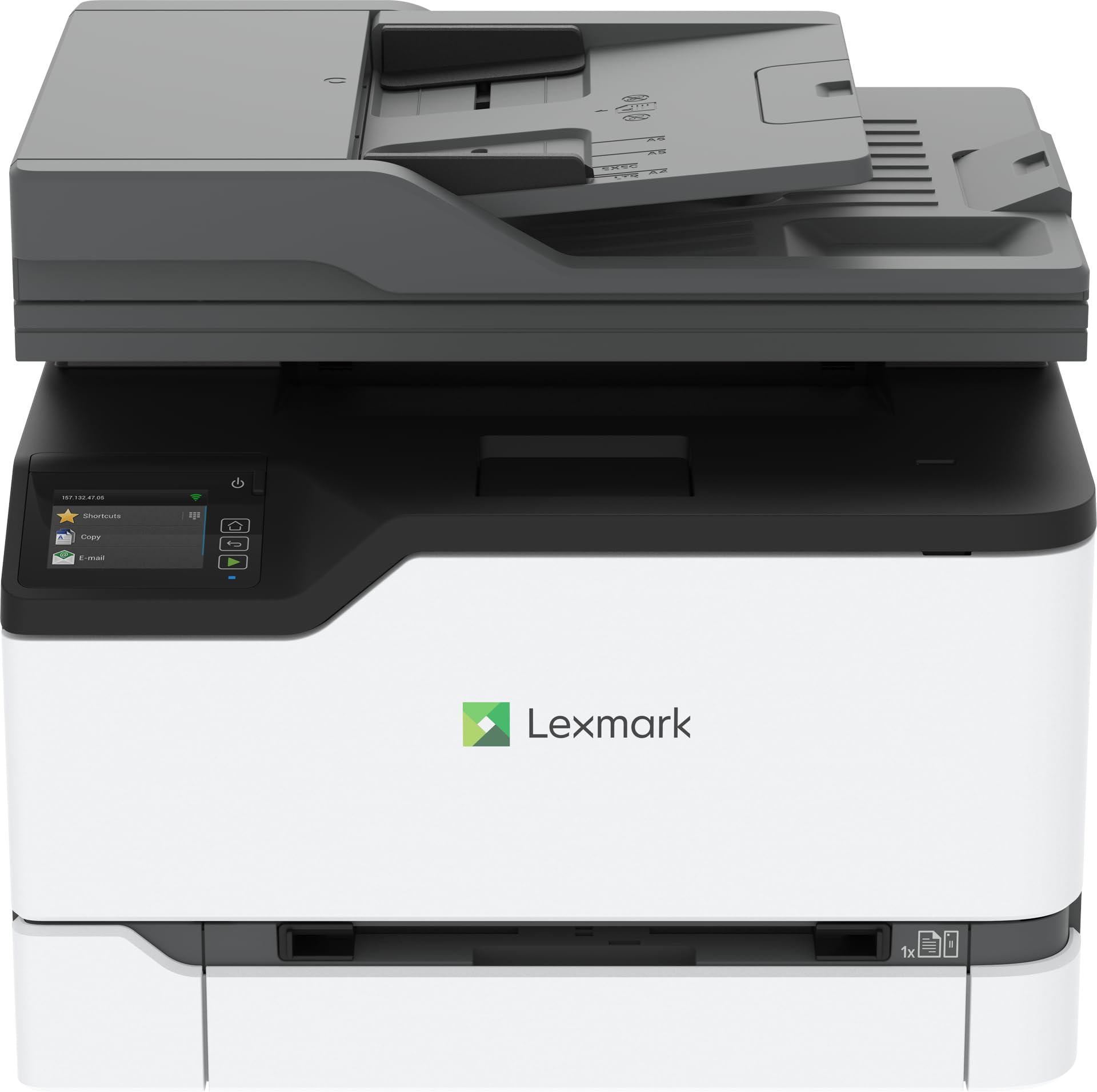
The Lexmark CX431adw is something of a dark horse in the colour laser MFP space, offering 26 ppm print speed and full fax capability for small offices that still rely on analog lines. It’s one of the few models in this roundup that has been confirmed to work out of the box with Linux distributions (Kubuntu, Ubuntu) without any additional driver installation — a rare and valuable trait for open-source-centric organisations.
The unit includes a flatbed scanner, automatic duplex printing, and a 50-sheet ADF, plus an LCD touchscreen for on-device navigation. Ethernet and USB 2.0 interfaces provide reliable wired connections, and the all-in-one form factor covers print, copy, scan, and analog fax from a single footprint. Build quality feels sturdy, and once running, the CX431adw produces crisp text and acceptable colour graphics for internal documents.
However, wireless setup has been described as extremely difficult by multiple buyers, with one user reporting 15 failed attempts. The small display makes navigating menus frustrating, and Lexmark’s support — based overseas — has drawn sharp criticism for long hold times. The unit also lacks a dedicated PC management application, forcing all configuration work through the tiny touchscreen. For wired Linux shops willing to tolerate the setup quirks, it’s a functional performer at a reasonable entry price.
Why it’s great
- Native Linux (Kubuntu/Ubuntu) support without extra drivers
- Decent 26 ppm colour print speed for small offices
- Includes analog fax for legacy telephony needs
Good to know
- Wireless setup is notoriously difficult and unreliable
- No PC-based management app; limited onscreen configuration
- Customer support based overseas with long wait times
11. Canon imageCLASS MF751Cdw

The Canon imageCLASS MF751Cdw is the predecessor-class sibling to the MF751Cdw II, and it remains a strong contender thanks to its 35 ppm print speed in both colour and black. It uses the same Toner 069 and 069 H cartridges as the newer model, and the 250-sheet standard cassette plus 50-sheet multipurpose tray provide adequate capacity for modest workgroup demands. The 50-sheet simplex ADF handles single-sided scans efficiently, though it lacks the time-saving duplex pass found on higher-tier models.
Mobile printing is easy via Canon PRINT Business, Apple AirPrint, and Mopria, and the straightforward colour touchscreen makes copying, scanning, and fax navigation reasonably intuitive. Canon offers a three-year limited warranty on the unit, and hundreds of buyers report outstanding colour accuracy for a laser printer — vibrant even on plain copier paper. The built-in Ethernet and USB interfaces ensure reliable wired connections, and the wireless setup, while occasionally finicky on Windows 10, generally works without major drama.
Some users note that the 1200 DPI output isn’t as razor-sharp as they expected, and the starter toner yields are predictably low. However, Canon allows third-party toner without firmware blocks, making this a more cost-conscious choice than HP or chip-locked Brother models. For teams that prioritise speed and colour vibrancy over advanced scanning features, the MF751Cdw is a proven, well-supported workhorse.
Why it’s great
- Fast 35 ppm colour and monochrome print speed
- Vibrant, accurate colour output on plain paper
- Three-year limited warranty and Chromebook compatible
Good to know
- Simplex ADF; no single-pass duplex scanning
- Starter toner yields are low; budget for high-capacity replacements
- 1200 DPI output slightly less sharp than some competitors
FAQ
Can I use third-party toner in a chip-locked colour laser printer?
How many pages should the included starter toner actually produce?
What is the real difference between a 19 ppm and a 35 ppm colour printer?
Is Wi-Fi Direct or Ethernet more reliable for colour laser printers?
Final Thoughts: The Verdict
For most small and mid-size teams, the best a3 colour laser printer winner is the Brother MFC-L8730CDW because it combines 33 ppm speed with a single-pass duplex scanner, NFC security, and eco-friendly design in a compact chassis. If you want the lowest possible cost per page from super-high-yield toner, grab the Brother MFC-L8930CDW. And for a fast, value-driven workhorse with excellent colour vibrancy and a three-year warranty, nothing beats the Canon imageCLASS MF751Cdw II.