
The difference between a flimsy, peeling badge and a crisp, professional ID that demands respect comes down to one decision: which printer feeds that blank PVC card. Badge ID printers are a specialized piece of office infrastructure, and buying wrong means fighting jams, washed-out colors, and unreadable QR codes during onboarding crunch. This guide breaks down the real-world performance of eleven distinct models, separating the workhorses from the headaches.
I’m Min — the co-founder and writer behind Gadgets Feed. I’ve spent hundreds of hours dissecting the technical specifications, software ecosystems, and real-user pain points across the entire spectrum of badge ID printers to deliver a buying guide that spares you from costly mistakes.
Whether you need a simplex starter for twenty employees or a dual-sided retransfer beast for a campus-wide deployment, this analysis of the best badge id printer options gives you the clear, category-specific judgment you need before spending a single dollar on hardware.
How To Choose The Best Badge ID Printer
The wrong badge printer wastes cards, ribbons, and hours of tech support time. The right one prints flawlessly for years. Focus on these four decision drivers.
Print Technology: Direct-to-Card vs. Retransfer
Direct-to-card printers (like the Fargo DTC1250e or Magicard Pronto) print directly onto the PVC surface. They are faster and more affordable, but the printed image sits exposed on the card face, making it vulnerable to scratching. Retransfer printers (like the Fargo HDP5000) print to a film first, then fuse that film onto the card, wrapping the image around the card’s edge for true borderless printing and significantly higher scratch resistance. If your badges must look flawless and survive two years in a pocket, retransfer is the choice.
Single-Sided vs. Dual-Sided (Simplex vs. Duplex)
Simplex printers print one side of the card only. That is sufficient for simple employee IDs with a photo on the front and no back-side info. Duplex models automatically flip the card and print both sides — essential for badges that carry barcodes, emergency contacts, or access control data on the reverse. Manual flipping is not an option; the print path and software alignment require automatic duplex. If you need back-side printing, filter for “automatic duplex” models only.
Ribbon Yield and Long-Term Cost
Every badge printer uses a color ribbon (typically YMCKO — Yellow, Magenta, Cyan, Black, Overlay) that lasts for a defined number of prints, usually 100, 250, or 500. A 100-print ribbon on a printer can cost more per badge in consumables than a printer with a 500-print ribbon. Always calculate total cost per card — ribbon price divided by yield plus card cost. Entry-level ribbons that cost for 100 prints (/card) quickly surpass the per-card cost of a premium 500-print ribbon.
Software and Driver Ecosystem
The printer is only half the system. Bad design software that fails on Windows 11, locks with yearly subscription fees, or has no Mac support will cripple your workflow. Look for software with a one-time license (not recurring), modern OS compatibility, and the ability to import data from databases or CSV files for batch printing. User reviews consistently report software as the single biggest pain point — worse than jams or print quality issues.
Quick Comparison
On smaller screens, swipe sideways to see the full table.
| Model | Category | Best For | Key Spec | Amazon |
|---|---|---|---|---|
| Fargo DTC1250e Dual Sided | Mid-Range | Small business dual-sided printing | 200-print YMCKOK ribbon | Amazon |
| Magicard 300 Dual Sided | Premium | Mid-volume dual-sided ID cards | Automatic duplex, 300 dpi | Amazon |
| Fargo DTC4500e Dual Sided | Premium | High-volume professional use | 500-image ribbon, Ethernet | Amazon |
| Fargo HDP5000 Dual Sided | Premium | High-definition retransfer printing | Retransfer film, 600 dpi | Amazon |
| Evolis Primacy Dual Sided | Premium | Mac-compatible dual-sided ID | 300 PVC cards, 300-print ribbon | Amazon |
| Magicard Pronto (Bodno Bronze) | Mid-Range | Simple single-sided office use | Simplex, 300 dpi | Amazon |
| Fargo DTC1250e Single Sided | Mid-Range | Budget single-sided Windows only | 250-print YMCKO ribbon | Amazon |
| Magicard 300 Single Sided | Mid-Range | Single-sided with LCD display | Simplex, 300 dpi, 3-yr warranty | Amazon |
| Badgy200 | Mid-Range | Dual-sided small-volume badges | Automatic duplex, 100-print ribbon | Amazon |
| Badgy100 | Budget | Entry-level single-sided printing | Simplex, 45s per color badge | Amazon |
| IDP SMART-21S | Budget | Affordable simplex starter kit | Simplex, 100-print YMCKO ribbon | Amazon |
In‑Depth Reviews
1. Bodno Fargo DTC1250e Dual Sided ID Card Printer

The DTC1250e in its dual-sided configuration hits the sweet spot for small-to-mid-sized businesses that need both sides printed automatically without manual intervention. The YMCKOK ribbon (200 prints) includes a separate clear overlay panel, giving each badge a protective topcoat that resists scuffing far better than budget single-sided ribbons. Users consistently report sharp, vibrant color output with a 16-second first print time.
The Bodno Silver Edition software included here adds batch import from Excel or CSV files — a real time-saver when onboarding ten or more employees at once. The 3-year warranty on the printer body and printhead is among the best in its class, though the software’s one-time license key has caused occasional registration friction on Windows 10 systems according to user feedback.
Some units have arrived with the ribbon cartridge misaligned, causing early jams. That risk is worth weighing against the low per-card cost of the 200-print ribbon. For organizations printing 50–100 badges per month, this package delivers the best balance of features, consumable economy, and print quality in the mid-range tier.
Why it’s great
- True automatic duplex with YMCKOK protective overlay
- Excel/CSV batch import saves time on bulk card runs
- 3-year warranty provides solid peace of mind
Good to know
- Software license key occasionally requires manual online verification
- Some users report ribbon misalignment on arrival
2. Magicard 300 Dual Sided ID Card Printer

The Magicard 300 in dual-sided form is a workhorse that balances print speed, reliability, and a 3-year warranty. Its key advantage over many competitors is the built-in LCD display that communicates printer status, ribbon life, and error messages in plain language rather than cryptic LED blink patterns. At 300 dpi resolution, text and logos come out crisp, and the color saturation is consistent across a full ribbon run.
Users in healthcare and volunteer organizations report seamless integration with existing security access software, often praising the printer’s ability to handle RFID cards when the thickness setting is adjusted. The out-of-box setup is straightforward on Windows, and the printer reaches full readiness within 15 minutes. The included Card Imaging design software is functional but basic — suitable for simple layouts but less capable than Bodno’s Silver Edition for batch processing.
The most significant post-purchase concern is the software license trap: Bodno (who bundles the software) has sent some users a –/year renewal demand after the first year, threatening to disable the software entirely if not paid. The printer hardware itself is excellent, but you may need to use third-party card design software to avoid licensing headaches.
Why it’s great
- LCD display simplifies troubleshooting and ribbon monitoring
- Reliable automatic duplex handling of thick cards
- 3-year warranty backs the printer hardware
Good to know
- Bundled software may require expensive yearly license renewal
- Basic software feels dated for complex layouts
3. Card Imaging Fargo DTC4500e Dual Side ID Card Printer

The DTC4500e is Fargo’s step-up from the DTC1250e, and the differences matter for higher-volume environments. The 500-image color ribbon drastically reduces per-card consumable cost and the frequency of ribbon changes. The dual input hopper lets you load two different card types (e.g., standard PVC and RFID) side-by-side, switching between them via the printer driver without physically swapping stacks.
Print speed is genuinely fast — the DTC4500e can push through a full hopper of 100 dual-sided cards without hesitation, maintaining consistent color from the first card to the last. The Ethernet connectivity makes network sharing straightforward in an office environment. Resolution reaches 4800 dpi for monochrome and 4800 x 600 dpi for color, though real-world output at 300 dpi is the practical ceiling.
The major Achilles’ heel is printhead durability. Multiple reviewers report the printhead failing shortly after the 3-year warranty expires, with replacement costs between and . That is roughly a third of the printer’s value per head replacement. Also, the printer’s driver support for modern macOS is essentially abandoned — only older macOS versions (up to 10.14) are officially supported, requiring workarounds.
Why it’s great
- 500-image ribbon delivers lowest per-card cost in class
- Dual input hopper handles two card types simultaneously
- Fast, consistent throughput for batch production
Good to know
- Printhead replacement is very expensive (–)
- No modern macOS driver support; Windows only
4. Card Imaging Fargo HDP5000 Dual Side High Definition ID Card Printer

The HDP5000 is the only retransfer printer on this list, and that technology difference is immediately visible. Instead of printing directly onto the card surface, it prints onto a transfer film and then fuses that film onto the card. The result is true edge-to-edge printing with zero white borders and an image that wraps slightly around the card edges — the same finish used on government-issued IDs and high-security badges.
The retransfer film also adds a layer of physical durability. Badges printed on the HDP5000 resist scratches, abrasion, and fading far better than direct-to-card prints. The 600 dpi resolution produces sharper fine text and micro-printing than any 300 dpi competitor. Organizations that have purchased three units consecutively attest to its reliability and consistent output.
The downsides are steep. The printer carries a premium price tag, and the consumables (transfer film plus YMCK ribbon) cost more per card than any direct-to-card option. Furthermore, some users report that the bundled Card Imaging software feels like a legacy product from the 1990s, with driver issues that forced one user to buy an entirely separate PC just to run the printer. Quality control on the 600 dpi printhead has also drawn complaints of blurry output.
Why it’s great
- True edge-to-edge retransfer for premium card finish
- 600 dpi resolution delivers micro-text clarity
- Transfer film adds significant scratch and fade resistance
Good to know
- Higher per-card consumable cost than direct-to-card printers
- Bundled design software is outdated and driver support is weak
5. Evolis Primacy Dual Sided ID Card Printer

The Evolis Primacy stands out as one of the few dual-sided badge printers with genuine Mac compatibility through the Bodno Bronze software. For organizations running a mixed OS environment, this alone eliminates the driver headache that plagues Fargo printers. The bundle includes a generous 300 PVC cards and a 300-print color ribbon, giving a lower entry-level cost-per-card than many mid-range competitors.
Print quality is excellent at 300 dpi, with smooth gradients and accurate skin tones. The dual-sided printing mechanism is reliable, though some users have noted that the initial setup can be finicky on non-Windows systems. Once configured, the printer produces professional-grade cards quickly — the R5F008AAA ribbon is more forgiving of low-print-volume gaps than the Badgy ribbons, which tend to dry out or tear after short idle periods.
The 2-year hardware warranty is shorter than the Fargo DTC1250e’s 3-year coverage, and customer support responsiveness has been inconsistent. Some users received a defective unit that the technician could not install, while others reported excellent support that resolved dual-sided alignment issues over the phone. The printer itself is a known design (Evolis has sold the Primacy for years), so parts and replacement ribbons are widely available.
Why it’s great
- Mac-compatible software with one-time license
- 300-card ribbon bundle reduces per-card consumable cost
- Reliable dual-sided printing with good color accuracy
Good to know
- 2-year warranty is shorter than Fargo’s 3-year coverage
- Setup can be tricky; quality control on arrival is inconsistent
6. Bodno Magicard Pronto ID Card Printer & Complete Supplies Package

The Magicard Pronto, bundled here as the Bodno Bronze Edition, is a straightforward single-sided printer that gets the job done without unnecessary complexity. At 300 dpi with edge-to-edge printing capability, it produces professional-looking badges with sharp text and clear photo reproduction. The print speed of around 35 seconds per color card is competitive for its class.
The Bronze Edition software uses a one-time license model — no subscription traps — and provides drag-and-drop templates that are genuinely usable by someone with no design experience. Customer support has a strong reputation for being responsive, with several users praising the quick resolution of driver issues and print quality adjustments. The included 100 PVC cards and MA100YMCKO ribbon mean you can print your first badge immediately after unpacking.
Where the Pronto falls short is its lack of dual-sided printing and the relatively high cost of its 100-print ribbon. Organizations that need more than 50 badges per month will find themselves replacing ribbons frequently. A small number of users report magenta ghosting and frequent paper jams, though these issues appear tied to specific production batches rather than the overall design.
Why it’s great
- One-time software license — no yearly fee
- Excellent customer support resolves issues quickly
- Edge-to-edge printing at 300 dpi for crisp badges
Good to know
- 100-print ribbon needs frequent replacement for active use
- Occasional quality control issues with jams and color ghosting
7. Fargo DTC1250e Single Sided USB Card Printer with Supplies Bundle
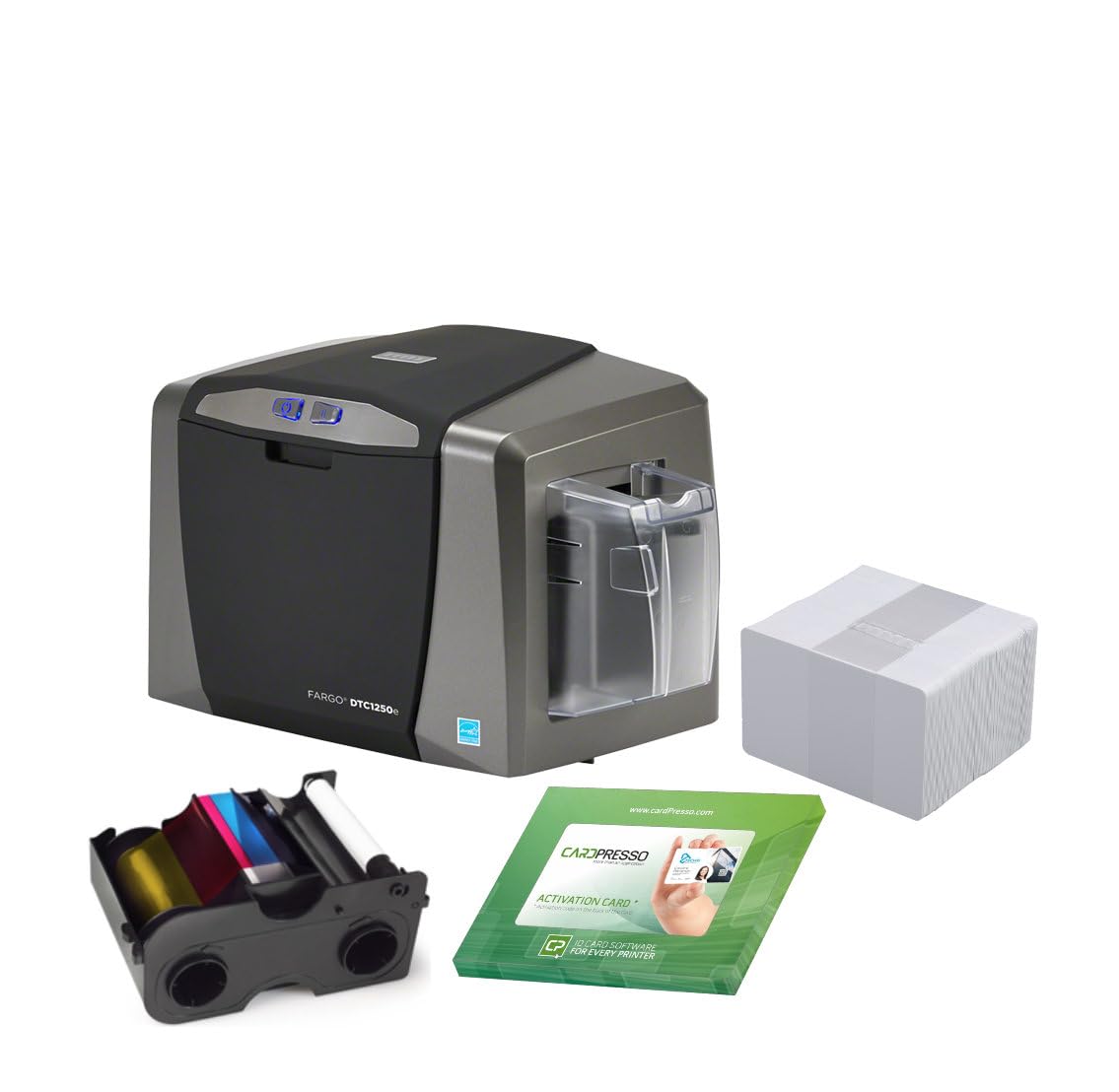
The single-sided DTC1250e is where Fargo’s reliability meets a lower entry cost. The 250-print YMCKO ribbon is a significant upgrade over the 100-print ribbons found in entry-level kits, reducing per-card consumable cost and the frequency of ribbon changes. The 3-year warranty covering both the printer and printhead is industry-leading for this price bracket.
Print quality is consistent and professional, with fast throughput that handles small batch runs efficiently. Users running Linux systems have reported success with Fargo’s official driver instructions, making this a rare option for Linux-based offices. The bundle includes 100 blank PVC cards and three cleaning rollers, plus the full-color ribbon.
The critical weakness is Mac support — there is none for any macOS version newer than 10.9 (2013). Mac users who purchase this printer will be unable to use it with modern hardware. Additionally, some buyers reported that the “100 PVC cards” in the bundle were unlabeled blanks, not HID-branded proximity cards as advertised. The printer itself is solid, but the bundle’s card quality is a gamble.
Why it’s great
- 250-print ribbon provides excellent per-card cost efficiency
- 3-year warranty covers printer and printhead
- Linux driver support available through official channels
Good to know
- No driver support for modern macOS (only up to 10.9)
- Included PVC cards may be unlabeled blanks
8. Magicard 300 Single Side ID Card Printer
The single-sided version of the Magicard 300 inherits the same robust hardware and LCD display as its dual-sided sibling, making it the best simplex option for organizations that only need front-side printing. The LCD eliminates guesswork during ribbon changes and error recovery — a significant advantage over printers that rely on blinking LEDs or no display at all.
Print quality at 300 dpi is ideal for employee photos, logos, and micro-text. The printer handles RFID cards reliably when the thickness setting is adjusted via the control panel. Setup is Windows-focused but straightforward, and users report that the printer integrates well with existing Security Access Systems without needing the bundled software.
The same license trap that affects the dual-sided Magicard 300 applies here — the Card Imaging software may demand a yearly subscription fee after the first year. Users who avoid that software entirely and design cards with a third-party editor have no issues. The simplex version also makes a poor choice if you later need back-side printing, as there is no upgrade path to duplex.
Why it’s great
- LCD display makes setup and troubleshooting easy
- Reliable RFID card handling with adjustable thickness
- 3-year warranty on the hardware
Good to know
- Software may require costly yearly license activation
- No upgrade path to dual-sided printing
9. Badgy200 Plastic Card Printer with Badge Studio+
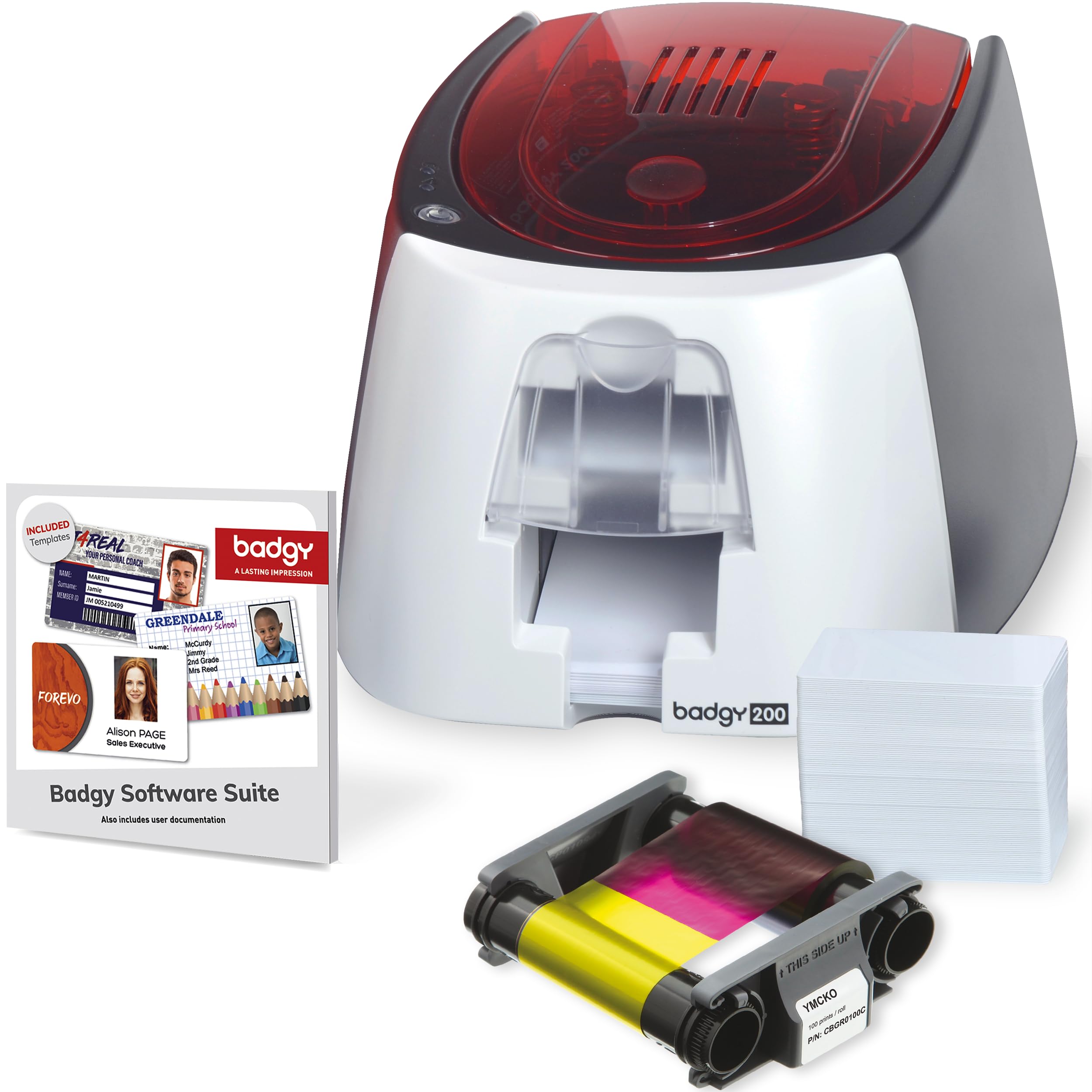
The Badgy200 is the more capable sibling of the Badgy100, adding automatic dual-sided printing and the upgraded Badge Studio+ design software. For a price that sits below most premium dual-sided printers, it offers a compelling entry point for small schools or offices that need both sides printed without manual card flipping.
The Badge Studio+ software includes database import functionality, free templates, and a design wizard — making it accessible even for first-time badge creators. The printer produces full-color output with acceptable quality for standard ID badges, though fine text can appear slightly less sharp than on 300 dpi units. The 100-print color ribbon is a limitation for higher-volume users.
Several critical user complaints center on the ribbon’s fragility. Multiple reports describe the ribbon tearing after roughly 50 prints, and replacement ribbons are expensive relative to the printer’s price point. Additionally, the Badgy200 does not print true edge-to-edge — there is a white margin on all sides, despite some advertising claims to the contrary. If borderless printing is essential, look at the retransfer models instead.
Why it’s great
- Automatic dual-sided printing at a competitive price point
- Badge Studio+ software with database import for bulk jobs
- Compact and lightweight for small desk spaces
Good to know
- Ribbon is fragile and may tear before the 100-print mark
- No true edge-to-edge printing; white margins present
10. Badgy100 Color Plastic Card Printer

The Badgy100 is the lowest-cost dedicated badge ID printer on this list, and it occupies a narrow but legitimate niche: very low-volume printing for micro-businesses that need a handful of badges per month. It prints a single-sided color badge in roughly 45 seconds and includes both PC and Mac design software, which is rare at this price tier.
Setup is genuinely easy — the printer is designed for the non-technical user. The included 100 PVC cards and ribbon get you running immediately. For a small business printing fewer than ten badges per week, the Badgy100 provides adequate quality without the financial commitment of premium hardware. The near-edge printing leaves only a 1.35mm margin, which most users find acceptable.
The Badgy100’s limitations emerge quickly with higher volume. The 100-print ribbon is expensive per card, and the printer becomes temperamental when idle for more than 15 minutes — overheating warnings and connection drops require restarting the unit. The ribbon cartridge in some units produced only 39 prints out of the claimed 50. This printer is for true occasional use only, not for any regular production schedule.
Why it’s great
- Lowest entry cost for a dedicated badge printer
- Includes both Windows and Mac design software
- Easy setup for non-technical users
Good to know
- Very high per-card consumable cost with 100-print ribbon
- Frequent connection drops and overheating warnings with intermittent use
11. IDP SMART-21S ID Card Simplex Printer Kit

The IDP SMART-21S is an all-in-one starter kit that includes the printer, PC-only IDesigner software, 100-print YMCKO ribbon, and 100 PVC cards. It is a simplex printer capable of 150 color cards per hour and 600 monochrome cards per hour, making it competitive on speed with printers costing twice as much.
The IDesigner software includes the EasyCapture photo capture tool, which simplifies the photo collection process for employee onboarding. The printer’s compact footprint (6.6 x 10.2 x 7 inches) fits on a standard desk without dominating the workspace. Users praise the print quality for professional-looking results with QR codes and images.
The SMART-21S has two critical flaws. First, it does not support true edge-to-edge printing — blue colors print as purple, and the helpdesk has confirmed this is a hardware limitation, not a fixable issue. Second, replacement ribbons are only available bundled with 100 PVC cards, meaning you pay for extra cards you may not need every time you replace the ribbon. This bundling forces a higher long-term cost than printers that sell ribbons independently.
Why it’s great
- Fast print speed for its class (150 color cards/hour)
- Compact desktop footprint saves workspace
- EasyCapture tool streamlines photo collection for badges
Good to know
- No edge-to-edge printing; blue colors print as purple
- Replacement ribbons only sold bundled with extra PVC cards
FAQ
Can a badge ID printer print on pre-printed or proximity cards?
How do I calculate the true per-card cost of a badge printer?
Why does my badge printer leave a white border on all sides?
Can I use any brand of PVC cards with my badge printer?
Final Thoughts: The Verdict
For most users, the best badge id printer winner is the Magicard 300 Dual Sided because it combines reliable automatic duplex printing, a helpful LCD display, a 3-year warranty, and consistent 300 dpi output at a price that avoids the premium territory’s inflated consumable costs. If you need Mac compatibility for a mixed-OS office, grab the Evolis Primacy Dual Sided. And for high-definition edge-to-edge printing with maximum scratch resistance, nothing beats the Fargo HDP5000.